Hey Marc,
Thanks for your question, unfortunately we don’t have a built in way to specify element widths, typically the width is a percentage of the content width at Enfold Theme Options ▸ General Layout ▸ Dimensions ▸ Content | Sidebar Ratio

So you could try adjusting these two options, if this doesn’t give the control you wish, we could help with so CSS that can set the max-width of certain elements.
If you would like this please link to a couple of pages with the elements for us to examine.
Best regards,
Mike
Hey Stefan,
Try this CSS in your Enfold Theme Options ▸ General Styling ▸ Quick CSS field:
.av-image-hotspot_inner {
    color: transparent !important;
}
.av-image-hotspot_inner::after {
    content: '';
	color: black;
	left: -3px;
	position: relative;
}

div .av-image-hotspot:nth-child(1) .av-image-hotspot_inner::after {
	content: 'A';
}

div .av-image-hotspot:nth-child(2) .av-image-hotspot_inner::after {
	content: 'B';
}
div .av-image-hotspot:nth-child(3) .av-image-hotspot_inner::after {
	content: 'C';
}
div .av-image-hotspot:nth-child(4) .av-image-hotspot_inner::after {
	content: 'D';
}
div .av-image-hotspot:nth-child(5) .av-image-hotspot_inner::after {
	content: 'E';
}
If you have more than 5 hotspots, copy the last one and add as many as you need changing the number and the letter.
Please ensure to copy the code from the forum and not an email notification so the symbols are not converted.
After applying the css, please clear your browser cache and check.
Best regards,
Mike
Hi,
Glad we were able to help, if you have any further questions please create a new thread and we will gladly try to help you. Thank you for using Enfold.
Best regards,
Mike
Ive imported one for the templates. Anyone have any idea how i change the logo to my own?
Ive attached an image of the current logo, when i replace the logo with mine in the enfold options nothing changes.
Thanks.
Hey Tim,
Please use the shortcode wand to create a contact form and paste the shortcode into a custom HTML widget.
Best regards,
Mike
Hi,
Glad Ismael could help, if you have any further questions please create a new thread and we will gladly try to help you. Thank you for using Enfold.
Best regards,
Mike
Hi,
Thank you for the link to your site, I enabled the WP Rocket to see what could be the cause for the topbar menu error, and it seems to be the WP Rocket setting “Optimize CSS delivery” I disabled this and tested your homepage with Windows in Chrome, Firefox, & Edge in a separate logged out window and this seems to have solved the issue. Please clear your browser cache and check. I would not worry about this option because you are using the theme option Enfold Theme Options ▸ Performance ▸ JS & CSS file merging and compression which should be the same thing, sometimes using two options to do the same thing can cause errors.
To disable the topbar on mobile I added this CSS in your Enfold Theme Options ▸ General Styling ▸ Quick CSS field:
@media only screen and (max-width: 980px) {
	#header_meta {
		display: none;
	}
}
I choose 980px because that is when your topbar started doubling up, if you want to change it to when the burger menu is not shown, try changing it to 990px.
Best regards,
Mike
Hi,
Yes I understand, our demo was created with the WooCommerce Bookings plugin in mind and the Motopress Hotel Booking Plugin can’t use the same settings and options.
Unfortunately I don’t have a solution for you, if you would like to request this feature of a new demo being created, the Dev Team has opened a new Github Feature Request for users to place requests and follow them as the Dev Team reviews them.
Best regards,
Mike
Hi,
Great, I’m glad that you found a solution, and thanks for the update. We’ll close this thread for now then, please open a new thread if you should have any further questions or problems.
Best regards,
Rikard
Hi,
Thanks for that. I activated the option to delete old CSS and JS files under Enfold->Performance, and your images are showing after that. Please review your site.
Best regards,
Rikard
Hallo,
Enfold offers a reopen setting for the cookie Banner. It is a short icon bottom right.
I would like to to use this option but as text Link in the footer. Is this possible?
Hi,
Thanks for the update, we’ll go ahead and close this thread for now then. Please open a new thread if you should have any further questions or problems.
Best regards,
Rikard
Hi,
Thanks for the update, we’ll go ahead and close this thread for now then. Please open a new thread if you should have any further questions or problems.
Best regards,
Rikard
Hi,
Great, I’m glad that Ismael could help you out. I’ll close this thread for now then, please open a new thread if you should have any further questions or problems.
Best regards,
Rikard
Hi,
Es gibt eine Option:
Enfold -> Shop -> Header Account Icon.
Dort kann man es einstellen.
Best regards,
Günter
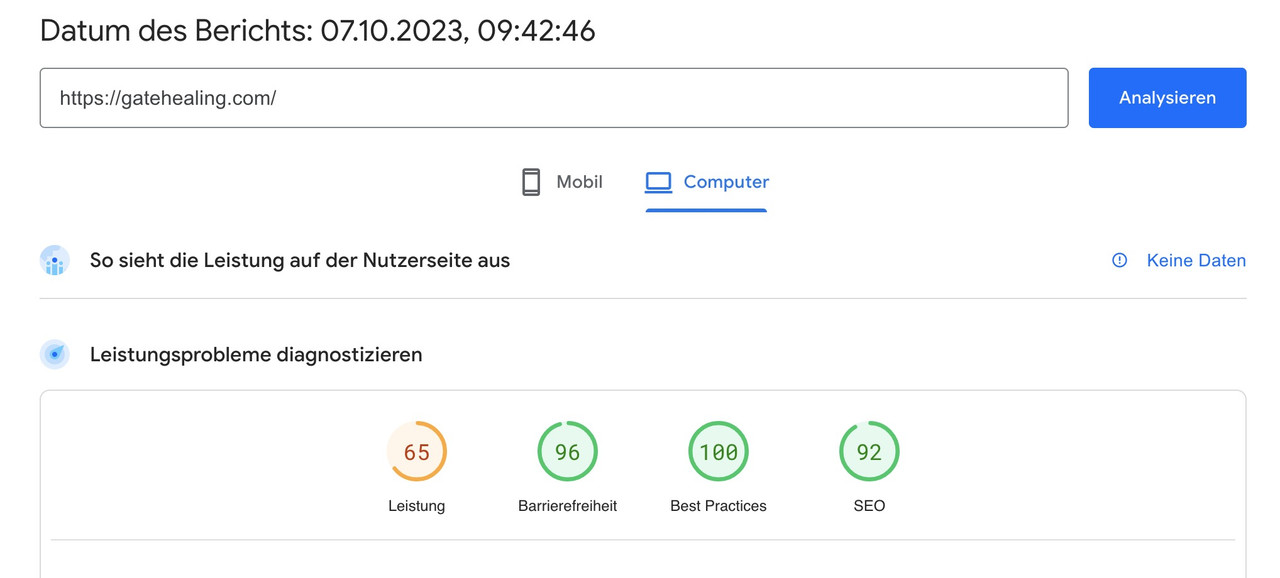
Your website is not so performance hungry as you beleave. So first try to use Enfolds merging options on performance tab.
i prefer to use css merging and javascript minification.
your page now is without these performance optimizations at:
i think that the additional classes inside text-block element will come from a plugin. If you search for those extemely specific class like : min-h-[20px] i only found that tailwind css from https://tailpress.io/
Did you build the site on an existing installation – and possibly change the theme to Enfold afterwards?
The loading of jQuery in the footer could be set on Enfold on the settings page: performance
This is of course possible, but then you have to take into account that the scripts that need jQuery are loaded afterwards. This can be achieved, for example, by first not loading the scripts in the head area and then setting a correspondingly higher priority number for the function.
Next: do you really need jQuery Migrate ? – same on performance tab
Thanks for the reply. Most of that was over my head. All of the html comes directly from the Enfold theme. I get all kinds of SEO errors saying that my HTML ratio is far too high. No idea why there are so many classes . . .and I don’t know what ‘rules’ is referring to. Not sure why not just 1 ol either. I’ll have to look.
I fixed that specific page you referenced. I have no clue how all of those classes get up there. I’ve seen it on other pages in text blocks too. It’s a bunch of extraneous code that I didn’t put there and that seems to have no purpose. Seems like a theme issue. I went thru every text block on my site and removed all the div class stuff like that. It took WEEKS. Still have no clue why it just appeared in there. I must’ve missed some, or they just start showing up spontaneously when I update a page. I don’t know, but it’s driving me batty.
I wish I knew enough to tell JQuery to load in the head vs foot, or somehow to just get it above the scripts that seem to depend on it.
Turning off WP Optimize fixed the issue. I hate to lose that plugin though. Just checked and apparently when I deactivate wp-optimize all of my images go back to their original file sizes (2-4MB each). So that’s not really an option. ShortPixel slows my site down SUBSTANTIALLY. So WPO causes sticking, SP slows things down too much. I gotta figure something out for images.
Thx!
Jon
-
This reply was modified 2 years, 6 months ago by
 gatehealing.
-
This reply was modified 2 years, 6 months ago by gatehealing.
does that stick behavior persist if you deactivate your WP Optimizer? – after that refresh all cachings and merging files on enfold and test it.
Try deactivating all plugins – and reactivating one by one. And inspect when the behavior turns back.
(https://kriesi.at/support/topic/experiencing-hick-up-hiccup-when-scrolling/)
________
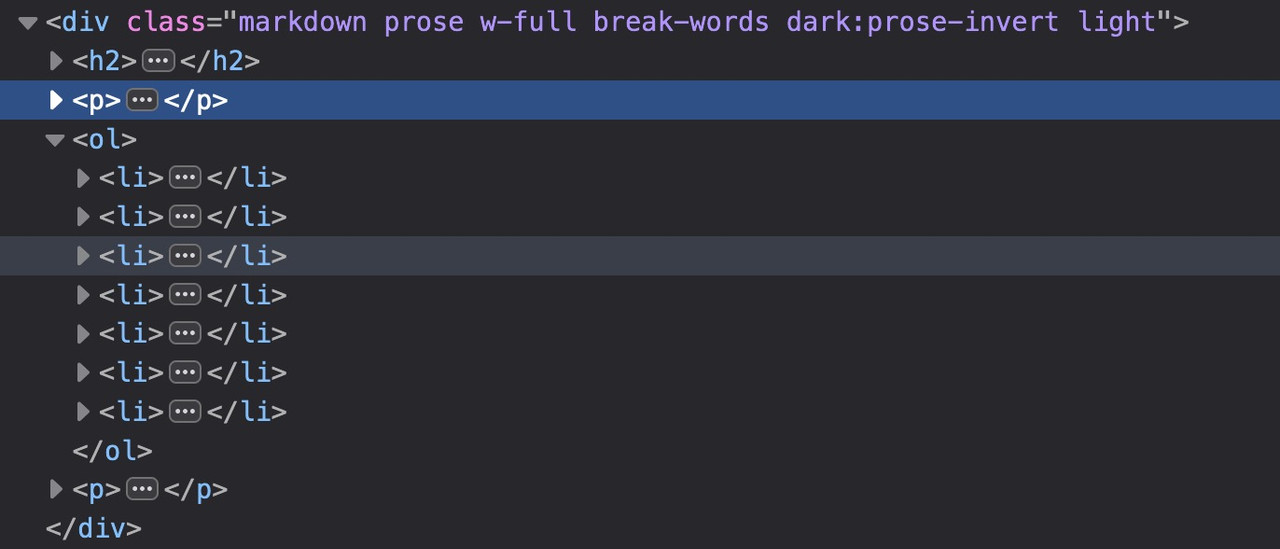
where does that html layout come from inside text-block element?
a lot of classes inside (flex flex-grow flex-col gap-3 or min-h-[20px]) but i could not find any rules on those classes.
( is that tailwind css ? where are the rules for it? )
see the DOM : https://gatehealing.com/helpful-resources/
on that page i do not understand the ol (ordered list ) settings – why not one ol – and let the numbers grow on return key
next: i see some errors on jQuery is not defined – this often happens when you are loading jQuery in your Footer but try to load other scripts in the head or before that jQuery load that needs the jQuery Sources.
Did you purge the cache before testing the page? You may have to toggle or temporarily disable the Enfold > Performance > File Compression settings as well. Please make sure to perform a hard refresh before testing the page.
Yes, I have done that:( If I enter the following code (=>css-field), …
@media only screen and (max-width: 767px) {
  #top #wrap_all .header_color h2,
  #top #wrap_all .main_color h2,
  #top #wrap_all .alternate_color h2 {
    font-size: 24px;
  }
}
it still does not work.
-
This reply was modified 2 years, 6 months ago by
 Tim.
Tim.
Ich kenne mich leider mit Codes quasi nicht aus… Peinlich:/ Wir haben Enfold als Vorlage genutzt und haben die Website von anderen designt bekommen. Kannst du ganz vielleicht nochmal eine Schritt-für-Schritt-Anleitung geben, die zeigt, was ich jetzt am besten tun sollte? Wenn nicht: auch kein Problem:)
ich wünschte ich wüsste wie man eine mouse hover an mobilen Endgeräten haben könnte.
Den gibt es nämlich nicht. touch screens habe sowas nicht. Problem der touch event wird als hover gewertet und aktiviert den Status.
Standardmäßig sollte es aber bei Enfold so sein, das in dem Fall die Captions dauerhaft angezeigt werden. Willst Du das unterbinden?
Dann könntest du ( sorry als Participant / Boardteilnehmer ist wohl duzen angesagt ) diese Elemente die durch das hovern hineinfahren einfach ausblenden mit display none.
.responsive.avia_mobile #top .av-masonry:not(.av-caption-style-overlay) .av-masonry-entry.av-masonry-item-with-image .av-inner-masonry-content {
  display: none
}
diese klasse: avia_mobile wird bei allen mobilen Endgeräten an html gesetzt.
Hi,
Originally I didn’t see this, but today I do, I think that you have added the border radius in the team member style tab, please check and remove the numbers from the boxes:

Best regards,
Mike
Hi, I have installed a plugin called encyclopedia to offer a kind of filterable lexicon.
https://de.wordpress.org/plugins/encyclopedia-lexicon-glossary-wiki-dictionary/
Now Enfold is rendering the whole thing like its blog, but there are some issues with this.
I’d like to exclude the whole plugin from being rendered by Enfold.
Is this possible?
PS: I tried to drop a file in the theme folder (archive-encyclopedia.php) – not really working.
Thx a lot in advance!
Hi Enfold,
I got a google console alert for several of our enfold websites here is an example of a page that got dinged:
https://getfitdontquit.com/work-that-core/
Here is the text of the alert:
New reason preventing your videos from being indexed
Search Console has identified that some videos on your site are not being indexed due to the following new reason:
Video outside the viewport
If this reason is not intentional, we recommend that you fix it in order to get affected videos indexed and appearing on Google.
156 videos on this page were indexed, just this one not: https://youtu.be/McNvQMaPLYs
I wonder why. Hope you can help.
Thanks
Tina
Hi Mike,
While waiting to receive a response from “Motopress”, I did a local installation on Mamp, I imported the database of the site in production (see site url in the Private Content), then I installed and activated Enfold.
For the moment I have not seen any real compatibility problems.
The big problem is the formatting of the plugin’s post taxonomies (Accomodation).
Unfortunately, all the work you did in your demo cannot be used with the Motopress plugin :(
And therefore, to make the booking’s content pleasant and captivating, there is a lot of css work to do :(
The ideal… sorry if I say it,
but it would be for Enfold to release another Hotel demo that uses the (free) MotoPress plugin.
But I understand that I am making an unacceptable request on your part 😳.
Best regards,
Oriano
Hey aaronjosephhall1,
Please check your settings under Enfold->General Styling->Typography.
Best regards,
Rikard
 Rasmus Haslund
Guest
Hi there!
We purchased the Enfold theme (currently on version 4.5.5) and are using it on https://floorball.dk. I’ve taken over the task of maintaining the website and would love to update to the latest Enfold theme.
The problem is I can’t figure out when or where we bought it. I tried to figure out a username or so at Envato but no e-mail I could think of seems to work.
I think it must be either (Email address hidden if logged out) , (Email address hidden if logged out) or (Email address hidden if logged out) but no luck.
Can you help please?
Hey,
Please add the following code to the Quick CSS field in Enfold theme options > General Styling tab:
#scroll-top-link:hover {
  color: white;
}
Cheers!
Yigit
Hi,
Glad we were able to help, if you have any further questions please create a new thread and we will gladly try to help you. Thank you for using Enfold.
Best regards,
Mike



