Hi,
Thank you, I hope you find enjoyment in your new business venture, Thank you for using Enfold.
Best regards,
Mike
Hi,
Try this CSS in your Enfold Theme Options ▸ General Styling ▸ Quick CSS field:
#top.home .slideshow_align_caption {
	text-align: center;
}
After applying the css, please clear your browser cache and check.
Best regards,
Mike
Hey Andrew Frahm,
Thanks for your question v4.2.5 in not compatible with WordPress v6+ or PHP v8+
You will need to update, we are now up to v5.6.9 and works with PHP v8+
Envato (Theme Forest) changed how the updates were delivered a while back so your version will not be able to update automatically, please follow these steps to manually update:
To update your version of Enfold you will need to download the latest installable WP version from your Theme Forest account and upload it to your WordPress ▸ Appearance ▸ Themes ▸ Add Themes ▸ Add New

after you choose the zip file and click install, you will see a This theme is already installed message because you are updating, you can continue

then you will see the Theme updated successfully message.

Best regards,
Mike
 Andrew Frahm
Guest
I have a client that has a ten year old site with Enfold 4.2.5 installed as their WordPress theme. They never setup a child theme. I removed all plugins that won’t work with WordPress 6.4.3 and disabled all the others. When I update to PHP 8.0 the site crashes and gives me a message that it can’t find layout.php within the theme or some similarly named file. That causes me to think that the age of the theme is the issue. Were there updates to the theme that could solve this issue and telling my client to just purchase the theme will solve?
Hey Enfoldfanatic,
The two files that you mention are both export functions that only fire when the settings are being exported, the first one is when the LayerSlider export zip file is being created and the second one is for when the Enfold theme settings are being exported, in both cases you would not want the export to use cached files and neither of these run in normal site operations, so I don’t see how this could be an issue.
Please feel free to remove these lines with the no-cache but be aware the export features may not work correctly.
Also note that neither of these files can be added to a child theme so you will need to edit these files with each update.
If you feel that this really needs to be changed in the theme the Dev Team has opened a new Github Feature Request for users to place requests and follow them as the Dev Team reviews them.
Best regards,
Mike
Hi,
Glad that this helps. We don’t have a built-in option to blur the image, but you can add a custom class blur-background to the color section advanced tab for Custom CSS Class:

Then add this CSS in your Enfold Theme Options ▸ General Styling ▸ Quick CSS field:
#top .avia-section.blur-background .av-parallax .av-parallax-inner {
    filter: blur(6px);
}

feel free to adjust the number to suit.
Best regards,
Mike
Hi,
I assume that your are referring to the Elegant Portfolio Demo

For this demo the main menu links have the background color and font color set with two Enfold Theme Options ▸ Advanced Styling ▸ Menu Links options, not the Apply only to mouse hover state & Apply only to active state check boxes in the screenshot:
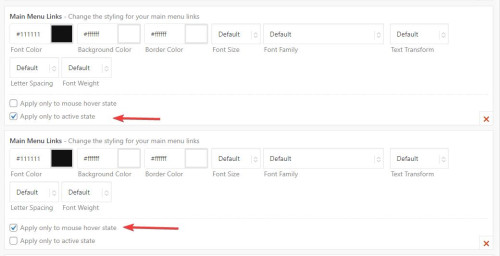
Then for the standard menu link color of white is set in a third Enfold Theme Options ▸ Advanced Styling ▸ Menu Links option with no check boxes checked:

There is no setting to have all of the menu items the same width, the width is set with a css min-width rule, for your site it looks like the largest menu item is “showrooms” at 98px so you could add this css to your Enfold Theme Options ▸ General Styling ▸ Quick CSS field
#header .av-main-nav > li > a {
    min-width: 98px;
}
in the future if you add larger menu items you can adjust this rule.
Please ensure to copy the code from the forum and not an email notification so the symbols are not converted.
Best regards,
Mike
Hi Mike
Thanks for that.
I am struggling to get the balance of styling. Nearly there but not quite.
Take a look at my link.
Preferred Top Menu Styling:
1/ Inactive links White #ffffff
2/ Active Links (including hover)
Background White Block #ffffff
Font Colour #000000
3/ Background White Block same size width on all
No underline on rollover
I am trying to mirror something similar to the function on your heading for your theme demo Enfold Portfolio
Can you help?
Hey andre_h_,
Thanks for the links to your example pages, I believe that you are referring to the parallax effect, where there is a fixed image and the rest of the page scrolls over it, like in this example that I created:

To create this I added a color section at the top of the page and set the height to 50% of the screen, and then added a background image with the Background Attachment set to Parallax

Then I added a special heading to the color section and under it with a masonry gallery at the bottom of the page, is this what you are trying to do?
Best regards,
Mike
Hi,
The only DocCheck plugin that I could find has beed closed on the WordPress library: doccheck-login

is this the one that you are referring to?
I assume that the plugin is tring to modify the headers to add it’s own login cookie and the plugin should call ob_start() at the top of the script to buffer the output.
Try contacting the plugin author to see if they are working on a solution for this, we are limited to the support that we can provide for third party plugins.
Best regards,
Mike
Hi,
Thanks for letting us know, we’ll close this thread for now then. Please open a new thread if you should have any further questions or problems.
Best regards,
Rikard
Hey smarta-brett,
Please try the following in Quick CSS under Enfold->General Styling:
.home .avia-slideshow-button {
    display: table;
    margin: 0 auto;
    margin-top: 20px;
}
Best regards,
Rikard
-
This reply was modified 2 years, 4 months ago by
 Rikard.
Hey Angelo,
Thank you for the link to your site, try this CSS in your Enfold Theme Options ▸ General Styling ▸ Quick CSS field:
@media only screen and (max-width: 767px) {
#top .avia-button .avia_button_icon, #top .avia-button .avia_iconbox_title {
    vertical-align: middle;
 }
}
After applying the css, please clear your browser cache and check.
Best regards,
Mike
Hi,
I see that you are using Enfold v4.0.5 with WordPress v6.4.2
This is a very old version of Enfold that is not compatible with WordPress v6+
Unfortunately a while back Envato (Theme Forest) changed how updates are done and the old API will no longer work. So you will need get the latest version from your Envato account and manually update, then after you update you can create a Envato Token in your Theme Forest account so that future updates can be done easily, but your current version will not work with the Envato Token.
To update your version of Enfold you will need to download the latest installable WP version from your Theme Forest account and upload it to your WordPress ▸ Appearance ▸ Themes ▸ Add Themes ▸ Add New
after you choose the zip file and click install, you will see a This theme is already installed message because you are updating, you can continue
then you will see the Theme updated successfully message.
Best regards,
Mike
Hey Ian Stone,
Thank you for your question, this is possible, you can change the name of the page that is used for the blog and then when the menu is created the page will use your new name for the page. Even if you import one of our demos you can still change the name of the page and the menu item for it.
Here is a link to the purchase page for the theme.
Best regards,
Mike
Hi,
Glad we were able to help, if you have any further questions please create a new thread and we will gladly try to help you. Thank you for using Enfold.
Best regards,
Mike
 Ian Stone
Guest
Hi there,
I want to use this template for a community group, Kinvara Tidy Towns, here in Ireland. My question is, can the Name on the Menu (Blog) and on the Blog Page itself and indeed everywhere else, be changed to “News”?
Thank you in advance.
Hi there,
I’m having issues with the latest version(s) of the Enfold theme. The website is being hosted at SiteGround and I want to make use of their dynamic cache system. However the website can’t be cached due to a supposed theme issue.
This is the reply from their tech department:
As you can see, the no-cache is found under the “themes/enfold/config-layerslider/LayerSlider/assets/classes/class.ls.exportutil.php” and “themes/enfold/framework/php/wordpress-importer/avia-export-class.php[” theme files. Bear in mind that such headers in most cases are imposed by either a plugin(s) and/or themes.
That said, I advise you to revise your theme and if required, contact the theme authors for further information on how to remove these no-cache headers from your website pages.
Could you check this out if this is a possibility? I will post the URL in the private content.
Regards,
S
Hello, I have to revisit this issue. To remind you, the DocCheck plugin restricts access to certain pages. I am currently logged out on every page load.
[21-May-2023 08:10:13 UTC] PHP Warning: Cannot modify header information - headers already sent in /home/mysitex/public_html/wp-content/themes/enfold/includes/helper-privacy.php on line 406
As the line above suggests, this is related to Enfold cookie handling. If I disable cookie consent messages in Enfold then I can browse pages without having to login on every page load. When I enable cookie consent messages, the login status is not remembered and I have to login on every page page load. It does not make a difference if I accept of reject cookies.
My cookie consent setting is “User must accept and must opt in, only essential cookies selected”
This line:
[21-May-2023 08:10:07 UTC] PHP Warning: session_start(): Session cannot be started after headers have already been sent in /home/mysitex/public_html/wp-content/plugins/doccheck-login/includes/class-dcl-base.php on line 304
Relates to this code:
session_start( [
			'cookie_lifetime' => 86400,
			'read_and_close'  => true,    // READ ACCESS FAST
		] );
Any ideas how I can keep using cookie consent but avoid the headers related warning messages so DocCheck stays logged in?
Thank you very much
Hey Munford,
Thank you for the link to your site, try this CSS in your Enfold Theme Options ▸ General Styling ▸ Quick CSS field:
#main #socket .copyright {
    float: none;
    text-align: center;
    width: 100%;
    display: inline-block;
}
After applying the css, please clear your browser cache and check.
Best regards,
Mike
Hey Highlander-2013,
Typically this error occurs when a Token is used on a older theme that can not use the token. If you are trying to update a older site then please do so manually this time and then the token will work properly for future updates.
To update your version of Enfold you will need to download the latest installable WP version from your Theme Forest account and upload it to your WordPress ▸ Appearance ▸ Themes ▸ Add Themes ▸ Add New
after you choose the zip file and click install, you will see a This theme is already installed message because you are updating, you can continue
then you will see the Theme updated successfully message.
Best regards,
Mike
Hey ERLAN CLAUDIO DOS SANTOS LYRIO,
Please vist our Envato product page.
Best regards,
Mike
Hallo
ich habe 7 x Enfold gekauft, und auch 7 Token generiert. Aber ein Token wird nicht erkannt.
Habe den Token schon mehr mal gelöscht und neu generiert immer die gleiche Fehlermeldung.
Wer kann mir helfen?
Hey woogie07,
Thank you for the link to your site, to change the background color of the top menu try this CSS in your Enfold Theme Options ▸ General Styling ▸ Quick CSS field:
#top .header_color .header_bg {
	background-color: #706f6f;
}
then to change the color of the menu links go to Enfold Theme Options ▸ Advanced Styling ▸ Menu Links
Then clear your browser cache and check.
Best regards,
Mike
So when I updated the footer text “Copyright 2024” through the enfold menu the site now looks like this https://staging3.hasbrouckpoolandspa.com/
Log in info pasted below (This is a new staging copy)
Hi
My site has the Main Menu top, logo centred under.
I want the following:
1/ Top Main Menu Background area as Grey #706f6f (not White)
2/ Main Nav colour White #ffffff
3/ Logo area below White #ffffff (as is)
I can’t see any styling for 1 & 2 in the Enfold settings.
Can you help please?
This reply has been marked as private.
This reply has been marked as private.
Hi,
Thanks for the update, we’ll close this thread for now then. Please open a new thread if you should have any further questions or problems.
Best regards,
Rikard
Hi,
Great, I’m glad that Ismael could help you out. I’ll close this thread for now then, please open a new thread if you should have any further questions or problems.
Best regards,
Rikard



