Sorry, I cannot find where this is, I do see svg deviders, however, that is not what I mean.
Even in the Enfold documentation nothing is mentioned about ‘diagonal border’ or c’olor section element’, so I am a bit lost…
Could you be more specific where I can find this option, e.g. step by step procedure?
Hi Mike,
many thanks for your response.
I found out that I can also insert products and product lists/categories into the “Avia Layout Architect”, which is exactly what I need to be able to design various pages with products and content :)
Are there any updates/expansions for the Avia Layout Architect or is this updated with every Enfold update?
Best regards
Christian
Hi,
For your blog post grid try this CSS in your Enfold Theme Options ▸ General Styling ▸ Quick CSS field:
.slide-entry a .overlay-type-extern.image-overlay {
    display: none !important;
}
After applying the css, please clear your browser cache and check.
Best regards,
Mike
Hi,
My client currently has a site that we built in Enfold.
They have requested various design changes to the header and footer that look customised.
I have included the current site and the figma link which shows the changes required.
Can you advise if the theme is capable of creating this with CSS and dev work, or if customised developer rebuild work is required.
Thanks
Hi,
Glad Guenni007 could help, thank you Guenni007, hopefully this is something Safari will correct in the future but it’s not something we can do from the theme. If you have any further questions please create a new thread and we will gladly try to help you. Thank you for using Enfold.
Best regards,
Mike
Hey Henk-Peter,
Thank you for the inquiry.
The site is built using the Enfold theme, but it was developed by someone else. If you require assistance with your site, we recommend checking out Codeable or posting your inquiries here in the forum. Please refer to the link below.
// https://kriesi.at/contact/customization
Best regards,
Ismael
Hey!
UPDATE: The Transparency Logo Options are now located in the Enfold > Theme Options panel.
Regards,
Ismael
The actual tab is gone and I can’t update my logo. How do I get this back??
Hi,
Thank you for the inquiry.
You can use the following filter to add a new social icon into the list.
// https://kriesi.at/documentation/enfold/social-share-buttons/#how-to-add-custom-social-icons-to-enfold-options
However, as the LINE icon isn’t included by default, you’ll need to retrieve an SVG version of the icon and convert it to a font icon using Fontello. Afterward, you can upload it to the theme using the Iconfont Manager. Please refer to the documentation below for detailed instructions.
// https://kriesi.at/documentation/enfold/icon/#adding-your-own-fontello-or-flaticon-icons-
// https://vimeo.com/75743285
Best regards,
Ismael
Hey Roman,
Thank you for the inquiry.
We are not yet sure what is causing the issue but you can temporarily fix it by editing the enfold/config-templatebuilder/avia-shortcodes/masonry_entries/masonry_entries.js file, look for this code around line 191.
if( new_items.length > data.items )
Replace it with:
if( new_items.length > data.items || new_items.length == data.items)
Please make sure to temporarily disable the Enfold > Performance > File Compression settings after doing the modification.
Best regards,
Ismael
Hey dlott,
Thank you for the inquiry.
We tried logging in to the site but the account above seems to be invalid. Please check the login info carefully, or provide a screenshot of the issue. In the meantime, please try to toggle or temporarily disable the Enfold > Performance > File Compression settings and see if it helps.
Best regards,
Ismael
Hi joandjaxx,
To make it extra large, replace avia-size-large with avia-size-x-large
For color, replace avia-color-purple with my-custom-color (or name it however you like)
Then go to Enfold > General Styling > Quick CSS:
#top .avia-button.my-custom-color {
    background-color: #333;
    color: #fff;
}
Just adjust the colors as you see fit (color is for text color).
Hope this helps.
Best regards,
Nikko
Hi,
Glad we were able to help, if you have any further questions please create a new thread and we will gladly try to help you. Thank you for using Enfold.
Best regards,
Mike
Hi,
Glad Nikko was able to help, if you have any further questions please create a new thread and we will gladly try to help you. Thank you for using Enfold.
Best regards,
Mike
Hi,
Thank you for the link to your site, I re-saved your permalinks and now the links are working, I don’t know what caused this but I see a wanning on your dashboard that your PHP is very old an you should update it.

WordPress require at least PHP v7.4, but most servers use v8 now.
Best regards,
Mike
I’m running version: 5.6.9 of Enfold on WordPress 6.4.2. After upgrading to PHP 8.0, styling breaks on the “Share This” social media icons and the “You might also like” related posts sections.
Compare the bottom of these 2 pages:
PHP 8: https://beta.golfcoursehome.com/jw-collection-november-17-2023/
PHP 5.5: https://www.golfcoursehome.com/jw-collection-november-17-2023/
Suggestions?
I’m running version: 5.6.9 of Enfold on WordPress 6.4.2. After upgrading to PHP 8.0, QueryMonitor shows the error below from LayerSlider:
Fatal error: Uncaught Error: array_keys(): Argument #1 ($array) must be of type array, null given
in /home/betagchtravis/public_html/wp-content/themes/enfold/config-layerslider/LayerSlider/assets/includes/slider_markup_setup.php on line 210
Here are a few pages the error displays on:
https://beta.golfcoursehome.com/community-lifestyles/new-gch-communities/
Suggestions?
Hey boehmmedia,
I believe that you do have the right hook, but that you have not added any html tags to add text into the table, since I assume that your function looks something like this with just plan text:
add_action('woocommerce_cart_totals_after_shipping', 'why_pay_shipping');
function why_pay_shipping() {
if (WC()->cart->cart_contents_total) {
echo '▸ Warum bezahle ich Versandkosten';
 }
}
and you are getting this result:

to add the text into the table you need to add a table tag like this:
add_action('woocommerce_cart_totals_after_shipping', 'why_pay_shipping');
function why_pay_shipping() {
if (WC()->cart->cart_contents_total) {
echo '<td colspan="2" style="text-align:center;">▸ Warum bezahle ich Versandkosten</td>';
 }
}
this is the new result:

please give this a try.
Best regards,
Mike
Hi,
Glad to hear that you have this sorted out, if you have any further questions please create a new thread and we will gladly try to help you. Thank you for using Enfold.
Best regards,
Mike
 Roman
RomanGuest
Hallo,
bin seit Jahren ein begeisterter Enfold User, also gleich mal vorweg – tolle Arbeit, weiter so!
Ich bin schon vor längerer Zeit auf einen nervigen Bug gestoßen, den ich mit einem komplizierten Workaround gefixed habe. Heute habe ich durch Zufall etwas entdeckt, das ich mit euch teilen will:
Wenn ich ein Masonry als “Custom Element Template” anlege und alle gleich bleibendene Werte sperre, dann verschwindet der “Mehr Laden”-Button immer nach dem ersten Klick auf ihn, egal ob noch Elemente vorhanden wären, oder nicht.
Heute entdeckt:
Das Problem tritt nur auf, wenn der Wert “Beitragsnummern” gesperrt ist (Stil -> Paginierung).
Sobald dieser Wert entsperrt wird funzt alles wie gewünscht und der Button kann gedrückt werden, bis alles geladen ist.
Das soll, vermute ich mal, nicht so sein :)
LG, Roman
Hi,
Thanks for letting us know, we’ll close this thread for now then. Please open a new thread if you should have any further questions or problems.
Best regards,
Rikard
Hey dondela,
Please try the following in Quick CSS under Enfold->General Styling:
#top .tabcontainer {
    background: #fff;
}
Best regards,
Rikard
Hey trancevisionyoga,
Could you try updating the theme to the latest version (5.6.9) to see if that helps please? https://kriesi.at/documentation/enfold/how-to-install-enfold-theme/#theme-update.
Best regards,
Rikard
Hi,
Please try the following in Quick CSS under Enfold->General Styling:
#text-4 {
    position: absolute;
    left: 250px;
}
Best regards,
Rikard
Ein wenig off-topic:
wenn man so einen variablen Font mal installiert hat ( ich habe sicherheitshalber dann beide statische und variable eingebunden) dann wählt man bei Enfold unter Fonts zunächst den statischen als Standard aus, und kann dann per @supports regel diese ersetzen , wenn der User Browser das unterstützt.
z.B.
@supports (font-variation-settings: normal) {
  body.roboto {
    font-family:'roboto-flex';
  }

  #top.roboto h1,
  #top.roboto h2,
  #top.roboto h3,
  #top.roboto h4,
  #top.roboto h5,
  #top.roboto h6 {
    font-family:'roboto-flex';
    font-weight:500;
 }

 #top.roboto .title_container .main-title,
  #top.roboto tr.pricing-row td,
  #top.roboto  .portfolio-title,
  #top.roboto .callout .content-area,
  #top.roboto .avia-big-box .avia-innerbox,
  #top.roboto .av-special-font,
  #top.roboto .av-current-sort-title,
  .html_elegant-blog #top.roboto  .minor-meta,
  #top.roboto #av-burger-menu-ul li {
    font-family:'roboto-flex';
    font-weight:400;
 }
}
um dann die Einstellungen für ein spezielles Element herauszufinden, kann man dieses sich in den Developer Tools der Browser anschauen.
Sehr schön kann dies der firefox – dort gibt es oben rechts den Tab : Schriftarten
Hier zieht man dann die Regler des variablen Fonts solange bis man das gewünschte Ergebnis hat.
( wie immer – click to enlarge the images )
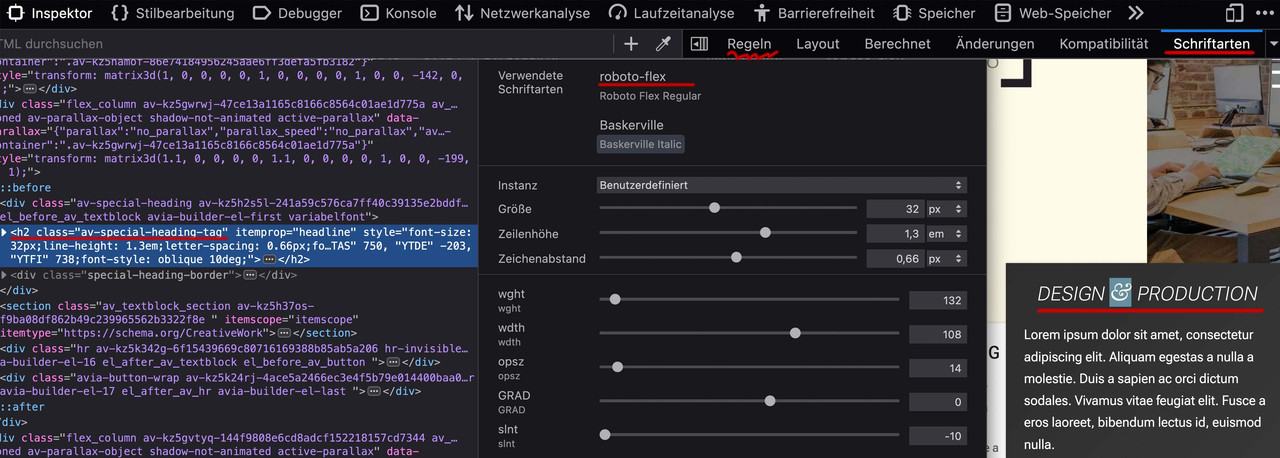
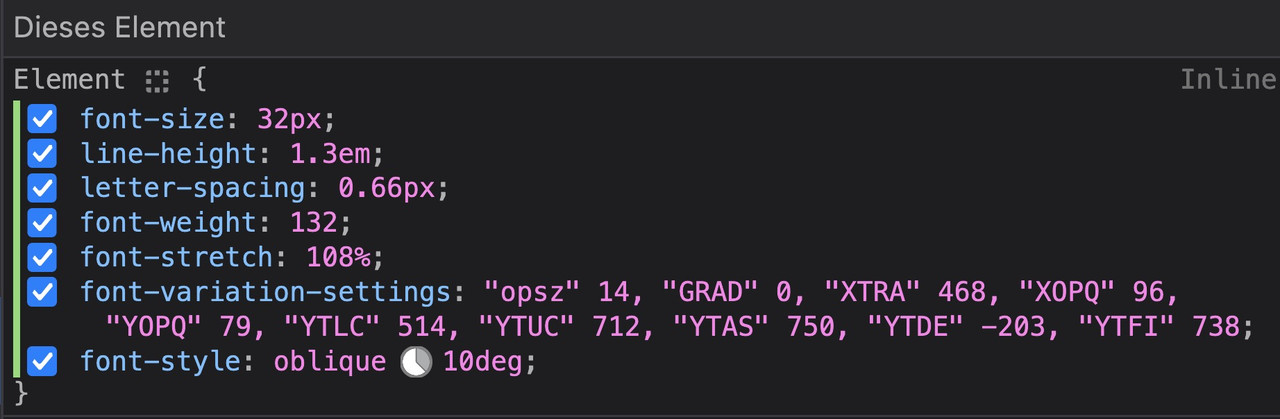
Ist man zufrieden, wechselt man zum Reiter : “Regeln” und kann dann am Element ablesen was man ins Quick css übernehmen muss:
kleinen Moment:
zunächst – OSX : beim Packen mit Standard Tools von OSX werden in das zip file zusätzliche Files unsichtbar mit hinzu gepackt.
BetterZip hat deshalb die Funktion : für Windows packen.
hier ist jetzt mal RethinkSans mit (400,500,700) : download: RethinkSans.zip
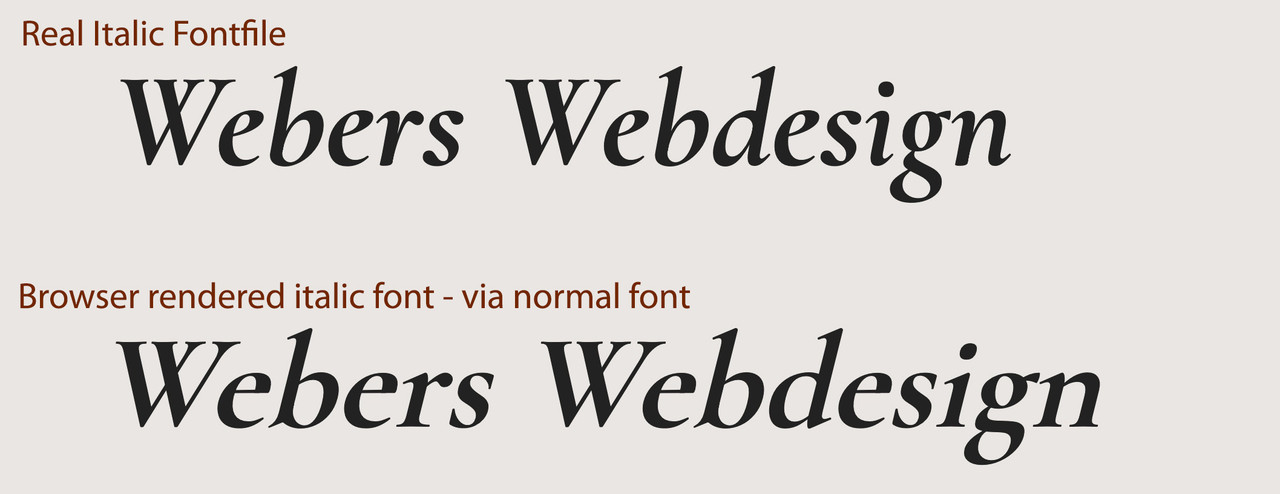
wenn Du dir die Schriftschnitte mal in Google Font anschaust, dann siehst du das die italic wirklich nur eine slanted Schrift ist somit sich italic und der vom Browser generierte italic Font sich kaum unterscheiden werden. Daher ließ ich die Schriftschnitte weg. ( Manche Serifen Schriften unterscheiden sich erheblich bei gerade und italic – dann macht es Sinn)
Da woff2 das bessere Format ist ( weil brotli Kompression ) ist es mit im zip file und wird gemäß Enfold auch bevorzugt geladen.
Hier wäre der variable Font: download: RethinkSans Variable.zip
Lösche also mal alle Schrift Vorkommnisse – auch in der Media Library vorher – und lade dann diese hoch : ich empfehle Dir nur die Statischen Fonts.
Kannst aber probieren nur den variablen zu nehmen.
sieht dann so aus:
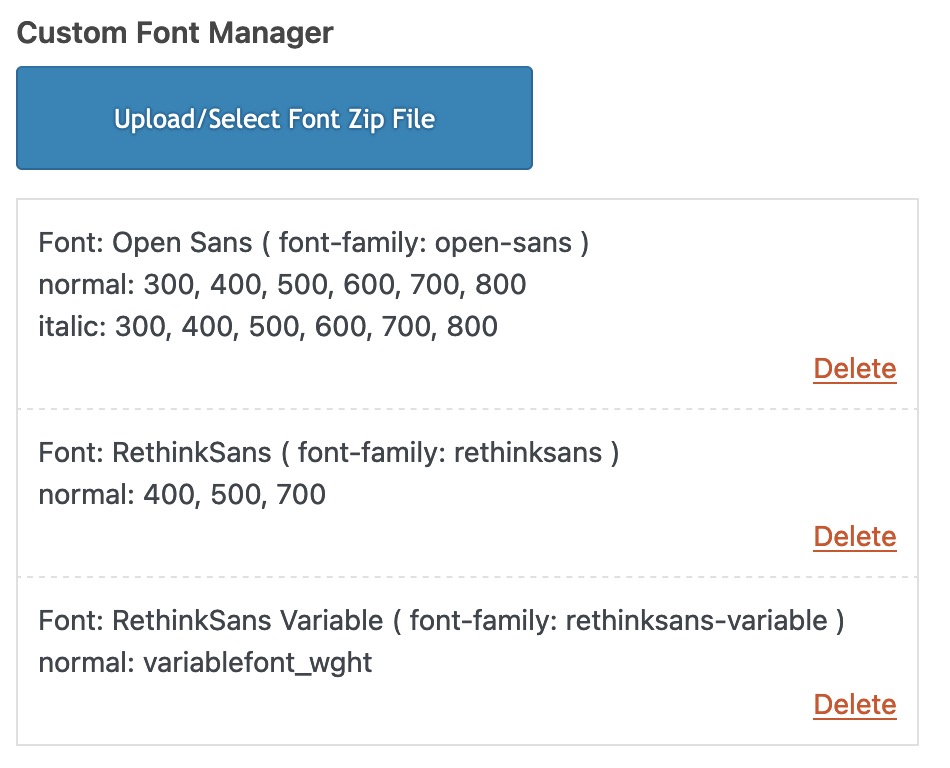
Du siehst dort auch wie die font-family dann anzusprechen ist. ( In klammern dahinter)
Hi,
Glad to hear that you have this sorted out with Nikko’s help, if you have any further questions please create a new thread and we will gladly try to help you. Thank you for using Enfold.
Best regards,
Mike
Hi,
Glad Nikko was able to help, if you have any further questions please create a new thread and we will gladly try to help you. Thank you for using Enfold.
Best regards,
Mike
Hi,
Please add a color section to the page and set it’s min height to 100%:

then add the other page elements such as your contact form inside of it and try again.
Please note that we ask that each thread stays on a specific topic, this helps other users find solutions based on the opening subject line quicker. For further questions please open a new thread
Thank you for your patience and understanding and for using Enfold.
Best regards,
Mike



