Hi,
I will try to use an example to explain better,
If your current live site and license is on “mysite.com”
then you can use as many copies on the subdomains like “stagingsite.mysite.com” “test.mysite.com” “newsite.mysite.com”
when you move to your new domain like “mynewsite.com” then you will need to purchase a new license,
you can purchase the new license a few days after you move it, just don’t include your “token” from your first license in the Enfold Theme Options ▸ Theme Update ▸ Enter a valid Envato private token on the new domain.
I hope thie helps.
Best regards,
Mike
I just purchased Enfold Theme with 6 months support where do i download the license and where do i post it?
This reply has been marked as private.
Hey schweg33,
Try this CSS in your Enfold Theme Options ▸ General Styling ▸ Quick CSS field:
#top:not(.home) #wrap_all .container_wrap_first {
    min-height: 75vh;
    background-image: url(/wp-content/themes/enfold/images/background-images/floral-dark-compressed.png) !important;
    background-repeat: repeat;
}
Please ensure to copy the code from the forum and not an email notification so the symbols are not converted.
After applying the css, please clear your browser cache and check.
Best regards,
Mike
Hey Tilman,
Try this CSS in your Enfold Theme Options ▸ General Styling ▸ Quick CSS field:
@media only screen and (min-width: 767px) {
.js_active .av-tab-section-tab-title-container {
display: flex!important;
justify-content: space-around;
align-items: flex-end;
}
}
#top .av-inner-tab-title {
    text-transform: none;
}
Please ensure to copy the code from the forum and not an email notification so the symbols are not converted.
After applying the css, please clear your browser cache and check.
Best regards,
Mike
Hey solinpaul2,
Thank you for your patience, unfortunately we don’t have a filter feature, you could try using a plugin, perhaps one of the ones in this article will help.
Our Masonry element has a sort option for posts & portfolio items, but I don’t think this is what you are looking for.
Best regards,
Mike
Hi,
To have a second blockquote color like green, you will need to add a custom class the blockquote, it looks like you are using Text Elements like this:

so switch to the Text tab and add the class: green

then add the css:
#top #wrap_all .all_colors blockquote.green {
    border-color: green;
}
this is the expected results:

Best regards,
Mike
Hi,
Glad we were able to help, if you have any further questions please create a new thread and we will gladly try to help you. Thank you for using Enfold.
Best regards,
Mike
Hi mirr,
I’m glad that Yigit could help you :)
Thanks for using Enfold and have a great day!
Best regards,
Nikko
Hello, I am encountering problems blocking cookies inserted by scripts that are injected from Google Tag Manager.
The solution could be something similar to what is explained here https://visiondefunnel.com/2021/04/24/configurar-el-consentimiento-de-cookies-con-google-tag-manager-con-receta/ (spanish ) or this other cookiebot https://www.cookieyes.com/documentation/block-third-party-cookies-with-google-tag-manager-and-cookieyes/ (english).
This solution tries to configure some variables in GTM, giving them logic, together with a custom event trigger.
It would be terribly interesting if you could provide us with a tutorial or documentation to try to do this same process with the enfold cookie manager.
Hey UPON,
Thank you for the link to your site, try this CSS in your Enfold Theme Options ▸ General Styling ▸ Quick CSS field:
#top .formcraft-datepicker .ui-datepicker-title select {
    color: inherit;
    -webkit-appearance: none;
    -moz-appearance: none;
    text-indent: 0.01px;
    text-overflow: '';
    box-shadow: none;
    padding: 0 0.5em!important;
    height: 2.9em;
    vertical-align: top;
    margin: 0;
    border: 0;
    background: 0 0;
    cursor: pointer;
    width: auto;
    display: inline-block;
    font-size: inherit;
    border-radius: 0;
}
Please ensure to copy the code from the forum and not an email notification so the symbols are not converted.
After applying the css, please clear your browser cache and check.
This in the expected results:

Best regards,
Mike
All my codes came from enfold
Your code did nothing
Dave
Hello,
These arrows aren’t coming from Enfold. You can remove them by adding the following code to the bottom of Quick CSS field in the Enfold theme options > General Styling
li.dropdown_ul_available:not(#menu-item-5472)::after
{
  display: none;
}
Regards,
Yigit
Cheers Enfold Team!
I have a problem with datepicker css. Plugin: Formcraft. Please let me know what to do. The title bar is broke and the black left border should be removed. I tried a lot of css codes but nothing worked. See URL in private content.
_ _
I contacted the plugin developer and already tested deactivating all plugins.
Answer plugin developer: Hello, This is a tricky one. Either your theme or another plugin is forcing elements on the page to follow certain CSS, which is breaking the datepicker. This is a poor coding practise on their end. Since the CSS they have implemented is using IDs and is all over the place I am also unable to offer a fix via CSS. I’d recommend contacting them or finding a way to disable contact form default CSS.
Thanks.
_ _
Thanks for your Support!
That exactly is the meaning of background-images. The content height determins the height of the section.
by the way – it now makes me wonder that the original inline rule set by Enfold is with height and not min-height:
.av-minimum-height-90:not(.av-slideshow-section) .container {
  height: 90vh;
}
so my code above reflects that.
Try first now to set only a min-height to 50vh
But as mentioned : the content height will be the determinating factor on that.
I’m getting “There has been a critical error on this website. Please check your site admin email inbox for instructions.” in Tools > Site health. Already tried to over write the Enfold folder on the server but it did not help. Is this related to the theme? WP, theme, plugins are all up to date.
Thanks
Hey Yory,
You have selected to use the Cabin font for all headings under Enfold->Advanced Styling. Please check your settings there.
Best regards,
Rikard
Hey John,
Try this CSS in your Enfold Theme Options ▸ General Styling ▸ Quick CSS field:
#top #wrap_all .all_colors blockquote {
    border-color: red;
}
and change the color to suit, and then clear your browser cache and any cache plugin, and check.
Best regards,
Mike
Hi,
Glad we were able to help, if you have any further questions please create a new thread and we will gladly try to help you. Thank you for using Enfold.
Best regards,
Mike
Hi,
Glad we were able to help, if you have any further questions please create a new thread and we will gladly try to help you. Thank you for using Enfold.
Best regards,
Mike
Hi,
Custom Elements should be an option.
Please read https://kriesi.at/documentation/enfold/custom-element-templates/#custom-elements-advanced-options.
You need to change Custom Elements For Subitems to Individually select subitem custom element templates.
Reload the page/post you want to edit after changing theme options.
Then you can add multiple testemonials and lock them.
Best regards,
Günter
Hello,
I installed enfold then imported parallax demo. But what I got is totally different. I couldn’t find any solution. I need some help please.
Hello,
Unfortunately the website still loses his CSS-styling.
But, i’ve noticed that on the FTP-server, where the site is hosted, some files are updated without my knowing.
It is in this folder:
httpdocs/wp-content/uploads/dynamic_avia
and the files that are updated are:
- enfold.css
- avia-gutenberg-dynamic-enfold.css
- index.php
- folder -> avia_posts_css
Maybe this is the cause of the site losing his CSS styling?
-
This reply was modified 2 years, 3 months ago by
 pantrom.
on each Enfold Advanced Layout Builder (ALB) Element – you have the chance to save that element as template:
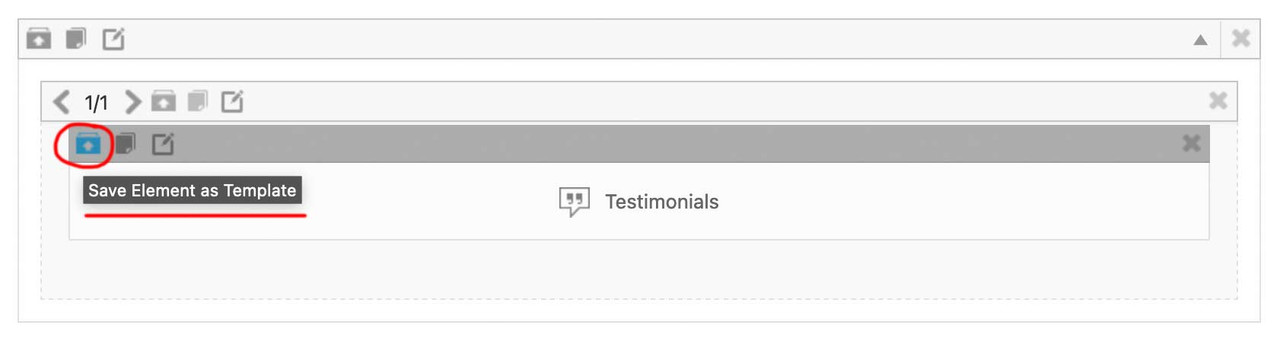
you now can insert this ( completely styled and filled with content ) ALB Element to different pages/posts – on top right of the layout builder window there is a drop-down:
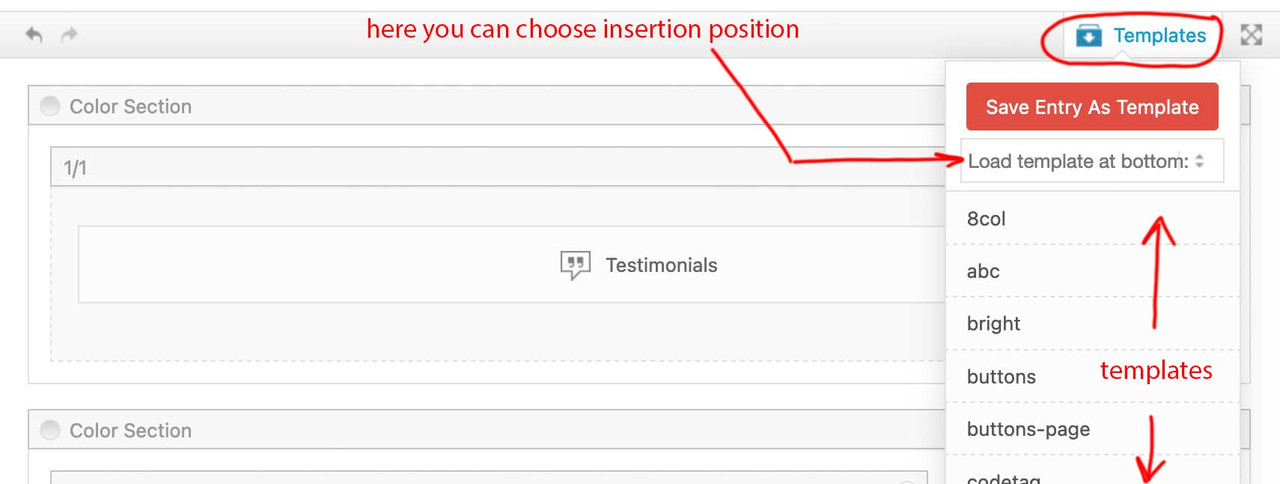
after Insertion ( top or bottom ) you now can drag that element to the wanted position.
___________
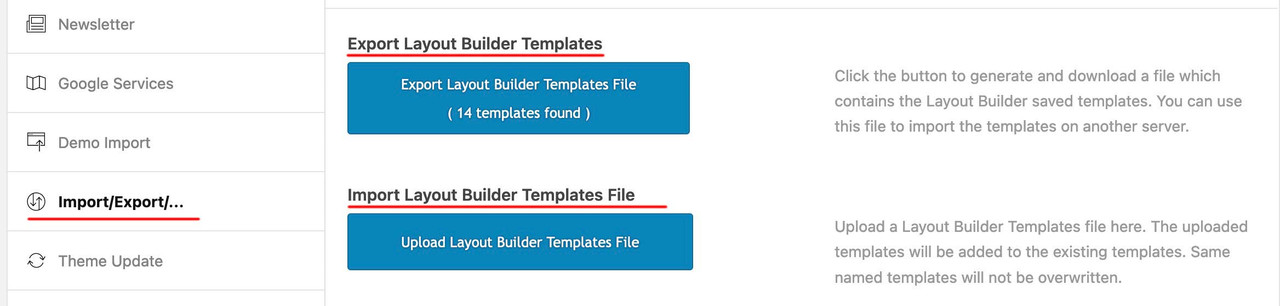
by the way: these templates could even be transformed to different installations ( but you had to think of transfering the content used inside these elements by yourself ) :
give a custom class to your color-section – f.e. : fifty
then put your rules inside a media-query: ( if you like to have it on a different screen-width than 767px – change that f.e. to 989px )
@media only screen and (max-width:767px) {
  .responsive #top .avia-section.fifty {
    height: 50vh;
  }
}
PS: if you really like to have that only for mobile devices – and not for small screen sizes ? you can change that selector ( and use the enfold default class for mobile devices: avia_mobile ):
.responsive.avia_mobile #top .avia-section.fifty {
  height: 50vh;
}
Hi guys,
I’m using the color section on a homepage with a minimum height set at 90%, however this applies on both desktop and mobile. For mobile I would like to set a min-height of 50%. I couldn’t find some css snippet for such setting on the documentation page https://kriesi.at/documentation/enfold/color-section/#toggle-id-1.
What would be the proper CSS snippet to set an alternative min height on mobile viewports?
Thanks and regards,
S
Hi
In theme options > General styling Font tab I’ve changed the font family for both Headings and Body and saved changes but there is no change on the front end. This is a staging site.
I did:
cleared browser cache
Purged all LiteSpeed caches
Updated Enfold to 5.6.9
disabled all plugins
activated twentytwentyfour theme
What could be the reason these changes are not applied?
BTW both front and back ends load super slow at times, even on text only pages. Seems like the server response time is adequate.
Thanks
Hi,
Glad we were able to help, if you have any further questions please create a new thread and we will gladly try to help you. Thank you for using Enfold.
Best regards,
Mike
Hi,
Glad we were able to help, if you have any further questions please create a new thread and we will gladly try to help you. Thank you for using Enfold.
Best regards,
Mike
Hi,
Glad we were able to help, if you have any further questions please create a new thread and we will gladly try to help you. Thank you for using Enfold.
Best regards,
Mike



