Hi,
We removed your old thread.
Please register to our support forum using your Purchase Code at https://kriesi.at/support/register/. After logging in, you can start new threads at https://kriesi.at/support/forum/enfold#new-post.
You’ll need a valid support period to start threads on our support forum. If your support period is expired, you can renew it at https://themeforest.net/item/enfold-responsive-multipurpose-theme/4519990.
Let us know if you have any other questions.
Regards,
Yigit
Dear Enfold-Team,
I created a custom partner/logo element. Under the first tab “Content” the button to add images is missing. I cant add images to the element.
There is a blank space where the button usually sits and the text next to it says:
Add Images
Here you can add new Images to the partner/logo element.
Thanks for your help, Tom E.
See the private screenshot link…
Hello,
I had to update a site for a client. The site has to go from version 4.7.6.1 to 5.7. The PHP was also updated.
It already is using a Child Theme. I was able to manually upload the new theme. But now the Child theme still sticks to the old version. I didn’t get a notification that I already uploaded the same theme. So now in the theme section I’ve the Child theme and the old and new version of the Enfold Parent theme.
How can I solve this without losing everything?
PS: I tried to modify magazine.php directly (that worked after all) and would like to put the modified file into my child theme directory to avoid it being overwritten on Enfold udates.
The original file path is: \wp-content\themes\enfold\config-templatebuilder\avia-shortcodes\magazine\magazine.php
I tried every possible subdir structure in the child theme folder, but to no avail. I placed the modified magazine.php in each of the following folders:
- \wp-content\themes\enfold-child\config-templatebuilder\avia-shortcodes\magazine\magazine.php
- \wp-content\themes\enfold-child\avia-shortcodes\magazine\magazine.php
- \wp-content\themes\enfold-child\magazine\magazine.php
- \wp-content\themes\enfold-child\magazine.php
The file is not recognized there. Is it possible at all to put a modified shortcode file into the child theme folder?
Thanks.
it is still the png as logo. you can just upload that file to media library and insert it to the logo input field.
Enfold will recognise that you have it centered on top – and will adjust the setting inside the svg ( preserveAspectRatio )
because you merge the css and js files – refresh that on Performance – Delete Old CSS And JS Files? at the bottom
Hey Robert,
Thanks for your question, your version will need to be manually updated, and if the parent theme was renamed then you will need to adjust the updated files the same, typically this is in the parent theme style.css file on the first line Theme Name: Enfold adjust this to when your theme is now named:

When you update please do not try to overwrite the files via FTP, this will leave old files behind and cause errors, you will need to first delete the old files and then upload the new ones. I recommend first making a full backup of your site and database.
If your child theme has any customized files like the header.php or footer.php please remove these, as this will cause errors in your theme. We do not recommend adding these files to your child theme, it is the most common reason for errors when updating. Please remove these files and any customizations you wish to make should be done in your child theme functions.php
Please note that with a renamed theme you will not be able to update automatically, perhaps after you backup the site you should try renaming the theme back to Enfold.
First export your theme settings at: Enfold Theme Options ▸ Import/Export ▸ Export Theme Settings File to your computer, this is just for backup.
Then renaming the theme back to Enfold at Theme Name: Enfold like in the screenshot above and rename your child theme style.css to Theme Name: Enfold Child and Template: enfold like this:
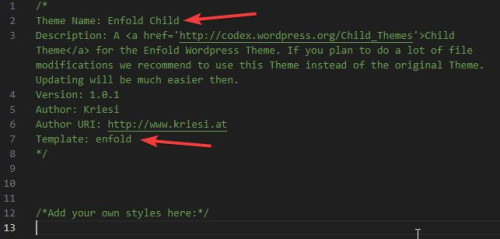
Then if your frontend styles seem wrong after you save and clear your browser cache you may need to import the theme settings that you saved earlier.
If this all works fine and your site is now working correctly with a “Enfold” named theme you can manually update like this:
First download the latest installable WP version from your Theme Forest account and upload it to your WordPress ▸ Appearance ▸ Themes ▸ Add Themes ▸ Add New

after you choose the zip file and click install, you will see a This theme is already installed message because you are updating, you can continue

then you will see the Theme updated successfully message.

This should get you on the right track, if you have trouble after you purchase the new theme then please register your Purchase Code here.
Then log into the support forum and open a new thread and we will assist.
Best regards,
Mike
Hi,
Thanks for letting us know. Please open a new thread if you should have any further questions or problems.
Best regards,
Rikard
 Robert
Guest
Hi, someone made the website for us few years ago using the Enfold 4.8.6.3. I need to update the theme thecause we upgrade php and its breading thing’s, I tried to contact the peoplenwho made the web to provide us with the licence or detail of the account where the theme was purchased from, but they noware to be found.
I guess I need to purchase the theme again, and I have no problem with this, but my warry is that the theme and the child theme were renamed, so if I buy the theme again wouldnyou help us upgrade?
Thank you.
Guten Tag,
ich habe auf meiner Website (Enfold Consulting Demo) einen Bereich, wo am Desktop in 2 Spalten abwechselnd links/rechts Foto und Text platziert ist. In der mobilen Handyversion kommen dann immer 2 Bilder und 2 Textbereiche übereinander.
Wie kann ich diesen Bereich für die mobile Handy-Version so einstellen, dass ebenfalls immer Bild auf Text folgt?
-
This topic was modified 1 year, 11 months ago by
 manfredergott. Reason: erledigt
Hi,
Thanks for that. Please try the following in Quick CSS under Enfold->General Styling:
.page-id-432 .components-flex-item input, .page-id-433 .wc-block-components-text-input input {
  padding: 8px 116px;
}
Best regards,
Rikard
@Ismael No clue. Lol. Just installed the latest version of Enfold, perhaps that will fix it. Thanks!
Hey Karen,
Thank you for your interests in the theme.
Yes, the theme is compatible with the Yoast plugin, and its content analysis seamlessly integrates with the theme’s Advanced Layout Builder. Regarding the license, the single license is valid indefinitely for a single website, but please note that the support license expires.
To help you get started with the theme, you can visit the documentation or open threads here in the forum so that we can assist you. Please check the link below:
// https://kriesi.at/documentation/enfold/quick-setup/#before-we-start
Best regards,
Ismael
Hey!
@Netzie: We replied in the thread using your account because it’s private: https://support.rankmath.com/ticket/continued-enfold-theme-being-compatible-ii/#post-787145
@Intell: Why do you have to disable the plugin? Please open a new thread if you’re still experiencing the issue.
Cheers!
Ismael
Hey David,
Thank you for the inquiry.
You can add this css code to adjust the space above the timeline content box:
@media only screen and (max-width: 767px) {

  /* Add your Mobile Styles here */
  .av-no-preview .avia-timeline-vertical .av-milestone-date {
    padding: 8px 0 0 0;
  }
}
Please make sure to toggle or temporarily disable the Enfold > Performance > File Compression settings after adding the modification.
Best regards,
Ismael
Hi Ismael,
I dont have Jaideep Asrani’s contact info – It’s a hidden miss who answer each ticket reply @RM
But here is the link … If you dont have access via the link – Then just use my login (see prev. private info) and go from there :)
https://support.rankmath.com/ticket/continued-enfold-theme-being-compatible-ii/ LINK
Best regards
Peter
on your setting now try this in quick css:
.phone-info div > span {
  display: inline-block;
  float: none;
}
but such a code is hard to edit so i wouldn’t work with enfold-shortcodes here – but pur html will work too.
f.e in phone-number input field
<a href="link1"><span class="map">Location</span></a><a href="link2"><span class="contact">Contact</span></a><a href="tel:+490221123456"><span class="tel">Phone</span></a>
see here on header meta: https://webers-testseite.de/text/
after that the classes will do their job in quick css:
.responsive #header_meta .phone-info span {
    color: #aaa;
    margin-right: 15px;
    font-size:16px
}

.phone-info span::before {
    font-family: entypo-fontello;
    font-size: 24px;
    padding-right: 5px;
    position: relative;
    top: 2px;
}

.phone-info .map::before { content: "\e842"; color: #900}
.phone-info .contact::before { content: "\e805"; color: #090}
.phone-info .tel::before { content: "\e854"; color: #009}
.phone-info .mail::before { content: "\e805"; color: #090}
On my devices (iphone and ipad) the favicon is not visible. The problem only occurs with enfold, other sites have no problems.
That is the reason why i ask for a link to a page where it is working for you. ( not your site – but the one – without enfold where you can see on your iPhone what you like to have.) then we can inspect the differences in head section.
Hi,
I would like to place 2 or items in my top bar, each with an icon and text, so a phone icon with phone number, a license icon, with license number, and possible an email icon with email text, very much like this website: https://vanfraneyplumbing.com/fort-myers-plumbing-services/
But with Enfold, if I add more than one, then both icons are right at the beginning, lumped together, so it doesn’t separate them the way it’s written.
See the site I’ve started here: http://eleinar25.sg-host.com/
The Code I used is as follows:
[av_font_icon icon='ue840' font='entypo-fontello' style='' caption='Call Us' size='20px' position='left' color='#ffffff'] Licensed Plumber FL State License #1427999 | [av_font_icon icon='ue854' font='entypo-fontello' style='' caption='Call Us' size='20px' position='left' color='#ffffff'] Call or Text 941.270.2930
Could you tell me how to do this correctly for 2 or 3 items with icons? Thank you!
Hi,
Thanks for letting us know, we’ll close this thread for now then. Please open a new thread if you should have any further questions or problems.
Best regards,
Rikard
Hey manfredergott,
Thanks for the update, we’ll close this thread for now then. Please open a new thread if you should have any further questions or problems.
Best regards,
Rikard
Hi,
Thanks for that, but I can’t see that you have added it yet. Please try following the documentation again: https://kriesi.at/documentation/enfold/header/#adding-a-header-widget-area
Best regards,
Rikard
Hi,
Glad Yigit was able to help, if you have any further questions please create a new thread and we will gladly try to help you. Thank you for using Enfold.
Best regards,
Mike
Hi,
Perhaps it is an error in the test, if you check your page with the Dev Tools inspector with the image not scrolled into view you can find the image placeholder and the class avia-img-lazy-loading-9144 but the image is not loaded:

then scroll down to the image and just as it comes into view you will see the image added to the DOM:

Please note that if you use the Ctrl+F to search for the class the page will automatically scroll the element into view, so once you find the place in the DOM scroll the window up so the image is a good way out of view, then reload the page and watch the DOM as you scroll down. You will see the image added to the DOM like in my screenshot above.
Best regards,
Mike
Hi,
I am using Lite Speed Cache plugin with options equivalent to some in Enfold theme, like Lazy Loading, CSS and Javascript File Compression And Merging. Should I turn on these options on in both theme and plugin or just at one place?
Theme is already pretty fast, can you recommend any plugin or tweak that will improve performance?
Many thanks!
@mike you can now close this issue.
For any other users of Enfold who use scalability Pro by Super Speedy Plugins / WP Intense:
To ensure that Enfold thumbnail sizes arent removed please go to Settings > Scalability Pro > Imports > Global Image sizes > Click Enable and then tick all of the boxes to exclude the image sizes from the optimisation settings. Obviously you can tweak this list if you want to disable some of the items.
You can also use other plugins like Shortpixel Regenerate Thumbnails plugin. We use this because you can quickly add new sizes as well.
Hey,
Please add the following code to the Quick CSS field in Enfold theme options > General Styling tab
.page-id-24 .avia-testimonial-markup-entry-content p:first-child {
  display: inline-block;
}
Best regards,
Yigit
Hey Sonia,
Please add the following code to the Quick CSS field in Enfold theme options > General Styling tab:
.avia_mobile .avia-slider-testimonials {
pointer-events: unset;
}
Best regards,
Yigit
Hey Stefan,
Enfold is fully compatible with WooCommerce so Enfold would be a good choice!
You can select one of the Enfold demos ( https://kriesi.at/themes/enfold-overview/ ) and start working on the site.
I hope this helps. Let us know if you have any other questions and enjoy the rest of your day!
Regards,
Yigit
 Stefan
Guest
Greetings!
I’m looking for a Theme of yours for a client. I’m already using for a different client your Enfold theme.
The new theme should be as easy as possible, that once I set up everything, the customer can take over the website and take care of it by themselfes again.
The current website contains a couple of standard pages and a webshop with round about 600 products. Currently, they’re using Elementor Pro but they want to get rid of it, so I recommended them to buy a theme from you.
Now the question, can you recommend a theme that is easy to configure as possible and contains a webshop?
Have a great day!
Stefan



