And now the profi tip:
1( Go to Google Font – choose your font – download it. You will get a ttf font.
2) Go to: Transfonter
choose svg as font:
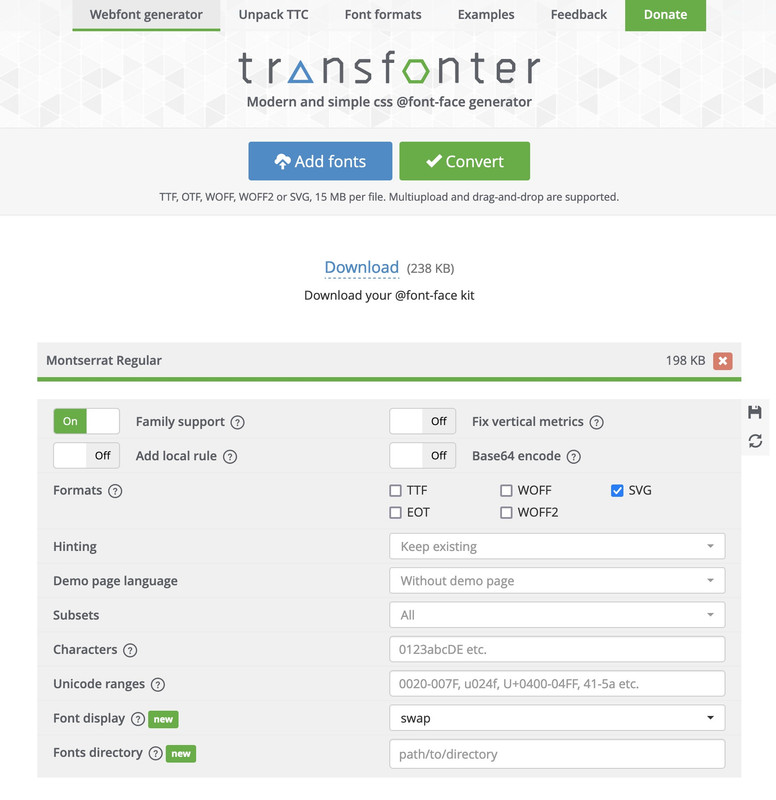
download the converted font – unzip and pull out the svg you get.
3) Go to fontello – drag & drop that svg to the “custom icons” field.
4) choose your selected icons – name it and download that zip file –
5) upload that to Enfold – Import/Export/…. Iconfont Manager
;)
see here – done with montserrat-regualar:

download here: https://webers-testseite.de/montserrat-numbers.zip
PS: sometimes it might be neccessary to adjust the size of those font-icons.
eg:
html body [data-av_iconfont="montserrat-numbers"]::before {
  font-family: 'montserrat-numbers';
  position: absolute;
  left: 50%;
  top: 50%;
  font-size: 2em;
  transform: translate(-50%, -50%);
}
see: https://webers-testseite.de/montserrat-numbers-2/
and – tip: you can combine more than one font-family in that upload.
Hey ditteditte,
Please try the following in Quick CSS under Enfold->General Styling:
#menu-item-130040 .three.units {
  width: 200px;
}
Best regards,
Rikard
Hi,
Thanks for the clarification. Please try the following in Quick CSS under Enfold->General Styling:
.home #av_section_4 .flex_column_table .av_textblock_section p {
  margin: 0.85em 10px;
}
You can adjust the second value to your liking.
Best regards,
Rikard
Hey Gianluca,
Please try the following in Quick CSS under Enfold->General Styling:
.main_color blockquote {
  border-color: #a6c626;
}

.main_color blockquote p {
  text-align: right;
}
Best regards,
Rikard
Hi there
We use the following code snippet to send an info to a special shop manager at checkout
// Add checkout fields
function custom_checkout_field( $checkout ) {
	// echo '<fieldset><legend>Zusätzliche Angaben</legend>';

	$options = array();
	$nicknames = array();
	$args = array( 'role' => 'shop_manager' );
	$users = get_users( $args );
	foreach ( $users AS $user ) :
		$user_id = $user->ID;
		$user_info = get_userdata( $user_id );
		$options[$user_id] = $user_info->first_name.' '.$user_info->last_name.' ('.$user_info->nickname.')';
		foreach ( explode( ', ', $user_info->nickname ) as $nickname )
			$nicknames[$nickname] = $nickname;
	endforeach;

	woocommerce_form_field( 'user_id', array(
		'type'     => 'select',
		'class'    => array( 'user_id form-row-first' ),
		'label'    => __( 'Cost center group' ),
		'required' => true,
		'options'  => $options
	), $checkout->get_value( 'user_id' ) );

	woocommerce_form_field( 'cost_center', array(
		'type'     => 'select',
		'class'    => array( 'cost_center form-row-last' ),
		'label'    => __( 'Cost center' ),
		'required' => true,
		'options'  => $nicknames
	), $checkout->get_value( 'cost_center' ) );

	// echo '</fieldset>';
}
add_action( 'woocommerce_after_checkout_billing_form', 'custom_checkout_field' );

function custom_checkout_field_process() {
	/* if ( !str_contains( $_POST['first_name_1'], 'wf-ib.de' ) ) // Checkout: Email validation
		wc_add_notice( __( '<strong>E-Mail-Adresse:</strong> Es sind nur E-Mail-Adressen mit der Domainendung wf-ib.de zulässig.' ), 'error' ); */

	if ( !$_POST['user_id'] )
		wc_add_notice( sprintf( __( '%s is a required field.', 'woocommerce' ), '<strong>' . __( 'Cost center group' ) . '</strong>' ), 'error' );

	if ( !$_POST['cost_center'] )
		wc_add_notice( sprintf( __( '%s is a required field.', 'woocommerce' ), '<strong>' . __( 'Cost center' ) . '</strong>' ), 'error' );
}
add_action( 'woocommerce_checkout_process', 'custom_checkout_field_process' );

function custom_checkout_field_update_order_meta( $order_id ) {
	if ( !empty( $_POST['user_id'] ) )
		update_post_meta( $order_id, 'user_id', intval( $_POST['user_id'] ) );

	if ( !empty( $_POST['cost_center'] ) )
		update_post_meta( $order_id, 'cost_center', sanitize_text_field( $_POST['cost_center'] ) );
}
add_action( 'woocommerce_checkout_update_order_meta', 'custom_checkout_field_update_order_meta' );

function custom_checkout_field_display_admin_order_meta( $order ) {
	$user_id = get_post_meta( $order->id, 'user_id', true );
	$cost_center = get_post_meta( $order->id, 'cost_center', true );
	$user_info = get_userdata( $user_id );
	echo '<p><strong>'.__( 'Cost center' ).'</strong>: '.$user_info->first_name.' '.$user_info->last_name.' ('.$cost_center.') <'.$user_info->user_email.'></p>';
}
add_action( 'woocommerce_admin_order_data_after_billing_address', 'custom_checkout_field_display_admin_order_meta', 10, 1 );
The order meta for user_id and cost_center are not saved by the hook woocommerce_checkout_update_order_meta. The big question now is why? We use a very similar code snippet in other projects and there it works without problems. Does Enfold prevent something?
-
This topic was modified 1 year, 11 months ago by
 RENZCOM.
-
This topic was modified 1 year, 11 months ago by RENZCOM.
Hey fkm,
Thanks for the screenshots and link to your site, try this CSS in your Enfold Theme Options ▸ General Styling ▸ Quick CSS field:
#top .avia-image-diff-container {
    margin: 0;
    width: 100vw !important;
  position: relative !important;
  left: calc(-50vw + 50%) !important;
}
Please ensure to copy the code from the forum and not an email notification so the symbols are not converted.
After applying the css, please clear your browser cache and check.
Best regards,
Mike
Hi Enfold-Team,
our new generated site with enfold is loading very slowly. We have activated shortpixel and supercache. The site is also without video loading very slowly. Any Idea what’s the problem?
Best regards
Vera
-
This topic was modified 1 year, 11 months ago by
 vthie.
Hi,
Thank you for your patience, please try disabling Enfold Theme Options ▸ Performance ▸ JS & CSS file merging and compression and disable any other caching plugins and enable Enfold Theme Options ▸ Performance ▸ Delete old CSS and JS files
Then clear your device cache, please note that iPhones can be hard to clear the cache, often you need to also clear the history to fully purge the cache, following these steps for Safari and note Step 4 where you will Clear the History.
If this doesn’t help please try adding this code to the end of your theme functions.php file in Appearance ▸ Editor:
function custom_avf_post_css_create_file( $create ) {
	return false;
}
add_filter( 'avf_post_css_create_file', 'custom_avf_post_css_create_file', 10, 1 );
and clear your cache again.
If this doesn’t correct please include admin login in the Private Content area so we can investigate.
Also when you say that “Desktop environments” work fine, is that Mac or Windows, or both?
Best regards,
Mike
Hi Ismael,
I will repeat my question in English for you:-) On my homepage I have an element which contains two columns. Each column has a picture and below some text. Now I want to add some padding to the textbox so that the text does not touch the limits of the column. It simply looks nicer. In Enfold the textbox itself does not have any padding option. If I add padding to the column, it makes the pictures smaller as well. Is there any way to add padding to the textbox but not to the picture?
Cheers again
Tanja
Hi,
Thank you for the update.
You can add this css code to hide the search icon on desktop view:
@media only screen and (min-width: 768px) {

  /* Add your Desktop Styles here */
  .responsive #top .av-main-nav .menu-item-avia-special {
    display: none;
  }
}
Make sure that the Enfold > Main Menu > Menu Items For Mobile settings is set to the first option.
Best regards,
Ismael
Hi,
Thanks for that. Please try the following in Quick CSS under Enfold->General Styling:
#after_section_2 .content {
  padding: 0;
}
Best regards,
Rikard
Hi,
Great, I’m glad to hear that you got things working. Thanks again to @guenni007 for helping out.
Please open a new thread if you should have any further questions or problems.
Best regards,
Rikard
Hey Mark,
If you don’t have access to the account which was used to purchase your theme license, then please make sure that you do. If you can’t get access, then you can purchase a new license here: https://themeforest.net/item/enfold-responsive-multipurpose-theme/4519990
After you have access to the theme files, then the update to 5.7 has to be done manually from the version you are running, please refer to my replies in this thread: https://kriesi.at/support/topic/enfold-4-5-theme-update-update-failed-download-failed-a-valid-url-was-not-pro/#post-1021541
You can either update manually via FTP: https://kriesi.at/documentation/enfold/how-to-install-enfold-theme/#theme-update, or upload the theme as if it was new under Appearance->Themes->Add New Theme.
If that doesn’t work then please try to delete the whole theme folder, then replace it with the new version. Make sure that you have backups of the site before starting updating.
Also please read this after you have updated: https://kriesi.at/documentation/enfold/theme-registration/
Best regards,
Rikard
Well I never changed any settings for that so I believe it is Enfold standard.
Hello Ismael
Thank you for your answer
if I insert this into the function php it does not work.
Maybe this is because I already have an entry.
/*archive village history filter portfolio by individual categories*/
function enfold_customization_postnav($settings){
$settings[‘is_fullwidth’] = false;
$settings[‘skip_output’] = false;
$settings[‘same_category’] = true;
return $settings;
}
Could you insert sort by title here?
Thank you
kind regards
Franz
Hey northorie,
Thank you for the inquiry.
You can toggle the visibility of the post meta info, including the date, in the Enfold > Blog Layout > Blog Meta Elements section. Look for the Blog Post Date option and toggle it accordingly.
Best regards,
Ismael
Hey hallo352,
Thank you for the inquiry.
Did you install a cache plugin? Please make sure to toggle or temporarily disable the Enfold > Performance > File Compression settings and purge the cache after the adjustments.
Best regards,
Ismael
Hey tomaszzawada,
Thank you for the inquiry.
To import the demo, you may need to do so manually via Tools > Import instead of using the Demo Import panel. First, download the medical.zip file from enfold-library/tree/master/demos/medical folder. After extracting the XML file, go to the Tools > Import > WordPress (Importer) panel (/admin.php?import=wordpress) and upload it.
Best regards,
Ismael
 Mark
MarkGuest
Hi there,
We have a client that is using the enfold theme. They have a really old version – 4.5.7.
It’s not working when we update PHP to 8+
How can they go about getting an update to their theme?
Hey Lorena,
You can purchase the theme here: https://themeforest.net/item/enfold-responsive-multipurpose-theme/4519990
After you have access to the theme files, then the update to 5.7 has to be done manually from the version you are running, please refer to my replies in this thread: https://kriesi.at/support/topic/enfold-4-5-theme-update-update-failed-download-failed-a-valid-url-was-not-pro/#post-1021541
You can either update manually via FTP: https://kriesi.at/documentation/enfold/how-to-install-enfold-theme/#theme-update, or upload the theme as if it was new under Appearance->Themes->Add New Theme.
If that doesn’t work then please try to delete the whole theme folder, then replace it with the new version. Make sure that you have backups of the site before starting updating.
Also please read this after you have updated: https://kriesi.at/documentation/enfold/theme-registration/
Best regards,
Rikard
Thanks, Rikard. To answer your questions: Yes, it does affect functionality on the website – e.g. functionality of the (for our offering indispensible) plugin “Extra Product Options (ThemeComplete)” is getting blocked. And yes, I did try every basic debugging approach such as deactivating plugins one by one.
But it comes down to that the same two errors are generated in the JS of ENFOLD. And the errors appeared with the update to Enfold v. 5.7. “Extra Product Options” did coexist for many years – something must have changed in Enfold 5.7 that broke the code.
 Lorena Poma
Guest
Dear, I am a webmaster of a WordPress installation that has the free Enfold 4.4.1 theme. I don’t have access to any Themeforest account. Is it possible to purchase the latest version license and upgrade the current installation? Thank you so much.
Hi, Thank you for the reply. The developer said they can’t remember what they did. Anyway, so first I will back up the page and database, then export the settings from the theme. Since the theme is called Enfold, but the child is called something else, do I have to rename the child before update? Then update, removing all the custom files from the child leaving only style.css & functions.php, what about the 3 folders from child js, css and inc, are they part of the theme? Anyway after updating will the child theme be also updated automatically? and when you said to compare, is the files from the old child theme with the one from the new?
Ich habe das Snippet “mobile logo” mit dem Code (siehe im privat content oben) wieder deaktiviert, da bei Aktivierung des Codes mobil nicht mein Logo, sondern das von Enfold erscheint, siehe privat content unten:
Hi
thanks. I’m not able to copy the page and so on. This is why I use Enfold, not having to deal with this knowledge. As the site must be connected to the host (hostpoint.ch) it has to happen on the real site.
Thank you beeing so kind to find the problem.
Maybe it would be better to switch to some one with german language skills? As I wrote: switching form php 7.4 to 8.1 is not working only for this site: http://www.jmbuettner.ch (log in see above). All others work fine: http://www.hammerstrasse.ch / http://www.familienfoto.ch / http://www.constitutio.info and so on (all of these Enfold theme.
For background info: see the treat I had for the same site a view weeks ago: https://kriesi.at/support/topic/blog-eintrage-lange-unlimitiert-einsatz-von-php-einstellungen/#post-1439384
regards
Dominic
For me the post title appears at the top, the image and then the text content.
Like this: https://kriesi.at/themes/enfold-gym/2014/08/24/a-nice-entry/
Hey Brecht,
Could you try updating the theme to the latest version (5.7) to see if that helps please? https://kriesi.at/documentation/enfold/how-to-install-enfold-theme/#theme-update.
Best regards,
Rikard
Hey Lorena,
First of all you need access to a Themeforest account which has bought the theme license, after that then the update to 5.7 has to be done manually from the version you are running, please refer to my replies in this thread: https://kriesi.at/support/topic/enfold-4-5-theme-update-update-failed-download-failed-a-valid-url-was-not-pro/#post-1021541
You can either update manually via FTP: https://kriesi.at/documentation/enfold/how-to-install-enfold-theme/#theme-update, or upload the theme as if it was new under Appearance->Themes->Add New Theme.
If that doesn’t work then please try to delete the whole theme folder, then replace it with the new version. Make sure that you have backups of the site before starting updating.
Also please read this after you have updated: https://kriesi.at/documentation/enfold/theme-registration/
Enfold is compatible with the latest versions of WordPress, PHP and MySQL.
Best regards,
Rikard
Hi,
Thanks for the update. Please open a new thread if you should have any further questions or problems.
Best regards,
Rikard
Hi,
1. You can set the font size for each screen size in the styling tab in the element option.
2.Please try the following in Quick CSS under Enfold->General Styling:
@media only screen and (max-width: 767px) {
#kontakt .flex_column {
  transform: none;
}
}
3. I’m not sure what is wrong with that screenshot, please try to explain a bit further.
4. Please try the following in Quick CSS under Enfold->General Styling:
@media only screen and (max-width: 767px) {
.home #av_section_2 .av-horizontal-gallery-slider {
  transform: none;
}
}
Best regards,
Rikard



