 Antonio Sánchez Viñeque
Guest
Good afternoon,
I am using WordPress version 6.2.5 with PHP version 7.4.33
I have Enfold Theme installed version 4.8.8.1.
I want to update Enfold to the latest version 5.7 or the previous version 5.6.12 and I have several questions:
-Is Enfold version 5.6.12 (or 5.7) compatible with Enfold v/ 4.8.8.1 and WordPress 6.2.5?
-If I update, will I have to make changes to the website?
I’m trying to update through the Theme Update tab of the Enfold options but I always get the error: Failed to update plugin: check your license detail first?
I know the license is old, but I’m willing to buy it again if necessary.
Can you help me with the update? Or can you help me with purchasing the new version if necessary and installing it?
______________________________________
Buenas tardes,
Estoy usando WordPress versión 6.2.5 con PHP versión 7.4.33
Tengo instalado en Tema Enfold versión 4.8.8.1.
Quiero actualizar Enfold a la última versión 5.7 o a la anterior 5.6.12 y tengo varias preguntas:
-¿La versión 5.6.12 (o la 5.7) de Enfold es compatible con la v/ 4.8.8.1 de Enfold y con la 6.2.5 de WordPress?
-Si actualizo, ¿Tendré que hacer cambios en la web?
Estoy intentando actualizar a través de la pestaña Theme Update de las opciones de Enfold pero tengo siempre el error: Failed to update plugin: check your license detail first?
Se que la licencia es antigua, pero estoy dispuesto a comprarla de nuevo si es necesario.
¿Pueden ayudarme con la actualización? o ¿pueden ayudarme con la compra de la nueva versión si es necesario y su instalación?
I would upload an unspectacular iconfont. Here I have inverted numbers. Link
Then upload your coloured icons and make a note of the path for each icon.
now replace an icon of this font with the noted links of your coloured icons
this comes to your quick css:
.av_font_icon {
    overflow: visible !important;
}

[data-av_iconfont="solar-icons"]  {
  content: " ";
  background-size: 100px;
  background-position: center center;
  background-repeat: no-repeat;
  border: none !important;
  color: transparent !important;
}

[data-av_iconfont="solar-icons"][data-av_icon="\e800"]{background-image: url(/wp-content/uploads/globe.gif) !important}
[data-av_iconfont="solar-icons"][data-av_icon="\e801"]{background-image: url(/wp-content/uploads/broken-spheres.svg) !important}
[data-av_iconfont="solar-icons"][data-av_icon="\e802"]{background-image: url(/wp-content/uploads/bubbles.svg) !important}
[data-av_iconfont="solar-icons"][data-av_icon="\e803"]{background-image: url(/wp-content/uploads/chrome-balls.svg) !important}
[data-av_iconfont="solar-icons"][data-av_icon="\e804"]{background-image: url(/wp-content/uploads/film.svg) !important}
[data-av_iconfont="solar-icons"][data-av_icon="\e805"]{background-image: url(/wp-content/uploads/glas-dots.svg) !important}
[data-av_iconfont="solar-icons"][data-av_icon="\e806"]{background-image: url(/wp-content/uploads/glas-waben.svg) !important}
[data-av_iconfont="solar-icons"][data-av_icon="\e807"]{background-image: url(/wp-content/uploads/green-world.svg) !important}
[data-av_iconfont="solar-icons"][data-av_icon="\e808"]{background-image: url(/wp-content/uploads/home.svg) !important}
[data-av_iconfont="solar-icons"][data-av_icon="\e809"]{background-image: url(/wp-content/uploads/hui.svg) !important}
[data-av_iconfont="solar-icons"][data-av_icon="\e80a"]{background-image: url(/wp-content/uploads/lotus.svg) !important}
[data-av_iconfont="solar-icons"][data-av_icon="\e80b"]{background-image: url(/wp-content/uploads/nachhaltig1.svg) !important}
Now – if you place your circled number 1 – you can see even in preview – the replaced colored icon:
And – yes even animated gifs can be inserted:

see replaced first icon : https://webers-testseite.de/abc/
PS: on that page with the snippets – you can see that i use the elements sizes for the icons – to generate the background-size :
https://enfold.webers-webdesign.de/colorized-font-icons/
if you like to use that too – remove from css code above the background-size line
function transfer_fontsize_to_backgroundsize(){
?>
<script>
window.addEventListener("DOMContentLoaded", function () {
(function($) {
	$('.av-icon-char[data-av_iconfont="solar-icons"], .iconbox_icon[data-av_iconfont="solar-icons"]').each(function() {
		var iconLineHeight = parseInt($(this).css('line-height'));
		var iconPadding = parseInt($(this).css('padding'));
		$(this).css('background-size', (iconLineHeight + 2*(iconPadding))+'px');
	});
})(jQuery);
});
</script>
<?php
}
add_action('wp_footer', 'transfer_fontsize_to_backgroundsize');
Hi,
This thread covers a couple of different methods and I think that it might be confusing.
So if you want to use color icons, then you would use Guenni007’s example, the easiest path is to upload the png images to your media library and then for each one choose a existing theme icon that you would probably never use as a placeholder, for example the keyboard ( ue83a ):

and then use this css to replace it with your image:
[data-av_iconfont="entypo-fontello"][data-av_icon="\e83a"]:before{font-size:0;width: 40px;display: inline-block;background-image: url(/wp-content/uploads/2024/05/tree.svg) !important}
now whenever you use the keyboard icon on your site your new image will show:

If you want to use B&W icons you can take the B&W PNG images and convert them to SVG, then follow Guenni007’s steps to fix them for Fontello then upload the SVG to Fontello to create your icon font:

then download the new icon font zip file and upload it to Enfold Theme Options ▸ Import/Export ▸ Iconfont Manager and then they will show in your icon list.
Best regards,
Mike
Hi,
Glad we were able to help, if you have any further questions please create a new thread and we will gladly try to help you. Thank you for using Enfold.
Best regards,
Mike
hi,
there has been somechanges the last 2 years on a website. With wordpress updates and enfold. I now notice a page with masonry gallery is giving a fatal error.
The error is:
AH01071: Got error ‘PHP message: PHP Fatal error: Uncaught Error: Call to undefined method avia_masonry::default_args() in /home/cs020/domains/public_html/wp-content/themes/enfold/config-templatebuilder/avia-shortcodes/masonry_gallery/masonry_gallery.php:651\
Somewhere on the forum I found that ‘i am missing the av-slideshow-helper.php in my child theme’. Which seems to be correct, but I do not know how to obtion this file and in what directory to put it?
With some old backups I did find a slideshow helper, but this was also missing a default_arg function so this was not of much help.
Hi,
I’m sorry for the delayed response.
We’ve investigated the errors on your site. The first issue is coming from the Autoptimize plugin. The second and third issues seem to be related to Enfold’s cookie bar.
Please go to the Enfold theme options > Privacy and Cookies > Cookie Handling > Enable cookie consent messages, disable it, and check if that resolves the error.
Best regards,
Yigit
 Davide
Guest
Hello,
we are looking for a company supporting us in order to speed up our sites based on Enfold theme.
Do you have any recommendation? Can you help directly or through a partner?
thanks
Davide Bongianni
Hi,
Thanks for that. Please try the following in Quick CSS under Enfold->General Styling:
.container_wrap {
  border-top-width: 0;
}
Best regards,
Rikard
Hey frasche,
Try this CSS in your Enfold Theme Options ▸ General Styling ▸ Quick CSS field:
@media only screen and (max-width: 767px) {
.responsive #top #wrap_all .flex_column.av_one_fourth {
width: 48% !important;
margin-right: 2% !important;
}
.responsive #top #wrap_all .flex_column_table_cell {
    float: left !important;
}
}
if this doesn’t help please include a link to your page so we can examine.
Best regards,
Mike
Hi,
Sounds like extortion, nonetheless it should help, if you have any further questions please create a new thread and we will gladly try to help you. Thank you for using Enfold.
Best regards,
Mike
Hi,
I added a background video to a section but its not showing. What am I doing wrong?
Enfold is the latest version.
I am creating 4 x 25% columns on a page for the members of a club. The containers contain the logo and the members’ address details. Since there are 130 members, this is OK on the desktop version, but on mobile Enfold switches to one container per member. I haven’t found anything about how to display 2 containers per column on the mobile. Do you have a code that I can use to display 2 containers per column next to each other on the mobile instead of just one? I could also solve this with a code block (Flexbox), but since the page is for a customer who wants to edit the site themselves, a code block is not a solution.
Hi,
When the theme options are saved, then the theme resources are regenerated. There is nothing random about it. If you want to remove the version number and time stamp from the CSS files, then you can do so under Enfold->Performance->Show Advanced Options. If you want to disable the post CSS file creation, then you can add this to your functions.php file:
/**
 * Filter to skip css file generation.
 * You can add logic to skip for certain pages/posts only.
 *
 * @since 4.8.6.1
 * @param boolean $create
 * @return boolean					true | false or anything else to skip generation of css file
 */
function custom_avf_post_css_create_file( $create )
{
	return false;
}

add_filter( 'avf_post_css_create_file', 'custom_avf_post_css_create_file', 10, 1 );
Best regards,
Rikard
Hello,
I still have two problems, the topic was colsed: https://kriesi.at/support/topic/structured-integration-of-various-enfold-pages-into-one-site/#post-1439394 .
1) When I use the code, it changes the text content, but not the image silder.
I have built the last tab directly in the tab, without code.
2) In the mobile view, I cannot determine how the order of the elements are displayed. As a single page it works correctly.
You can have a look here:
Thank you. BR Matthias
Hello Mike,
i just downloaded the png icon collection load that over the import, but enfold says just svg can be loaded to the symbol fonts. I think i can use the symbols but not like the other symbols which are already there from enfold. I would like to see thenew collection by the symbollist.
I think that is not possible or did i do something wrong?
Many regards rixi
Hi,
Thank you for the inquiry.
1.) You can adjust the style of the burger menu items in the Enfold > Advanced Styling panel. Look for the element under the Main Menu (Icon) section. You can also use this css code:
.html_av-overlay-full #top #wrap_all #av-burger-menu-ul li {
    line-height: 1em;
    font-size: 2em;
}
Please make sure to toggle the Enfold > File Compression settings and purge the cache.
2.) Add this script to the functions.php file to make the close icon fade out on scroll down and fade in again on scroll up.
function ava_custom_script_fade_scroll()
{
    ?>
    <script>
        (function ($)
        {
            $(document).ready(function () {
                var lastScrollTop = 0;
                var element = $('.av-hamburger.av-hamburger--spin.av-js-hamburger.av-inserted-main-menu.is-active');
                $(window).scroll(function () {
                    var st = $(this).scrollTop();
                    if (st > lastScrollTop) {
                        element.fadeOut();
                    } else {
                        element.fadeIn();
                    }
                    lastScrollTop = st;
                });
            });
        })(jQuery);
    </script>
    <?php
}
add_action('wp_footer', 'ava_custom_script_fade_scroll');
Best regards,
Ismael
Hey Jens,
Thank you for the inquiry.
Looks like the automatic update did not succeed or stopped after a duration of time. Please restore the site to a working condition using a backup or restore point. Then, download the latest version of the theme from your Themeforest account. You can then manually upload the latest version via S/FTP.
Please check the documentation below for more info:
// https://kriesi.at/documentation/enfold/theme-update/#update-via-ftp
Best regards,
Ismael
Hi, I’m having a similar problem to the one I had in 2019 with the Enfold / WordPress updates affecting the way the child theme functions.php is supposed to work. The link to that ticket is https://kriesi.at/support/topic/error-with-enfold-child-theme-functions-php-move-search-icon-since-wp5-2-upgrade/
When I performed the updates the search box is now appearing in the top left above the logo where it is not supposed to be. The search box in the top bar to the right is where we have placed the search icon. In Enfold’s child theme functions.php, we have been using the following:
function av_move_search(){
?>
<script>
/* appends search button to the top secondary menu */
jQuery(window).load(function(){
jQuery(“#menu-item-search”).detach().appendTo(‘#header_meta .sub_menu ul’)
});
</script>
<?php
}
add_action(‘wp_footer’, ‘av_move_search’);
It has worked fine except for the glitchy problem in 2019, which we resolved by rolling back the WordPress version and then waiting a bit to update. This time though I thought I’d leave it for you to see so you can advise us on a better approach for when this happens. Could you please take a look? Thank you.
Hey divinecurio,
Thank you for the link to your site, in your Enfold Theme Options ▸ Advanced Styling you have the H1 set to two different sizes, 36px & 70px, please remove the 36px one:

Best regards,
Mike
Hey Yory,
Try this CSS in your Enfold Theme Options ▸ General Styling ▸ Quick CSS field:
#top #wrap_all .av-product-class-minimal-overlay .inner_product_header {
	opacity: 0;
}

#top #wrap_all .av-product-class-minimal-overlay a:hover .inner_product_header {
	opacity: 1;
}
After applying the css, please clear your browser cache and check.
Best regards,
Mike
My website has crashed after updating to the new version of enfold theme. I have tried both within the desktop where I get this message: Warning: set_time_limit(): Cannot set max execution time limit due to system policy in /customers/d/a/4/xxxx.xx/httpd.www/wp-admin/includes/class-wp-upgrader.php on line 527 where xxxx.xx is my website url (see private content). I ended up getting locked out and could only regain access by removing all plugins and changing theme to twenty twenty-four in php.
I also tried updating the them by downloading and then uploading from themeforest.
Fatal error: Uncaught TypeError: count(): Argument #1 ($value) must be of type Countable|array, string given in /customers/d/a/4/xxxx.xx/httpd.www/wp-content/themes/enfold/framework/php/function-set-avia-frontend.php:2136 Stack trace: #0 /customers/d/a/4/xxxx.xx/httpd.www/wp-content/themes/enfold/includes/admin/option_tabs/avia_performance.php(401): avia_count_active_plugins() #1 /customers/d/a/4/xxxx.xx/httpd.www/wp-content/themes/enfold/includes/admin/register-admin-options.php(296): include(‘/customers/d/a/…’) #2 /customers/d/a/4/xxxx.xx/httpd.www/wp-content/themes/enfold/framework/php/class-superobject.php(269): include(‘/customers/d/a/…’) #3 /customers/d/a/4/dxxxx.xx/httpd.www/wp-content/themes/enfold/framework/php/class-superobject.php(220): avia_superobject->_create_option_arrays() #4 /customers/d/a/4/xxxx.xx/httpd.www/wp-content/themes/enfold/framework/php/class-superobject.php(166): avia_superobject->init() #5 /customers/d/a/4/xxxx.xx/httpd.www/wp-content/themes/enfold/framework/php/class-superobject.php(562): avia_superobject::instance(Array) #6 /customers/d/a/4/xxxx.xx/httpd.www/wp-content/themes/enfold/framework/avia_framework.php(101): AviaSuperobject(Array) #7 /customers/d/a/4/xxxx.xxu/httpd.www/wp-content/themes/enfold/functions.php(247): require_once(‘/customers/d/a/…’) #8 /customers/d/a/4/xxxx.xx/httpd.www/wp-settings.php(663): include(‘/customers/d/a/…’) #9 /customers/d/a/4/xxxx.xx/httpd.www/wp-config.php(86): require_once(‘/customers/d/a/…’) #10 /customers/d/a/4/xxxx.xx/httpd.www/wp-load.php(50): require_once(‘/customers/d/a/…’) #11 /customers/d/a/4/xxxx.xx/httpd.www/wp-admin/admin.php(34): require_once(‘/customers/d/a/…’) #12 /customers/d/a/4/xxxx.xx/httpd.www/wp-admin/index.php(10): require_once(‘/customers/d/a/…’) #13 {main} thrown in /customers/d/a/4/xxxx.xx/httpd.www/wp-content/themes/enfold/framework/php/function-set-avia-frontend.php on line 2136
where xxxx.xx is my website url (see private content).
After spending a very long time with one.com’s help team, they believe there are errors in the theme and advised me to contact you. I would appreciate any guidance you can give as we have literally tried everything to solve this.
-
This topic was modified 1 year, 11 months ago by
 BroncofanDK.
Hi,
You don’t need to pay for a premium package, you can download and use the ones you like for commercial use with attribution:

just add a link to them on your site:

Best regards,
Mike
Hi,
Glad we were able to help, if you have any further questions please create a new thread and we will gladly try to help you. Thank you for using Enfold.
Best regards,
Mike
I need to create a mega menu with 9 elements in 3 rows. That is 3 elements per row.
Each element is an image at the left and a text at the right. Everything centred horizontal and vertical.
So it is like a mini grid of 9 elements for the mega menu, everything centred.
I tried this: https://kriesi.at/documentation/enfold/mega-menu/
But it is confusing and then after having one of the items kind of working, I am missing the image in left, text in right and everything centred.
What should be the correct way for this and the CSS needed to make it visually correct?
Thank you.
Hi,
Glad to hear, please register your Purchase Code here. Then log into the support forum and open a new thread when you have any questions and we will be happy to help.
Best regards,
Mike
Hi,
Try this CSS in your Enfold Theme Options ▸ General Styling ▸ Quick CSS field:
#top .av-burger-overlay li li .avia-bullet,
#top .av-hamburger-inner,
#top .av-hamburger-inner::before,
#top .av-hamburger-inner::after {
  background-color: #009989 !important;
}
#top .av-burger-overlay li li .avia-bullet,
#top .av-hamburger.is-active .av-hamburger-inner,
#top .av-hamburger.is-active .av-hamburger-inner::before,
#top .av-hamburger.is-active .av-hamburger-inner::after {
  background-color: #fff !important;
}
Please ensure to copy the code from the forum and not an email notification so the symbols are not converted.
After applying the css, please clear your browser cache and check.
Best regards,
Mike
Hey mattb1169,
Please see our documentation for Logo Centered split menu it will explain the specific settings and the code snippets. Another user Guenni007 posted a different example using jQuery that calculates the center better and would recommend giving it a try.
Please note that both solutions will depend on how many menu items that you have, fewer is better and six should be fine, and when your menu changes to the mobile menu, 990px is better, but each site is a little different.
Best regards,
Mike
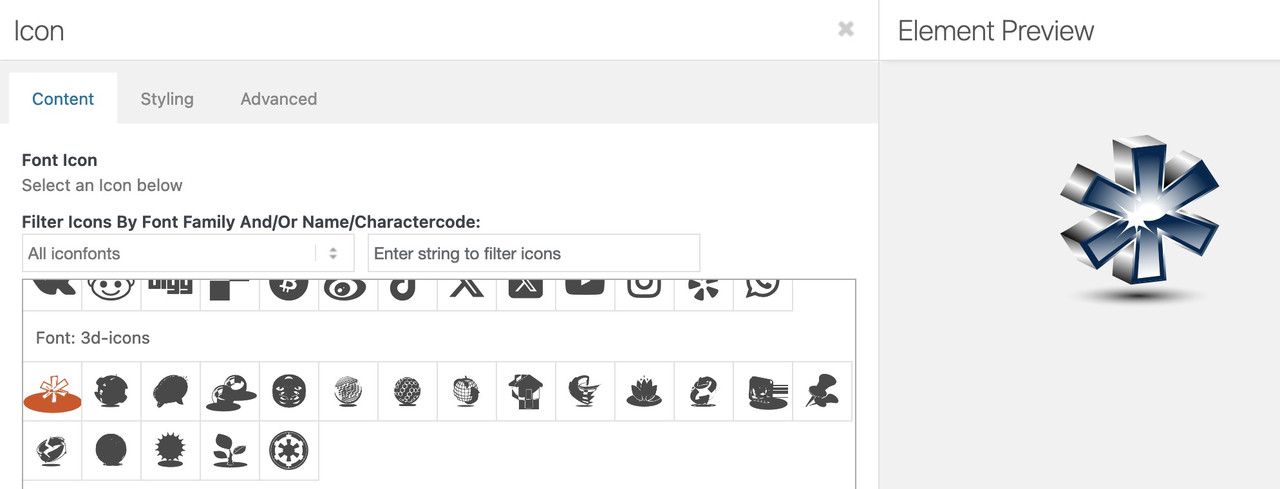
see here an example page – and code how i did that.
In principle, I misuse a specially uploaded iconfont for this (e.g. 3d-icons) – and then replace the monocolour icons with the coloured ones using css.
However, I have made a little more effort and uploaded monocolour icons of the coloured ones to fontello, so that I can see in the icon selection what kind of icon I want to use.
https://enfold.webers-webdesign.de/colorized-font-icons/
Hi,
If you want to use color icons (png, jpg, or gif), follow Guenni007’s css technique here.
Thanks for sharing Guenni007 :)
Best regards,
Mike



