Dear Enfold team,
I found a bunch of threads on the issue but none seem to work for me.
I did create a video-page. It’s muted upon auto-start which is not intended.
The video is a locally saved mp4 simply running from the avia builder’s video element.
How can I enable the automatic sound with the auto-start? Is there a way?
Settings: https://paste.pics/RA5VP
Best
Stefan
On https://calvarybaptistdunnellon.com/about-us-demo-2017, I am trying to duplicate your About Us page — particularly the filmstrip section.
I uploaded the images used to media library and added them to masonry.
Looks good — but there is no animation and the gray edges are not present in this attempt.
Can you tell me what I need to change…just for the “filmstrip” part?
Hi,
It looks like in your custom enfold_child_en.css the H tag line-heights are set to 5em

On the German pages the standard line-height: 1.1em; is used with no custom css used.
Best regards,
Mike
Hey Jak73,
Try this CSS in your Enfold Theme Options ▸ General Styling ▸ Quick CSS field:
#top.page-id-502 #av_section_1 .flex_column.av_one_half {
	border: 2px solid;
}
#top.page-id-502 #av_section_1 .flex_column.av_one_half h2:nth-child(2) {
padding-right: 20px;
}
you may need to adjust the image in the middle one, it is adding white space, perhaps the image is not wide enough? All of the other images look good.
Best regards,
Mike
Hey Jak73,
Try this CSS in your Enfold Theme Options ▸ General Styling ▸ Quick CSS field:
.responsive #header_main .container {
	max-width: 100%;
}
After applying the css, please clear your browser cache and check.
Best regards,
Mike
Hey Jak73,
Edit your color section and disable the Scroll Down Arrow

Best regards,
Mike
Hi,
Glad we were able to help, if you have any further questions please create a new thread and we will gladly try to help you. Thank you for using Enfold.
Best regards,
Mike
Hi,
Try adding this CSS in your Enfold Theme Options ▸ General Styling ▸ Quick CSS field:
.avia-image-container.blue-info .av-image-caption-overlay-center {
    color: #222222;
}
Best regards,
Mike
Hey Jak73,
Try this CSS in your Enfold Theme Options ▸ General Styling ▸ Quick CSS field:
#footer-title {
font-size: 38px;
font-weight: bold;
font-family: arial;
color: #222;
float: right;
top: -38px;
position: relative;
left: -10%;
}
Then add this code to the end of your child theme functions.php file in Appearance ▸ Editor:
function custom_script() { ?>
  <script>
document.addEventListener("DOMContentLoaded", function() {
    var titleText = document.querySelector("h1.av-special-heading-tag").textContent;
    var footerTitleDiv = document.createElement("div");
    footerTitleDiv.id = "footer-title";
    footerTitleDiv.textContent = titleText;
    document.getElementById("socket").appendChild(footerTitleDiv);
});
</script>
  <?php
}
add_action( 'wp_footer', 'custom_script', 99 );
This is the expected result:

Best regards,
Mike
Hi,
Try this CSS in your Enfold Theme Options ▸ General Styling ▸ Quick CSS field:
.blue-info .av-image-caption-overlay {
    border-top: 0px;
    border-bottom: 0px;
}
#top .blue-info .avia-image-overlay-wrap .av-caption-image-overlay-bg {
  opacity: 1 !important;
  background-color: #c8ebf8 !important;
}
After applying the css, please clear your browser cache and check.
Best regards,
Mike
Hi,
Seems to work when I try:

see the link below. But see Guenni007 post about using Transfonter here where he points out that the Font Kit Generator from FontSquirrel does not support the font family option.
Best regards,
Mike
Hi,
There is no link to polyfill.io in the theme, the theme only uses wp-polyfill, that is the built-in WordPress polyfill file at /wp-includes/js/dist/vendor, so even if the theme didn’t have this reference the WordPress core still does, so I believe this will still be an issue until WordPress removes it.
You can see the open issue here, it is open to the public.
Best regards,
Mike
Hi,
When switching to enfold als current theme (instead of the child) it is not happening, simply because the postslider is not sliding at that point. It just shows the items (correct).
I’m not understanding what you mean, your postslider looks the same as our demo, have you customized the element somehow? Perhaps this is the issue?
Best regards,
Mike
Hi,
Typically you would drag the elements into the LayerSlider where you want to see them, try checking the free LayerSlider templates for one similar to what you want to achieve:

Also note that typically you will need to create two sliders, one for desktop and one for mobile because the desktop screen is landscape and the mobile screen is portrait.
Best regards,
Mike
what is your starting point. An Image Alb Element from Enfold – or is it a placed media file inside a Text-Block Alb?
Hi @mike yes there WAS 5.7.1 on it but I reverted that the day before yesterday. Since @guenni007 had some usefull information I thought I would look into it on Monday.
Did not have a proper check on whether 5.7.1 had some other issues (but at least it did not solve the current one).
When switching to enfold als current theme (instead of the child) it is not happening, simply because the postslider is not sliding at that point. It just shows the items (correct).
Hi. The Enfold theme is awesome! I used Enfold theme with Real Estate Pro plugin.
https://codecanyon.net/item/real-estate-pro-wordpress-plugin/13245602
However I am having issues on the frontend image uploader. Do you happened to encounter this issue?
Please help.
Hi,
I have reported this issue here feel free to review it and add any comments and subscribe to it to follow as the Dev Team reviews it.
Best regards,
Mike
Hi,
Glad we were able to help, if you have any further questions please create a new thread and we will gladly try to help you. Thank you for using Enfold.
Best regards,
Mike
Hi,
I have updated to the latest Enfold and re-input my custom code and my menu is no longer working probaly. Please see site links in Private.
Please can you advise why it is not pulling in correctly? It looks to be showing the mobile menu all the time.
Thanks in advance.
Hi,
To add a border radius to the images in #bc-custom-section for bothe desktop and mobile, try this CSS in your Enfold Theme Options ▸ General Styling ▸ Quick CSS field:
#top #bc-custom-section div .flex_column a.avia_image {
	border-radius: 30px;
}
Please ensure to copy the code from the forum and not an email notification so the symbols are not converted.
After applying the css, please clear your browser cache and check.
Best regards,
Mike
Hi,
Glad to hear that you have this sorted out, we will close it for you. If you have any further questions please create a new thread and we will gladly try to help you. Thank you for using Enfold.
Best regards,
Mike
Hi,
When I check your example site with my browser it doesn’t look like your screenshot. I assume that your screenshot is from a smaller screen width.
I recommend changing your option at Enfold Theme Options ▸ General Layout ▸ Dimensions ▸ Maximum Container width to achieve the width that you wish.
Best regards,
Mike
Hey Jak73,
You can set that under Enfold->Advanced Styling.
Best regards,
Rikard
Hi,
I don’t see this error on your site, the error is for your Flaticon icon fonts:

It looks like you have tried to add two of them:

but it looks like only one is working:

So try deleting both of these and then and each one at a time and see which one is not working, not all Flaticon will work, if they are in color or SVG they will not work, you must use iconfonts which are icon fonts is different. Try using fontello.com, please see our documentation here.
Best regards,
Mike
loading the font from Google is not GDPR compliant – hosting the font on your own servers is.
but this is from performance point of view a heavy font: even the woff files will have for each font-weight over 1.1MB
Try it yourself via Enfold – Import/Export – Custom Font Manager – and upload that zip file : https://webers-testseite.de/ZenKakuGothicNew.zip
only light, regualar and bold are inside ( there is on google black and medium inside – but see comment above)
You can find those uploaded fonts then under General Styling – Fonts (Tab) at the end of the list inside :
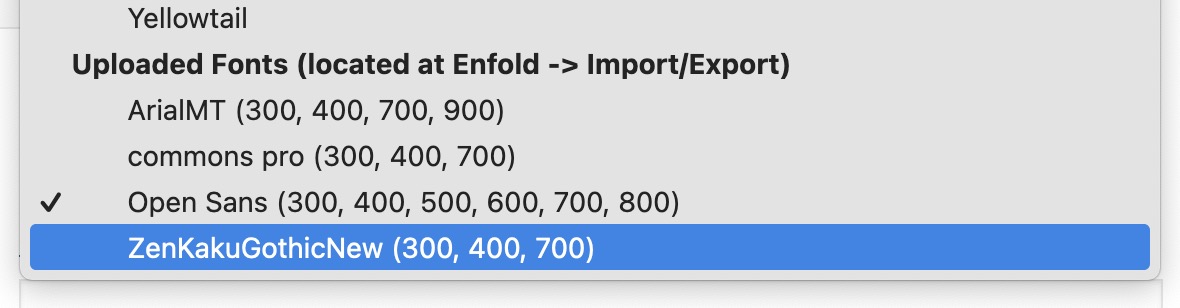
if you want to hamper google font loading via Enfold from google pages – paste this to your child-theme functions.php:
function my_output_google_webfonts_script( $activate ){
  return false;
}
add_filter( 'avf_output_google_webfonts_script', 'my_output_google_webfonts_script', 10, 1 );
PS: if you got a CDN Server – then it might be better to load it from their servers.
But how to write with that font-face i do not know – how do you choose your letters:
伟伯网页设计
Yeah, inspecting the code I was not able to find it either.
Searching Enfold files there are pollyfill references in this files.
class-avia-gutenberg.php
leaflet-src.esm.js
leaflet-src.esm.js.map
leaflet-src.js
leaflet-src.js.map
dotlottie-player.js
package-lock.json
avia.js
Which one is causing the problem and how?
No idea.
How can I explicitly test whether it is loaded – here, for example, I can’t find anything in the network analysis.
https://kriesi.at/themes/enfold-construction/contact/
i think that the dotlottie is using some polyfill features. And some older parallax scripts do too.
Yes, this is the scenario.
– Google Project 1
API Used: Google Maps
Credentials.
– Enfold Site
Maps Credentials in Enfold settings
A Map in the contact page
That is it.
No idea where it is coming from and how Enfold inserts the map, but as there is nothing else in the site, the map is from enfold and the alert is for maps, that is why I opened this thread.
thanks for the info – and these projects are Enfold Sites? Can you deduce where a use of polyfill in Enfold might come from?
Also, when I go to the demo pages with Google Maps usage – I can’t find a polyfill usage.



