
-
AuthorSearch Results
-
July 22, 2024 at 2:13 pm #1462676
In reply to: Can’t get custom font to install
Hi Ismael,
Thanks for your response, I have only just realised you replied. I believe the file structure is correct as I followed the instructions on the link you sent.
I am trying to upload a non-Google font called Blakely, which I have as a TFF file (one weight has been compressed into a zip file). I have uploaded the Zip file. This uploaded, and it gave me this CSS:Font: MACOSX ( font-family: macosx )
normal: 400I then added this to the quick CSS;
H1, H2, ul, li
{
font-family: ‘macosx’ !important;
}And also tried selecting it under “heading font” in Enfold and I have also tried this:
H1, H2, ul, li
{
font-family: ‘macosx (400)’ !important;
}I would be very grateful if you could take a look.
Many thanks
July 22, 2024 at 2:00 pm #1462675In reply to: WooCommerce Category Styling
Hi Tim,
Thank you for the credentials.
Having a look into it – you are having a lot of customizations, a lot of plugins and also modifications to the image sizes defined.
E.g. 1500*0 – Featured Thin (added by theme), 1700*0 – Fullscreen Sections/Sliders (added by theme), …
In core it is: 1500*430 – Featured Thin (added by theme), 1500*1500 – Fullscreen Sections/Sliders (added by theme)
We are using core WP functions for creating the responsive scrset and size – no idea what *0 causes behind the scene in WP core.
Also it is a bit strange that when no image is selected for a category we get the last image added returned by a core WP function:
$attachment_id = avia_get_woocommerce_term_meta( $term->term_id, 'thumbnail_id' );calls
get_term_meta( $term_id, $key, $single )The following functions are involved in handling the banner for shop page and category pages in file ..\config-woocommerce\config.php:
avia_woocommerce_overview_banner_image()
avia_woocommerce_big_cat_banner()
avia_woocommerce_shop_banner()
avia_woocommerce_parallax_banner()The code in the functions is pretty straight and easy to understand.
What I would suggest you can do:
– To make 100% sure we do not have a bug in our core (we tested it carefully, but we might have missed something) create a clean install with Enfold and WooCommerce, add a few images and categories and check, if you get it to run as you want it – using filters if necessary (we can add additional filters if needed to core)
– Then you need to dig into your customizationed site and try to figure out, what breaks our code
I know this answer does not satisfy but digging into your code cannot be done in a few minutes.
If you need anything added to code or anything I can assist you let me know.
Best regards,
GünterJuly 22, 2024 at 12:29 pm #1462671Hi Gerry,
Please open a new thread and include WordPress admin login details in private, so that we can have a closer look at your site. We’ll close this thread for now.
Best regards,
RikardJuly 22, 2024 at 10:35 am #1462662In reply to: horinzontal line full screen
Hi,
If you enable debug mode under Enfold->Layout Builder->Show advanced options, then you can add this shortcode to a new page to see how it was made:
[av_layout_row border='' min_height='15px' color='main_color' mobile='av-fixed-cells' id='welcome' av_uid='av-98dfif']
[av_cell_one_fourth vertical_align='top' padding='0px' padding_sync='true' background_color='#719430' src='' attachment='' attachment_size='' background_attachment='scroll' background_position='top left' background_repeat='no-repeat' mobile_display='' av_uid='av-38ln3']

[/av_cell_one_fourth][av_cell_one_fourth vertical_align='top' padding='0px' padding_sync='true' background_color='#92bb46' src='' attachment='' attachment_size='' background_attachment='scroll' background_position='top left' background_repeat='no-repeat' mobile_display='' av_uid='av-8vfxsn']

[/av_cell_one_fourth][av_cell_one_fourth vertical_align='top' padding='0px' padding_sync='true' background_color='#acd464' src='' attachment='' attachment_size='' background_attachment='scroll' background_position='top left' background_repeat='no-repeat' mobile_display='' av_uid='av-8r5rn3']

[/av_cell_one_fourth][av_cell_one_fourth vertical_align='top' padding='0px' padding_sync='true' background_color='#e1fbb2' src='' attachment='' attachment_size='' background_attachment='scroll' background_position='top left' background_repeat='no-repeat' mobile_display='' av_uid='av-8ggrav']

[/av_cell_one_fourth]
[/av_layout_row]
Best regards,
RikardJuly 22, 2024 at 10:16 am #1462660In reply to: Please delete previous post
Hey Please delete,
Thanks for the update, we’ll close this thread then. Please open a new thread if you should have any further questions or problems.
Best regards,
RikardJuly 22, 2024 at 8:34 am #1462648Hey!
We replied here: https://kriesi.at/support/topic/how-to-add-structured-data-with-enfold-without-a-plugin/#post-1462641
Regards,
IsmaelJuly 22, 2024 at 8:11 am #1462644In reply to: Fatal error: Unparenthesized `a ? b : c ? d : e`
Hi,
Thank you for the update.
with the “old” version of enfold, the slider automatically received an ID (fullscreen_slider_1). After the Update, the ID is gone….
You can manually apply the ID in the elements’ Advanced > Developer Settings > Custom ID Attribute field. You can also apply Custom CSS Class names or add a description to the element.
Best regards,
IsmaelJuly 22, 2024 at 8:05 am #1462642Hi,
Thank you for the update.
To temporarily fix the overlap issue, please add this css code:
.av_seperator_small_border .av-main-nav > li > a > .avia-menu-text {
    margin-left: 0;
}

.av_seperator_small_border .av-main-nav > li:not(.av-menu-button) > a > .avia-menu-text {
    margin-left: -13px;
}
And to change the font, please go to the Enfold > Advanced Styling panel and edit the Main Menu > Main Menu Links element.
Best regards,
IsmaelJuly 22, 2024 at 7:39 am #1462639In reply to: horinzontal line full screen
Hi Mike,
Thanks for your answer.
I tried but the script shows no difference.In the past I used Enfold Health demo to make a site, unfortunately it’s not online anymore. In this demo on the homepage a green line is used beneath the fullscreen header. It’s made with #avia_sc_grid_row but I don’t know the settings anymore. Is it possible to use this en can you refresh my memory? ;-)
July 22, 2024 at 6:27 am #1462636Topic: How to add Structured data on Enfold without a plugin
in forum Enfoldpierremartin311
ParticipantHello,
1 – I add my script json in header.php just before </head> on my site : vernissageduvar.com
Everything is OK with the google testing tool of structured data but i can’t see my strucutured data in the Google search console..Why?2- Whats is the difference by making this : https://kriesi.at/support/topic/structured-data-html/#post-758419 or ading the script in header.php?
Thanks!
July 22, 2024 at 12:09 am #1462630Topic: Auto launch masonry gallery
in forum EnfoldnTECHgrate
ParticipantHello Enfold Team,
I have a masonry gallery on my homepage, but it doesn’t load until I start to scroll. I want to change this and have it load on page launch. Can you please help with this?
Thanks
-James
July 22, 2024 at 12:07 am #1462629Topic: Hide Empty Table Cells on Mobile
in forum EnfoldParticipantHello Enfold Team,
I would like to hide empty table cells on mobile devices. Can you please point me in the right direction for this?
Thank you for your help.
-James
July 21, 2024 at 10:39 pm #1462626In reply to: Fatal error: Unparenthesized `a ? b : c ? d : e`
Hi there!
thanks again, I think I can manage most of the problems that occurred with the update to the v6.0.2.
for the moment 1 question appeared:
I use a fullscreen slider which I used to adapt to fit my needs.
with the “old” version of enfold, the slider automatically received an ID (fullscreen_slider_1). After the Update, the ID is gone….
is there a possibility to give the slider an ID?Best regards, Clemens
July 21, 2024 at 8:48 pm #1462623In reply to: unable to edit content using Advanced editor
Hi,
I don’t believe that there is a issue with backward compatibility, we would have also experienced this on our sites and seen other users post this, but I have seen shortcode in the text element become corrupt as in this screenshot:
https://img.savvyify.com/images/2024/07/21/Enfold_Support_6362.md.jpg
I also note that you seem to have put your ALB shortcodes in a text element, instead of adding the elements to the page, do you recall building your pages like this, it is unusual.
You could try rolling back to the older version, or restore your server backup to before you updated.Best regards,
MikeJuly 21, 2024 at 8:18 pm #1462622In reply to: Probleme mit Enfold
Hi,
Thanks for the screenshot, I have not seen anything like this before so wee will need to login and check, but first you will need to use your new license to register for the support forum and open a new thread so we can help further.
Currently this post is using the contact form which is not appropriate for support questions like this, we are glad could help you so far, but we ask that you use the support forum for further support.
Thank you for understanding and using Enfold.Best regards,
MikeJuly 21, 2024 at 8:01 pm #1462621In reply to: Different View in Smartphone and Browser
Hi,
When you write:top:27%; is my live view in my smartphone good, but the view in the browser development is bad.
it sounds like you are referring to this custom css:

because it is the only one that is a percentage, but this one should not change your device vew because it has the max-width of 736px, which is smaller than your device.
This custom css should be the one that works on your device:

because it’s max-width is the same as your device, but I not sure if you are changing the top:16px; to top:27px; or 27%
If I’m correct about this, change this css to:@media only screen and (max-width: 373px) { .inner-container { position: relative; top: 16px; } }so it stops working at 373px and then add this css for your device:
@media only screen and (min-width: 374px) and (max-width: 379px) {
    .inner-container {
        position: relative;
        top: your-value;
    }
}
and adjust the your-value to what looks good on your device.
This way other devices will still look correct, it get tricky when a single device doesn’t display correctly, but I think this will work for you.
When I check with my iPhone 7 which has a screen width of 320px, the logo looks just like it does in the browser development tool for the same width.Best regards,
MikeJuly 21, 2024 at 7:12 pm #1462620In reply to: Probleme mit Enfold
Hi Ricard,
everything seems to work fine after the update. Well, nearly everything. I do have a big problem, though. Since I updated, I can’t use the Advanced Layout Editor properly. The layout of the page is scrambled, the sidestrip is gone.
What can I do?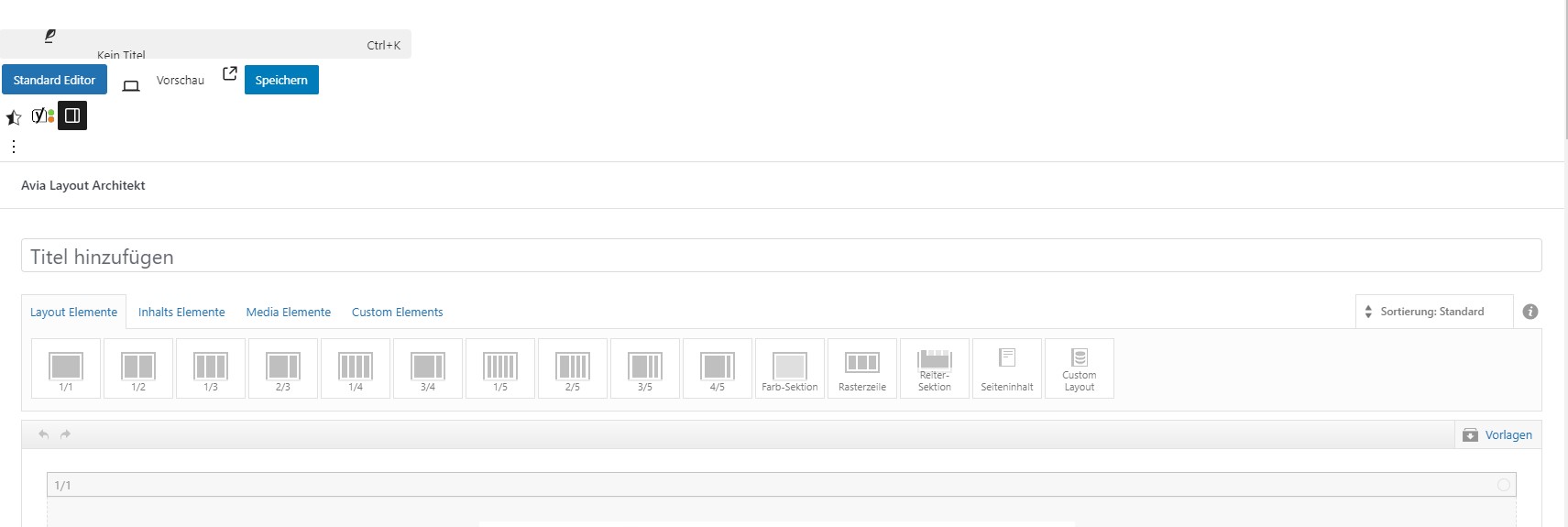 July 21, 2024 at 4:50 pm #1462617
In reply to: Advance Editor loss
Hey cws0827,
Could you try updating the theme to the latest version (6.0.2) to see if that helps please? https://kriesi.at/documentation/enfold/theme-update/.
Best regards,
RikardJuly 21, 2024 at 2:49 pm #1462610In reply to: unable to edit content using Advanced editor
Hi,
kwanumzen108 it looks like you have pasted theme shortcode into a text element, but you have extra HTML before and after the shortcode, typically this will cause breaks:


sometimes this occurs when a page is saved as a default WordPress builder page, and then converted back again.
cws0827 I’m not sure what you mean by scenery theme package, please open a new thread with the url to the page in question and an admin login so we can be of more assistance. It gets confusing when we are working on more than one site per thread. Thanks for understanding.Best regards,
MikeJuly 21, 2024 at 2:22 pm #1462608In reply to: Change of Logo
Hi,
Glad to hear, we will close this then, thanks for using Enfold.Best regards,
MikeJuly 21, 2024 at 1:31 pm #1462605In reply to: Section toggle
Hi,
Glad to hear that you have this sorted out, if you have any further questions please create a new thread and we will gladly try to help you. Thank you for using Enfold.Best regards,
MikeJuly 21, 2024 at 11:29 am #1462601Hi Mike, the website is currently on my desktop only (on the app Local). i’ll share a link when its nearly finished.
animation in menu: the menu i shared has a small hoover over effect on the text. How do I achieve for example a colour change and underlining in white for the url that is active?
Size of menu: the example menu has the same width as the content under it, till it gets too small and changes to a hamburger menu. How do I achieve this? I think Enfold could really use some more menu options, such as the one i’m exploring now, as i’ve build several enfold sites and I’m really looking to achieve something a bit different than all the other enfold sites (i and others) have build, but still remain loyal to the enfold theme/team.
-
This reply was modified 1 year, 8 months ago by
the_digital_manager.
July 21, 2024 at 5:33 am #1462589Topic: How to add Structured data with Enfold without a plugin
in forum EnfoldParticipantHello,
How can i add structured data with Enfold without a plugin?
I add my script json in header.php just before </head>
Everything is OK with the google testing tool of structured data but i can’t see my strucutured data in the Google search console..This is my site : vernissageduvar.com
Thanks for your help!
July 20, 2024 at 10:27 pm #1462585In reply to: How to add a text with link to special heading?
Hey Jak73,
The title fields do not support HTML, such as links. A possible work around is to use our plugin Special Character Translation please read about it in our documentation here. Then you can add this code to your title to show the less than symbols of the HTML: ###lt###.
Or try using a text element to simulate the special heading element.Best regards,
MikeJuly 20, 2024 at 9:21 pm #1462579In reply to: How to change the symbols of the arkkordeon toggles?
Hi,
Glad we were able to help, if you have any further questions please create a new thread and we will gladly try to help you. Thank you for using Enfold.Best regards,
MikeJuly 20, 2024 at 9:16 pm #1462576In reply to: How to change the colour of the footer menue?
Hey Jak73,
Try this CSS in your Enfold Theme Options ▸ General Styling ▸ Quick CSS field:#socket #avia3-menu .avia-menu-text { color: #000; } #socket #avia3-menu .avia-menu-text:hover { color: #ccc; }After applying the css, please clear your browser cache and check.
Best regards,
MikeJuly 20, 2024 at 8:06 pm #1462567In reply to: Pricing Table Help
Hey navindesigns,
Thank you for the link to your site, it looks like the burger menu color is black on a black header background, so it is not seen, try this CSS in your Enfold Theme Options ▸ General Styling ▸ Quick CSS field to make it white:.header_color .av-hamburger-inner, .header_color .av-hamburger-inner::before, .header_color .av-hamburger-inner::after { background-color: #fff; }For the table height, Try adding this code to the end of your child theme functions.php file in Appearance ▸ Editor:
function custom_table_script() { ?>
  <script>
(function($){
  $(window).load(function(){
  	$('.page-id-2333 .avia-pricing-table-container').each(function(){
     var $columns = $('.pricing-table',this);
     var maxHeight = Math.max.apply(Math, $columns.map(function(){
         return $(this).height();
     }).get());
     $columns.height(maxHeight);
});
});
})(jQuery);
</script>
  <?php
}
add_action( 'wp_footer', 'custom_table_script', 99 );
and this css in your Quick CSS:
.page-id-2333 .pricing-table li.empty-table-cell {
    display: block;
}
.page-id-2333 .avia-pricing-table-container .pricing-table li:nth-child(6) {
	height: 62px;
}
Best regards,
MikeJuly 20, 2024 at 7:30 pm #1462565In reply to: horinzontal line full screen
Hi,
Try this CSS in your Enfold Theme Options ▸ General Styling ▸ Quick CSS field:#top.page-id-317 #wrap_all #main #av_section_1.avia-builder-el-first { border-top: 10px solid #000; border-bottom: 10px solid #000; }After applying the css, please clear your browser cache and check.
Best regards,
MikeJuly 20, 2024 at 7:02 pm #1462562In reply to: Accordeon problem / flickering on iOS devices
Hi,
Thanks for the link to your site, I disabled the Enfold Theme Options ▸ Performance ▸ JS & CSS file merging and compression and cleared your WPRocket cache and the issue seems solved. Please clear your browser cache and check.
Please note that testing with Safari can be hard to clear the cache, often you need to also clear the history to fully purge the cache, following these steps for Safari and note Step 4 where you will Clear the History.Best regards,
MikeJuly 20, 2024 at 6:10 pm #1462560In reply to: Different View in Smartphone and Browser
-
This reply was modified 1 year, 8 months ago by
-
AuthorSearch Results
-
Search Results
-
Hello,
1 – I add my script json in header.php just before </head> on my site : vernissageduvar.com
Everything is OK with the google testing tool of structured data but i can’t see my strucutured data in the Google search console..Why?2- Whats is the difference by making this : https://kriesi.at/support/topic/structured-data-html/#post-758419 or ading the script in header.php?
Thanks!
Topic: Auto launch masonry gallery
Hello Enfold Team,
I have a masonry gallery on my homepage, but it doesn’t load until I start to scroll. I want to change this and have it load on page launch. Can you please help with this?
Thanks
-James
Hello Enfold Team,
I would like to hide empty table cells on mobile devices. Can you please point me in the right direction for this?
Thank you for your help.
-James
Hello,
How can i add structured data with Enfold without a plugin?
I add my script json in header.php just before </head>
Everything is OK with the google testing tool of structured data but i can’t see my strucutured data in the Google search console..This is my site : vernissageduvar.com
Thanks for your help!


