Hi C,
So are you saying it’s not possible to add multiple photos when setting it up?
To enable custom elements for subitems, please add the following code to functions.php file:
add_theme_support( 'show_advanced_custom_element_options' );
Please make sure to add the code below the following code:
if( isset( $avia_config['use_child_theme_functions_only'] ) )
{
	return;
}
Then, go to Enfold theme options > Custom Elements > Show Advanced Options > Custom Elements For Subitems, and select the “Individually select subitem custom element templates” option ( https://imgur.com/a/6yYuLfn ).
My end goal is to be able to have a way to change/add photos in one location and have that change happen on multiple pages so I don’t have to make the change 20+ times across my site. Is there another way to do this?
You can do this with Custom Layouts ( https://kriesi.at/documentation/enfold/custom-layout-and-dynamic-content/ ). Please note, this element is a full width element and it cannot be placed inside Column elements.
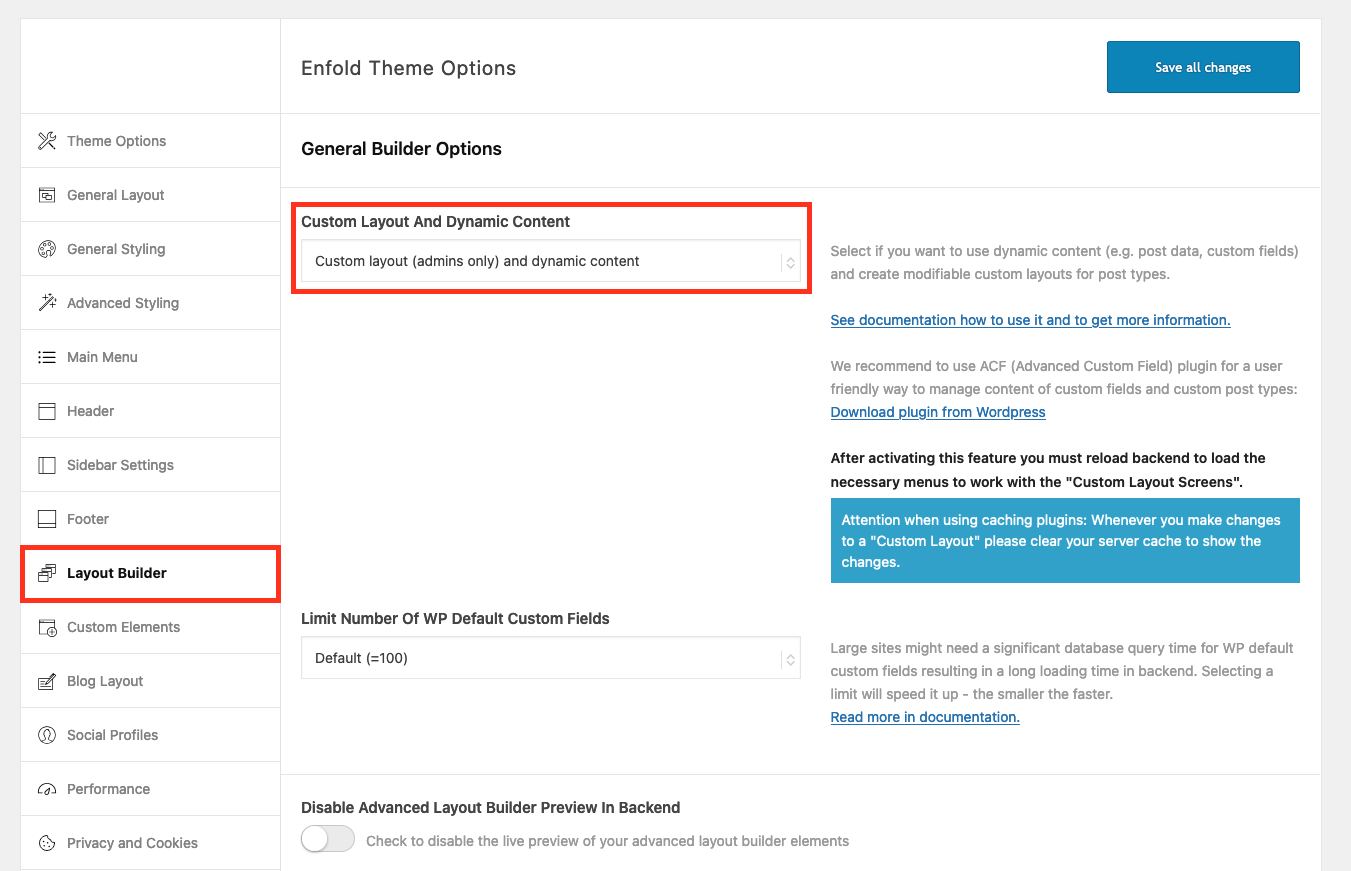
To do that, please go to Enfold theme options > Layout Builder and enable Custom Layout And Dynamic Content ( https://kriesi.at/documentation/enfold/wp-content/uploads/sites/22/2024/02/Custom-Layout-And-Dynamic-Content.png ).
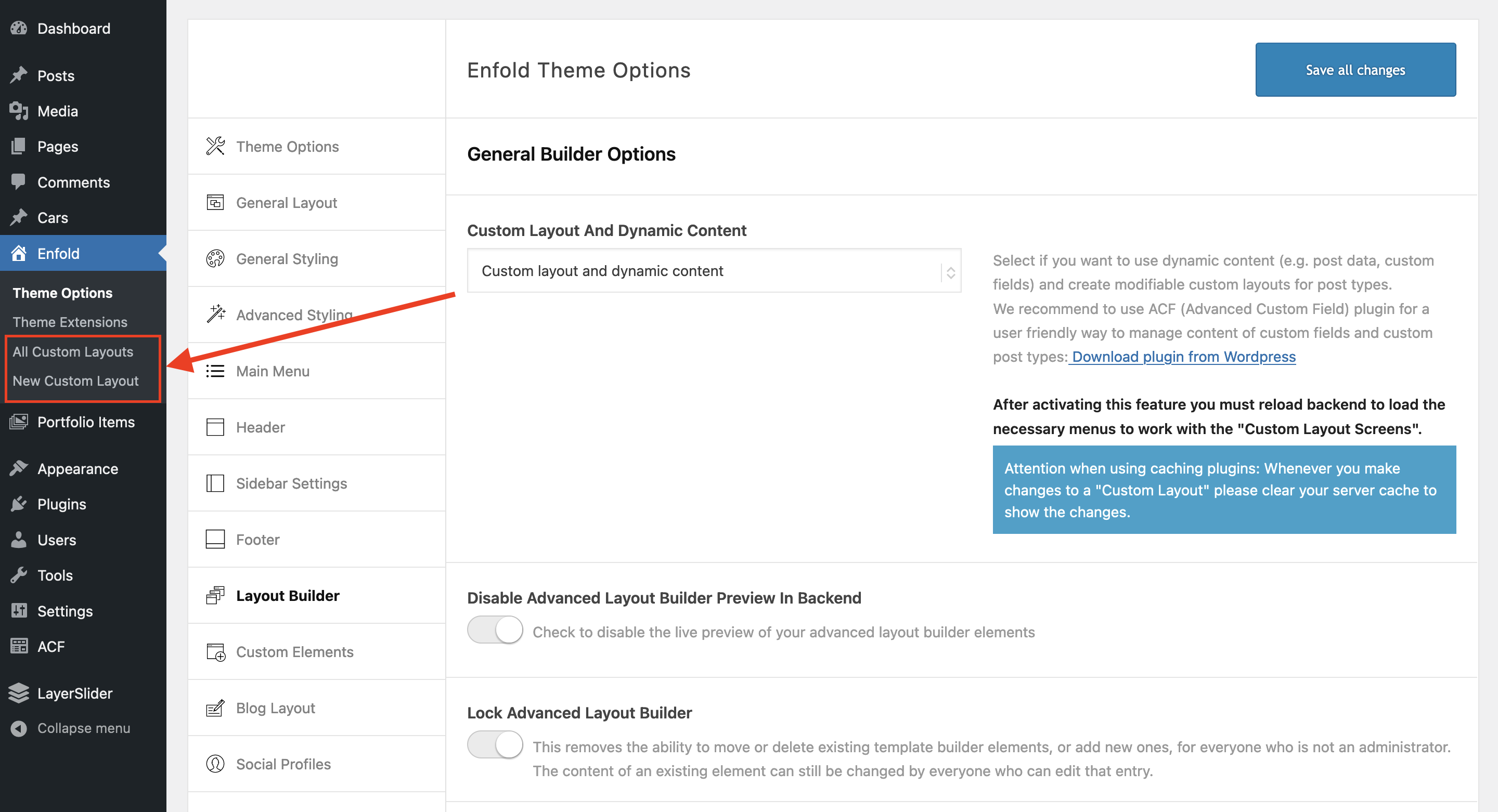
Then, go to Enfold > New Custom Layout ( https://kriesi.at/documentation/enfold/wp-content/uploads/sites/22/2024/02/Custom-Layouts-CPT.png ) and create your layout.
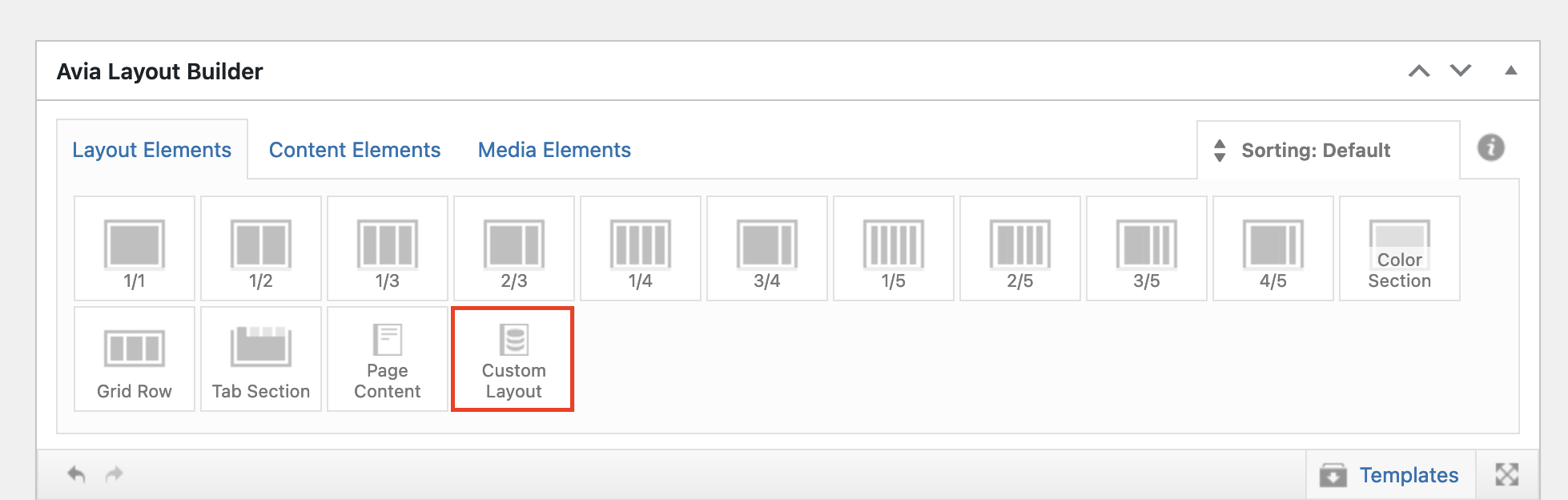
After that, edit your page, add the Custom Layout element ( https://kriesi.at/documentation/enfold/wp-content/uploads/sites/22/2024/02/Custom-Layout-ALB-Element.png ) to your page and select the template you created.
Best regards,
Yigit
Hi,
Thanks for the update, we’ll close this thread for now then. Please open a new thread if you should have any further questions or problems.
Best regards,
Rikard
Hey ausgesonnen,
Please try the following in Quick CSS under Enfold->General Styling:
#top .avia-gallery-thumb a {
  border-color: transparent;
}

#top .avia-gallery img {
  padding: 5px;
}
Best regards,
Rikard
Hi,
Please try the following in Quick CSS under Enfold->General Styling:
a.all_sort_button, .editorial-design_sort_sep {
  display: none;
}
Best regards,
Rikard
Hi,
Please check the token that you are using: https://kriesi.at/documentation/enfold/theme-registration/
Best regards,
Rikard
 Sonia
SoniaGuest
I have tabs in my website and now I check that all tabs with more than 2 colums are cut! Have a look please to the link and tell me how to solve this bug. Thanks
Hi,
i have installed Enfold with an active Token from Envato. But i still shows an old Version (5.7). Do you have ideas why it does not show the last Version for an Update (6.0.5)
Thanks
Patrick
Hi,
Please check https://kriesi.at/documentation/enfold/custom-element-templates/#custom-elements-advanced-option-custom-elements-for-subitems
and try to add:
add_theme_support( 'show_advanced_custom_element_options' );
I think this should help.
Best regards,
Günter
Hi,
Thank you for the update.
Did you create a Custom Elements Template (CET) from one of the sliders?
// https://kriesi.at/documentation/enfold/custom-element-templates/
Please provide login details in the private field so that we can check the element.
Best regards,
Ismael
Hi,
Thank you for the info.
Have you tried activating delayed JS execution while disabling the Enfold > Performance > File Compression settings? If the issue persists after disabling the compression settings, please keep the delayed JS execution disabled.
Best regards,
Ismael
Hey Katrin,
WooCommerce 9.0 has been out for a while now, and we haven’t seen any problems running Enfold with it. https://developer.woocommerce.com/releases/
Best regards,
Rikard
Hello everyone, I need your help because I think I have a problem with enfold. I recently created a website for a client and the 500mb database that I purchased is apparently insufficient for a site of around twenty pages and yet fully optimized thanks to extensions and specific SQL queries. Could anyone help me?
I’ll leave you the link to my website if anything might help you.
Link : http://www.kerry-han.fr
Hi,
Thanks for the update, we’ll close this thread for now then. Please open a new thread if you should have any further questions or problems.
Best regards,
Rikard
Hey mirotck,
Try this CSS in your Enfold Theme Options ▸ General Styling ▸ Quick CSS field:
@media only screen and (max-width: 479px) {
.flex_column.avia-builder-el-19 .av_font_icon {
    display: inline-block;
    margin-left: 10%;
}
.flex_column.avia-builder-el-19 {
    display: flex;
    justify-content: center;
}
.flex_column.avia-builder-el-19 .hr.hr-invisible {
    display: none;
}
}
Please ensure to copy the code from the forum and not an email notification so the symbols are not converted.
After applying the css, please clear your browser cache and check.
Best regards,
Mike
Hi,
Glad Ismael could help, if you have any further questions please create a new thread and we will gladly try to help you. Thank you for using Enfold.
Best regards,
Mike
Hi,
Glad Guenni007 could help, thank you Guenni007, if you have any further questions please create a new thread and we will gladly try to help you. Thank you for using Enfold.
Best regards,
Mike
Dear Enfold Team
I would love to have 3 icon elements in one row on mobile, instead of having them aligned vertically i would love to have them horizontally basically.
Also, i would love to have the width of that row to be the same more or less as the buttons on top. I will attach a screenshot of how it should look.
It’s the first element on mobile layout (home).
View post on imgur.com
Thank you so much for providing me any sort of help. I just renewed my support licence, thanks!
Cheers from Switzerland
Miro
 Katrin
Guest
Is the Enfold theme woocommerce 9.0 ready? I can’t find any information about this on the EnvatoMarekt product page. Thanks for answering.
Hey bonbuttercup,
You can activate debug mode under Enfold->Layout Builder->Show Advanced Options. That will show all the shortcodes below the regular layout window. If you activate debug mode on your new site, then you simply copy/paste the content into your new site.
Best regards,
Rikard
Hi,
i really have a problem with the second upload of a favicon. The first time it was ok, was showing in the tab and on google but now the new one i loaded is just shown on the tabs. I loaded the new favicon over the upload function in enfold. I deleted the old one. the name is favicon.png. I made a favicon.ico and put it in the main folder. I overwrote the graphic of the wordpress icon, but its still there.I have no idea what else i can do.
You have any idea???? THat would be perfect :)
Many greetings rixi
The child theme name does not appear in the frontend. So why rename the child theme?
Just to obfuscate the Enfold origin – this involves much more than just changing the name.
By the way – it is a good idea – to have a backup on this. And perhaps if you rename child and parent theme to save your theme settings file and maybe the quick css.
As long as you do not change the reference in the style.css of the child theme to the parent element, you can rename it as you wish.
Enfold even offers you the option of renaming the stylesheet of the Theme using a filter.
but read here carefully on the docu: https://kriesi.at/documentation/enfold/personalize-theme/
function avia_change_filename($stylesheet){
return 'myfilename';
}
add_filter('avf_dynamic_stylesheet_filename', 'avia_change_filename');
by the way dear dev/mods: on docu this snippet is listet with myfilename.css – this will lead to myfilename.css.css – so above only the name is neccessary – the css extension is added to the filename by default.
I must say, however, that those who are able to examine such things more closely will always recognise the basis of the theme.
Hi,
Thanks for sharing your solution, perhaps this will help someone in the future. If you have any further questions please create a new thread and we will gladly try to help you. Thank you for using Enfold.
If you would like to request this as a feature the Dev Team has opened a new Github Feature Request for users to place requests and follow them as the Dev Team reviews them.
Best regards,
Mike
Hey Dav-Nex,
Thanks for your patience, but unfortunately we are not able to test this as it is a paid plugin without a trial version. I have not seen any other posts about this issue.
Perhaps try disabling all of your other plugins to see if there is a conflict. The only MIME issue that I have seen is with some managed WP servers when mod_headers nosniff are adding in the server php settings in plesk or similar servers, this solution was to add the nosniff headers via htaccess. Try checking this. We were not able to reproduce this on our servers, so perhaps this is what you are experiencing.
We are limited to the support that we can offer for third party paid plugins, you could request this feature check with the Dev Team which has opened a Github Feature Request for users to place requests and follow them as the Dev Team reviews them.
Best regards,
Mike
Hi,
Enfold now supports the Advanced Custom Fields plugin which will help you create Custom Post Types (CPT).

In the Enfold Theme Options ▸ Layout Builder ▸ Show advanced options ▸ Activate Your Custom Post Types For ALB you can enable the Advanced Layout Builder (ALB)

Please see our documentation for further info
Best regards,
Mike
Hi,
Thanks for the update, we’ll close this thread for now then. Please open a new thread if you should have any further questions or problems.
Best regards,
Rikard
Hi,
Thanks for the update, we’ll close this thread for now then. Please open a new thread if you should have any further questions or problems.
Best regards,
Rikard
Hey dlambers,
That option is still not available in Enfold unfortunately. You can request the feature here though.
Best regards,
Rikard
Hi,
That file can be found under Appearance->Theme file editor. It looks like that option is turned off on your installation though, it’s likely turned off by your hosting provider. Note that if you are not running a child theme, then your changes to core theme files will be overwritten on updates. You can also add code using a plugin like this: https://wordpress.org/plugins/code-snippets/
Best regards,
Rikard
because i do not see private content – i guess your page is like this:
https://kriesi.at/themes/enfold-2017/blog/blog-default/ – and you like to have the link for the whole (Image, heading, excerpt and read-more)
if you like to have it more specific – use custom classes or page-id’s
this snippet transfers the first link that could be found in the articel to the slide-entry:
function transfer_first_link_as_link_to_article(){
?>
<script type="text/javascript">
window.addEventListener("DOMContentLoaded", function () {
  (function($) {
      $('.slide-entry').each( function() {
        var LinkSection = $(this).find('a:first').attr('href');
        var LinkTarget = $(this).find('a:first').attr('target');
        if (typeof LinkSection !== "undefined"){
          $(this).on("click", function(){
            if (LinkTarget === "_blank"){
              window.open(LinkSection, '_blank');
            } else {
              window.location.href = LinkSection;
            };
          });
          $(this).css('cursor','pointer');
        };
      });
  })(jQuery);
});
</script>
<?php
}
add_action('wp_footer', 'transfer_first_link_as_link_to_article');
Hey helfyworkspace,
The theme you are running is not ours, we are the creators of the Enfold theme.
Best regards,
Rikard