We have tried this but the issue persists. Test was re-run after clearing our server side and local cache.
Using our hosts plugin to merge JS creates a separate issue. When Combining Javascript Files, most elements of our site no longer show up (blank/white screen). This includes the homepage fullwidth slider, product sliders etc.
On our hosts plugin side, we use the following settings: Combine CSS Files, Defer Render Blocking Javascript, Minify HTML Output, Web Font Optimization and Disable Emojies. The host in question is Siteground and their plugin is Siteground Optimizer.
If we enable the themes performance setting for Javascript we do not have the blank elements issue (Merge and Compress all theme Javascript files works fine). On this note though, if we choose Use Minified Theme Javascript files, we do get the blank elements issue.
We run 4 websites, all using Enfold with the same host. All 4 sites use the same Enfold Performance settings and Sietground Optimzer settings. The other 3 sites we run do not report any browser issues though. Hopefully this helps to diagnose.
Hey Gianluca,
Thank you for the inquiry.
We didn’t find any table element in the home page. Where did you add it? You may need to replace or update the selector “#av_section_1.main_color” depending on the position of the color section containing the table element. You could also apply a custom css class name or ID to the color section element and use that instead. Please check this documentation for more info.
// https://kriesi.at/documentation/enfold/add-custom-css/#enable-custom-css-class-name-support
Best regards,
Ismael
Hi,
Thanks for that. Please try the following in Quick CSS under Enfold->General Styling:
.content {
  padding-top: 0;
  padding-bottom: 0;
}
Best regards,
Rikard
We have a new website built on Enfold. We noticed a few strange things with this build. In particular, we have a color sections with background on the “footer page” that when we open them to edit, the screen just has a blank white color section with no content. We waited a very long time to see if it would load and it never did. We have tried 3 different browsers and I purchased a brand new theme from ThemeForest and uploaded it, click REPLACE ENFOLD with the Extraction to see if that works and it did not.
Can you help? I can make an admin login for you to look if you think you can help.
Please let me know. Love, Love, Love this theme.
Chris Cook
There’s that one year old thread, where Nikko posts a suggestion to change the appearance of the menu bar with a .svg
The thread can be seen here:
https://kriesi.at/support/topic/custom-menu-bar-shape/
Unfortunately that thread has been closed and more unfortunately Nikko shows as inactive, so maybe he isn’t a member of Enfold Support anymore.
All in all this solution does fit my needs too – besides of the shape of the .svg.
Nikko seems to have used the custom Enfold svg shape “Mountain”. And after you follow his steps in the above mentioned thread, your menu bar looks like this (I coloured it pink to make it stand out for viewing purposes).
Nikko’s solution
I would like to have a curve instead. And I’d like to place the logo inside of it, so that it would be outside of the menu bar.
See mockup of what I would like to reach
Could someone please help me with that?
Hi,
thanks for your feedback. I received the following response from the TranslatePress team:
The issue comes from the Enfold theme itself from what I can tell. They have a data attribute data-title=”Welches Charterrevier passt zu meinen Vorstellungen?” on the paragraph for each FAQ and this overwrites the ENGLISH already translated version.
However, TranslatePress does not translate data attributes, so the original language version gets placed instead of the English version.
Thanks and best regards
Hey Sarah,
Thank you for the inquiry.
You can use the Custom Layout and Dynamic Content feature to create different views for your posts. Please check this documentation for more info: https://kriesi.at/documentation/enfold/custom-layout-and-dynamic-content/
Best regards,
Ismael
 Marcel Kappelsberger
Guest
Sehr geehrte Damen und Herren,
leider habe ich weiterhin keinen Zugriff zum Purchase-Code, da dies der vorherige Website-Administrator nicht überliefert hat. Daher kann ich hier kein Update durchführen.
Siehe hier:
Wie kann ich nun vorgehen?
 Sarah
SarahGuest
Hi,
We can see that we can create custom content types and display individual pages using that layout.
Is there a way to create the views ? easily.. so they look better than just blog posts.
E.g. ideally we’d have for say project.. a small image, big image, short description and full one..
One the projects overview page.. we’d use the small image and short description, then they click through and get the full project.. looking as we’d like it to be
We’d also ideally have that projects page be filterable by project.
so.. in a way a customised portfolio page.
but also like to use this for other things like staff directory by department etc.
thanks
Hi,
Glad we were able to help, if you have any further questions please create a new thread and we will gladly try to help you. Thank you for using Enfold.
Best regards,
Mike
Hi,
Glad to hear that you have this sorted out, if you have any further questions please create a new thread and we will gladly try to help you. Thank you for using Enfold.
Best regards,
Mike
Hey Jak73,
Try this CSS in your Enfold Theme Options ▸ General Styling ▸ Quick CSS field:
#top.page-id-8462 #header .inner-container {
    border-bottom: none;
}
#top.page-id-8462 .av_minimal_header #header_main {
	border-bottom: 1px solid #000;
}
Please ensure to copy the code from the forum and not an email notification so the symbols are not converted.
After applying the css, please clear your browser cache and check.
Best regards,
Mike
Hi,
Glad to hear that you have this sorted out, if you have any further questions please create a new thread and we will gladly try to help you. Thank you for using Enfold.
Best regards,
Mike
Hi Guenni,
Thanks for getting back so quickly. I pasted the code, nothing is happening though.
I have tried different scripts now that i found on the interwebs, some work partially, some don’t.
How is it so hard to make the header reappear upon scroll-up? Shouldn’t there be just a toggle switch for this in the enfold child – header settings?
I can’t be the only one with this problem. All the solutions i find on youtube are based on elementor. Which i don’t have.
Some other solutions are depending on making a js folder in enfold child folder. Then making a .js file and inserting a script, then a code for functions.php and also one for style.php, did a couple of those and none seem to work or do anything at all.
ok – then erase the given css code.
But for having the submenue sticky aswell there had to be hardcoded changes to enfold elements. This is not so easy as just css settings.
PS: 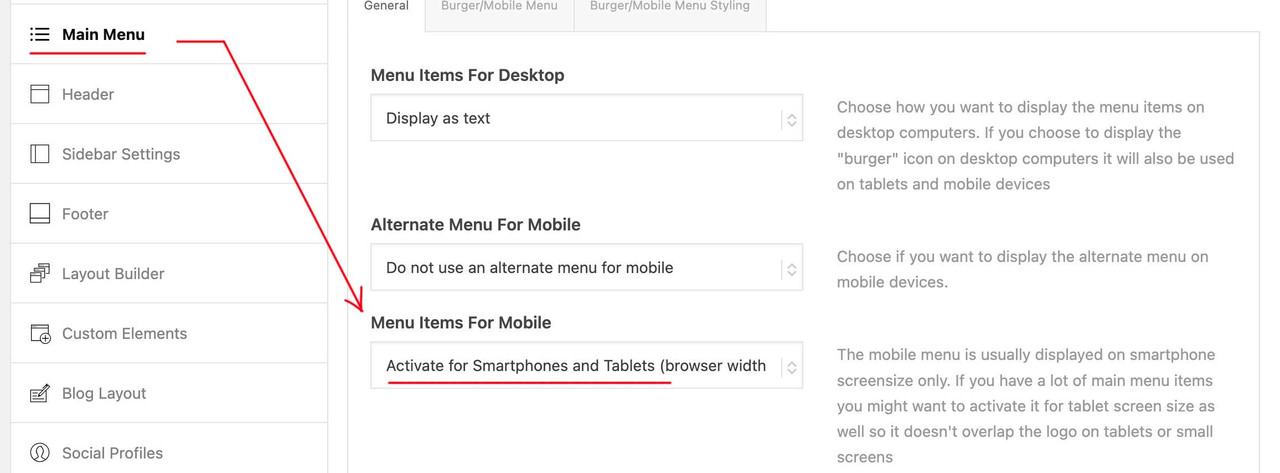
but even 990px are not enought – your menue overlays the logo much earlier.
@media only screen and (max-width: 1080px) {
    #top #header .av-main-nav > li.menu-item:not(.menu-item-search-dropdown)  {
        display: none!important;
    }
    #top #header .av-burger-menu-main {
        cursor: pointer;
        display: block!important;
    }
}
Hi Thanks,
Thanks a lot for getting back and the tips provided!
It is ok for the header to disappear when scrolling down, that way customers can see more of the content. There is no need to constantly see the whole header.
I don’t see any options in the enfold child – main menu tab to choose a breakpoint.
Also all of my pages have a submenu that breaks to burger on smaller screen. I don’t know what the best solution is for mobile viewers. Most people are viewing the website through mobile i guess nowadays.
I tried pasting your code, and it works for permanently viewing the header, however the submenu disappears upon scrolling, and the logo doesn’t shrink so the logo is overlaying on the content of each page. is there a way to also permanently show the submenu?
Cheers!
Hello, I have been using it for a long time and have not had any problems, but despite updating the wordpress version and enfold theme, this editor is not editable. The php version is PHP 7.4. How can I proceed? Is there a way to find out what is causing the error?
https://prnt.sc/yzIYEQZY7wvN
Hi,
Glad Guenni007 could help, thank you Guenni007, if you have any further questions please create a new thread and we will gladly try to help you. Thank you for using Enfold.
Best regards,
Mike
Hi,
Glad Ismael could help, if you have any further questions please create a new thread and we will gladly try to help you. Thank you for using Enfold.
Best regards,
Mike
Hey JL,
Unfortunately fontello.com doesn’t offer a Blue Sky icon, perhaps they will in the future as it becomes more popular, in the meanwhile you could add your Blue Sky link to a social network that you don’t use and use css to replace the icon with a Blue Sky image. See this thread.
You can also add your request to the open Enfold Feature Request for Blue Sky here.
Best regards,
Mike
Hey Enfold team! Are there any plans to add a Bluesky icon in the Social Profiles section?
I’d like to add social icons and links to the socket, but I don’t want to leave out Bluesky. So I’ll hold off and see if this is already possible or coming soon.
Hope to hear from you soon, thanks!
Hi,
Glad Ismael could help, if you have any further questions please create a new thread and we will gladly try to help you. Thank you for using Enfold.
Best regards,
Mike
Hi,
Glad we were able to help, if you have any further questions please create a new thread and we will gladly try to help you. Thank you for using Enfold.
Best regards,
Mike
or just – activate the option in main menue to show search icon ( this is the one for ajax search )
and put this to your child-theme functions.php:
function add_search_to_main_menu($items, $args) {
    if ($args->theme_location == 'avia') {
        $search_form = '<li id="menu-item-search-desktop" class="menu-item av-medium-hide av-small-hide av-mini-hide" role="menuitem">' . get_search_form(false) . '</li>';
        $items .= $search_form;
    }
    return $items;
}
add_filter('wp_nav_menu_items', 'add_search_to_main_menu', 10, 2);
and this to quick css:
#avia-menu {
  display: flex;
  flex-flow: row nowrap;
  justify-content: space-between;
  align-items: center;
}
#top #searchform > div {
  position: relative;
  max-width: 220px;
  opacity: 1 !important;
  display: block !important;
}
/*=== synchronise it with your hamburger breakpoint ===*/
@media only screen and (min-width: 990px) {
  #menu-item-search {
    display: none;
  }
}
Advantage : Ajax Functionality is preserved for mobile case.
see: https://enfold.webers-webdesign.de/
PS: after you have seen the demo page, I will remove it again, because it disturbs other demos on the site.
e.g. the one with left and right header layout
Hey Bernd,
Our current version (v6.0.8) supports PHP v8, to update in this case please delete the theme folder /enfold/ via FTP and then upload the new theme folder /enfold/ from your theme download in your Theme Forest account via FTP. Don’t simply try to overwrite the theme folder via FTP as some old files will be left behind as cause errors.
I recommend creating a full backup first.
Best regards,
Mike
 Bernd
BerndGuest
Hallo,
ich habe eine Webseite (jira.at) zu einem anderen Provider migriert und festgestellt, dass dort nur PHP 8 aufwärts verfügbar ist und die 4.5 Version nur php 7.4 unterstützt. Aus diesem Grund habe ich jetzt ein anderes Template aktiviert.
Meine Frage: wurde damals eine Version für Joachim Jira gekauft (jira.at)? Wenn nein, unterstützt die aktuelle Version php8.x und kann ich diese einfach über die alte Version via FTP kopieren?
besten Dank
Bernd
Hi,
Try this CSS in your Enfold Theme Options ▸ General Styling ▸ Quick CSS field:
#footer .widget_pages .widgettitle {
	display: none;
}
Please ensure to copy the code from the forum and not an email notification so the symbols are not converted.
After applying the css, please clear your browser cache and check.
Best regards,
Mike
Hey Rick,
Thank you for the inquiry.
The site requires additional authentication. Please provide the .htaccess credentials in the private field so we can access and check the site. Kindly note that the theme is no longer compatible with the latest version of WordPress. You may need to revert to an older version of the platform or consider switching to a compatible theme, such as Enfold. For more details about the Enfold theme, please check this link:https://themeforest.net/item/enfold-responsive-multipurpose-theme/4519990
Best regards,
Ismael
Merci pour votre retour,
Je pourrais donc utiliser seulement le menu principal avec cette méthode en ajoutant un séparateur ?
ou dois je ajouter le nouvel élément de menu de lien personnalisé je ne trouve pas sur Enfold ou wordpress ?
Comment ajouter une marge entre mes boutons pour qu’ils soient plus espacés ?
Cordialement,
Hey Antonio,
Thank you for your inquiry!
You can add the email address in the Contact Form > Backend > Your E-Mail Address field. If you’re experiencing issues with receiving messages, please refer to this guide: https://kriesi.at/documentation/enfold/contact-form/#my-contact-form-is-not-sending-emails-
Merry Christmas!
Best regards,
Ismael



