Hi,
Thank you for the update.
Where can we check the element? Please create a test or provide the link to the page where you need to adjust the subheading text. Have you tried to temporarily disable the Enfold > Performance > File Compression settings?
Best regards,
Ismael
Hey Danilo C.,
Thank you for the inquiry.
You may need to update via FTP, as the current version does not support automatic updates. Please refer to the documentation for more info: https://kriesi.at/documentation/enfold/theme-update/#update-via-ftp
Let us know if you need more assistance.
Best regards,
Ismael
you can manage it by clip-path.
But the following section had to be handled the same way on top of that section
see ( css code including ): https://enfold.webers-webdesign.de/enfold-one-page-agency/
the shift of that edge you like to have – had to be the same value on both sections! so % will not be ok ( the % is in relation to the section height – and that maybe different for both sections) for the shift. It had to be a absolute value – or a relative value that is the same for both sections ( f.e. screen width)
now only the polygone points declare the form of your separator. The points coordinates are starting top left and goes clockwise.
see f.e. : Clippy
__________
to explain what I mean by shift: Starting from a rectangular polygon with an additional point at the bottom, in the example I move this point upwards by an amount (10vw). This means that the y-coordinate is 100% – 10vw. The same goes for the bottom left point.
So that there is no gap, I have to do the same with the following section. But then for the first and second point of the polygon.
-
This reply was modified 1 year, 2 months ago by
 Guenni007.
Hi,
Glad we were able to help, if you have any further questions please register for support with your new license and then create a new thread and we will gladly try to help you. Thank you for using Enfold.
Best regards,
Mike
Hi,
Try this CSS in your Enfold Theme Options ▸ General Styling ▸ Quick CSS field:
#top .widget ul.social_bookmarks {
    display: inline-flex;
    gap: 0px 10px;
}

#top .widget ul.social_bookmarks li {
    border: none
}
After applying the css, please clear your browser cache and check.

Best regards,
Mike
Hey pikkuapuri,
Bluesky & Pixelfed are not available on fontello.com where our icon fonts are from.
Our Dev Team is reviewing the Feature Request for Bluesky, but we will probably need to wait until it is on fontello.com.
For now, follow the steps in this thread and change the code from “TikTok” to Bluesky or Pixelfed and the icon font character code to yours (ie: ue800) also ensure quotes in the code that you copy and paste is not changed.
Note that the icon fonts can not be in color, only black and white, and when you upload a SVG to fontello.com you may need to adjust as in this thread.
Best regards,
Mike
Hi,
Glad we were able to help, if you have any further questions please create a new thread and we will gladly try to help you. Thank you for using Enfold.
Best regards,
Mike
Hi,
1: When I check the burger menu has the landmark “role=”navigation””
2: To add a role=”button” please request open a new Github Feature Request for the Dev Team review.
3: you have a duplicate thread for this.
Best regards,
Mike
Hey bemodesign,
Please try the following in Quick CSS under Enfold->General Styling:
@media only screen and (max-width: 479px) {
div .products .product a img {
  height: 400px !important;
}
}
Best regards,
Rikard
Hey Alex,
The update to 6.0.9 has to be done manually from the version you are running, please refer to my replies in this thread: https://kriesi.at/support/topic/enfold-4-5-theme-update-update-failed-download-failed-a-valid-url-was-not-pro/#post-1021541
You can either update manually via FTP: https://kriesi.at/documentation/enfold/how-to-install-enfold-theme/#theme-update, or upload the theme as if it was new under Appearance->Themes->Add New Theme.
If that doesn’t work then please try to delete the whole theme folder, then replace it with the new version. Make sure that you have backups of the site before starting updating.
Also please read this after you have updated: https://kriesi.at/documentation/enfold/theme-registration/
Best regards,
Rikard
 Alex
AlexGuest
Hello Kriesi – Team,
about 8 years ago i was working on a website while using your Enfold 4.2.1 version.
i just forgot about the project. but now i want to relaunch the website while using the content i already created. unfortunatly i los my API-key.
is it possible to ugrade from 4.2.1 version of Enfold to a current version? and still keep the original conent?
i am also interested in purchasing a new licence.
let me know, if this works. And how i am going to do the update?
cheers,
Alex
Hey Guenter,
Thank you for your patience, to use the paid layerslider license you will need to remove the embedded version from the theme by: Layout-Builder – Integrated (Bundled) LayerSlider Plugin – “Remove theme plugin files only and keep slides”
This version blocks the paid license check.
I would recommend exporting your sliders first, but is probably not necessary, just good practice.
I also have noticed that some sliders created with a very old version of the layerslider have issues with the latest version options, such as the first demo, it seems that the layerslider has not maintained a good backward compatibility with all options as new options have been added.
Best regards,
Mike
Hey navindesigns,
I believe you are referring to your burger menu, but I find no sub-menu links in it so I don’t know how this would apply.
Nonetheless this will require the Dev Team to review, please open a new Github Feature Request for the Dev Team to review.
Thank you for your patience.
Best regards,
Mike
Hi,
Glad Guenni007 could help, thank you Guenni007, if you have any further questions please create a new thread and we will gladly try to help you. Thank you for using Enfold.
Best regards,
Mike
Hi,
Glad to hear that you have this sorted out, if you have any further questions please create a new thread and we will gladly try to help you. Thank you for using Enfold.
Best regards,
Mike
Hi,
Glad to hear that you have this sorted out, if you have any further questions please create a new thread and we will gladly try to help you. Thank you for using Enfold.
Best regards,
Mike
Hey schweg33,
Try this CSS in your Enfold Theme Options ▸ General Styling ▸ Quick CSS field:
.responsive .page-id-3302 #av_section_1 .container {
	max-width: 100%;
	padding: 0;
}
.page-id-3302 #layer_slider_2.avia-shadow {
    box-shadow: none;
}
After applying the css, please clear your browser cache and check.
Best regards,
Mike
Hey Tyler,
You can change that under Enfold->General Styling->Logo Area. You can also set it under Enfold->Advanced Styling.
Best regards,
Rikard
Hey Yves,
Please make sure that you have backups of your site before you update anything. https://kriesi.at/documentation/enfold/theme-update/.
Best regards,
Rikard
Hello,
I couldn’t find any solution so far. I removed every plugin nothing changed this behavior.
When I edit my page, for example adding another element and adding some text and clicking on “Save” the half of the page will be deleted automatically.
i don’t know why.
I have installed the following:
Enfold: 6.0.9
PHP: 8.2.27
Wordpress: 6.7.1
Can somebody help me please?
Thank you very much in advance.
Hey,
I’ve upgraded Enfold on that site (https://planfait.fr/) from version 5.6.8 to 6.0.9
It works but I have that error remained and i don’t know what to do with it.
Anyone to give me a hand on that one please ?
Thx
 Yves
YvesGuest
Hi we got on espaciogrecia.com enfold 4.9 and we want last version its possible without broke anything we got done on the website
Hi,
Thanks for the update, we’ll close this thread for now then. Please open a new thread if you should have any further questions or problems.
Best regards,
Rikard
Hi,
Thanks for the update. Please open a new thread if you should have any further questions or problems.
Best regards,
Rikard
Hi,
Thanks for the update, we’ll close this thread for now then. Please open a new thread if you should have any further questions or problems.
Best regards,
Rikard
Hi,
Thanks for the update, we’ll close this thread for now then. Please open a new thread if you should have any further questions or problems.
Best regards,
Rikard
Hello Ismael,
I tried login in with the enfold support account and had no problem accessing the wp-admin page, I double checked and the role of the account is admin.
I published the Test product again.
Best regards,
Michael
I have a separate individual licence for some of my customers. How to manage that best in Enfold?
Remove the embedded one by: Layout-Builder – Integrated (Bundled) LayerSlider Plugin – “Remove theme plugin files only and keep slides”
or is there something else I need to consider?
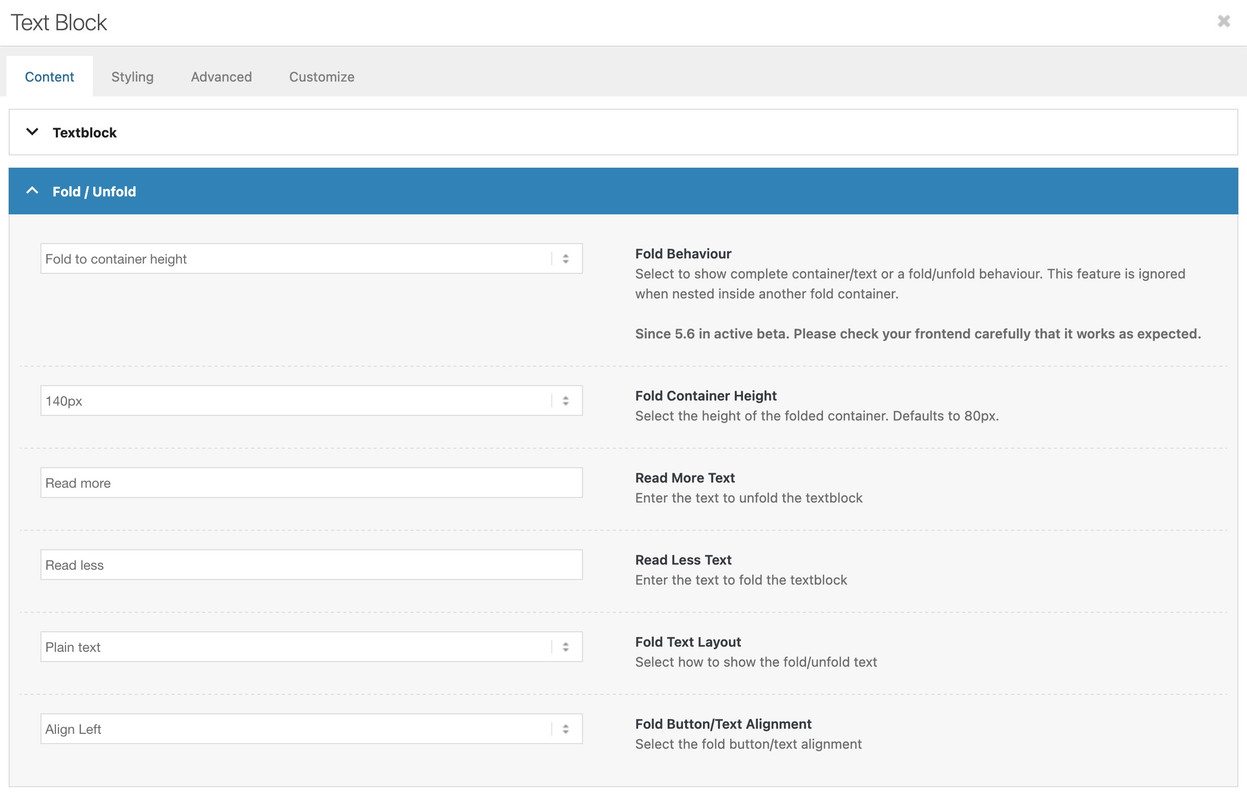
yes – i think you are right . Allthough there are translatables in the code of enfold
__( 'Read More Text', 'avia_framework' ),
__( 'Read more', 'avia_framework' ),
__( 'Read Less Text', 'avia_framework' ),
__( 'Read less', 'avia_framework' ),
on many languages these ( f.e. on german) tranlations are missing.
but for dutch there is: Lees minder and Lees meer inside the lang files – so i guess you only want to change that translation? One solution could be to have your own translation files – or to use a plugin to change these translations.
I don’t know how you have implemented multilanguage support for your installation. With WPML you have separate pages. There you could rename it manually in the element.
For mobile view: I need code for only the Caption Text, and maybe the Caption Title. thanks!



