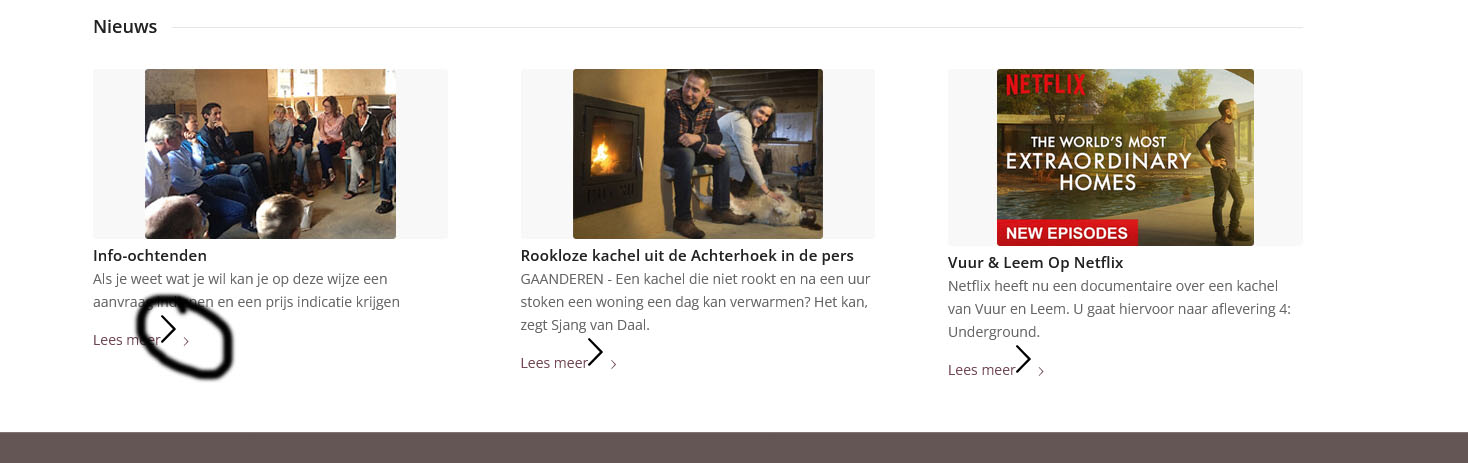
hello, on my frontpage suddenly is appearing – after updating Enfold – some extra arrows at the bottom of some ‘read more’ posts
how to get rid of this?
best regards, jelle
https://vuurenleem.nl/wp-content/uploads/2025/02/pijlen.jpg
-
This topic was modified 1 year, 1 month ago by
 jeel147.
Hello,
I am currently testing the Enfold theme on a subdomain before recommending a license purchase to my client. However, I have encountered an issue with the Advanced Layout Builder (ALB).
After installing the theme and WooCommerce, whenever I try to use ALB, the page freezes, and a spinning wheel appears in the area where the content blocks should be. I am unable to drag and drop elements to build the page.
I have added the following string in the functions.php of the child theme but the issue persists
add_theme_support( 'avia_custom_shop_page' );
Could you please assist me in resolving this issue? I would like to ensure that the theme functions properly before proceeding with the purchase.
Thank you in advance for your support.
Best regards,
Manu
Hallo. Ich möchte beim Theme Enfold health coach die Farben Grün ändern. Ich habe es schon unter Enfold –> Erweitertes Styling versucht. Es gelingt mir, die Schriftfarben und auch das vordefinierte Farbschema zu wechseln, aber ich finde keine Möglichkeit, um die grünen Hintergrundfarben auf der Website zu ändern. Gibt es eine css-Datei, in der ich neue Farben festlegen kann und wo finde ich diese? Die Seite ist im Wartungsmodus, ich habe aber eine Zugriffsmöglichkeit eingerichtet. Danke schon Mal, lieben Gruß Ulli
Hello, I would like to change the green colors in the Enfold Health Coach theme. I have already tried doing this under Enfold → Advanced Styling. I was able to change the text colors and switch the predefined color scheme, but I can’t find a way to change the green background colors on the website.
Is there a CSS file where I can define new colors, and where can I find it?
The site is in maintenance mode, but I have set up an access option.
Thanks in advance!
Best regards,
Ulli
on https://kriesi.at/themes/enfold-2017/elements/magazine/ you want to preserve the bigger image post and have on the smaller images a two column view?
to have:
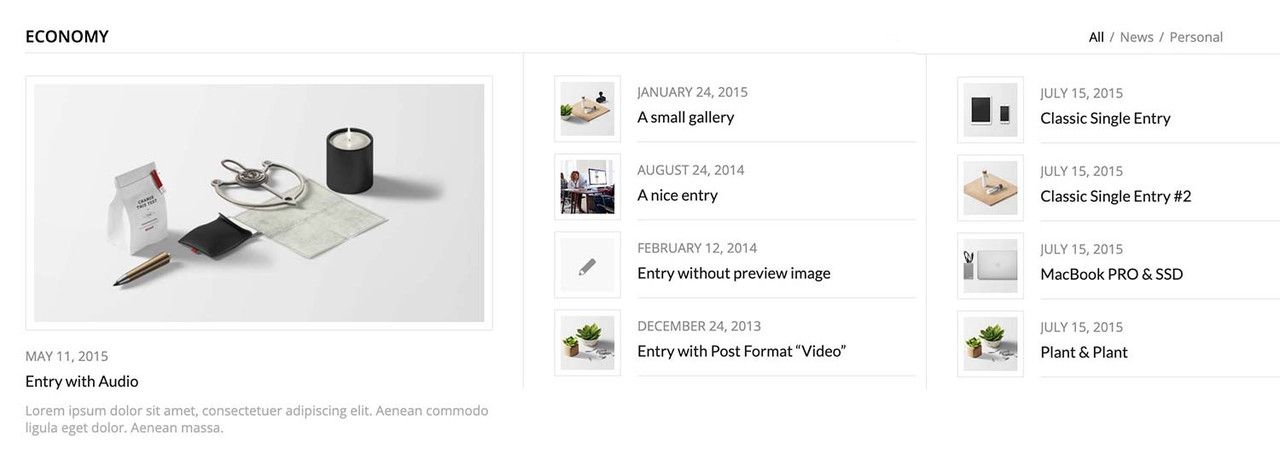
you can have this by css only – but you had to break earlier to responsive case to have enough space for showing the articles with smaller images:
#top .av-magazine-sideshow:before,
#top .av-magazine-sideshow:after {
  display: none;
}

#top .av-magazine-sideshow {
  display: flex;
  flex-flow: row wrap;
  justify-content: space-between;
}

#top .av-magazine-sideshow .av-magazine-entry {
  flex: 0 1 48%;
  width: unset;
}
I have two sites using Enfold both with the same host.
One of the sites just updated automatically to Version 7 and the other one didn’t. I would like to disable the auto update feature. I forget how this works. How can I disable the auto update please?
BTW: I have this Problem in every of my 7 Projects, where I use Enfold…
Hi,
Glad we were able to help, if you have any further questions please create a new thread and we will gladly try to help you. Thank you for using Enfold.
Best regards,
Mike
Hi,
Glad Ismael could help, if you have any further questions please create a new thread and we will gladly try to help you. Thank you for using Enfold.
Best regards,
Mike
Hi,
Glad we were able to help, if you have any further questions please create a new thread and we will gladly try to help you. Thank you for using Enfold.
Best regards,
Mike
Hello, I have a web design company and have been using your theme for years. The problem is that all my sites are looking the same and people are looking to different looks. Themes like: https://archi.oceanthemes.site/
3 question for you:
1. Are there were any themes that are similar to the way Enfold works in the backend? I really don’t want to relearn how to design websites.
2. It seems like the Enfold demo options have not been updated in years. https://kriesi.at/themes/enfold-overview/
3. Do you have any options like these looks?: https://archi.oceanthemes.site/ or https://www.lavenderlandscape.com/
thanks!
Hi,
Try this CSS in your Enfold Theme Options ▸ General Styling ▸ Quick CSS field:
@media only screen and (max-width: 479px) {
#top.home .slideshow_inner_caption {
    width: 50%;
}
    #top.home .avia-slideshow .av-slideshow-caption .avia-caption-content p {
        font-size: 9px;
        line-height: 9px;
        margin-bottom: 0;
    }
   #top.home .avia-slideshow .avia-slideshow-button {
   	margin-top: 10px;
   	font-size: 9px;
   }
}

Best regards,
Mike
Hi,
Glad Rikard could help, if you have any further questions please create a new thread and we will gladly try to help you. Thank you for using Enfold.
Best regards,
Mike
Hi,
Thanks for the update. Please open a new thread if you should have any further questions or problems.
Best regards,
Rikard
Hey Martina,
Thanks for the update. Please open a new thread if you should have any further questions or problems.
Best regards,
Rikard
Hi,
Thanks for the update, we’ll close this thread for now then. Please open a new thread if you should have any further questions or problems.
Best regards,
Rikard
Hello Ismael,
it is still not working after the enfold Update.
I made a copy of the Home Page before which is working now but it has the wrong name.It`s called Home-sicherung. I would like the change that into Home and give Home.another title but cannot make changes on Home.
Could I change Home-sicherung into Startseite and make that as the main Page and then delete Home?
That would be the only way that i could imagine.
Many greetings and thank you :)
rixi
Hey sam,
Thank you for the inquiry.
The initial setup and configuration are not included in the support because these can differ per site or client. However, we can assist you if you encounter any issues or have any questions. To get started with the theme, you can check the documentation below.
— https://kriesi.at/documentation/enfold/
Best regards,
Ismael
Hey rixi,
Thank you for the inquiry.
There is a script error when we try to edit the home page. We also noticed that the site is using an older version of the theme (6.0.5). Please download the latest version of the theme or update it in the Enfold > Theme Update panel. After the update, make sure to purge the cache before testing the builder again.
Let us know the result.
Best regards,
Ismael
Hi,
This is the error that we got after attempting to validate the API key.
js?v=3.56&callback=av_backend_maps_loaded&key=AIzxxxx_AE_2AWxxxxxxx2OjTe-e3BUxHRG5nDBc:164 Geocoding Service: You must enable Billing on the Google Cloud Project at https://console.cloud.google.com/project/_/billing/enable Learn more at https://developers.google.com/maps/gmp-get-started
It says that you have to enable billing for your Google Cloud project. For more info on how to properly generate an API key, please review this documentation.
— https://kriesi.at/documentation/enfold/google-map/#how-to-register-a-google-maps-api-key
Best regards,
Ismael
Hey Jak73,
Try this CSS in your Enfold Theme Options ▸ General Styling ▸ Quick CSS field:
@media only screen and (max-width: 989px) {
#top.home .flex_column_table.av-equal-height-column-flextable:not(:first-child) {
    margin-top: 0;
}
}
Please ensure to copy the code from the forum and not an email notification so the symbols are not converted.
After applying the css, please clear your browser cache and check.
Best regards,
Mike
Hey frb1,
You should be able to simply move it in to the file in question and it should apply after saving. If it doesn’t, then please try saving theme option or toggle the file compression options under Enfold->Performance.
Best regards,
Rikard
Hi,
Glad Rikard could help, if you have any further questions please create a new thread and we will gladly try to help you. Thank you for using Enfold.
Best regards,
Mike
Hi Rikard,
The issue is still ongoing.
Would you be able to take a look via the temporary login provided? If this could be addressed as soon as possible, that would be greatly appreciated, as the Enfold logo appearing instead of ours is causing confusion.
Thanks for your help.
Best,
Matt
Hi Kriesi,
You recommend moving all quick CSS to “custom.css” if you have CSS alterations to “major portions of the theme”.
Questions:
• We implemented the CSS you see in privat6e content. Would you advice us to move this to /wp-content/themes/enfold/css/custom.css?
• Will changes in custom.css occur instantly in the frontend, like it does when I add/alter quick CSS in General Styling/Quick CSS?
• Can I just copy the CSS as it is, or “do I have to” structure it as suggested in the custom.css file? (the splitting of general, desktop and mobile rules)
Hope you can advice us on this topic :)
Best,
Frederik
Hello Rikard,
Here are the instructions. We followed them, but the same error keeps occurring.
How to manually import a theme demo
•
• Please add following line to Functions.php file in Appearance > Editor
add_theme_support( ‘avia_demo_store_downloaded_files’ );
• Download the zip file of the demo you would like to import from https://github.com/KriesiMedia/enfold-library/tree/master/demos
• Extract it in \uploads\avia_demo_files\ folder. If you are importing Enfold 2017 demo, files should be extracted inside \enfold-2017\ so it should look as \uploads\avia_demo_files\enfold-2017\
• Go to Enfold theme options > Demo Import and import the demo
Hi support
I have two questions:
1) Is it true that you have to buy a new license for Enfold when the old one runs out? Can’t you just extend the old one? Right now it looks like I have three licenses for Enfold.
Am I doing something wrong? Can you help me?
2) On my site, I have activated something that causes, for example, ‘featured image’ and other images that are links to appear with a round arrow in a small circle above. I have been through all the menu items, but can’t figure out how to disable this functionality.
Can you help me?
Kind regards
Hanne B. Stegemüller,
Denmark
Necesito editar la página de categoría de productos woocommerce en tema Enfold, con el objetivo de que al ver los productos de una categoría, en la barra lateral muestre el resto de categorías.
Gracias por su ayuda
Hey wolfgangspelitz,
Thank you for the inquiry.
You have four options, create a custom shortcode, use the Custom Element Template (CET), create Custom Layouts or create your own Advance Layout Builder elements (ALB). The downside with using the CET is that you can only create a template for a single element and the Custom Layouts cannot be inserted into drop zones such as Columns or Sections. If you need to combine multiple elements or shortcodes, you’ll have to create a custom shortcode or create your own ALB elements.
To learn more about CET and Custom Layouts, please check the links below:
— https://kriesi.at/documentation/enfold/custom-element-templates/
— https://kriesi.at/documentation/enfold/custom-layout-and-dynamic-content/
For custom shortcodes, this should help: https://codex.wordpress.org/Shortcode_API
And to register another ALB element or override an existing one, please refer to this documentation: https://kriesi.at/documentation/enfold/intro-to-layout-builder/#add-elements-to-alb
If you need help with customizations, you can contact our partner, Codeable: https://kriesi.at/contact/customization
Best regards,
Ismael
Hi,
The code above will disable the theme’s modifications, including the function that forces the default event template, which is located in the themes/enfold/config-events-calendar/views folder.
Best regards,
Ismael