Hi,
Thank you for the inquiry.
it stays invisible?
The color value is incorrectly set as “#ffffff f”. Please check the Enfold > General Styling or the Enfold > Theme Options > Transparency Header options and look for the invalid color value.
Best regards,
Ismael
Hi,
Unfortunately, it’s not possible to import a single element from a demo. As mentioned above, the page only contains a Portfolio Grid element, set to have a single column. If you have enabled the builder’s debug mode, you can insert this shortcode manually.
[av_portfolio columns='1' one_column_template='special' items='-1' contents='excerpt' preview_mode='custom' image_size='featured_large' linking='' sort='yes' paginate='yes' query_orderby='date' query_order='DESC' av_uid='av-s1vx']
Debug mode: https://kriesi.at/documentation/enfold/intro-to-layout-builder/#debug-mode
Best regards,
Ismael
Hi,
Thank you for the inquiry.
We can’t access the site due to a critical error. Please make sure to extract the enfold.zip file from the downloaded package before uploading it to the site. You can also upload the theme via FTP. Please check this documentation: https://kriesi.at/documentation/enfold/theme-update/#update-via-ftp
If the issue persists, please switch the installation to debug mode, then provide the WP login details in the private field: https://developer.wordpress.org/advanced-administration/debug/debug-wordpress/#example-wp-config-php-for-debugging
Best regards,
Ismael
Hey Stacey,
Thanks for reaching out.
It’s possible that you’re support license has expired. Please check this link for more info on how to extend or renew: https://travelerwp.com/how-to-renew-or-extend-support-for-my-wordpress-website-on-themeforest/
Regarding the site issue, please try to toggle or temporarily disable the Enfold > Performance > File Compression settings, disable the plugins, then purge the cache. Make sure to remove the browser history before checking. Let us know if the issue persists.
Best regards,
Ismael
Hi,
Thank you for the inquiry.
Please provide the login details in the private field. In the meantime, try adding the following code to the Quick CSS field, then toggle or temporarily disable the Enfold > Performance > File Compression settings.
#avia-menu > li.menu-item-search-dropdown > a:after {
    content: '';
}
Best regards,
Ismael
Hi,
ich habe jetzt mehrfach versucht, das Enfold-Theme zu installieren und bekomme jedes Mal die Fehlermeldung, dass es einen kritischen Fehler auf der Webseite gab.
Die Webseite ist http://www.andersleben-anderspflegen.de
Könnt Ihr prüfen wieso dieser Fehler auftritt.
Danke für die Hilfe.
Viele Grüße
Peter
Hey Matt,
This seems to be a duplicate thread that we answered, thinkjarvis also points out that
on sites where bots have alreaedy hit and created a sitemap for them to crawl – They will continue to try and crawl those links because they already know they exist.
On new Enfold sites where Bots can no longer crawl the links – All is fine because there is no way for them to access the filter urls in the first place, therefore do not know the links exist.
The Dev Team writes:
On shop overview page the dropdowns for sort by and display do not have a href=” but only a data-href and link is done by js.
When I check my install there is no link:

Best regards,
Mike
Hey ausgesonnen,
Try this CSS in your Enfold Theme Options ▸ General Styling ▸ Quick CSS field:
#menu-item-96 a .avia-menu-text {
    white-space: normal;
    word-wrap: break-word;
    display: block;
    width: 150px;
    text-align: right;
    line-height: 15px;
}
Please ensure to copy the code from the forum and not an email notification so the symbols are not converted.
After applying the css, please clear your browser cache and check.
adjust to suit

Best regards,
Mike
Hey Silje,
Try this CSS in your Enfold Theme Options ▸ General Styling ▸ Quick CSS field:
.single-product .avia-image-overlay-wrap:hover {
transform: rotateY(180deg);
}
before hover:

on hover:

Best regards,
Mike
Hi,
@Jason this is not currently possible, if you would like to request this feature the Dev Team has opened a new Github Feature Request for users to place requests and follow them as the Dev Team reviews them.
Best regards,
Mike
Hi
I am trying to figure out the correct code snippet to use for changing the main single product image on hover to the first gallery image.
Example this page: https://labhuset.no/product/fiocchetti-plasmafryser-30-40c/
I found this earlier thread: https://kriesi.at/support/topic/change-single-product-image-on-hover-with-gallery-first-image/
But found the code shared there unclear. It would be great with an update with a workable code.
Enfold has been used to customize all the single product pages in WooCommerce.
I am working on figuring out how to change images on hover (for the first gallery image) of the main product in the Single product page
2.
It would also be helpful to at the same time have the correct code to change images on hover in the shop page AND the archive page. Having the thumbnails seen change to the first gallery image.
Thank you!
-
This topic was modified 1 year, 1 month ago by
 SHR Design. Reason: A mistake in adding the word flip. It has been adjusted
Hi,
Glad Rikard could help, if you have any further questions please create a new thread and we will gladly try to help you. Thank you for using Enfold.
Best regards,
Mike
Hi,
Try this CSS in your Enfold Theme Options ▸ General Styling ▸ Quick CSS field:
#top #header .av-main-nav > li > a .avia-menu-text {
    right: -10px;
}
adjust to suit.
Best regards,
Mike
Hi,
Try this CSS in your Enfold Theme Options ▸ General Styling ▸ Quick CSS field:
#top .av_font_icon a:hover {
	color: #d5392e;
}
Please ensure to copy the code from the forum and not an email notification so the symbols are not converted.
After applying the css, please clear your browser cache and check.
Best regards,
Mike
Hi,
Glad Rikard could help, if you have any further questions please create a new thread and we will gladly try to help you. Thank you for using Enfold.
Best regards,
Mike
Hey ausgesonnen,
Try this CSS in your Enfold Theme Options ▸ General Styling ▸ Quick CSS field:
#top #header.header_color #header_main .widget a:hover {
	background: #fff;
	color: var(--enfold-main-color-secondary);
}
Please ensure to copy the code from the forum and not an email notification so the symbols are not converted.
After applying the css, please clear your browser cache and check.
Best regards,
Mike
So we have a form on globalgrowthnetworks.com which is hosted on Hostgator. Other sites I work on on siteground the enfold forms just work out of the box,
On Hostgator however there seems to be a need to install a smtp plugin to get the form to work properly. This however I’m having a hard time to getting to work. Do you have any documentation on how to get this done, and specifically what plugin to use and configuration?
Hey rvga,
Try this CSS in your Enfold Theme Options ▸ General Styling ▸ Quick CSS field:
#header.header_color #header_meta .sub_menu li ul a:hover {
	background-color: red;
}
#top #header.header_color #header_meta .sub_menu li ul {
    left: 8%;
}
#header.header_color #header_meta .sub_menu li ul a,
#header.header_color #header_meta .sub_menu li a {
	font-size: 14px;
}
Please ensure to copy the code from the forum and not an email notification so the symbols are not converted.
adjust the color, font-size and placement (left) to suit.
After applying the css, please clear your browser cache and check.
Best regards,
Mike
Hi,
Thanks for the update. Please open a new thread if you should have any further questions or problems.
Best regards,
Rikard
Alright, we’ll add an Enfold licence to the localhost version and wait for you to release a new update. Thanks for the support! ;)
Hey Tanja,
Please ensure that you are using Enfold v7.0, then add this code to the end of your child theme functions.php file in Appearance ▸ Editor:
add_filter('avf_default_icons','avia_replace_standard_icon', 10, 1);
function avia_replace_standard_icon($icons)
{
$icons['svg__standard']	 = array( 'font' =>'svg_entypo-fontello', 'icon' => 'leaf');
return $icons;
}
Please ensure to copy the code from the forum and not an email notification so the symbols are not converted.

Best regards,
Mike
Hi,
Glad to hear that you have this sorted out, if you have any further questions please create a new thread and we will gladly try to help you. Thank you for using Enfold.
Best regards,
Mike
Hi Matt,
Enfold have fixed the issue – However on sites where bots have alreaedy hit and created a sitemap for them to crawl – They will continue to try and crawl those links because they already know they exist.
On new Enfold sites where Bots can no longer crawl the links – All is fine because there is no way for them to access the filter urls in the first place, therefore do not know the links exist.
So on your existing site – Bots may continue to crawl the links for a while but should stop eventually.
If you want to put a stop to them now. Follow my instructions to reinstate the Woocommerce defaults and add some redirects so bots can no longer access those query strings. This is what we have had to do on the sites where there are hundreds or thousands of products and categories – Otherwise the bots that are aware of the filter links will continue to crawl them.
I hope this helps.
Hey ausgesonnen,
Please try the following in Quick CSS under Enfold->General Styling:
.content {
  padding-top: 0;
  padding-bottom: 0;
}
Best regards,
Rikard
Hey MarcusJeroch,
You can create your own 404 page by building it in a page, then set it as your custom 404 page under Enfold->Theme Options.
Best regards,
Rikard
Hi,
Thanks for the update, we’ll close this thread for now then. Please open a new thread if you should have any further questions or problems.
Best regards,
Rikard
Hi,
Great, I’m glad that we could help. Please open a new thread if you should have any further questions or problems.
Best regards,
Rikard
Hi,
Thanks for the update, we’ll close this thread for now then. Please open a new thread if you should have any further questions or problems.
Best regards,
Rikard
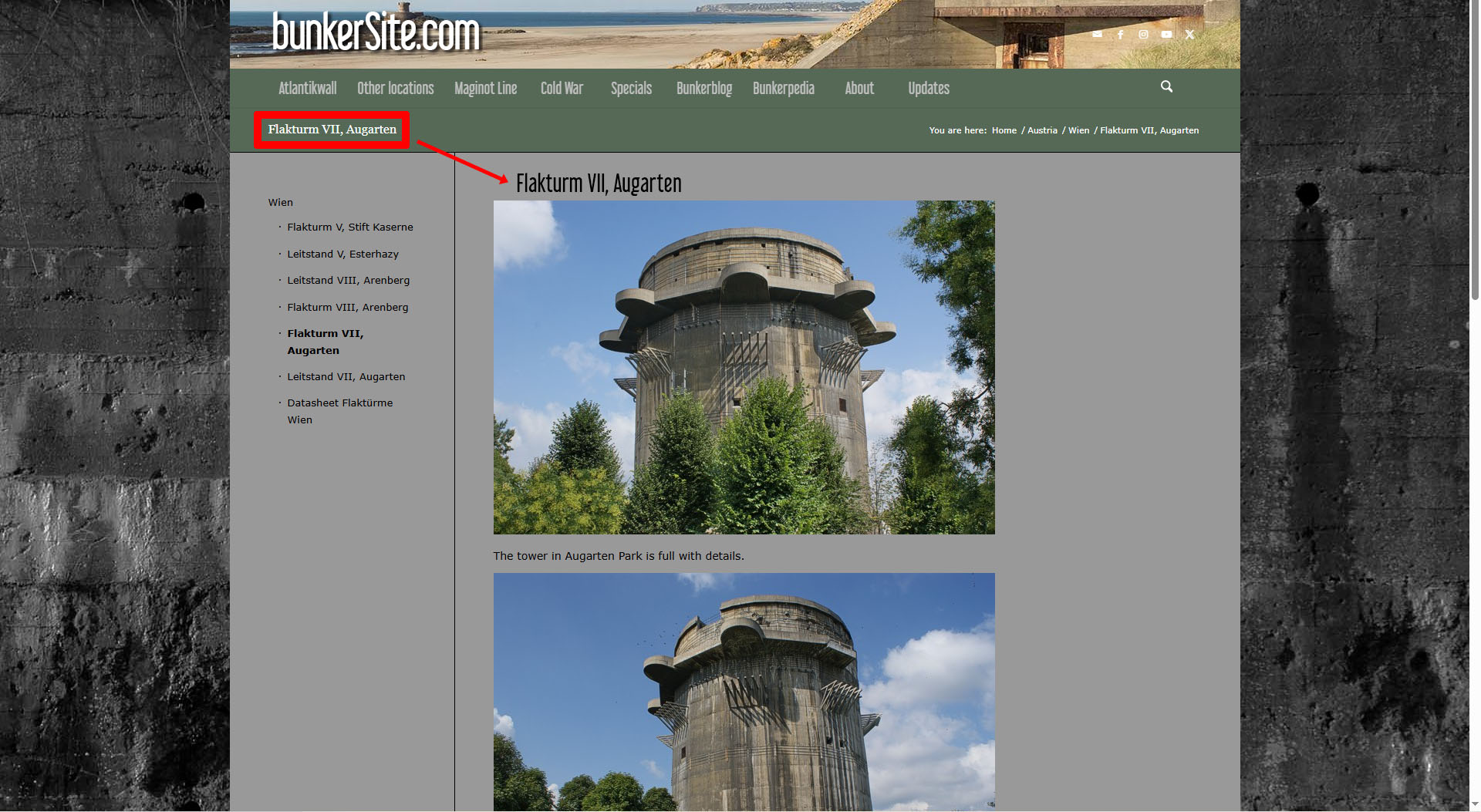
Situation: I’m using a child theme. I’m using the classic editor for most pages. I have thousands of pages so it needs to be automatic.
It seems very simple.
I want to have the title of the page moved from the header area to above the main content, so next to the sidebar, and I want to style it in a certain way (like on the screenshot)
-
This topic was modified 1 year, 1 month ago by
 sudhafen. Reason: Added working screenshot
-
This topic was modified 1 year, 1 month ago by sudhafen.
We have many sites using Enfold for many years. Thanks for the goodness! Today, on our largest site we see an anomaly where the output view changes depending on the login/out state. Thankfully, public sees all elements. See attached. We are at 7.0 and just noticed this.



