Hey woogie07,
You can buy more than one license with the same account yes. You can create different tokens for each license to keep track of them: https://kriesi.at/documentation/enfold/theme-registration/
Best regards,
Rikard
Hello,
Since update 7.0 SVG icons problem
With previous versions of Enfold, I replaced the default icons of Enfold like the magnifying glass, the basket, the social icons, back to top and others according to the several different sites that I have under Enfold.
Now that these icons are called in SVG automatically it does not work anymore.
I used a solution found on your documentation or support.
With the functions.php and the avf_default_icons filter.
Example : $icons[‘search’] = array( ‘font’ =>’flaticon’, ‘icon’ => ‘uf163’);
Would it be possible to disable SVG icons?
Do you have another solution?
Kind regards,
Hello and thank you for your reply.
If you haven’t heard yet, Envato just changed the way you create a token a few days ago. They’ve added an input field that “must” correspond to the site on which you validate Enfold, even if it’s not really explicit.
Hi,
I want to purchase multiple Enfold licenses within my account.
Is the process to simply go to the purchase page and buy the licence. If so, how are the licences differentiated within my themeforest account?
Please confirm.
Thanks
Hi Team
Please could you provide a solution to edit the border on the gallery element in enfold. I have a white border around the images and I would like to change the colour to #50616b and I need to reduce the thickness.
Sorry – it was carnival here in the Rhineland (Germany) until yesterday, and that’s basically a public holiday week.
Next: it would be nice if you could disable merging in the Enfold settings until all your goals are met. It’s hard to review and give advice without using devtools.
Do you / your customer realy want that narrow content width vor desktop view?
It’s hard enough to reconcile this, but with such a narrow content area, as you’ve noticed yourself, very long menu items quickly become two-liners.
Hey Jean,
Thank you for the inquiry.
Did you generate a private token? Please try to generate the token again and make sure that the required permissions are enabled.
— View and search Envato sites (checked by default) (Required)
— View the user’s Envato Account username
— View the user’s email address
— View the user’s account profile details
— Download the user’s purchased items (Required)
— Verify purchases of the user’s items
— List purchases the user has made (Required)
Please review this doc for more info: https://kriesi.at/documentation/enfold/theme-registration/#toggle-id-5
Best regards,
Ismael
 Jean
JeanGuest
Hi, I bought the Enfold theme for the third time and the new Envato token creation system seems to be causing problems. I’ve just installed Enfold on my new site via Envato account and I get this message:
La dernière fois que nous avons vérifié votre jeton Envato nous n’avons pas pu nous y connecter :
L’accès aux achats n’a pu avoir lieu
Le nom d’utilisateur n’a pu être trouvé (requis pour votre information seulement)
Impossible d’accéder à l’E-Mail (requis uniquement pour votre information)
Les erreurs suivantes sont survenues :
Achats : Erreur de code 403 retournée par Envato : Forbidden:
– reason: invalid-token
username Erreur de code 403 retournée par Envato : Forbidden:
– reason: invalid-token
email Erreur de code 403 retournée par Envato : Forbidden:
– reason: invalid-token
Achats : un pb. a eu lieu pour accéder à vos achats. Mises à jour impossible.
Hi,
Sorry for the delay. We tried this on our end and got this error:
Uncaught Error: Class “AbstraktEnfoldExtensions” not found in
Could you provide the related files and a screenshot of the file structure?
Best regards,
Ismael
Hey havi,
Thank you for the inquiry.
It seems to be working correctly when we checked. Please toggle or temporarily disable the Enfold > Performance > File Compression settings, then purge the cache. Let us know if the issue persists.
Best regards,
Ismael
Hi,
Thank you for the update.
The site is using a very old version of the theme (5.7). Please log in to your Themeforest account, download the latest version (7.0), extract the enfold.zip file and its contents, and then upload it to your server via FTP. You can also contact your hosting provider if you need further assistance with uploading the theme.
Please check this documentation for more info: https://kriesi.at/documentation/enfold/theme-update/#update-via-ftp
Best regards,
Ismael
Hi,
Thank you for the update.
If you need to apply this modification to a specific gallery, you can use the Custom CSS Class field. Please check this documentation: https://kriesi.at/documentation/enfold/add-custom-css
In the Advanced > Developer Settings > Custom CSS Class field of the Gallery element, place the name “av-gallery-side-nav” for example, then adjust the css rule:
#top div .av-gallery-side-nav .avia-gallery-big {
    float: right;
    width: 50%;
}
Best regards,
Ismael
Hey chrickel,
Thank you for the inquiry.
Please add this code in the Quick CSS field:
#top .menu-item-search-dropdown > a.avia-svg-icon svg:first-child, #top .menu-item-search-dropdown > a.avia-svg-icon img[is-svg-img="true"] {
    width: auto;
    height: 1em;
    position: relative;
    z-index: 1;
    stroke: var(--enfold-header-color-color);
    fill: var(--enfold-header-color-color);
}
Best regards,
Ismael
Hi we installed a new version of Enfold and have been running into some bugs. We make edits, save and when we return the layout builder has changed and certain elements are not appearing in the backend. The home page backend is the best example of this. Url and Temp login details attached.
Thanks
Graham
Hi,
Great, I’m glad that Mike could help you out. Please open a new thread if you should have any further questions or problems.
Best regards,
Rikard
Hi,
Thanks for the update, we’ll close this thread for now then. Please open a new thread if you should have any further questions or problems.
Best regards,
Rikard
Hi,
Thanks for the update, we’ll close this thread for now then. Please open a new thread if you should have any further questions or problems.
Best regards,
Rikard
Hey cygrafix1,
You can create your own custom footer in a page, then set that as your footer under Enfold->Footer. Please try that out.
Best regards,
Rikard
Hey ausgesonnen,
Please try the following in Quick CSS under Enfold->General Styling:
.av-hamburger-inner:after {
  display: none;
}
Best regards,
Rikard
Hi guys,
The Load more button for the Masonry element stopped responding once you upgrade to Enfold 7.0 (on all my sites where I upgraded). The ones where I haven’t work fine.
Here’s one of the sites:
Tried on Chrome (cleared cache too), Firefox and Safari and it didn’t work on any of them.
Thank you!
Havi
I have renmamed the enfold file in enfold1 no it is possible to log-in again. I´ll post at the private content space.
Hope you can help.
Rgds
Peter
I applied your CSS in the Enfold general styling quick CSS box and it worked nicely. Is there a way to apply this selectively when using this on a gallery? There may be times when I do want the thumbnails to appear under vs to the left.
Hey Mike
I have added a gallery image to one of the Fiocchetti products and will add additional images to other products where I plan on using the code..
Here is what the screen looks like in the backend of the Enfold custom single product screen: https://www.dropbox.com/s/y154n178mrx85yz/Screenshot%202025-03-04%20at%2014.26.45.jpg?st=n7e1k9nw&dl=0
The gallery images will not be visible on the frontend.
I am looking for a code snippet to use which will then on hover use the first gallery image instead of the main product image.
Similar to what is done here: https://www.fiocchetti.com/en/products/bloodbanks-4degc?e=275 but mainly for the single product page.
I need the code for the shop, archive and the single product page.
Thanks.
-
This reply was modified 1 year, 1 month ago by
 SHR Design. Reason: Additional information
Hi,
Please try the following in Quick CSS under Enfold->General Styling:
nav.main_menu {
  margin-top: 5px;
}
Best regards,
Rikard
Hi,
Thanks for the update, we’ll close this thread for now then. Please open a new thread if you should have any further questions or problems.
Best regards,
Rikard
Hey ausgesonnen,
Please try the following in Quick CSS under Enfold->General Styling:
@media only screen and (max-width: 990px) {
.av-logo-container {
  height: 300px !important;
}

.html_header_sticky #top .main_menu ul:first-child > li a {
  line-height: 0 !important;
}
}
Best regards,
Rikard
Hi,
Thanks for the update. Please open a new thread if you should have any further questions or problems.
Best regards,
Rikard
I just reported another issue with exactly the same issue. Update to 7.0 made the site inaccessible due to the high database load.
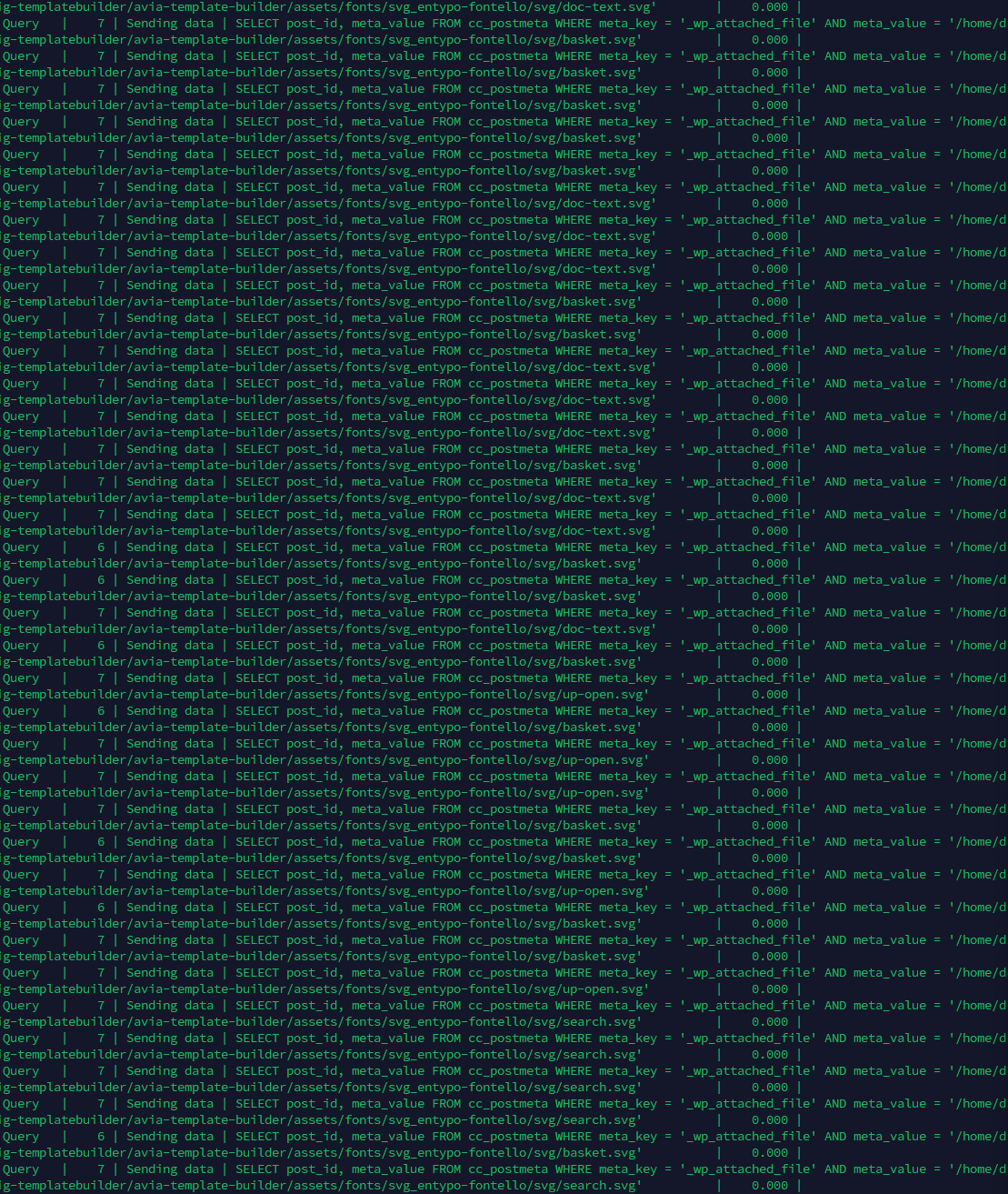
-
This reply was modified 1 year, 1 month ago by
 ceesenco.



