Upon adding a social profile, I can see in the Enfold>Header menu I can see there is an option to “Display in main header area”, but for the “Phone number/Extra info” drop down it doesn’t have this option. We would like out phone number in the main header area.
We are using the Enfold Construction Demo theme.
We would like our phone number where the “X” and “Dribble” buttons are.
Hi,
Sorry I don’t understand your request, Please note that we ask that each thread stays “on topic” and different threads are used for multiple questions, this helps future users find solutions easier and multiple Moderators assist you with a solution, thank you for understanding.
Please open a new thread and explain fully, perhaps a screenshot would help.
Best regards,
Mike
Hey jackwerrell,
As I understand try using a “header widget” please see our documentation here: Adding a header widget area
Best regards,
Mike
Hi, I am currently in the process of updating our website using the Enfold theme, we have out logo perfectly sized in the logo area, we would like to add our phone number aligned to the very right of the logo area, also allowing it to be an interactive button using the “tel:” link to our number. What is the best way to go about implementing this?
Loidis Fire Safety
Hey westefan,
If the field options are locked they will carry over to the duplicate, if you would like to request this feature the Dev Team has opened a new Github Feature Request for users to place requests and follow them as the Dev Team reviews them.
Best regards,
Mike
hi ismal, i disabled the recaptacha in the enfold form security option and the bug is gone. Is there a known conflict between recaptcha and the forms ?
Hi,
Thanks for the login to your site, when I check your site doesn’t have the Enfold theme installed, you have the Avada theme by ThemeFusion installed, you will need to check with them.
Best regards,
Mike
Hi,
Thanks for the update, we’ll close this thread for now then. Please open a new thread if you should have any further questions or problems.
Best regards,
Rikard
When I disable the Super Minify plugin and use the Enfold theme minify/merge CSS/JS options, I get the broken Easy slider again. I think it is because a JS error is recurring with your minify/merge tools.
I’m not sure what other tool to use to assess my performance . . . I think y’all had suggested DebugBear a while back, so that’s why I use theirs. Is there a better option for me to check?
Current desktop with Super Minfy plugin (enfold minify disabled): https://www.debugbear.com/test/website-speed/C7ILxl13/overview
Current mobile with Super Minify plugin (enfold minify disabled): https://www.debugbear.com/test/website-speed/iBNTHJck/overview
When I make changes, I typically delete the cache in WP, then delete my browser cache/history as well . . . this seems to trigger that 502 Bad Gateway cloudflare that I’ll get on their forum and with my host support to troubleshoot, but if y’all see anything I should point out to them, I’ll appreciate the info. . . I have to go visit every page and refresh it . . . though blog posts are not impacted.
Hey nancyT,
Try this CSS in your Enfold Theme Options ▸ General Styling ▸ Quick CSS field:
@media only screen and (max-width: 767px) {
    .responsive.html_header_top.html_logo_center #top .logo {
        left: 10%;
        position: relative;
        float: right;
    }
}
After applying the css, please clear your browser cache and check.

Best regards,
Mike
Client wants logo centered on mobile. (Enfold)
I was thinking it might be overlap the hamburger menu but promised I’d try. Can’t seem to target it properly.
thanks!
Nancy
-
This topic was modified 1 year ago by
 nancyT.
This happened after a major revise of the site in place, no migration. I understand it would be on by default, my question is where is the code which enables this option in the enfold theme it its not in the wp-config file were it is most often found. I thought that code got blown out there somehow, but I looked at other Enfold installations and found the code is in fact not there in an enfold installation.
Where in the code of the theme is there anything relevant to this? Or is there nothing in the theme at all which controls this?
Thanks
Hey Tim,
Try this CSS in your Enfold Theme Options ▸ General Styling ▸ Quick CSS field:
@media only screen and (max-width: 767px) {
.responsive #top .av_header_transparency.av_alternate_logo_active .logo a>svg {
    opacity: 0;
}

.responsive #top .av_header_transparency .logo .subtext.avia-svg-logo-sub {
    display: block;
}
}
Please ensure to copy the code from the forum and not an email notification so the symbols are not converted.
After applying the css, please clear your browser cache and check.
Best regards,
Mike
Hi,
Glad Ismael could help, if you have any further questions please create a new thread and we will gladly try to help you. Thank you for using Enfold.
Best regards,
Mike
Hi Rikard,
Thanks for your feedback.
while configuring the post view, I saw that it is possible to choose where I can display my post view using this code [post-views].
I need to use the blo c code in meta data blog . (Enfold child–>blog->meta data blog) and activate my count view. I think doing this I can display my code view near ” PAR NODEMIT”
How to put the post view in “meta data blog” on enfold child ?
Best regards,
Aubin
Hi,
Glad we were able to help, if you have any further questions please create a new thread and we will gladly try to help you. Thank you for using Enfold.
Best regards,
Mike
Hi,
Try this CSS in your Enfold Theme Options ▸ General Styling ▸ Quick CSS field:
.av-large-gap.av-fixed-size .av-masonry-entry .av-inner-masonry {
    right: 50px;
    bottom: 50px;
}
Adjust to suit.
After applying the css, please clear your browser cache and check.
Best regards,
Mike
Hi,
Try this CSS in your Enfold Theme Options ▸ General Styling ▸ Quick CSS field:
.single-post .big-preview.single-big {
	display: none;
}
After applying the css, please clear your browser cache and check.
Best regards,
Mike
Hi,
When I check your site https://veltrh.abcbrand.sk/en redirects to https://veltrh.abcbrand.sk/ so I can not see the different headers.
https://www.veltrhnehnutelnosti.sk/en doesn’t have the custom header widget area enabled, so you need to enable it.
This is probably a header widget area, but I can’t see without a login.
Best regards,
Mike
Hi,
Thanks for the update. If you have further questions which is not on the original topic, then please open a new thread and try to explain the problem that you are having a bit further. We’ll close this thread for now.
Best regards,
Rikard
Hi,
Thanks for the update, we’ll close this thread for now then. Please open a new thread if you should have any further questions or problems.
Best regards,
Rikard
Hello @Guenni007,
Thank you for the tip, the first thing I tried was to click the synchronize global settings option, and compare all enfold settings between the two languages but to no avail. Now I have tried exporting and importing the settings file.
Feel free to take a look at the two variants and their html structure of the header:
https://veltrh.abcbrand.sk/en
Best regards
as a participant i do not see your private content messages – but do you use WPML?
WPML does handle your language Settings even for those enfold options.
you got on top your lang flags :
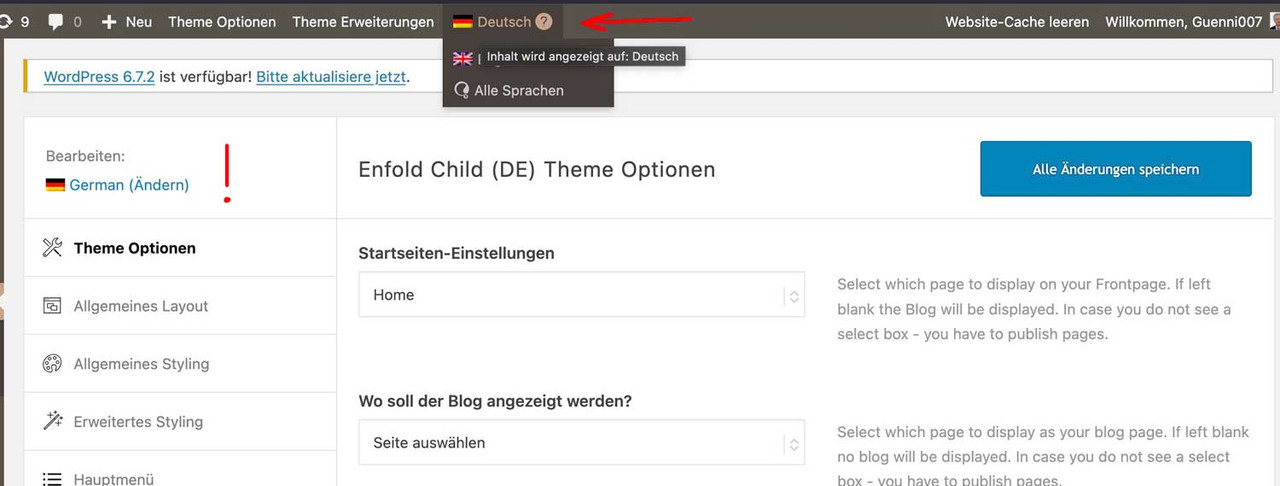
so if you like to have the same look – you had to synchronise these settings for each language.
read here https://kriesi.at/support/topic/implementing-the-same-theme-setting-to-all-languages-using-enfoldwpml/
My advice: first style the page completely in your native language, then go via the theme settings. ( see link above)
First: how did you embed/activate that Sacramento Font to Enfold?
Next: what is common to those headings that should use the Sacramento Font? (maybe there is something we can use as selector)
_______
If there is no commonality for these headings, you will need to do this manually.
You should give a custom class to those heading elements. (f.e. sacramento – why not?)
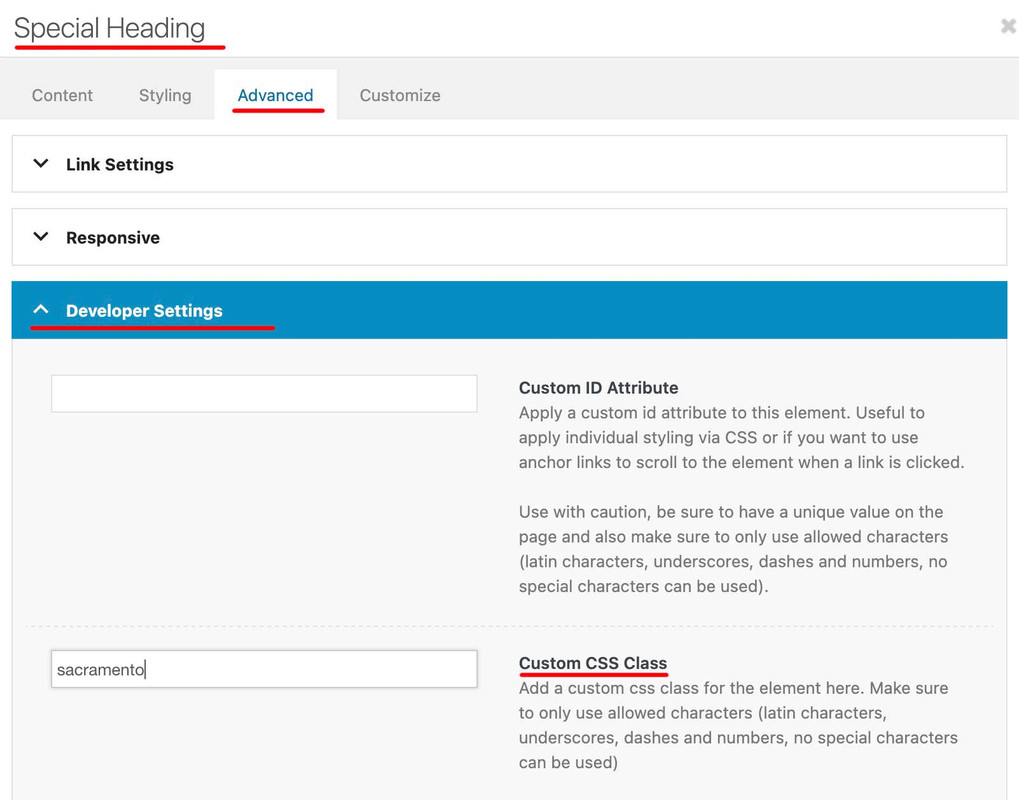
then you will have that custom class at the parent of your h-tags (av-special-heading-tag)
#top .av-special-heading.sacramento .av-special-heading-tag {
  font-family: 'sacramento';
  font-weight: 700
}
It may be necessary to force the font family by adding !important to this declaration.
Hello,
Could you please take a look at my website, and see why the header structure is different for main language and /en/ variant? The settings in enfold are the same for both languages, but one custom html is in container, other language doesn’t have it inside the container.
Thank you
I seem to remember running tests and finding that my speed suffers greatly unless i have somethings controlled by your stuff, and others controlled by the plugin . . . it was a maddeningly long process of figuring that out. I’ll try it both ways and see. The plugin interface looks different now than last time I looked at it, so they may have simplified it (or I may be thinking about a different plugin that was more complex).
I also have WP super cache running . . . does that have any impact? With enfold minification/merging off and super minify on, my debugbear numbers are showing ttfb at 2 seconds: https://www.debugbear.com/test/website-speed/W7grfudn/overview . . . I do remember that jetpack really screwed things up.
I’m putting my login creds in private box in case y’all need to see how its setup. I appreciate y’all’s help and patience.
UPDATE: With enfold css/js minification/merging ON with super minify, it gets me back to where I should be . . . no clue why it needs to do double duty? https://www.debugbear.com/test/website-speed/2QkjuPDT/overview
Thx!
Jon
@Ismael,
I have another issue linked here for which I need assistance. I’m assuming you’ll likely be the one to respond to it since most of modifications I made to tabs section was from CSS you’ve posted in previous forum posts. Please let me know if I need to create a new issue, or what the enfold moderators need to move forward with the issue. LINK is here. – https://kriesi.at/support/topic/pill-tab-section-not-working-as-expected/
Thank you!
Hi Rikard,
thank you for your answer.
The problem is that under “Enfold Child Theme Options – Blog Layout” under the option “Single Post Style” you can set that a large or small image should be displayed above the blog article. But since this looks unsightly for us, I would like to leave out this image above the blog article altogether.
Hope this helps to understand.
Best regards
 Ali Trevino-Murphy
Guest
Hi there,
I got a little overwhelmed by your contact system so just decided to go this route. My site has the enfold theme I think running in the background– a marketing company set it up for us. I have been getting emails from WordPress that my site has a vulnerability due to this theme and I asked Flywheel and they said the solution was to reach out to the makers of the theme directly.
Please help! I’m worried this will cause us to fail our PCI compliance that is coming up soon.
Thanks very much,
Ali



