Hi vigilanciamediterranea,
Did you read through the suggestions earlier in this thread? This is not a theme problem, please try temporarily deactivating plugins to see what happens then. If you should need further help, then please open a new thread.
Best regards,
Rikard
next question: why don’t you use the enfold options on adding video to color-section:
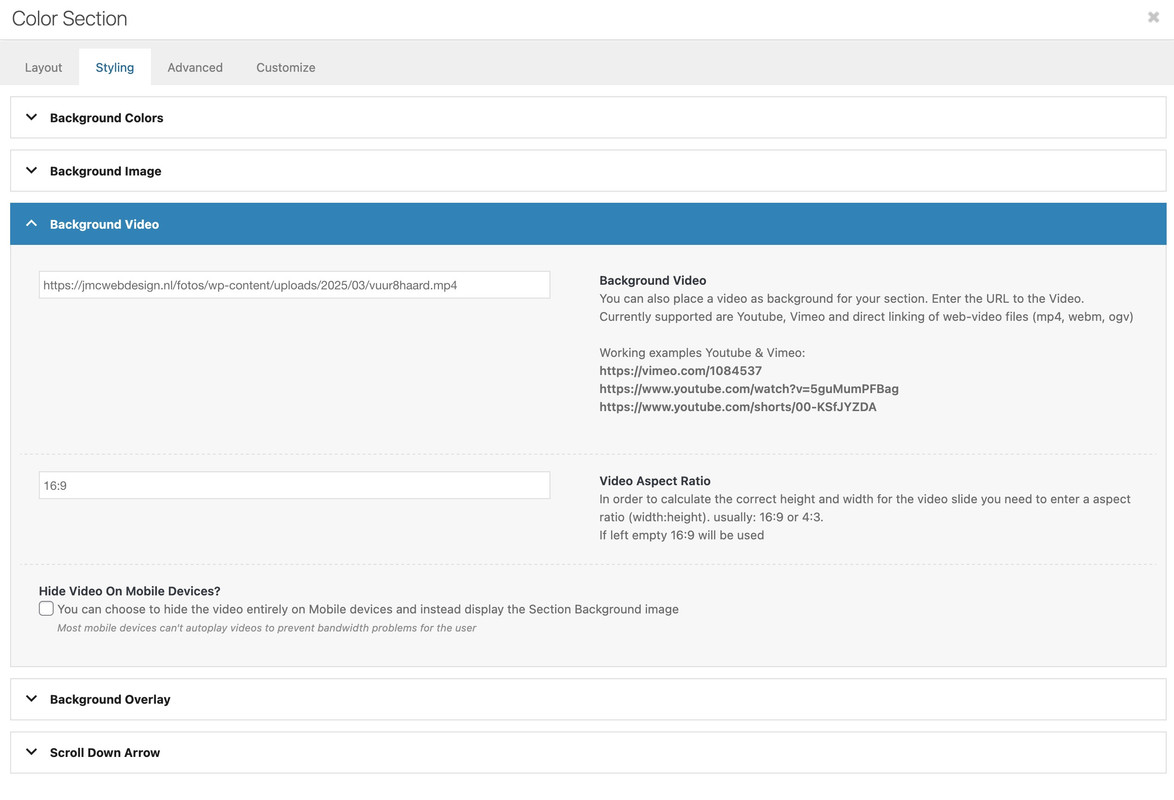
see with css code:
https://webers-testseite.de/vuur/
Update: I have updated to Enfold 7.1 this morning and still getting the error.
Hi Rikard,
i’ve update to 7.0 but it’s still not working. We have temporary insert the content into a Content Slider Element, for mobile view only ;-)
I’ve also try it on another page that is currently in production by us with Enfold. Theres also jumping up on scrolling (up).
Greetings
This reply has been marked as private.
Good day,
Please advise how the buttons placed over an image can be centred on a mobile device? It works perfectly on a tablet or larger screen but the buttons place at the top of the image on a mobile. I would like them centred in the square over the image.
https://img.savvyify.com/image/Screenshot-20250313-082839-Chrome.9Ezyc
Hi! Thank You for your reply and for going through it. I have checked the sample page that you have created, made some tests and here what I have found. When you create new page and put a color section with image background (like you have done), defining parameters like no repeat or stretch… It will show up for the first time. But as soon as you try to adjust the parameters after first save or create new color section on that existing page, the image will disappear. When you bring back the parameters to the values that you have defined when creating that page and section for the first time it will appear again. So this issue is making the work on the site completely impossible. Please take a look again. Previously the site was working completely without issues, and those issues came up after update of the template. One interesting point also, I have multiple sites on enfold, and on others there was no issue after the update. Only this one, so far as I noticed.
I uploaded the Enfold 7.0 and when activated, it gives an error of a fatal error has occurred. I put back the older version of enfold 5.6.5 and it works fine. I have purchased 27 licenses for different websites and never encountered this issue before.
Hey Russell,
Please login to our support forum, and open a new thread for technical support. Also please try to explain what happens a bit further, and include server error logs.
Best regards,
Rikard
Hi janssen-media,
Could you try updating the theme to the latest version (7.0) to see if that helps please? https://kriesi.at/documentation/enfold/theme-update/.
Best regards,
Rikard
hello, in the last few days I purchased the latest version of the Enfold theme, since I had Version 3.8 active on WordPress. I managed to install correctly the new version of the theme, everything is fine, the problem is that the portfolio elements are visible in the WordPress, but they are not visible in the site. I don’t know how to activate them on the site, could you help me? thanks
Hello, we’ve noticed an issue across multiple websites we’ve developed using the Enfold theme. Specifically, in Google search results, instead of showing the correct site name, Google often displays the domain name as the site title.
This happens regardless of the SEO plugin used (Yoast SEO, SEOPress, Rank Math, etc.), which suggests the issue might be related to Enfold itself. We have already:
• Set the correct SEO title in the homepage settings.
• Implemented structured data with WebSite schema defining the correct site name.
• Checked Google Search Console for any overriding settings.
• Requested reindexing, but the issue persists.
Could this behavior be caused by Enfold? Is there a specific setting or modification required in the theme to ensure Google picks up the correct site name?
Thank you in advance for your help!
Hey Enfold
I am about to build a graphic “value-house” of flip boxes, but I can not adjust the height of the flip box, I made for testing.
I am using a background image, which the flip box crops vertically.
I’ve tried all options available for adjusting the height but the flip box do not respond…
Would you by any chance look at it?
Data in private.
Best regards
We are having trouble with search icons displaying correctly since updating to the Enfold 7. I found the article on the SVG search icon, https://kriesi.at/support/topic/svg-search-icon-in-top-menu-after-update-enfold-7/ and that helped with the issue we were having with the icon ‘disappearing’ from the nav bar. However, we have a search widget area on the home page of the website that is no longer displaying correctly. The custom search icon (a .png) is no longer showing and has been automatically replaced by the SVG icon. That icon is now floating off to the right and is completely out of place in the widget area. I’ve attached a link to a screenshot of what it is supposed to look like and the website URL is in the private content as well. Your advice is appreciated. Thank you.
i understand – but what about showing me the demo-page what was the base of your page.
f.e.: https://kriesi.at/themes/enfold-law/practice-areas/#av_section_2 – and my question if it is a background-image or as an image element?
this is inside the zip file downloaded from Google:
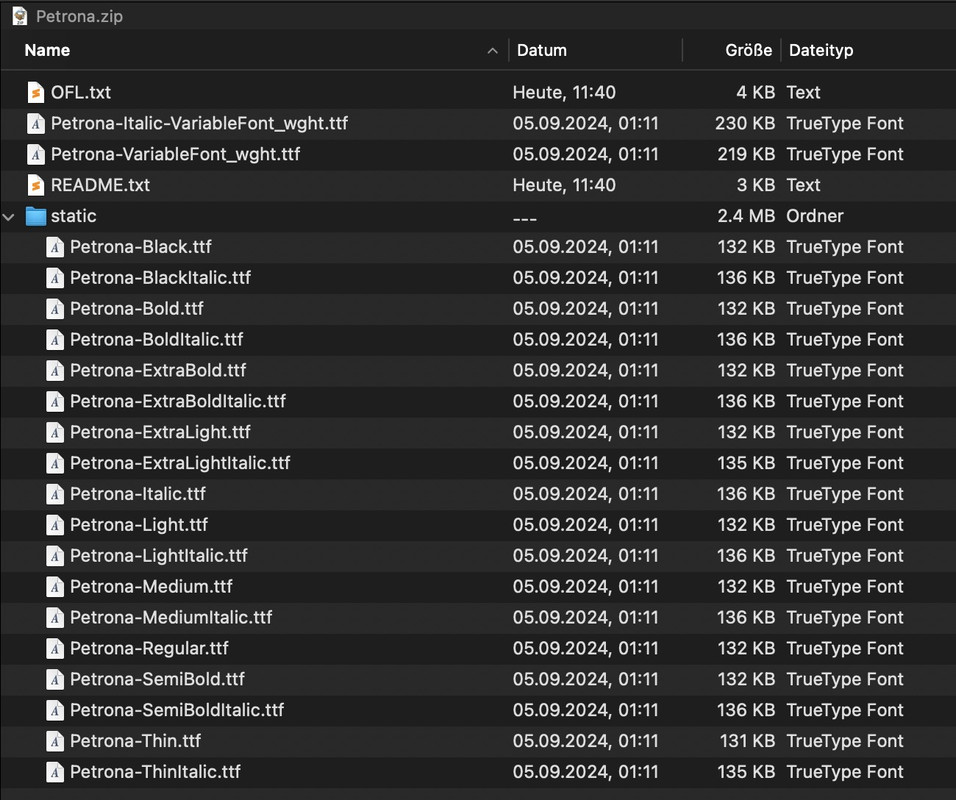
so you see the variable fonts – and inside the static folder the other fonts.
Enfold can handle both – but you had to upload them separately. So unzip that file – the varible fonts put in a Folder f.e. Petrona-variable and pull out that zip file the static folder and rename it to Petrona
zip these two folders ( on Mac do not include Mac Meta data ). Now these zip files are ready to upload. Make a decision what you like to use.
For testing purpose – if you only need 100,400,700 download: Link
and here is the variable font: Link
First test only the static fonts. Normal users rarely know how to use a variable font ;)
Enfold font manager:
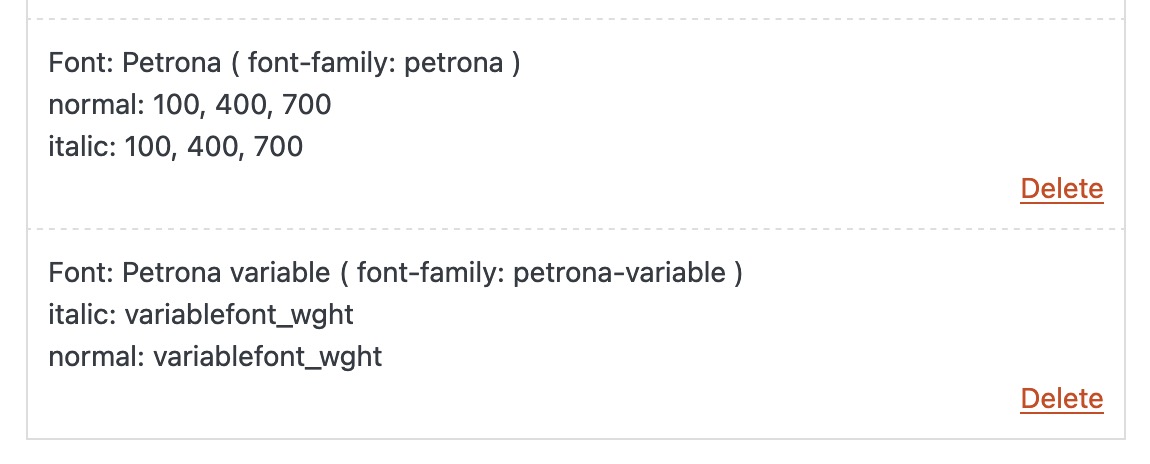
Choose your font then in General Styling – Fonts – at the end of the list there are the uploaded fonts
all modern-quote headings (from enfold heading element) are set to font-weight 300 on default. You can insert this to have bold :
#top .modern-quote .av-special-heading-tag {
  font-weight: 700;
}
your headings inside text-block are handled different – so they are bold.
the above problem may have nothing to do with this, but you are aware that the downloaded Petrona.zip contains both static and variable fonts.
Google Petrona is one such variable font. The zip file you download from Google contains the variable font files and the static font files in a subfolder. Enfold also supports the use of variable fonts – but you need to upload them separately.
Now you has to decide if you like to use both – and the static font files as fallback solution ( that needs some additional conditional querries ) – or to use one kind of font file.
The static fonts contain a large number of styles (from 100 to 900 – regular and italic); you may want to make a selection here.
Hey Ismael
That looks like it works nicely! Thank you very much!
The steps to get this working for a new person coming across this long thread:
If using the Enfold’s Advance Layout Builder (ALB) then the following needs to be done to get a single product image to change on hover. This will need to manually be done for each image and can not be done automatically from the approach Ismael showed.
————–
Go to the product image in the backend.
Click the main image and go to Advanced -> Animation -> Parallax Rules and Image Hover Effect and switch it to “Fade to another image” a little further down select which image it should switch to. Save the product and check the frontend. Hovering over the product image should now switch to the image that was selected.
——
Ismael I got one more thing to ask…
Can you also update the older thread showing the code needed? So that anyone whom comes across it can see the code snippet needed to get the general WooCommerce hover product (single, shop, archive) switch to another image.
Thank you again!
Hi,
Thanks for the update. Please try replacing enfold/framework/php/class-responsive-images.php with this file: https://github.com/KriesiMedia/enfold-library/blob/master/temp_fixes/Enfold_7_0/framework/php/class-responsive-images.php
Best regards,
Rikard
Hey Aram,
Thank you for the inquiry.
We temporarily disabled the Enfold > Performance > File Compression settings, and this seems to have fixed the issue with the blog page. We are not yet sure why the background image of the color section is not displaying. It worked fine on a test page we created (see the private field).
Please try to remove the current color section and delete the related background image from the Media > Library, then add the color section again and re-upload the image. Let us know how it goes.
Best regards,
Ismael
Mike
Omg, sorry. I do all sites with Enfold, forgot the client wanted Avada on that one.
Tony
Hi, Please help me with the issues that I face after updating the enfold.
Color section background image is not showing (cache is cleared and incognito browser is used).
There are unnecessary symbols on blog page and also in Advanced Layout Builder.
Thank You in advance!
 Pepe
PepeGuest
Hello,
I need to set up a temporary site to migrate a website. The original site has enfold but I don’t want to migrate the databases. I want to reconstruct everything from scratch as the site is too old, so there would be a time where I have to enfold deployments.
Is this scenario supported without buying another license?
Cheers.
Hallo,
ich habe Probleme mit der Darstellung des Portfolio Masonry.
Ich arbeite mit Landscape- und Portrait-Tags um einige Bilder größer anzuzeigen.
Alle Portfolio featured Images sind in einer Größe angelegt.
Das Problem ist, das die Sortierung nach Datum nicht stimmmt.
Ich möchte 2 Spalten, mit einem grosses Bild und daneben 2 kleine untereinender.
In der nächsten Zeilen möglichst umgekehrt – und genau dies macht die Taxonomie leider nicht.
Die großen Bilder setzt er alle untereinenander, nicht versetzt.
Enfold setzt dazwischen einfach andere Bilder (älteren Datums) oder er hält die reihenfolgen der großen Bilder nicht ein.
Ich habe alles ausprobiert auch mit Seitenreihenfolge, bin aber mit meinem Latein am Ende. :-)
Gibt es Hilfe?
———–
Hello,
I have problems with the display of Portfolio Masonry.
I work with landscape and portrait tags to display some images larger. (double size)
All portfolio featured images are set up in one size.
The problem is that the sorting by date is not correct.
I want 2 columns, with a large image and next to it 2 small ones, one below the other.
In the next row, if possible, the other way round – and unfortunately this is exactly what the taxonomy does not do.
He places the large pictures one below the other, not offset.
Enfold simply puts other images (older dates) in between or it does not maintain the order of the large images.
I have tried everything, including the page order, but I am at my wits’ end. :-)
Is there any help?
-
This topic was modified 1 year ago by
 bur2000.
-
This topic was modified 1 year ago by bur2000.
Hi,
Glad Guenni007 could help, thank you Guenni007, if you have any further questions please create a new thread and we will gladly try to help you. Thank you for using Enfold.
Best regards,
Mike
Hi,
Glad Guenni007 could help, thank you Guenni007, if you have any further questions please create a new thread and we will gladly try to help you. Thank you for using Enfold.
Best regards,
Mike
Hi,
Glad Guenni007 could help, thank you Guenni007, if you have any further questions please create a new thread and we will gladly try to help you. Thank you for using Enfold.
Best regards,
Mike
Please toggle or temporarily disable the Enfold > Performance > File Compression settings after adding the css. – what file compression setting do?
I updated one of our client’s websites to Enfold 7.0 last week and have been experiencing very slow speeds when trying to edit pages.
We have have repaired and optimized the database tables and emptied the debug log file, which was quite large. We also updated PHP to the latest release and increased the PHP resources to improve the website’s performance. Unfortunately, none of those things have helped.
Any suggestions or assistance would be appreciated. Thanks.



