-
Search Results
-
Hello Enfold team,
We are experiencing KILLED QUERY errors particularly for magazine element (see end of this post for sample error). When contacting WP Engine they also report that our autoload data is very high and point to Enfold. They provided a way to set autoload off but I’d need to know which Enfold autoload entries you’d suggest to change to no. Your help is appreciated.
Error sample
KILLED QUERY (22544 characters long generated in /nas/content/live/wels/wp-content/themes/enfold/config-templatebuilder/avia-shortcodes/magazine/magazine.php:1135): SELECT SQL_CALC_FOUND_ROWS wp_posts.ID#012#011#011#011#011#011 FROM wp_posts LEFT JOIN wp_term_relationships ON (wp_posts.ID = wp_term_relationships.object_id)#012#011#011#011#011#011 WHERE 1=1 AND ( #012 wp_term_relationships.term_taxonomy_id IN (250)#012) AND ((wp_posts.post_type = ‘alb_custom_layout’ AND (wp_posts.post_status = ‘publish’ OR wp_posts.post_status = ‘tribe-ea-success’ OR wp_posts.post_status = ‘tribe-ea-failed’ OR wp_posts.post_status = ‘tribe-ea-schedule’ OR wp_posts.post_status = ‘tribe-ea-pending’ OR wp_posts.post_status = ‘tribe-ea-draft’ OR wp_posts.post_status = ‘future’ OR wp_posts.post_status = ‘draft’ OR wp_posts.post_status = ‘pending’ #012OR wp_posts.post_status = ‘private’ #012OR wp_posts.post_status = ‘sent’)) OR (wp_posts.post_type = ‘ame_ac_changeset’ AND (wp_posts.post_status = ‘publish’ OR wp_posts.post_status = ‘tribe-ea-success’ OR wp_posts.post_status = ‘tribe-ea-failed’ OR wp_posts.post_status = ‘tribe-ea-schedule’ OR wp_posts.post_status = ‘tribe-ea-pending’ OR wp_posts.post_status = ‘tribe-ea-draft’ OR wp_posts.post_status = ‘future’ OR wp_posts.post_status = ‘draft’ OR wp_posts.post_status = ‘pending’ #012OR wp_posts.post_status = ‘private’ #012OR wp_posts.post_status = ‘sent’)) OR (wp_posts.post_type = ‘attachment’ AND (wp_posts.post_status = ‘publish’ OR wp_posts.post_status = ‘tribe-ea-success’ OR wp_posts.post_status = ‘tribe-ea-failed’ OR wp_posts.post_status = ‘tribe-ea-schedule’ OR wp_posts.post_status = ‘tribe-ea-pending’ OR wp_posts.post_status = ‘tribe-ea-draft’ OR wp_posts.post_status = ‘future’ OR wp_posts.post_status = ‘draft’ OR wp_posts.post_status = ‘pending’ #012OR wp_posts.post_status = ‘private’ #012OR wp_posts.post_status = ‘sent’)) OR (wp_posts.post_type = ‘avia_framework_post’ AND (wp_posts.post_status = ‘publish’ OR wp_posts.post_status = ‘tribe-ea-success’ OR wp_posts.post_status = ‘tribe-ea-failed’ OR wp_posts.post_status = ‘tribe-ea-schedule’ OR wp_posts.post_status = ‘tribe-ea-pending’ OR wp_posts.post_status = ‘tribe-ea-draft’ OR wp_posts.post_status = ‘future’ OR wp_posts.post_status = ‘draft’ OR wp_posts.post_status = ‘pending’ #012OR wp_posts.post_status = ‘private’ #012OR wp_posts.post_status = ‘sent’)) OR (wp_posts.post_type = ‘bible3’ AND (wp_posts.post_status = ‘publish’ OR wp_posts.post_status = ‘tribe-ea-success’ OR wp_posts.post_status = ‘tribe-ea-failed’ OR wp_posts.post_status = ‘tribe-ea-schedule’ OR wp_posts.post_status = ‘tribe-ea-pending’ OR wp_posts.post_status = ‘tribe-ea-draft’ OR wp_posts.post_status = ‘future’ OR wp_posts.post_status = ‘draft’ OR wp_posts.post_status = ‘pending’ #012OR wp_posts.post_status = ‘private’ #012OR wp_posts.post_status = ‘sent’)) OR (wp_posts.post_type = ‘custom_css’ AND (wp_posts.post_status = ‘publish’ OR wp_posts.post_status = ‘tribe-ea-success’ OR wp_posts.post_status = ‘tribe-ea-failed’ OR wp_posts.post_status = ‘tribe-ea-schedule’ OR wp_posts.post_status = ‘tribe-ea-pending’ OR wp_posts.post_status = ‘tribe-ea-draft’ OR wp_posts.post_status = ‘future’ OR wp_posts.post_status = ‘draft’ OR wp_posts.post_status = ‘pending’ #012OR wp_posts.post_status = ‘private’ #012OR wp_posts.post_status = ‘sent’)) OR (wp_posts.post_type = ‘customize_changeset’ AND (wp_posts.post_status = ‘publish’ OR wp_posts.post_status = ‘tribe-ea-success’ OR wp_posts.post_status = ‘tribe-ea-failed’ OR wp_posts.post_status = ‘tribe-ea-schedule’ OR wp_posts.post_status = ‘tribe-ea-pending’ OR wp_posts.post_status = ‘tribe-ea-draft’ OR wp_posts.post_status = ‘future’ OR wp_posts.post_status = ‘draft’ OR wp_posts.post_status = ‘pending’ #012OR wp_posts.post_status = ‘private’ #012OR wp_posts.post_status = ‘sent’)) OR (wp_posts.post_type = ‘deleted_event’ AND (wp_posts.post_status = ‘publish’ OR wp_posts.post_status = ‘tribe-ea-success’ OR wp_posts.post_status = ‘tribe-ea-failed’ OR wp_posts.post_status = ‘tribe-ea-schedule’ OR wp_posts.post_status = ‘tribe-ea-pending’ OR wp_posts.post_status = ‘tribe-ea-draft’ OR wp_posts.post_status = ‘future’ OR wp_posts.post_status = ‘draft’ OR wp_posts.post_status = ‘pending’ #012OR wp_posts.post_status = ‘private’ #012OR wp_posts.post_status = ‘sent’)) OR (wp_posts.post_type = ‘dev-daily’ AND (wp_posts.post_status = ‘publish’ OR wp_posts.post_status = ‘tribe-ea-success’ OR wp_posts.post_status = ‘tribe-ea-failed’ OR wp_posts.post_status = ‘tribe-ea-schedule’ OR wp_posts.post_status = ‘tribe-ea-pending’ OR wp_posts.post_status = ‘tribe-ea-draft’ OR wp_posts.post_status = ‘future’ OR wp_posts.post_status = ‘draft’ OR wp_posts.post_status = ‘pending’ #012OR wp_posts.post_status = ‘private’ #012OR wp_posts.post_status = ‘sent’)) OR (wp_posts.post_type = ‘dev-military’ AND (wp_posts.post_status = ‘publish’ OR wp_posts.post_status = ‘tribe-ea-success’ OR wp_posts.post_status = ‘tribe-ea-failed’ OR wp_posts.post_status = ‘tribe-ea-schedule’ OR wp_posts.post_status = ‘tribe-ea-pending’ OR wp_posts.post_status = ‘tribe-ea-draft’ OR wp_posts.post_status = ‘future’ OR wp_posts.post_status = ‘draft’ OR wp_posts.post_status = ‘pending’ #012OR wp_posts.post_status = ‘private’ #012OR wp_posts.post_status = ‘sent’)) OR (wp_posts.post_type = ‘dev-women’ AND (wp_posts.post_status = ‘publish’ OR wp_posts.post_status = ‘tribe-ea-success’ OR wp_posts.post_status = ‘tribe-ea-failed’ OR wp_posts.post_status = ‘tribe-ea-schedule’ OR wp_posts.post_status = ‘tribe-ea-pending’ OR wp_posts.post_status = ‘tribe-ea-draft’ OR wp_posts.post_status = ‘future’ OR wp_posts.post_status = ‘draft’ OR wp_posts.post_status = ‘pending’ #012OR wp_posts.post_status = ‘private’ #012OR wp_posts.post_status = ‘sent’)) OR (wp_posts.post_type = ‘ecme-dev’ AND (wp_posts.post_status = ‘publish’ OR wp_posts.post_status = ‘tribe-ea-success’ OR wp_posts.post_status = ‘tribe-ea-failed’ OR wp_posts.post_status = ‘tribe-ea-schedule’ OR wp_posts.post_status = ‘tribe-ea-pending’ OR wp_posts.post_status = ‘tribe-ea-draft’ OR wp_posts.post_status = ‘future’ OR wp_posts.post_status = ‘draft’ OR wp_posts.post_status = ‘pending’ #012OR wp_posts.post_status = ‘private’ #012OR wp_posts.post_status = ‘sent’)) OR (wp_posts.post_type = ‘ep-pointer’ AND (wp_posts.post_status = ‘publish’ OR wp_posts.post_status = ‘tribe-ea-success’ OR wp_posts.post_status = ‘tribe-ea-failed’ OR wp_posts.post_status = ‘tribe-ea-schedule’ OR wp_posts.post_status = ‘tribe-ea-pending’ OR wp_posts.post_status = ‘tribe-ea-draft’ OR wp_posts.post_status = ‘future’ OR wp_posts.post_status = ‘draft’ OR wp_posts.post_status = ‘pending’ #012OR (wp_posts.post_author = 41 AND wp_posts.post_status = ‘private’) #012OR (wp_posts.post_author = 41 AND wp_posts.post_status = ‘sent’))) OR (wp_posts.post_type = ‘ep-synonym’ AND (wp_posts.post_status = ‘publish’ OR wp_posts.post_status = ‘tribe-ea-success’ OR wp_posts.post_status = ‘tribe-ea-failed’ OR wp_posts.post_status = ‘tribe-ea-schedule’ OR wp_posts.post_status = ‘tribe-ea-pending’ OR wp_posts.post_status = ‘tribe-ea-draft’ OR wp_posts.post_status = ‘future’ OR wp_posts.post_status = ‘draft’ OR wp_posts.post_status = ‘pending’ #012OR (wp_posts.post_author = 41 AND wp_posts.post_status = ‘private’) #012OR (wp_posts.post_author = 41 AND wp_posts.post_status = ‘sent’))) OR (wp_posts.post_type = ‘family-devotion’ AND (wp_posts.post_status = ‘publish’ OR wp_posts.post_status = ‘tribe-ea-success’ OR wp_posts.post_status = ‘tribe-ea-failed’ OR wp_posts.post_status = ‘tribe-ea-schedule’ OR wp_posts.post_status = ‘tribe-ea-pending’ OR wp_posts.post_status = ‘tribe-ea-draft’ OR wp_posts.post_status = ‘future’ OR wp_posts.post_status = ‘draft’ OR wp_posts.post_status = ‘pending’ #012OR wp_posts.post_status = ‘private’ #012OR wp_posts.post_status = ‘sent’)) OR (wp_posts.post_type = ‘faq’ AND (wp_posts.post_status = ‘publish’ OR wp_posts.post_status = ‘tribe-ea-success’ OR wp_posts.post_status = ‘tribe-ea-failed’ OR wp_posts.post_status = ‘tribe-ea-schedule’ OR wp_posts.post_stat
Topic: Custom divider
Hello,
i want te make something like the picure in the link. I have tried te use the custom svg divider en other options in enfold en searched over the internet for a solution but haven’t found anything. I want half an background color under a layout element. See for my idea:
https://brugmedia.nl/wp-content/uploads/2025/04/Screen.pngIs something like this possible in enfold?
Hi! I have installed last update of Enfold.
My web is aytoconsuegra.es and here is the normal view of article list in Homepage (left my web, right other web with same template):

Now here is my web aytoconsuegra.es mobile view of article list in Homepage (left my web, right other web with same template):
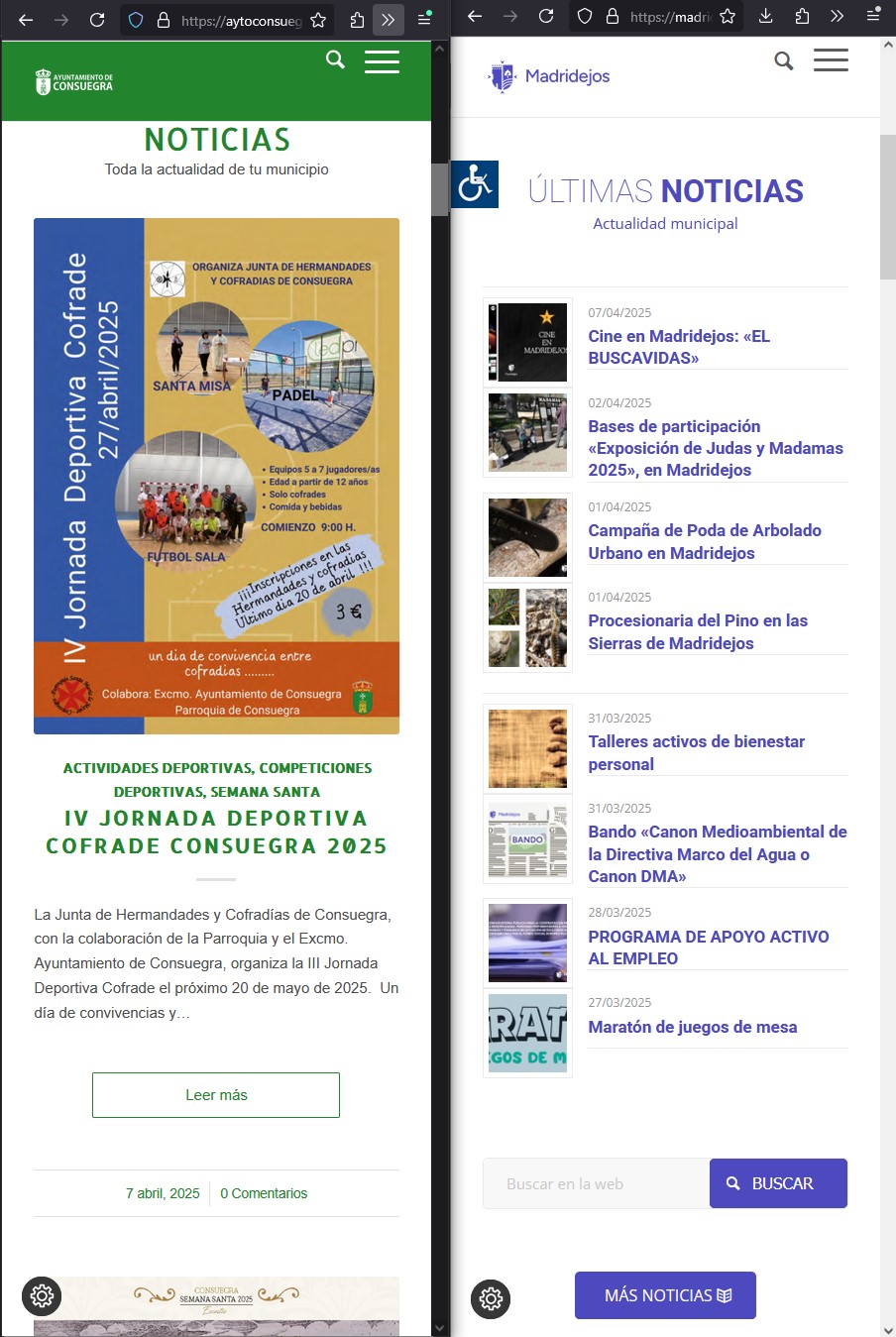
I would like to keep the same format as the website on the right.
Thanks.
Topic: Can this update be done?
I have taken over an old site and it’s last version is Enfold: 4.7.6.3. Is it even possible to update to 7.1? If not are there older versions that I can upload and work my way to 7.1?
Hi @enfold!
Using your wonderful Hello-Theme I wonder how I can Change the subtitels in the Menue-Bar
Thanks for your Feedback.Michael F Kraus
The shortcode button hyperlink does not work. The buttons look nice but do not load the referenced URL.
The shortcode (with URL placeholder text) is:
[av_button label='ALL ISSUES' link='manually,http://' link_target='https://theURL' size='medium' position='left' icon_select='no' font='entypo-fontello' color='theme-color' custom_bg='#444444' custom_font='#ffffff' av_uid='av-5obiu2i']I’ve tried these steps too, but still no success:
– Disable “merging and compression” for CSS and JS files from Enfold > Performance.
– If a caching plugin is installed check the plugin settings and clear the cache..
– Hard refresh by pressing Ctrl + Shift + F5 on your browser or press the F12 key to open chrome dev tools and right click on the refresh button and select “Empty Cache and Hard Reload”.Hi,
We’ve encountered a PHP Fatal Error in the Enfold theme, causing our WordPress installation to crash intermittently. The issue originates from an unsupported operation (string + int) in the postslider.php file:
File Path:
/themes/enfold/config-templatebuilder/avia-shortcodes/postslider/postslider.phpLine 1447:
$params[‘offset’] = $params[‘offset’] + ( ( $this->current_page – 1 ) * $params[‘items’] );
Suggested fix:
Explicitly cast parameters to integers to avoid type errors:$params[‘offset’] = (int)$params[‘offset’] + ((int)($this->current_page – 1) * (int)$params[‘items’]);
Please consider including this adjustment in your next update to ensure greater stability across varying page configurations.
Thanks
Hi Enfold Team and community,
I’m using the Masonry element with taxonomy filters via the Avia Layout Builder, and I’ve noticed that the “ALL” label (which appears to show all items) cannot currently be customized or translated from the backend interface.This becomes problematic on multilingual sites or when specific UI wording is needed (e.g., replacing “ALL” with “Everything”, “Tous les articles”, “Overview”, etc.).
I’ve submitted a feature request on GitHub to suggest making this label customizable: 🔗 GitHub Feature Request: https://github.com/KriesiMedia/Enfold-Feature-Requests/issues/132
Feel free to support the idea there if you think it would improve flexibility and localization for your projects too!
Thanks again to the Enfold team for the great work!
Best regards,
ArsèneHi,
I registered a custom image size adding following code to functions.php:function add_custom_image_size() { add_image_size( 'medium_squared', 600, 600, true ); // true = crop esatto } add_action( 'init', 'add_custom_image_size' ); function add_custom_image_sizes_to_editor( $sizes ) { return array_merge( $sizes, array( 'medium_squared' => __( 'Medium squared' ), ) ); } add_filter( 'image_size_names_choose', 'add_custom_image_sizes_to_editor' );Now I can see and use my new image size in Wp:
But i can’t see it in Enfold ALB elemnts dropdowns:
Any help?
Thank youMy Google Recaptcha V3 and V2 is shown as working in the Enfold settings but when I try to send an email from my contact form I get the error “Invalid form for recaptcha sent”. This error goes away if I turn of file compression in the Enfold settings but I want to keep file compression on. Is this an error?
I noticed that my client’s site is not showing the slider and gallery images. I updated Enfold to 7.0, and I’m still not seeing them populate.
Any ideas?
Thanks
B
Viewing 30 results - 3,121 through 3,150 (of 244,510 total)