-
Search Results
-
Hi there,
I built this site with Enfold, as I always do and LOVE Enfold, but I’m getting this error from Google Search Console which I’ve never gotten before. I tried looking up Google results, but I don’t understand the error or the reason for it, I apologize for my lack of knowledge. Any idea what’s causing it and how to fix it?
New issues detected on https://falconlam.com/
To owner of https://falconlam.com/,Search Console has identified that your site is affected by 6 new issues of type Products.
Top Errors (5 maximum)Errors can prevent your page or feature from appearing in Search results. The following errors were found on your site:
Either “offers”, “review”, or “aggregateRating” should be specified
Hey Team Enfold,
I’m having some trouble with ‘search’ content element (avia_sc_search) on Safari (iPhone). The search element shows ajax search results in a list underneath the input field and if one would like to scroll down to see the last result in a list it can not be done. As soon as you touch the screen it clears the search box and thus removes the search results. On comparison on an android device (chrome) you can scroll the page without loosing the search results and search result box dissapears after a click outside of that search box (normal behaviour).
My best guess would be that Safari handles some click/touch events differently. How can I achieve androids expected behaivior on iPhone’s Safari?
These test are done on latest Enfold (at the time 4.5.4), fresh WP 5.1 install, nothing else installed.
Looking forward to hearing from you,
AF
Topic: Enable Related Posts
I’ve searched the entire forum and tried everything I’ve found. I still can’t get related posts to work.
Can someone explain — step-by-step — how to get related posts working.
I have 10 posts, at least, with the same tags.
I have enabled them in the Enfold setup.
Nothing.I’ve added the blog block in ALB. It just shows the latest posts, including the post it’s currently on.
I’ve added php code directly to the single.php file.
I’ve created my own related-posts.php file in my child theme includes folder.
Again, nothing.
I’m using a Related Posts Plugin but I really want this to work natively.
If anyone can help I would really appreciate it.
Hi,
I want to enable adding variation product directly from shop page. So far it’s working fine, here’s the guide I followed:
https://stackoverflow.com/questions/51827835/how-to-add-to-cart-without-reloading-page-on-woocommerce/51828575#51828575There’s only one thing missing, it’s the loading sequence when you click “Add to Cart” (in my case, it’s “Buy Now” button). Enfold gives loading sequence, like:
– reducing “Add to Cart” button opacity
– loading spinner on product image
– check mark after it’s successfully added
– notification on cart, that product is addedI want to add those sequence to my custom button. You can see for yourself at my site (link attached), if you search for “VARIABLE” product, the ones with select option to select variations, and you click “Buy Now”, it’ll just add the product directly, no loading sequence.
Can you help?
Thanks.
hello, at this website the header is displaying oke on a pc , but on a mobile its displaying in a different way:
1. you can still see the Enfold logo on a mobile. I have resolved this problem by loading up my own logo and than hiding it via CSS.
The problems here below however are still existing:2. ive just removed a lot of code in in my css and now things seem to be better. (i had some kind of menu problems on my mobile, see pics below).
Still, i think the menu bar is quite high at the moment , on mobile as well as on a pc.
Is there a way to diminish this height or is this impossible because of the searching glass displayed as wel as the tree menu lines on a mobile?Hi,
I am having the same issue as described at https://kriesi.at/support/topic/strip-shortcodes-in-searchresults/, but I am not using my own excerpts. Check out the first result at https://www.c3s.ie/?s=school. I don’t want to see the following:
[/av_icon_box]
[/av_one_third][/av_section]If it helps, here is the actual content from the Secondary School Resources post, pulled from the database: https://my.cl.ly/content/81ce30a5cfd1
Using latest WP and Enfold 4.5.2 (can’t update to 4.5.4 as mentioned in another ticket). Please advise, thanks!
Has anybody else had this? I ran the last update on both of my websites and now google won’t index my home pages. I run Yoast on both sites so I know that everything with right on point before the updates. Now google fetch tests and the Ryte website list a whole host of problems that I don’t understand and haven’t seen before.
Both Yoast support and ryte show that the whole site appears to be indexed but something is stopping the home page from being indexed which is, of course, a major issue when my search engine results went from the top position prior to the update to now not being indexed.
Sitemaps have dropped off, API removed…..I’m not using any plugins that I wasn’t using before the update either…
Is it possible that the update has robots.txt file that’s blocking indexation???? How can I go from top ranking for specific search results to not being indexed at all…. just because of an enfold update????
Any assistance at all would be greatly appreciated.
Hi Enfold team, thanks for a truly great theme! Impressive work!
A question for the Team and a little explanation from me which may help other people on Enfold. As I’ve seen many people on this (and other forums) confused on how to deal with retina/non-retina images.
I am happy to see that Enfold has taken the same approach I favour for catering to retina screens: upload double-size and let the theme/browser do the downscaling as needed.
I basically treat images this way in WP:
– create double-size true width/height
– save them in Photoshop “save for web” with between 30 and 20% quality
– run all images through FileOptimizer before upload
– set WP compression to between 90 and 100
– set thumbnails in theme functions.php to double-size and regenerate thumbs
– run all thumbs from WP through FileOptimzer locally and re-upload through FTPMy question to you:
Do I need to manually double the sizes of the thumbs in the (child)theme’s function.php for the thumbnails or have your already done this? I would not want to make the thumbs 4x as big as needed :-)For Enfold users wondering about the why of this approach:
Content images in a responsive template have different requirements compared to the traditional “this-is-the-width” approach. But all present attempts to serve up different image sizes to different devices, whether client-side or server-side, are incomplete at best and based on wrong assumptions at worst (apart from most of them not being standards compliant). Including the src-set approach favoured by WP and the plugin Retina approach. Why?
These factors make the traditional (src-set) approach invalid:
– the same content image is wider when there is no sidebar present
– content images in widgets change width on various smaller screens
– content images in sidebars change width on various smaller screens
– high resolution / retina screens need a 2x larger image to be sharp
– smaller screen widths may have higher resolution screens
– users may always zoom in on each page (on desktop, tablet and phone)So we need to serve up much larger images in order to cater for the above. But we have no way of knowing in advance which device has which screen resolution with which layout and which zoom. At present the best solution in my opinion is therefore to serve up one large image and to let the browser do the scaling for us (modern browsers have become quite good at this). Yes, even for phones/tablets.
This does not mean we need to bother our visitors with large image sizes, more data consumption and slower loading pages.
High Resolutin/Retina images aren’t necessarily larger files, at least not with JPEGs. Since you have four times as many pixels with a twice larger size, you can get away with a great deal more compression, and the end result is sometimes even smaller than the original. A 400x400px image at 40% quality may appear no more heavily compressed than a 200x200px image at 80% quality, yet may be the same or smaller file size.By having a 2x larger image and then scaling down in the browser, it has the effect of reducing the jpeg compression from 8×8 squares to 4×4 squares (giving the compression 64 pixels to work with instead of 16) on standard monitors – even at high compression. This “false resolution” hides the increased numbers of jpeg artifacts. On retina screens the artifacts would double with a traditional size image scaled up.
This is an interesting and extensive research article showing this option for dealing with highres images:
https://www.netvlies.nl/tips-updates/algemeen/design-interactie/retina-revolution/Basically, it’s saying that, if you make the image quite large (width and height), but then save it at quite low quality, it still comes out very sharp on retina displays. It means that you can use the one same image on all devices, and that the file size is very low, too, which is an extra bonus. You can set the width (with the height set to auto) of the image in the CSS to get the dimensions needed.
This is currently my approach for dealing with both retina-friendly and bandwidth-friendly images.
Example with a test photo with many details:
Traditional: test-600x375px – 80% quality – size = 87KB
Retina-friendly: test-1200×750 – 40% quality – size = 96KB
Retina-friendly: test-1200×750 – 30% quality – size = 79KB
Retina-friendly: test-1200×750 – 20% quality – size = 67KBUsually 30% quality “save for web” in Photoshop is quite enough for a double-sized (retina) image to remain sharp. And many times even 20% quality will work just fine. Try it out yourself.
For Enfold users on Windows, may I suggest a great tool for (loslessly) compressing PNG and JPG (and many other formats) even further before uploading?
FileOptimizer
website: https://nikkhokkho.sourceforge.net/static.php?page=FileOptimizerWe are using Enfold theme with Layer slider. The image slider on the home page and the tops of all the interior pages are not displaying.
I’ve spent some time searching for the answer and can’t find anything. It seems like everything is set correctly but the images still don’t display.
We don’t have a caching plugin.
I have the classic editor installed and activated. I’ve set the theme settings for the WP classic editor.Hello,
I checked out my site created with Enfold oni google search console. Googlebot does say that my site is not optimized for mobile and does not load a lot of resources
Help!
http://www.studiodentistico-depetro.itThank you
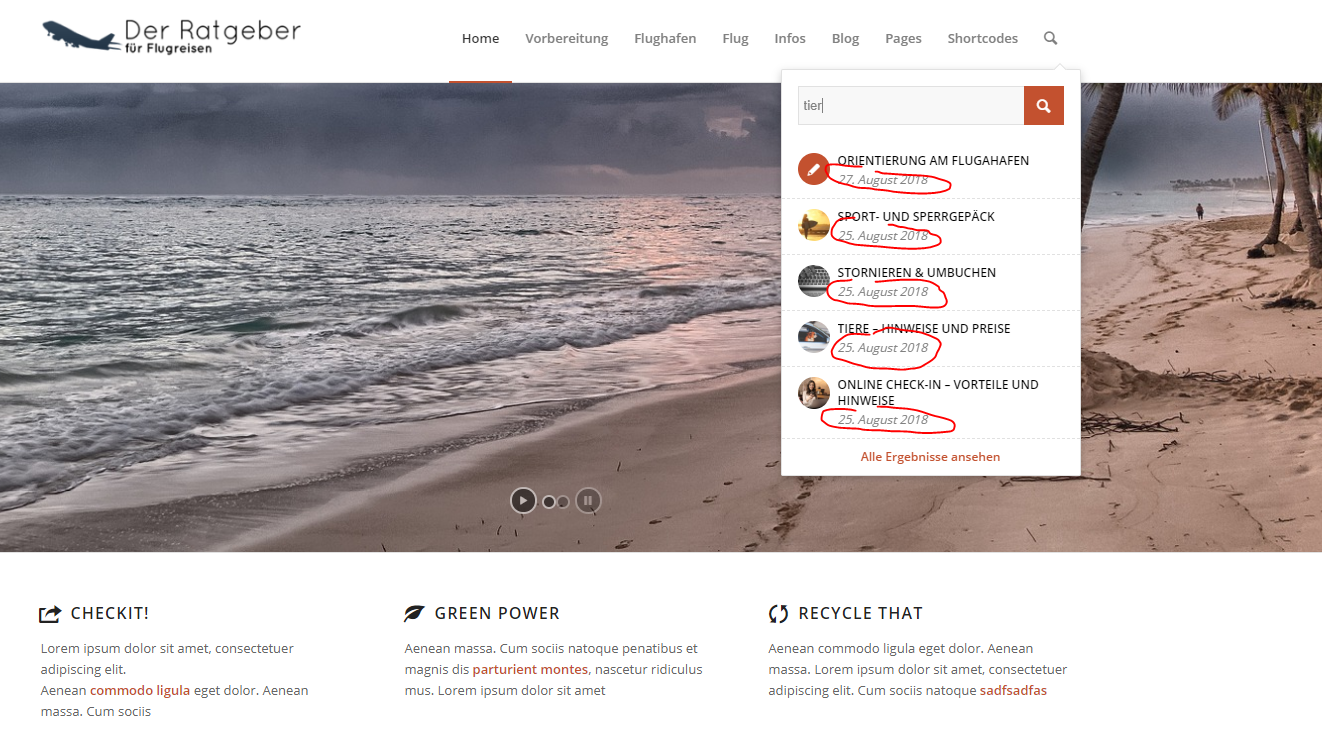
Topic: Search bar – Remove date
Dear team,
I would like to remove the date label in the search from my Enfold Theme.
Here a screenshot; there I marked the place red.
https://s17.directupload.net/images/190220/vmw8u9zr.pngI would be very happy if there would be a way to remove the date from this view.
Many greetings
FelixTopic: Forms
Hi,
This is a general website question and not really an Enfold issue, at least I don’t think it is. I want a form selection tool or plugin that allows me to ask a few questions with conditional formatting with the end result to point to a certain page on the website.
I have contact form 7 but that seems to only work for sending emails.
I want something that asks – What kind of Printer? Brother, Epson, etc. then, based on that answer, you can select the printer type. Then, based on that result you press submit and it takes you to a page where it seels ink for just those printers.
I don’t know what you call that and I can’t search for it. Would appreciate any help anyone can offer.
Thanks!
When editing the home page, if I click the Preview button or the Update button, when it opens the new tab, it gives the error “Sorry, the post you are looking for is not available. Maybe you want to perform a search?”
After getting the error, I updated to WordPress 5.0.3, then switched back to the classic editor, and am still getting the same error message. The error only occurs, though, when I’m working with the home page; any other page that I edit can be previewed with no errors.
I am using Enfold 4.4.1
Hello–I’m a little behind the times and trying to upgrade my Enfold theme as part of my managed WordPress v5.0.3/PHP version 5.6 site. Whenever I try to upgrade the theme, I get this error:
“Downloading update from …
An error occurred while updating Enfold: Download failed. A valid URL was not provided.”I searched the forums and found that the moderator in this thread: https://kriesi.at/support/topic/enfold-4-5-theme-update-update-failed-download-failed-a-valid-url-was-not-pro/ said to open a new thread if you were having trouble.
So, I’m opening up a new thread. Any help is appreciated! Thanks!
Hi,
I get an error (see details hereafter) when clicking the “search icon” in the main menu
Using Enfold 4.5.3
Can you help ?
Regards
PascalWarning: include(/var/www/html/pub/wp-content/uploads/avia_fonts/lifestyles/charmap.php): failed to open stream: No such file or directory in /var/www/html/pub/wp-content/themes/enfold/config-templatebuilder/avia-template-builder/php/font-manager.class.php on line 469
Warning: include(): Failed opening ‘/var/www/html/pub/wp-content/uploads/avia_fonts/lifestyles/charmap.php’ for inclusion (include_path=’.:/usr/share/php’) in /var/www/html/pub/wp-content/themes/enfold/config-templatebuilder/avia-template-builder/php/font-manager.class.php on line 469