Hi,
Please try the following in Quick CSS under Enfold->General Styling:
@media only screen and (max-width: 1550px) {
  #menu-item-search {
    display: block !important;
  }
}
You can upload screenshots to an array of services and sites like Google Drive, Dropbox, Imgur, Snipboard etc. You can then link to the image in question here.
Best regards,
Rikard
Hey Silje,
Thank you for the inquiry.
Have you tried adjusting the color values in the Enfold > General Styling > Main Content tab? To fix the issue temporarily, please disable the Autoptimize and cache plugin, then add this css code:
#top .main_color .input-text, #top .main_color input[type=text], #top .main_color input[type=input], #top .main_color input[type=password], #top .main_color input[type=email], #top .main_color input[type=number], #top .main_color input[type=url], #top .main_color input[type=tel], #top .main_color input[type=search], #top
 .main_color textarea, #top .main_color select {
   border-color: black;
   background-color: white;
   color: gray;
   font-family: inherit;
}
Best regards,
Ismael
Did you realy read what i have written? Did you see where I saw the striking difference? I described two very prominent differences as examples, and Ismael shows you again where the problem might lie.
If Enfold expects to find the following: data-av_icon=""; but then finds this: av_icon=”” – it cannot be interpreted correctly – and therefore no icon can be inserted.
Ok – here for you, so that you don’t get annoyed by the translation again (or even by the different header heights).
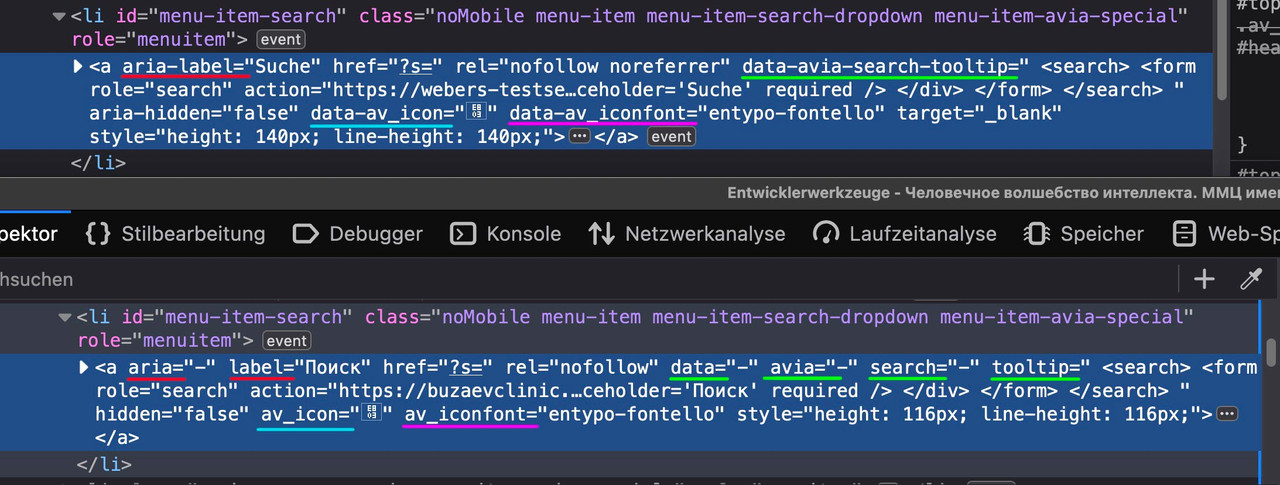
It seems that in your installation all minus signs “–” indicate a splitting of the properties.
And because your images and other alb do have data- attributes – there might be some changes to search behaviour. Maybe a custom script that takes influence on that?
Yes, of course, it was my mistake.
So I copied the file from the Enfold theme to my Enfold child theme. I’ve moved the code line – echo avia_pagination( ”, ‘nav’ ); to be below the code line – global $avia_config;
But nothing has changed. I created a sub-folder – includes – inside the enfold child folder and put the correct loop-search.php file in this folder
and still, nothing has changed.
What am I missing?
I’ve added links to the 2 websites I’m having this problem directly to a random search results page for you to see the problem on your own.
The first one is the website I’ve altered the files
The second one I didn’t change anything.
Hey Silje,
This is default browswer behaviour, it’s not theme functionality. When hovering over links for example, the browser will show the title attribute, like if you hover over the Duckduckgo logo here. The Duckduckgo search engine is not running Enfold as far as I know. I would suggest that you keep your title attributes, as they matter for SEO and accessibility.
Best regards,
Rikard
Hey ibuzaev,
Thank you for the inquiry.
The element for the search icon is missing. Please try temporarily disable the Enfold > Performance > File Compression settings, then purge the cache. If the issue persists, please provide the login details in the private field.
Best regards,
Ismael
Hello.
No matter how much I search, I can’t seem to find how to make the top bar appear (Like the grey-blue one at https://kriesi.at/themes/enfold-shop/ with the “Give us a call now” text), or how to edit it’s content. Can you please let me know?
Thank you
well it is in the enfold folder : includes.
If you make a subfolder to your child-themes folder : includes and put the edited loop-search.php inside that folder the search results page will show featured images.
here is on basis of enfold 6.0.4 the edited file:
see: https://pastebin.com/3nAyB6Gr
Changes are made on line 50ff . I inserted some classes to better select them and put the link on the image too.
download: https://pastebin.com/dl/3nAyB6Gr
a little css is needed
.search-result-image {
    display: block;
}
.search-result-image img {
    width: 120px;
    border: 1px solid #aaa
}
.search-result-image svg {
  width: 120px !important;
  height: auto;
}
.search-result-image img {
    width: 120px;
}
.search-result-image {
    float: left;
    margin-bottom: 20px;
    padding-right: 30px;
}
PS: on line 52 you can see that i took the medium image format as source (and not the thumbnail image) – you can change that to anything you like – but medium got one advantage – it is a non cropped image format.
see: https://webers-testseite.de/?s=web
Hi,
When I tried to follow the instructions on the following link: https://kriesi.at/support/topic/add-featured-image-to-search-results/, I was confused about where to find the loop-search.php file to place the code. I hope the Enfold team can help clarify this.
Thank you.
Hello,
I contacted popup maker support and asked them the problem of rendering content made with AVIA editor. I provided them with the credentials and they did some further investigation. Their conclusions are as follows.
Hi Andrea,
We tried it out and we’re also unable to render the content built with Avia in our popups. When we searched for similar cases, it looks like it has been this way ever since.
Could you try reaching out to Avia if they have ideas as to why their content doesn’t show up in Popup Maker?
As an alternative, you can still use the standard Gutenberg Block Editor in our popups if you want to utilize columns.
You can enable the block editor by going to Popup Maker > Settings > Enable Block Editor Support.
Other page builders that still work with Popup Maker are Elementor (using template shortcodes), Divi, Beaver Builder, and WP Bakery Page Builder.
Let us know if you have other questions.
In conclusion they also verified the incompatibility of the AVIA editor with the rendering of their plugin … but from what you wrote above there was a time when rendering worked. If we can figure out which version of Enfold and Popup Maker were the ones that worked, we will have a key to understanding the origins of the problem.
If we are able to find a solution, it is OK if not I would say that I have to abandon this path and switch to use the standard Gutenberg Block Editor in my popups. I tried to use the Gutenberg editor … now I understand the reason for the negative comments I had seen about it … compared to AVIA editor it is really bad! I was hoping it was something similar to AVIA or Elementor, but we are light years away. Yes, it is better than the standard editor but unfortunately it is not a nice choice! Well, I really hope I will find a better solution in the future.
Thank you for your support
Andrea
-
This reply was modified 1 year, 5 months ago by
 cuccarini.
-
This reply was modified 1 year, 5 months ago by cuccarini.
-
This reply was modified 1 year, 5 months ago by cuccarini.
-
This reply was modified 1 year, 5 months ago by cuccarini.
sadly the topic is closed: . https://kriesi.at/support/topic/search-function-with-link-list/
what i got so far:
https://enfold.webers-webdesign.de/pages
this is only for pages ( if you like to have that for posts – just change the post-type )
i managed it by a custom shortcode – then place this as : [glossary] on your page
function az_index($post_id) {
    $AZposts = get_posts(array(
        'numberposts'       => -1,
        'post_type'         => 'page',
        'orderby'           => 'title',
        'order'             => 'ASC',
        // 'category'           => $cat
    ));

    $current = "";
    $nav = "";
    $postlist = "";
    foreach($AZposts as $AZpost) {
        $postLink = get_permalink( $AZpost->ID );
        $firstletter = strtoupper(substr($AZpost->post_title,0,1));
        if($firstletter != $current) {
            $nav .= "<span class='firstletters'><a href='#$firstletter'> $firstletter </a></span> ";
            $postlist .= "<h3 class='firstletter' id='$firstletter'> $firstletter </h3>\n";
            $current = $firstletter;
        }
        $postlist .= "<span><a class='postlink' href='".$postLink ."'>" . $AZpost->post_title.  "</a></span><br>\n";
    }

    print $nav . "<br><br>" . $postlist;
}
add_shortcode( 'glossary', 'az_index' );
and :
.firstletters {
  padding: 0 10px ;
  background: #900;
  margin-right: 5px;
  display: inline-block;
}

.firstletters a {
  color: #FFF;
  text-align: center !important;
}
i tried to have unordered list after the h3 headings – but i couldn’t find a way to do that ( loop is hard to find the place to insert that tags ) – maybe a mod got a good idea
Solution: Reinstate the default woo dropdowns – Applies to all Enfold sites:
The default woo filters are dequeued in enfold > config-woocommerce > config.php and config-365.php
We can requeue them and disable the Enfold filters by adding the following to functions.php in the child theme:
// Removes Enfolds sort by dropdowns
function avia_woocommerce_frontend_search_params()
{
   return;
}

// Re-adds the default sortby dropdown
add_action( 'woocommerce_before_shop_loop', 'woocommerce_catalog_ordering', 20 );
Styling fixes
Add the following css:
@media only screen and (max-width: 767px) {
    .responsive #top .woocommerce-ordering {
        position: relative;
        float: left;
        clear: both;
        margin: 0;
        padding-bottom: 0px;
        padding-top: 15px;
        top: 0px;
        margin-top:60px;
    }
}

@media only screen and (min-width: 768px) {
    .responsive #top .woocommerce-ordering {
        position: relative;
        float: left;
        clear: both;
        margin: 0;
        padding-bottom: 15px;
        padding-top: 15px;
        top: 0px;
        margin-top:0px;
    }
}

#top.woocommerce-page .woocommerce-ordering select {
width: 100%;
font-size:16px;
padding: 8px;
line-height: 1.2em;
}
-
This reply was modified 1 year, 5 months ago by
 thinkjarvis.
hi guys. my website is about tourist attractions and destinations and I want the user to select country and city and even attraction types(waterfall or jungle or beach etc…. based on tags). for search by Category, Tag, Custom Taxonomy, Post Type, Post Date or any combination of these is possible in Enfold? or I must use plugins? I want users to see this search result on the Home page and blog post sidebars or wherever I need it. thanks
Hello!
I would love to be able to add hyphenation to (Italian) texts on my website as there is a lot of spacing between words on mobile in justified text and I don’t like to use aligned text.
I have already searched through topics, found some threads about this but haven’t really understood what the best solution is. Some sounded pretty complicated. Some mention the plugin Hyphenator, which is not available anymore. I am pretty sure I had an hyphenation option on the Avia builder in a previous Enfold website I had, which had been created by a professional, and I do not know how he did that.
Any advice?
Thank you
Elena
Hi Forum & Enfold-Team,
I have implemented the contact form and the math question and conditions checkbox are mandatory. Now I am receiving spam messages with the checkbox unchecked. On the mail it says “I have read and understood your reasonable terms: false”.
How can I prevent receiving spam like this? Why can mails be sent if the terms are marked with “false” – in my understanding the checkbox is not accepted in this way?
I cannot see whether the mathematical problem has really been solved.
Can someone read out the e-mail address to which the e-mail was sent? Do I have to implement Google reCAPTCHA?
Many thanks!
Kind regards,
bleistift
P.S.: I did some research on reCAPTCHA. It seams that it needs a lot of java traffic. Do you have any experiences with the plugin https://dineshkarki.com.np/buy-wp-armour-extended instead?
-
This topic was modified 1 year, 6 months ago by
 bleistift.
-
This topic was modified 1 year, 6 months ago by bleistift.
The Ajax search shows only a few results. The results are displayed in a certain order (newest; page order …); Your search term is on a page that is older than the pages shown.
The number – how many results are displayed – is set to 5 by default in Enfold. This makes sense for the normal placement at the top inside main menu. Where you have the search, you might want to increase this a little.
Incidentally, if you only want to display pages (or posts) there, you could also restrict this to these post types.
Put this to your child-theme functions.php :
function avf_modify_ajax_search_query($search_parameters){
  parse_str($search_parameters, $params);
  $params['numberposts'] = 10;
  $search_parameters = http_build_query($params);
  return $search_parameters;
}
add_filter('avf_ajax_search_query', 'avf_modify_ajax_search_query', 10, 1);
Hi,
This note from my marketing colleague:
in our client sites that we manage we are noticing some Enfold entries in their Google Search Console. Most entries are related to (1) soft 404s and (2) canonical issues. There are a number of entries like this across many of our other clients’ sites, all using Enfold. Please see the screen shot linked here with 1x example. https://paste.pics/f1541bffbf80fd217b530b3832afe6ae
Can you please advise if there is a solution for Google to not to report these, so that it behaves similar to other sites that we manage which are not on Enfold.
Additional information for you to be aware of, is that all our websites are hosted by the same provider on servers with the exact same sever configuration.
Thanks – we look forward to hearing from you.
Hi,
Thank you for using Enfold and reporting this.
First issue:
We are working on a fix to ignore s=…. for all pages that are not the search page. Will be in the next Release 6.0.4.
Second issue:
The warning you mention is in a file that was used with the old Envato update API < 3.0 and is deprecated. If you have entered an "Envato private token" it should not be loaded at all.
But we will remove it in next release 6.0.4.
Best regards,
Günter
Hi,
To disable it, open js/avia.js go to line 90 and comment it like this:
// new $.AviaAjaxSearch({scope:'#header, .avia_search_element'});
then disable both Enfold Theme Options ▸ Performance ▸ JS & CSS file merging and compression and enable Enfold Theme Options ▸ Performance ▸ Delete old CSS and JS files Then clear your browser cache and any cache plugin a few times, and check.
Please remember that clearing javascript files can take a few tries. I tested this and it works to remove the ajax function:

Best regards,
Mike
 Robert Massart
Guest
Noted problem paging after searching with expressions that contain one of these words:
jpg, jpeg, gif or png
To reproduce go to:
https://kriesi.at/themes/enfold-2017/?s=jpg
search on ‘jpg’
Go to bottom of page and try to navigate to page 2,
instead of going to page 2, it attempts to load on image in a light box.
 Rob – Press Wizards
Guest
From WordFence:
Enfold <= 6.0.3 – Authenticated (Contributor+) Stored Cross-Site Scripting via wrapper_class and class Parameters
Description
The Enfold – Responsive Multi-Purpose Theme theme for WordPress is vulnerable to Stored Cross-Site Scripting via the ‘wrapper_class’ and ‘class’ parameters in all versions up to, and including, 6.0.3 due to insufficient input sanitization and output escaping. This makes it possible for authenticated attackers, with Contributor-level access and above, to inject arbitrary web scripts in pages that will execute whenever a user accesses an injected page.
Improper Neutralization of Input During Web Page Generation (‘Cross-site Scripting’)
CVSS VectorCVSS:3.1/AV:N/AC:L/PR:L/UI:N/S:C/C:L/I:L/A:N
CVE CVE-2024-5061
CVSS 6.4 (Medium)
Publicly Published August 29, 2024
Last Updated August 29, 2024
Researcher stealthcopter
See: https://www.wordfence.com/threat-intel/vulnerabilities/wordpress-themes/enfold/enfold-603-authenticated-contributor-stored-cross-site-scripting-via-wrapper-class-and-class-parameters
Hi,
When I check your site at 1536 x 864, that you wrote was your screen size, but I don’t see the menu over the logo:

To switch the two icons try this css
.av-burger-menu-main.menu-item-avia-special {
	  top: -120px;
}
#menu-item-search {
	top: 100px;
}
You can also adjust the values and perhaps keep the icons away from the logo
Best regards,
Mike
Hey williamslyd,
Thank you for the inquiry.
You can turn off the AJAX search by toggling the Append Search Icon To Main Menu option in the Enfold > Main Menu panel. Let us know how it goes.
Best regards,
Ismael
Hey CityCollege,
Thank you for the inquiry.
1.) Why do you need the search query string on your pages? This is a special parameter that can only be used on the root page of the site. All other query parameters should work for other pages. Example:
https://kriesi.at/themes/enfold-2017?s=test
For other pages:
https://kriesi.at/themes/enfold-2017/pages/pricing/?test=test
2.) Where do you see this warning? You can temporarily hide it by setting the WP_DEBUG_DISPLAY to false.
Best regards,
Ismael
We got two issues when doing random security check:
I. When using a search query string in a page, it returns 404 – this should not be the correct behavior. i.e (reproduced on your demo link below)
https://kriesi.at/themes/enfold-2017/pages/pricing/?s=test
2. The second one is the following error: Warning: Attempt to read property “item_id” on int in /code/wp-content/themes/enfold/framework/php/auto-updates/class-pixelentity-theme-update.php on line 93
Our theme is latest version! (6.0.3) and the envato private token was revalidated and shows no issues.
Hi Support,
Three(3) of my sites broke yesterday! Had to revert PHP 8.2 back to 8.1.29 to get the errors to go away.
They are all updated to the latest Enfold version of 5.6.5. (WP 6.6.1).
Here are examples of two of the site error messages. Please help, I am not a developer or programmer, a novice.
Errors:
Website: WhyCookAlameda.com
Deprecated: Creation of dynamic property Avia_Popup_Templates::$resp_sizes_options is deprecated in /home/customer/www/whycookalameda.com/public_html/wp-content/themes/enfold/config-templatebuilder/avia-template-builder/php/base-classes/class-popup-templates-responsive.php on line 65
Deprecated: Creation of dynamic property Avia_Popup_Templates::$resp_titles is deprecated in /home/customer/www/whycookalameda.com/public_html/wp-content/themes/enfold/config-templatebuilder/avia-template-builder/php/base-classes/class-popup-templates-responsive.php on line 81
Warning: Cannot modify header information – headers already sent by (output started at /home/customer/www/whycookalameda.com/public_html/wp-content/themes/enfold/config-templatebuilder/avia-template-builder/php/base-classes/class-popup-templates-responsive.php:65) in /home/customer/www/whycookalameda.com/public_html/wp-includes/pluggable.php on line 1093
Website: Excalibersearch.com
Deprecated: Creation of dynamic property Avia_Popup_Templates::$resp_sizes_options is deprecated in /home/customer/www/excalibursearch.com/public_html/wp-content/themes/enfold/config-templatebuilder/avia-template-builder/php/base-classes/class-popup-templates-responsive.php on line 65
Deprecated: Creation of dynamic property Avia_Popup_Templates::$resp_titles is deprecated in /home/customer/www/excalibursearch.com/public_html/wp-content/themes/enfold/config-templatebuilder/avia-template-builder/php/base-classes/class-popup-templates-responsive.php on line 81
Deprecated: Creation of dynamic property avia_slideshow::$service is deprecated in /home/customer/www/excalibursearch.com/public_html/wp-content/themes/enfold/config-templatebuilder/avia-shortcode-helpers/class-avia-slideshow.php on line 800
Again, please help. I have given you access in the private section.
Hi,
If you don’t want to manually create your own logo, you can also search Google for a logo creator or maker. There are many online tools that automate the creation of logos and only require your registration. After creating the logo, you can upload it to the site by going to the Enfold > Theme Options > Logo settings. Let us know if you need more assistance.
Best regards,
Ismael
Hello,
I’m trying to replicate the three blue boxes on the home page of your medical theme. The blue boxes read Departments, Medical Services, Research. How do you add left and right padding? Also, how do you overlap the hero with the three blue boxes? Here is the link to the theme I’m referring to.
LINK
Thanks for your help,
Steve
Hi,
To show the search icon on the desktop menu try enabling Enfold Theme Options ▸ Main Menu ▸ General ▸ Append search icon to main menu
I can’t see your images as they require a login, to add a screenshot please try using an Screenshot service and pasting the image URL in your post.
Best regards,
Mike



