-
AuthorSearch Results
-
March 4, 2025 at 9:03 am #1478545
In reply to: Robot Txt error + google index
Hola Ismael
1/ yep i relaunched google consol inspection after i removed the beehiive newsletter CCS link, i also unchecked few option in enfold them that were unnecessary according to the thread i have read (query, css etc ..) in the performance page. It seems the beehiive error eventually disappeared after new test.
2/ errors are various , seems to concern an avia format (despite avia content is checked in yoast setting)
my contact page is the only one to have soft 404 error and google can’t access it. It has 3 errors
https://www.domain.ch/wp-content/themes/enfold/config-templatebuilder/avia-shortcodes/heading/heading.min.css?ver=6.0.9
https://www.domain.ch/wp-content/themes/enfold/config-templatebuilder/avia-shortcodes/icon_circles/icon_circles.min.css?ver=6.0.9+ the usual captcha icon robot text error i develop at the end of the message
for the rest of the pages , errors are. :
https://www.domain.ch/wp-content/themes/enfold/css/base.min.css?ver=6.0.9
https://www.domain.ch/wp-content/themes/enfold/css/grid.min.css?ver=6.0.9
————-
arecaptacha logo robot.txt :
googlebot is blocked by robot.txt file : https://www.gstatic.com/recaptcha/api2/logo_48.png
when you open robot text file you get this :
User-agent: *
Allow: /_/aihub_pod/
Allow: /_/alkali-learn/
Allow: /_/apps-viewer/
Allow: /_/atari/
Allow: /_/boq/
Allow: /_/boq-play/
Allow: /_/boutique/
Allow: /_/buganizer/
Allow: /_/compare-banking/
Allow: /_/compare-insurance/
Allow: /_/fi/
Allow: /_/fonts/
Allow: /_/mss/boq-bard-web/
Allow: /_/mss/boq-chrome-cloudcast/
Allow: /_/mss/boq-cloud-web3-portal/
Allow: /_/mss/boq-discover-labs/
Allow: /_/mss/boq-geo/
Allow: /_/mss/boq-makersuite/
Allow: /_/mss/boq-nbu-monetization/
Allow: /_/mss/boq-search/
Allow: /_/mss/boq-search-engagement-post/
Allow: /_/mss/boq-travel/
Allow: /_/mss/boq-identity/
Allow: /_/pantheon/
Allow: /_/pantheon-platform/
Allow: /_/play/
Allow: /_/pog/
Allow: /_/cloudsourcetools/
Allow: /_/devopsconsole/
Allow: /_/tfhub/
Allow: /_/transparencyreport/
Allow: /_/gstore/
Allow: /_/ain/_/js/
Allow: /ac/
Allow: /actions/news/rss/
Allow: /ads/learn/
Allow: /ads/local/
Allow: /ads/gpa/vidgen/
Allow: /ads/research/
Allow: /ads/ubaq/
Allow: /aihub/tfhub/
Allow: /alkali/
Allow: /amphtml/stamp/ucp/post-testing/
Allow: /android/market/
Allow: /android/market_images/
Allow: /atari/images/public/
Allow: /audio_news/
Allow: /bfe/apps/website/
Allow: /boutique/sitemaps/
Allow: /compare/
Allow: /chrome/crlset/
Allow: /chrome/webstore/images/
Allow: /cloud-launcher/sitemap/
Allow: /cloudsourcetools/images/
Allow: /commercesearch/images/
Allow: /communities/sitemap/
Allow: /copy-conductor/crawled/
Allow: /covid19/mobility/
Allow: /culturalinstitute/images/
Allow: /culturalinstitute/sitemaps/
Allow: /culturalinstitute/stella/
Allow: /ct/log_list/
Allow: /delight/
Allow: /devopsconsole/images/
Allow: /devrel-devsite/
Allow: /docs/forms/social/
Allow: /docs/socialmarkup/
Allow: /dictionary/static/sitemaps/
Allow: /droidguard/
Allow: /earth/social/
Allow: /enterprise-partner-search/sitemaps/
Allow: /external_hosted/
Allow: /flights/
Allow: /flutter-canvaskit/
Allow: /foodordering/
Allow: /frommers/
Allow: /gb/images/
Allow: /glass/images/commerce/
Allow: /gpay/social/
Allow: /growth-ime/
Allow: /gsx/
Allow: /gtp/stir/
Allow: /guidebooks/
Allow: /GoogleInternetAuthority/
Allow: /h5games_gamecenter/images/
Allow: /healthricherkp/illustrations/
Allow: /healthricherkp/cropped/
Allow: /hex/
Allow: /history/static/
Allow: /identity/accountsettingsactivityweb/
Allow: /identity/accountsettingssyaf/
Allow: /images
Allow: /inproduct_help/chatsupport/
Allow: /lamda/images/
Allow: /local/donut/
Allow: /mapspro/
Allow: /marketing-cms/
Allow: /moderator/static/ux/
Allow: /modern-formats-eng/ucp/framework_logging/
Allow: /modern-formats-eng/ucp/*/client/
Allow: /modern-formats-eng/ucp/*/csr/
Allow: /modern-formats-eng/ucp/*/dev/
Allow: /modern-formats-eng/ucp/static/framework_logging/
Allow: /modern-formats-eng/ucp/static/*/client/
Allow: /modern-formats-eng/ucp/static/*/csr/
Allow: /modern-formats-eng/ucp/static/*/dev/
Allow: /nbubumblebee/
Allow: /og/
Allow: /onebox/media/sports/logos/
Allow: /onebox/media/sports/photos/soccer/wc2018/
Allow: /onebox/sports/logos/
Allow: /onebox/sports/logos/sports_types/png/
Allow: /pagespeed/insights/ui/logo/
Allow: /pantheon/
Allow: /pantheon-platform/
Allow: /patent-search/frontend/
Allow: /pay/images/merchant_logos/
Allow: /pay/images/program_logos/
Allow: /paygo/
Allow: /play/store/web/
Allow: /play/surveys/serp/
Allow: /podcasts/test-podcast/rss/
Allow: /politics/e/sharing/
Allow: /prettyearth/assets/
Allow: /psb/udc/
Allow: /s2/sitemaps/
Allow: /search-ar-dev/
Allow: /search-console/scfe/
Allow: /shopping-content-api/product_images/
Allow: /shopping/shoppingpage/casa/
Allow: /shopstream/
Allow: /sites/
Allow: /sitemaps/
Allow: /social/photosui/images/
Allow: /social/photosui/sitemap/
Allow: /stadia/gamers/
Allow: /store/images/favicons/
Allow: /subscriptions/
Allow: /support/content/
Allow: /system1/images/
Allow: /travel-frontend/images/
Allow: /finance/favicon/
Allow: /travel-vacations/
Allow: /touringbird/
Allow: /trends/
Allow: /trends_tpt/
Allow: /trustedstores/images/
Allow: /trustedstores/js/
Allow: /tv/thumb/
Allow: /ui/
Allow: /vr/*
Allow: /vsi/*.pdf$
Allow: /wondermissive/interest/
Allow: /youtube/fonts/
Allow: /youtube/img/promos/
Allow: /icons/
Allow: /js/
Allow: /ss/
Allow: /*.js
Allow: /*.css
Allow: /*.svg
Allow: /buyside-e2e-monitor/the strange thing is i dont find this in my yoast robot manager
do you think Google captach might be a problem ?
March 3, 2025 at 2:52 pm #1478469Hi Rikard
1) Thanks I’ll try that.
2) I am sorry but I really can’t find: Enfold->Advanced Styling. Look for the Linked Image Overlay option. And I’ve searched every thing twice again.
I send you credentials in “Private Content” – is it possible that you can help me disabling function? Then I’ll be happy. It is annoying for my readers when it is turned on.
Best regards,
HanneMarch 3, 2025 at 5:51 am #1478427In reply to: Version 7.0 – Strange search button text display
Hi,
Thank you for the inquiry.
Please provide the login details in the private field. In the meantime, try adding the following code to the Quick CSS field, then toggle or temporarily disable the Enfold > Performance > File Compression settings.
#avia-menu > li.menu-item-search-dropdown > a:after {
    content: '';
}
Best regards,
IsmaelFebruary 27, 2025 at 7:40 pm #1478156Hi,
Thanks for that. Please try the following in Quick CSS under Enfold->General Styling:
.mec-dropdown-wrap {
  max-width: 100%;
}

.mec-wrap.mec-modern-search-bar .mec-search-form .mec-dropdown-wrap i {
  height: 36px;
}
Best regards,
RikardFebruary 26, 2025 at 5:30 pm #1478043In reply to: Enfold 7.0
I have looked it several times and nothing stands out that would render my elements completely ignored.
I’ve attached one of the elements so you can see it.<?php /** * AMG Tabs and tabs * * Creates tabs or accordions */ if( ! defined( 'ABSPATH' ) ) { exit; } // Exit if accessed directly if( ! class_exists( 'amg_sc_cards', false ) ) { class amg_sc_cards extends aviaShortcodeTemplate { use \aviaBuilder\traits\scNamedColors; use \aviaBuilder\traits\scButtonStyles; /** * * @var int */ static protected $toggle_id = 1; /** * * @var int */ static protected $counter = 1; /** * * @var int */ static protected $initial = 0; /** * * @var array */ static protected $tags = array(); /** * Google search only accepts 1 Tag “FAQPage” * * @since 5.0 * @var int */ static protected $total = 0; /** * * @since 4.8.8 * @var boolean */ protected $in_sc_exec; /** * * @since 4.9 * @var string */ protected $heading_tag; /** * * @since 4.9 * @var string */ protected $heading_class; /** * * @since 4.5.5 * @param AviaBuilder $builder */ public function __construct( $builder ) { $this->in_sc_exec = false; $this->heading_tag = ''; $this->heading_class = ''; parent::__construct( $builder ); $this->_construct_scNamedColors(); $this->_construct_scButtonStyles(); } /** * @since 4.5.5 */ public function __destruct() { $this->_destruct_scNamedColors(); $this->_destruct_scButtonStyles(); parent::__destruct(); } /** * Create the config array for the shortcode button */ protected function shortcode_insert_button() { $this->config['version'] = '1.0'; $this->config['self_closing'] = 'no'; $this->config['base_element'] = 'yes'; $this->config['name'] = __( 'Cards', 'avia_framework' ); $this->config['tab'] = __( 'AMG Elements', 'avia_framework' ); $this->config['icon'] = AviaBuilder::$path['imagesURL'] . 'sc-contentslider.png'; $this->config['order'] = 270; $this->config['target'] = 'avia-target-insert'; $this->config['shortcode'] = 'amg_card_container'; $this->config['shortcode_nested'] = array( 'amg_card' ); $this->config['tooltip'] = __( 'Creates a new Cards Layout Group', 'avia_framework' ); $this->config['tinyMCE'] = array( 'tiny_always' => true ); $this->config['preview'] = true; $this->config['disabling_allowed'] = true; $this->config['id_name'] = 'id'; $this->config['id_show'] = 'yes'; $this->config['alb_desc_id'] = 'alb_description'; $this->config['name_item'] = __( 'AMG Card Item', 'avia_framework' ); $this->config['tooltip_item'] = __( 'An AMG Card Item', 'avia_framework' ); } protected function admin_assets() { $ver = AbstraktEnfoldExtensions::get_plugin_version(); $developMode = AbstraktEnfoldExtensions::developMode(); $lastmodtime = $developMode ? rand(1, 999999999) : $ver; //load css wp_enqueue_style( 'amg-cards', plugin_dir_url(__FILE__) . "cards.min.css", array( 'avia-layout' ), $lastmodtime ); wp_enqueue_script( 'amg-cards', plugin_dir_url(__FILE__) . "cards.min.js", array( 'avia-shortcodes' ), $lastmodtime, true ); } protected function extra_assets() { $ver = AbstraktEnfoldExtensions::get_plugin_version(); $developMode = AbstraktEnfoldExtensions::developMode(); $lastmodtime = $developMode ? rand(1, 999999999) : $ver; //load css wp_enqueue_style( 'amg-cards', plugin_dir_url(__FILE__) . "cards.css", array( 'avia-layout' ), $lastmodtime ); wp_enqueue_script( 'amg-cards', plugin_dir_url(__FILE__) . "cards.js", array( 'avia-shortcodes' ), $lastmodtime, true ); } /** * Popup Elements * * If this function is defined in a child class the element automatically gets an edit button, that, when pressed * opens a modal window that allows to edit the element properties * * @return void */ protected function popup_elements() { $this->elements = array( array( 'type' => 'tab_container', 'nodescription' => true ), array( 'type' => 'tab', 'name' => __( 'Content', 'avia_framework' ), 'nodescription' => true ), array( 'type' => 'template', 'template_id' => 'toggle_container', 'templates_include' => array( $this->popup_key( 'content_amg_card' ) ), 'nodescription' => true ), array( 'type' => 'tab_close', 'nodescription' => true ), array( 'type' => 'tab', 'name' => __( 'Automation', 'avia_framework' ), 'nodescription' => true ), array( 'type' => 'template', 'template_id' => 'toggle_container', 'templates_include' => array( $this->popup_key( 'behavior_intro' ), $this->popup_key( 'style_behavior' ) ), 'nodescription' => true ), array( 'type' => 'tab_close', 'nodescription' => true ), array( 'type' => 'tab', 'name' => __( 'Styling', 'avia_framework' ), 'nodescription' => true ), array( 'type' => 'template', 'template_id' => 'toggle_container', 'templates_include' => array( $this->popup_key( 'styling_card_dimensions' ), $this->popup_key( 'styling_colors' ), $this->popup_key( 'styling_font_sizes' ) ), 'nodescription' => true ), array( 'type' => 'tab_close', 'nodescription' => true ), array( 'type' => 'tab', 'name' => __( 'Advanced', 'avia_framework' ), 'nodescription' => true ), array( 'type' => 'toggle_container', 'nodescription' => true ), array( 'type' => 'template', 'template_id' => $this->popup_key( 'advanced_heading' ), 'nodescription' => true ), array( 'type' => 'template', 'template_id' => 'screen_options_toggle', 'lockable' => true ), array( 'type' => 'template', 'template_id' => 'developer_options_toggle', 'args' => array( 'sc' => $this ) ), array( 'type' => 'toggle_container_close', 'nodescription' => true ), array( 'type' => 'tab_close', 'nodescription' => true ), array( 'type' => 'template', 'template_id' => 'element_template_selection_tab', 'args' => array( 'sc' => $this ) ), array( 'type' => 'tab_container_close', 'nodescription' => true ) ); } /** * Create and register templates for easier maintainance * * @since 4.6.4 */ protected function register_dynamic_templates() { $this->register_modal_group_templates(); /** * Content Tab * =========== */ $c = array( array( 'name' => __( 'Add/Edit Card', 'avia_framework' ), 'desc' => __( 'Here you can add, remove and edit the tabs you want to display.', 'avia_framework' ), 'type' => 'modal_group', 'id' => 'content', 'modal_title' => __( 'Edit Card Element', 'avia_framework' ), 'editable_item' => true, 'lockable' => true, 'tmpl_set_default' => false, 'std' => array( array( 'title' => __( 'Card 1', 'avia_framework' ), 'tags' => '' ), array( 'title' => __( 'Card 2', 'avia_framework' ), 'tags' => '' ), ), 'subelements' => $this->create_modal() ), array( 'name' => __( 'Title Position', 'avia_framework' ), 'desc' => __( 'Select one of the 4 choices', 'avia_framework' ), 'id' => 'title_position', 'type' => 'select', 'std' => 'bottom', 'lockable' => true, 'subtype' => array( __( 'Top', 'avia_framework' ) => 'top', __( 'Bottom', 'avia_framework' ) => 'bottom', __( 'Full', 'avia_framework' ) => 'full', __( 'None', 'avia_framework' ) => 'none', ) ) ); $template = array( array( 'type' => 'template', 'template_id' => 'toggle', 'title' => __( 'Cards', 'avia_framework' ), 'content' => $c ), ); AviaPopupTemplates()->register_dynamic_template( $this->popup_key( 'content_amg_card' ), $template ); $c = array( array( 'name' => __( 'Hover Animation', 'avia_framework' ), 'desc' => __( 'Select the style of hover animation', 'avia_framework' ), 'id' => 'animation', 'type' => 'select', 'std' => 'up', 'lockable' => true, 'subtype' => array( __( 'Up', 'avia_framework' ) => 'up', __( 'Down', 'avia_framework' ) => 'down', __( 'Fade', 'avia_framework' ) => 'fade', __( 'Flip', 'avia_framework' ) => 'flip', ) ), array( 'name' => __( 'Column Order', 'avia_framework' ), 'desc' => __( 'Select the column order', 'avia_framework' ), 'id' => 'column', 'type' => 'select', 'std' => 'row', 'lockable' => true, 'subtype' => array( __( 'Forward', 'avia_framework' ) => 'row', __( 'Reverse', 'avia_framework' ) => 'row-reverse', ) ) ); $template = array( array( 'type' => 'template', 'template_id' => 'toggle', 'title' => __( 'Hover', 'avia_framework' ), 'content' => $c ), ); AviaPopupTemplates()->register_dynamic_template( $this->popup_key( 'style_behavior' ), $template ); $c = array( array( 'name' => __( 'Intro', 'avia_framework' ), 'desc' => __( 'Choose to use active style class', 'avia_framework' ), 'id' => 'intro', 'type' => 'select', 'std' => '', 'lockable' => true, 'subtype' => AbstraktEnfoldExtensions::get_intro_animations() ), array( 'name' => __( 'Duration', 'avia_framework' ), 'desc' => __( 'Select duration of time this animation will run', 'avia_framework' ), 'id' => 'duration', 'type' => 'select', 'std' => 's100', 'lockable' => true, 'required' => array( 'intro', 'not', '' ), 'subtype' => AbstraktEnfoldExtensions::get_duration_times() ), ); $template = array( array( 'type' => 'template', 'template_id' => 'toggle', 'title' => __( 'Intro', 'avia_framework' ), 'content' => $c ), ); AviaPopupTemplates()->register_dynamic_template( $this->popup_key( 'behavior_intro' ), $template ); /** * Styling Tab * =========== */ $c = array( array( 'name' => __( 'Container Layout', 'avia_framework' ), 'desc' => __( 'Either use the widget default colors or apply some custom ones', 'avia_framework' ), 'id' => 'card_layout', 'type' => 'select', 'std' => '', 'lockable' => true, 'subtype' => array( __( 'Default', 'avia_framework' ) => '', __( 'Define Custom layout', 'avia_framework' ) => 'custom' ), ), array( 'name' => __( 'Container Max Width', 'avia_framework' ), 'desc' => __( 'Enter your minimum height for each glow in pixels', 'avia_framework' ), 'id' => 'max_width', 'type' => 'input', 'std' => '1400px', 'lockable' => true, 'required' => array( 'card_layout', 'equals', 'custom' ) ), array( 'name' => __( 'Container Min Height', 'avia_framework' ), 'desc' => __( 'Enter your minimum height for each card in pixels', 'avia_framework' ), 'id' => 'min_height', 'type' => 'input', 'std' => '580px', 'lockable' => true, 'required' => array( 'card_layout', 'equals', 'custom' ) ), array( 'name' => __( 'Column Count', 'avia_framework' ), 'desc' => __( 'This number will be the maximum number of cards per row.', 'avia_framework' ), 'id' => 'flex', 'type' => 'select', 'std' => '0 1 33.33%', 'lockable' => true, 'subtype' => array( __( '1', 'avia_framework' ) => '0 1 100%', __( '2', 'avia_framework' ) => '0 1 50%', __( '3', 'avia_framework' ) => '0 1 33.33%', __( '4', 'avia_framework' ) => '0 1 25%', __( '5', 'avia_framework' ) => '0 1 20%' ), 'required' => array( 'card_layout', 'equals', 'custom' ) ), array( 'name' => __( 'Box Shadow', 'avia_framework' ), 'desc' => __( 'Either use the card default box shadow or apply a custom one', 'avia_framework' ), 'id' => 'box', 'type' => 'select', 'std' => '', 'lockable' => true, 'subtype' => array( __( 'Default', 'avia_framework' ) => '', __( 'Define Box Shadow', 'avia_framework' ) => 'custom' ) ), array( 'name' => __( 'Box Shadow', 'avia_framework' ), 'desc' => __( 'Enter your custom box-shadow using standard CSS Syntax', 'avia_framework' ), 'id' => 'box-shadow', 'type' => 'input', 'std' => '0 0 3px #ccc', 'rgba' => true, 'lockable' => true, 'required' => array( 'box', 'equals', 'custom' ), ), array( 'name' => __( 'Border Radius', 'avia_framework' ), 'desc' => __( 'Set the border radius of the column', 'avia_framework' ), 'id' => 'border_radius', 'type' => 'multi_input', 'sync' => true, 'std' => '', 'lockable' => true, 'multi' => array( 'top' => __( 'Top-Left-Radius', 'avia_framework' ), 'right' => __( 'Top-Right-Radius', 'avia_framework' ), 'bottom' => __( 'Bottom-Right-Radius', 'avia_framework' ), 'left' => __( 'Bottom-Left-Radius', 'avia_framework' ) ) ), array( 'name' => __( 'Folded Corner', 'avia_framework' ), 'desc' => __( 'Set the border radius of the column', 'avia_framework' ), 'id' => 'corner', 'type' => 'select', 'std' => '', 'lockable' => true, 'subtype' => array( __( 'Yes', 'avia_framework' ) => 'yes', __( 'No', 'avia_framework' ) => 'no' ) ), ); $template = array( array( 'type' => 'template', 'template_id' => 'toggle', 'title' => __( 'Container', 'avia_framework' ), 'content' => $c ), ); AviaPopupTemplates()->register_dynamic_template( $this->popup_key( 'styling_card_dimensions' ), $template ); $c = array( array( 'name' => __( 'Colors', 'avia_framework' ), 'desc' => __( 'Either use the themes default colors or apply some custom ones', 'avia_framework' ), 'id' => 'colors', 'type' => 'select', 'std' => '', 'lockable' => true, 'subtype' => array( __( 'Default', 'avia_framework' ) => '', __( 'Define Custom Colors', 'avia_framework' ) => 'custom' ) ), array( 'name' => __( 'Title Font Color', 'avia_framework' ), 'desc' => __( 'Select a custom color for the toggle icon. Leave empty to use default', 'avia_framework' ), 'id' => 'title_font_color', 'type' => 'colorpicker', 'std' => '', 'rgba' => true, 'lockable' => true, 'required' => array( 'colors', 'equals', 'custom' ), 'container_class' => 'av_third av_third_first', ), array( 'name' => __( 'Title Background Color', 'avia_framework' ), 'desc' => __( 'Select a custom color for the toggle icon. Leave empty to use default', 'avia_framework' ), 'id' => 'title_bg_color', 'type' => 'colorpicker', 'std' => '', 'rgba' => true, 'lockable' => true, 'required' => array( 'colors', 'equals', 'custom' ), 'container_class' => 'av_third av_third_last', ), array( 'name' => __( 'Content Font Color', 'avia_framework' ), 'desc' => __( 'Select a custom font color. Leave empty to use the default', 'avia_framework' ), 'id' => 'font_color', 'type' => 'colorpicker', 'std' => '', 'rgba' => true, 'lockable' => true, 'required' => array( 'colors', 'equals', 'custom' ), 'container_class' => 'av_third av_third_first' ), array( 'name' => __( 'Background Color', 'avia_framework' ), 'desc' => __( 'Select a custom background color. Leave empty to use the default', 'avia_framework' ), 'id' => 'background_color', 'type' => 'colorpicker', 'std' => '', 'rgba' => true, 'lockable' => true, 'required' => array( 'colors', 'equals', 'custom' ), 'container_class' => 'av_third', ) ); $template = array( array( 'type' => 'template', 'template_id' => 'toggle', 'title' => __( 'Colors', 'avia_framework' ), 'content' => $c ), ); AviaPopupTemplates()->register_dynamic_template( $this->popup_key( 'styling_colors' ), $template ); $c = array( array( 'name' => __( 'Title Font Sizes', 'avia_framework' ), 'desc' => __( 'Select a custom font size for the toggle title. Using non default values might need CSS styling.', 'avia_framework' ), 'type' => 'template', 'template_id' => 'font_sizes_icon_switcher', 'lockable' => true, 'textfield' => true, 'subtype' => array( 'default' => AviaHtmlHelper::number_array( 10, 50, 1, array( __( 'Use Default', 'avia_framework' ) => '' ), 'px' ), 'desktop' => AviaHtmlHelper::number_array( 10, 50, 1, array( __( 'Use Default', 'avia_framework' ) => '' ), 'px' ), 'medium' => AviaHtmlHelper::number_array( 10, 40, 1, array( __( 'Use Default', 'avia_framework' ) => '', __( 'Hidden', 'avia_framework' ) => 'hidden' ), 'px' ), 'small' => AviaHtmlHelper::number_array( 10, 40, 1, array( __( 'Use Default', 'avia_framework' ) => '', __( 'Hidden', 'avia_framework' ) => 'hidden' ), 'px' ), 'mini' => AviaHtmlHelper::number_array( 10, 40, 1, array( __( 'Use Default', 'avia_framework' ) => '', __( 'Hidden', 'avia_framework' ) => 'hidden' ), 'px' ) ), 'id_sizes' => array( 'default' => 'size-title', 'desktop' => 'av-desktop-font-size-toggle', 'medium' => 'av-medium-font-size-toggle', 'small' => 'av-small-font-size-toggle', 'mini' => 'av-mini-font-size-toggle' ) ), array( 'name' => __( 'Content Font Sizes', 'avia_framework' ), 'desc' => __( 'Select a custom font size for the content.', 'avia_framework' ), 'type' => 'template', 'template_id' => 'font_sizes_icon_switcher', 'lockable' => true, 'textfield' => true, 'subtype' => array( 'default' => AviaHtmlHelper::number_array( 10, 50, 1, array( __( 'Use Default', 'avia_framework' ) => '' ), 'px' ), 'desktop' => AviaHtmlHelper::number_array( 10, 50, 1, array( __( 'Use Default', 'avia_framework' ) => '' ), 'px' ), 'medium' => AviaHtmlHelper::number_array( 10, 40, 1, array( __( 'Use Default', 'avia_framework' ) => '', __( 'Hidden', 'avia_framework' ) => 'hidden' ), 'px' ), 'small' => AviaHtmlHelper::number_array( 10, 40, 1, array( __( 'Use Default', 'avia_framework' ) => '', __( 'Hidden', 'avia_framework' ) => 'hidden' ), 'px' ), 'mini' => AviaHtmlHelper::number_array( 10, 40, 1, array( __( 'Use Default', 'avia_framework' ) => '', __( 'Hidden', 'avia_framework' ) => 'hidden' ), 'px' ) ), 'id_sizes' => array( 'default' => 'size-content', 'desktop' => 'av-desktop-font-size-content', 'medium' => 'av-medium-font-size-content', 'small' => 'av-small-font-size-content', 'mini' => 'av-mini-font-size-content' ) ) ); $template = array( array( 'type' => 'template', 'template_id' => 'toggle', 'title' => __( 'Font Sizes', 'avia_framework' ), 'content' => $c ), ); AviaPopupTemplates()->register_dynamic_template( $this->popup_key( 'styling_font_sizes' ), $template ); /** * Advanced Tab * ============ */ $c = array( array( 'type' => 'template', 'template_id' => 'heading_tag', 'theme_default' => 'p', 'name' => __( 'Tab Title Tag (Theme Default is <%s>)', 'avia_framework' ), 'desc' => __( 'Select a html tag for the toggle titles of this element.', 'avia_framework' ), 'context' => __CLASS__, 'lockable' => true ), ); $template = array( array( 'type' => 'template', 'template_id' => 'toggle', 'title' => __( 'Tab Titles', 'avia_framework' ), 'content' => $c ), ); AviaPopupTemplates()->register_dynamic_template( $this->popup_key( 'advanced_heading' ), $template ); } /** * Creates the modal popup for a single entry * * @since 4.6.4 * @return array */ protected function create_modal() { $elements = array( array( 'type' => 'tab_container', 'nodescription' => true ), array( 'type' => 'tab', 'name' => __( 'Content', 'avia_framework' ), 'nodescription' => true ), array( 'type' => 'template', 'template_id' => 'toggle_container', 'templates_include' => array( $this->popup_key( 'modal_card_title' ), $this->popup_key( 'modal_card_image' ), $this->popup_key( 'modal_card_content' ) ), ), array( 'type' => 'tab_close', 'nodescription' => true ), ///////////////////////////// BUTTON START ////////////////////////////// array( 'type' => 'tab', 'name' => __( 'Button', 'avia_framework' ), 'nodescription' => true ), array( 'type' => 'template', 'template_id' => 'toggle_container', 'templates_include' => array( $this->popup_key( 'modal_button' ), $this->popup_key( 'modal_button_link' ), $this->popup_key( 'styling_button_appearance' ), $this->popup_key( 'styling_button_fonts' ), $this->popup_key( 'styling_button_margin_padding' ), $this->popup_key( 'styling_button_colors' ), 'border_toggle', 'box_shadow_toggle', $this->popup_key( 'advanced_button_animation' ) ), 'nodescription' => true ), array( 'type' => 'tab_close', 'nodescription' => true ), ///////////////////////////// BUTTON END //////////////////////////////// array( 'type' => 'tab', 'name' => __( 'Advanced', 'avia_framework' ), 'nodescription' => true ), array( 'type' => 'template', 'template_id' => 'toggle_container', 'templates_include' => array( $this->popup_key( 'modal_advanced_developer' ) ), 'nodescription' => true ), array( 'type' => 'tab_close', 'nodescription' => true ), array( 'type' => 'template', 'template_id' => 'element_template_selection_tab', 'args' => array( 'sc' => $this, 'modal_group' => true ) ), array( 'type' => 'tab_container_close', 'nodescription' => true ) ); return $elements; } /** * Register all templates for the modal group popup * * @since 4.6.4 */ protected function register_modal_group_templates() { /** * Content Tab * =========== */ $c = array( array( 'name' => __( 'Card Title', 'avia_framework' ), 'desc' => __( 'Enter the card title here (Better keep it short)', 'avia_framework' ), 'id' => 'title', 'type' => 'input', 'std' => 'Tab Title', 'lockable' => true, ) ); $template = array( array( 'type' => 'template', 'template_id' => 'toggle', 'title' => __( 'Title', 'avia_framework' ), 'content' => $c ), ); AviaPopupTemplates()->register_dynamic_template( $this->popup_key( 'modal_card_title' ), $template ); $c = array( array( 'name' => __( 'Card Image', 'avia_framework' ), 'desc' => __( 'Either upload a new, or choose an existing image from your media library', 'avia_framework' ), 'id' => 'src', 'type' => 'image', 'title' => __( 'Insert Image', 'avia_framework' ), 'button' => __( 'Insert', 'avia_framework' ), 'std' => AviaBuilder::$path['imagesURL'] . 'placeholder.jpg', 'lockable' => true, 'locked' => array( 'src', 'attachment', 'attachment_size' ) ), array( 'name' => __( 'Image Position', 'avia_framework' ), 'desc' => __( 'Either upload a new, or choose an existing image from your media library', 'avia_framework' ), 'id' => 'image_position', 'type' => 'select', 'std' => 'bottom', 'lockable' => true, 'locked' => array( 'src', 'attachment', 'attachment_size' ), 'subtype' => array( __( 'Top', 'avia_framework' ) => 'top', __( 'Bottom', 'avia_framework' ) => 'bottom', __( 'Above', 'avia_framework' ) => 'above', __( 'Below', 'avia_framework' ) => 'below', ) ) ); $template = array( array( 'type' => 'template', 'template_id' => 'toggle', 'title' => __( 'Image', 'avia_framework' ), 'content' => $c ), ); AviaPopupTemplates()->register_dynamic_template( $this->popup_key( 'modal_card_image' ), $template ); $c = array( array( 'name' => __( 'Card Content', 'avia_framework' ), 'desc' => __( 'Enter some content here', 'avia_framework' ), 'id' => 'content', 'type' => 'tiny_mce', 'std' => __( 'Tab Content goes here', 'avia_framework' ), 'lockable' => true, ), ); $template = array( array( 'type' => 'template', 'template_id' => 'toggle', 'title' => __( 'Content', 'avia_framework' ), 'content' => $c ), ); AviaPopupTemplates()->register_dynamic_template( $this->popup_key( 'modal_card_content' ), $template ); ///////////////////////////// BUTTON START ////////////////////////////// BUTTON START //////////////////////////////// $template = AbstraktEnfoldExtensions::amg_enfold_section('Button'); AviaPopupTemplates()->register_dynamic_template( $this->popup_key( 'modal_button' ), $template ); $template = AbstraktEnfoldExtensions::amg_enfold_section('Link Settings'); AviaPopupTemplates()->register_dynamic_template( $this->popup_key( 'modal_button_link' ), $template ); $template = AbstraktEnfoldExtensions::amg_enfold_section('Appearance'); AviaPopupTemplates()->register_dynamic_template( $this->popup_key( 'styling_button_appearance' ), $template ); $template = AbstraktEnfoldExtensions::amg_enfold_section('Font Sizes'); AviaPopupTemplates()->register_dynamic_template( $this->popup_key( 'styling_button_fonts' ), $template ); $c = AbstraktEnfoldExtensions::amg_enfold_section('Button Margin And Padding'); AviaPopupTemplates()->register_dynamic_template( $this->popup_key( 'styling_button_margin_padding' ), $c ); $template = AbstraktEnfoldExtensions::amg_enfold_section('Colors'); AviaPopupTemplates()->register_dynamic_template( $this->popup_key( 'styling_button_colors' ), $template ); $template = AbstraktEnfoldExtensions::amg_enfold_section('Animation'); AviaPopupTemplates()->register_dynamic_template( $this->popup_key( 'advanced_button_animation' ), $template ); ///////////////////////////// BUTTON END ////////////////////////////// BUTTON END //////////////////////////////// $setting_id = Avia_Builder()->get_developer_settings( 'custom_id' ); $class = in_array( $setting_id, array( 'deactivate', 'hide' ) ) ? 'avia-hidden' : ''; $c = array( array( 'name' => __( 'For Developers: Custom Tab ID','avia_framework' ), 'desc' => __( 'Insert a custom ID for the element here. Make sure to only use allowed characters (latin characters, underscores, dashes and numbers, no special characters can be used)','avia_framework' ), 'id' => 'custom_id', 'type' => 'input', 'std' => '', 'container_class' => $class, ) ); $template = array( array( 'type' => 'template', 'template_id' => 'toggle', 'title' => __( 'Developer Settings', 'avia_framework' ), 'content' => $c ), ); AviaPopupTemplates()->register_dynamic_template( $this->popup_key( 'modal_advanced_developer' ), $template ); } /** * Editor Sub Element - this function defines the visual appearance of an element that is displayed within a modal window and on click opens its own modal window * Works in the same way as Editor Element * * @param array $params holds the default values for $content and $args. * @return array usually holds an innerHtml key that holds item specific markup. */ public function editor_sub_element( $params ) { $default = array(); $locked = array(); $attr = $params['args']; Avia_Element_Templates()->set_locked_attributes( $attr, $this, $this->config['shortcode_nested'][0], $default, $locked ); $template = $this->update_option_lockable( 'title', $locked ); $params['innerHtml'] = ''; $params['innerHtml'] .= "<div class='avia_title_container' {$template} data-update_element_template='yes'>{$attr['title']}</div>"; return $params; } /** * Create custom stylings * * @since 4.8.4 * @param array $args * @return array */ protected function get_element_styles( array $args ) { $result = parent::get_element_styles( $args ); extract( $result ); $default = array( 'faq_markup' => '', 'styling' => '', 'colors' => '', 'border_color' => '', 'title_font_color' => '', 'title_background_color' => '', 'font_color' => '', 'background_color' => '', 'background_title_color' => '', ); $default = $this->sync_sc_defaults_array( $default, 'no_modal_item', 'no_content' ); $locked = array(); Avia_Element_Templates()->set_locked_attributes( $atts, $this, $shortcodename, $default, $locked, $content ); Avia_Element_Templates()->add_template_class( $meta, $atts, $default ); $meta = aviaShortcodeTemplate::set_frontend_developer_heading_tag( $atts, $meta ); $this->in_sc_exec = true; $atts = shortcode_atts( $default, $atts, $this->config['shortcode'] ); // set heading tag for all titles - save global $default_heading = ! empty( $meta['heading_tag'] ) ? $meta['heading_tag'] : 'h3'; $args = array( 'heading' => $default_heading, 'extra_class' => $meta['heading_class'] ); $extra_args = array( $this, $atts, $content, 'title' ); /** * @since 4.9 * @return array */ $args = apply_filters( 'avf_customize_heading_settings', $args, __CLASS__, $extra_args ); $this->heading_tag = ! empty( $args['heading'] ) ? $args['heading'] : $default_heading; $this->heading_class = ! empty( $args['extra_class'] ) ? $args['extra_class'] : $meta['heading_class']; $element_styling->create_callback_styles( $atts ); $classes = array( 'cardContainer', $element_id, $atts['styling'] ); $element_styling->add_classes( 'item_container', $classes ); $element_styling->add_classes_from_array( 'item_container', $meta, 'el_class' ); $element_styling->add_responsive_classes( 'item_container', 'hide_element', $atts ); $element_styling->add_responsive_font_sizes( 'title', 'size-title', $atts, $this ); $element_styling->add_responsive_font_sizes( 'title', 'size-title', $atts, $this ); $element_styling->add_responsive_font_sizes( 'toggle-content', 'size-content', $atts, $this ); if ($atts['card_layout'] == 'custom') { $element_styling->add_styles( 'item_container', array( 'max-width' => $atts['max_width'], ) ); $element_styling->add_styles( 'column', array( 'flex' => str_replace(',', ' ', $atts['flex']), ) ); $element_styling->add_styles( 'border', array( 'border-radius' => str_replace(',', ' ', $atts['border_radius']), ) ); } if( 'custom' == $atts['colors'] ) { $element_styling->add_styles( 'content', array( 'color' => $atts['font_color'], ) ); $element_styling->add_styles( 'title', array( 'color' => $atts['title_font_color'], )); $element_styling->add_styles( 'tBackground', array( 'background-color' => $atts['title_bg_color'], )); $element_styling->add_styles( 'flip', array( 'box-shadow' => $atts['box-shadow'], )); } if ($atts['corner'] != 'yes') { $element_styling->add_styles( 'corner', array( 'border-style' => 'none', )); } // #top needed when placed inside section $selectors = array( 'column' => "#top #wrap_all .cardContainer.{$element_id} .amg-flex-box .amg-flex-column", 'item_container' => "#top #wrap_all .cardContainer.{$element_id}", 'title' => "#top #wrap_all .cardContainer.{$element_id} .amg-card-container {$this->heading_tag}.amg-card-title", 'content' => "#top #wrap_all .cardContainer.{$element_id} .amg-card-container .amg-card-content", 'contentTitle' => "#top #wrap_all .cardContainer.{$element_id} .amg-card-container {$this->heading_tag}.amg-card-content-title", 'tBackground' => "#top #wrap_all .cardContainer.{$element_id} .amg-card-container .card-title-container", 'flip' => "#top #wrap_all .cardContainer.{$element_id} .amg-card-container .amg-flip-box", 'border' => "#top #wrap_all .cardContainer.{$element_id} .amg-card-container .amg-flip-box, #top #wrap_all .cardContainer.{$element_id} .amg-card-container, #top #wrap_all .cardContainer.{$element_id} .amg-card-container .amg-card-content, #top #wrap_all .cardContainer.{$element_id} .amg-card-container .amg-card-image, #top #wrap_all .cardContainer.{$element_id} .amg-card-container .card-title-container", 'corner' => "#top #wrap_all .cardContainer.{$element_id} .amg-card-container .card-title-container:before " ); $element_styling->add_selectors( $selectors ); $result['default'] = $default; $result['atts'] = $atts; $result['content'] = $content; $result['meta'] = $meta; $result['element_styling'] = $element_styling; $this->parent_atts = $atts; amg_sc_cards::$initial = $atts['initial']; amg_sc_cards::$tags = array(); $this->el_styling = $element_styling; return $result; } /** * Create custom stylings for items * * @since 4.8.4 * @param array $args * @return array */ protected function get_element_styles_item( array $args ) { $result = parent::get_element_styles_item( $args ); /** * Fixes a problem when 3-rd party plugins call nested shortcodes without executing main shortcode (like YOAST in wpseo-filter-shortcodes) */ if( ! $this->in_sc_exec ) { return $result; } extract( $result ); $default = array( 'title' => '', 'tags' => '', 'custom_id' => '', 'custom_markup' => '' ); $default = $this->sync_sc_defaults_array( $default, 'modal_item', 'no_content' ); $locked = array(); Avia_Element_Templates()->set_locked_attributes( $atts, $this, $shortcodename, $default, $locked, $content ); $classes = array( 'card', $element_id ); $element_styling->add_classes( 'item_container', $classes ); $element_styling->add_classes( 'item_container', $this->class_by_arguments( 'icon_select, size, position', $atts, true, 'array' ) ); $element_styling->add_responsive_classes( 'item_container', 'hide_element', $atts ); $element_styling->add_responsive_font_sizes( 'container', 'size-content', $atts, $this ); $this->set_button_styes( $element_styling, $atts ); ///////////////////////////// BUTTON START ////////////////////////////// BUTTON START //////////////////////////////// if( $atts['icon_select'] == 'yes' ) { $atts['icon_select'] = 'yes-left-icon'; } $classes = array( 'avia-button', $element_id ); $element_styling->add_classes( 'container', $classes ); $element_styling->add_classes( 'container', $this->class_by_arguments( 'button_icon_select, size, position', $atts, true, 'array' ) ); $element_styling->add_responsive_classes( 'container', 'hide_element', $atts ); $element_styling->add_responsive_font_sizes( 'container', 'size-text', $atts, $this ); $element_styling->add_responsive_font_sizes( 'button_icon', 'size-button-icon', $atts, $this ); $element_styling->add_classes( 'wrap', $element_id . '-wrap' ); $this->set_button_styes( $element_styling, $atts ); if( ! empty( $atts['css_position'] ) ) { $element_styling->add_responsive_styles( 'wrap', 'css_position', $atts, $this ); } $element_styling->add_responsive_styles( 'container', 'margin', $atts, $this ); $element_styling->add_responsive_styles( 'container', 'padding', $atts, $this ); if( ! in_array( $atts['animation'], array( 'no-animation', '' ) ) ) { if( false !== strpos( $atts['animation'], 'curtain-reveal-' ) ) { $classes_curtain = array( 'avia-curtain-reveal-overlay', 'av-animated-when-visible-95', 'animate-all-devices', $atts['animation'] ); // animate in preview window if( is_admin() ) { $classes_curtain[] = 'avia-animate-admin-preview'; } $element_styling->add_classes( 'curtain', $classes_curtain ); $element_styling->add_callback_styles( 'curtain', array( 'animation' ) ); } else { $wrap_classes = array( 'avia_animated_button', 'av-animated-when-visible-95', // 'animate-all-devices', $atts['animation'] ); if( is_admin() ) { $wrap_classes[] = 'avia-animate-admin-preview'; $element_styling->add_callback_styles( 'wrap', array( 'animation' ) ); } else { $element_styling->add_callback_styles( 'wrap-animation', array( 'animation' ) ); } $element_styling->add_classes( 'wrap', $wrap_classes ); } } ///////////////////////////// BUTTON END //////////////////////////////// BUTTON END ////////////////////////////////// $selectors = array( 'item_container' => ".cardContainer .amg-card-container.{$element_id}", 'content' => ".cardContainer .amg-card-container.{$element_id} .amg-card-content" ); ///////////////////////////// BUTTON START ////////////////////////////// BUTTON START //////////////////////////////// $selectors = AbstraktEnfoldExtensions::amg_button_append_selectors($selectors, $element_id); ///////////////////////////// BUTTON END //////////////////////////////// BUTTON END ////////////////////////////////// $element_styling->add_selectors( $selectors ); $result['default'] = $default; $result['atts'] = $atts; $result['content'] = $content; $result['element_styling'] = $element_styling; return $result; } /** * Frontend Shortcode Handler * * @param array $atts array of attributes * @param string $content text within enclosing form of shortcode element * @param string $shortcodename the shortcode found, when == callback name * @return string $output returns the modified html string */ public function shortcode_handler( $atts, $content = '', $shortcodename = '', $meta = '' ) { $result = $this->get_element_styles( compact( array( 'atts', 'content', 'shortcodename', 'meta' ) ) ); extract( $result ); extract( $atts ); $this->subitem_inline_styles = ''; amg_sc_cards::$counter = 1; $content = ShortcodeHelper::avia_remove_autop( $content, true ); $style_tag = $element_styling->get_style_tag( $element_id ); $item_tag = $element_styling->style_tag_html( $this->subitem_inline_styles, 'sub-' . $element_id ); $container_class = $element_styling->get_class_string( 'item_container' ); $class = $atts['animation']; $class .= " {$atts['title_position']}"; $output = ''; $output .= $style_tag; $output .= $item_tag; $output .= "<div id='app' data-animated='{$atts['intro']}' data-duration='{$atts['duration']}' data-height='{$atts['min_height']}' data-mobile-height='{$atts['mobile_min_height']}' {$meta['custom_el_id']} class='{$container_class} {$class}' {$markup_faq}>"; $output .= "<div class='amg-flex-box'>"; $output .= $content; $output .= '</div>'; $output .= '</div>'; $this->in_sc_exec = false; return $output; } /** * Shortcode handler * * @param array $atts * @param string $content * @param string $shortcodename * @return string */ public function amg_card( $atts, $content = '', $shortcodename = '' ) { /** * Fixes a problem when 3-rd party plugins call nested shortcodes without executing main shortcode (like YOAST in wpseo-filter-shortcodes) */ if( ! $this->in_sc_exec ) { return ''; } $result = $this->get_element_styles_item( compact( array( 'atts', 'content', 'shortcodename' ) ) ); extract( $result ); $toggle_atts = $atts; $this->subitem_inline_styles .= $element_styling->get_style_tag( $element_id, 'rules_only' ); ///////////////////////////// BUTTON START //////////////////////////////// BUTTON START ////////////////////////////////// $output = ''; $output .= $style_tag; $button = ''; if( '' != $atts['color_options'] ) { if( 'custom' != $atts['btn_color_bg_hover'] && 'btn_custom_grad' != $atts['btn_color_bg'] ) { // must be added otherwise we get a bottom border !!! // $style_hover = "style='background-color:{$atts['btn_color_bg_hover']};'"; if( $this->is_special_button_color( $atts['btn_color_bg_hover'] ) ) { $background_hover = "<span class='avia_button_background avia-button avia-color-{$atts['btn_color_bg_hover']}' {$style_hover}></span>"; } } } $style_tag = $element_styling->get_style_tag( $element_id ); $wrap_class = $element_styling->get_class_string( 'wrap' ); $button_container_class = $element_styling->get_class_string( 'container' ); if ($atts['button'] == 'yes') { $button = AbstraktEnfoldExtensions::amg_create_button($atts, $meta, $button_container_class, $style_tag, $wrap_class, $background_hover); } ///////////////////////////// BUTTON END //////////////////////////////// BUTTON END ////////////////////////////////// $output .= "<div class='amg-flex-column card'>"; $output .= '<div class="amg-card-container">'; $output .= '<div class="amg-flip-box">'; $output .= '<div class="amg-card-content">'; $output .= ShortcodeHelper::avia_apply_autop( ShortcodeHelper::avia_remove_autop( $content ) ); $output .= $button; $output .= '</div>'; $output .= '<div id="' . $toggle_atts['custom_id'] . '" class="amg-card-image" id="card-image-' . $toggle_atts['custom_id'] . '"><img alt="' . $toggle_atts['title'] . '" src="' . $toggle_atts['src'] . '"></div>'; $output .= "<div class='card-title-container'><{$this->heading_tag} class='amg-card-title'>" . $toggle_atts['title'] . "</{$this->heading_tag}></div>";; $output .= '</div>'; $output .= '</div>'; $output .= '</div>'; amg_sc_cards::$counter ++; return $output; } } }February 25, 2025 at 10:22 pm #1477953In reply to: unusual layout – an Günni
wie gesagt – ich kann ganz gut mit den dev tools umgehen, und dein Hamburger war bei 1000px aktiv und die Lupe war auch nicht da.
Egal:schwarzer balken unten.
Gehe in die Einstellungen von Socket: General Styling – Socket dort wo du #111111 hast ändere es auf dein #ffffffMenü Farben:
#top #header .av-main-nav > li > a .avia-menu-text,
#top #header .av-main-nav > li > a .avia-menu-subtext {
  color: var(--enfold-main-color-primary);
}

#top #header .av-main-nav > li > a:hover .avia-menu-text,
#top #header .av-main-nav > li > a:hover .avia-menu-subtext {
  color: var(--enfold-main-color-secondary);
}
bei dem Headerlayout würde ich dir raten, bei 990px den Hamburger zu setzen.
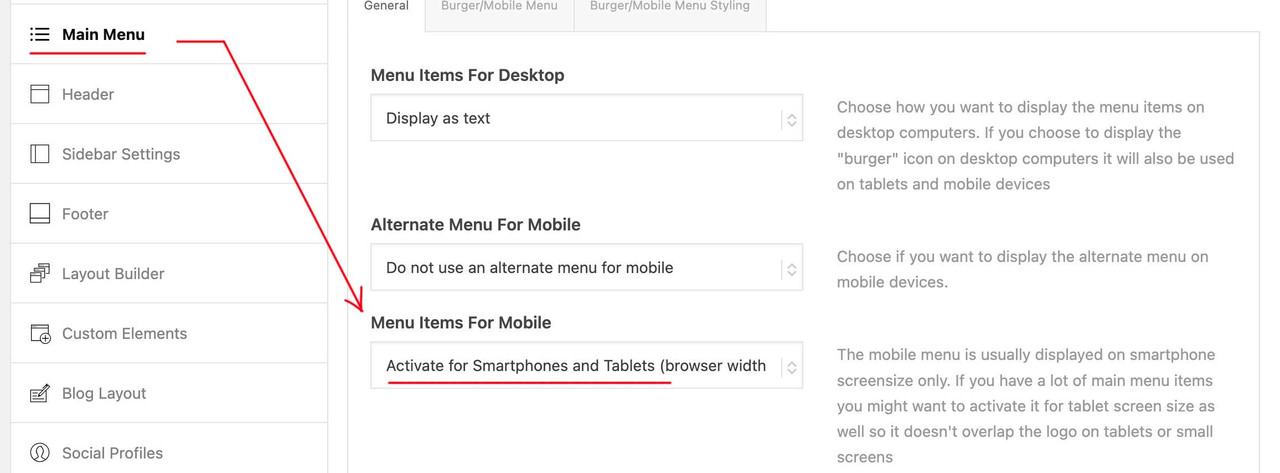
Main Menu – General – Menu Items For Mobile …
Lupe entfernen: Main Menu – General – Append Search Icon To Main Menu (uncheck)danach geht es dann weiter…
February 25, 2025 at 10:20 pm #1477952In reply to: Add Amazon style search bar in top menu
Hi,
the search icon in the header looks fine, to move down the search icon in the sidebar try this CSS in your Enfold Theme Options ▸ General Styling ▸ Quick CSS field:.sidebar .av_searchform_search.avia-svg-icon { top: 31px !important; }Please ensure to copy the code from the forum and not an email notification so the symbols are not converted.
After applying the css, please clear your browser cache and check.

Best regards,
MikeFebruary 25, 2025 at 6:25 pm #1477934In reply to: Add Amazon style search bar in top menu
Hello. It seems after an Enfold theme update, the search icon in the CSS/custom snippets from here is below the search line and not in the red box. When I try to fix it, it moved the sidebar search icon up as well. Any idea how I can JUST move the header search icon up 20px and leave the sidebar alone? THanks.
February 25, 2025 at 5:33 pm #1477922In reply to: Search layout
This reply has been marked as private.February 23, 2025 at 4:28 pm #1477711In reply to: Issue with ALB using Woocommerce
Hi Mike
Sorry to bother you but I would like to solve the issue.
So I did some new research because I remembered using ALB with Woocommerce a while back. I uploaded in another subdomain Enfold Version: 6.0.1 and Woocommerce Version 9.1.1 and at this point ALB worked inside the Product Page. Clearly same Server as the other test.
Credentials in Private Content.
As I upgrade Woocommerce or the theme to the latest version the problem recurs.
Anyway if I can’t rsolve this inconvenience it’s not a problem, I will use Enfold for other projects. It still remains my favorite theme.
Best regards
Manu-
This reply was modified 1 year ago by
manurimini.
February 23, 2025 at 8:25 am #1477680In reply to: Similar themes to Enfold or design options
you can find all demos on GitHub Library: Link
download the zip file you need. Extract the xml file of it and look for the needed enfold shortcode of the wanted page — easiest way: search for the page ID as: post_id>206 or finding the home page on that demo search for: CDATA[home]
copy the needed enfold shortcodes from :
<content:encoded><![CDATA[
… here is the avia shortcode inside
]]></content:encoded>
this copied shortcodes you can enter on a new page inserting it to the debug mode input field (activate the debug mode on : Layout Builder – Debug Mode (Backend Only))
save that new page – now you have copied all the layout of the wanted page.You had to edit now that page elements to enter your image/media links inside that code.
February 16, 2025 at 6:04 pm #1477200In reply to: Transparent logo killing mobile speed.
One issue I discovered using Rocket is that delaying js in totality caused the layer slider to only load a white page besides the logo. I was able to exclude Enfold js, not all of it but what looked related to sliders, in the drop down menus of Rocket. There’s a box to white list specific js, I’ll have to research to discover the specific piece to include there.
I don’t seem to be losing the speed gained by having the whole image load. I was concerned the speed gains came from loading a white page.The original issue remains despite being improved. I can’t imagine that little logo WebP file can be sucking up that much time. The distribution of time is mostly allocated to “load delay” so it must be something with scripts not the image itself. Again, if I drop in a non-transparent version, this all goes away, I believe it is the transparency causing the issue.
If it means anything I looked at a friends page and they have a similar issue although their theme is one that uses Elementor so this may be a WP issue and not intrinsic to Enfold?February 12, 2025 at 8:59 am #1476938In reply to: Change color of only the bottom header section
This reply has been marked as private.January 31, 2025 at 11:54 am #1476070Topic: Things I couldn’t fix using the forum search or documentation
in forum Enfoldjosefkaiblinger
ParticipantDear Enfold- Support!
First of all many thanks for your outstanding work and coding abilities, which you present here. With the help of the Forum I could fix most of the problems I encountered building my site.
However, there are still a few very annoying errors which I wasn’t able to fix, I hope you can help me out.
The site address is [in the private content area]
1) I don’t want the image caption of the header logo to show up on mouseover – i found no option to hide the caption in the enfold header settings
2) The blue footer area (with the Copyright and Impressum link) ist way too large, I would like to have it approx. double the size as the dark blue subfooter area. Especially on mobile view, this area is huge, which does look very strange.
3) Although I set a favicon which is normally displayed in the Chrome Tab on PC and Mobile, on Ipad Chrome browser there’s still the normal WordPress Icon – how can I fix this?I think thats all for now!
Again thank you for your great help!
January 28, 2025 at 7:37 am #1475908Hi,
You have to manually adjust the Styling > Button Bar Style settings of the Social Buttons element. We set it to Circle to test. Please note that the Enfold Child Theme Options > Blog Layout > Share Button Bar Style settings are intended for the social sharing icons in the posts.
If you have any additional questions at this time we kindly ask that you open them up in a separate thread. The longer threads get in the forum, they become more difficult to support as they tend to drift off topic and they also make it troublesome for users trying to search for solutions. Keeping threads relevant to their original inquiry ensures that we can keep better track of what has been resolved and that users can more effectively find answers to similar issues they might be experiencing.
Thanks!
Best regards,
IsmaelJanuary 27, 2025 at 5:42 pm #1475872Topic: Can’t update theme
in forum Enfoldscottsteve
ParticipantI get this message when I try to update Enfold.
“An error occurred while updating Enfold: Could not move the old version to the upgrade-temp-backup directory.”
I have searched the forum and followed applicable device.
The settings on my upgrade-temp-backup directory and its subfolder, themes, are correct – 755I am able to update plugins, just not the theme.
January 23, 2025 at 3:12 pm #1475653Sandor
GuestHi,
I have been a satisfied user of enfold since 2014.
My Purchase codes: e77e1dbe-9f18-4fb7-8735-35f5479ec567 – if necessary.I would like to report this problem because it is a script error.
I need to use the MEC plugin (Modern Events Calendar by Wednus – https://webnus.net/modern-events-calendar) on my website – I searched for a suitable calendar plugin for a long time and decided on this one.
Unfortunately, MEC conflicts with Enfold + Woocommerce, monthly view in MEC plugin displaying incorrectly. I am attaching a printscreen. Only the monthly view is faulty, everything else works fine.
For testing purposes, I installed the Enfold and the MEC plugin on a brand new WP site (on a subdomain) – it works fine.
When I also installed Woocommerce, the monthly calendar view on the new website broke.
If I turn off Woocommerce, the monthly view works fine, if I turn back, falls apart again.
This was a “virgin” WP website.
But the MEC works with the WP base template even if I enable Woocommerce.So there is a conflict with Enfold, between the MEC plugin and Woocommerce both.
– Base WP template + MEC + Woocommerce = works fine,
– Enfold + MEC = works fine,
– Enfold + MEC + Woocommerce = doesn’t work.
So, the error is in the Enfold.I consulted MEC support, they said the problem is between Enfold and Woocommerce: “The Enfold theme likely includes scripts that conflict when both WooCommerce and MEC are enabled simultaneously.” – they wrote me.
Is it possible to fix this error?
Thank you.Best regards,
SandorJanuary 23, 2025 at 3:05 pm #1475652Topic: MEC conflicts with Enfold + Woocommerce
in forum EnfoldParticipantHi,
I have been a satisfied user of enfold since 2014.
My Purchase codes: e77e1dbe-9f18-4fb7-8735-35f5479ec567 – if necessary.I would like to report this problem because it is probably a script error.
I need to use the MEC plugin (Modern Events Calendar by Wednus – https://webnus.net/modern-events-calendar) on my website – I searched for a suitable calendar plugin for a long time and decided on this one.
Unfortunately, MEC conflicts with Enfold + Woocommerce, monthly view in MEC plugin displaying incorrectly. I am attaching a printscreen. Only the monthly view is faulty, everything else works fine.
For testing purposes, I installed the Enfold and the MEC plugin on a brand new WP site (on a subdomain) – it works fine.
When I also installed Woocommerce, the monthly calendar view on the new website broke.
If I turn off Woocommerce, the monthly view works fine, if I turn back, falls apart again.
This was a “virgin” WP website.
But the MEC works with the WP base template even if I enable Woocommerce.So there is a conflict with Enfold, between the MEC plugin and Woocommerce.
– Base WP template + MEC + Woocommerce works fine,
– Enfold + MEC works fine,
– Enfold + MEC + Woocommerce doesn’t work.
So, the error is in the Enfold.I consulted MEC support, they said the problem is between Enfold and Woocommerce: “The Enfold theme likely includes scripts that conflict when both WooCommerce and MEC are enabled simultaneously.” – they wrote me.
Is it possible to fix this error?
Thank you.Best regards,
SandorJanuary 22, 2025 at 8:40 am #1475544Topic: Disable Enfold generated images
in forum Enfolddesignelefant
ParticipantHello,
We have an image heavy website we manage with over 2K images. When Enfold creates additional images, they become too many and take a lot of hosting space. What is the best way to disable Enfold autogenerated images in the future (or decide which to keep)?
We have researched some of the previous similar issues (see the links), but after applying the code and testing, we saw no changes. For any new uploaded image, Enfold creates several and they are 17-18 again.
Please advise.
Here are the forum links we were referring to:
FYI: The website we are talking about is hosted in WP Engine.
Thank you in advance for the assistance.
Best Regards,
Elefant TeamJanuary 21, 2025 at 6:58 pm #1475509In reply to: Extra large white spaces
Hi, Ismael,
I have created a staging site for you, and the access info is below. I didn’t install any new security plugin. So we are still having two issues:
-missing images on the home page (if it helps, when I am logged in, and preview home page, the images are there)
-also the search bar isn’t rendering the way it used to with Enfold.Thanks so much!
JustineJanuary 21, 2025 at 5:01 pm #1475502Topic: accessibility and av-font-icon
in forum EnfoldGrobi
ParticipantHi Enfold team.
Hopefully you had a good start to 2025.To test how I can achieve digital accessibility on my site, i.e. remove the barriers, I am currently trying out WAVE.
I have embedded an av_font_icon on my Enfold site and provided it with a link (a mailto:-link to my email address). Wave finds this problem with my av_font_icon:“Empty link
A link contains no text.”I don’t even know what kind of text should be there at the moment (that will be my next research step), but given the special syntax of the av_font_icons, I do not have an idea how and where I have to insert something like text or whatever. Or – asked you in another way: which element can I integrate into the av-font-icon-syntax to solve my “no-text-issue”?
<p style=”text-align: center;”>[av_font_icon icon='ue805' font='entypo-fontello' style='border' caption='Questions on all topics' link='mailto: (Email address hidden if logged out) ' linktarget='' size='70px' position='center' animation='' color='white' sonar_effect_effect='1' sonar_effect_color='white' sonar_effect_duration='1' sonar_effect_scale='1.5' sonar_effect_opac='0.2' animation=''id='' custom_class='' av_uid='av-5rzj40' admin_preview_bg=''][/av_font_icon]</p>
Can you give me a tip on what I need to do?
Best regards
GrobiJanuary 21, 2025 at 12:06 am #1475457In reply to: Strange inline height applied to Color Sections
Thank you. There are no custom scripts, and I have no plugins loaded that control the appearance of the site. I find it hard to believe that another company’s plugin would target a specific group of DIVs that are unique to your system, vs some other random DIVs on the site.
The affected DIVs have the following class names, most of which are very likely unique to Enfold:
<div class=”
flex_column
av-1m9n6-eed31fd77f8bd9daf76119c2565fcb44
av_one_full
avia-builder-el-2
avia-builder-el-no-sibling
first
flex_column_table_cell
av-equal-height-column
av-align-middle
av-zero-column-padding
av-column-min-height-pc ”
data-av-column-min-height=”{"column-min-pc":"100%","column-equal-height":true}”
style=”height: 1344.8px;
“>There are three generic-sounding class names that might conceivably be used by another plugin developer (flex_column, flex_column_table_cell and first).
I searched through the source code of an affected page looking for instances these classes. All the instances I found were only in DIVs created by the Enfold system. Again I can’t imagine a situation where a plugin would be assigning inline heights to anything in this strange way, and it’s even less imaginable that it would apply it to another system’s page elements.
I also note that this weird inline height style immediately follows Enfold’s ‘data-av-column-min-height’ attribute. Coincidence?
January 18, 2025 at 9:31 pm #1475358In reply to: Burger Menu Position – small screens
Hey nancyT,
Try this CSS in your Enfold Theme Options ▸ General Styling ▸ Quick CSS field:@media only screen and (max-width: 767px) { .av-burger-menu-main.menu-item-avia-special, .responsive.html_cart_at_menu.html_header_searchicon .menu-item-search-dropdown { right: -100px; } }Please ensure to copy the code from the forum and not an email notification so the symbols are not converted.
After applying the css, please clear your browser cache and check.

Best regards,
MikeJanuary 15, 2025 at 11:29 am #1475141Topic: Error Analysis for Landing Page
in forum Enfoldwagnerstephan
ParticipantDear Kriesi Team,
I have been a user of your theme “Enfold” for several years now. For the most part, I am very impressed with the theme. And whenever I encountered an issue or needed help with implementing a specific idea or layout, I was able to find solutions in your forum. Most of the time, I found the threads simply through Google searches. This made it unnecessary for me to use your support directly—until now.
I have set up two landing pages for a client, but unfortunately, they load very slowly, primarily in the “Chrome” browser. Since we are advertising these pages via Google Ads, slow-loading websites are, of course, counterproductive.
At my company, we use a Plesk environment on a rented server. We have already conducted several analyses through our internal admins as well as external partners. Unfortunately, we haven’t been able to determine why the landing pages aren’t performing well. Sometimes, the pages load relatively quickly, but at other times, it takes 10–12 seconds before any content is displayed. This makes it difficult to pinpoint the issue.
We have now reached the point where we’d like to ask for your support to check whether the issue might be related to the “Enfold” theme itself or possibly to a component we might have overlooked. I would kindly ask you to analyze the slower of the two pages first. The URL for the page has been attached separately for your reference.
Thanks a lot!Best regards,
StephanP.S.: One more addition: Saving changes in the Enfold WordPress BACKEND also takes a noticeably long “waiting time” each time. If the backend already takes so long to load, something must be seriously wrong.
-
This topic was modified 1 year, 2 months ago by
wagnerstephan.
January 13, 2025 at 5:10 am #1475045In reply to: Contact form colors
Hey jccardaillac,
Thank you for the inquiry.
The site is not loading our end. To adjust the style of the contact form fields, please add this code in the Enfold > General Styling > Quick CSS field.
#top .main_color .input-text, #top .main_color input[type='text'], #top .main_color input[type='input'], #top .main_color input[type='password'], #top .main_color input[type='email'], #top .main_color input[type='number'], #top .main_color input[type='url'], #top .main_color input[type='tel'], #top .main_color input[type='search'], #top .main_color textarea, #top .main_color select {
    border-color: #000000;
    color: #000000;
    font-family: inherit;
    background: #eeeeee;
}
Make sure to toggle or temporarily disable the Enfold > Performance > File Compression settings to make sure that the changes take effect.
Best regards,
IsmaelJanuary 7, 2025 at 6:12 am #1474755In reply to: How do I place a photo next to text
Hey melanie308,
Thank you for the inquiry.
In a Text or Code Block elementy, you can add something like this:
<div style="overflow: hidden;">
  <img src="main-enfold.png" alt="Image" alt="Image" style="float: left; margin-right: 20px; max-width: 50%;">What is Lorem Ipsum?
Lorem Ipsum is simply dummy text of the printing and typesetting industry. Lorem Ipsum has been the industry's standard dummy text ever since the 1500s, when an unknown printer took a galley of type and scrambled it to make a type specimen book. It has survived not only five centuries, but also the leap into electronic typesetting, remaining essentially unchanged. It was popularised in the 1960s with the release of Letraset sheets containing Lorem Ipsum passages, and more recently with desktop publishing software like Aldus PageMaker including versions of Lorem Ipsum.

Why do we use it?
It is a long established fact that a reader will be distracted by the readable content of a page when looking at its layout. The point of using Lorem Ipsum is that it has a more-or-less normal distribution of letters, as opposed to using 'Content here, content here', making it look like readable English. Many desktop publishing packages and web page editors now use Lorem Ipsum as their default model text, and a search for 'lorem ipsum' will uncover many web sites still in their infancy. Various versions have evolved over the years, sometimes by accident, sometimes on purpose (injected humour and the like).

Where does it come from?
Contrary to popular belief, Lorem Ipsum is not simply random text. It has roots in a piece of classical Latin literature from 45 BC, making it over 2000 years old. Richard McClintock, a Latin professor at Hampden-Sydney College in Virginia, looked up one of the more obscure Latin words, consectetur, from a Lorem Ipsum passage, and going through the cites of the word in classical literature, discovered the undoubtable source. Lorem Ipsum comes from sections 1.10.32 and 1.10.33 of "de Finibus Bonorum et Malorum" (The Extremes of Good and Evil) by Cicero, written in 45 BC. This book is a treatise on the theory of ethics, very popular during the Renaissance. The first line of Lorem Ipsum, "Lorem ipsum dolor sit amet..", comes from a line in section 1.10.32.

The standard chunk of Lorem Ipsum used since the 1500s is reproduced below for those interested. Sections 1.10.32 and 1.10.33 from "de Finibus Bonorum et Malorum" by Cicero are also reproduced in their exact original form, accompanied by English versions from the 1914 translation by H. Rackham.

Where can I get some?
There are many variations of passages of Lorem Ipsum available, but the majority have suffered alteration in some form, by injected humour, or randomised words which don't look even slightly believable. If you are going to use a passage of Lorem Ipsum, you need to be sure there isn't anything embarrassing hidden in the middle of text. All the Lorem Ipsum generators on the Internet tend to repeat predefined chunks as necessary, making this the first true generator on the Internet. It uses a dictionary of over 200 Latin words, combined with a handful of model sentence structures, to generate Lorem Ipsum which looks reasonable. The generated Lorem Ipsum is therefore always free from repetition, injected humour, or non-characteristic words etc.

</div>
Make sure to update the image URL.
Best regards,
IsmaelHey schweg33,
Try this CSS in your Enfold Theme Options ▸ General Styling ▸ Quick CSS field:.search.search-results .post-meta-infos, .search.search-results .entry-content{ display: none; }Before:

After:

Best regards,
MikeJanuary 2, 2025 at 3:44 pm #1474483Topic: Unexpected Redirects Referencing Avia-Elements
in forum Pre Sale QuestionsJurre Robertus
GuestWe are currently encountering an issue with our website, which uses the Enfold theme. In Google Search Console, we have noticed a significant number of redirects referencing avia-elements.
These URLs contain unusual parameters and redirects that we did not create or configure. This is causing concern as it may impact our site’s SEO and functionality.
Could someone please help us understand:
– What might be causing these unexpected redirects?
– How we can resolve or prevent this issue?We would appreciate your guidance or any updates on whether this might be a known issue with the theme.
Looking forward to your response.
January 1, 2025 at 5:13 pm #1474457Topic: kriesi.at site crashes when attempting a search
in forum Enfoldzimbo
ParticipantI have a problem with an Easy Slider on my website.
In seeing if there is a previous post about this, when I enter ‘easy slider’ into the search box at https://kriesi.at/support/forum/enfold/ , the site crashes with
There has been a critical error on this website.

Learn more about troubleshooting WordPress.
December 28, 2024 at 6:20 pm #1474341In reply to: Hamburger icon/ menu always visible on mobile.
ok – then erase the given css code.
But for having the submenue sticky aswell there had to be hardcoded changes to enfold elements. This is not so easy as just css settings.but even 990px are not enought – your menue overlays the logo much earlier.
@media only screen and (max-width: 1080px) { #top #header .av-main-nav > li.menu-item:not(.menu-item-search-dropdown) { display: none!important; } #top #header .av-burger-menu-main { cursor: pointer; display: block!important; } } -
This reply was modified 1 year ago by
-
AuthorSearch Results
-
Search Results
-
Dear Enfold- Support!
First of all many thanks for your outstanding work and coding abilities, which you present here. With the help of the Forum I could fix most of the problems I encountered building my site.
However, there are still a few very annoying errors which I wasn’t able to fix, I hope you can help me out.
The site address is [in the private content area]
1) I don’t want the image caption of the header logo to show up on mouseover – i found no option to hide the caption in the enfold header settings
2) The blue footer area (with the Copyright and Impressum link) ist way too large, I would like to have it approx. double the size as the dark blue subfooter area. Especially on mobile view, this area is huge, which does look very strange.
3) Although I set a favicon which is normally displayed in the Chrome Tab on PC and Mobile, on Ipad Chrome browser there’s still the normal WordPress Icon – how can I fix this?I think thats all for now!
Again thank you for your great help!
Topic: Can’t update theme
I get this message when I try to update Enfold.
“An error occurred while updating Enfold: Could not move the old version to the upgrade-temp-backup directory.”
I have searched the forum and followed applicable device.
The settings on my upgrade-temp-backup directory and its subfolder, themes, are correct – 755I am able to update plugins, just not the theme.
Hi,
I have been a satisfied user of enfold since 2014.
My Purchase codes: e77e1dbe-9f18-4fb7-8735-35f5479ec567 – if necessary.I would like to report this problem because it is a script error.
I need to use the MEC plugin (Modern Events Calendar by Wednus – https://webnus.net/modern-events-calendar) on my website – I searched for a suitable calendar plugin for a long time and decided on this one.
Unfortunately, MEC conflicts with Enfold + Woocommerce, monthly view in MEC plugin displaying incorrectly. I am attaching a printscreen. Only the monthly view is faulty, everything else works fine.
For testing purposes, I installed the Enfold and the MEC plugin on a brand new WP site (on a subdomain) – it works fine.
When I also installed Woocommerce, the monthly calendar view on the new website broke.
If I turn off Woocommerce, the monthly view works fine, if I turn back, falls apart again.
This was a “virgin” WP website.
But the MEC works with the WP base template even if I enable Woocommerce.So there is a conflict with Enfold, between the MEC plugin and Woocommerce both.
– Base WP template + MEC + Woocommerce = works fine,
– Enfold + MEC = works fine,
– Enfold + MEC + Woocommerce = doesn’t work.
So, the error is in the Enfold.I consulted MEC support, they said the problem is between Enfold and Woocommerce: “The Enfold theme likely includes scripts that conflict when both WooCommerce and MEC are enabled simultaneously.” – they wrote me.
Is it possible to fix this error?
Thank you.Best regards,
SandorHi,
I have been a satisfied user of enfold since 2014.
My Purchase codes: e77e1dbe-9f18-4fb7-8735-35f5479ec567 – if necessary.I would like to report this problem because it is probably a script error.
I need to use the MEC plugin (Modern Events Calendar by Wednus – https://webnus.net/modern-events-calendar) on my website – I searched for a suitable calendar plugin for a long time and decided on this one.
Unfortunately, MEC conflicts with Enfold + Woocommerce, monthly view in MEC plugin displaying incorrectly. I am attaching a printscreen. Only the monthly view is faulty, everything else works fine.
For testing purposes, I installed the Enfold and the MEC plugin on a brand new WP site (on a subdomain) – it works fine.
When I also installed Woocommerce, the monthly calendar view on the new website broke.
If I turn off Woocommerce, the monthly view works fine, if I turn back, falls apart again.
This was a “virgin” WP website.
But the MEC works with the WP base template even if I enable Woocommerce.So there is a conflict with Enfold, between the MEC plugin and Woocommerce.
– Base WP template + MEC + Woocommerce works fine,
– Enfold + MEC works fine,
– Enfold + MEC + Woocommerce doesn’t work.
So, the error is in the Enfold.I consulted MEC support, they said the problem is between Enfold and Woocommerce: “The Enfold theme likely includes scripts that conflict when both WooCommerce and MEC are enabled simultaneously.” – they wrote me.
Is it possible to fix this error?
Thank you.Best regards,
SandorHello,
We have an image heavy website we manage with over 2K images. When Enfold creates additional images, they become too many and take a lot of hosting space. What is the best way to disable Enfold autogenerated images in the future (or decide which to keep)?
We have researched some of the previous similar issues (see the links), but after applying the code and testing, we saw no changes. For any new uploaded image, Enfold creates several and they are 17-18 again.
Please advise.
Here are the forum links we were referring to:
FYI: The website we are talking about is hosted in WP Engine.
Thank you in advance for the assistance.
Best Regards,
Elefant TeamHi Enfold team.
Hopefully you had a good start to 2025.To test how I can achieve digital accessibility on my site, i.e. remove the barriers, I am currently trying out WAVE.
I have embedded an av_font_icon on my Enfold site and provided it with a link (a mailto:-link to my email address). Wave finds this problem with my av_font_icon:“Empty link
A link contains no text.”I don’t even know what kind of text should be there at the moment (that will be my next research step), but given the special syntax of the av_font_icons, I do not have an idea how and where I have to insert something like text or whatever. Or – asked you in another way: which element can I integrate into the av-font-icon-syntax to solve my “no-text-issue”?
<p style=”text-align: center;”>[av_font_icon icon='ue805' font='entypo-fontello' style='border' caption='Questions on all topics' link='mailto: (Email address hidden if logged out) ' linktarget='' size='70px' position='center' animation='' color='white' sonar_effect_effect='1' sonar_effect_color='white' sonar_effect_duration='1' sonar_effect_scale='1.5' sonar_effect_opac='0.2' animation=''id='' custom_class='' av_uid='av-5rzj40' admin_preview_bg=''][/av_font_icon]</p>
Can you give me a tip on what I need to do?
Best regards
GrobiDear Kriesi Team,
I have been a user of your theme “Enfold” for several years now. For the most part, I am very impressed with the theme. And whenever I encountered an issue or needed help with implementing a specific idea or layout, I was able to find solutions in your forum. Most of the time, I found the threads simply through Google searches. This made it unnecessary for me to use your support directly—until now.
I have set up two landing pages for a client, but unfortunately, they load very slowly, primarily in the “Chrome” browser. Since we are advertising these pages via Google Ads, slow-loading websites are, of course, counterproductive.
At my company, we use a Plesk environment on a rented server. We have already conducted several analyses through our internal admins as well as external partners. Unfortunately, we haven’t been able to determine why the landing pages aren’t performing well. Sometimes, the pages load relatively quickly, but at other times, it takes 10–12 seconds before any content is displayed. This makes it difficult to pinpoint the issue.
We have now reached the point where we’d like to ask for your support to check whether the issue might be related to the “Enfold” theme itself or possibly to a component we might have overlooked. I would kindly ask you to analyze the slower of the two pages first. The URL for the page has been attached separately for your reference.
Thanks a lot!Best regards,
StephanP.S.: One more addition: Saving changes in the Enfold WordPress BACKEND also takes a noticeably long “waiting time” each time. If the backend already takes so long to load, something must be seriously wrong.
We are currently encountering an issue with our website, which uses the Enfold theme. In Google Search Console, we have noticed a significant number of redirects referencing avia-elements.
These URLs contain unusual parameters and redirects that we did not create or configure. This is causing concern as it may impact our site’s SEO and functionality.
Could someone please help us understand:
– What might be causing these unexpected redirects?
– How we can resolve or prevent this issue?We would appreciate your guidance or any updates on whether this might be a known issue with the theme.
Looking forward to your response.
I have a problem with an Easy Slider on my website.
In seeing if there is a previous post about this, when I enter ‘easy slider’ into the search box at https://kriesi.at/support/forum/enfold/ , the site crashes with
There has been a critical error on this website. Learn more about troubleshooting WordPress.