Hi clodgc,
You’ll need to set your token permission with the following:
- View and search Envato sites (checked by default)
- View your Envato account username
- View your email address
- View your account profile details
- Download your purchased items
- Verify purchases of your item
- List purchases you’ve made
For further information on these topic, please check our documentation: https://kriesi.at/documentation/enfold/theme-registration/
Best regards,
Nikko
And to what direction the search-input field should open?
Where does the ajax search results should toggle?
What happend to the scroll to top button?
This in child-theme functions.php will place the magnifier icon in the menu3 of enfold:
function avia_append_search_nav3 ( $items, $args )
{
    if ((is_object($args) && $args->theme_location == 'avia3') || (is_string($args) && $args = "fallback_menu"))
      {
          global $avia_config;
          ob_start();
          get_search_form();
          $form =  htmlspecialchars(ob_get_clean()) ;

          $items .= '<li id="menu-item-search3" class="noMobile menu-item menu-item-search-dropdown menu-item-avia-special">
                 <a href="?s=" data-avia-search-tooltip="'.$form.'" '.av_icon_string('search').'>
                  <span class="avia_hidden_link_text">'.__('Search','avia_framework').'</span>
                 </a>
               </li>';
      }
      return $items;
}
add_filter( 'wp_nav_menu_items', 'avia_append_search_nav3', 10, 2 );
but i do not know how to get the ajax search results to show
Hey John,
Please try to check first if the token you are using have the sufficient permission:
- View and search Envato sites (checked by default)
- View your Envato account username
- View your email address
- View your account profile details
- Download your purchased items
- Verify purchases of your item
- List purchases you’ve made
For more information, please check our documentation: https://kriesi.at/documentation/enfold/theme-registration/
To answer your question above, here’s the link on how to update it via FTP: https://kriesi.at/documentation/enfold/theme-update/#update-via-ftp
Also, as long as all your modifications is in the child theme, your modifications shouldn’t be lost (but it’s good to have a backup always).
Best regards,
Nikko
Hi,
We just did basic tests in the avia_ajax_search function inside the functions-enfold.php file, but failed to extract any results because the site is very slow on our end. Please hire a freelance developer or a maintenance agency to help out in identifying the issue. For some reason, doing a search triggers an internal server error, but we can’t reproduce the same issue on our own installations.
And you didn’t answer me about which tool you used to test my frontpage weight and requests…
We just observed the number of requests and check the size of the page directly in the browser inspector > Networks tab. We didn’t use any external tools but you can certainly do so if necessary. Popular choices are Gtmetrix or Google’s Lighthouse. And we deactivated the Autoptimize plugin temporarily to rule out any issues related to compression or script minification.
If you don’t mind, please open a new posts so that we can push this topic back to the queue, or refresh it. This thread is getting a bit long, so it tends to be a bit confusing for other moderators. I will also forward the new thread to our channel.
Best regards,
Ismael
Hey Christin,
Sorry for the late reply, the first link above to the Shop Demo is the default product page, the other two were created with the Advanced Layout Builder using the woocommerce elements in the “Plugin Additions” tab.

Please note that the Advanced Layout Builder for products will not work with all WooCommerce Extensions.
As for importing products via CSV for custom product pages, I tried researching this “issue” but only found one thread about this and it was about using the plugin WP All Import.
You can import your products via a woocommerce CSV file by going to WordPress > Tools > Import > WooCommerce products (CSV)

For example, the woocommerce plugin includes a sample CSV import file at: \wp-content\plugins\woocommerce\sample-data\
After the products are imported successfully and if you wish to change them to “custom product pages” with the Advanced Layout Builder, simply open the Advanced Layout Builder and edit to suit.
Since the sample products were created with the Classic Editor and then exported, they will be imported the same.
As for editing PHP files to create your “certain screen design”, while you can create many layouts with the Advanced Layout Builder, sometimes this is not enough to match the desired design, in this case you may need to edit the files in \enfold\config-woocommerce\. In these cases I would recommend hiring a freelancer to make the changes for you as it is not an easy task.
Best regards,
Mike
Hey mrsecommerce,
Please make sure that the token you used has the following permissions:
- View and search Envato sites (checked by default)
- View your Envato account username
- View your email address
- View your account profile details
- Download your purchased items
- Verify purchases of your item
- List purchases you’ve made
For further information please check our documentation: https://kriesi.at/documentation/enfold/theme-registration
Best regards,
Nikko
Hi Rikard,
It’s all done on development copy before bothering you – did not make difference. Now everything up to date on live site also. Issue stays there.
I tested Ajax product search with a random theme this morning with success. So it is Enfold-Woocommerce conflict probably..
Tiit
I’m looking for a quiz plugin that works with Enfold. I’ve read the “recommended plugins” post, but there are no quizzes there. I’ve searched forums for “recommended quiz plugin for Enfold” and found a couple of answers that say to use https://wordpress.org/plugins/wp-pro-quiz/, but there’s an alert on the page that says “This plugin has been closed as of June 17, 2020 and is not available for download. This closure is temporary, pending a full review.” I don’t know what that means. I’m happy to search CodeCanyon myself, but am wondering if anyone has had particular success with another quiz plugin (free or premium). I don’t need all the functionality of LearnDash or I would try that. Can anyone advise?
Hi Jeff,
Thanks for contacting us!
I searched your emails in our database however they cannot be found. However your purchase code is not registered, so please go to – https://kriesi.at/support/register/ and register a new account. After that you can start new threads under Enfold sub forum – kriesi.at/support/forum/enfold#new-post :)
Cheers!
Yigit
 Jimmy Miranda
Thanks that worked!
When creating a New Consult and at the Check Out page its not showing PayPal or Square payment options. I searched and haven’t been able to figure it out. Could this be an issue with enfold?
Also, every time I make a change on WooCommerce I keep losing Shop Page (Make an Appointment) and creates a new one labeled as Shop. So I have to go back and rename the page back to Make an Appointment and update the menu so its visible on the site. Do you know what could be causing this?
I have a video on one page within my wordpress site (enfold theme). The video is a link from youtube using full width easy slider. When I look on an ipad or mobile it does not show and says: Please set a mobile device fallback image for this video in your wordpress backend. I have tried to search and do this and cant seem to find a way to correct. Cam anybody help?
After Enfold update to version 4.7.5 Ajax search broke.
Have tried clear .htaccess, all plugins off etc – the result is:
Ajax works only with Woocommerce off.
I do need direct assistance ASAP.
Hi there, loving the Enfold theme. It’ works great until you try to use the “plugin additons” on the Avia Layout Builder. They don’t allow for editing. I’ve searched everywhere to figure out what I’m missing. I’m assuming the plugin additions are for woo commerce since they are all related to shopping. i.e. “product slider” “product grid” product info” etc.
I’d like to use these to populate my product pages but am having issues.
Can you point me in the right direction?
You can add one to the page but there is no edit function like wiht all of the other elements in Avia.
Thank you!
Jacquie
Hi there,
I did not find a post which helps me out, so I try it with a new topic (sorry, if I missed the solution)
A customer has a certain screendesign for their product pages which I try to implement on the new Enfold+WooCommerce page I’m currently building.
The Design is very specific, when in comes to positioning of elements like the product image, further images, pricing, add2cart etc.
The current temple isn’t working for me at all, so I wanted to edit the current template.
I searched for (easy) ways to do so. Like plugins etc.
But all I can find are plugins, which require me to use other builders than the Advanced Layout Builder.
I’ve found some replies, where you (Enfold support team) mentioned, that I could use the ALB, but you can’t upload products via CSV after that.
Since that is one of the main reasons to build a new page for my customer, that wouldn’t be of any use for me.
I was wondering, how you set up the different product pages on your Enfold Shop Demo:
Are these built with the ALB / Did these require custom PHP code?
So… do I have to learn how to edit PHP files in order to create a custom product page or is there an easier way to do so?
Bests,
Chris
Hi Nikko,
unfortunatley this does not change anything.
With this option I would have to un-fix the main menu because the search results are not displayed in the visible area.
I need to position the search below the logo or at least above the main menu.
Is there maybe a chance to put the search widget via shortcode there?
Can I add/place an Enfold widget area above the main menu instead below of it?
Thanks,
Neverlands
Hey SarahKunterbunt,
Have you followed the instructions posted in the documentation? https://kriesi.at/documentation/enfold/theme-registration/
Also please make sure you have the proper token permission:
- View and search Envato sites (checked by default)
- View your Envato account username
- View your email address
- View your account profile details
- Download your purchased items
- Verify purchases of your item
- List purchases you’ve made
Best regards,
Nikko
Hello,
I am using Enfold with the Consulting Demo.
I realized that there is no search option so I’ve tried the solution from this topic.
But I don’t like it because then I would have to un-frix the main menu.
Is it possible to place the search like this?
I would like to directly show the form, not just the search icon:
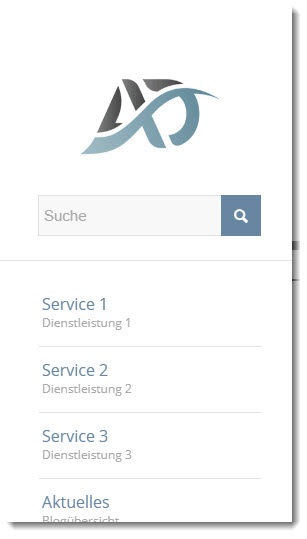
Best regards,
Neverlands
Hi
I am seeing 25 errors in Google Search Console for my enfold site.
The error is “Either ‘name’ or ‘item.name’ should be specified”
I saw in another thread that this was caused by BBPress but I don’t use BBPress.
I also saw in another forum (not enfold) an answer that said the following:
“When you are going to post something on your blog then” must include label name” it is compulsory for all the posts otherwise your post URL is not on google. After you post with label name you see you don’t have any Breadcrumbs name or item.name or list element Error.”
But how do I add a label name to my posts (and pages) in enfold?
Does anyone have any ideas on how I can fix this, please?
Kind regards
Tia
Hi guys,
I want a search icon on mobile. I tried to add the following code to Quick CSS in Enfold theme options under General Styling tab but it doesn’t work. Can you help me?
@media only screen and (max-width: 767px) {
.main_menu .avia-menu, #header_main_alternate {
display: block !important;
}
.av-main-nav > li { display: none; }
li#menu-item-search {
display: block!important;
margin-top: -90px;
right: 70px;
}
.responsive .main_menu {
float: right;
}}
Hey Guenter,
Not sure if this is what you meant, but I extendend the lightbox script that when no title attribute exists (which currently leads to an empty title string in lightbox) it searches for the alt attribute and displays it instead.
And for the fixed size I also copy the alt attribute to the a tag.
Does that make sense?
To check use 4.7.6.1 and replace
enfold/js/avia-snippet-lightbox.js and
enfold/config-templatebuilder/avia-shortcodes/av-helper-masonry.php
with:
https://github.com/KriesiMedia/enfold-library/blob/master/temp_fixes/Enfold_4_7_6_1/lightbox_fix/avia-snippet-lightbox.js
https://github.com/KriesiMedia/enfold-library/blob/master/temp_fixes/Enfold_4_7_6_1/lightbox_fix/av-helper-masonry.php
Best regards,
Günter
Hi 2SPRO,
That’s great progress!
Here is the code you can put in Enfold > General Styling > Quick Css, if it does not work, put into themes/enfold/css/custom.css
.is-form-style button.is-search-submit {
    vertical-align: top;
}
If you need further assistance please let us know.
Best regards,
Victoria
Hi Yigit,
Maybe we didn’t understand each other.
Here the Italian Language for Enfold Version 4.7.6
Other, I’ve found an mistakes on register-admin-options.php
Search in: includes/admin/register-admin-options.php on line 1283
$recaptcha_v3 = sprintf( __( 'Please keep in mind that Version 3 needs to <a href="%1$s" target="_blank" rel="noopener noreferrer">monitor user behaviour and collects user data</a>. In case the score does not recognize a human Version 2 checkbox will be used additionally for verification. Therefore you must also register V2 keys.', ''), $recaptcha_v3 );
Replace with:
$recaptcha_v3 = sprintf( __( 'Please keep in mind that Version 3 needs to <a href="%1$s" target="_blank" rel="noopener noreferrer">monitor user behaviour and collects user data</a>. In case the score does not recognize a human Version 2 checkbox will be used additionally for verification. Therefore you must also register V2 keys.', 'avia_framework'), $recaptcha_v3 );
Regards
Luigi
Hi 2SPRO,
Those errors are due to insufficient permission.
Please make sure that token you have added has the required permission:
- View and search Envato sites (checked by default)
- View your Envato account username
- View your email address
- View your account profile details
- Download your purchased items
- Verify purchases of your item
- List purchases you’ve made
For more information regarding this issue, please check our documentation: https://kriesi.at/documentation/enfold/theme-registration/
Best regards,
Nikko
Hi Kevin,
Here is the code you can put in Enfold > General Styling > Quick Css, if it does not work, put into themes/enfold/css/custom.css
@media only screen and (max-width: 1300px) {
  nav.main_menu, #menu-item-search {
    display: block !important;
  }
  .menu-item {
    display: none;
  }
  .av-burger-menu-main.menu-item-avia-special {
    display: block;
  }
}
If you need further assistance please let us know.
Best regards,
Victoria
Hi Nikko,
Thx for your reply :)
Oh to bad, I had hoped you already came across one that’s compatible with Enfold.
Yes, Learndash has video progression, but unfortunately it’s not fully compatible with Enfold (yet).
Oh well, the search continues.
You can close this ticket.
Sincerely,
Morticka
Hey Aurora,
Here is the code you can put in Enfold > General Styling > Quick Css, if it does not work, put into themes/enfold/css/custom.css
#top.home #header.av_header_transparency .av-main-nav > li > a .avia-menu-text,
#top.home #header.av_header_transparency .av-main-nav > li#menu-item-search a {
    color: #fff;
}
If you need further assistance please let us know.
Best regards,
Victoria
Greetings Enfold Team:
1) 1st problem i cannot update to the latest version. I see the data below
Errors occured checking on 2020/07/22 12:10:
Download Package URL: Errorcode 403 returned by Envato: Forbidden:
– response_code: 403
– reason: scope-missing
Download Package URL: A problem occured accessing your download link. Unable to perform update.
Following Envato package errors occured:
Enfold – Request for Download URL failed.
2) On all my search bars the the search icon is lower than the bar
Hello,
I bought enfold for a dozen websites and everything works perfectly :)
1/ But for my last website, I have installed Buddypress and BudyPress Docs.
Everything works except the BP Docs files load button, when I click, the page searches for a few seconds and then nothing happens.
But when I disable Enfold, the button works and I access the media library tu upload file.
Can you tell me how to solve the problem please?
2/ I can’t use the automatic update system of Enfold, neither with Envato Market plugin.
Thank you in advance,
Stephanie
Hi, Yigit,
thanks for your answer.
I would like to see an alternative way described in the documentation instead of recommending a plugin. Because the settings have to be made only once and using a plugin for this I find it a bit exaggerated.
This is how it works without a plugin:
1. rewrite mo- and po-files and put them into child-theme folders – as described here: https://kriesi.at/documentation/enfold/translation/#child-theme-translations
2. also rewriting the Ajax-Search texts – here this contribution was very helpful: https://kriesi.at/support/topic/change-text-on-search-page/#post-848196
Thanks a lot.
Best,
Tobias



