 Ian Davidson
Guest
Hi, this is not a pre-sales question, but there is no other way to get hold of you as your Forum Search functionality is giving me a critical website error and I’ve cleared my cache a few times. I’m having an issue with the latest version of Enfold. There’s no Custom Text Block with this version, so all previous CTB entries are broken.
Hi,
Thanks for your patience and the link to your site please try adding this css to your Enfold Theme Options ▸ General Styling ▸ Quick CSS field:
@media only screen and (min-width: 767px) and (max-width: 989px) {
  .responsive #top #main {margin-top: -90px!important;}
  #top #wrap_all .av_header_transparency {background-color: transparent!important;}
  div#header_main > .container {display: block !important;}
  }
  @media only screen and (max-width: 989px){
.html_mobile_menu_tablet .header_color.av_header_transparency div .av-hamburger-inner, .html_mobile_menu_tablet .header_color.av_header_transparency div .av-hamburger-inner:before, .html_mobile_menu_tablet .header_color.av_header_transparency div .av-hamburger-inner:after {
    background-color: #fff;
}
}
  #top #wrap_all .av_header_transparency #menu-item-search a:before {
  	color: #fff;
  }
After applying the css, please clearing your Autoptimize plugin and your browser cache and check.
Best regards,
Mike
You can find several posts using the search function on how to remove this notice in the footer.
add to your own notice there : [nolink]
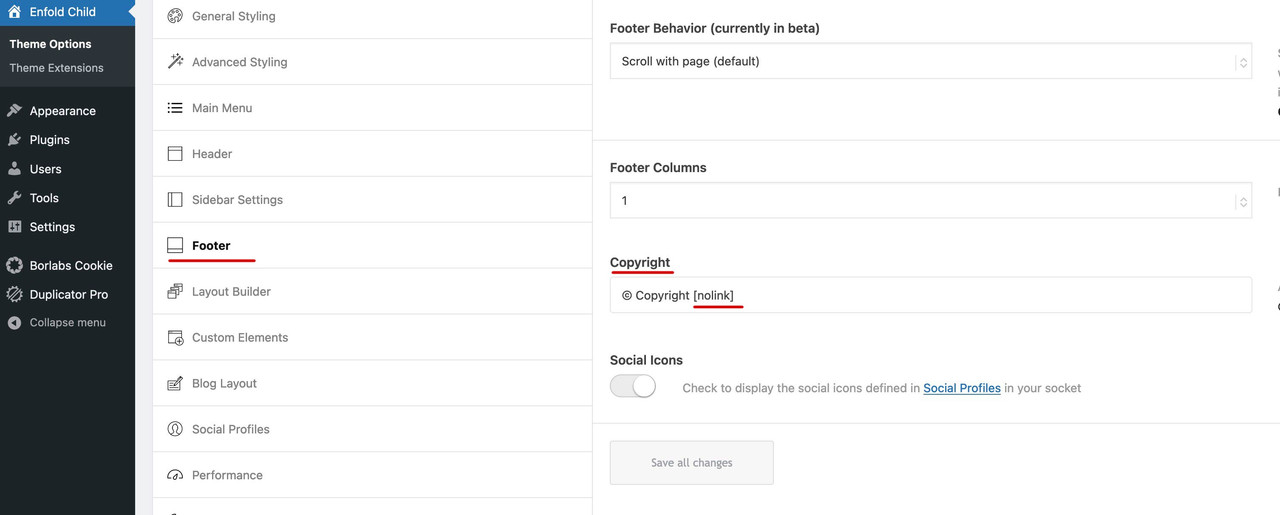
You can even find it in the documentation ( link ) . If you have a little patience, you will be answered even here friendly and in compliance with netiquette. Even people who have no profit from the theme here – nice and friendly participants like me answer you comprehensively and quickly.
You can even rewrite this note that is automatically inserted there to your own settings.
Here is an answer from my side that is not too long ago. : Link
I wish you another beautiful day. ;)
ok guys i was successful with the enfold update, 4,1 to 5.5 (somany years without att)…
sorry for creating this topic withou search a little bit more.
-
This reply was modified 2 years, 11 months ago by
 LFZ1.
LFZ1.
Hey andupro,
Thank you for the inquiry.
You can add the search bar in a text widget and use a hook to insert the widget inside the header area. Please check the following documentation for more info.
// https://kriesi.at/documentation/enfold/header/#adding-a-header-widget-area
Best regards,
Ismael
Hey D hughes,
Thank you for your patience I tried to research your past thread and I believe it was this one for the enfold theme at antonsport.com, and you provided a Purchase code which I checked here. This purchase code only offers support in the forum until 2018-12-08
When you purchase the license for the theme it is forever but typically only includes 6 months of support, you can purchase more support in your Theme Forest (Envato) account you can read more here.
If you don’t have a Theme Forest (Envato) account because you are using a license given to you by a developer, then ask him to extend your support or create your own account when you purchase a license directly from Envato. Envato will not transfer licenses, and due to our contract with Envato we can not directly sell licenses or support.
I see your original question was about significant speed issues and the site is using v5.4, when I check it seems to load in 1.72s which is very good, if you want to try to improve it try reading our article here.
If you have further questions please try renewing your support and open a new thread.
Best regards,
Mike
Hey mgyura,
Thanks for your patience, I see in your first screenshot the Gravity Forms option icon is also not showing in the admin side panel above the “pages” option as in the second screenshot, are you sure it is active?

In a forum search I found a recommendation for No conflict mode in GF settings.
Please see if you can find this setting, otherwise please include an admin login in the Private Content area so we can be of more assistance.
Best regards,
Mike
Hi Nikko –
cheers.
But WP Amour just works with enfold and when you have a subscription with wp amour.
And If I would do every subscription I needed – for the same money I could hire an agency to do a .net version of the websites. ;-)
I have done my research and found the following solution (which is free for the moment):
https://www.cloudflare.com/en-gb/products/turnstile/
There was also a thread from earlier where Yigit said he will ask the dev team how they can integrated it to the enfold form… I think it was couple month ago.
Any thoughts on that?
Cheers
T
Hi there. I searched and got an error. So I just thought i’d ask.
Where in Content Elements can I find the layout that is displayed here:
Hey Monika,
Thank you for the inquiry.
You can use this CSS code to remove the box shadow from a field when it’s focused.
#top input[type="text"]:focus, #top input[type="password"]:focus, #top input[type="email"]:focus, #top input[type="number"]:focus, #top input[type="url"]:focus, #top input[type="tel"]:focus, #top input[type="search"]:focus, #top textarea:focus {
    box-shadow: none;
}
Please toggle or temporarily disable the Enfold > Performance > File Compression settings after adding the css.
Best regards,
Ismael
Hi Daniel,
I edited the .htaccess file on the root of the WordPress installation, also, created a new .htaccess file inside the framework folder, and added the following to disable directory browsing
Options -Indexes
Then, I started a validation on Google Search Console on 1/4/23 but unfortunately, it’s still pending.
Please refer to Peter’s post here https://kriesi.at/support/topic/google-search-console-403-error-on-directory-wp-contentthemesenfoldframework-2/#post-1013166 or to this post https://rankmath.com/kb/fix-blocked-due-to-access-forbidden-403-error/ and check if these work for you.
Best regards,
Yigit
Hello,
We use the licensed Enfold theme on our website. Our site has a favicon, but each site also has a different icon in google searches. This icon does not appear in google searches of our site. Does this have a setting in the Enfold theme? I am attaching the screenshot link below.
https://prnt.sc/6zXNICjFv2nW
Hu Rikard,
Thanks for your quick reply. I understand now why it changed. And Enfold still rules ;-).
I already solved my problem myself. I will post my solution underneath. Maybe it helps other people searching the forum!
My problem was that, only on mobile phones, text was wrapped around images in a very ugly way. I solved this using this code under ‘quick css’ under the “Style’ tab. All images are now centered and the text starts under the image. Please see https://divorcesupport.nl
This is the css code:
img.alignleft,
img.alignright {
float: none;
margin-left: auto;
margin-right: auto;
width: auto;
display: block;
}
}
Then there was a new problem. There are also some images with captions on my website. These were still not centered because they are not ‘seen’ as images. I am a complete noob and couldn’t find the solution within the forum, so I tried and … tried… and managed to solve it using this css code under ‘quick css’ under the style tab:
@media(max-width: 767px){
#top .wp-caption.alignright,
#top .wp-caption.alignleft {
float: none;
margin-left: auto;
margin-right: auto;
display: block;
}
}
And now also the images with captions look great on mobile phones, for example see https://divorcesupport.nl/scheiden-scheiding-mediator-mediation-mijdrecht-hillegom-alphen-aan-den-rijn-roelofarendsveen-co-ouderschap/
Just posting all the above to help others. Thank you for your quick reply. Enjoy your weekend!
Lennard
This reply has been marked as private.
Hi,
Thanks, I see this error: Refused to execute script from ‘‘ because its MIME type (‘text/html’) is not executable, and strict MIME type checking is enabled.
This is causing #1 & #3
When did this begin, after updating to PHP v8.1.8, or adding a plugin?
I have not seen this before but I don’t believe Enfold can cause this, I recommend starting by disabling all of your plugins, I’m thinking strict MIME type checking might be a setting in Wordfence, but it could be a different one.
My research seems to point to a server setting or .htaccess, but it’s vague, try asking your webhost if strict MIME type checking can be disabled
Best regards,
Mike
Hey cappellettimax,
Try this css in your Enfold Theme Options ▸ General Styling ▸ Quick CSS field
#top.search-results .template-search .product .post-meta-infos {
	display: none;
}
#top.search-results .template-search .product .entry-content {
    height: 100px;
    overflow: hidden;
}
After applying the css, please clear your browser cache and check.
Best regards,
Mike
Hi,
Thanks for your feedback, but I have searched our theme files and nav_menu_link_attributes is not used in our menus.
I did find these:
wp_nav_menu_items
wp_nav_menu_args
wp_nav_menu_objects
Perhaps the plugin can write a function to use one of these, I would not know how to do this and as Rikard pointed out above we are limited in supporting third-party plugins.
Thank you for your patience and understanding and using Enfold.
Best regards,
Mike
Hey vantagepointmg,
Thanks for the link to your site, I see on your page /contact-us/ you are using the plugin Formidable, I can see that their css rules are too weak.
So one solution would be to add this css to your Quick CSS:
#top #main .with_frm_style input[type=text], #top #main .with_frm_style input[type=password], #top #main .with_frm_style input[type=email], #top #main .with_frm_style input[type=number], #top #main .with_frm_style input[type=url], #top #main .with_frm_style input[type=tel], #top #main .with_frm_style input[type=phone], #top #main .with_frm_style input[type=search], #top #main .with_frm_style select, #top #main .with_frm_style textarea, .frm_form_fields_style, #top #main .with_frm_style .frm_scroll_box .frm_opt_container, .frm_form_fields_active_style, .frm_form_fields_error_style, #top #main .with_frm_style .frm-card-element.StripeElement, #top #main .with_frm_style .chosen-container-multi .chosen-choices, #top #main .with_frm_style .chosen-container-single .chosen-single {
    color: #555555;
    background-color: #ffffff;
    border-color: #cccccc;
    border-width: 1px;
    border-style: solid;
    -moz-border-radius: 4px;
    -webkit-border-radius: 4px;
    border-radius: 4px;
    width: 100%;
    max-width: 100%;
    font-size: 14px;
    padding: 6px 10px;
    -webkit-box-sizing: border-box;
    -moz-box-sizing: border-box;
    box-sizing: border-box;
    outline: none;
    font-weight: normal;
}
and see if that corrects, it is the css from the plugin that I adjusted to have more specificity.
Or if you just want to change the text field color in the theme settings change the color of Enfold Theme Options ▸ General Styling ▸ Main Content ▸ Main Content Secondary Font Color
Best regards,
Mike
Hey sarthakchoudhary,
Thanks for your question, the maintenance options is for the whole site, if you don’t want to show a single page try setting that page to “private” you can use the “Quick Edit” option:

or the Visibility option under Publish:

I have not tested any plugins with this option, but you can try these: maintenance mode single page
Best regards,
Mike
Hey Santiago,
Please go to Enfold theme options > Main Menu and disable “Append Search Icon To Main Menu”.
Best regards,
Yigit
Hi, we would love to try and clean up how the “Search Results Page” displays the results (e.g. prioritising product pages, pages, blog posts). Do you know of a Search Results Plugin that is Enfold friendly?
Regards,
Annemarie
On one of my Enfold websites (see private content) I have 2 indentical (?) Google fonts loading:
https://fonts.gstatic.com/s/opensans/v34/memvYaGs126MiZpBA-UvWbX2vVnXBbObj2OVTS-muw.woff2
https://fonts.gstatic.com/s/opensans/v34/memvYaGs126MiZpBA-UvWbX2vVnXBbObj2OVTSumu1aB.woff2
I use Open Sans on all my Enfold sites and normally there is just one Open Sans request, not two. I searched all theme options but can not find somethuing that causes this issue.
Any idea why on this website 2 Open Sans fonts are loading?
Thanks,
Alwin
Hey Tim,
A user, who is using Grid layout for their Search Results, reported a compatibility issue with the Relevansi plugin. We fixed it in Enfold and that note refers to it.
Here is that thread: https://kriesi.at/support/topic/search-results-page-avia_product_slider-get_style_tag-on-null-error/
Best regards,
Yigit
Hi everyone,
I’m working on 2 Enfold sites and with both I created portfolios with categories.
The first page shows the ‘portfolio grid’: https://snipboard.io/jdMkyW.jpg
The second one doesn’t: https://snipboard.io/SceP6O.jpg
It’s probably a one click solution, but simply I can’t find it. And searched up and down the forum…
Any ideas? Thanks in advance!!
Best regards,
Stefan
I’m working in the Enfold Child main menu.
Unfortunately, not all menu entries are loading.
(‘get-in-touch’, ‘practise-area’, … are missing)
You can’t find them using the search function either.
Hey muffinwiz,
On our demo page it is in a special heading at the top of the page:

But I don’t see it on either of the pages you linked to, do you have any of the demo pages still on your site?
If so try deleting them and rebuild your Relevanssi search database and then check again.
If this doesn’t help please include an admin login in the Private Content area so we can be of more assistance.
Best regards,
Mike
We use the audio player (media element) on two pages. Since some time we use Relevanssi as a search plugin. When we search for “pastor”, the search returns on all pages where the audio player is used the following sentence “A list of our latest Sermons, all preached by pastor Coleman”. However this sentence is not part of any of our pages – but it is on one of the demos of enfold: https://kriesi.at/themes/enfold-church/sermons/
Even if we check the source code (html) of one of the pages where the search finds this text, it does not exist.
Does anyone have an idea where this sentence is coming from and how we can get rid of it? The name of our pastor is not Coleman ;-)
Hello Enfold support team,
First and foremost, thank you for all your help.
I want to customize the accordion functionality on one of my websites. Specifically, I want to remove the line between the header and the content when the item is expanded. I searched through your documentation and tried looking for direction on this but came up short. Can you please point me in the right direction?
I provided an admin username, password, and the website URL in the private content box.
-James
Hey Tom,
The Events Calendar should inherit the colors you set in Enfold theme options > General Styling tab. It is not fully compatible with customizer.
If you’d like to override Enfold theme options styling, please add following code to bottom of Quick CSS field in Enfold theme options > General Styling
.tribe-events .tribe-events-c-search__button {
  background-color: var(--tec-color-background-events-bar-submit-button) !important;
  color: var(--tec-color-text-events-bar-submit-button) !important;
}
Best regards,
Yigit
Hey Tom,
I reported the issue to our developers. Issue should be fixed in upcoming version.
As a temporary solution, I added the following code to the bottom of the Quick CSS field in Enfold theme options > General Styling
/* Temporary CSS fix for TEC styling */
:root{
    --tec-color-text-events-title-day:var(--tec-color-text-events-title);
    --tec-color-text-events-title-latest-past:var(--tec-color-text-events-title);
    --tec-color-text-event-title-list:var(--tec-color-text-events-title);
    --tec-color-text-events-title-month-multiday:var(--tec-color-text-events-title);
    --tec-color-text-events-title-widget-list:var(--tec-color-text-events-title);
    --tec-color-text-secondary-event-date-month:var(--tec-color-text-secondary-event-date);
    --tec-color-text-secondary-event-date-month-mobile:var(--tec-color-text-secondary-event-date-month);
    --tec-color-text-day-of-week-month:var(--tec-color-text-secondary);
    --tec-color-day-marker-month:var(--tec-color-text-primary);
    --tec-color-day-marker-month-hover:var(--tec-color-text-primary-hover);
    --tec-color-day-marker-month-active:var(--tec-color-text-primary-active);
    --tec-color-day-marker-current-month:var(--tec-color-day-marker-month);
    --tec-color-day-marker-current-month-hover:var(--tec-color-day-marker-month-hover);
    --tec-color-day-marker-current-month-active:var(--tec-color-day-marker-month-active);
    --tec-color-day-marker-past-month:var(--tec-color-text-primary);
    --tec-color-day-marker-past-month-hover:var(--tec-color-day-marker-past-month);
    --tec-color-day-marker-past-month-active:var(--tec-color-day-marker-past-month);
    --tec-color-text-day-of-week-week:var(--tec-color-text-secondary);
    --tec-border-radius-month-multiday:9.5px;
    --tec-color-border-secondary-month-grid:var(--tec-color-border-secondary);
    --tec-color-border-active-month-grid-hover:var(--tec-color-border-active);
    --tec-color-background-month-grid:transparent;
    --tec-color-background-tooltip:var(--tec-color-background);
    --tec-color-text-events-bar-input:var(--tec-color-text-primary);
    --tec-color-text-events-bar-input-placeholder:var(--tec-color-text-secondary);
    --tec-opacity-events-bar-input-placeholder:var(--tec-opacity-default);
    --tec-color-border-events-bar:var(--tec-color-border-secondary);
    --tec-color-background-events-bar:var(--tec-color-background);
    --tec-color-background-view-selector:var(--tec-color-background-events-bar);
    --tec-color-background-view-selector-tabs:var(--tec-color-background-view-selector);
    --tec-color-background-view-selector-list-item-hover:var(--tec-color-background-secondary);
    --tec-color-background-subscribe-list-item-hover:var(--tec-color-background-secondary);
    --tec-color-text-view-selector-list-item:var(--tec-color-text-primary);
    --tec-color-text-view-selector-list-item-hover:var(--tec-color-accent-secondary-hover);
    --tec-color-background-search-container:var(--tec-color-background-events-bar);
    --tec-color-text-events-bar-submit-button:var(--tec-color-background);
    --tec-color-text-events-bar-submit-button-active:var(--tec-color-text-events-bar-submit-button);
    --tec-color-text-events-bar-submit-button-hover:var(--tec-color-text-events-bar-submit-button);
    --tec-color-background-events-bar-submit-button:var(--tec-color-button-primary);
    --tec-color-background-events-bar-submit-button-hover:var(--tec-color-button-primary-hover);
    --tec-color-background-events-bar-submit-button-active:var(--tec-color-button-primary-active);
    --tec-color-icon-events-bar:var(--tec-color-icon-primary);
    --tec-color-icon-events-bar-active:var(--tec-color-icon-active);
    --tec-color-icon-events-bar-hover:var(--tec-color-icon-hover)
}
You can remove in the version after 5.4.1
Edit: After checking your other thread, I realized we must hear back from our devs. As I mentioned in the other thread, TEC styling should inherit Enfold theme options.
Best regards,
Yigit
-
This reply was modified 3 years ago by
 Yigit.



