Hi,
All of your sites are using an outdated version of the theme. Please download a latest copy of the theme from ThemeForest and replace the theme folder via FTP in wp-content\themes
For more information please check the FTP install guide.
You may not see the changes until the cached files are cleared in your browser.
Please perform the below steps to clear the browser cache:
1. Disable “merging and compression” for CSS and JS files from Enfold > Performance.
2. If a caching plugin like W3 Total Cache or Wordfence is installed check the plugin settings and clear the cache and deactivate the plugins for testing purpose.
3. Hard refresh by pressing Ctrl + Shift + F5 on your browser or press the F12 key to open chrome dev tools and right-click on the refresh button and select “Empty Cache and Hard Reload”.

Once you update the theme to the latest version the issue should be fixed.
If you have any questions please feel free to get back to us.
Best regards,
Vinay
Hi,
Sorry for the late reply, I see that your logo is an 80×80 thumbnail, “w-new-logo-small-80×80.png”
please try using the full size logo “w-new-logo-small.png”
So to correct this try going to Enfold Theme Options > Logo, and paste the url in the Private Content area below and then click the “save all changes” button in the top right corner, not the “upload” button to the right of the “logo” box:
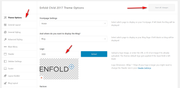
This is because the logo is already uploaded to your site.
Best regards,
Mike
Hi Àlex,
You can open a new thread using the very large blue button on the top of the Enfold sub forum, or you can use this link to open a new thread. Please note that the forum will be closed for new threads until January 2.
Best regards,
Rikard
Hey,
1- Please add following code to Quick CSS in Enfold theme options > General Styling tab
#top .avia-cookie-consent-modal-buttons-wrap {
    position: absolute;
    top: 50px;
    width: 100%;
}
2- We would need to inspect the element to find out why it is not displayed. Text color might be white. Could you please add it once again and let us know so we can check?
3- You can simply insert empty HTML tags not to display tab title
<u></u>
Best regards,
Yigit
Hi Enfold Support Team,
Enfold latest Portfolio Widget
I’m using Enfold latest Portfolio Widget in the Footer and I’ve choosen “display title only”. Is it possible to hide the date and show only the title?
Footer viewed with an iPhone
My client is a perfectionist and has discovered that the search button behind the magnifier symbol doesn’t fit perfectly and that the linespacing of the footer menu is much too tight.
Kind regards
Alexander
Hello,
On one of my sites I cant edit any page anymore – the Avia Layout Builder is missing back end with blank pages?
(I know Social media buttons are missing front end but can await for the fix).
I am using Enfold 4.6.3.1 and WP 5.3.2
Any help to fix the Avia Builder issue .. maybe a link to 4.6.4 beta?
I have provided login details privately.
Thanks in advance
That helped me learning reading:
” activate the child and import the parent theme settings under Enfold->Import/Export. Then add this to Quick CSS and save”
The button is on there which I feel thankful and relieved seeing yet it’s overlapping with the menu
How do I move the menu to the left and remove the cart icon?
Hi
After migrating two sites with the plugin “all in one wp migration” the social-media-icon-symbols (see testpage -> header area, socket and social-share-buttons-element) have dissapeared. Inspecting the links I found data-av_icon=”” and data-av_iconfont=”entypo-fontello” missing.
It would be great if you could help me in this matter. I tried a lot: newest WP, newest Enfold, deactivating all plugins, removing child-theme’s css, function.php and etc.
Thanks for your help and best regards
Fabian
Hello Enfold support team,
on my Enfold site I am using external JavaScript as a booking module for appointments.
It has a negative impact on page speed.
I see Enfold has a “Click to load solution” for google maps shortcode.
Can I use that somehow for my own booking module?
Thanks!
I noticed that under the updated articles there is a problem with the display of buttons share on social media.
I see the same problem on the documentation page.
I’ve read through the solutions to this issue but seem to have an error in my implementation. The javascript code’s working outside of WP/Enfold: https://coldspringdesign.com/ltc-button-test.html
This page [https://logisticstrainingcenter.com/dev-authentication-for-discount-code/#tab-id-2] has a custom button:
<input class=”id_vet_mil_click” height=”100%” src=”https://s3.amazonaws.com/idme/buttons/v4/verify-with-idme-green.png” type=”image” value=”Verify Military Credentials” width=”100%” />
I have this code in my functions.php file:
/* Verify with ID.me for Veteran/Military status */
function verify_vet_mil_button(){
?>
<script>
(function($){
$(window).load(function() {
$(‘.id_vet_mil_click’).on(function(e){
e.preventDefault();
window.open(‘https://api.id.me/oauth/authorize?client_id=d8c73d118584e3cd966a7990692f5340&redirect_uri=https://ywnos0oef8.execute-api.us-east-2.amazonaws.com/testing/callback&response_type=code&scope=military’,
‘popUpWindow’,
‘height=600,width=500,left=100,top=100,resizable=yes,scrollbars=yes,toolbar=yes,menubar=no,location=no,directories=no,status=yes’
);
});
});
})(jQuery);
</script>
<?php
}
add_action(‘wp_footer’, ‘verify_vet_mil_button’);
But I’m not able to get the pop-up window working. Can you help?
Hey Taryn,
Please try the following in Quick CSS under Enfold->General Styling:
.avia-button.avia-color-theme-color {
    border: 3px solid #d39107;
}
Best regards,
Rikard
This reply has been marked as private.
Hi Jordan
Thanks, it’s still confusing why some css-code is applied when it’s put it in quick css but not applied when it’s put in style.css. One thing – not related to WPML – but please allow me to use this ticket: The social shares icon on product pages don’t look nice anymore. I use in css:
	.single-product .av-share-box {
    	margin-bottom: 20px;
	}
and in functions.php
add_action('woocommerce_after_single_product_summary', 'avia_add_social_toolbar', 10, 2);
function avia_add_social_toolbar($id = "", $context = "")
{
		avia_social_share_links();
}
like written here (Enfolds early years…): https://kriesi.at/support/topic/social-buttons-on-woocommerce-product-pages/
You find a sample product in the private content.
Happy day, filz
-
This reply was modified 6 years, 3 months ago by
 filz51.
Hey diaboloqueen,
Refer the following:
Under “Cookie Consent Buttons”
Best regards,
Jordan Shannon
The header looked like this in Enfold (not child theme) before the child theme
View post on imgur.com
And after I installed the child theme and added the header widget it looks like this
View post on imgur.com
How would I get rid of the extra white space in the header and then move the menu back to where it was and then move the paypal button to the far right?
Thanks for your patience while I learn this
Hi,
I use enfold out of the medical demo. At my site I added a button (just need it temporarly) to the fullscreen slider. But unfortunatley this button is masked by the boxes, which have a negative margin.
I’ve tried to fix with this css code, but it doesn’t work.
#top .avia-slideshow-button {
    z-index: 999999 !important;
}
Does anybody has an idea to fix it?
Thanks in advance.
Yours, Thomas
-
This topic was modified 6 years, 3 months ago by
 venolab.
Hi Enfold support, social icons on “share this post” is totally blank and visible only on hover; moreover, typical symbol of social like “f” of facebook are disappear. Can you help me?
Thanks in advance
Hi Enfold button, please, could you remember me the right place to modify helper social media.php to set noindex of social button?
Thanks in advance
Hi,
I updated enfold\framework\php\function-set-avia-frontend.php file – https://kriesi.at/support/topic/social-buttons-broken-with-wp-5-3-1-update/page/2/#post-1166096
Fix will be included in upcoming update. Please review your website :)
Regards,
Yigit
Hello Ismael
Sorry, I don’t understand a thing.
Can you not build it in the page itself, so I can see what you mean. That would be great.
See: http://maastrichtvooriedereen.nl.transurl.nl/test-enfold/
I also placed the question in a separate post, since it no longer really belongs in this post
Below the link to that other post (and the answer from Mike).
I have placed the sidebar on every page like this. If I remove it and set it at page level, it doesn’t matter. Photo blocks are still at the bottom.
Really hope you can help me.
Tom
-
This reply was modified 6 years, 3 months ago by
 tom.
tom.
Hello Mike,
Sorry, I don’t understand a thing.
Can you not build it in the page itself, so I see what you mean. That would be very nice.
See http://maastrichtvooriedereen.nl.transurl.nl/test-enfold/
The intention is therefore that the 2 photo blocks with button must come directly below the text and not at the bottom.
I already asked the question in an earlier post, but this was another question. I have therefore asked the question separately.
Below the link to that other post (and Ismael’s answer).
Really hope you can help me.
Tom
-
This reply was modified 6 years, 3 months ago by tom.
Hi,
I updated enfold\framework\php\function-set-avia-frontend.php file – https://kriesi.at/support/topic/social-buttons-broken-with-wp-5-3-1-update/page/2/#post-1166096. Please review your website :)
Best regards,
Yigit
Please check your OWN site for debugging: here you see it’s not showing : kriesi.at/documentation/enfold/social-share-buttons/
Email icon is there, the rest does not show
I rolled back to my own site , so you cannot see it there.
I’ve look all over why this occured, and then i saw it did not work on your own site either.
Only the e-mail icon works: see on url kriesi.at/documentation/enfold/social-share-buttons/
Let me know when this is updated.
-
This topic was modified 6 years, 3 months ago by
 jeeteecorp.
Hi,
Thank you for the feedback, I have changed your menu buttons so they are smaller, please check.
I did it by going to Enfold Theme Options > Menu > Show separators between elements and choose “small separators”

there is another option “no separators” which will add a small gap between the buttons, please give it a try to see which you like better.
Best regards,
Mike
Hi Knallfrosch3,
You can do that in each sub forum, like Enfold for instance. Click the large blue button on top of the forum, or use this link: open a new thread.
Best regards,
Rikard
Hi,
Thank you for following up.
What is “Auto Reload”? When do i need it? Why?
1.) After accepting the cookies, users have to refresh the page first in order to see the map properly or play a video directly in the site. You can however auto reload the page so that users don’t have to refresh the page manually.
It seems as if – at least for the essentiell cookies – the default is on “Accept” – otherwise the button would not be green. (please explain!!) – its the result of [av_privacy_allow_cookies]
2.) There are three options in the Enfold > Privacy & Cookies. The first one allows you to enable or store all cookies without the users’ explicit consent — all cookies will be silently accepted on page load. The next option enables all essential cookies by default — users can manually opt out if they want to. And the last option is probably what you’re currently using, which is why the other cookies are not enabled by default or why it’s not set to green as you put it.
Best regards,
Ismael
That temporary Style Sheet solutions the Michael mentioned works good, until they get it updated.
Seen Here
Just make sure to “Add to your Quick CSS in Enfold Child Theme Options > General Styling”
Hey Tilman,
Here is the code you can put in Enfold > General Styling > Quick Css, if it does not work, put into themes/enfold/css/custom.css
.wc-block-grid.has-3-columns .wc-block-grid__product {
    margin-bottom: 50px;
}
Do you mean the “Add to cart” button? it cannot be changed in the backend. You need to use a filter or edit the code.
If you need further assistance please let us know.
Best regards,
Victoria



