When I go to the menu Enfold Child > Theme Update, I see that it wants me to upgrade my theme. It tells me that “A new Version (4.7.6.4) of your Parent Theme (Enfold) is available!” Before I press the “Update Now” button, I have a few questions:
1) I am assuming that this only upgrades the parent theme and that all of the customization that I have made to my child theme will remain intact. Is this correct?
2) Will the CSS in the Quick CSS box remain intact?
3) Will all the changes I have made under the Enfold Child Theme Options (for instance theme options, general layout, general styling, advanced styling, main menu, header, etc) remain as it is or will it all get reset to default.
I just don’t want to get any surprises when I do update the theme. Thanks.
well i am curious why the enfold video embed causes crashing in chrome.
https://ace5studios.com/tag-buttons/
this page works fine in vivaldi, but i get the crash mentioned above in chrome, and so do numerous other people.
if i remove the [av_video] thing it works just fine.
Installing Adobe fonts to work with enfold:
I have used another user’s template, but I was getting errors when implementing his solution. It turned out that all the quotation marks used in the solution was not of the correct style. I replaced all the single and double quotation marks in a text editor with the correct ones.
Here is a short overview before updating the functions.php in the child theme of enfold
1) Activate a font in adobe fonts by sliding the toggle switch of the font you want to use. The slider will turn blue.
2) Look for the </> opposite the slider and click on it.
3) Add the font to a project by tapping the down arrow button and create a new one or add to an existing project.
4) Save > and a new window will pop up. At the top of the window you will see: <link rel=”stylesheet” href=”https://use.typekit.net/xyxyxyx.css”>
take note of the code before .css”> yours will be unique.
5) Take note of the font name and the weight. I copied and pasted it into my text editor, where required. Replace your font and font weight where I used freight-sans in step (7) and use the code in step (4) at the bottom of the php code in (7).
6) The text editor on this forum changes all the single and double quotation marks to the wrong format. You would need to manually edit everyone one in a text editor for the code in (7) to work
7)
/* Adobe typekit font */
add_action( ‘init’, ‘enfold_customization_switch_fonts’ );
function enfold_customization_switch_fonts() {
global $avia;
$avia->style->print_extra_output = false;
}
add_filter( ‘avf_google_heading_font’, ‘avia_add_heading_font’);
function avia_add_heading_font($fonts)
{
$fonts[‘Freight Sans Pro’] = ‘freight-sans-pro:400’;
$fonts[‘Freight Sans Compressed Pro’] = ‘freight-sans-compressed-pro:500’;
return $fonts;
}
add_filter( ‘avf_google_content_font’, ‘avia_add_content_font’);
function avia_add_content_font($fonts)
{
$fonts[‘Freight Sans Pro’] = ‘freight-sans-pro:400’;
$fonts[‘Freight Sans Compressed Pro’] = ‘freight-sans-compressed-pro:500’;
}
add_filter( ‘wp_head’, ‘enfold_customization_add_scripts’ );
function enfold_customization_add_scripts(){
?>
<link rel=”stylesheet” href=”https://use.typekit.net/xxxxxxx.css”>
<?php
}
8) Save the code in (7) with your info in a file named Functions.php by using a text editor and FTP the file to the folder of your enfold child installation.
public_html/the path where you installed wordpress/wp-content/themes/enfold_child
9) this new Functions.php file will only work if your child theme is the template that you activated in your wordpress themes dashboard
10) the fonts appeared for me at the bottom of the list of fonts available to chose from in enfold dashboard
-
This reply was modified 5 years, 5 months ago by
 fivepixels.
Hey,
Thanks for contacting us and sorry for the late reply!
I added following code to bottom of functions.php file in Appearance > Editor
add_action( 'ava_after_content', 'enfold_customization_back_button' );
function enfold_customization_back_button() {
	echo do_shortcode("[av_hr class='invisible' height='90' shadow='no-shadow' position='center' custom_border='av-border-thin' custom_width='50px' custom_border_color='' custom_margin_top='30px' custom_margin_bottom='30px' icon_select='yes' custom_icon_color='' icon='ue808' font='entypo-fontello']");
	$link = get_permalink( avia_get_option('blogpage') );
	echo do_shortcode("[av_button label='Back' link='manually,".$link."' link_target='' size='medium' position='left' icon_select='no' icon='ue800' font='entypo-fontello' color='theme-color' custom_bg='#444444' custom_font='#ffffff']");
}
Please review your website :)
Best regards,
Yigit
Hey designyvr,
Please try the following in Quick CSS under Enfold->General Styling:
@media only screen and (max-width: 767px) {
.home .avia-slideshow-button {
    margin-top: -30px;
}
}
Best regards,
Rikard
Hi dear Enfold Staff!
I’m using Enfold 4.7.5 with Enfold Child,
and I would like to know something which I saw in other websites made with wordpress:
the text links change color (become orange) when the cursor pass over them.
How is it possible to do it?
This is not for the text in the buttons, but for the other text (in tables, or just a word or phrase in a longer text).
Thank you very much and best regards,
Antonio Salvemini
This reply has been marked as private.
if you like to have the same buttons as Enfold offers for the header-top or the socket – you can create your own shortcode for these by putting this to child-theme functions.php:
function social_bookmarks_shortcode() {
$social_args = array('outside'=>'ul', 'inside'=>'li', 'append' => '');
$social = avia_social_media_icons($social_args, false);
return $social;
}
add_shortcode('social-bookmarks', 'social_bookmarks_shortcode');
then use a text-widget to place the shortcode :[social-bookmarks]
to have the icons besides each other a bit css is needed:
#footer .widget .social_bookmarks li {
    clear: right !important;
}
The same with share buttons : go to a test-page and style the content element: social share buttons with option “use a custom set”
go and copy the shortcode from debug mode:
F.e.:
[av_social_share title='Share this entry' buttons='custom' share_facebook='aviaTBshare_facebook' share_twitter='aviaTBshare_twitter']
put the shortcode to a textwidget.
on gdpr ( DSGVO) reasons there is a nice plugin like shariff wrapper will create a widget for it and you can either place the global share buttons or customize them by shortcode f.e.:
[shariff services="facebook|twitter|mailto" theme="round" borderradius="50"]
Hi Enfold team!
I am in the forever battle to get my Socket styling narrowed down. Currently I have menu links that are centered and stacked using the following code:
@media only screen and (max-width:550px) {
  .responsive #socket .sub_menu_socket {
    display: block !important;
    width: 100%;
  }

  .responsive #socket .sub_menu_socket .menu {
    margin-left: 0;
  }

  .responsive #socket .sub_menu_socket .menu li {
    border: 0;
    display: block;
    float: none;
    text-align: center;
    line-height: 1.7;
  }
}
I also have some Quick CSS in place that force underlines ALL links on the website with this code:
#main a {
text-decoration: underline;
}
#main .sidebar a,
#footer a,
#socket a {
text-decoration: underline;
}
a.avia-button,a span.avia_iconbox_title,#top .av_font_icon a.av-icon-char {
    text-decoration: none!important;
}
Here are my 3 questions for mobile-only version:
1) Although the menu links are centered with the code I provided, how do I center the Copyright and Social Media icons, but also stacking the Social Icons below?
2) How can I increase the size of the Social Media icons on that mobile version only?
3) Lastly, how can I remove the underline on those Social Media icons? For some reason, nothing I’m trying has worked so far!
I think my CSS coding is a little pieced together but any suggestions would be amazing. Thanks in advance!
Any thoughts here? I’m having the same issue. Since update, the Enfold theme menu in WP admin area does not display. Works fine on my local, but not on production. DB’s are identical, as are plugins.
Looks like issue with JQuery.
Errors in console:
Uncaught TypeError: createElementButton.live is not a function
/wp-content/themes/enfold/framework/js/avia_dynamic_templates.js?ver=5.0:52
Uncaught TypeError: s is undefined
/wp-includes/js/wp-auth-check.min.js?ver=5.5.1:2
Hi Bernhard,
Actually, I don’t see anything wrong with your method, you just don’t need to update the child theme, only the parent theme.
Also .DS_Store is not important (it’s generated by Mac), you can skip it.
This is what I did:
Login to ThemeForest and download the Enfold theme.
1. Right-click over the downloaded zip file and extract/unzip it.
2. It should generate a new folder, open it and look for the enfold folder
3. Right-click the enfold folder then zip it, here’s a tutorial on how to create a zip file in windows: https://www.howtogeek.com/668409/how-to-zip-and-unzip-files-on-windows-10/ (this should create enfold.zip
4. Log in to WordPress as and Admin.
5. Install and activate a maintenance plugin and put your site in Maintenance mode.
6. Go to Appearance > Themes, switch to a default WordPress theme like TwentyTwenty then delete Enfold.
7. Click on the ADD NEW button.
8. Click on the UPLOAD THEME button.
9. Click BROWSE and choose enfold.zip file
10. Click the INSTALL NOW button and switch to Enfold or your child theme.
11. Remove the maintenance mode then deactivate and remove the maintenance plugin.
Best regards,
Nikko
Hi ClimbingSocks,
Here is the code you can put in Enfold > General Styling > Quick Css, if it does not work, put into themes/enfold/css/custom.css
#top form.cart .button:hover {
    background-color: rgb(26, 108, 26) !important;
}
If you need further assistance please let us know.
Best regards,
Victoria
Hey Verena Trestl,
Thank you for your interest in Enfold.
Enfold does not have a booking system, you can add that via a plugin.
Yes, you can add Google maps full-width above the footer.
You can style buttons as you like, we can help you with the CSS for that.
After you purchase the license, you can use the purchase key to register at the forum and report any issues that you need help with.
The parallax effect is available in the color sections, it’s not working on mobile though.
Here are the docs for you:
If you need further assistance please let us know.
Best regards,
Victoria
Hi Snerp,
Here is the code you can put in Enfold > General Styling > Quick Css, if it does not work, put into themes/enfold/css/custom.css
#top .av-custom-form-color .button:hover {
    background-color: #e216c2;
    border-color: #07141e1a;
    color: #fff !important;
}
If you need further assistance please let us know.
Best regards,
Victoria
Hi D,
Thanks for giving us admin access, your server info seems fine.
Can you try to install it this way?
- Login to ThemeForest and download the Enfold theme.
- Right-click over the downloaded zip file and extract/unzip it.
- It should generate a new folder, open it and look for the enfold folder
- Right-click the enfold folder then zip it, here’s a tutorial on how to create a zip file in windows: https://www.howtogeek.com/668409/how-to-zip-and-unzip-files-on-windows-10/ (this should create enfold.zip
- Log in to WordPress as and Admin.
- Go to Appearance > Themes
- Click on the ADD NEW button.
- Click on the UPLOAD THEME button.
- Click BROWSE and choose enfold.zip file
- Click the INSTALL NOW button and activate Enfold
Best regards,
Nikko
Hi,
thanks a lot for your answer. I added the CSS Code in the Quick CSS field under “General Styling” in my Enfold Theme. You can find the pages, where I would like to change the hover color of the “In den Warenkorb”-Button in the private content.
Thanks for further support.
Best regards,
Magnus
Hey Eefke,
You can use a full-width slider and add a button to it.
Here are the docs for you:
If you need further assistance please let us know.
Best regards,
Victoria
Hey flipper1960,
Sorry for the late reply, and thanks for the login and test page, so I have not used the Meow Lightbox plugin before so in my research I found the plugin was giving the same error as reported here to the plugin author, the solution for this error is to remove this from the “lightbox.js” script:
//# sourceMappingURL=lightbox.js.map
This may have not been necessary, but I wanted to rule it out. Anyways, I wanted to isolate the behavior of the Meow plugin & the Magnific Popup lightbox which is the default lightbox, typically other lightbox scripts use a similar script for the lightbox. So I first tried using the “exclude” function in the Magnific Popup lightbox, which is in the file \wp-content\themes\enfold\js\avia-snippet-lightbox.js on line 211, with the lightbox option in the theme set to disabled, but with this setting the Meow Lightbox plugin fires first and loads, but then is redirected to the image file. If you watch very closely you will see that the plugin is working but I believe the Magnific Popup lightbox is embedded deeper than it seems.
So as a workaround, I enabled the Magnific Popup lightbox in the theme options and added this script in your functions.php file:
function custom_script(){
  ?>
  <script>
(function($){
  $('body').on("click", ".lightbox", function () {
	  setTimeout(function(){
	  $('button.mfp-close').trigger('click');
		  }, 200);
  });
})(jQuery);
</script>
<?php
}
add_action('wp_footer', 'custom_script');
I also replaced your Meow Lightbox plugin “Selector” classes with “.avia-gallery a” to target this one element, I understand you want to add more, but if we can get this one element to work first then we can move forward on the other elements.
So now on your test page, the “avia-gallery” is working for the Meow Lightbox plugin, please clear your browser cache and check.
Best regards,
Mike
Hi,
according to this thread I changed the color of the add to cart button in my woocommerce shop using quick CSS under general styling of my enfold theme successfully with this code:
.single .cart .button { background-color: #6786a1!important; text-shadow: none!important; box-shadow:0 1px 0 rgba(255, 255, 255, 0.3) inset, 0 -1px 0 rgba(0, 0, 0, 0.2) inset, 0 1px 2px rgba(0, 0, 0, 0.2)!important; color: white!important; }
So now I have the question, how can I specify the color for hovering over the button?
Thanks a lot!
 Verena Trestl
Guest
Hi Kriesi Enfold Team,
I would like to purchase your theme and I have some questions before I really do it and start working with it. I would appreciate if you could come back to me on follwing issues:
1. BOOKING/RESERVATION for RESTAURANTS: Do you provide only the booking form with table view as shown on your DEMO VERSION RESTAURANT? Or do you offer more versions on booking systems? If not (and if yes too), how would the booking system work out? Do we get the option to manage bookings in the backend and will the customer receive a confirmation mail etc. So how does a booking system work with enfold? Is it available in GERMAN? And in case I would like to install a plugin from another developer on this issue would it be possible?
2. GOOGLE MAPS: Can we put google maps fullwidth e.g. above the footer ?
3. BUTTONS: do I always have to fill the buttons with a colour or can I just use coloured frames too? Which kind of options do I have in general with the buttons (colour, frames, size, font adn font size)
4. PRELOADER: Can I create a preloader on my own e.g. with my logo?
5. BLOG BOXES: Which kind of blog designs do you offer? I would prefer having a picture or video above and text below in a box. Is this possible? Is it possible to add a shadow to the boxes?
6. PARALLAX: Can the parallax effect be put anywhere I want to the page? Or is it just possible above the footer (as in your demo).
7. FORMS: Can I set different types of forms for different issues?
8. MAILCHIMP / GDPR: Can I include NL request and Privacy Terms right to the forms and booking tool?
9. SUPPORT: How does the support work out once I purchased the theme? How can I get in touch with you and how often can I ask you something?
10. NO CSS SKILLS: Since I am a complete beginner with CSS (I have not even started with tutorials but I am planning on it as soon as my time allows it) I would appreciate if I could set up the wp-site with drag&drop as much as possible. So if I do not import the demo site, do I have to deal with CSS and building everything on my own or do I have still the possibility to build it with drag&drop as I want it to be?
Well that’s it for now and i would appreciate a response as soon as possible because I would like to start soooon 😊
Thanks for your support
Regards Verena
Hi Enfold Team!
I have added a new picture at the top of my ‘about page’ (see private content).
How I can I make it full width?
Is it possible to add a button on a picture?
Many Thanks.
Hi,
I am having consistent issues with using the button row. It works perfectly on desktops, but when you visit the site on a mobile phone (i only have ios), some buttons don’t work. In the sample below the “activities” and “giving” buttons do nothing on the moble but work perfectly on the desktop. Any insight as to why this may be happening?
I am using WordPress 4.5.2 and Enfold 4.7.6.3
This has been happening since the initial install. Not sure if it is an ios issue or an Enfold issue. I added a link to one of the samples where we are having the issue
Before the latest update we have an issue where by when we scrolled down the page elements wouldn’t load, such as buttons or images or galleries, or would be slow to load. Resizing the browser always fixed the issue but obviously this wasn’t ideal.
We fixed the issue by removing a Fullwidth Easy Slider and after this no more problems… until we updated to the latest version of Enfold and now every page on the site is effected and elements are slow to load or just don’t load at all unless we resize the browser manually and then they appear.
Any help would be appreciated as our developers are stuck too.
another information if it helps: I was at wordpress 5.5.1 and last Enfold release. I downgrade everything to dicember 2019, so wordpress 5.3.2 and enfold (4.6.3.1) bur the error appears: Failed to load plugin url: https://scuoladellinfanziasantantonio.it/wp-content/themes/enfold/config-templatebuilder/avia-template-builder/assets/js/avia-tinymce-buttons-4.js
Hi,
is there a slider element in Enfold that features a background image, a headline, a description text and a button?
Unfortunately I could not find one that features all of the items.
Thanks!
Best regards
Caro
Hey Severin,
Thanks for contacting us and sorry for the late reply!
You can read more about cookie options here – https://kriesi.at/documentation/enfold/privacy-cookies/#default-cookie-and-services-option-settings.
You are currently using “User must accept and must opt in, only essential cookies selected” option so you can simply go to Enfold theme options > Privacy & Cookies > Cookie Handling > Buttons and add a new button below “OK, Weiter” and choose “Do not accept and hide notification” for button action :)
If you are planning to install WooCommerce, we would recommend you to use “Essential cookies are accepted on first page load, user must opt in” instead so cart would not be reset if cookies were accepted/rejected after adding items to cart.
Best regards,
Yigit
Hi! I have Enfold and LayerSlider installed here (see private content)
Sometimes the page shows blank space instead of the slider. The issue gets fixed if I hit “Update” button on the page in wp-admin, however the problem comes back in a couple of days. Could you please help solving this?
I have tried enfold-child/config-woocommerce/config.php, enfold-child/woocommerce/config-woocommerce/config.php and enfold-child/woocommerce/config.php but the site still refers to enfold/config-woocommerce/config.php.
Alternatively, how do I edit the “Show details” button as I need to replace it with a dynamic custom dropdown menu.
 Rob Kosinski
Guest
I inherited admin duties for a WordPress website set up in 2015. It’s running the Enfold theme 4.3.2. The website appears to work but the backend of the Enfold menu is broken and I can’t change anything. They few options Enfold is showing me do nothing when clicked or changed. Save button stays grayed out.
Do you have any suggestions or options for me regarding this install. I don’t even know who purchased it for the website. The website running it is in the Private Content box.
Thanks.
That plugin is if you want to have more than this line-break button – because now Enfold ( or maybe it is a new thing from WP ) shows a button on visible mode:
can you see this:
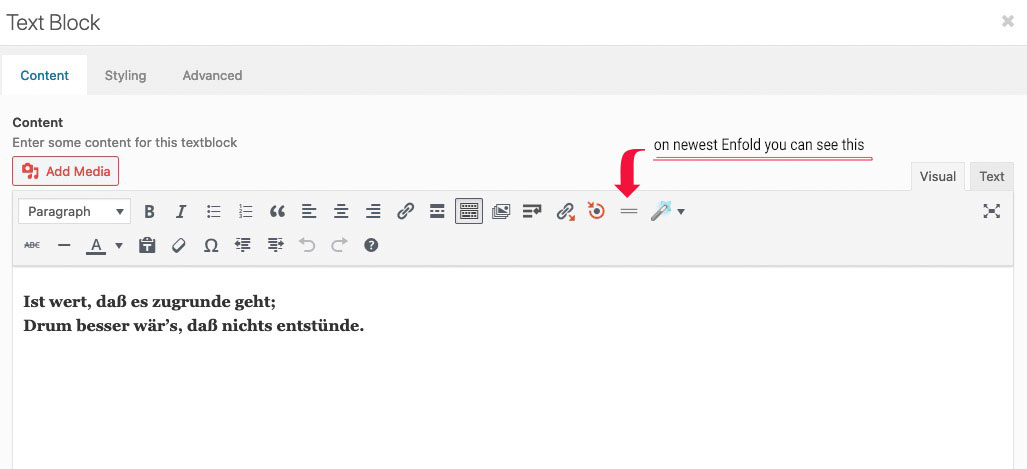
if you click : Enfold will insert the tags itself ( <br class=”avia-permanent-lb” /> ); switch to text mode then you will see what i mean




