Hi,
In Social Buttons element “use defaults” option was chosen so it displays the share buttons enabled in Enfold theme options > Blog Layout. They were not showing up because they were all disabled. I enabled some and that worked.
Please review your website :)
Best regards,
Yigit
Hi,
Thanks for the update. I’m still not sure where exactly you want to place them? You can check the documentation here: https://kriesi.at/documentation/enfold/social-share-buttons/. If you need to customise them more, then you can add them to a new page layout, then copy the shortcodes. You would have to enable debug mode in order to see and copy shortcodes: https://kriesi.at/documentation/enfold/intro-to-advanced-layout-builder/#debug-mode
Best regards,
Rikard
Hi,
Thank you for the update.
We modified the avia_media.js, avia_media_advanced.js, avia_colorpicker.js and avia_advanced_form_elements.js files and replace all instances of the .live function with .on. These changes fixed the issue with the upload button but we cannot guarantee full functionality. Again, we recommend updating to Enfold or any themes with continuing support.
Best regards,
Ismael
Hello. I noticed this morning that the dialogue boxes are not loading when trying to add/change a button or button row or add a button shortcode to a text element. See browser error that kicks up after the dialogue box fails to load. I am running the most recent version of Enfold.
Any ideas?
POST https://sabr.org/wp-admin/admin-ajax.php 500 (Internal Server Error)
send @ load-scripts.php?c=0&load%5Bchunk_0%5D=jquery-core,jquery-migrate,utils,regenerator-runtime,wp-polyfill,wp-hooks&ver=6.0.1:2
ajax @ load-scripts.php?c=0&load%5Bchunk_0%5D=jquery-core,jquery-migrate,utils,regenerator-runtime,wp-polyfill,wp-hooks&ver=6.0.1:2
s.ajax.s.ajax @ load-scripts.php?c=0&load%5Bchunk_0%5D=jquery-core,jquery-migrate,utils,regenerator-runtime,wp-polyfill,wp-hooks&ver=6.0.1:5
fetch_ajax_content @ avia-modal.js?ver=6.0.1-4.8:413
create_html @ avia-modal.js?ver=6.0.1-4.8:224
set_up @ avia-modal.js?ver=6.0.1-4.8:86
$.AviaModal @ avia-modal.js?ver=6.0.1-4.8:65
(anonymous) @ avia-builder.js?ver=6.0.1-4.8:463
dispatch @ load-scripts.php?c=0&load%5Bchunk_0%5D=jquery-core,jquery-migrate,utils,regenerator-runtime,wp-polyfill,wp-hooks&ver=6.0.1:2
v.handle @ load-scripts.php?c=0&load%5Bchunk_0%5D=jquery-core,jquery-migrate,utils,regenerator-runtime,wp-polyfill,wp-hooks&ver=6.0.1:2
Hey Ralf,
Thank you for the inquiry.
Are you referring to the buttons in the consent message bar? You can change the text of the buttons in the Enfold > Privacy & Cookies > Cookie Handling tab, look for the Buttons section. If this is not what you are looking for, please provide a screenshot using imgur, savvyify or dropbox.
Best regards,
Ismael
Hi,
Thanks for your feedback, but the product slider doesn’t show the “Buy Now” or “Show Options” buttons, please see our Shop Demo example.

To add a “Buy Now” button to the product slider you can try adding this code to the end of your functions.php file in Appearance ▸ Editor:
add_action( 'after_setup_theme', function() {
     add_action( 'woocommerce_after_shop_loop_item_title', 'woocommerce_template_loop_add_to_cart', 12 );
}, 999);

Best regards,
Mike
just put in the mainClass the enfold class: avia-popup
( mainClass: 'avia-popup mfp-fade', ) and to better select that popup maybe we put in an additonal class f.e.: people
function button_for_biography(){
?>
<script>
window.addEventListener("DOMContentLoaded", function () {
	(function($) {
		$('#people').each(function(){
		var that = this;
			$('.flex_column', this).each(function(i){
				if($(this).find('.mfp-hide').length){
					$(this).find('.avia-button').attr('href','#bio-'+(i+1)).addClass('no-scroll');
					$(this).find('.avia_image').attr('href','#bio-'+(i+1)).addClass('no-scroll');
					$(this).find('.mfp-hide').attr('id','bio-'+(i+1)).addClass('white-popup');
				}
			});
		});

		$('#people .flex_column').find('.avia-button[href^="#bio-"]').magnificPopup({
			type:'inline',
			midClick: true,
			removalDelay: 500,
			mainClass: 'avia-popup mfp-fade people',
			gallery: {
				enabled:true,
			},
		});

		$('#people .flex_column').find('.avia_image[href^="#bio-"]').magnificPopup({
			type:'inline',
			midClick: true,
			removalDelay: 500,
			mainClass: 'avia-popup mfp-fade people',
			gallery: {
				enabled:true,
			},
		});

	})(jQuery);
});
</script>
<?php
}
add_action( 'wp_footer', 'button_for_biography');
now we can influence that close button “X” only for that popup (people) by:
div.avia-popup.people .mfp-close {
  right: -5px;
  top: -45px;
  color: #fff;
}
I am using the default Enfold Theme named “Enfold Classic Theme” but want to use the boxes and button of https://kriesi.at/themes/enfold-law/. Is it possible?
Hey Sabine,
Please refer to the documentation here: https://kriesi.at/documentation/enfold/social-share-buttons/
Best regards,
Rikard
Just a moment – i see that the gallery will show by this code each lightbox twice
so i had to thing about that a while … and because maybe not all images on the page got hidden bios – i inserted if clauses:
function button_for_biography(){
?>
<script>
window.addEventListener("DOMContentLoaded", function () {
	(function($) {
		$('#people').each(function(){
		var that = this;
			$('.flex_column', this).each(function(i){
				if($(this).find('.mfp-hide').length){
					$(this).find('.avia-button').attr('href','#bio-'+(i+1)).addClass('no-scroll');
					$(this).find('.avia_image').attr('href','#bio-'+(i+1)).addClass('no-scroll');
					$(this).find('.mfp-hide').attr('id','bio-'+(i+1)).addClass('white-popup');
				}
			});
		});

		$('#people .flex_column').find('.avia-button[href^="#bio-"]').magnificPopup({
			type:'inline',
			midClick: true,
			removalDelay: 500,
			mainClass: 'mfp-fade',
			gallery: {
				enabled:true,
			},
		});

		$('#people .flex_column').find('.avia_image[href^="#bio-"]').magnificPopup({
			type:'inline',
			midClick: true,
			removalDelay: 500,
			mainClass: 'mfp-fade',
			gallery: {
				enabled:true,
			},
		});

	})(jQuery);
});
</script>
<?php
}
add_action( 'wp_footer', 'button_for_biography');
PS: i see on your developer page that on click the lightbox opens and the background scrolls a bit.
so i inserted on those links the class: no-scroll to hamper that
don’t know why this makes the difference ;)
see all code and example page on : https://enfold.webers-webdesign.de/sky19er/
on my site – https://hardwoodbrothers.com/ – I have 4 buttons on my full width slider – I did this by adding 4 button shortcodes in the caption section
They look good on desktop but I want to make the size of the buttons on mobile much smaller
How do I go about doing this? the buttons are using the enfold large button class but I only want the size to change on this slider (not sitewide)
Hi,
Thank you for the inquiry.
You may need to install the following plugin in order to make the links of the buttons accessible in the video slide.
// https://github.com/KriesiMedia/enfold-library/tree/master/integration%20plugins/Enfold/Slider%20Video%20Controls%20Fix
Best regards,
Ismael
you want to have both functions ? toggle works and a button to open bios?
Or do you only want to have a button instead ( for the toggle container ) just put under your text-block a button. ( button link just #)
under that button put a text-block with the bio and give a custom-class to that text-block : mfp-hide
see here: https://enfold.webers-webdesign.de/sky19er/
If this is what you like to have?
PS: or use the image – or the h3 Name as lightbox trigger.
Hello, since the Enfold update the links of the 2 buttons in the Slide Show element no longer work when a video is embedded. If there is a background image in it, then it works. As soon as a background video is embedded, the links no longer work.
The link is there, but when you click on it, the link does not open.
I am trying to follow your document to create a custom element button – https://kriesi.at/documentation/enfold/custom-element-templates/
However, it is not working as expected. I created my button in the custom element section but when I drag the button on my page I do not see a red closed padlock left of the “Delete” icon as mentioned in your document. (so this means it is not a custom element although I dragged it from the custom element tab)
What am I doing wrong? Please assist
see login info below
Thanks in advance
Hi,
Thank you for your patience and the login to your site, so for the page linked below where you added the custom class roundbutton, I don’t find any css in your Enfold Theme Options ▸ General Styling ▸ Quick CSS field or in your child theme ▸ style.css.
It looks like you mostly add your custom css to the WordPress ▸ Customize ▸ Additional CSS field, which is good, but I don’t find the customization that Ismael recommended anywhere, so I assume that you have removed it. I see that instead of using custom css you are using the element Advanced ▸ Position ▸ Image Position, which is good.

but please note that this was for the desktop resolution only, for the other sizes the position is using the same desktop position:
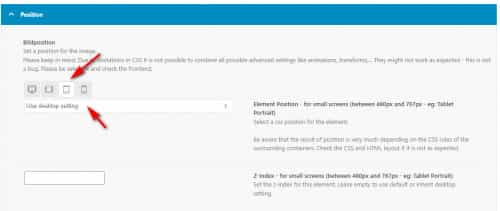
so you will want to set each resolution size position option, for example for small screens (between 480px and 767px – eg: Tablet Portrait) I set it to top -40 & left -40

and now the position is better:
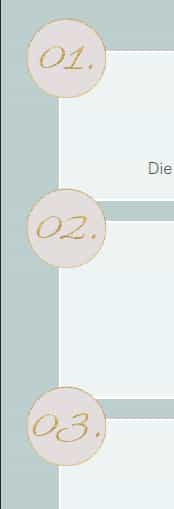
for the smallest screens you have the element hidden, so there is no need to set the position:

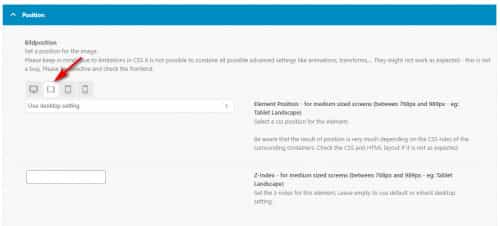
and for medium sized screens (between 768px and 989px – eg: Tablet Landscape) the current desktop position seems to work fine, so there is no need to set the position:
please clear your browser cache and check this page and if you find it working now please adjust your other pages accordingly.
Best regards,
Mike
Hello,
I would like to use the Theme Law (Demo) Boxes at https://kriesi.at/themes/enfold-law/ that shows Insurance Litigation, Real Property Litigation, Construction Litigation, and Add Get In Touch Button from the Rop Right Side (With Round Corners Shape) in Enfold Classic Theme. For example, see the image at https://ibb.co/KX2Y9PK
I have copied the boxes from Law Theme and Top Right Side Button and pasted them in the layout of Classic Theme to give you a demonstration.
Please let me know how to do it through the code so the layout doesn’t get changed when I update my theme from WordPress Dashboard. Thank you.
,
Hi Guido,
You can start a new thread by following this link, or if you click this button: https://imgur.com/a/AnoSPNb.
Best regards,
Rikard
Hi,
Thanks for contacting us!
Please refer to this post – https://kriesi.at/documentation/enfold/social-share-buttons/#how-to-add-custom-social-icons-to-enfold-options
Apparently Mastodon icon is not available on Fontello so please check under “Using images or non-Fontello icons” section :)
Regards,
Yigit
Dear Kriesies,
ENFOLD is a well thought out cms inside the wordpress cms
also u spend a lot of care on the designs, so bought this theme 2x TWICE! :)
question: currently customer has 1) Facebook 2) LinkedIn and 3) Twitter but also want’s a 4) Mastodon social network button
https://mastodon.social/@mastodon
not sure how to add it as there are only 3 columns/buttons possible to config see screenshot
https://pasteboard.co/5WN8nC149uaz.jpg
where to tweak the theme? :D
Hey finchkelsey,
Thanks for your question, if you have the accordion set to “open one at a time” then each time you click the title the accordion open or closes, and you should be seeing a plus or minus icon next to the title, this could be your button? The full title is basically a button. You can also added more text to the title, I don’t think there is a limit.
Perhaps if you could link to a mockup we could understand better.
If you find the accordion too limiting in style you could use jQuery to toggle visibility of an element, here is an example.
Perhaps this could work if you added a button and image inside of a text element and on load only the button and text showed with clicking the button shows the image?
If you think that using other elements would help then try linking to a test page and explain the behavior and perhaps we could help or understand better.
Best regards,
Mike
This reply has been marked as private.
Hi A,
There were many errors in your custom CSS related to the way you add comments in CSS. I have corrected them. Following is the correct way of adding comments in CSS
/* Comment goes here */
And you had following custom CSS in Quick CSS field which was overriding default styling
#top .av-menu-button > a .avia-menu-text {
  font-size: 16px !important;
  font-family: 'Lato' !important;
  background: #9cae30 !important;
  border-collapse: separate !important;
  border-width: 0px !important;
  border-color: white !important;
  border-radius: 5px !important;
  color: white !important;
  opacity: 1 !important;
  padding: 10px !important;
  box-shadow: 8px 8px 10px rgba(0, 0, 0, 0.5) !important;
  -webkit-transition: 0.3s !important;
  -moz-transition: 0.3s !important;
  -ms-transition: 0.3s !important;
  -o-transition: 0.3s !important;
  transition: 0.3s !important;
}
I changed it to following
	#top .av-menu-button > a .avia-menu-text {
			font-size: 16px!important;
			font-family: 'Lato'!important;
			/* background: #9cae30!important; CAMBIO ANDREA  */
			border-collapse: separate!important;
			border-width: 0px!important; /* CAMBIO ANDREA 30/6/2022, prima c'era 1px */
			border-color: white!important;
			border-radius: 5px!important;
			color: white!important;
			opacity:1!important;
			padding:10px!important;
			/* box-shadow: 8px 8px 10px rgba(0, 0, 0, 0.5)!important; */
			-webkit-transition:	0.3s!important;
			-moz-transition:	0.3s!important;
			-ms-transition:		0.3s!important;
			-o-transition:		0.3s!important;
			transition:			0.3s!important;
                         border: solid !important;
	}
You can now change border color in Enfold theme options > Advanced Styling > Menu Item Button with Border :)
Best regards,
Yigit
Hi havi,
Please try to add this CSS code in Enfold > General Styling > Quick CSS:
#top #wrap_all #header.header_color .av-menu-button-colored.menu-item-32 > a .avia-menu-text {
    background-color: #ea526e;
    border-color: #ea526e;
}
Best regards,
Nikko
Okay, so I deleted the child theme and imported it newly. (Note that when I did this from this link https://kriesi.at/documentation/enfold/child-theme/ It said I was using a newer 5.0.1 and the one from the site is 5.0. Is that an issue? Not sure how to update that.)
After doing this I didn’t see any update.
I then clicked on the Rest All Options button and I looks like it is taking the updates now.
Only thing I am not sure is if I need to update the child theme.
that fixed the issue for the single button but not the other 2 (in the next 2 tabs). I could inspect each button and do the same for each but that would be short term solution if more buttons were needed. Would it be possible to maybe create another button class and style the class? How would we go about this in enfold?
Hey virtualbis,
Please try the following in Quick CSS under Enfold->General Styling:
.avia-button.av-9sm6i-a4825a76fda65903aec8c6e47139e571 {
  color: #fff !important;
}
Best regards,
Rikard
Hey Mehran,
Thanks for contacting us!
Please edit your Tab Section element and go to General > Tab Buttons Out Of Screen Behaviour and choose to display arrows.
If you do not have that option, you might be using an older version of the theme. If that is the case, please refer to this post – https://kriesi.at/documentation/enfold/theme-update/ and update Enfold to the latest version 5.1.
If you have any other questions or issues, please register to our support forum – https://kriesi.at/support/register/ using your purchase code and start new threads under Enfold sub forum :)
Best regards,
Yigit
Hey casadives,
Thank you for the inquiry.
There is an available filter that we can use to add more options to the social icon element. Please check the following documentation for more info about the said filter.
// https://kriesi.at/documentation/enfold/social-share-buttons/#how-to-add-custom-social-icons-to-enfold-options
These threads should also help.
// https://kriesi.at/support/topic/tiktok-in-social-media/#post-1189115
// https://kriesi.at/support/topic/adding-tiktok-for-social-profiles-the-correct-way/#post-1353254
Best regards,
Ismael
 gb
gbParticipant
Hi,
I noticed in the Church default theme a nice Calendar that includes a drop down subscribe button with options to various calendars. I did not seem to find how to add this in the Enfold documentation. Could someone explain how to activate this feature?
Thanks,
GB
example:
https://preview.themeforest.net/item/enfold-responsive-multipurpose-theme/full_screen_preview/4519990?_ga=2.203929680.1538873570.1658362966-4038335.1645815916



