
-
Search Results
-
Hi Enfold support,
I’ve got a problem with the promobox text button. This style is involved
.avia-promocontent { margin-right: 200px; position: relative; z-index: 3;}
Example : http://586814b516.url-de-test.ws/enfoldsupport/link-on-large-promo-button/
With the margin-right set to 200px; the <p> element is quickly overlapping the button and link is inactive on the left part of the button (example 1)
“z-index: 2; ” is working, but does it break something in the overall css coherence ?
If the button text is still larger (example 2), you have to change margin-width. A way not to change the margin-right value each time according to text length ?
Thanks for your good work with Enfold
Thanks.
Topic: WOOCOMMERCE SETTINGS
Hi, I made my project with ENFOLD using the woocommerce plugin. I create my own product catalogue display page (the landing shop page) using Enfold pages because I wanted to change the image sizes and with a fullwith layer slyder WP on the top. I have two problems: 1. if I set this own page in woocommmerce (woocommerce settings – product options – Product and shop page) as my catalogue display page, the fullwith layer slyder dont work. 2. Secondly when I’m at my chart page and its empty there is a button to return to the shop but doesn’t work. Once clicked reloads the same page. I think because I didnt define my product and shop page in woocommerce settings. Thank you for your help
Hey guys – I am freakin out because of the facebook share function! I allready tried 4 different social share plugins, but always the same problem.
If you click on the share button the pop up opens perfectly, but in the “share window” is only the URL of the blog post visible, and nothing else. No Post Image, no excerpt of the article! Here’s a screenshot…
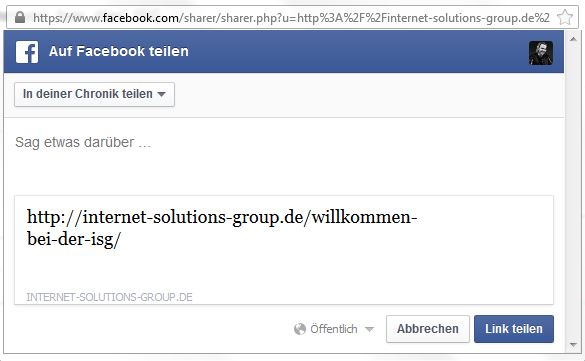
How can we solve this problem?
This theme is absolutely great, and I can’t believe that such basics will not work and cause issues. We’ve also tried the actual social plugin on another website of us, and it works perfect. So as allready many other users had the same problem, the problem must be caused by the theme or what else could it be?Really looking forward to your help! If you want to test it out on our site – please visit: http://internet-solutions-group.de/willkommen-bei-der-isg/
I have a test site where I have done some extensive work at http://www.idesign-websites.co.uk pasword is giles123 and I am migrating to http://www.regen-uk.co.uk
I am using WP-Migrate by Brad Touesnard which I have used extensively over a number of years. However I have tried everything but cant get this to work usually on all my other sites this works without issue.
I have tried pointing the new config file to the development database and all is fine. But when I import new database and connect I get nothing only blank screen. I see the following issue with the template builder from the error logs can you please help urgently as I have to get site up and running today.
Sat Mar 01 13:16:51 2014] [warn] [client 81.133.39.221] mod_fcgid: stderr: PHP Parse error: syntax error, unexpected ”colum’ (T_ENCAPSED_AND_WHITESPACE), expecting ‘]’ in /var/www/vhosts/regen-uk.co.uk/httpdocs/wp-content/themes/enfold/config-templatebuilder/avia-shortcodes/contentslider.php on line 394
[Sat Mar 01 13:16:52 2014] [warn] [client 81.133.39.221] mod_fcgid: stderr: PHP Parse error: syntax error, unexpected ”colum’ (T_ENCAPSED_AND_WHITESPACE), expecting ‘]’ in /var/www/vhosts/regen-uk.co.uk/httpdocs/wp-content/themes/enfold/config-templatebuilder/avia-shortcodes/contentslider.php on line 394
[Sat Mar 01 13:16:54 2014] [warn] [client 81.133.39.221] mod_fcgid: stderr: PHP Parse error: syntax error, unexpected ”colum’ (T_ENCAPSED_AND_WHITESPACE), expecting ‘]’ in /var/www/vhosts/regen-uk.co.uk/httpdocs/wp-content/themes/enfold/config-templatebuilder/avia-shortcodes/contentslider.php on line 394
[Sat Mar 01 13:16:56 2014] [warn] [client 81.133.39.221] mod_fcgid: stderr: PHP Parse error: syntax error, unexpected ”colum’ (T_ENCAPSED_AND_WHITESPACE), expecting ‘]’ in /var/www/vhosts/regen-uk.co.uk/httpdocs/wp-content/themes/enfold/config-templatebuilder/avia-shortcodes/contentslider.php on line 394
[Sat Mar 01 13:16:58 2014] [warn] [client 81.133.39.221] mod_fcgid: stderr: PHP Parse error: syntax error, unexpected ”colum’ (T_ENCAPSED_AND_WHITESPACE), expecting ‘]’ in /var/www/vhosts/regen-uk.co.uk/httpdocs/wp-content/themes/enfold/config-templatebuilder/avia-shortcodes/contentslider.php on line 394
[Sat Mar 01 13:16:59 2014] [warn] [client 81.133.39.221] mod_fcgid: stderr: PHP Parse error: syntax error, unexpected ”colum’ (T_ENCAPSED_AND_WHITESPACE), expecting ‘]’ in /var/www/vhosts/regen-uk.co.uk/httpdocs/wp-content/themes/enfold/config-templatebuilder/avia-shortcodes/contentslider.php on line 394
[Sat Mar 01 13:17:02 2014] [warn] [client 81.133.39.221] mod_fcgid: stderr: PHP Parse error: syntax error, unexpected ”colum’ (T_ENCAPSED_AND_WHITESPACE), expecting ‘]’ in /var/www/vhosts/regen-uk.co.uk/httpdocs/wp-content/themes/enfold/config-templatebuilder/avia-shortcodes/contentslider.php on line 394
[Sat Mar 01 13:17:05 2014] [warn] [client 81.133.39.221] mod_fcgid: stderr: PHP Parse error: syntax error, unexpected ”colum’ (T_ENCAPSED_AND_WHITESPACE), expecting ‘]’ in /var/www/vhosts/regen-uk.co.uk/httpdocs/wp-content/themes/enfold/config-templatebuilder/avia-shortcodes/contentslider.php on line 394
[Sat Mar 01 13:17:06 2014] [warn] [client 81.133.39.221] mod_fcgid: stderr: PHP Parse error: syntax error, unexpected ”colum’ (T_ENCAPSED_AND_WHITESPACE), expecting ‘]’ in /var/www/vhosts/regen-uk.co.uk/httpdocs/wp-content/themes/enfold/config-templatebuilder/avia-shortcodes/contentslider.php on line 394
[Sat Mar 01 13:18:04 2014] [warn] [client 81.133.39.221] mod_fcgid: stderr: PHP Parse error: syntax error, unexpected ”colum’ (T_ENCAPSED_AND_WHITESPACE), expecting ‘]’ in /var/www/vhosts/regen-uk.co.uk/httpdocs/wp-content/themes/enfold/config-templatebuilder/avia-shortcodes/contentslider.php on line 394
[Sat Mar 01 13:18:13 2014] [warn] [client 81.133.39.221] mod_fcgid: stderr: PHP Parse error: syntax error, unexpected ”colum’ (T_ENCAPSED_AND_WHITESPACE), expecting ‘]’ in /var/www/vhosts/regen-uk.co.uk/httpdocs/wp-content/themes/enfold/config-templatebuilder/avia-shortcodes/contentslider.php on line 394
[Sat Mar 01 13:18:21 2014] [warn] [client 81.133.39.221] mod_fcgid: stderr: PHP Parse error: syntax error, unexpected ”colum’ (T_ENCAPSED_AND_WHITESPACE), expecting ‘]’ in /var/www/vhosts/regen-uk.co.uk/httpdocs/wp-content/themes/enfold/config-templatebuilder/avia-shortcodes/contentslider.php on line 394
[Sat Mar 01 13:18:22 2014] [warn] [client 81.133.39.221] mod_fcgid: stderr: PHP Parse error: syntax error, unexpected ”colum’ (T_ENCAPSED_AND_WHITESPACE), expecting ‘]’ in /var/www/vhosts/regen-uk.co.uk/httpdocs/wp-content/themes/enfold/config-templatebuilder/avia-shortcodes/contentslider.php on line 394
[Sat Mar 01 13:20:47 2014] [warn] [client 81.133.39.221] mod_fcgid: stderr: PHP Parse error: syntax error, unexpected ”colum’ (T_ENCAPSED_AND_WHITESPACE), expecting ‘]’ in /var/www/vhosts/regen-uk.co.uk/httpdocs/wp-content/themes/enfold/config-templatebuilder/avia-shortcodes/contentslider.php on line 394
[Sat Mar 01 13:21:03 2014] [warn] [client 81.133.39.221] mod_fcgid: stderr: PHP Parse error: syntax error, unexpected ”colum’ (T_ENCAPSED_AND_WHITESPACE), expecting ‘]’ in /var/www/vhosts/regen-uk.co.uk/httpdocs/wp-content/themes/enfold/config-templatebuilder/avia-shortcodes/contentslider.php on line 394UPDATE as at 3:23 pm
I have now recently uploaded the latest version 2.5.4 of enfold and reloaded database on live site error log does not show anything now but get this error in firefox saying page is not redirecting properly Firefox has detected that the server is redirecting the request for this address in a way that will never complete. This problem can sometimes be caused by disabling or refusing to accept cookies.
I have also deleted databse and recreated a fresh install of the database all looks ok but have no data in it !!PLEASE CAN YOU HELP I have been trying to migrate over and it has taken all day so far and no further forward my host provider says it is not an issue with them but the theme.
looked at access log shows this:
I have now looked the access logs and this is what is reported
http://regen-uk.co.uk/wp-content/themes/enfold/framework/css/avia_admin.css?ver=3.8.1″ “Mozilla/5.0 (Macintosh; Intel Mac OS X 10.7; rv:24.0) Gecko/20100101 Firefox/24.0”
81.133.39.221 – – [01/Mar/2014:15:01:39 +0000] “GET /wp-content/themes/enfold/framework/images/icons/hammer_screwdriver.png HTTP/1.1” 200 982 “http://regen-uk.co.uk/wp-admin/admin.php?avia_welcome=true&page=avia” “Mozilla/5.0 (Macintosh; Intel Mac OS X 10.7; rv:24.0) Gecko/20100101 Firefox/24.0”
81.133.39.221 – – [01/Mar/2014:15:01:39 +0000] “GET /wp-content/themes/enfold/framework/images/icons/palette.png HTTP/1.1” 200 1049 “http://regen-uk.co.uk/wp-admin/admin.php?avia_welcome=true&page=avia” “Mozilla/5.0 (Macintosh; Intel Mac OS X 10.7; rv:24.0) Gecko/20100101 Firefox/24.0”
81.133.39.221 – – [01/Mar/2014:15:01:39 +0000] “GET /wp-content/themes/enfold/framework/images/icons/blueprint_horizontal.png HTTP/1.1” 200 698 “http://regen-uk.co.uk/wp-admin/admin.php?avia_welcome=true&page=avia” “Mozilla/5.0 (Macintosh; Intel Mac OS X 10.7; rv:24.0) Gecko/20100101 Firefox/24.0”
81.133.39.221 – – [01/Mar/2014:15:01:39 +0000] “GET /wp-content/themes/enfold/framework/images/icons/layout_select.png HTTP/1.1” 200 560 “http://regen-uk.co.uk/wp-admin/admin.php?avia_welcome=true&page=avia” “Mozilla/5.0 (Macintosh; Intel Mac OS X 10.7; rv:24.0) Gecko/20100101 Firefox/24.0”
81.133.39.221 – – [01/Mar/2014:15:01:40 +0000] “GET /wp-content/themes/enfold/framework/images/icons/layout_select_footer.png HTTP/1.1” 200 495 “http://regen-uk.co.uk/wp-admin/admin.php?avia_welcome=true&page=avia” “Mozilla/5.0 (Macintosh; Intel Mac OS X 10.7; rv:24.0) Gecko/20100101 Firefox/24.0”
81.133.39.221 – – [01/Mar/2014:15:01:40 +0000] “GET /wp-content/themes/enfold/framework/images/colorpicker/select2.png HTTP/1.1” 200 568 “http://regen-uk.co.uk/wp-content/themes/enfold/framework/css/avia_colorpicker.css?ver=3.8.1” “Mozilla/5.0 (Macintosh; Intel Mac OS X 10.7; rv:24.0) Gecko/20100101 Firefox/24.0”
81.133.39.221 – – [01/Mar/2014:15:01:40 +0000] “GET /wp-content/themes/enfold/framework/images/icons/layout_select_sidebar.png HTTP/1.1” 200 513 “http://regen-uk.co.uk/wp-admin/admin.php?avia_welcome=true&page=avia” “Mozilla/5.0 (Macintosh; Intel Mac OS X 10.7; rv:24.0) Gecko/20100101 Firefox/24.0”
81.133.39.221 – – [01/Mar/2014:15:01:40 +0000] “GET /wp-content/themes/enfold/framework/images/icons/update.png HTTP/1.1” 200 996 “http://regen-uk.co.uk/wp-admin/admin.php?avia_welcome=true&page=avia” “Mozilla/5.0 (Macintosh; Intel Mac OS X 10.7; rv:24.0) Gecko/20100101 Firefox/24.0”
81.133.39.221 – – [01/Mar/2014:15:01:40 +0000] “POST /wp-admin/admin-ajax.php HTTP/1.1” 200 379 “http://regen-uk.co.uk/wp-admin/admin.php?avia_welcome=true&page=avia” “Mozilla/5.0 (Macintosh; Intel Mac OS X 10.7; rv:24.0) Gecko/20100101 Firefox/24.0”
81.133.39.221 – – [01/Mar/2014:15:02:39 +0000] “POST /wp-admin/admin-ajax.php HTTP/1.1” 200 423 “http://regen-uk.co.uk/wp-admin/admin.php?avia_welcome=true&page=avia” “Mozilla/5.0 (Macintosh; Intel Mac OS X 10.7; rv:24.0) Gecko/20100101 Firefox/24.0”
149.255.60.143 – – [01/Mar/2014:15:03:48 +0000] “POST /wp-cron.php?doing_wp_cron=1393686228.5452430248260498046875 HTTP/1.0” 301 622 “-” “WordPress/3.8.1; http://www.regen-uk.co.uk”
81.133.39.221 – – [01/Mar/2014:15:03:48 +0000] “POST /wp-admin/admin-ajax.php HTTP/1.1” 200 423 “http://regen-uk.co.uk/wp-admin/admin.php?avia_welcome=true&page=avia” “Mozilla/5.0 (Macintosh; Intel Mac OS X 10.7; rv:24.0) Gecko/20100101 Firefox/24.0”
81.133.39.221 – – [01/Mar/2014:15:03:50 +0000] “GET /wp-admin/admin.php?avia_welcome=true&page=avia HTTP/1.1” 302 443 “http://regen-uk.co.uk/wp-admin/themes.php?theme=enfold” “Mozilla/5.0 (Macintosh; Intel Mac OS X 10.7; rv:24.0) Gecko/20100101 Firefox/24.0”
81.133.39.221 – – [01/Mar/2014:15:03:51 +0000] “GET /wp-login.php?redirect_to=http%3A%2F%2Fregen-uk.co.uk%2Fwp-admin%2Fadmin.php%3Favia_welcome%3Dtrue%26page%3Davia&reauth=1 HTTP/1.1” 301 784 “http://regen-uk.co.uk/wp-admin/themes.php?theme=enfold” “Mozilla/5.0 (Macintosh; Intel Mac OS X 10.7; rv:24.0) Gecko/20100101 Firefox/24.0”
81.133.39.221 – – [01/Mar/2014:15:03:51 +0000] “GET /wp-login.php?redirect_to=http%253A%252F%252Fregen-uk.co.uk%252Fwp-admin%252Fadmin.php%253Favia_welcome%253Dtrue%2526page%253Davia&reauth=1 HTTP/1.1” 200 5282 “http://regen-uk.co.uk/wp-admin/themes.php?theme=enfold” “Mozilla/5.0 (Macintosh; Intel Mac OS X 10.7; rv:24.0) Gecko/20100101 Firefox/24.0”
81.133.39.221 – – [01/Mar/2014:15:03:51 +0000] “GET /wp-includes/css/dashicons.min.css?ver=3.8.1 HTTP/1.1” 301 590 “http://regen-uk.co.uk/wp-login.php?redirect_to=http%253A%252F%252Fregen-uk.co.uk%252Fwp-admin%252Fadmin.php%253Favia_welcome%253Dtrue%2526page%253Davia&reauth=1” “Mozilla/5.0 (Macintosh; Intel Mac OS X 10.7; rv:24.0) Gecko/20100101 Firefox/24.0”
81.133.39.221 – – [01/Mar/2014:15:03:51 +0000] “GET /wp-includes/css/buttons.min.css?ver=3.8.1 HTTP/1.1” 301 586 “http://regen-uk.co.uk/wp-login.php?redirect_to=http%253A%252F%252Fregen-uk.co.uk%252Fwp-admin%252Fadmin.php%253Favia_welcome%253Dtrue%2526page%253Davia&reauth=1” “Mozilla/5.0 (Macintosh; Intel Mac OS X 10.7; rv:24.0) Gecko/20100101 Firefox/24.0”
81.133.39.221 – – [01/Mar/2014:15:03:51 +0000] “GET /wp-admin/css/wp-admin.min.css?ver=3.8.1 HTTP/1.1” 301 582 “http://regen-uk.co.uk/wp-login.php?redirect_to=http%253A%252F%252Fregen-uk.co.uk%252Fwp-admin%252Fadmin.php%253Favia_welcome%253Dtrue%2526page%253Davia&reauth=1” “Mozilla/5.0 (Macintosh; Intel Mac OS X 10.7; rv:24.0) Gecko/20100101 Firefox/24.0”
81.133.39.221 – – [01/Mar/2014:15:03:51 +0000] “GET /wp-content/themes/enfold/config-templatebuilder/avia-template-builder/assets/css/avia-media.css?ver=3.8.1 HTTP/1.1” 301 714 “http://regen-uk.co.uk/wp-login.php?redirect_to=http%253A%252F%252Fregen-uk.co.uk%252Fwp-admin%252Fadmin.php%253Favia_welcome%253Dtrue%2526page%253Davia&reauth=1” “Mozilla/5.0 (Macintosh; Intel Mac OS X 10.7; rv:24.0) Gecko/20100101 Firefox/24.0”
81.133.39.221 – – [01/Mar/2014:15:03:51 +0000] “GET /wp-admin/css/colors.min.css?ver=3.8.1 HTTP/1.1” 301 578 “http://regen-uk.co.uk/wp-login.php?redirect_to=http%253A%252F%252Fregen-uk.co.uk%252Fwp-admin%252Fadmin.php%253Favia_welcome%253Dtrue%2526page%253Davia&reauth=1” “Mozilla/5.0 (Macintosh; Intel Mac OS X 10.7; rv:24.0) Gecko/20100101 Firefox/24.0”
81.133.39.221 – – [01/Mar/2014:15:03:51 +0000] “GET /wp-includes/css/dashicons.min.css?ver=3.8.1 HTTP/1.1” 304 136 “http://regen-uk.co.uk/wp-login.php?redirect_to=http%253A%252F%252Fregen-uk.co.uk%252Fwp-admin%252Fadmin.php%253Favia_welcome%253Dtrue%2526page%253Davia&reauth=1” “Mozilla/5.0 (Macintosh; Intel Mac OS X 10.7; rv:24.0) Gecko/20100101 Firefox/24.0”
81.133.39.221 – – [01/Mar/2014:15:03:51 +0000] “GET /wp-content/themes/enfold/config-templatebuilder/avia-template-builder/assets/css/avia-media.css?ver=3.8.1 HTTP/1.1” 304 136 “http://regen-uk.co.uk/wp-login.php?redirect_to=http%253A%252F%252Fregen-uk.co.uk%252Fwp-admin%252Fadmin.php%253Favia_welcome%253Dtrue%2526page%253Davia&reauth=1” “Mozilla/5.0 (Macintosh; Intel Mac OS X 10.7; rv:24.0) Gecko/20100101 Firefox/24.0”
81.133.39.221 – – [01/Mar/2014:15:03:52 +0000] “GET /wp-includes/css/buttons.min.css?ver=3.8.1 HTTP/1.1” 304 136 “http://regen-uk.co.uk/wp-login.php?redirect_to=http%253A%252F%252Fregen-uk.co.uk%252Fwp-admin%252Fadmin.php%253Favia_welcome%253Dtrue%2526page%253Davia&reauth=1” “Mozilla/5.0 (Macintosh; Intel Mac OS X 10.7; rv:24.0) Gecko/20100101 Firefox/24.0”
81.133.39.221 – – [01/Mar/2014:15:03:52 +0000] “GET /wp-admin/css/wp-admin.min.css?ver=3.8.1 HTTP/1.1” 304 137 “http://regen-uk.co.uk/wp-login.php?redirect_to=http%253A%252F%252Fregen-uk.co.uk%252Fwp-admin%252Fadmin.php%253Favia_welcome%253Dtrue%2526page%253Davia&reauth=1” “Mozilla/5.0 (Macintosh; Intel Mac OS X 10.7; rv:24.0) Gecko/20100101 Firefox/24.0”
81.133.39.221 – – [01/Mar/2014:15:03:52 +0000] “GET /wp-admin/css/colors.min.css?ver=3.8.1 HTTP/1.1” 304 136 “http://regen-uk.co.uk/wp-login.php?redirect_to=http%253A%252F%252Fregen-uk.co.uk%252Fwp-admin%252Fadmin.php%253Favia_welcome%253Dtrue%2526page%253Davia&reauth=1” “Mozilla/5.0 (Macintosh; Intel Mac OS X 10.7; rv:24.0) Gecko/20100101 Firefox/24.0”
81.133.39.221 – – [01/Mar/2014:15:03:52 +0000] “GET /wp-admin/images/wordpress-logo.svg?ver=20131107 HTTP/1.1” 304 135 “http://regen-uk.co.uk/wp-Update – Site will respond to wp-admin and shows login screen but does not allow you to login see http://www.regen-uk.co.uk/wp-admin
Have just tried All-in-One WP Migration plugin and exactly same thing happens, goto browser and get same error. There is definately something that is wrong in the database during migration of one domain name to another that is causing the issue. I can get the migrated site and do a fresh install fine, but that is not what I want to do. The database should be able to be migrated using the appropriate tools and plugins without having to start again from scratch
We use Polylang for the translation of our website all pages works correctly but the homepage can’t handle the same text/block/shortcode in 2 languages.. 99.9% of site is translate the last page when you input the shortcode (column 1/4) 4 times insides each.. 1 button + text bloc when update the last two column disapear from admin side and frontend side.
Any clue? can it be a error from Enfold or Polylang ?
I have increase the Wp cache to 128mb
Hi guys,
For some reason, on this page – http://godiaperfree.com/gear-guide-gallery/, the facebook share buttons from sociable are showing up in the footer for each portfolio piece added. Not sure why. The twitter icons are acting correctly and showing on the portfolio piece when opened. Any suggestions would be great.
Cheers,
DavidTopic: WPML Problem mit Blog
Hallo,
habe im Forum folgende Anleitung gefunden und verwendet, leider ohne Erfolg:1) Please go to the wordpress dashboard and select “English” from the language switcher (admin bar at the top). Then go to Pages > Add New and add a blog page to your website. Then save the page and translate it to Italian.
2) Go to Enfold > Theme Options and select the blog page for your “English” website. Then click the “Save Options” button. Afterwards select “Italian” from the language switcher and configure your blog page for the “Italian” website (select the page you created when you translated the “English” blog page – see 1). Save the settings and now both pages are blog pages and connected to each other.Die Blogs der drei Sprachen sind nach wie vor nicht miteinander verknüpft – alle weiteren Seiten und Portfolio-Einträge funktionieren einwandfrei, woran könnte dies liegen?
http://glanzhof.deGruss
PeterTopic: Large Main Menu resize Logo
Hi,
we happily use enfold, but have some small problems, here’s what we want to achieve:
We need a quite large main-menu inkluding 2 Links displayed as buttons. That’s why i deactivated the “shrink-effect” on scrolling.
Now, if the screen-width is between ~800px and 990px the main menu overlaps our logo
Which options do we have?- activate “mobile menu” already on width < 990 (that would be not preferable)
- resize the logo and move it to the upper left corner, it would be no problem if we would have to move the main menu down
- am i overseeing something? or do we have another option?
Here’s the url of our site, it is currently under construction: http://new.dev.net-files.de/
Best regards!Topic: Floating button 2
Hi,
after updating our enfold theme to the latest version we are again experiencing trouble with our floating button, like described in a previous theme: https://kriesi.at/support/topic/floating-button/
The button dissappears behind pictures.
Could you please look it up and help? The URL is http://zebra.biThanks,
zebra.bi


