Hello,
when using enfold in the german version there is a bug with the datepicker in the forms.
The button that moves ur view to the previous month is translatet as “Vorangegangen” but the text is way to big for the button and bleeds into the month selection.
How can i fix this behaviour until the bug is fixed?
Yes, that’s the issue we were having. It DOES work with the Classic Editor plug-in activated, but we were advised by y’all to not use the Classic Editor plug-in and to use Enfold’s built-in theme option. When we use Enfold’s option, the button needs to both display and to work.
Justin
Hi USEYOURHEAD,
The current version you are using is still using the old API (username and API key) which envato has already deprecated therefore you can’t update it with the usual method.
You can do the following process instead:
First make a backup:
– Site Backup: https://kriesi.at/documentation/enfold/backup-wordpress-site/
– Theme Settings Backup: https://kriesi.at/documentation/enfold/backup-theme-settings/
Option 1: Use Envato Market to update your site
– link: https://envato.com/market-plugin/
Option 2: Update manually
1. Login to ThemeForest and download the Enfold theme, right-click over the downloaded zip file and extract/unzip it.
2. It should generate a new folder, open it and look for the enfold folder
3. Right-click the enfold folder then zip it, here’s a tutorial on how to create a zip file in windows: https://www.howtogeek.com/668409/how-to-zip-and-unzip-files-on-windows-10/ (this should create enfold.zip
4. Log in to WordPress as and Admin.
5. Install and activate a maintenance plugin and put your site in Maintenance mode.
6. Go to Appearance > Themes, switch to a default WordPress theme like TwentyTwenty then delete Enfold.
7. Click on the ADD NEW button.
8. Click on the UPLOAD THEME button.
9. Click BROWSE and choose enfold.zip file
10. Click the INSTALL NOW button and switch to Enfold or your child theme.
11. Remove the maintenance mode then deactivate and remove the maintenance plugin.
Then register the theme by following the instructions in https://kriesi.at/documentation/enfold/theme-registration/
Once this is done, the next time you update, you’ll only need to go to Enfold > Theme Updates and click on the Update button.
Once it is updated please let us know if the issue still persists.
Best regards,
Nikko
have a look to the docu:
https://kriesi.at/documentation/enfold/social-share-buttons/#how-to-add-custom-social-icons-to-enfold-options
i do often prefer the option a little bit under the snippet: “Using images or non-Fontello icons” – so you can have multicolored icons
this to child-theme functions.php:
function avia_add_houzz_social_icon($icons) {
$icons['Houzz'] = 'houzz';
return $icons;
}
add_filter('avf_social_icons_options','avia_add_houzz_social_icon', 10, 1);
and f.e. something like this to your quick css:
#top #wrap_all .av-social-link-houzz a:before{
    content: "";
    width: 20px;
    height: 20px;
    display: inline-block;
    vertical-align: middle;
    background: url(url-to-your-houzz.png) no-repeat center center;
    background-size: contain;
}
you find the new entry on the end of the drop-down list.
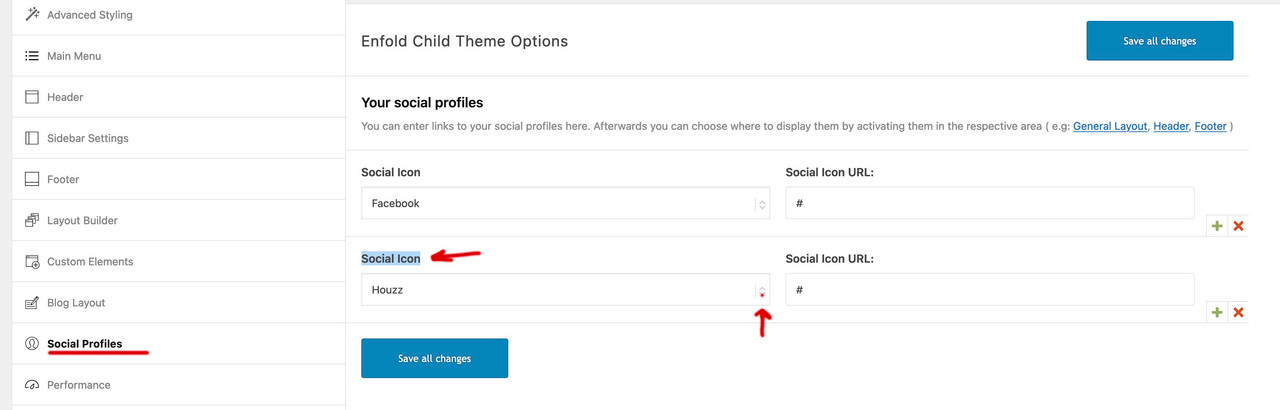
and on blog-layout options you will see too that new social option
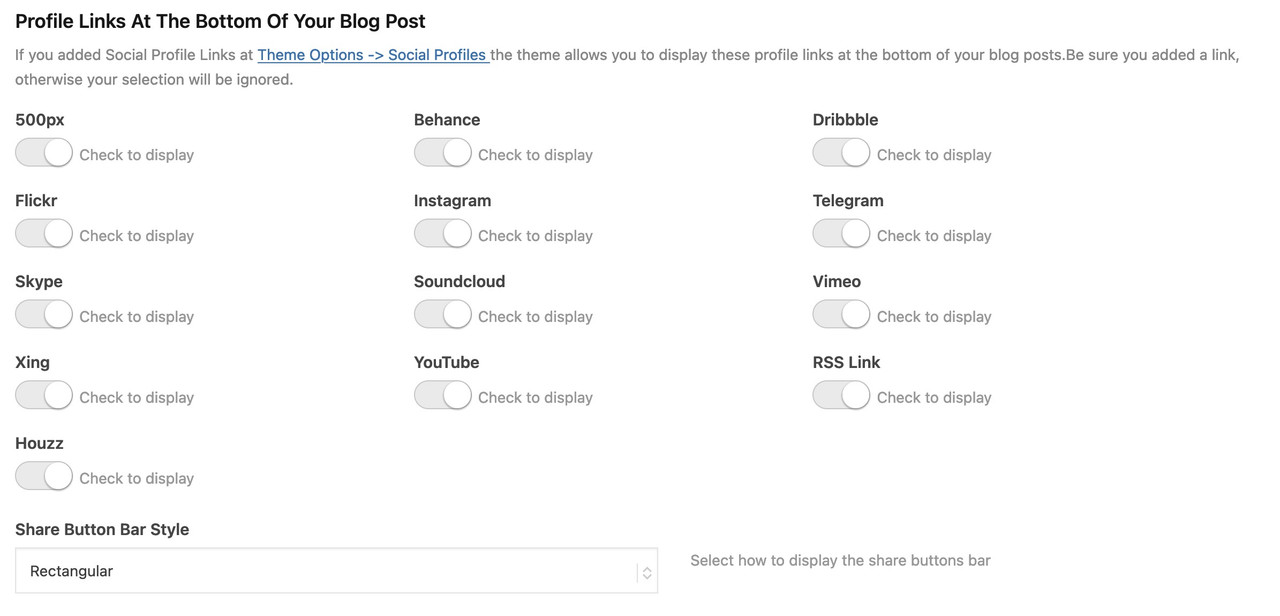
Neither of these items appear to be fixed in the beta version, which I’ve installed and tested on a dev site. Same issue. When Classic Editor is selected in Enfold’s theme options and a new page or post created, the Add Form button is not there. When using the Avia Layout Builder and a Text block, the Add Form button is there but doesn’t work.
Hi Ismael,
Thank you for your response.
I did some tests and unfortunately, it didn’t help. The problem still occurs.
I have renewed my support license, please try to prioritise this a bit, without creating new content I have a problem with managing my business.
Additional thing (maybe it will be helpful somehow), the server uses PHP version 8.0.28.
And second thing, we can show you one error we saw yesterday (but I think it resonates with your snippet of code above and as I wrote it didn’t help):
An error of type E_ERROR was caused in line 819 of the file /nas/content/live/inlinksprod/wp-content/themes/enfold/config-templatebuilder/avia-template-builder/php/class-font-manager.php. Error message: Uncaught TypeError: asort(): Argument #1 ($array) must be of type array, null given in /nas/content/live/inlinksprod/wp-content/themes/enfold/config-templatebuilder/avia-template-builder/php/class-font-manager.php:819
Stack trace:
#0 /nas/content/live/inlinksprod/wp-content/themes/enfold/config-templatebuilder/avia-template-builder/php/class-font-manager.php(819): asort(NULL)
#1 /nas/content/live/inlinksprod/wp-content/themes/enfold/config-templatebuilder/avia-template-builder/php/class-font-manager.php(792): avia_font_manager::set_new_backend('new', Array)
#2 /nas/content/live/inlinksprod/wp-content/themes/enfold/config-templatebuilder/avia-template-builder/php/class-font-manager.php(774): avia_font_manager::get_display_char('new', NULL)
#3 /nas/content/live/inlinksprod/wp-content/themes/enfold/config-templatebuilder/avia-template-builder/php/class-font-manager.php(925): avia_font_manager::backend_icon(Array)
#4 /nas/content/live/inlinksprod/wp-content/themes/enfold/config-templatebuilder/avia-shortcodes/buttons/buttons.php(536): av_backend_icon(Array)
#5 /nas/content/live/inlinksprod/wp-content/themes/enfold/config-templatebuilder/avia-template-builder/php/class-shortcode-template.php(1629): avia_sc_button->editor_element(Array)
#6 /nas/content/live/inlinksprod/wp-content/themes/enfold/config-templatebuilder/avia-template-builder/php/class-template-builder.php(2193): aviaShortcodeTemplate->prepare_editor_element(false, Array, true)
#7 /nas/content/live/inlinksprod/wp-includes/class-wp-hook.php(308): AviaBuilder->js_template_editor_elements('')
#8 /nas/content/live/inlinksprod/wp-includes/class-wp-hook.php(332): WP_Hook->apply_filters('', Array)
#9 /nas/content/live/inlinksprod/wp-includes/plugin.php(517): WP_Hook->do_action(Array)
#10 /nas/content/live/inlinksprod/wp-includes/media-template.php(1555): do_action('print_media_tem...')
#11 /nas/content/live/inlinksprod/wp-includes/class-wp-hook.php(308): wp_print_media_templates('')
#12 /nas/content/live/inlinksprod/wp-includes/class-wp-hook.php(332): WP_Hook->apply_filters('', Array)
#13 /nas/content/live/inlinksprod/wp-includes/plugin.php(517): WP_Hook->do_action(Array)
#14 /nas/content/live/inlinksprod/wp-admin/admin-footer.php(78): do_action('admin_footer', '')
#15 /nas/content/live/inlinksprod/wp-admin/post.php(369): require_once('/nas/content/li...')
#16 {main}
Thank you so much in advance!
Best regards,
Maciej
-
This reply was modified 2 years, 11 months ago by
 inlinks.
-
This reply was modified 2 years, 11 months ago by inlinks.
Hi,
In the screenshot it looks like you have added code into the Custom Class field of the button:

please don’t do this as this field is only for class names.
We don’t have a way to add woocommerce shortcodes into buttons, instead add the shortcodes for woocommerce buttons into a code block element, or a text block, or if you are editing a product page using the Advanced Layout Builder use the Product Purchase Button element.
Best regards,
Mike
Is there an ETA on this?
We’ve just discovered that even in the Advanced Layout Editor, in a Text element, though the “Add Form” button appears, when you click on it, nothing happens.
We were advised to use the Classic Editor option in Enfold’s theme options instead of using the Classic Editor plug-in because of other issues that were happening. But now that we’re using it, we can’t add forms.
Thank you for your help!
Justin
maybe you style it this way: one color-section to 100% height. Page Template as : Template Blank – no header no footer
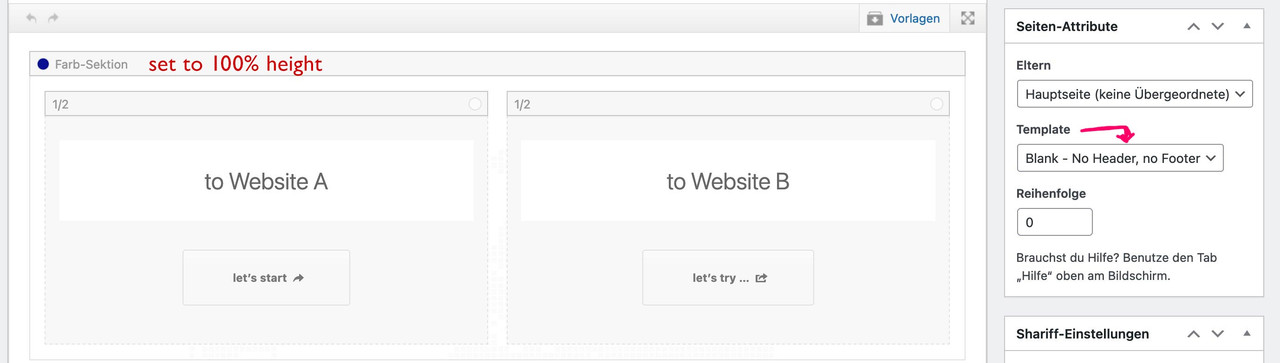
see: https://enfold.webers-webdesign.de/website-switch/
you can have that page as landing page – but for your menu set the home button as you like and change logo link to Website A link
add_filter('avf_logo_link','av_change_logo_link');
function av_change_logo_link($link){
    $link = "https://website-A-Domain-link";
    return $link;
}
Hello Ismael,
Thank you for your reply.
In answer to your questions:
– No, I have no post category named “blog”
– And, no, I fully cleared the cache on “everything” (computer, phone, etc.) before each fix attempt.
Again, all I did was:
1. Temporarily changed the “Where Do You Want To Display The Blog” field in the Enfold Child Theme Options to a “blank” page,
2. Click the “Save all changes” button,
3. Change back to “blog” for “Where Do You Want To Display The Blog” in the Enfold Child Theme Options,
4. Click the “Save all changes” button,
5. Fixed
Before doing any of the above, I first removed the css fix you suggested, as this had failed to solve the problem.
Again, I have no idea why the above action successfully solved the “featured image not full width” problem, which I had struggled with for more than a day.
Hopefully, this post will help others who encounter a similar problem.
Thanks for the follow-up!
Hey Gunter,
We would like to change the functionality of the search button in enfold. We have some custom code we have developed for how we want the search box to appear and we have it working via a header widget. We had to do it this way to get the html to be able to span full width in the header over the top of the menu items.
What we now want to achieve is:
1) Unhook the js event that normally fires when you click on the search button in the header. The code that pops up the input box to type your search term in.
2) Add our own js hook on the click event of the search button.
We can do step 2 easily but removing the existing hooks for step 1 is harder. We have tried removing all click events from it but it doesn’t seem to work. There is some more advance event setup using virtualMouseBindings that we got lost in. How can we remove the event that fires when you click on the search button.
Thanks,
Tim
I’m trying to do the following:
-Add woocommerce short codes into “buttons” and not sure where to do this. I went into Developer location, but not sure what to do from there. The button should not redirect to cart or checkout page.
-I want it also to pop up a little message or highlight button showing that product has been added.
Hey Kerstin,
Thanks for the feedback, after you login you can follow this link to open a new thread or go to the Enfold forum and click the full-width blue button at the top of the forum.

Best regards,
Mike
Good Morning Mike,
thanks for your feedback during Easter!
I found the issue .. not sure if it is a bug or not: Showing the media overview in a list, and clicking on the PDF, the “green button” from the DownloadManager will not be visible and …wp-content/themes/enfold/config-lottie-animations/assets/lottie-player/dotlottie-player.js.map gives back a 404 error.
Switching the media overview to grid, the 404 is gone and clicking on the PDF, the “green button” from the DownloadManager is shown.
Funny thing: the dotlottie-player.js.map does not exists in both cases.
Best,
Martin
Hi,
Typically the buttons remain the same size on tablet and desktop, see our demo example
desktop:

tablet:

On your site the caption title of the second slide for tablet is 70px, so the buttons don’t show, see screenshot 1 below, if you change it to 30px using the option above the buttons will show, see screenshot 2 below.
If you still want the buttons to be smaller for screen sizes up to 990px, try this CSS in your Enfold Theme Options ▸ General Styling ▸ Quick CSS field:
@media only screen and (max-width: 990px) {
#top #main .avia-slideshow-button {
    margin-top: 0px;
    padding: 5px 6px;
}
}
After applying the css, please clear your browser cache and check.
Best regards,
Mike
Hi,
Thank you for the link to your site the underline is from css from the block editor:
a:where(:not(.wp-element-button)) {
    text-decoration: underline;
}
to remove try this CSS in your Enfold Theme Options ▸ General Styling ▸ Quick CSS field:
#main a:where(:not(.wp-element-button)) {
    text-decoration: none;
}
After applying the css, please clear your browser cache and check.
Best regards,
Mike
Hey Kathy Evans,
Thank you for your patience and the link to your site, when I check your slider it seems the only issue is with the second slide text font is too large, please note that you can adjust the font size for each screen size in the element options:

changing a huge font size down for tablet will allow the buttons to show.
Best regards,
Mike
Hey daves1997,
To copy a table you can use the Templates ▸ Save Entry As Template button to create a template of your page, idealy you would want only the elements on the page that you want to clone. If there are extra elements on the page, go a head and create a template and name it specifically as a temp template then use it on a blank page, then remove the elements you don’t want and then create a new template and delete the temp one.

Best regards,
Mike
I updated the theme but now it bought another problem, after updating the theme, it is not showing me my shop as it was earlier. It says “This page is set as the default WooCommerce Shop Overview and therefore does not support the Enfold advanced layout editor ” Also the Advance Layout Editor button is disabled.
Hey Kerstin,
If you are signed into the support forum, then you don’t have to send pre sale questions. You can start new topic in the support forum instead, by following this link, or by clicking this button: https://imgur.com/a/AnoSPNb
Best regards,
Rikard
Hey mgyura,
Thank you for the inquiry.
The underline is due to an inline style, possibly added by a plugin.
a:where(:not(.wp-element-button)) {
    text-decoration: underline;
}
To override it, you can add this css code in the Quick CSS field.
a:where(:not(.wp-element-button)) {
    text-decoration: none !important;
}
You may need to toggle or temporarily disable the Enfold > Performance > File Compression settings and update the theme from version 5.2 to the latest version 5.5.
Best regards,
Ismael
Hallo zusammen,
ich benutze Enfold schon seit Jahren und bin sehr zufrieden. Ich habe aber mit der aktuellen Version ein Problem mit dem Avia Layout Architekt. Die Buttons “Layout Elemente”, “Inhalts Elemente” und “Media Elemente” fehlen. Man sieht nur eine Reihe mit den einzelnen Spalten Elementen “1/1”, “1/2” usw.
Ich habe die aktuelle Version 5.5 und WP 6.2.
Brauche dringend Hilfe bei diesem Problem
Viele Grüße Tim
Hi,
Thanks for your patience and the link to your site, I added this code to the end of your child theme functions.php file in Appearance ▸ Editor:
function custom_script() { ?>
  <script>
window.addEventListener('DOMContentLoaded', function() {
(function($){
	setTimeout(function(){
$('#footer-template .av-recaptcha-submit').insertAfter($('#element_avia_1_1'));
},400);
})(jQuery);
});
</script>
  <?php
}
add_action('wp_footer', 'custom_script');
and this css to your child theme stylesheet:
#footer-template .avia_ajax_form #element_avia_1_1.form_element_three_fourth {
    width: 68%;
    float: left;
    margin-right: 1%;
}
#footer-template .avia_ajax_form .button.av-recaptcha-submit {
    margin-top: 8px;
    padding: 14px 20px;
}
#footer-template .avia_ajax_form p:nth-child(8) {
    top: -35px;
}
@media only screen and (max-width: 761px) {
	#footer-template .avia_ajax_form #element_avia_1_1.form_element_three_fourth {
    width: 58%;
}
}
@media only screen and (min-width: 762px) and (max-width: 1024px) {
	#footer-template .avia_ajax_form #element_avia_1_1.form_element_three_fourth {
    width: 63%;
}
}
and cleared your Autoptimize cache and this is the result:

Please clear your browser cache and check.
Best regards,
Mike
Hello everyone, since the enfold theme has not been updated, I wanted to delete the settings for the update theme with the button “reset all options”. Unfortunately, all settings on all folders were deleted. In which files are these settings saved? I would like to selectively transfer the files from my backup via FTP. Best regards Mario
Hey Vanessa,
You can find these options in the Styling tab of the button https://i.imgur.com/SEc7S4c.png and Enfold theme options > Advanced Styling > Buttons https://i.imgur.com/EtLYPLl.png
Best regards,
Yigit
Hi,
As Guenni007 points out, you can set the social icons in the topbar at Enfold Theme Options ▸ Header ▸ Extra Elements ▸ Header Social Icons ▸ Display in top bar at the right and Enfold Theme Options ▸ Header ▸ Extra Elements ▸ Header Secondary Menu ▸ Secondary Menu in top bar at the left


The button style doesn’t show but you could adjust with css to suit your needs.
Best regards,
Mike
Hey MyWin,
To add an image in the accordion toggle that will open in a lightbox, use the add media button above the text field

choose your image and in the ATTACHMENT DISPLAY SETTINGS choose Link to media file

now clicking on the image will open it in a lightbox

To open a video in a lightbox, choose an image as your video thumbnail and in the ATTACHMENT DISPLAY SETTINGS choose Link to Custom URL and add your link, if using YouTube use this format: https://www.youtube.com/watch?v=G0k3kH
now clicking on the image will open the video in a lightbox.
Best regards,
Mike
Hi,
Thank you for your patience, I toggled the Enfold Theme Options ▸ Performance ▸ JS & CSS file merging and compression and Enfold Theme Options ▸ Performance ▸ Delete old CSS and JS files and now the buttons sponsors & press jump to the IDs on the homepage quickly, please clear your browser cache and check.
Best regards,
Mike
Hi,
I believe that you are referring to the two buttons My A-Wise and Call Us stacking on the mobile version of the test site, but today the test site is not loading please check.
Since the live site is working correctly and it is using Enfold 5.4.1, compare the settings and the custom css to find the difference.
Best regards,
Mike
Hi,
Thanks for your patience and the link to your site to hide the exkl. MwSt. below the buy button on single product pages please try adding this css to your Enfold Theme Options ▸ General Styling ▸ Quick CSS field:
#top.single-product .wc-gzd-additional-info.tax-info {
	display: none;
}
After applying the css, please clear your browser cache and check.
Best regards,
Mike



