
-
Search Results
-
I’m building my first site with Enfold, and it has all been going swimmingly, but I’m suddenly unable to view or edit pages within WordPress (back-end) with the Advanced Editor active. The page will load, but as it’s loading the Advanced Editor the browser window will just turn white. There is a brief moment when I’m able to click the button to switch back to the default editor, but unfortunately it will just continue loading the Advanced Editor and turn white anyway. The only thing displayed is just a small square at the top left of the window. It isn’t the normal broken image icon.
Pages are still viewable from the front-end.
I have confirmed that I am still able to view/edit pages that are set to the default editor without issue. I have had no recent browser updates, and have tried with both Chrome and Firefox. I have also confirmed that WordPress is up-to-date and Enfold has just been updated, with no change.
Any help will be appreciated. I need to be able to use the Advanced Editor to finish this site.
::EDIT::
While all pages are still able to be viewed, I am also now experiencing issues with the header displaying incorrectly after updating Enfold, with portions of the header menu being down in the slider banner. Clicking any of these options will cause them to jumble together on top of each other and be unclickable on any subsequent page.

::EDIT 2::
I’ve added a temporary admin account for any needed review.
Wondering if you can help me please
I have items in the Woo shop and there is a button to select options.Wondering if you can tell me is the default color and hover color controled by the Enfold settings or is it a Woo option.
See image – I would like to change the very lick color of the “Select Options” button to something darker
Topic: Widget in mobile menu
Hi!
I have a widget with an image (british flag) linked to another website (english version) underneath the menu, in the left sidebar. The problem is the following : in the mobile version I added the quick CSS `@media only screen and (max-width: 767px) {
.responsive.html_header_sidebar #header .avia-custom-sidebar-widget-area {
display: block;
}}`and went to Enfold theme options > Sidebar Settings and check “Sidebar on Smartphones” to display sidebar on smartphones
BUT
I don’t want others widgets (Facebook like box, mobile phone number). So the best would be that my flag appear directly in the menu to make that the menu button stay on the logo right side. What is the best way to do that ?
Thank you for your help.
Topic: Change buttons style
Hello, though I´ve changed the buttons border radius style in Enfold advanced options, nothing happens.
How can I make buttons not so “rounded” and more square?Thanks
I’m struggling here at not being able to directly contact a support person! I need help getting this theme installed
I’m using WordPress 4.6.1
I’ve tried to load the Enfold theme in Chrome MS Edge & also Firefox;From the WP interface I see;
If you have a theme in a .zip format, you may install it by uploading it here.So I upload the enfold.zip file;
enfold.zip Install nowAnd then it takes me to a screen which asks;
Are you sure you want to do this? (there is no button or anything to click y/n)
And a link to “Please try again.” which directs back to the admin/theme-install.php pageMy webhost company is Zentec, they are mostly non-responsive to any requests for assistance, I have repeatedly requested FTP access and those requests continue to be ignored.
Hi,
after changing the server I get some error messages which I could not stop.
Notice: Undefined index: index in …/wp-content/themes/enfold/config-templatebuilder/avia-shortcodes/buttons_fullwidth.php on line 346
Notice: Undefined index: index in …/wp-content/themes/enfold/config-templatebuilder/avia-shortcodes/masonry_entries.php on line 386
Notice: Undefined index: index in …/wp-content/themes//enfold/config-templatebuilder/avia-shortcodes/masonry_entries.php on line 389
Notice: Undefined index: index in …/wp-content/themes/enfold/config-templatebuilder/avia-shortcodes/masonry_entries.php on line 392
Notice: Undefined index: index in …/wp-content/themes/enfold/config-templatebuilder/avia-shortcodes/masonry_entries.php on line 393In additional I register an extra widget above widget area.
After changing the server I get also an error. I could solve it in frontend.
But the whole widget area is still messy so I think something still goes wrong
The site is in maintenance mode, so I give you a login as private note.Could you help please
Topic: arrange social icons
how can i deactivate the borders of the social share icons? how can i delete the title and how can i bring the social share button to the top of the page? that aligns perfect with the sidebar?
how can i show the mouse over text under the social share buttons not above? http://imgur.com/a/o1qiP
And how can i deactivate the date in the post preview at the sidebar here: http://imgur.com/a/vfFSE and how can i make the font size of the post title in the sidebar bigger? can i adjust this in the enfold settings in the backend or do i need custom css?
Topic: Blog format inconsistent
My problem is the blog format is not consistent. I have a post here that is NOT using the advanced layout builder and the elegant layout sets just fine.
http://ninjatechc.com/2016/09/15/galaxy-note-7-lets-talk-batteries/But now on a page that IS using the advanced layout editor it is not using the elegant format and does not even show the Enfold sharing buttons.
http://ninjatechc.com/2016/11/17/microsoft-purchases-linkedin/
The featured image also does not show…. (also is not showing on other posts/pages)
Update:
I looked further and anything made using the Advanced Editor will not show the featured image and the sharing icon section…. Using the default everything is fine….
Hi Yigit,
at first thx a lot again for your help with my last/first problem! :-)
Post Link: https://kriesi.at/support/topic/downloadlink-and-pictureframe-problems/#post-706147
And now, here are my new questions for you…and your colleagues. :-)
Question 1: Main-Menu in combination with sidebar-pages
Please click here…see link 1 in private content field.
This is the “service-area“ of my site and there you see that I have a sidebarnavigation on the left side.
You can see further, that the word “service“ in the mainmenu is active (green) and the first point
“why designbasis“ in the sidebar is active (dark red), too.But if you click on another point like “corporate design“, only this point stay active, but not any longer
the word “service“ in the mainmenu. Of course I know, why it is so technicaly. But the logic of the
navigation is here not really correct, isn’t it? The mainmenu “service“ have to, or let me better say “must“,
stay active also by the other navigation-areas. How do I do this?Question 2: Where can I change the highlight-colour of the back-button?
Please click here…see link 2 in private content field.
If you go over the “back-button“ on the right side, you’ll see a white highlight in the button/text. It looks
not very pretty, or clean. ;-/ Where can I change the colour, or even better “turn off“ the highlight-colour. :-)Question 3: Font-Styling in the advanced-styling-area
Please click here…see link 3 in private content field.
A few minutes before I read that this area is still a active BETA. So, maybe this is the answer, why it not
works correctly. ;-/The Lato-Font-Family has much more weights, than you show in the “weights-pulldown-menu“. Why is it
so? I like to have more than only these three ones, please! ;-)Question 4: Google-Fonts
Please click here…see link 4 in private content field.
Please click here…see link 5 in private content field.I’ve installed this Plugin and the developer-team says, that it allows me to choose from over 600+ google fonts.
But in the “Enfold-Styling-Menu“ I have much less fonts than 600+. I know, the screenshot shows only the fonts
for the body text. But this is the most important to me. Why is it so? I also entered a valid Api Key in the preferences.I hope that my explanations are plain enough. :-) In advance thx for your support!
Aloha
CarstenHi, I’m working with Enfold the first time, still on local server.
I placed a product search field in the secondary menu. Now I want to customize the look: the submit button should be to the right of the input field and not be under it, without space between. Additional the color should be green, not the default color. I hope it’s clear what I mean. Can I manage that with Quick CSS?Hi Enfold team
I’m talking about that: http://kriesi.at/documentation/enfold/add-new-or-replace-advanced-layout-builder-elements-from-child-theme/
You said: “You can also add new ones using the other shortcode elements as examples.”
> I do not understand that (I’m not enlgish)I have override one of you AVIA element: postslider.php (My postslider.php is in my /shorcodes child theme folder and it works BUT it also override the original one, so : how can I create a new shortcode based on postslider.php that will not override the one of enfold ?)
PS: before submitting a ticket here I have tried a lot of thing within this file, like, renaming the file to my-postslider.php and do some modifications in the file like this:
if ( !class_exists( 'my_avia_sc_postslider' ))
{
	class my_avia_sc_postslider extends aviaShortcodeTemplate
	{

		/**
		 * Create the config array for the shortcode button
		 */
		function shortcode_insert_button()
		{
			$this->config['name']		= __('Post Slider', 'avia_framework' );
			$this->config['tab']		= __('Content Elements', 'avia_framework' );
			$this->config['icon']		= AviaBuilder::$path['imagesURL']."sc-postslider.png";
			$this->config['order']		= 30;
			$this->config['target']		= 'avia-target-insert';
			$this->config['shortcode'] 	= 'my_av_postslider';
			$this->config['tooltip'] 	= __('Display MY Slideshow of Post Entries', 'avia_framework' );
			$this->config['drag-level'] = 3;
		}
thanks
I have the theme “Enfold” and use it for our shop. However, I would like to display the catalog representation as a list instead of grid. Unfortunately it does not work with the theme. For the display as a list I would like to use the WordPress plugin “WooCommerce Grid / List toggle”. How can you help me there.
——————————————————————————
Ich habe das Theme “Enfold” und benutze es für unseren Shop. Die Katalog-Darstellung möchte ich allerdings als Liste statt Raster anzeigen. Leider funktioniert es nicht mit dem Theme. Für die Anzeige als Liste möchte ich das WordPress-plugin “WooCommerce Grid / List toggle” benutzen. Wie könnt ihr mir da weiterhelfen
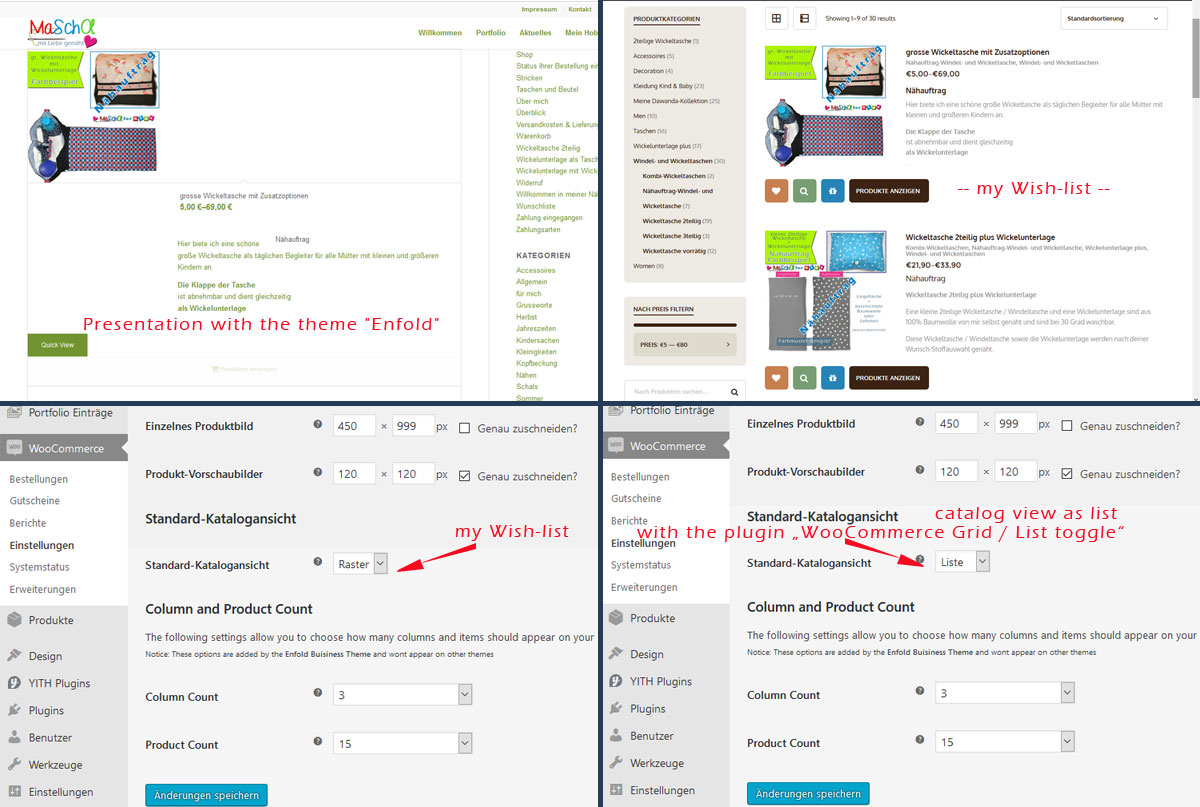
WooCommerce Grid / List toggle is a simple plugin which adds a grid / list toggle button to your product archives allowing users to toggle between grid / list views of your products on your WooCommerce store.
The list view arranges products in a vertical list and pulls in the excerpt to give a more detailed overview.
The grid view you will be familiar with as this is WooCommerce’s default layout for product archives.
The store owner can choose whether grid or list view be set as the default via the Catalog tab of the WooCommerce settings screen.Thanks for all the great work you do. I’ve started a second website, this time using Enfold (previous site used Choices). Fantastic product and even better customer support!
I have two call to action links on my homepage slider based on the medical template. They appear and are functional from larger devices, but the call to action buttons seem to be hidden behind content boxes on smaller devices such as the iPhone.
Topic: Move tags up -portfolio page
We’ve added tags to the portfolio page via the enfold template php, but the tags appear at the bottom. We’d like to move them up under the “buy” buttons. Any way of doing this?
Thanks!
*URL attached in private
Hi
Please give an example CSS that would change the vertical position of
(1) button
(2) an icon
within a color section.
I’ve searched high and low and was surprised this question hasn’t been asked before on enfold. I’m sure the answer would be useful to others.
Please just post an example in px and I can change it around.
That would be very much appreciated.
Thankyou again!
Richard
hi there,
i am looking for a solution to display a button page/sidewide which sticks to one side of the screen. On click the button then is to open a modal window / light box containing a contact form. What would be the best way to implement this within Enfold?
Best Regards
Philipp
Topic: Button on sidebar widget
Hi,
I’ve inserted a button in a text widget using this shortcode:
[av_button_big label='Send' description_pos='below' link='page,1051' link_target='' icon_select='no' icon='ue800' font='entypo-fontello' custom_font='#ffffff' color='theme-color' custom_bg='#067764' color_hover='custom' custom_bg_hover='#067764'][/av_button_big]The button is running but WP shows this mesage:
Notice: Undefined index: index in /wp-content/themes/enfold/config-templatebuilder/avia-shortcodes/buttons_fullwidth.php on line 346


