-
Search Results
-
Hello. I have a major problem on a website. All the link setting options within the modules (like image, buttons etc.) are not functional. Meaning the entry field for the link that is usually there is not displayed so I cannot put in the link. Also there are some other glitches in the builder with other modules like magazine (doesn’t display option field for categories to choose from).
Can you please take a look. This site had problems before freshly installing ENFOLD (latest version). At first the Avia Layout Builder was not working. The support here had fixed the issue in December. see
Not sure if the “link” issue has been since then or later since I did not needed to work on it immeadiately.Plugins are all disables rhigt now.
Hi
Need your help – SOS
At next Sunday I need to run a new eCommerce and I Have got a some UI problem that I cant seem to work out.
Im running enfold 3.8.4, wordpress 4.7.1,
Some of the menu and settings of the woocomerce part, are not working or dont response to any click
For example’ cant operate the product menu in a product editor….
Or cant see the shipping options…
Or an the Edit Product, I cant click on wordpress screen option button…I have switched to 2016 theme and all got fixed ( for testing)
The default Video Slide looks great out of the box with Enfold (not Layer or Revolution).
But when using a Gravity Form shortcode in the Caption Text – the form doesn’t appear.
The “Submit Form” buttons appear, as well as some form validation if you try and submit.
Is this a JS conflict or z-index issue?
So i am now trying to make some modifications to the PHP files to customize a few shortcodes.
My website is using the “enfold health coach” variation of the theme. I have my site about 90% finished already… not starting from scratch.
I am trying to use the child theme to modify the code. here is what i did:1. Download the enfold child zip file from here: http://kriesi.at/documentation/enfold/downloads/
2. Export my theme settings file via the enfold>import/export panel.
3. Upload the uncompressed child folder next to the enfold theme folder via FTP.
4. Activate the child theme via Appearance>themes in wordpress.
5. Import the theme settings i saved in step 2.I end up with all the fonts messed up on the site, different colors in the menu, buttons among many other problems.
Just for the sake of it, i also tried overwriting the functions.php and style.css files included in the child theme with the ones that were already present in the regular enfold folder on the site, but then the website crashed completely. (not an expert here as you can see)I had to revert everything back to the regular enfold theme. Now the site is back to normal the way i customized it. No problems whatsoever :)
In other words, the child theme messes up the site even if i import the backed up settings.Am i missing something or doing anything wrong?
Thanks a lot for your help.
Topic: Font Size Tool in Text Block
Hello,
Fantastic theme I am just requiring an answer to a question on behalf of the clients that use the websites we build using Enfold.
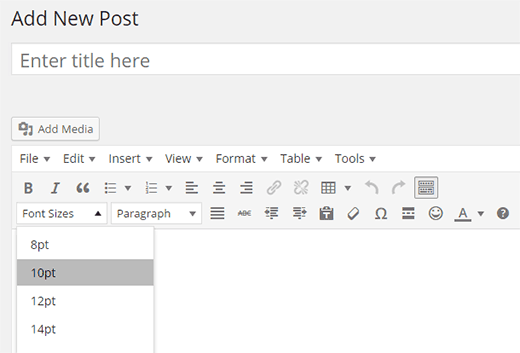
Most themes we have used in the past have the option within the editor section where someone can highlight a line of text and adjust the font size on that individual line. A lot of our clients have no knowledge of css and html and are wanting to adjust a line of text, within a blog post for example, to be a particular font size and they can’t without asking us where we have to manually go in an add a span or class to that text line.
Is there a way we can add a tool that allows for this ability?
I know that TinyMCE for example has this ability: http://cdn.wpbeginner.com/wp-content/uploads/2012/09/wp-font-size-button.png
How do I change the background color of the subimt button on mailchimp widget in enfold?
I’ve tried this
.main_color .primary-background, .main_color .primary-background a, div .main_color .button, .main_color #submit, .main_color input[type=’submit’], .main_color .small-preview:hover, .main_color .avia-menu-fx, .main_color .avia-menu-fx .avia-arrow, .main_color.iconbox_top .iconbox_icon, .main_color .iconbox_top a.iconbox_icon:hover, .main_color .avia-data-table th.avia-highlight-col, .main_color .avia-color-theme-color, .main_color .avia-color-theme-color:hover, .main_color .image-overlay .image-overlay-inside:before, .main_color .comment-count, .main_color .av_dropcap2, #top #wrap_all .main_color .av-menu-button-colored > a .avia-menu-text, .main_color .av-colored-style .av-countdown-cell-inner, .responsive #top .main_color .av-open-submenu.av-subnav-menu > li > a:hover, #top .main_color .av-open-submenu.av-subnav-menu li > ul a:hover {
background-color: #2a7ec4 !important;
color: #ffffff;
border-color: #507210;
}but it has had no effect. Any help would be appreciated.
Hi!
I learned from this tutorial how to add google tracking to the contact form, but more important for me is to track “tel:” links.
1. Can you please help me understand how to implement OnClick function on my buttons? (they’re “a href” links that created using Avia Layout Builder > Content Elements > Button).
2. Please let me know what is the best (easiest, safest, and will stay when I upgrade to new versions) to implement the Google Conversion Tag to my page? (It’s a <script type=”text/javascript”> code that needs to be implemented inside the <body> code).Google documentation for this action: https://support.google.com/adwords/answer/6331304?hl=en&authuser=0
Many thanks!
This code works in the quick CSS:
.avia-button {
font-size: 30px!important;
}
But I want this only for some buttons, so I set a custom CSS class ( support ) called ab-button
But when I add The following code, nothing happens:
.ab-button {
font-size: 30px!important;
}
What am I doing wrong?
Hi,
I am using the Enfold Theme.
I am using the Masonry content element in the Avia Layout Builder. I want to remove the “All” and the “/” from the sort categories and default to the first category.
I’ve already removed the “All” and the “/”, and I found this code in the forums to change the default category, and it seems to work. Although, it takes more than 13 seconds for my images to load.
add_action(‘wp_footer’, ‘ava_auto_click’);
function ava_auto_click(){
?>
<script>
(function($){
$(window).load(function() {
$(‘.backgrounds_sort_button’).trigger(‘click’);
});
})(jQuery);
</script>
<?php
}Is there any way to make the images load faster? When it loaded all photos, it loaded a lot faster.
Any help would be appreciated. Thanks.
Hello,
The Mega Menu Checkbox option is no longer available for my website. This happened after I added a new item to it and hit the update button.
Dayclubs & Nightclubs and Services are suppose to be a 3 column menu and Adventures was 2 columns.
At first I thought it might be because I also updated enfold to 3.8.4, but I resorted back and the option was still not there. It is now back to the latest version.
Have you removed that option? Or is there another issue going on?
https://www.dropbox.com/s/81kii62d8o01bzn/cityvipconcierge.com_2017-01-20_09-52-45.png?dl=0
Any help you can give would be greatly appreciated.
Thank You
Afternoon all,
not really a support question more of a why-does-it-happen question.
The standard layout.css that come with Enfold has the following css…
.html_elegant-blog .avia-content-slider .read-more-link{
	position: relative;
	top:18px;
}
I was just wondering why? The css pushes the button down and renders it unseeable. Removing the top:18px; aligns the button correct. Is that line just an error or does it serve a purpose I can’t see?
Thanks
TJ
Topic: Email Links not working
Hello, I wrote before about my email links not working on my Enfold sites. When clicking nothing happens or it goes to a 404 page.
This happens both in the social media icon header button as well as on the how to reach us page and on an image that I want to click through to an email. I’ve tried just the email, I’ve tried mailto:email and I’ve tried html code.
I’ve messed with my own browser situation however I can’t get it to work in Safari or Chrome.
Is there a way to ask the user which image on the page they want to share when they click the Pin It button? I want to provide a different image for Pinterest to conform to their portrait orientation guidelines so defaulting to the featured image doesn’t work for me.
Here’s an example page: http://www.lottaveg.com/vegan-baked-potato/.
If you click the Pinterest “Save” button below the recipe description, it opens an image selection layer with both the landscape featured image and the portrait image that’s included in the content. However, when I click the Pin icon in the share bar below the recipe, it defaults to the featured image without giving me the option to select the portrait version.
Ideally, I’d like to be able to use a hidden image for Pinterest as described here: http://pinchofyum.com/how-to-hide-an-image-in-a-wordpress-post.
Thanks!
JPHi Want to add a button to the main menu on our website. Can you explain how. I looked at the code on your demo: http://kriesi.at/themes/enfold-restaurant/ I don’t want it to be transparent, but like the button – green background, in the top nav. I want to move it to the main nav and have already added Book Now!
Thanks,
YvonneHello Support,
I’ve posted a link below to a Gravity Form I’ve created in Enfold. I’m having an issue getting the radio button with “other” field to line up. It’s kicking the “other” field box down just below the button. Could you provide me with a quick css code to fix this issue?
Thanks for your help!
How do I go about changing the content and links of the two buttons on the home page? Currently one links to the contact page and I would like to redirect it to my shop instead.