Viewing 30 results - 31 through 60 (of 11,204 total)
  • Author
    Search Results
  • #1493774

    Can you post a link to the page in question?
    It will then be easier to advise you on which method to use to place the widget (which hook to use) and which CSS is required.
    (follow Rikards link above)

    /* ==== Header widget area
    Logo left, Menu right
    Logo right, Menu Left
    Logo center, Menu above
    ==== */
    add_action( 'ava_after_main_menu', 'enfold_customization_header_widget_area' );
    	function enfold_customization_header_widget_area() {
    	dynamic_sidebar( 'header' );
    }
    
    /* ==== Header widget area ============
    Logo left, menu below
    ==================================== */
    add_action( 'ava_main_header', 'enfold_customization_header_widget_area' );
    	function enfold_customization_header_widget_area() {
    	dynamic_sidebar( 'header' );
    }
    

    after that create your new widget-area on :

    _______________________

    if you like to have the widget-area always nearby the logo – it might be better to use a filter to place the widget area:
    See here a different solution with a widget area inside logo container ;)
    https://basis.webers-testseite.de/
    tell me – if this is what you like to have – and if your header setting is in this way.

    See snippets and basic css for that on: https://webers-testseite.de/fiorettipau/

    i inserted to that widget-area a html widget – (copy&pasted html code from an enfold button-row)
    Of course, you have to adapt the CSS to your header configuration. And you may also need to set a responsive behaviour.

    f.e. if you got a shrinking header – you had to decide f.e. if you set the widgettitle to display none on header-scrolled.

    #1493761

    Hello Ismael,

    Off-course I shall share a view screenshots of this problem, becuase I understand you have no clu what is going on.
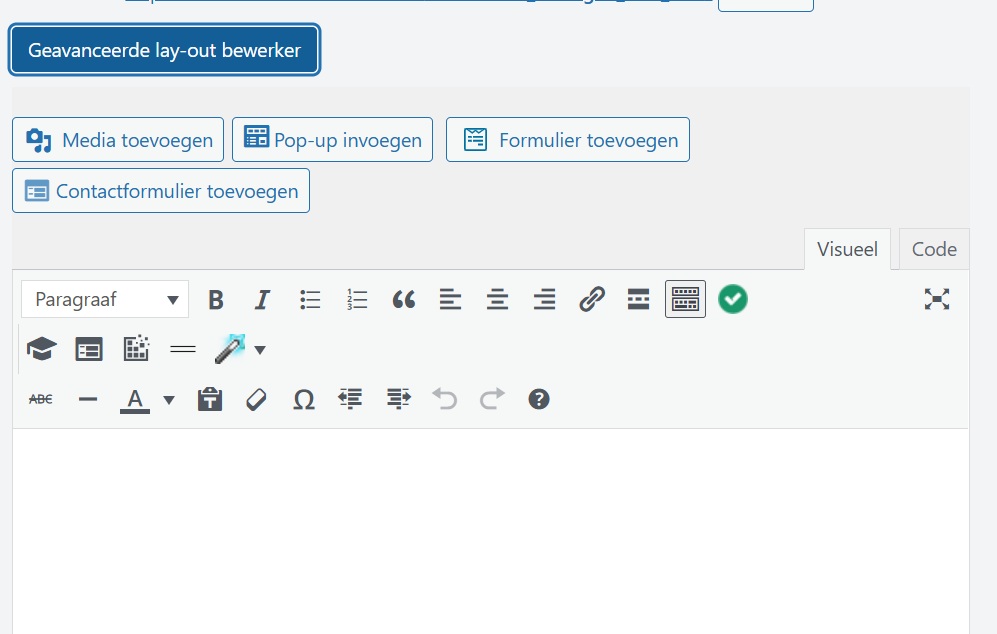
    Screenshot 1 is how it suppose to look like in normal conditions, you will see the blue ALB button:
    ALB-problem-1

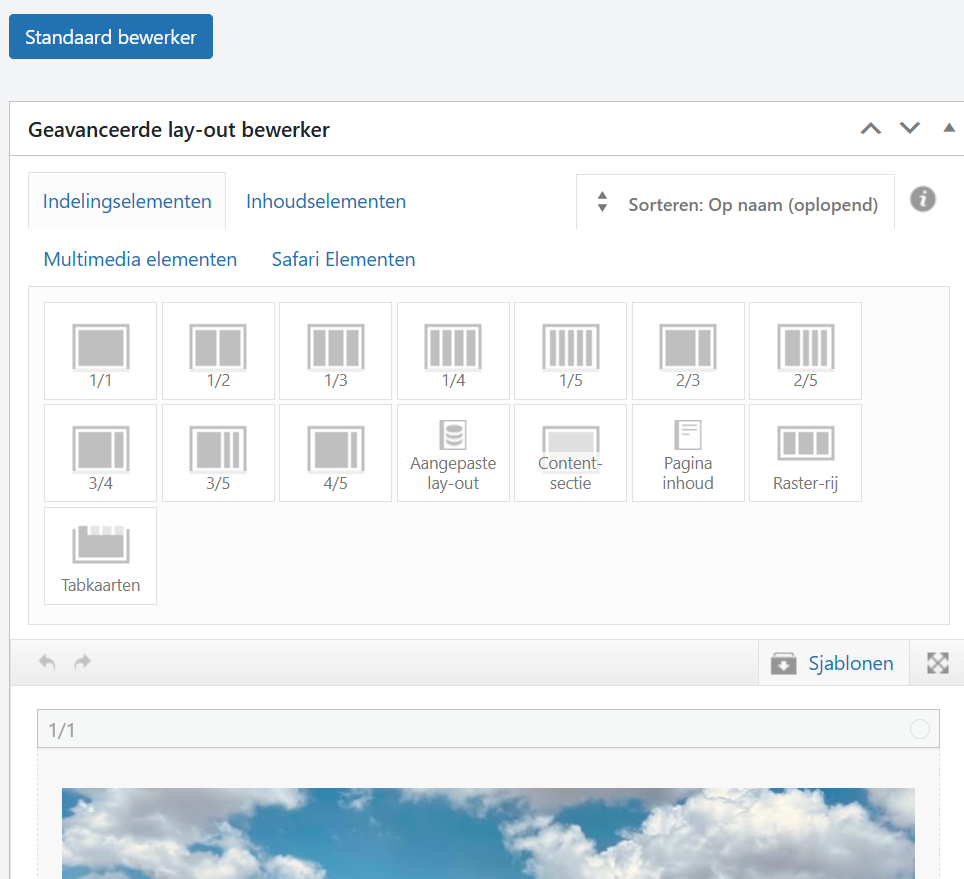
    Screenshot 2 is when you have activated the button and you see all options you can choose from:
    ALB-problem-2

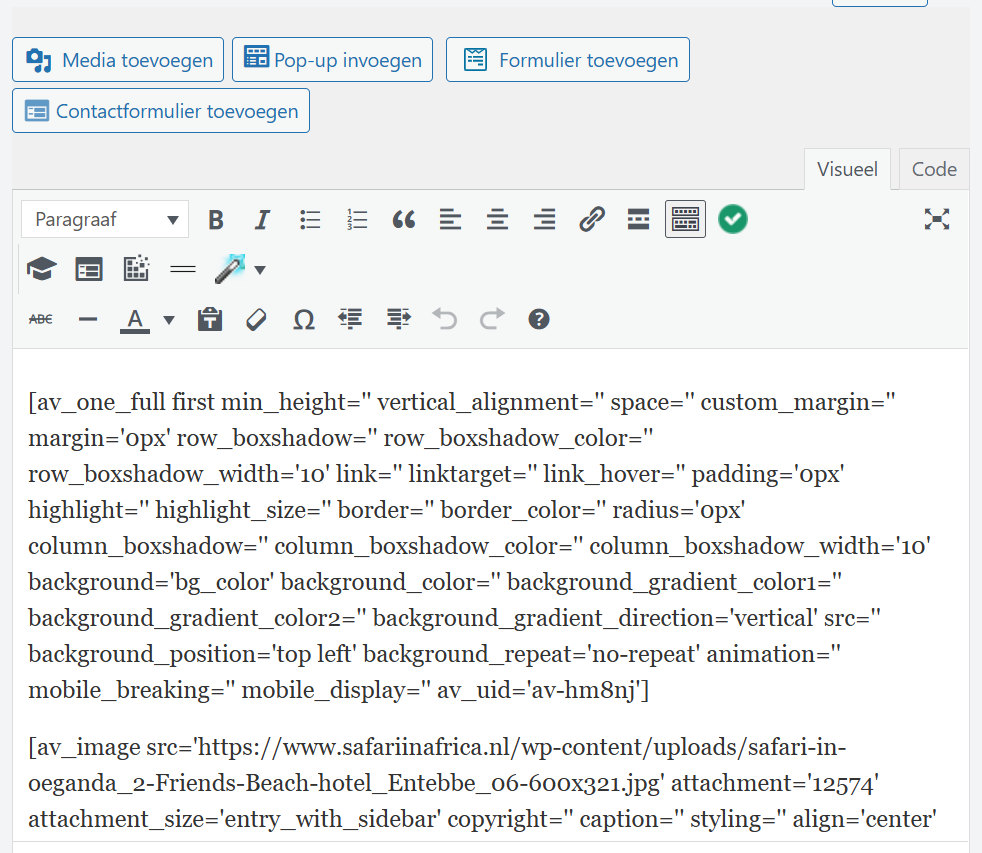
    Screenshot 3 is how the pages look like whit the problem: no ALB button is there:
    ALB-problem-3

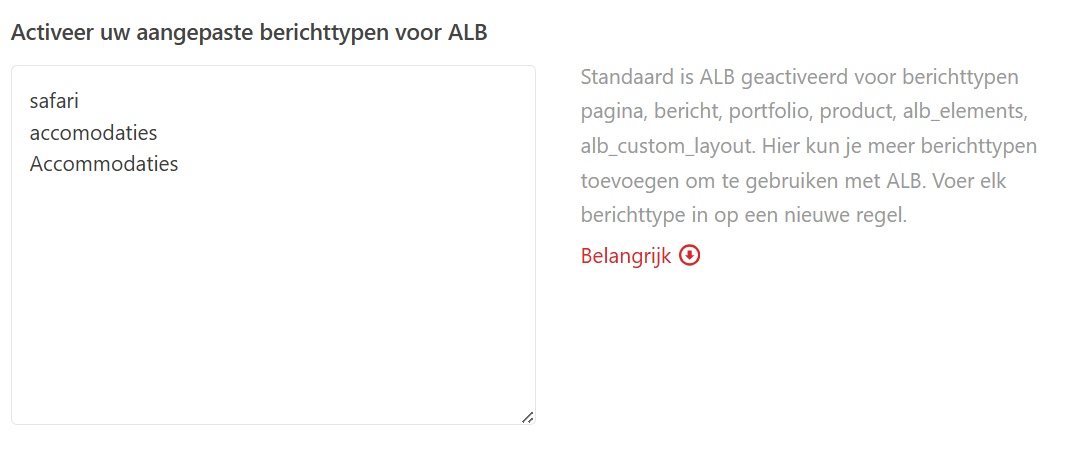
    Screenshot 4 is the Listings that I have made in the Enfold Child > Layout Editor > Advanced Options > Enable your custom post types for ALB:
    (my site is in Dutch btw)
    and I have used 2 seperate words for the accommodation that are not working (Safari is working) when I turn then from place there is no effect, Safari is still working and accommodation is not:
    ALB-problem-4

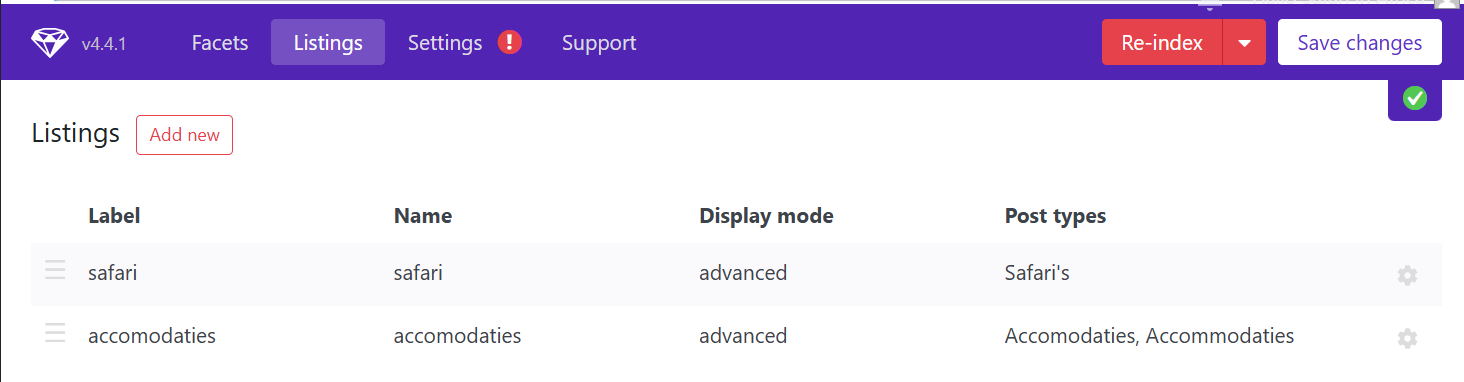
    Screenshot 5 are the 2 Listings
    ALB-problem-5

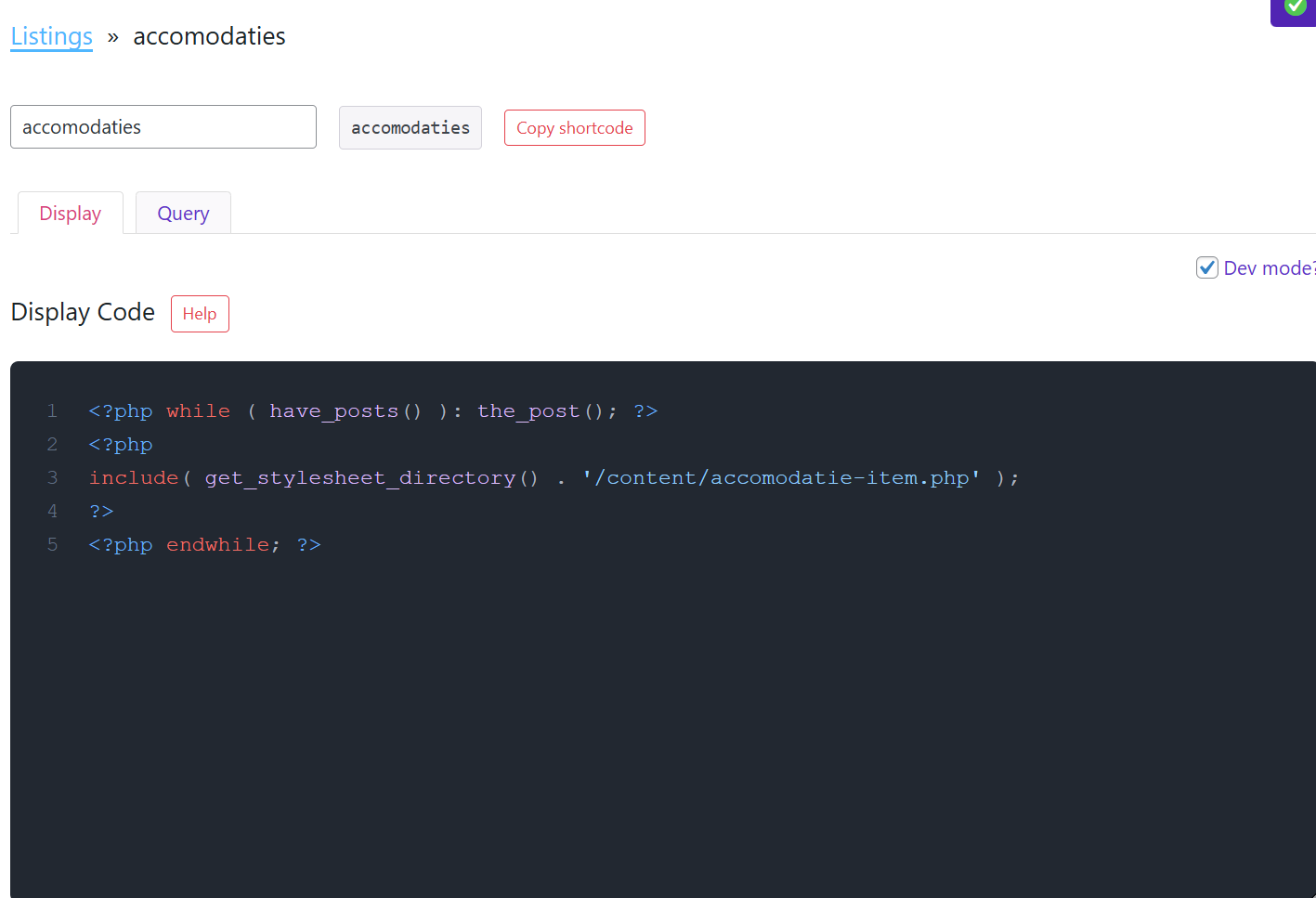
    Screenshoit 6 is the Listing settings to Display
    ALB-problem-6

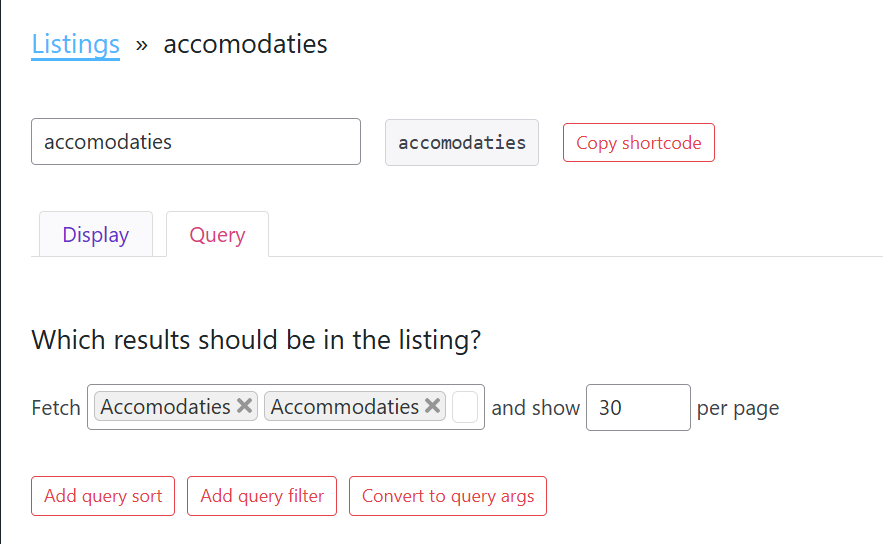
    Screenshoit 7 is the Listing settings to Query
    ALB-problem-7

    #1493752

    Hey Antonio,

    Thank you for the inquiry.

    You can add this css code to switch the header to transparent in the mobile view.

    @media only screen and (max-width: 767px) {
    
      /* Add your Mobile Styles here */
      .responsive #top #wrap_all #header {
        position: fixed;
        background: transparent;
      }
    
      .responsive #top .av_header_transparency.av_alternate_logo_active .logo a>img,
      .responsive #top .av_header_transparency.av_alternate_logo_active .logo a>svg {
        display: none;
      }
    
      .responsive #top .av_header_transparency .logo .subtext.avia-svg-logo-sub,
      .responsive #top .av_header_transparency .logo img.alternate {
        display: block;
      }
    
      #top #header.header_color.av_header_transparency .av-main-nav>li>a:hover .av-hamburger-inner,
      #top #header.header_color.av_header_transparency .av-main-nav>li>a:focus .av-hamburger-inner,
      #top #header.header_color.av_header_transparency .av-main-nav>li>a:hover .av-hamburger-inner::before,
      #top #header.header_color.av_header_transparency .av-main-nav>li>a:focus .av-hamburger-inner::before,
      #top #header.header_color.av_header_transparency .av-main-nav>li>a:hover .av-hamburger-inner::after,
      #top #header.header_color.av_header_transparency .av-main-nav>li>a:focus .av-hamburger-inner::after {
        background: var(--enfold-header-color-button-font);
        opacity: 1;
      }
    
      #top .header_color .av-hamburger-inner,
      #top .header_color .av-hamburger-inner::before,
      #top .header_color .av-hamburger-inner::after {
        background-color: var(--enfold-header-color-button-font);
      }
    }

    (see screenshot in the private field)

    Best regards,
    Ismael

    #1493731

    HI

    I cleared the cache using hummingbird. The bottom two buttons still look unformatted.

    Screenshot: https://tinyurl.com/26542vg3

    Q: does the Enfold theme have its own caching button?

    Please advise.

    #1493697
    kurson
    Participant

    The Enfold Button Loses it’s formatting when modified.

    When I modify the text for any of these buttons, the button previews correctly but when I go line it loses its formatting an looks like a clear button ith green text.

    Screenshot: https://tinyurl.com/2yp6lkec

    Screenshot: https://tinyurl.com/24v5xh82

    #1493506

    Hey Shawn,

    You can open a new thread by clicking this link, or click this button on the Enfold sub forum: https://imgur.com/a/AnoSPNb

    Best regards,
    Rikard

    Hey woogie07,
    Typically if you use the default Enfold/Woo product page layout and choose the WooCommerce 3.0 product gallery in Shop Options > Product Gallery
    It should work. But currently it looks like your page is using a custom layout using Enfold elements.
    It might be possible to keep your layout if you use the dots in your slider instead of the next/prev button and some custom javascript, if you limit your slides to the same number as your variations options. Currently you have 33 slides but only 14 variations options. Perhaps a another plugin would help, but note that not all woo addon plugins work well with Enfold, so you would need to test.

    Best regards,
    Mike

    #1492690

    Hi Rikard.
    Here’s how is it for exemple on Firefox : https://ibb.co/205DCvTS
    ….And here’s how it should be : https://ibb.co/6JmFg6pV
    As you can see, the color of the blue bar with section title has desapeared, same for the button’s color and borders.
    And agin, it’s doing this only on this website. I have no problem so far with the other websites using Enfold.

    Can you help me please ?
    In advance, Thank you .

    #1492665

    Thanks again, Ismael! Interesting — the temp login isn’t expired, but here’s another one in the PC, also good for a week. I spoke with wp engine support and they troubleshot for about a half hour but couldn’t solve it. They showed me how to look in the inspector > Network > trigger the error > click on the first admin-ajax.php > Response and note how there’s just a “1” (https://snipboard.io/RJ7US6.jpg) as opposed to the html that should show there — they suggested I pass that info on to you in hopes it might provide a clue. I also added another environment in the same account, to test a clean install of Enfold there, and there doesn’t seem to be an issue with that install; no errors on buttons, etc. / functioning normally, if that offers any clue / potential solution. Lmk if you have any other questions.

    #1492267

    In reply to: Enfold Version 3.8

    Hey Angelika2017,
    A few years ago Theme Forest stopped using the API Key for updating, and now uses the Token. So you will need to manually update with the steps below. Also Enfold v3.8 is not PHP v8+ ready, which is the most likely reason you can not make changes. Updating should solve.
    We recommend creating a full site backup, including the database, please use your webhost tools for this and not a plugin, unless you are very conflict with the plugin. Another good approach would be to first create a staging site, most webhosts offer this as a single click option, if your webhost has the Softaculous script library that is available in cPanel & Plesk. If it lists your WordPress site you will see a button to create a staging site.
    While we don’t expect any issues updating your site, this is a practical approach for such an old site.
    If you don’t have a Theme Forest because a “developer” created this site for you using their own Theme Forest account, you may need to create your own account by purchasing your own license. Note that Theme Forest will not transfer licenses & we can not create licenses due to our contract with Theme Forest.

    To update your version of Enfold you will need to download the latest installable WP version from your Theme Forest account and upload it to your WordPress ▸ Appearance ▸ Themes ▸ Add Themes ▸ Add New
    after you choose the zip file and click install, you will see a This theme is already installed message because you are updating, you can continue,
    then you will see the Theme updated successfully message.
    After which you can go to your Theme Forest account and create a new Token for future automatic updates.

    Best regards,
    Mike

    Hello,

    There seems to be something wrong with my Enfold installation. When I try the following command,
    $ wp plugin update --all

    I get the following errors:

    PHP Warning:  Undefined array key "HTTP_X_FORWARDED_PROTO" in phar:///usr/local/bin/wp/vendor/wp-cli/wp-cli/php/WP_CLI/Runner.php(1277) : eval()'d code on line 87
    PHP Warning:  Attempt to read property "options" on null in /var/www/html/wp-content/themes/enfold/framework/php/function-set-avia-frontend.php on line 66
    Warning: Attempt to read property "options" on null in /var/www/html/wp-content/themes/enfold/framework/php/function-set-avia-frontend.php on line 66
    PHP Warning:  Trying to access array offset on value of type null in /var/www/html/wp-content/themes/enfold/framework/php/function-set-avia-frontend.php on line 74
    Warning: Trying to access array offset on value of type null in /var/www/html/wp-content/themes/enfold/framework/php/function-set-avia-frontend.php on line 74
    PHP Warning:  Attempt to read property "options" on null in /var/www/html/wp-content/themes/enfold/framework/php/function-set-avia-frontend.php on line 66
    Warning: Attempt to read property "options" on null in /var/www/html/wp-content/themes/enfold/framework/php/function-set-avia-frontend.php on line 66
    PHP Warning:  Trying to access array offset on value of type null in /var/www/html/wp-content/themes/enfold/framework/php/function-set-avia-frontend.php on line 74
    Warning: Trying to access array offset on value of type null in /var/www/html/wp-content/themes/enfold/framework/php/function-set-avia-frontend.php on line 74
    PHP Warning:  Attempt to read property "options" on null in /var/www/html/wp-content/themes/enfold/framework/php/function-set-avia-frontend.php on line 66
    Warning: Attempt to read property "options" on null in /var/www/html/wp-content/themes/enfold/framework/php/function-set-avia-frontend.php on line 66
    PHP Warning:  Trying to access array offset on value of type null in /var/www/html/wp-content/themes/enfold/framework/php/function-set-avia-frontend.php on line 74
    Warning: Trying to access array offset on value of type null in /var/www/html/wp-content/themes/enfold/framework/php/function-set-avia-frontend.php on line 74
    PHP Warning:  Attempt to read property "options" on null in /var/www/html/wp-content/themes/enfold/framework/php/function-set-avia-frontend.php on line 66
    Warning: Attempt to read property "options" on null in /var/www/html/wp-content/themes/enfold/framework/php/function-set-avia-frontend.php on line 66
    PHP Warning:  Trying to access array offset on value of type null in /var/www/html/wp-content/themes/enfold/framework/php/function-set-avia-frontend.php on line 74
    Warning: Trying to access array offset on value of type null in /var/www/html/wp-content/themes/enfold/framework/php/function-set-avia-frontend.php on line 74
    PHP Warning:  Attempt to read property "options" on null in /var/www/html/wp-content/themes/enfold/framework/php/function-set-avia-frontend.php on line 66
    Warning: Attempt to read property "options" on null in /var/www/html/wp-content/themes/enfold/framework/php/function-set-avia-frontend.php on line 66
    PHP Warning:  Trying to access array offset on value of type null in /var/www/html/wp-content/themes/enfold/framework/php/function-set-avia-frontend.php on line 74
    Warning: Trying to access array offset on value of type null in /var/www/html/wp-content/themes/enfold/framework/php/function-set-avia-frontend.php on line 74
    PHP Warning:  Attempt to read property "options" on null in /var/www/html/wp-content/themes/enfold/framework/php/function-set-avia-frontend.php on line 66
    Warning: Attempt to read property "options" on null in /var/www/html/wp-content/themes/enfold/framework/php/function-set-avia-frontend.php on line 66
    PHP Warning:  Trying to access array offset on value of type null in /var/www/html/wp-content/themes/enfold/framework/php/function-set-avia-frontend.php on line 74
    Warning: Trying to access array offset on value of type null in /var/www/html/wp-content/themes/enfold/framework/php/function-set-avia-frontend.php on line 74
    PHP Warning:  Attempt to read property "options" on null in /var/www/html/wp-content/themes/enfold/framework/php/function-set-avia-frontend.php on line 66
    Warning: Attempt to read property "options" on null in /var/www/html/wp-content/themes/enfold/framework/php/function-set-avia-frontend.php on line 66
    PHP Warning:  Trying to access array offset on value of type null in /var/www/html/wp-content/themes/enfold/framework/php/function-set-avia-frontend.php on line 74
    Warning: Trying to access array offset on value of type null in /var/www/html/wp-content/themes/enfold/framework/php/function-set-avia-frontend.php on line 74
    PHP Warning:  Attempt to read property "options" on null in /var/www/html/wp-content/themes/enfold/framework/php/function-set-avia-frontend.php on line 66
    Warning: Attempt to read property "options" on null in /var/www/html/wp-content/themes/enfold/framework/php/function-set-avia-frontend.php on line 66
    PHP Warning:  Trying to access array offset on value of type null in /var/www/html/wp-content/themes/enfold/framework/php/function-set-avia-frontend.php on line 74
    Warning: Trying to access array offset on value of type null in /var/www/html/wp-content/themes/enfold/framework/php/function-set-avia-frontend.php on line 74
    PHP Warning:  Attempt to read property "options" on null in /var/www/html/wp-content/themes/enfold/framework/php/function-set-avia-frontend.php on line 66
    Warning: Attempt to read property "options" on null in /var/www/html/wp-content/themes/enfold/framework/php/function-set-avia-frontend.php on line 66
    PHP Warning:  Trying to access array offset on value of type null in /var/www/html/wp-content/themes/enfold/framework/php/function-set-avia-frontend.php on line 74
    Warning: Trying to access array offset on value of type null in /var/www/html/wp-content/themes/enfold/framework/php/function-set-avia-frontend.php on line 74
    PHP Warning:  Attempt to read property "options" on null in /var/www/html/wp-content/themes/enfold/framework/php/function-set-avia-frontend.php on line 66
    Warning: Attempt to read property "options" on null in /var/www/html/wp-content/themes/enfold/framework/php/function-set-avia-frontend.php on line 66
    PHP Warning:  Trying to access array offset on value of type null in /var/www/html/wp-content/themes/enfold/framework/php/function-set-avia-frontend.php on line 74
    Warning: Trying to access array offset on value of type null in /var/www/html/wp-content/themes/enfold/framework/php/function-set-avia-frontend.php on line 74
    PHP Warning:  Attempt to read property "options" on null in /var/www/html/wp-content/themes/enfold/framework/php/function-set-avia-frontend.php on line 66
    Warning: Attempt to read property "options" on null in /var/www/html/wp-content/themes/enfold/framework/php/function-set-avia-frontend.php on line 66
    PHP Warning:  Trying to access array offset on value of type null in /var/www/html/wp-content/themes/enfold/framework/php/function-set-avia-frontend.php on line 74
    Warning: Trying to access array offset on value of type null in /var/www/html/wp-content/themes/enfold/framework/php/function-set-avia-frontend.php on line 74
    PHP Warning:  Attempt to read property "options" on null in /var/www/html/wp-content/themes/enfold/framework/php/function-set-avia-frontend.php on line 66
    Warning: Attempt to read property "options" on null in /var/www/html/wp-content/themes/enfold/framework/php/function-set-avia-frontend.php on line 66
    PHP Warning:  Trying to access array offset on value of type null in /var/www/html/wp-content/themes/enfold/framework/php/function-set-avia-frontend.php on line 74
    Warning: Trying to access array offset on value of type null in /var/www/html/wp-content/themes/enfold/framework/php/function-set-avia-frontend.php on line 74
    PHP Warning:  Attempt to read property "options" on null in /var/www/html/wp-content/themes/enfold/framework/php/function-set-avia-frontend.php on line 66
    Warning: Attempt to read property "options" on null in /var/www/html/wp-content/themes/enfold/framework/php/function-set-avia-frontend.php on line 66
    PHP Warning:  Trying to access array offset on value of type null in /var/www/html/wp-content/themes/enfold/framework/php/function-set-avia-frontend.php on line 74
    Warning: Trying to access array offset on value of type null in /var/www/html/wp-content/themes/enfold/framework/php/function-set-avia-frontend.php on line 74
    PHP Warning:  Attempt to read property "options" on null in /var/www/html/wp-content/themes/enfold/framework/php/function-set-avia-frontend.php on line 66
    Warning: Attempt to read property "options" on null in /var/www/html/wp-content/themes/enfold/framework/php/function-set-avia-frontend.php on line 66
    PHP Warning:  Trying to access array offset on value of type null in /var/www/html/wp-content/themes/enfold/framework/php/function-set-avia-frontend.php on line 74
    Warning: Trying to access array offset on value of type null in /var/www/html/wp-content/themes/enfold/framework/php/function-set-avia-frontend.php on line 74
    PHP Warning:  Attempt to read property "options" on null in /var/www/html/wp-content/themes/enfold/framework/php/function-set-avia-frontend.php on line 66
    Warning: Attempt to read property "options" on null in /var/www/html/wp-content/themes/enfold/framework/php/function-set-avia-frontend.php on line 66
    PHP Warning:  Trying to access array offset on value of type null in /var/www/html/wp-content/themes/enfold/framework/php/function-set-avia-frontend.php on line 74
    Warning: Trying to access array offset on value of type null in /var/www/html/wp-content/themes/enfold/framework/php/function-set-avia-frontend.php on line 74
    PHP Warning:  Attempt to read property "options" on null in /var/www/html/wp-content/themes/enfold/framework/php/function-set-avia-frontend.php on line 66
    Warning: Attempt to read property "options" on null in /var/www/html/wp-content/themes/enfold/framework/php/function-set-avia-frontend.php on line 66
    PHP Warning:  Trying to access array offset on value of type null in /var/www/html/wp-content/themes/enfold/framework/php/function-set-avia-frontend.php on line 74
    Warning: Trying to access array offset on value of type null in /var/www/html/wp-content/themes/enfold/framework/php/function-set-avia-frontend.php on line 74
    PHP Warning:  Attempt to read property "options" on null in /var/www/html/wp-content/themes/enfold/framework/php/function-set-avia-frontend.php on line 66
    Warning: Attempt to read property "options" on null in /var/www/html/wp-content/themes/enfold/framework/php/function-set-avia-frontend.php on line 66
    PHP Warning:  Trying to access array offset on value of type null in /var/www/html/wp-content/themes/enfold/framework/php/function-set-avia-frontend.php on line 74
    Warning: Trying to access array offset on value of type null in /var/www/html/wp-content/themes/enfold/framework/php/function-set-avia-frontend.php on line 74
    PHP Warning:  Attempt to read property "options" on null in /var/www/html/wp-content/themes/enfold/framework/php/function-set-avia-frontend.php on line 66
    Warning: Attempt to read property "options" on null in /var/www/html/wp-content/themes/enfold/framework/php/function-set-avia-frontend.php on line 66
    PHP Warning:  Trying to access array offset on value of type null in /var/www/html/wp-content/themes/enfold/framework/php/function-set-avia-frontend.php on line 74
    Warning: Trying to access array offset on value of type null in /var/www/html/wp-content/themes/enfold/framework/php/function-set-avia-frontend.php on line 74
    PHP Fatal error:  Uncaught Error: Attempt to modify property "config" on null in /var/www/html/wp-content/themes/enfold/config-templatebuilder/avia-shortcodes/slideshow_layerslider/slideshow_layerslider.php:28
    Stack trace:
    #0 /var/www/html/wp-content/themes/enfold/config-templatebuilder/avia-template-builder/php/shortcode-template.class.php(65): avia_sc_layerslider->shortcode_insert_button()
    #1 /var/www/html/wp-content/themes/enfold/config-templatebuilder/avia-template-builder/php/template-builder.class.php(1306): aviaShortcodeTemplate->__construct()
    #2 /var/www/html/wp-content/themes/enfold/config-templatebuilder/avia-template-builder/php/template-builder.class.php(428): AviaBuilder->createShortcode()
    #3 /var/www/html/wp-includes/class-wp-hook.php(341): AviaBuilder->init()
    #4 /var/www/html/wp-includes/class-wp-hook.php(365): WP_Hook->apply_filters()
    #5 /var/www/html/wp-includes/plugin.php(522): WP_Hook->do_action()
    #6 /var/www/html/wp-settings.php(742): do_action()
    #7 phar:///usr/local/bin/wp/vendor/wp-cli/wp-cli/php/WP_CLI/Runner.php(1317): require('...')
    #8 phar:///usr/local/bin/wp/vendor/wp-cli/wp-cli/php/WP_CLI/Runner.php(1235): WP_CLI\Runner->load_wordpress()
    #9 phar:///usr/local/bin/wp/vendor/wp-cli/wp-cli/php/WP_CLI/Bootstrap/LaunchRunner.php(28): WP_CLI\Runner->start()
    #10 phar:///usr/local/bin/wp/vendor/wp-cli/wp-cli/php/bootstrap.php(78): WP_CLI\Bootstrap\LaunchRunner->process()
    #11 phar:///usr/local/bin/wp/vendor/wp-cli/wp-cli/php/wp-cli.php(27): WP_CLI\bootstrap()
    #12 phar:///usr/local/bin/wp/php/boot-phar.php(11): include('...')
    #13 /usr/local/bin/wp(4): include('...')
    #14 {main}
      thrown in /var/www/html/wp-content/themes/enfold/config-templatebuilder/avia-shortcodes/slideshow_layerslider/slideshow_layerslider.php on line 28
    Fatal error: Uncaught Error: Attempt to modify property "config" on null in /var/www/html/wp-content/themes/enfold/config-templatebuilder/avia-shortcodes/slideshow_layerslider/slideshow_layerslider.php:28
    Stack trace:
    #0 /var/www/html/wp-content/themes/enfold/config-templatebuilder/avia-template-builder/php/shortcode-template.class.php(65): avia_sc_layerslider->shortcode_insert_button()
    #1 /var/www/html/wp-content/themes/enfold/config-templatebuilder/avia-template-builder/php/template-builder.class.php(1306): aviaShortcodeTemplate->__construct()
    #2 /var/www/html/wp-content/themes/enfold/config-templatebuilder/avia-template-builder/php/template-builder.class.php(428): AviaBuilder->createShortcode()
    #3 /var/www/html/wp-includes/class-wp-hook.php(341): AviaBuilder->init()
    #4 /var/www/html/wp-includes/class-wp-hook.php(365): WP_Hook->apply_filters()
    #5 /var/www/html/wp-includes/plugin.php(522): WP_Hook->do_action()
    #6 /var/www/html/wp-settings.php(742): do_action()
    #7 phar:///usr/local/bin/wp/vendor/wp-cli/wp-cli/php/WP_CLI/Runner.php(1317): require('...')
    #8 phar:///usr/local/bin/wp/vendor/wp-cli/wp-cli/php/WP_CLI/Runner.php(1235): WP_CLI\Runner->load_wordpress()
    #9 phar:///usr/local/bin/wp/vendor/wp-cli/wp-cli/php/WP_CLI/Bootstrap/LaunchRunner.php(28): WP_CLI\Runner->start()
    #10 phar:///usr/local/bin/wp/vendor/wp-cli/wp-cli/php/bootstrap.php(78): WP_CLI\Bootstrap\LaunchRunner->process()
    #11 phar:///usr/local/bin/wp/vendor/wp-cli/wp-cli/php/wp-cli.php(27): WP_CLI\bootstrap()
    #12 phar:///usr/local/bin/wp/php/boot-phar.php(11): include('...')
    #13 /usr/local/bin/wp(4): include('...')
    #14 {main}
      thrown in /var/www/html/wp-content/themes/enfold/config-templatebuilder/avia-shortcodes/slideshow_layerslider/slideshow_layerslider.php on line 28
    Error: There has been a critical error on this website.Learn more about troubleshooting WordPress. There has been a critical error on this website.

    Any help is appreciated!
    Thanks,
    Richard

    #1492122
    collinsfgc2025
    Participant

    Hi,

    When I last used Enfold, there was a “Preview” button that would show you the page after you’d made changes in the editor. Now, I can only find an arrow at the top that will open the page, but unless I save the changes, they don’t appear there. I need a way to preview changes before making them permanent with a Save. Suggestions?

    Also, next to the Copyright statement, I’d like to remove the text: powered by Enfold WordPress Theme. How can I do that?

    Thanks.

    Thanks for your input. And yes, I know the issue was caused by the Enfold theme, I had already tried debugging with fallback themes where the Hivepress listing search worked just fine. Unfortunately, we had to stick with the Enfold theme as the whole website was already fully built with it and its ALB visual editor, making it impossible to switch themes just for Hivepress compatibility.

    However, yesterday I took a full day to investigate the Enfold theme files, and I am happy to report that I have found the cause, and thus could fix the problem. Enfold developers might want to read on to understand and fix this potentially problematic code, as it might cause incompatibility issues with not just Hivepress but also other WordPress extensions that use their own search logic.

    The file causing the Hivepress search problem is found in the Enfold theme file structure, namely

    /themes/enfold/includes/helper-template-logic.php

    In this file exists a function called “avia_search_query_filter”, starting around line 37. Its purpose is to “make sure that empty searches are sent to the search page as well”. Empty searches would mean standard text searches without a keyword (search term).

    Unfortunately, this function does not check for custom post_types, it just addresses all searches. The URL https://wiras.dora.group/?post_type=hp_listing&s= should definitely display the search results for the custom “Listing” post type, which is Hivepresses’ own custom post_type (since the parameter is in the URL after clicking Search), and not be treated as a standard text search.

    The problem is that most Hivepress searches would be considered “empty” searches as they don’t have a keyword parameter, but are searches by checkbox, select menue or radio button values (these are generated by the listings “custom fields”). Thus, the above mentioned function of the Enfold theme hijacks those searches and instead of handing them over to Hivepress, redirects them to the themes’ own “Nothing found” search result page.

    All I had to do now is to comment out the whole function in the file “helper-template-logic.php”, starting from line 41 until line 66:

    41 if(!function_exists(‘avia_search_query_filter’))
    42 {
    43 function avia_search_query_filter($query)
    […]
    64 add_filter(‘pre_get_posts’, ‘avia_search_query_filter’);
    65 }

    For now this works for us, as we don’t use a standard text search on the site anyway. We just have to be careful when updating the theme.

    You might consider finetuning your function to check for “custom post types” and exclude them from the search redirecting, as it seems your current approach is a bit too general and has the potential to hijack other plugins custom search patterns.

    Best regards,
    Sebastian

    #1491535

    In reply to: Extra blank space

    Hi,
    To open a new thread plase login and use this link. It is the large blue button.
    To remove the copyright please go to Enfold Theme Options ▸ Footer ▸ Copyright ▸ and add [nolink] See this documentation 

    Best regards,
    Mike

    #1491455

    Hi again,

    I managed to fix it. For those with the same problem, here’s a code snippet to add to the functions.php file that will flush both WP Rocket’s cache and object cache automatically, right after pressing Enfold’s “Save all changes” button.

    // Clear WP Rocket cache and Object Cache when Enfold Theme Options are saved
    add_action( 'avia_ajax_after_save_options_page', function( $new_options ) {
    	
    	// Object Cache Pro: flush object cache
        if ( function_exists( 'wp_cache_flush' ) ) {
            wp_cache_flush();
        }
    	
    	// WP Rocket: full cache purge
        if ( function_exists( 'rocket_clean_domain' ) ) {
            rocket_clean_domain();
        }
    
    }, 20 );


    @Ismael
    , I suggest you forward this to your team, as there is clearly something wrong here:
    – The checkbox “Delete Old CSS And JS Files” is confusing. One expects to not have the CSS deleted if it’s unchecked.
    – If there’s object cache in place, even when all caches are flushed after saving Enfold’s settings, the new CSS is not generated. Object cache needs to be cleared too.

    By the way, the ver=ver-1763353330 parameter is not something of our website. Even Enfold’s demo has it: https://kriesi.at/themes/enfold-2017/

    Thank you.

    #1491451

    Hi Ismael,

    The fact that files are physically deleted is a problem. Honestly, it’s a bit frustrating, because if you guys don’t see any problem, we are stuck with a theme that will cause display issues when you least expect it.

    Since you’d like to see style issues, here’s the steps you need to follow. It can also be reproduce on the staging site:

    1) Activate WP Rocket (the cache plugin we use)

    2) Flush WP Rocket’s cache.

    3) Visit the homepage from an Incognito window. Everything looks good. Notice the backgrounds and the file: https://i.imgur.com/Za2PKtu.png

    4) Go to Theme Options > Performance and scroll down. You will see the option that says “Delete Old CSS And JS Files” is unchecked: https://i.imgur.com/saPibEH.png

    5) Toggle the option on and then off again so the button to save the changes becomes available: https://i.imgur.com/UKA29Ny.png

    6) Save the changes.

    7) At this point, the physical CSS files are deleted.

    8) Close the previous Incognito window and open a new one.

    9) Visit the homepage again. Styles are missing: https://i.imgur.com/oqqtgWN.png

    The reason is clear. Enfold is deleting the files the cached page still references to. I think you need to solve this in any way:
    – Either flush the cache of the most popular cache plugins automatically,
    – or make the checkbox “Delete Old CSS And JS Files” do what it’s supposed to do (if anyway they’re deleted, why does this checkbox exist?),
    – or provide a solution (a filter or something) so that we can flush the cache programmatically when the “Save the changes” button is pressed.

    Thank you,

    #1491392

    Hi Ismael,

    Again, it’s not about losing the styling or not. It’s about the theme’s functionality. Please follow these steps, and feel free to try them yourself. This time I am adding screenshots:

    1) Go to the custom CSS folder. You can see that the CSS file exists: https://i.imgur.com/YLUSIKJ.png

    2) Go to Theme Options > Performance and scroll down. You will see the option that says “Delete Old CSS And JS Files” is unchecked: https://i.imgur.com/saPibEH.png

    3) Toggle the option on and then off again so the button to save the changes becomes available: https://i.imgur.com/UKA29Ny.png

    4) Save the changes. The CSS files should not be deleted, correct? Now check the folder again: https://i.imgur.com/NTTBKLb.png

    5) The link now redirects to a 404: https://app.site.com/wp-content/uploads/dynamic_avia/avia_posts_css/post-25947.css

    6) On a live site, the CSS does not get regenerated because caching systems serve a cached page and prevent the request from reaching Enfold so it can regenerate the CSS. This is problematic because the CSS should not have been deleted in the first place.


    @earthchilde
    : Am I missing something here?

    #1491371

    Hi Ismael,

    I think we are still not on the same page. Let me try to explain it again.

    The problem is that Enfold deletes the old CSS files when saving the theme options. That always happens. It doesn’t matter whether you have made changes to pages or not. It doesn’t matter whether the “Delete Old CSS And JS Files” option is disabled. It’s simple: you press the “Save all changes” button and the CSS files are deleted. Here’s a step by step to reproduce the problem:

    1. Open the homepage from an Incognito.
    2. See the /wp-content/uploads/dynamic_avia/avia_posts_css/post-1614.css file created.
    3. Open the theme options.
    4. Go to the Performance section.
    5. See that “Delete Old CSS And JS Files” is disabled.
    6. Press the “Save all changes” button.
    7. The /wp-content/uploads/dynamic_avia/avia_posts_css/post-1614.css file gets deleted. This should not happen. We explicitly chose these files not to be deleted.

    This is not a problem if there is no cache in place. But almost everyone has a cache plugin, a CDN, or server cache. This means that when the files get deleted, the pages in question still serve the deleted files, and the only solution is to clear the cache manually so that Enfold can regenerate the CSS.

    But the bottom line is that Enfold has a bug where it deletes the CSS files even when we choose not to.

    I hope that clarifies it.

    Thank you.

    #1491278

    Hi Ismael,

    Sorry, what I meant is that all the files in the avia_posts_css folder get deleted when pressing the “Save all changes” button on the Enfold settings page. This button: https://i.imgur.com/2frX3XH.png

    And that happens even when the “Delete Old CSS And JS Files” is disabled and when there is no cache in place. You can see it by yourself in the staging site link I sent you before.

    Thanks!

    TasmaniaBV
    Participant

    Hi,

    We have a very old version (3.0.6) of the Enfold theme and we need to upgrade our PHP version from 5.6.40 to the neweset version PHP 8.4.

    However when we tried we also needed to update the theme which we couldn’t find in our themeforest account so now we have bought the newest version.

    I am trying to fix the issues with our IT partner and he tried updating it while running a localhost version on his laptop but he got a lot of errors.

    Also as soon as we try to update through FTP we get a never ending stream of error messages for example:

    Fatal error: Access level to av_email_spam::shortcode_insert_button() must be public (as in class aviaShortcodeTemplate) in ******\htdocs\*******\wp-content\themes\enfold\config-templatebuilder\avia-shortcodes\email_spam.php on line 16

    To be smart i thought to just exclude it from the php file just to have it move on to the next 50 similar error messages.

    Please let me know how to update the theme. As I found on your forums it was suggested you first needed to update to a version 4.5. or something and that would allow auto updates. However we now only have version 3.0.6. and the newest 7.1.3.

    Kind regards

    #1491052

    Hey allespalettibystefan,

    It’s unfortunately unlikely that we will find the time to make the Enfold layout builder compatible with the plugin you are using. If the plugin is compatible with the default WordPress editor, then I would suggest that you use those. Note that you can still add Enfold elements using Magic Wand button in the classic editor.

    Best regards,
    Rikard

    #1490874

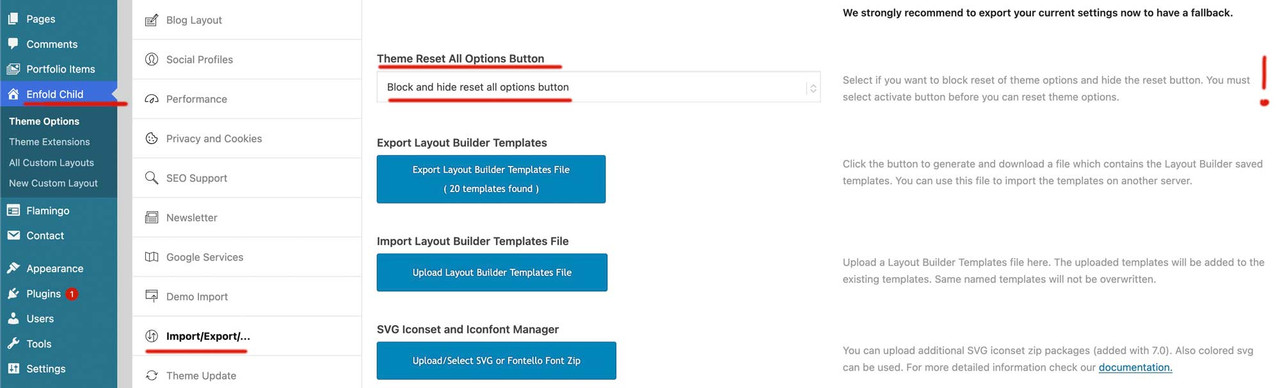
    Perhaps the developers should set this setting to this value (“Block and Hide reset all options button”) by default after Enfold Activation. Too many people have accidentally pressed this button despite a warning pop-up.

    mehrasadi23
    Participant

    Hi,

    Hope you’re doing fine. I’ve recently bought Enfold and I’m using the Travel Demo. There is a blue bar above the main header/main menu that I can’t remove. I even found went to Enfold –> Advanced Styling and I deleted something called “small bar above the main menu”. Now the blue bar is kind of gone but that area is still there with the buttons (call, Registeration, Customer Login). So I thought it’s best to ask you before playing around with it anymore. I found a solution you have provided with adding a CSS code to Enfold but I was wondering if it’s possible to get rid of it without adding any CSS code.

    Thanks

    #1490627
    Chris Cameron
    Guest

    My website terrystavern.com is running Enfold 4.2.4. Can the old 4.2.4 version be updated to the latest version 7.1.3 using the theme update button on my cPanel, or will programming be required to preserve the design? I want to know before purchasing because a web designer used your theme to develop this site and I may choose to just replace the theme with all new if I can’t just by your $59 regular license and simply hit the update button in the Enfold Theme admin area. I don’t have the time to devote to programming and would opt to start with a fresh website if it’s not possible to just hit the update button after purchasing your license. Please let me know. Thanks.

    #1490209
    rtwcs_web
    Participant

    Over the last few days when attempting to edit pages using Advanced Layout Builder page edit, it just throws up a blank page with a button for the Default Editor that just provides a small non-resizable box showing the HTML source.

    After consulting the hosting provider DreamHost they revealed a console message:

    “wp.editPost.PluginBlockSettingsMenuItem is deprecated since version 6.6.
    Please use wp.editor.PluginBlockSettingsMenuItem instead.”

    The suggestion was that there is some incompatibility between our version of Enfold 7.1.3 and WordPress 6.8.3

    caorda
    Participant

    It looks like this issue is recurring in Enfold 7.1.2 when ‘Use first slides caption as permanent caption’ is selected.

    • This topic was modified 4 months, 3 weeks ago by caorda.
    #1490020
    BlutVampir
    Participant

    I have a custom shortcode:

    <?php
    
    if ( ! defined( 'ABSPATH' ) ) {  exit;  }    // Exit if accessed directly
    
    if ( ! class_exists( 'avia_sc_portfolio_kacheln' ) )
    {
    	class avia_sc_portfolio_kacheln extends aviaShortcodeTemplate
    	{
    		/**
    		 * Create the config array for the shortcode button
    		 */
    		function shortcode_insert_button()
    		{
    			$this->config['version']		= '1.0';
    			$this->config['self_closing']	= 'no';
    			$this->config['base_element']	= 'yes';
    
    			$this->config['name']			= 'Portfolio Kachel';
    			$this->config['tab']			= 'wuk Elements';
    			$this->config['icon']			= AviaBuilder::$path['imagesURL'] . 'sc-image.png';
    			$this->config['order']			= 1;
    			$this->config['target']			= 'avia-target-insert';
    			$this->config['shortcode'] 		= 'av_portfoliokachel';
    //			$this->config['modal_data']     = array( 'modal_class' => 'mediumscreen' );
    			$this->config['tooltip'] 	    = __( 'Inserts an image of your choice', 'avia_framework' );
    			$this->config['preview'] 		= 1;
    			$this->config['disabling_allowed'] = true;
    			$this->config['id_name']		= 'id';
    			$this->config['id_show']		= 'yes';
    		}
    
    		function popup_elements()
    		{
    			$template_url = get_stylesheet_directory_uri();
    			$this->elements = array(
    
    				array(
    						'type' 	=> 'tab_container',
    						'nodescription' => true
    					),
    
    				array(
    						'type' 	=> 'tab',
    						'name'  => __( 'Kachel', 'avia_framework' ),
    						'nodescription' => true
    					),
    
    					array(
    							'type' 	=> 'toggle_container',
    							'nodescription' => true
    						),
    
    					array(
    									"name" 	=> __("Choose Image",'avia_framework' ),
    									"desc" 	=> __("Either upload a new, or choose an existing image from your media library",'avia_framework' ),
    									"id" 	=> "bild",
    									"type" 	=> "image",
    									"title" => __("Insert Image",'avia_framework' ),
    									"button" => __("Insert",'avia_framework' ),
    									"std" 	=> "",
    						),
    
    						array(
    							"name" 	=> __("Title", 'avia_framework' ),
    							"id" 	=> "title",
    							"std" 	=> "",
    							"type" 	=> "input"
    						),
    
    						array(
    							"name" 	=> __("Text", 'avia_framework' ),
    							"id" 	=> "text",
    							"std" 	=> "",
    							"type" 	=> "textarea"
    						),
    
    						array(
    							"name" 	=> __("Button Text", 'avia_framework' ),
    							"id" 	=> "button_text",
    							"std" 	=> "",
    							"type" 	=> "input"
    						),
    
    						array(
    							'name'	=> __( 'Image Link?', 'avia_framework' ),
    							'desc'	=> __( 'Where should your image link to?', 'avia_framework' ),
    							'id'	=> 'link',
    							'type'	=> 'linkpicker',
    							'fetchTMPL'	=> true,
    							'std'		=> '',
    							'lockable'	=> true,
    							'subtype'	=> array(
    											__( 'No Link', 'avia_framework' )	=> '',
    											__( 'Lightbox', 'avia_framework' )	=> 'lightbox',
    											__( 'Set Manually', 'avia_framework' )	=> 'manually',
    											__( 'Single Entry', 'avia_framework' )	=> 'single',
    											__( 'Taxonomy Overview Page', 'avia_framework' )	=> 'taxonomy',
    										)
    						),
    
    						array(
    							'name'	=> __( 'Open new tab/window', 'avia_framework' ),
    							'desc'	=> __( 'Do you want to open the link url in a new tab/window?', 'avia_framework' ),
    							'id'	=> 'target',
    							'type'	=> 'select',
    							'std'	=> '',
    							'lockable'	=> true,
    							'required'	=> array( 'link', 'not_empty_and', 'lightbox' ),
    							'subtype'	=> AviaHtmlHelper::linking_options()
    						),
    
    					array(
    							'type' 	=> 'toggle_container_close',
    							'nodescription' => true
    						),
    
    				array(
    						'type' 	=> 'tab_close',
    						'nodescription' => true
    					),
    
    				array(
    						'type' 	=> 'tab',
    						'name'  => __( 'Advanced', 'avia_framework' ),
    						'nodescription' => true
    					),
    
    					array(
    							'type' 	=> 'toggle_container',
    							'nodescription' => true
    						),
    
    						array(
    								'type'			=> 'template',
    								'template_id'	=> 'screen_options_toggle',
    								'lockable'		=> true
    							),
    
    						array(
    								'type'			=> 'template',
    								'template_id'	=> 'developer_options_toggle',
    								'args'			=> array( 'sc' => $this )
    							),
    
    					array(
    							'type' 	=> 'toggle_container_close',
    							'nodescription' => true
    						),
    
    				array(
    						'type' 	=> 'tab_close',
    						'nodescription' => true
    					),
    
    				array(
    						'type'			=> 'template',
    						'template_id'	=> 'element_template_selection_tab',
    						'args'			=> array(
    												'sc'	=> $this
    											)
    					),
    
    				array(
    						'type' 	=> 'tab_container_close',
    						'nodescription' => true
    					),
    
    				array(
    						'id'	=> 'av_element_hidden_in_editor',
    						'type'	=> 'hidden',
    						'std'	=> '0'
    					)
    			);
    
    		}
    
    		/**
    		 * Editor Element - this function defines the visual appearance of an element on the AviaBuilder Canvas
    		 * Most common usage is to define some markup in the $params['innerHtml'] which is then inserted into the drag and drop container
    		 * Less often used: $params['data'] to add data attributes, $params['class'] to modify the className
    		 *
    		 *
    		 * @param array $params this array holds the default values for $content and $args.
    		 * @return $params the return array usually holds an innerHtml key that holds item specific markup.
    		 */
    		function editor_element( $params )
    		{
    			extract( $params['args'] );
    
    			global $KACHELINDEX;
    			$KACHELINDEX++;
    
    			if (strstr($link,"manually,")) { $url = str_replace("manually,","",$link); }
    			elseif (strstr($link,",")) {
    				$tmp = explode(",",$link);
    				$url = get_the_permalink($tmp[1]);
    			}
    
    			$out = '<div class="portfolio_kacheln sameheight"'.((empty($button_text) && !empty($link)) ? ' onclick="location.href='.$url.'"' : '').'>
    				<div class="bg2">'.str_pad($KACHELINDEX, 2, "0", STR_PAD_LEFT).'</div>
    				<div class="pic" style="">'.
    					'<img src="'.$bild.'" />'.
    					'<h3>'.$title.'</h3>'.
    				'</div>'.
    				(!empty($text) ? '<p>'.$text.'</p>' : '').
    				((!empty($link) && !empty($button_text)) ? '<p class="action"><a href="'.$url.'" class="button">'.$button_text.'</a></p>' : '').
    			'</div>';
    
    			$params['innerHtml'] = $out;
    
    			return $params;
    		}
    
    		/**
    		 * Frontend Shortcode Handler
    		 *
    		 * @param array $atts array of attributes
    		 * @param string $content text within enclosing form of shortcode element
    		 * @param string $shortcodename the shortcode found, when == callback name
    		 * @return string $output returns the modified html string
    		 */
    		function shortcode_handler( $atts, $content = '', $shortcodename = '', $meta = '' )
    		{
    			extract( $atts );
    			global $KACHELINDEX;
    			$KACHELINDEX++;
    
    			if (strstr($link,"manually,")) { $url = str_replace("manually,","",$link); }
    			elseif (strstr($link,",")) {
    				$tmp = explode(",",$link);
    				$url = get_the_permalink($tmp[1]);
    			}
    
    			$out = '<div class="portfolio_kacheln sameheight"'.((empty($button_text) && !empty($link)) ? ' onclick="'.($target == '' ? 'location.href='.$url.'"' : 'window.open(\''.$url.'\', \'_blank\');') : '').'>
    				<div class="bg2">'.str_pad($KACHELINDEX, 2, "0", STR_PAD_LEFT).'</div>
    				<div class="pic" style="">'.
    					'<img src="'.$bild.'" />'.
    					'<h3>'.$title.'</h3>'.
    				'</div>'.
    				(!empty($text) ? '<p>'.$text.'</p>' : '').
    				((!empty($link) && !empty($button_text)) ? '<p class="action"><a'.($target != '' ? ' target="'.$target.'"' : '').' href="'.$url.'" class="button">'.$button_text.'</a></p>' : '').
    			'</div>';
    
    			return $out;
    		}
    
    	}
    }
    

    taht generates a shortcode like:

    [av_portfoliokachel bild='https://xexadeti.cyon.site/wp-content/uploads/2025/08/sta-schweisstechnische-ausbildung-mag-schweissen.jpg' attachment='277' attachment_size='full' title='MAG' text='(135 - Metall-Aktivgas-Schweissen)	Unverändert: [av_portfoliokachel bild='https://xexadeti.cyon.site/wp-content/uploads/2025/08/sta-schweisstechnische-ausbildung-mag-schweissen.jpg' attachment='277' attachment_size='full' title='MAG' text='(135 - Metall-Aktivgas-Schweissen)
    Gelöscht: MAG – das Arbeitstier unter den Schweissverfahren! Wir zeigen dir, wie’s richtig geht!' button_text='Infos zu MAG' link='portfolio_entries,5' target='' id='' custom_class='' template_class='' av_element_hidden_in_editor='0' av_uid='av-mebf8h83' sc_version='1.0' admin_preview_bg=''][/av_portfoliokachel]

    everything working fine, except oine thing, the ‘ Character.

    array(
    							"name" 	=> __("Text", 'avia_framework' ),
    							"id" 	=> "text",
    							"std" 	=> "",
    							"type" 	=> "textarea"
    						),

    If I enter a ‘ char in this “Text” field, it doesnt get escaped as it should
    as example: text=’test’s’ will be the endresult and not text=’test\’s’. Is there a hook or filter where I can “correctly apply escaping to a field?

    Strangly, I did setup the page and that did work. I did update to latest enfold version and now, that is not working anymore. Is that a new bug that the encoding is not correctly working?

    It dows work, when changing the field name from “text” to “content”. But what, if I want more than 1 “content” field?
    Normal textarea should equallless its name escaped correctly in enfold…

    Thanks for aour advice or fix.

    #1489688
    Rachael Weissenburger
    Guest

    My website design is missing the add new plugins

    #1489624

    In reply to: License Key

    Hi,
    Please note that your page is in maintenance mode so we can not see it without logging in, but based on the photography demo, the two buttons “view portfolio and get in touch” are in the slider:
    slider_buttons
    To edit the button text, first click the slider in the backend to edit, and then click the slide to edit:
    edit_slider
    then go to the Advanced tab Link Settings and edit the Button Label:
    edit_slider_buttons
    Please note that while you have a valid license for the theme, which is for life, support on the forum is different, when you purchase the theme, you also get six months of support with your purchase code, but your support expired 2016-03-02 so for further support please try going to your Theme Forest account and renew your support and then register your new support purchase code and log in to the support forum and open a new thread. Please note that using the contact form is not appropriate for support questions.

    Best regards,
    Mike

    #1489367
    goldengate415
    Participant

    I just received this and the only API I use is for my Enfold sites. I assume you guys are on top of this:

    Hello Google Maps Customer,

    We are changing the Google Maps JavaScript API controls to reduce the space they occupy by default and to improve the accessibility of panning the map.

    We’re reaching out to you because we have observed one or more of the following criteria:

    Your end-users use the Zoom buttons significantly more than the average.
    One or more of your maps explicitly disables the Zoom control.
    One or more of your maps have customized controls.
    We have provided additional information below to guide you through this change.

    What you need to know
    Map controls are visual elements that allow user interaction with the map, including zooming the map, enabling Street View, and changing the Map Type.

    Version 3.58 of the Google Maps JavaScript API added a new Camera control to make panning the map accessible with a single gesture. This new Camera control features buttons for panning the map and for zooming the map in and out, effectively being a single control to guide the map’s viewport.

    The changes are listed in the table below:

    Date Available in Channel Changes Implemented
    In September 2024 In the weekly channel Version 3.58 and version 3.59 offer the Camera control, without changing the default map controls.
    In November 2024 In the quarterly channel
    In February 2025 In the weekly channel Version 3.60 and newer contain the updated changes to the default map controls.
    In May 2025 In the quarterly channel
    November 2025 Version 3.58 is no longer available.
    February 2026 Version 3.59 is no longer available.
    What you need to do
    Before the default controls are updated

    Test the new Camera control on your maps in version 3.60 or newer.

    If you use default controls in your map options, specify version 3.60 or newer to see how the default controls change.
    If you do not use the default controls, or prefer not to test a newer version for now, enable the Camera control, and optionally disable the Zoom control, in google.maps.MapOptions.
    After the default controls are updated
    Consider taking one of the following actions when using version 3.60 or newer:

    If your code explicitly enables the Zoom control (zoomControl: true), both the Zoom control and the Camera control will be displayed. Consider choosing one to save on map space.
    If your code explicitly disables the Zoom control (zoomControl: false), you may also want to disable the Camera control.
    If your code explicitly enables the Zoom control (zoomControl: true) while keeping the default controls disabled (disableDefaultUI: true), only the Zoom control will be displayed. For better accessibility, consider enabling the Camera control instead.
    You can specify version 3.59 which will be available until February 2026.

    Impacted customers/accounts:

    Your affected projects, client ids and most affected websites are listed below:

    400662023768
    http://www.thomashenthorne.com
    We’re here to help
    Refer to our Maps Javascript API documentation for information about how to edit google.maps.MapOptions to enable cameraControl.

    If you have any other questions or need additional support, please contact us at Google Maps Platform Support.

    Thanks for choosing Google Maps Platform.

    —The Google Maps Platform Team

Viewing 30 results - 31 through 60 (of 11,204 total)