Hi,
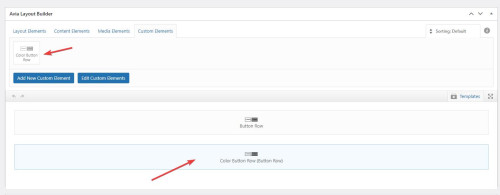
Please note in our documentation Custom Elements Advanced Options about the opton: Custom Elements For Subitems which by default is set to All sub-items use the same custom element template for button rows you will want to change this to Individually select subitem custom element templates
Please scroll down to this part of the documentation for Button Rows and review.
I have done this for you on your test page:

Best regards,
Mike
HI,
I tried this as stated in de documentation
*—————————————-
// CSS – Contact form submit button
//————————————–*/
#top .avia_ajax_form input[type=’submit’] {
border: none;
background: #eb5424;
color: #f6f6f5;
}
#top .avia_ajax_form input[type=’submit’]:hover {
background: #000000;
}
but it did not change, even after clearing the cache.
I changed submit to the Dutch ‘Verzenden’ for the button, so I tried that wording in the CSS as well, but without success
Maybe ‘submit’ has to be something else,since I use the Dutch version of WordPress/Enfold?
Hey Monique,
Thank you for the inquiry.
Please temporarily edit the enfold/config-templatebuilder/avia-template-builder/php/class-element-templates.php and remove this code around line 672.
			$duplicate  = '<a href="' . $notify_url . '" aria-label="' . esc_attr__( 'Make a duplicate from this element template', 'avia_framework' ) . '" rel="permalink">';
			$duplicate .=		esc_html__( 'Duplicate', 'avia_framework' );
			$duplicate .= '</a>';

			$actions['duplicate'] = $duplicate;
Let us know if this removes the Duplicate button.
Best regards,
Ismael
Hello,
Since the latest Enfold update was installed, I noticed I am getting a “duplicate” post link when I roll over an order link in WooCommerce. I spoke to Woo Support and they said it is from the parent theme since the CSS on the button says Avia Framework. Is there a simple solution to fix this?
Thanks,
Monique
 Håkan
HåkanGuest
Hello, is it possible to add a video.like this one (see link) with Enfold? Will I need a plugin?
It should be intregrated to the website, not with a play-button or frames.
Hi,
Typically when you add a new social profile following the documentation this is the correct code snippet that you should add to your child theme functions.php:
// Register new icon as a theme icon
function avia_add_custom_icon($icons) {
$icons['line'] = array( 'font' =>'icomoon', 'icon' => 'ue900');
return $icons;
}
add_filter('avf_default_icons','avia_add_custom_icon', 10, 1);

// Add new icon as an option for social icons
function avia_add_custom_social_icon($icons) {
$icons['Line'] = 'line';
return $icons;
}
add_filter('avf_social_icons_options','avia_add_custom_social_icon', 10, 1);
// Add new icon to sharebox
add_filter('avia_social_share_link_arguments', 'avia_add_social_share_link_arguments', 10, 1);
function avia_add_social_share_link_arguments($args){
    $tiktok = array('line' => array("encode"=>true, "encode_urls"=>false, "pattern" => "https://line.me/", 'label' => __("Share on Line",'avia_framework')));
    $args = array_merge($line, $args);
    return $args;
}
and then you would choose the new social profile from the options”

and then it will show on the front end:

I have done this for you.
Best regards,
Mike
Thank you. I suspected that was (at least part of) the problem. I just purchased a new version of ENFOLD and when I try to install it on this site, I still get an error message (below). Can you help me? JACKIE GAMBILL
Installing theme from uploaded file: themeforest-tLyxAgOg-enfold-responsive-multipurpose-theme.zip
You are in recovery mode. This means there may be an error with a theme or plugin. To exit recovery mode, log out or use the Exit button. Exit Recovery Mode
Unpacking the package…
Installing the theme…
The package could not be installed. The theme is missing the style.css stylesheet.
Theme installation failed.
Hi,
Please see our documentation for: How to add Custom Social Icons to Enfold options.
Best regards,
Mike
Hey Anton,
Thank you for the inquiry.
Adding this css code should remove the space below the video.
.su-youtube.su-u-responsive-media-yes {
    margin-bottom: 0;
}
The double button on the official site is not available by default, but here is the markup in case you want to use it on your own site.
HTML:
<div class="avia-double-buttons "><a href="https://site.at/themes/enfold-overview/" class="avia-double-button avia-double-button-1">View Demos</a><span class="button_or">or</span><a href="https://1.site.market/" class="avia-double-button avia-double-button-2">Purchase Now</a></div>
CSS:
#top .avia-double-button {
    letter-spacing: 1px;
    padding: 13px 20px;
    text-transform: uppercase;
    font-size: 13px;
    text-align: center;
    min-width: 175px;
    display: inline-block;
    transition: all 0.4s ease-in-out;
    -moz-transition: all 0.4s ease-in-out;
    -webkit-transition: all 0.4s ease-in-out;
    -o-transition: all 0.4s ease-in-out;
    border: 4px solid #fff;
    text-decoration: none;
}

#top div .main_color .avia-double-button {
    border-color: #e1e1e1;
    background: #fcfcfc;
    color: #222222;
}

#top #wrap_all .avia-slide-wrap .avia-double-button, #top #wrap_all .avia-hover-fx .avia-double-button {
    background: #000;
    background: rgba(0,0,0,0.2);
    border-color: #fff;
    color: #fff;
    padding-bottom: 11px;
    text-decoration: none;
}

#top .avia-double-button-2 {
    border-top-right-radius: 100px;
    border-bottom-right-radius: 100px;
    border-left: none;
}

#top .avia-double-button-1 {
    border-top-left-radius: 100px;
    border-bottom-left-radius: 100px;
    border-right-width: 2px;
}

.avia-double-buttons {
    margin-top: 30px;
    text-align: center;
    position: relative;
}

#top .button_or {
    position: absolute;
    display: block;
    height: 26px;
    line-height: 21px;
    width: 26px;
    text-align: center;
    top: 50%;
    left: 50%;
    margin: -13px 0 0 -14px;
    background: #fff;
    color: #666;
    border-radius: 100px;
    font-size: 10px;
    border: 2px solid #FFF;
    font-style: italic;
    font-weight: 600;
    z-index: 11;
}
Best regards,
Ismael
Hi,
Thanks for the login, I tested both of your custom buttons:
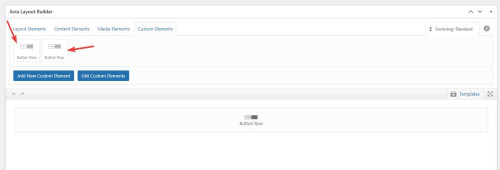
and they both show the add more button option:
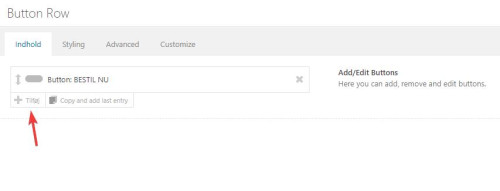
so I added more buttons and saved your page:
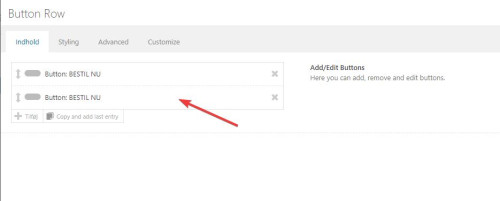
please check, if you still are unable to add buttons then please try the login you posted for us.
Best regards,
Mike
Hi,
On mobile there is not enough room for the buttons next to the logo, so they will need to be smaller and under the logo.
Try this CSS in your Enfold Theme Options ▸ General Styling ▸ Quick CSS field:
@media only screen and (max-width: 430px) {
	.responsive #top #header #header_main .inner-container .widget {
    order: 3;
    flex-basis: 100%;
	}
	.responsive #top #header #header_main .inner-container .widget .avia-button.avia-size-medium {
	padding: 12px 5px 10px;
    font-size: 12px;
    min-width: 60px;
	}
	.responsive #top #header #header_main .inner-container .widget>div {
		padding: 0;
	}
	.responsive #top #header #header_main .inner-container .widget>div>div {
	text-align: center;
	}
}
Please ensure to copy the code from the forum and not an email notification so the symbols are not converted.
After applying the css, please clear your browser cache and check.
Best regards,
Mike
In all my other themes, the blog page only shows excerpts of blog posts with a more… button/link to the full aritcle.
How can I do this in Enfold?
Any help appreciated
Kerry
Hi,
Thank you for the link to your site, the issue was in your widget there was a “pre” & “code” tag, probably from were you copied the code from.

I removed it for you and now your header buttons are correct

please clear your browser cache and check.
Best regards,
Mike
Hi,
Thank you for the inquiry.
You can use the following filter to add a new social icon into the list.
// https://kriesi.at/documentation/enfold/social-share-buttons/#how-to-add-custom-social-icons-to-enfold-options
However, as the LINE icon isn’t included by default, you’ll need to retrieve an SVG version of the icon and convert it to a font icon using Fontello. Afterward, you can upload it to the theme using the Iconfont Manager. Please refer to the documentation below for detailed instructions.
// https://kriesi.at/documentation/enfold/icon/#adding-your-own-fontello-or-flaticon-icons-
// https://vimeo.com/75743285
Best regards,
Ismael
Hi joandjaxx,
To make it extra large, replace avia-size-large with avia-size-x-large
For color, replace avia-color-purple with my-custom-color (or name it however you like)
Then go to Enfold > General Styling > Quick CSS:
#top .avia-button.my-custom-color {
    background-color: #333;
    color: #fff;
}
Just adjust the colors as you see fit (color is for text color).
Hope this helps.
Best regards,
Nikko
 Roman
RomanGuest
Hallo,
bin seit Jahren ein begeisterter Enfold User, also gleich mal vorweg – tolle Arbeit, weiter so!
Ich bin schon vor längerer Zeit auf einen nervigen Bug gestoßen, den ich mit einem komplizierten Workaround gefixed habe. Heute habe ich durch Zufall etwas entdeckt, das ich mit euch teilen will:
Wenn ich ein Masonry als “Custom Element Template” anlege und alle gleich bleibendene Werte sperre, dann verschwindet der “Mehr Laden”-Button immer nach dem ersten Klick auf ihn, egal ob noch Elemente vorhanden wären, oder nicht.
Heute entdeckt:
Das Problem tritt nur auf, wenn der Wert “Beitragsnummern” gesperrt ist (Stil -> Paginierung).
Sobald dieser Wert entsperrt wird funzt alles wie gewünscht und der Button kann gedrückt werden, bis alles geladen ist.
Das soll, vermute ich mal, nicht so sein :)
LG, Roman
Hey sharynt3,
Please see this tutorial for making the team member element a popup.
In this thread Guenni007 offers another solution using a image, text & button to simulate a team member popup and has a working example that you can try.
Best regards,
Mike
HI, I would I stylize the Calendly “Book now” text pop up on my homepage to look like an enfold styled button? Right now the text is kinda plane….
-
This topic was modified 2 years, 4 months ago by
 joandjaxx.
Hi
I can’t seem to get button row working in Custom Elements. Tried to create from start, and also tried to make a Custom Element from existing button row, it’s wanna make one button? Can’t add any or nothing. Tried one several enfold installation with samme output.
 Melissa
Guest
Hi Enfold Team,
We see that you have lots of themes. As a beginner of using WordPress theme, we will be much appreciated if you can give us some advice or suggestions about which Enfold theme will be most suitable for my B2B business? Also we’d like that theme can meet our requirements that have a button which can post some articles and the purchasing functions. Thanks again in advance! Looking forward to you soon.
Best Regards,
Melissa from UPP
Hi,
we´ve recently run into a conflict with the plugin Foo Bookings. It appears to be a conflict with Enfold because when I switched themes on advice of the plugin developer, the problem was resolved. I also tried deactivating all our usual plugins to make sure there was no conflict here, but this had no effect.
With Foo Bookings you can add dates to a product so that the customer can choose his prefered date on the frontend of the product page. Foo has recently added a pop up window to this function in the backend: To add new dates you click on the button “Add dates” and then the pop up is displayed. Unfortunately the window is all greyed out and it isn´t possible to enter any data. You have to click on escape to make the window disappear again. When I switched to the theme WP 2024 the pop up window was no longer greyed out.
I´d be really grateful if you could take a look at this and give me some advice.
Thanks a lot in advance.
Best regards,
Sara
This is all very confusing. So, I bought the enfold theme at themeforest.net. They send me to envato.com to connect the theme to my wordpress site. But I have to have an account here to get questions answered. Have I got that right? Three different logins for one theme.
Here’s my question, The connection between my site and envato says that my enfold theme is up to date, version 5.0, I come here and see that it’s actually up to version 5.6.9. How do I update to the latest version on my website?
With other themes all I have to do is click an update button. I see no such thing for this one, so how to I make this happen?
Thanks,
Dee
(Email address hidden if logged out)
 James Carter
Guest
Hello
I am considering buying the Enfold theme to build a WordPress website. But after searching the Internet I see users of this theme are having problems with the theme.
As early as May 2023 a user of the theme said he pulled up his site and pages on the site were missing on his site. And a web designer also said he had pages and buttons missing when he went to design a website page. Sounds like there is a problem with the page builder that is built into the theme.
Can you tell me if the problem with the page builder been fixed. It is now December 9, 2023. I really don’t want problems with the page builder. I understand it’s older technology and according to Theme Forest ithe theme has been updated recently.
Thank You for your time.
Hey smarta-brett,
Please try the following in Quick CSS under Enfold->General Styling:
.home .avia-slideshow-button {
    display: table;
    margin: 0 auto;
    margin-top: 20px;
}
Best regards,
Rikard
-
This reply was modified 2 years, 4 months ago by
 Rikard.
Hey Angelo,
Thank you for the link to your site, try this CSS in your Enfold Theme Options ▸ General Styling ▸ Quick CSS field:
@media only screen and (max-width: 767px) {
#top .avia-button .avia_button_icon, #top .avia-button .avia_iconbox_title {
    vertical-align: middle;
 }
}
After applying the css, please clear your browser cache and check.
Best regards,
Mike
Hi,
Please find the link below to import the 2017 demo slider into your LayerSlider using the import button:

Best regards,
Mike
hi,
it works fine other themes, i works fine when i deactivate the layout editor.
so it is clearly an issue in enfold, right?
other user have problems to:
bis dann, marco.
hello,
if i layout a product with the advanced layout editor the button from the plugin
request a quote is not visible. when i switch to the standard editor all is fine.
there some topics about this and it is an enfold problem, but no one posted a fix.
can you help, please?
bis dann, marco.
-
This topic was modified 2 years, 4 months ago by
 netztaucher.



