-
Search Results
-
Topic: Enfold Robots.txt
We used Yoast to put the following into the “robots.txt” file:
User-Agent: *
Disallow: /wp-admin/
Disallow: /blog-orig/blog-multi-author/
Disallow: /blog-orig/blog-single-author-big/
Disallow: /blog-orig/blog-single-author-full/
Disallow: /blog-orig/blog-single-small/
Disallow: /blog-orig/masonry-blog/
Disallow: /pages/
Disallow: /pages/faq/
Disallow: /pages/help/
Disallow: /pages/landing-page/
Disallow: /pages/team/
Disallow: /pages/pricing/
Disallow: /pages/services/
Disallow: /projects/masonry-portfolio/
Disallow: /projects/mixed-fullwidth-portfolio/
Disallow: /projects/portfolio-2-column/
Disallow: /projects/portfolio-3-column/
Disallow: /projects/portfolio-ajax/
Disallow: /services/coming-soon/
Disallow: /services/maintenance-mode/
Disallow: /services-2/
Disallow: /shortcodes/
Disallow: /shortcodes/animated-image/
Disallow: /shortcodes/blog-element/
Disallow: /shortcodes/buttons/
Disallow: /shortcodes/columns/
Disallow: /shortcodes/contact-forms/
Disallow: /shortcodes/easy-slider/
Disallow: /shortcodes/gallery/
Disallow: /shortcodes/hr/
Disallow: /shortcodes/iconbox
Disallow: /shortcodes/iconlis/
Disallow: /shortcodes/images-with-hotspots/
Disallow: /shortcodes/layer-slider/
Disallow: /shortcodes/notificatio/
Disallow: /shortcodes/portfolio-shortcode/
Disallow: /shortcodes/post-slider/
Disallow: /shortcodes/pricing-and-data-tables/
Disallow: /shortcodes/progressbars/
Disallow: /shortcodes/promo-box/
Disallow: /shortcodes/tabs/
Disallow: /shortcodes/team/
Disallow: /shortcodes/testimonials/
Disallow: /shortcodes/video/
Disallow: /transparent-header/
Disallow: /wp-content/plugins/
Allow: /wp-content/uploads/Sitemap: https://continentalconstructionmanagement.com/sitemap_index.xml
Sitemap: https://continentalconstructionmanagement.com/post-sitemap.xml
Sitemap: https://continentalconstructionmanagement.com/page-sitemap.xml
Sitemap: https://continentalconstructionmanagement.com/portfolio-sitemap.xml
Sitemap: https://continentalconstructionmanagement.com/category-sitemap.xml
Sitemap: https://continentalconstructionmanagement.com/post_tag-sitemap.xml
Sitemap: https://continentalconstructionmanagement.com/portfolio_entries-sitemap.xml
Sitemap: https://continentalconstructionmanagement.com/author-sitemap.xml============
BUT, when I try to check that it is there ( https://continentalconstructionmanagement.com/robots.txt ) it shows this:
User-Agent: *
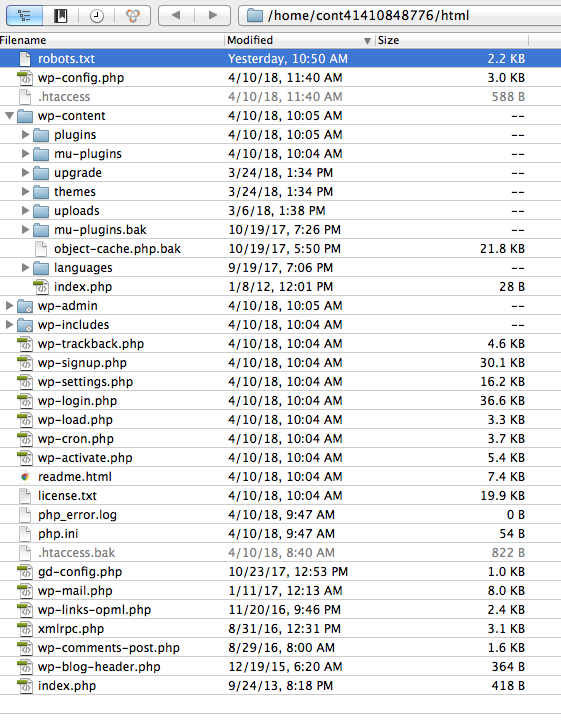
Disallow:I looked at the file with FTP, it is there and has everything we want in it, and it’s in the ‘root’ directory:
https://visualimpactsystems.com/CCM-RootScreenshot-RobotsFile.jpgWe also ‘submitted’ it in the Google Seach Console.
Any ideas why it is not showing up/working? (Google has already indexed some of the pages we disallowed in the robots file).
( site:continentalconstructionmanagement.com )Mark Besh
Visual Impact SystemsHey everybody!
At first many thanks for the outstanding work: set up Enfold for clients more than 5times! Great!
We are using for an client The Events Calendar Version 4.6.13 and Enfold Version 4.2.2. Because Enfold will be overwrite the styles from the events calendar the prev/next buttons in the single event screen will not shown. When disabling this overwriting function in Enfold the buttons will be shown: but I’ve no time to styling all objects manually in the event calendar in the same way as taken in Enfold. Any suggestions for fixing this will be fine!
many thanks to all
FrankUnd da mein Englisch nicht perfekt ist: hier die Frage auf Deutsch. Das aktuelle Enfold überschreibt die styles des installierten Events Calendars. Klappt alles, aber in der single view der Events werden die previous/next Buttons nicht angezeigt. Wenn ich die Funktion des Überschreibens in Enfold auskommentiere, werden die Buttons eingeblendet. Natürlich mit den styles aus dem Events Calendar, aber mir fehlt echt die Zeit, diese manuell auf das ausgewählte Theme in Enfold anzupassen.
Hello,
Since a few hours ago I keep getting one of these errors every time I start loading a page to edit:
Failed to load plugin url: https://www.connix.nl/wp-content/themes/enfold/config-templatebuilder/avia-template-builder/assets/js/avia-tinymce-buttons-4.js
Failed to load plugin url: https://www.connix.nl/wp-content/themes/enfold/config-layerslider/LayerSlider/static/admin/js/ls-admin-tinymce.jsThe page editor was loading very slow before, and today it stopped working at all.
I have tries a clean enfold install and disabling all plugins as others suggested, but this did not work.
The files names in the error I replaced with those of a new install download, sadly this did not change anything.Do you have any suggestions?
Thanks,
TjeuHello,
i’m trying to put a purchase button into woocommerce product page, and not show.
When remove this buttom from enfold advanced template into page product, then show but without purchase button.I put temporaly the purchase buttom shortcode from woocommerce ( [add_to_cart id=”….”]) and work, but isn’t show same if purchase button from enfold… and not show quantity box.
I update theme to 4.2.6, wordpress to 4.9.5, woocommer to 3.3.5 .. deactivated all plugins, etc.. But not run
Please, how can i solve it?
ThanksHello,
I purchased the Enfold theme and ran into some problems with the installation. I wanted to ask my questions at the support forum and tried to create an account. Using my purchase code:e666a094-7c68-4fb0-b5e0-a7022e5cbe5e and my email address: (Email address hidden if logged out) when I hit the send button I saw there was a typo in the email address, but the request for an account for the support blog was already send. I wanted to create a new account but the system says my purchase code is already linked. (to the emailaddress with the typo) Can you tell me how to manage this situation or adjust my email address to (Email address hidden if logged out) so I can activate my support account?
regards Bas Oberndorff
Previous and Next post navigation buttons are missing. I have not disabled them in the Enfold options. I am running a child theme, but have made no mods or custom functions that would effect this. I do have 2 test posts, so it should work. I’ve searched the forums and have not found anything related to this issue.
Hi,
I have added a mailchimp form to my footer. Within the mailchimp form I have coded a customer css in html which is exactly how I would like to form to display. The enfold theme however is overriding the coding I think as it is nothing like I have designed.
The full code is:
<style>
.email {
text-align: center;
font-size: 12px;
padding: 20px 80px;
border-color: #000000;
border-bottom: 0px;
}::placeholder {
color: #000000;
}.button {
color: #000000;
text-align: center;
text-decoration: none;
display: inline-block;
font-size: 12px;
margin: 0px 0px;
cursor: pointer;
border: #000000;
padding: 20px 118.5px;
border-color: #000000;
background-color: #ffffff;
border: 2px solid #000000;}
</style>
<p>
<input type=”email” class=”email” name=”EMAIL” placeholder=”NAME@EMAIL.CO.UK” required />
<br>
<input type=”submit” class=”button” value=”SUBSCRIBE” />
</p>Please can you advise how to use this code instead of the enfold set css?
I have used https://www.w3schools.com/html/tryit.asp?filename=tryhtml_intro to build my css.
Many thanks
Hi I have a problem using “learndash” LMS in Enfold and Firefox (tested with Safari, is no problem).
Info: Enfold 4.2.6, problem in Firefox (59.0.1, on iMac)
When a user clicks a “statistics” link, a box pops up containing the results of a test they took. In FIrefox (59.0.1, on iMac), the header area covers the “close” button (top right of the pane), the sidebar is still there and the footer is in the wrong position.
Pic attachedThe elements in place should be covered by the popup box, but they are not.
Is there anything you can suggest I do?
Pic hereHi Kriesi team,
Since the last Enfold update (4.2.6) the shop page of my Woocommerce website where I display all the products shows a “Read more” button instead of “Add to cart”. When I’m on the product page I can see every informations except for the “Add to cart” button.
I looked into the Woocommerce source code and I checked multiple times that all the conditions were valid.
It’s only when I tried to recreate everything on a fresh new local website that I saw that everything worked well with other themes.So when I activate the Enfold theme 4.2.6 and activate the WordPress debug option, I have the following message on shop page and product page :
Warning: call_user_func_array() expects parameter 1 to be a valid callback, no array or string given in ..../wp-includes/class-wp-hook.php on line 288 class="post-503 product type-product status-publish product_cat-alice last instock shipping-taxable product-type-simple">I found this thread on the board : I don’t know if that has something to do with my problem but do you think the next update could fix it ?
Thanks in advance !
I can also give some FTP access and temp login.Cheers,
Hi there,
after i’ve adjusted the color for frames in the enfold settings. I’ve now by the slider a line like a separatorline by all the pictures on the full slider. by the normal slider i doesn’t have this issue. is there a way (with css) to adjust the color specially for the full slider back to white (so it’s not visible)?
i’ve searched through the forum, but with no luck.second question:
is there a button to click to hide:
<!–
Debugging Info for Theme support:Theme: Enfold
Version: 4.2.6
Installed: enfold
AviaFramework Version: 4.6
AviaBuilder Version: 0.9.5
ML:128-PU:28-PLA:9
WP:4.9.5
Updates: enabled
–>
i’m happy to recommend your templates to friends, but not really interested, that some “competitors” knows by the first look on my page, which WP-Template i’m using. :)thanks in advance!
best regards,
MichelHello Victoria
My reply to your last piece of CSS given to me was met with a request to close the thread – which seems strange because my topic was still about Contact Form 7 with (CSS) Enfold Styles.Since I was not able to get a reply on that thread I have to start again – which doubles the amount of work.
I have copied and pasted the ending of your last CSS here and my reply to you and can only hope I find a reply to this. thanks for your help.
My website page in discussion: you can see the problem here on desktop / wide screen view
***** your last reply to me*************
Hi Pete,
Here is the code you can put in Enfold > General Styling > Quick Css, if it does not work, put into themes/enfold/css/custom.css
@media only screen and (min-width: 768px) {
#top .wpcf7-form-control-wrap.your-name input[type=text] {
width: 95%;}
.wpcf7-form div + p, .wpcf7-form div + p + p {
width: 50%;
float: left;}
.wpcf7-form div + p + p {
clear: right;
}}
If you need further assistance please let us know.Best regards,
Victoria****** MY LAST REPLY TO YOU – WHICH WAS CUT OFF WHEN THE THREAD WAS CLOSE******
Thanks so much Victoria! thats a really clever bit of CSS!
I’ve set it at 1368px – just wider than iPad pro screen horizontal.
It works fine apart from a couple of small things:-1. On the wide desktop version where the name and email are side by side – the space between that line and the SUBJECT line below seems to be wider than when the 2 fields are stacked on top of each other.
2. Also on desktop perhaps the gap/padding above the Name/Email line is wider making a large gap between that line on desktop view and the bulleted text above. Ideally I would like the gaps above/below field to be consistent between desktop and mobile.
3. The CSS you provided to create black field borders is being carried into the Enfold Search field. Is there a way I can restrict this border styling to the CF7 form?
Here’s the full quick CSS i have for this contact page at the moment including your latest fixes.
/* CF7 Submit Button CSS Styles */
.wpcf7 input[type=submit] {
padding:15px 45px;
background:#FCE228;
color:#232323;
font-size:16px;
font-weight:bold;
border:1px solid #232323;
cursor:pointer;
-webkit-border-radius: 3px;
border-radius: 3px;
}/* CF7 Submit Button CSS Hover Styles */
.wpcf7 input[type=submit]:hover {
background-color: #232323;
color: #FCE228;
border:1px solid #232323;
}/* CF7 Label Text Styles */
.wpcf7 label {
padding: 0 0 10px 0;
font-size: 20px;
color:#232323;
}/* CF7 File Upload Button CSS Styles */
.wpcf7 input[type=file] {
padding:0px 0px;
background:none;
color:#000;
font-size:14px;
border:none;
-webkit-border-radius: 3px;
border-radius: 3px;
}/* CF7 Input Field Heights */
.wpcf7 input[type=text] {height:40px;}
.wpcf7 input[type=email] {height:40px;}/* CF7 Input Field border and radius */
#top .main_color .input-text,
#top .main_color input[type=’text’],
#top .main_color input[type=’input’],
#top .main_color input[type=’password’],
#top .main_color input[type=’email’],
#top .main_color input[type=’number’],
#top .main_color input[type=’url’], #top .main_color input[type=’tel’],
#top .main_color input[type=’search’], #top .main_color textarea, #top .main_color select {
border-color: #232323;
border-radius: 3px;
margin-top: 5px;
}/* CF7 name and email Fields alongside but not on mobile */
@media only screen and (min-width: 1368px) {
#top .wpcf7-form-control-wrap.your-name input[type=text] {
width: 95%;}
.wpcf7-form div + p, .wpcf7-form div + p + p {
width: 50%;
float: left;}
.wpcf7-form div + p + p {
clear: right;
}}
I had a 45 minute screen sharing session with the WooCommerce happiness engineer to help with my bookings plug-in. The issue I am having is a booking product is not displaying correctly with Enfold, but when we activated another theme, it displayed correctly. Instead of displaying correctly, I am getting a very long list of PayPal buttons and it won’t display the calendar. It takes a very long time for page to load as it “appears” it may be trying to load every single day or option as separate purchases. He couldn’t see any issues with my bookings settings that would be causing the issue nor did any other settings seem to be the issue. It displayed perfectly with one of the WP default themes.
Here is the product page that shows the issue: https://leehoyphotography.com/index.php/product/half-day-birding-tour/
Thanks,
Lee