
-
AuthorSearch Results
-
June 3, 2018 at 3:10 am #966022
Topic: ACF Frontend Form Issue
in forum EnfoldMM
ParticipantWith the latest version of the theme installed, I found Advanced Custom Field Front-end form’s upload buttons are not working properly. I tried switching the theme to something else and it worked fine on that. So, the issue is clearly some conflict with enfold.
This is the error i see on console:
Uncaught TypeError: Cannot read property 'query' of undefined
    at Object.new_media_frame (acf-input.min.js?ver=5.6.10:2)
    at Object.popup (acf-input.min.js?ver=5.6.10:2)
    at Object.add (acf-input.min.js?ver=5.6.10:2)
    at HTMLAnchorElement.<anonymous> (acf-input.min.js?ver=5.6.10:1)
    at HTMLDocument.dispatch (jquery.js?ver=1.12.4:3)
    at HTMLDocument.r.handle (jquery.js?ver=1.12.4:3)
Please check. Thanks!
June 3, 2018 at 1:54 am #966008In reply to: Styling On Cookie Bar
Hey Sujohn,
Please try adding this code to the Quick CSS section under Enfold > General Styling or to your child theme’s style.css file:
CSS Snippet:
/* CSS - Cookie message button */

#top .avia-cookie-consent .avia-cookie-consent-button.av-extra-cookie-btn {
    border:none;
}

/* End CSS */
Result:

Best regards,
VinayJune 3, 2018 at 1:38 am #965995Hey jbc2018,
Thank you for reaching out to us. Please try adding this code to the Quick CSS section under Enfold > General Styling or to your child theme’s style.css file:
CSS Snippet:
/* CSS - Product title */

#top h2.woocommerce-loop-product__title {
    font-size: 1em;
}

/* End CSS */
You may not see the changes until the cached files are cleared in your browser.
Please perform the below steps to clear the browser cache:
1. Disable “merging and compression” for CSS and JS files from Enfold > Performance.
2. If a caching plugin is installed check the plugin settings and clear the cache and deactivate the plugins for testing purpose.
3. Hard refresh by pressing Ctrl + Shift + F5 on your browser or press the F12 key to open chrome dev tools and right click on the refresh button and select “Empty Cache and Hard Reload”.

If you still have any issue please provide a precise link to the page, showing the elements in question? We need to be able to inspect them in order to help :)
Best regards,
VinayJune 2, 2018 at 9:21 pm #965974Hi,
The css from the child theme & Quick CSS is merged into a file in /wp-content/uploads/dynamic_avia/
saving the theme options is what causes the merge.
If you add css to the child theme, please go to the Quick CSS field and add a blank space to enable the “Save all changes” button, and then save.
If you are in development please disable the Enfold Theme Options > Performance > JS & CSS file merging and compression
as this is better to use once your site is done and you are not editing css anymore.
Perhaps your css has an error in it, you can easily check by copying all of it to the WordPress > Customize > Additional CSS, as it will error check for you.
Hope this helpsBest regards,
MikeJune 2, 2018 at 3:21 pm #965881Topic: Styling On Cookie Bar
in forum EnfoldSujohn
ParticipantHi
Just a very small issue with styling on the cookie bar button. One of my buttons has a white border appearing and I can’t get rid of it.
I have tried the advanced settings and also the css code here
https://kriesi.at/support/topic/cookie-consent-and-learn-more-button-styling-enfold-theme-option
and also this
.avia-button .avia-cookie-consent-button .avia-cookie-consent-button-2 .av-extra-cookie-btn {
border: none;
}
I can’t see any changes taking effect. Not sure what I am doing wrong.Thanks
SuJune 2, 2018 at 12:16 pm #965811In reply to: Icon title "inside" icons in list
Hi,
Glad you are able to view the changes in a private window.
Please perform the below steps to clear the browser cache:
1. Disable “merging and compression” for CSS and JS files from Enfold > Performance. Select “Delete old CSS” option at the bottom and save the page.
2. I believe you already deactivated the caching plugins for testing purpose.
3. Hard refresh by pressing Ctrl + Shift + F5 on your browser or press the F12 key to open chrome dev tools and right click on the refresh button and select “Empty Cache and Hard Reload”.
Hope this clears the browser cache for you :)
Best regards,
VinayJune 2, 2018 at 8:47 am #965738In reply to: Icon title "inside" icons in list
Hi,
Thank you for sharing the screenshot but it did not work for me :(
Strange the icons look good on my end, I just added the line height to vertically align the icons with the text.

This is how it looks on my end now :)

You may not see the changes until the cached files are cleared in your browser.
Please perform the below steps to clear the browser cache:
1. Disable “merging and compression” for CSS and JS files from Enfold > Performance.
2. If a caching plugin is installed check the plugin settings and clear the cache and deactivate the plugins for testing purpose.
3. Hard refresh by pressing Ctrl + Shift + F5 on your browser or press the F12 key to open chrome dev tools and right click on the refresh button and select “Empty Cache and Hard Reload”.
Best regards,
VinayJune 2, 2018 at 4:56 am #965673In reply to: & font colour Spa demo template
Hi,
Would you like to style the scroll to top button?
Please check the documentation https://kriesi.at/documentation/enfold/menu/#custom-styling-scroll-to-top-button
Best regards,
VinayJune 2, 2018 at 4:19 am #965657In reply to: Adjusting the Full Screen Slider Button Size
Hi,
Please try adding this code to the Quick CSS section under Enfold > General Styling or to your child theme’s style.css file:
CSS Snippet:
/* CSS - Slideshow button */

#top .avia-slideshow-button {
	width:100%;
	margin-top:30px!important;
}

/* End CSS */
Result

Best regards,
VinayJune 1, 2018 at 4:05 pm #965431Hi,
You may not see the changes after adding styles to your child theme because:
1. Please use pure CSS in the editor I noticed you are using another processing language.

2. Disable “merging and compression” for CSS and JS files from Enfold > Performance.
3. If a caching plugin is installed check the plugin settings and clear the cache and deactivate the plugins for testing purpose.
4. Hard refresh by pressing Ctrl + Shift + F5 on your browser or press the F12 key to open chrome dev tools and right click on the refresh button and select “Empty Cache and Hard Reload”.
Best regards,
VinayJune 1, 2018 at 3:04 pm #965397In reply to: Header full width and responsive
Hi,
Please try adding this code to the Quick CSS section under Enfold > General Styling or to your child theme’s style.css file:
CSS Snippet:
/* CSS - full width header */

/* Custom width header */
#top #header .container {
    width:100%;
    max-width: 100%;
}

/* End CSS */
For more info please check https://kriesi.at/documentation/enfold/header/#custom-header-width
Result:

You may not see the changes until the cached files are cleared in your browser.
Please perform the below steps to clear the browser cache:
1. Disable “merging and compression” for CSS and JS files from Enfold > Performance.
2. If a caching plugin is installed check the plugin settings and clear the cache and deactivate the plugins for testing purpose.
3. Hard refresh by pressing Ctrl + Shift + F5 on your browser or press the F12 key to open chrome dev tools and right click on the refresh button and select “Empty Cache and Hard Reload”.
Best regards,
VinayJune 1, 2018 at 2:01 pm #965356Hi,
This code should work for you
.main_color .av-timeline-nav a span {
    background-color: #ff7827;
    opacity:1;
}
Result:

You may not see the changes until the cached files are cleared in your browser.
Please perform the below steps to clear the browser cache:
1. Disable “merging and compression” for CSS and JS files from Enfold > Performance.
2. If a caching plugin is installed check the plugin settings and clear the cache and deactivate the plugins for testing purpose.
3. Hard refresh by pressing Ctrl + Shift + F5 on your browser or press the F12 key to open chrome dev tools and right click on the refresh button and select “Empty Cache and Hard Reload”.
If you still have any issue please provide a precise link to the page, showing the elements in question? We need to be able to inspect them in order to help :)
Best regards,
VinayJune 1, 2018 at 11:18 am #965204In reply to: Social Profiles Question
Hi Adam,
Please refer to this post – https://kriesi.at/documentation/enfold/social-share-buttons/#how-to-add-custom-social-icons-to-enfold-options
If that does not help, please request purchase code from person who bought the theme and use it to register to our support forum – https://kriesi.at/support/register/ and start a new thread under Enfold sub forum. Due to our policy, we only provide support for registered users. Thanks for your understanding!
Best regards,
YigitJune 1, 2018 at 2:32 am #965033In reply to: Fonts in Enfold einbinden
Ich habs – endlich.
1.) Bitte das Theme auf mind. 4.4 updaten
2.) Unter Import findet sich dann ein Button um Fonts zu importieren, daneben gleich der Link, um sich das passende Font bei Google zu suchen und dort down zu loaden
3.) Font suchen, Zip Datei runterladen
4.) Zip Datei in Enfold unter Import ganz unten hochladen, einfügen. Dann sollte er die neu installierte Schrift schon anzeigen. (Falls das nicht funktioniert, wie bei mir, Browser wechseln oder Cache leeren)
5.) Neu installierte Schrift im Reiter “Allgemeines Styling” -> Schrift -> auswählen (ganz oben, ab 4.4.1 ganz unten)
6.) Speichern.
7.) Google Webfonts abschalten. (Ich habe ein Plugin dafür erstellt)-
This reply was modified 7 years, 9 months ago by
SDUS.
May 31, 2018 at 8:20 pm #964915In reply to: Adjusting the Full Screen Slider Button Size
Hi 2eminds,
Here is the code you can put in Enfold > General Styling > Quick Css, if it does not work, put into themes/enfold/css/custom.css
#top #fullscreen_slider_1  .avia-slideshow-button {
  padding: 15px 30px 13px;
  font-size: 20px;
  min-width: 220px;
  border-radius: 3px;
}
If you need further assistance please let us know.
Best regards,
VictoriaMay 31, 2018 at 6:11 pm #964881In reply to: Masonry problem
Hey modulexlam,
Thank you for using Enfold.
Have you created portfolio categories? You need to apply categories to the portfolio items. The masonry elements will automatically display those categories as sort buttons.
Best regards,
IsmaelMay 31, 2018 at 11:54 am #964736Hi,
I see that you are using the Advanced Layout Builder for your posts, it has been created to give you the most design choices, and doesn’t show some things automatically like the default WordPress editor like the excerpts. You will need to create your own excerpts by going to the top of your post page and clicking “Screen Options” and then checking the box “excerpts”, in your language it’s “abstract”. I did this to the first post to show you, and here is a screenshot:
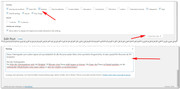
This is also why your featured image is not displaying at the top of your post, please use a image element to add one. You will notice the post “SCHNELLER LAUFEN DURCH RUMPFSTABILISATION” is using the WordPress default editor and it shows the featured image and the excerpt.
I hope this explains well.In testing I removed my code in the functions.php and the copyright seems to be staying correct, but I not sure if this is a caching issue, we can add the functions.php code back in later if need be.
I recommend disabling your caching plugin while you are developing, when you are done the caching plugin will be a good idea. I also note that the buttons for the caching plugin seem off a little as if there is a conflict with another plugin

I recommend disabling your plugins. If that resolves the issue, reactivate each one individually until you find the cause.
—–
Can I ask if you have registered for support yet? This thread looks different to us than a regular support thread, most likely because you started it before as a contact form request. We would like to start using the regular support threads for your future questions, I hope this makes sense and you understand.If you have not done so yet, please register here kriesi.at/support/register with your item purchase code .
Go to https://kriesi.at/support/ select the theme you purchased bookmark the URL.
Example: https://kriesi.at/support/enfold
Scroll to the bottom of the page to open a new ticket.
Best regards,
MikeMay 31, 2018 at 10:24 am #964711Topic: Share social media icon for facebook etc
in forum EnfoldMickeyboy000
ParticipantHi. How do I put a social media Share button/icon on my enfold themed website. Is it possible?
Cheers.
May 31, 2018 at 8:51 am #964670Topic: Enfold updates
in forum Enfoldfionayoung
ParticipantI am trying to install an update to my enfold theme. I click on the “theme update” button, and it tells me I need to enter my themeforest user name and API key. I have my user name and have managed to log into my envato market account, but I can’t find my themeforest API key. Can you tell me where I would find this? Thanks
May 31, 2018 at 5:48 am #964621Hey goldengate415,
Thank you for using Enfold.
1.) Is it working properly if you remove the slider? I think it overshoots because the slider loads a little later than when the anchor lands to the section. Please try this css code.
.n2-ss-align {
    min-height: 100vh;
}
2.) Could you explain this a bit further? The burger menu is already a button.
Best regards,
IsmaelMay 30, 2018 at 9:45 pm #964519Topic: Enfold Version 4.4. Cookie Consent
in forum EnfoldEleina_Shinn
ParticipantHi, I think something is missing in the release of 4.4.
Absolutely LOVE that you added the Privacy and Cookies section to Theme Options by the way, thank you so much, has made it so easy!
However, just noticed with 4.4. that the Buttons section is missing. With 4.3.2, you could enter button text and button was placed automatically. Then you could check the Learn More Link, change the text and add the url…
Now I can change only the message and tell it where to place the message, no button is appearing, no option for changing button text, it appears to have been removed. I tried checking your new option “modal window with privacy and cookie info” , but that didn’t work either.
Thought you might want to know. Here’s the site: http://crossfitthoroughbreds.com where I just updated to 4.4. No more button
May 30, 2018 at 5:37 pm #964413Topic: Update 3.6.1 to 4.4
in forum EnfoldOculusinsight
ParticipantHi, Unfortunately our website has not been updated recently. We have done the latest wordpress update and I now need to update our Enfold theme from 3.6.1 to 4.4. I am worried since there have been so many updates in between. Is there anything I can or should do to prepare before I hot the button?
May 30, 2018 at 4:41 pm #964374In reply to: How is [av_privacy_video_embeds] suppsed to work?
Thanks a lot Ismael, got it.
I suppose I can open the video in a Lightbox using this paramter:
?iframe=trueright? Couldn’t test that yet, sorry.Then I understood in a quick test that it’s only working when the video has been embedded via Enfold element, like e.g. the video element. It won’t be working when I use an iFrame code snippet from YouTube, e.g. in a text element. Can you confirm this? If so, will that be changed in a later version?
And at the end, will it be possible to fetch the video preview thumbnail from YouTube instead of having a black box with a play button? Maybe you guys would like to investigate the YouTube Lyte plugin…?
Thank you very much and cheers.
May 30, 2018 at 3:23 pm #964312In reply to: How is [av_privacy_video_embeds] suppsed to work?
Hey L+T,
Thank you for using Enfold.
If this option (video embed) is disabled, every videos will be replaced by a blank frame with an external link to the actual video. It will still display a play button but the video will open in a new window when you click on the button. It’s not going to load the video at all.
Best regards,
IsmaelMay 30, 2018 at 12:08 pm #964161In reply to: No cookie YouTube in background videos
Well, as you obviously won’t do anything about it, I will now have to find solutions following lion’s or Guenni’s advice. Or remove the background video at all. I was faithful you would listen and add this needed feature. Another option for me could be to use another plugin like e.g. YouTube Lyte. This however will not work with background videos. And actually I wanted to avoid using more plugins and just use what’s included into Enfold.
Of course you are right when you say that YouTube still sets cookies. But if you use the no-cookie URL’s NO cookie will come from YouTube until the user clicks on the play button! Only then cookies will be set, but e.g. no DoubleClick cookies anymore!
Pretty much all DGSVO (GDPR) specialized lawyers in Germany state it is now obligatory to use the no-cookie URLs! Using an iFrame it’s no problem, using the Enfold fields it’s impossible without the extras from lion or Guenni I suppose.
I am aware I am anything but important to you, but at the moment stating Enfold is GDRP or DSGVO compliant is simply false advertisement I am afraid.
Anyway. I have my reply, have seen the same reply in all other threads on the topic and need to solve it myself. Thank you very much nevertheless.
Cheers.
May 30, 2018 at 5:53 am #964032In reply to: Help me rebuild elements from the Enfold 2017 demo
Hi,
This is built with the tab section element:
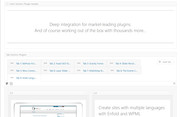
Here is the debug code from the demo for you to test on your site, although you may not get all of the images:[av_tab_section transition='av-tab-slide-transition' padding='large' tab_pos='av-tab-above-content' tab_padding='none' initial='5' id='Plugins' av_element_hidden_in_editor='0' av_admin_tab_active='9' bg_color='#f1f1f1' color='#919191' av_uid='av-g4ml7q'] [av_tab_sub_section tab_title='bbPress Forums' vertical_align='middle' icon_select='image_top' icon='ue800' font='entypo-fontello' tab_image='3004' tab_image_style='' color='#333333' background_color='' src='' attachment='' attachment_size='' background_attachment='scroll' background_position='top left' background_repeat='no-repeat' av_uid='av-fwq2xi'] [av_one_half first min_height='av-equal-height-column' vertical_alignment='av-align-middle' space='' margin='0px' margin_sync='true' padding='0px' padding_sync='true' border='' border_color='' radius='0px' radius_sync='true' background_color='' src='' attachment='' attachment_size='' background_position='top left' background_repeat='no-repeat' animation='' mobile_display='' av_uid='av-fquroe'] [av_image src='https://test.kriesi.at/enfold-2017/wp-content/uploads/sites/24/2015/07/bbpress-ipad.jpg' attachment='541' attachment_size='full' align='center' styling='no-styling' hover='' link='' target='' caption='' font_size='' appearance='' overlay_opacity='0.4' overlay_color='#000000' overlay_text_color='#ffffff' animation='no-animation' admin_preview_bg='rgb(255, 255, 255)' av_uid='av-fkap7y'][/av_image] [/av_one_half][av_one_half min_height='' vertical_alignment='' space='' custom_margin='' margin='0px' padding='0px' border='' border_color='' radius='0px' background_color='' src='' background_position='top left' background_repeat='no-repeat' animation='' mobile_display='' av_uid='av-fi4t7i'] [av_heading tag='h1' padding='0' heading='Easily build and manage your community with the bbPress forum plugin' color='' style='blockquote modern-quote' custom_font='' size='30' subheading_active='' subheading_size='15' custom_class='' admin_preview_bg='rgb(255, 255, 255)' av_uid='av-fcczq6'][/av_heading] [av_hr class='custom' height='50' shadow='no-shadow' position='left' custom_border='av-border-fat' custom_width='50px' custom_border_color='#000000' custom_margin_top='30px' custom_margin_bottom='30px' icon_select='no' custom_icon_color='' icon='ue808' font='entypo-fontello' admin_preview_bg='' av_uid='av-f3zdpa'] [av_textblock size='' font_color='' color='' admin_preview_bg='' av_uid='av-f0v41a'] <strong>bbPress</strong> is a forum software with a twist from the creators of WordPress. Easily setup discussion forums inside your WordPress powered site. [/av_textblock] [av_hr class='invisible' height='20' shadow='no-shadow' position='left' custom_border='av-border-fat' custom_width='50px' custom_border_color='#000000' custom_margin_top='30px' custom_margin_bottom='30px' icon_select='no' custom_icon_color='' icon='ue808' font='entypo-fontello' admin_preview_bg='' av_uid='av-eraeba'] [av_button label='Learn more about bbPress' link='manually,https://bbpress.org/' link_target='_blank' size='large' position='left' icon_select='yes-right-icon' icon_hover='aviaTBicon_hover' icon='ue80b' font='entypo-fontello' color='custom' custom_bg='#8dc770' custom_font='#ffffff' admin_preview_bg='' av_uid='av-eohj52'] [/av_one_half][/av_tab_sub_section][av_tab_sub_section tab_title='Yoast SEO for WP' vertical_align='middle' icon_select='image_top' icon='ue800' font='entypo-fontello' tab_image='3012' tab_image_style='' color='#333333' background_color='' src='' attachment='' attachment_size='' background_attachment='scroll' background_position='top left' background_repeat='no-repeat' av_uid='av-egxeue'] [av_one_half first min_height='av-equal-height-column' vertical_alignment='av-align-middle' space='' margin='0px' margin_sync='true' padding='0px' padding_sync='true' border='' border_color='' radius='0px' radius_sync='true' background_color='' src='' attachment='' attachment_size='' background_position='top left' background_repeat='no-repeat' animation='' mobile_display='' av_uid='av-eb1xf2'] [av_heading tag='h1' padding='0' heading='Optimize your site for search engines with Yoast SEO for WordPress' color='' style='blockquote modern-quote' custom_font='' size='30' subheading_active='' subheading_size='15' custom_class='' admin_preview_bg='rgb(255, 255, 255)' av_uid='av-e4t3a6'][/av_heading] [av_hr class='custom' height='50' shadow='no-shadow' position='left' custom_border='av-border-fat' custom_width='50px' custom_border_color='#000000' custom_margin_top='30px' custom_margin_bottom='30px' icon_select='no' custom_icon_color='' icon='ue808' font='entypo-fontello' admin_preview_bg='' av_uid='av-e1y1em'] [av_textblock size='' font_color='' color='' admin_preview_bg='' av_uid='av-dsnfvq'] <strong>Yoast SEO</strong> allows you to easily optimize your WordPress site with one plugin for all search engines. It allows for real time content analysis of your blog entries and has many more features to streamline your site. A premium version of the plugin is also available. [/av_textblock] [av_hr class='invisible' height='20' shadow='no-shadow' position='left' custom_border='av-border-fat' custom_width='50px' custom_border_color='#000000' custom_margin_top='30px' custom_margin_bottom='30px' icon_select='no' custom_icon_color='' icon='ue808' font='entypo-fontello' admin_preview_bg='' av_uid='av-dpclby'] [av_button label='Learn more about Yoast SEO' link='manually,https://yoast.com/wordpress/plugins/seo/' link_target='_blank' size='large' position='left' icon_select='yes-right-icon' icon_hover='aviaTBicon_hover' icon='ue803' font='entypo-fontello' color='custom' custom_bg='#0075b3' custom_font='#ffffff' admin_preview_bg='' av_uid='av-1cp9fy'] [/av_one_half][av_one_half min_height='av-equal-height-column' vertical_alignment='av-align-middle' space='' margin='0px' margin_sync='true' padding='0px' padding_sync='true' border='' border_color='' radius='0px' radius_sync='true' background_color='' src='' attachment='' attachment_size='' background_position='top left' background_repeat='no-repeat' animation='' mobile_display='' av_uid='av-dbfcku'] [av_image src='https://test.kriesi.at/enfold-2017/wp-content/uploads/sites/24/2015/07/yoast-ipad.jpg' attachment='548' attachment_size='full' align='center' styling='no-styling' hover='' link='' target='' caption='' font_size='' appearance='' overlay_opacity='0.4' overlay_color='#000000' overlay_text_color='#ffffff' animation='no-animation' admin_preview_bg='rgb(255, 255, 255)' av_uid='av-d6vt8e'][/av_image] [/av_one_half][/av_tab_sub_section][av_tab_sub_section tab_title='Gravity Forms' vertical_align='middle' icon_select='image_top' icon='ue800' font='entypo-fontello' tab_image='3007' tab_image_style='' color='#333333' background_color='' src='' attachment='' attachment_size='' background_attachment='scroll' background_position='top left' background_repeat='no-repeat' av_uid='av-d0qro6'] [av_one_half first min_height='av-equal-height-column' vertical_alignment='av-align-middle' space='' margin='0px' margin_sync='true' padding='0px' padding_sync='true' border='' border_color='' radius='0px' radius_sync='true' background_color='' src='' attachment='' attachment_size='' background_position='top left' background_repeat='no-repeat' animation='' mobile_display='' av_uid='av-crwb5y'] [av_image src='https://test.kriesi.at/enfold-2017/wp-content/uploads/sites/24/2015/07/gravity-ipad.jpg' attachment='543' attachment_size='full' align='center' styling='no-styling' hover='' link='' target='' caption='' font_size='' appearance='' overlay_opacity='0.4' overlay_color='#000000' overlay_text_color='#ffffff' animation='no-animation' admin_preview_bg='rgb(255, 255, 255)' av_uid='av-cn1v2m'][/av_image] [/av_one_half][av_one_half min_height='' vertical_alignment='' space='' custom_margin='' margin='0px' padding='0px' border='' border_color='' radius='0px' background_color='' src='' background_position='top left' background_repeat='no-repeat' animation='' mobile_display='' av_uid='av-cjmu26'] [av_heading tag='h1' padding='0' heading='Build great forms with GravityForms' color='' style='blockquote modern-quote' custom_font='' size='30' subheading_active='' subheading_size='15' custom_class='' admin_preview_bg='rgb(255, 255, 255)' av_uid='av-cb4umm'][/av_heading] [av_hr class='custom' height='50' shadow='no-shadow' position='left' custom_border='av-border-fat' custom_width='50px' custom_border_color='#000000' custom_margin_top='30px' custom_margin_bottom='30px' icon_select='no' custom_icon_color='' icon='ue808' font='entypo-fontello' admin_preview_bg='' av_uid='av-c6v7ri'] [av_textblock size='' font_color='' color='' admin_preview_bg='' av_uid='av-179idi'] Although Enfold has a great and simple form builder for everyday contact forms, sometimes what you need is something more sophisticated with a lot more options. Thats where <strong>GravityForms</strong> shines! [/av_textblock] [av_hr class='invisible' height='20' shadow='no-shadow' position='left' custom_border='av-border-fat' custom_width='50px' custom_border_color='#000000' custom_margin_top='30px' custom_margin_bottom='30px' icon_select='no' custom_icon_color='' icon='ue808' font='entypo-fontello' admin_preview_bg='' av_uid='av-bwn6ja'] [av_button label='Learn more about GravityForms' link='manually,https://woocommerce.com/?ref=84' link_target='_blank' size='large' position='left' icon_select='yes-right-icon' icon_hover='aviaTBicon_hover' icon='ue849' font='entypo-fontello' color='custom' custom_bg='#365666' custom_font='#ffffff' admin_preview_bg='' av_uid='av-boa0pq'] [/av_one_half][/av_tab_sub_section][av_tab_sub_section tab_title='Slider Revolution' vertical_align='middle' icon_select='image_top' icon='ue800' font='entypo-fontello' tab_image='3009' tab_image_style='' color='#333333' background_color='' src='' attachment='' attachment_size='' background_attachment='scroll' background_position='top left' background_repeat='no-repeat' av_uid='av-bianmm'] [av_one_half first min_height='av-equal-height-column' vertical_alignment='av-align-middle' space='' margin='0px' margin_sync='true' padding='0px' padding_sync='true' border='' border_color='' radius='0px' radius_sync='true' background_color='' src='' attachment='' attachment_size='' background_position='top left' background_repeat='no-repeat' animation='' mobile_display='' av_uid='av-ba6otq'] [av_heading tag='h1' padding='0' heading='Use Slider Revolution for beautiful slides' color='' style='blockquote modern-quote' custom_font='' size='30' subheading_active='' subheading_size='15' custom_class='' admin_preview_bg='rgb(255, 255, 255)' av_uid='av-b4nw6u'][/av_heading] [av_hr class='custom' height='50' shadow='no-shadow' position='left' custom_border='av-border-fat' custom_width='50px' custom_border_color='#000000' custom_margin_top='30px' custom_margin_bottom='30px' icon_select='no' custom_icon_color='' icon='ue808' font='entypo-fontello' admin_preview_bg='' av_uid='av-b18812'] [av_textblock size='' font_color='' color='' admin_preview_bg='' av_uid='av-atk0cu'] Although the plugin is not included as part of the theme (other than the Layerslider Plugin, which is) the theme will show an extra template builder element for the Slider Revolution Plugin for easier integration with our layouts. No Matter with Layer Based Slider you prefer, we got you covered! [/av_textblock] [av_hr class='invisible' height='20' shadow='no-shadow' position='left' custom_border='av-border-fat' custom_width='50px' custom_border_color='#000000' custom_margin_top='30px' custom_margin_bottom='30px' icon_select='no' custom_icon_color='' icon='ue808' font='entypo-fontello' admin_preview_bg='' av_uid='av-aquxra'] [av_button label='Learn more about Slider Revolution' link='manually,https://codecanyon.net/item/slider-revolution-responsive-wordpress-plugin/2751380?ref=Kriesi' link_target='_blank' size='large' position='left' icon_select='yes-right-icon' icon_hover='aviaTBicon_hover' icon='ue891' font='entypo-fontello' color='custom' custom_bg='#c50000' custom_font='#ffffff' admin_preview_bg='' av_uid='av-aj4gam'] [/av_one_half][av_one_half min_height='av-equal-height-column' vertical_alignment='av-align-middle' space='' margin='0px' margin_sync='true' padding='0px' padding_sync='true' border='' border_color='' radius='0px' radius_sync='true' background_color='' src='' attachment='' attachment_size='' background_position='top left' background_repeat='no-repeat' animation='' mobile_display='' av_uid='av-aaumue'] [av_image src='https://test.kriesi.at/enfold-2017/wp-content/uploads/sites/24/2015/07/revslider-ipad.jpg' attachment='546' attachment_size='full' align='center' styling='no-styling' hover='' link='' target='' caption='' font_size='' appearance='' overlay_opacity='0.4' overlay_color='#000000' overlay_text_color='#ffffff' animation='no-animation' admin_preview_bg='rgb(255, 255, 255)' av_uid='av-a6u352'][/av_image] [/av_one_half][/av_tab_sub_section][av_tab_sub_section tab_title='Woo Commerce' vertical_align='middle' icon_select='image_top' icon='ue800' font='entypo-fontello' tab_image='3010' tab_image_style='' color='#333333' background_color='' src='' attachment='' attachment_size='' background_attachment='scroll' background_position='top left' background_repeat='no-repeat' av_uid='av-a12fty'] [av_one_half first min_height='av-equal-height-column' vertical_alignment='av-align-middle' space='' margin='0px' margin_sync='true' padding='0px' padding_sync='true' border='' border_color='' radius='0px' radius_sync='true' background_color='' src='' attachment='' attachment_size='' background_position='top left' background_repeat='no-repeat' animation='' mobile_display='' av_uid='av-9upf8e'] [av_image src='https://test.kriesi.at/enfold-2017/wp-content/uploads/sites/24/2015/07/woo-ipad.jpg' attachment='522' attachment_size='full' align='center' styling='no-styling' hover='' link='' target='' caption='' font_size='' appearance='' overlay_opacity='0.4' overlay_color='#000000' overlay_text_color='#ffffff' animation='no-animation' admin_preview_bg='rgb(255, 255, 255)' av_uid='av-9prbyu'][/av_image] [/av_one_half][av_one_half min_height='' vertical_alignment='' space='' custom_margin='' margin='0px' padding='0px' border='' border_color='' radius='0px' background_color='' src='' background_position='top left' background_repeat='no-repeat' animation='' mobile_display='' av_uid='av-9kmhna'] [av_heading tag='h1' padding='0' heading='Open your own WooCommerce Online Store' color='' style='blockquote modern-quote' custom_font='' size='30' subheading_active='' subheading_size='15' custom_class='' admin_preview_bg='rgb(255, 255, 255)' av_uid='av-9ane6e'][/av_heading] [av_hr class='custom' height='50' shadow='no-shadow' position='left' custom_border='av-border-fat' custom_width='50px' custom_border_color='#000000' custom_margin_top='30px' custom_margin_bottom='30px' icon_select='no' custom_icon_color='' icon='ue808' font='entypo-fontello' admin_preview_bg='' av_uid='av-94562u'] [av_textblock size='' font_color='' color='' admin_preview_bg='' av_uid='av-8y5zxq'] <strong>WooCommerce</strong> is now the most popular eCommerce platform on the web, so you can rest assured you're in good company. Build beautiful and functional stores without any hassle by using our Enfold Theme in conjunction with WooCommerce. [/av_textblock] [av_hr class='invisible' height='20' shadow='no-shadow' position='left' custom_border='av-border-fat' custom_width='50px' custom_border_color='#000000' custom_margin_top='30px' custom_margin_bottom='30px' icon_select='no' custom_icon_color='' icon='ue808' font='entypo-fontello' admin_preview_bg='' av_uid='av-8vbby6'] [av_button label='Learn more about WooCommerce' link='manually,https://woocommerce.com/?ref=84' link_target='_blank' size='large' position='left' icon_select='yes-right-icon' icon_hover='aviaTBicon_hover' icon='ue859' font='entypo-fontello' color='custom' custom_bg='#a46497' custom_font='#ffffff' admin_preview_bg='' av_uid='av-v97vi'] [/av_one_half][/av_tab_sub_section][av_tab_sub_section tab_title='Layer Slider Plugin' vertical_align='middle' icon_select='image_top' icon='ue800' font='entypo-fontello' tab_image='3008' tab_image_style='' color='#333333' background_color='' src='' attachment='' attachment_size='' background_attachment='scroll' background_position='top left' background_repeat='no-repeat' av_uid='av-8kmnye'] [av_one_half first min_height='av-equal-height-column' vertical_alignment='av-align-middle' space='' margin='0px' margin_sync='true' padding='0px' padding_sync='true' border='' border_color='' radius='0px' radius_sync='true' background_color='' src='' attachment='' attachment_size='' background_position='top left' background_repeat='no-repeat' animation='' mobile_display='' av_uid='av-8eayfa'] [av_heading tag='h1' padding='0' heading='Use LayerSlider for amazing custom animations. The plugin is the only one included in the theme' color='' style='blockquote modern-quote' custom_font='' size='30' subheading_active='' subheading_size='15' custom_class='' admin_preview_bg='rgb(255, 255, 255)' av_uid='av-85rjam'][/av_heading] [av_hr class='custom' height='50' shadow='no-shadow' position='left' custom_border='av-border-fat' custom_width='50px' custom_border_color='#000000' custom_margin_top='30px' custom_margin_bottom='30px' icon_select='no' custom_icon_color='' icon='ue808' font='entypo-fontello' admin_preview_bg='' av_uid='av-817fvy'] [av_textblock size='' font_color='' color='' admin_preview_bg='' av_uid='av-7v0bha'] Our goto slider when it comes to complex layer-based animation sliders. The Plugin is included as part of the theme but no worries, if you don't use we wont load it, to take care of your server resources. [/av_textblock] [av_hr class='invisible' height='20' shadow='no-shadow' position='left' custom_border='av-border-fat' custom_width='50px' custom_border_color='#000000' custom_margin_top='30px' custom_margin_bottom='30px' icon_select='no' custom_icon_color='' icon='ue808' font='entypo-fontello' admin_preview_bg='' av_uid='av-7my1mu'] [av_button label='Learn more about the LayerSlider' link='manually,https://codecanyon.net/item/layerslider-responsive-wordpress-slider-plugin/1362246?ref=Kriesi' link_target='_blank' size='large' position='left' icon_select='yes-right-icon' icon_hover='aviaTBicon_hover' icon='ue84e' font='entypo-fontello' color='custom' custom_bg='#312853' custom_font='#ffffff' admin_preview_bg='' av_uid='av-7jeceu'] [/av_one_half][av_one_half min_height='av-equal-height-column' vertical_alignment='av-align-middle' space='' margin='0px' margin_sync='true' padding='0px' padding_sync='true' border='' border_color='' radius='0px' radius_sync='true' background_color='' src='' attachment='' attachment_size='' background_position='top left' background_repeat='no-repeat' animation='' mobile_display='' av_uid='av-7e8whi'] [av_image src='https://test.kriesi.at/enfold-2017/wp-content/uploads/sites/24/2015/07/layerslider-ipad.jpg' attachment='544' attachment_size='full' align='center' styling='no-styling' hover='' link='' target='' caption='' font_size='' appearance='' overlay_opacity='0.4' overlay_color='#000000' overlay_text_color='#ffffff' animation='no-animation' admin_preview_bg='rgb(255, 255, 255)' av_uid='av-77l9xy'][/av_image] [/av_one_half][/av_tab_sub_section][av_tab_sub_section tab_title='Mailchimp Newsletter' vertical_align='middle' icon_select='image_top' icon='ue800' font='entypo-fontello' tab_image='3005' tab_image_style='' color='#333333' background_color='' src='' attachment='' attachment_size='' background_attachment='scroll' background_position='top left' background_repeat='no-repeat' av_uid='av-72gtie'] [av_one_half first min_height='av-equal-height-column' vertical_alignment='av-align-middle' space='' margin='0px' margin_sync='true' padding='0px' padding_sync='true' border='' border_color='' radius='0px' radius_sync='true' background_color='' src='' attachment='' attachment_size='' background_position='top left' background_repeat='no-repeat' animation='' mobile_display='' av_uid='av-6tk1o6'] [av_image src='https://test.kriesi.at/enfold-2017/wp-content/uploads/sites/24/2015/07/mailchimp-ipad-1.jpg' attachment='545' attachment_size='full' align='center' styling='no-styling' hover='' link='' target='' caption='' font_size='' appearance='' overlay_opacity='0.4' overlay_color='#000000' overlay_text_color='#ffffff' animation='no-animation' admin_preview_bg='rgb(255, 255, 255)' av_uid='av-6olnlq'][/av_image] [/av_one_half][av_one_half min_height='' vertical_alignment='' space='' custom_margin='' margin='0px' padding='0px' border='' border_color='' radius='0px' background_color='' src='' background_position='top left' background_repeat='no-repeat' animation='' mobile_display='' av_uid='av-6irbue'] [av_heading tag='h1' padding='0' heading='Mailchimp Newsletter Integration' color='' style='blockquote modern-quote' custom_font='' size='30' subheading_active='' subheading_size='15' custom_class='' admin_preview_bg='rgb(255, 255, 255)' av_uid='av-mp8om'][/av_heading] [av_hr class='custom' height='50' shadow='no-shadow' position='left' custom_border='av-border-fat' custom_width='50px' custom_border_color='#000000' custom_margin_top='30px' custom_margin_bottom='30px' icon_select='no' custom_icon_color='' icon='ue808' font='entypo-fontello' admin_preview_bg='' av_uid='av-m4tce'] [av_textblock size='' font_color='' color='' admin_preview_bg='' av_uid='av-62pb7a'] Not technically a plugin but only the most popular newsletter service there is. And Enfold allows you to create subscription forms out of the box. Just enter your <strong>Mailchimp</strong> API key and start collecting subscribers! [/av_textblock] [av_hr class='invisible' height='20' shadow='no-shadow' position='left' custom_border='av-border-fat' custom_width='50px' custom_border_color='#000000' custom_margin_top='30px' custom_margin_bottom='30px' icon_select='no' custom_icon_color='' icon='ue808' font='entypo-fontello' admin_preview_bg='' av_uid='av-5vxhfa'] [av_button label='Learn more about Mailchimp' link='manually,https://mailchimp.com' link_target='_blank' size='large' position='left' icon_select='yes-right-icon' icon_hover='aviaTBicon_hover' icon='ue836' font='entypo-fontello' color='custom' custom_bg='#f58eac' custom_font='#ffffff' admin_preview_bg='' av_uid='av-5qh2fq'] [/av_one_half][/av_tab_sub_section][av_tab_sub_section tab_title='The Events Calendar' vertical_align='middle' icon_select='image_top' icon='ue800' font='entypo-fontello' tab_image='3006' tab_image_style='' color='#333333' background_color='' src='' attachment='' attachment_size='' background_attachment='scroll' background_position='top left' background_repeat='no-repeat' av_uid='av-5i88ha'] [av_one_half first min_height='av-equal-height-column' vertical_alignment='av-align-middle' space='' margin='0px' margin_sync='true' padding='0px' padding_sync='true' border='' border_color='' radius='0px' radius_sync='true' background_color='' src='' attachment='' attachment_size='' background_position='top left' background_repeat='no-repeat' animation='' mobile_display='' av_uid='av-jh3cu'] [av_heading tag='h1' padding='0' heading='Manage and organize events with this amazing plugin' color='' style='blockquote modern-quote' custom_font='' size='30' subheading_active='' subheading_size='15' custom_class='' admin_preview_bg='rgb(255, 255, 255)' av_uid='av-1vhxy'][/av_heading] [av_hr class='custom' height='50' shadow='no-shadow' position='left' custom_border='av-border-fat' custom_width='50px' custom_border_color='#000000' custom_margin_top='30px' custom_margin_bottom='30px' icon_select='no' custom_icon_color='' icon='ue808' font='entypo-fontello' admin_preview_bg='' av_uid='av-hyz1y'] [av_textblock size='' font_color='' color='' admin_preview_bg='' av_uid='av-4vj31i'] A solid, feature-rich calendar and events management suite that’s scalable from soup to nuts. Also comes with a Pro version and a ton of extensions. Definitely check it out! [/av_textblock] [av_hr class='invisible' height='20' shadow='no-shadow' position='left' custom_border='av-border-fat' custom_width='50px' custom_border_color='#000000' custom_margin_top='30px' custom_margin_bottom='30px' icon_select='no' custom_icon_color='' icon='ue808' font='entypo-fontello' admin_preview_bg='' av_uid='av-4s3r86'] [av_button label='Learn more about the Evens Calendar' link='manually,http://mbsy.co/6cr37' link_target='_blank' size='large' position='left' icon_select='yes-right-icon' icon_hover='aviaTBicon_hover' icon='ue84e' font='entypo-fontello' color='custom' custom_bg='#1173b3' custom_font='#ffffff' admin_preview_bg='' av_uid='av-4k48x2'] [/av_one_half][av_one_half min_height='av-equal-height-column' vertical_alignment='av-align-middle' space='' margin='0px' margin_sync='true' padding='0px' padding_sync='true' border='' border_color='' radius='0px' radius_sync='true' background_color='' src='' attachment='' attachment_size='' background_position='top left' background_repeat='no-repeat' animation='' mobile_display='' av_uid='av-4d9gnq'] [av_image src='https://test.kriesi.at/enfold-2017/wp-content/uploads/sites/24/2015/07/events-ipad.jpg' attachment='542' attachment_size='full' align='center' styling='no-styling' hover='' link='' target='' caption='' font_size='' appearance='' overlay_opacity='0.4' overlay_color='#000000' overlay_text_color='#ffffff' animation='no-animation' admin_preview_bg='rgb(255, 255, 255)' av_uid='av-47ubyu'][/av_image] [/av_one_half][/av_tab_sub_section][av_tab_sub_section tab_title='Multi Language' vertical_align='middle' icon_select='image_top' icon='ue800' font='entypo-fontello' tab_image='3011' tab_image_style='' color='#333333' background_color='' src='' attachment='' attachment_size='' background_attachment='scroll' background_position='top left' background_repeat='no-repeat' av_uid='av-41xzoe'] [av_one_half first min_height='av-equal-height-column' vertical_alignment='av-align-middle' space='' margin='0px' margin_sync='true' padding='0px' padding_sync='true' border='' border_color='' radius='0px' radius_sync='true' background_color='' src='' attachment='' attachment_size='' background_position='top left' background_repeat='no-repeat' animation='' mobile_display='' av_uid='av-3v2h6m'] [av_image src='https://test.kriesi.at/enfold-2017/wp-content/uploads/sites/24/2015/07/wpml-ipad.jpg' attachment='547' attachment_size='full' align='center' styling='no-styling' hover='' link='' target='' caption='' font_size='' appearance='' overlay_opacity='0.4' overlay_color='#000000' overlay_text_color='#ffffff' animation='no-animation' admin_preview_bg='rgb(255, 255, 255)' av_uid='av-3pgcy6'][/av_image] [/av_one_half][av_one_half min_height='' vertical_alignment='' space='' custom_margin='' margin='0px' padding='0px' border='' border_color='' radius='0px' background_color='' src='' background_position='top left' background_repeat='no-repeat' animation='' mobile_display='' av_uid='av-3mx4zy'] [av_heading tag='h1' padding='0' heading='Create sites with multiple languages with Enfold and WPML' color='' style='blockquote modern-quote' custom_font='' size='30' subheading_active='' subheading_size='15' custom_class='' admin_preview_bg='rgb(255, 255, 255)' av_uid='av-3ffqp2'][/av_heading] [av_hr class='custom' height='50' shadow='no-shadow' position='left' custom_border='av-border-fat' custom_width='50px' custom_border_color='#000000' custom_margin_top='30px' custom_margin_bottom='30px' icon_select='no' custom_icon_color='' icon='ue808' font='entypo-fontello' admin_preview_bg='' av_uid='av-39izqu'] [av_textblock size='' font_color='' color='' admin_preview_bg='' av_uid='av-308lxq'] WPML allows running fully multilingual websites with WordPress, making it easy to translate WordPress pages, posts, tags, categories and themes. And since our Themes are optimised for <strong>WPML</strong> the whole experience gets even better! [/av_textblock] [av_hr class='invisible' height='20' shadow='no-shadow' position='left' custom_border='av-border-fat' custom_width='50px' custom_border_color='#000000' custom_margin_top='30px' custom_margin_bottom='30px' icon_select='no' custom_icon_color='' icon='ue808' font='entypo-fontello' admin_preview_bg='' av_uid='av-ad5su'] [av_button label='Learn more about WPML' link='manually,http://bit.ly/kwpml' link_target='_blank' size='large' position='left' icon_select='yes-right-icon' icon_hover='aviaTBicon_hover' icon='ue859' font='entypo-fontello' color='custom' custom_bg='#307a9b' custom_font='#ffffff' admin_preview_bg='' av_uid='av-2oatpq'] [/av_one_half][/av_tab_sub_section] [/av_tab_section]Best regards,
MikeMay 29, 2018 at 11:33 pm #963981Topic: Portfolio Lightbox
in forum Enfoldalard
ParticipantHi,
I just created a new website with Enfold and my first page with a very simple portfolio.
1- When clicking on one image from the portfolio grid, a bigger image pops up in a lightbox but from there, I cannot navigate to the next or previous image. Navigation arrows and close button don’t show up. Can you help me fixing this (it used to work for another website I created a while ago with Enfold)?
2- I would like to customize the appearance of the image overlay:
– change the color of the orange circle and make it smaller
– change the title background in white and display the title in an other color such as grey.
can you also help me for implementing those changes?Many thanks.
May 29, 2018 at 6:59 pm #963869In reply to: Add Whatsapp Icon to header
Hi,
Please refer to this post – https://kriesi.at/documentation/enfold/social-share-buttons/#how-to-add-custom-social-icons-to-enfold-options :)
Regards,
YigitMay 29, 2018 at 6:28 pm #963855In reply to: Button in Header
This reply has been marked as private.May 29, 2018 at 1:52 pm #963670Hi guys,
Thank you for using Enfold and suggesting this.
I added a shortcode to add a button that opens the popup. Should be part of the next update.
Meanwhile you can replace
C:\xampp\htdocs\wp_kriesi\wp-content\themes\enfold\includes\helper-privacy.php
with
https://github.com/KriesiMedia/enfold-library/blob/master/temp_fixes/Enfold_4_4/helper-privacy.php
Do not forget to make a backup of the original file for fallback.
Shortcode is (all parameters are optional, remove ‘ ‘ after [ ):
[ av_privacy_popup button_text='your custom text' wrapper_class='' id='' class='']Best regards,
Günter -
This reply was modified 7 years, 9 months ago by
-
AuthorSearch Results
-
Search Results
-
Topic: ACF Frontend Form Issue
With the latest version of the theme installed, I found Advanced Custom Field Front-end form’s upload buttons are not working properly. I tried switching the theme to something else and it worked fine on that. So, the issue is clearly some conflict with enfold.
This is the error i see on console:
Uncaught TypeError: Cannot read property 'query' of undefined at Object.new_media_frame (acf-input.min.js?ver=5.6.10:2) at Object.popup (acf-input.min.js?ver=5.6.10:2) at Object.add (acf-input.min.js?ver=5.6.10:2) at HTMLAnchorElement.<anonymous> (acf-input.min.js?ver=5.6.10:1) at HTMLDocument.dispatch (jquery.js?ver=1.12.4:3) at HTMLDocument.r.handle (jquery.js?ver=1.12.4:3)Please check. Thanks!
Topic: Styling On Cookie Bar
Hi
Just a very small issue with styling on the cookie bar button. One of my buttons has a white border appearing and I can’t get rid of it.
I have tried the advanced settings and also the css code here
https://kriesi.at/support/topic/cookie-consent-and-learn-more-button-styling-enfold-theme-option
and also this
.avia-button .avia-cookie-consent-button .avia-cookie-consent-button-2 .av-extra-cookie-btn {
border: none;
}
I can’t see any changes taking effect. Not sure what I am doing wrong.Thanks
SuHi. How do I put a social media Share button/icon on my enfold themed website. Is it possible?
Cheers.
Topic: Enfold updates
I am trying to install an update to my enfold theme. I click on the “theme update” button, and it tells me I need to enter my themeforest user name and API key. I have my user name and have managed to log into my envato market account, but I can’t find my themeforest API key. Can you tell me where I would find this? Thanks
Hi, I think something is missing in the release of 4.4.
Absolutely LOVE that you added the Privacy and Cookies section to Theme Options by the way, thank you so much, has made it so easy!
However, just noticed with 4.4. that the Buttons section is missing. With 4.3.2, you could enter button text and button was placed automatically. Then you could check the Learn More Link, change the text and add the url…
Now I can change only the message and tell it where to place the message, no button is appearing, no option for changing button text, it appears to have been removed. I tried checking your new option “modal window with privacy and cookie info” , but that didn’t work either.
Thought you might want to know. Here’s the site: http://crossfitthoroughbreds.com where I just updated to 4.4. No more button
Topic: Update 3.6.1 to 4.4
Hi, Unfortunately our website has not been updated recently. We have done the latest wordpress update and I now need to update our Enfold theme from 3.6.1 to 4.4. I am worried since there have been so many updates in between. Is there anything I can or should do to prepare before I hot the button?
Topic: Portfolio Lightbox
Hi,
I just created a new website with Enfold and my first page with a very simple portfolio.
1- When clicking on one image from the portfolio grid, a bigger image pops up in a lightbox but from there, I cannot navigate to the next or previous image. Navigation arrows and close button don’t show up. Can you help me fixing this (it used to work for another website I created a while ago with Enfold)?
2- I would like to customize the appearance of the image overlay:
– change the color of the orange circle and make it smaller
– change the title background in white and display the title in an other color such as grey.
can you also help me for implementing those changes?Many thanks.


