And why does the “add to cart” button disappear with Enfold and how can I get it back?
This reply has been marked as private.
Hello, I’m trying to link to a PDF from one of my Tab Titles in a Tab Section on a Page. Ideally, when user clicks on Datasheet, the Datasheet PDF would open in a new tab (there won’t be any content nested within this tab.
There are a lot options to choose from and thought you would have the best way to accomplish this!
When just adding regular HTML link in Tab Title, it forces the tab to a new row, so could add some CSS to get that back inline I suppose.
Or I could add a link via CSS, but…
I’m planning on doing this to quite a few pages, so if there’s a button I’m missing or something from Enfold 2010 or something obvious, I’d appreciate it!
Thanks much!
Jed
Hi Kriesi
Thanks for a great theme. For my client I need help to solve a problem they continuesly have, when opdating the front page. I have had different programming experts in my network to look at this problem, but it seems that they all refer to you as the “theme-Writer” to help solve the issue, and in a new theme-update. Supposedly you are the only one who can help us.
When being in our the WP-controlpanel and making changes in the front page, when we update our changes we get this error text below – I really hope you can help me/us soon as possible:)
This is the error we get after puching th e”update” button. The error is then shown in a white blank pagewiew:
Notice: Undefined index: index in /customers/4/0/d/martinogco.dk/httpd.www/wp-content/themes/enfold/config-templatebuilder/avia-shortcodes/slideshow_fullscreen/slideshow_fullscreen.php on line 887 Notice: Undefined index: index in /customers/4/0/d/martinogco.dk/httpd.www/wp-content/themes/enfold/config-templatebuilder/avia-shortcodes/slideshow_fullscreen/slideshow_fullscreen.php on line 890 Warning: Cannot modify header information – headers already sent by (output started at /customers/4/0/d/martinogco.dk/httpd.www/wp-content/themes/enfold/config-templatebuilder/avia-shortcodes/slideshow_fullscreen/slideshow_fullscreen.php:887) in /customers/4/0/d/martinogco.dk/httpd.www/wp-admin/post.php on line 198 Warning: Cannot modify header information – headers already sent by (output started at /customers/4/0/d/martinogco.dk/httpd.www/wp-content/themes/enfold/config-templatebuilder/avia-shortcodes/slideshow_fullscreen/slideshow_fullscreen.php:887) in /customers/4/0/d/martinogco.dk/httpd.www/wp-includes/pluggable.php on line 1219
I really hope to hear from you soon as possible.
This reply has been marked as private.
I am moving one site to enfold and I need to show 3 videos in each post.
Actual short code:
[one_third]
[image size="thumb" title="The Title" icon="play" lightbox="true" link="http://www.youtube.com/watch?v=W9On5fAdu8I"]
http://img.youtube.com/vi/W9On5fAdu8I/2.jpg
[/image]
[/one_third]

[one_third]
[image size="thumb" title="The Title" icon="play" lightbox="true" link="http://www.youtube.com/watch?v=W9On5fAdu8I"]
http://img.youtube.com/vi/W9On5fAdu8I/2.jpg
[/image]
[/one_third]

[one_third_last]
[image size="thumb" title="The Title" icon="play" lightbox="true" link="http://www.youtube.com/watch?v=W9On5fAdu8I"]
http://img.youtube.com/vi/W9On5fAdu8I/2.jpg
[/image]
[/one_third_last]
That shows 3 images with a play button, when you click one a Lightbox open playing the video there, in site.
Enfold short code:
[av_one_third first]
[av_video src='https://www.youtube.com/watch?v=W9On5fAdu8I' mobile_image='' attachment='' attachment_size='' format='16-9' width='16' height='9' conditional_play='' av_uid='']
[/av_one_third][av_one_third]
[av_video src='https://www.youtube.com/watch?v=W9On5fAdu8I' mobile_image='' attachment='' attachment_size='' format='16-9' width='16' height='9' conditional_play='' av_uid='']
[/av_one_third][av_one_third]
[av_video src='https://www.youtube.com/watch?v=W9On5fAdu8I' mobile_image='' attachment='' attachment_size='' format='16-9' width='16' height='9' conditional_play='' av_uid='']
[/av_one_third]
That show 3 tiny videos that you can play “Tiny size” or click the title “inside the video” so they open in a new page directly in youtube.
How can I do what I have in the actual short code ?
Thank you.
Hi,
I don’t know why it becomes like that, but normally there is no codes showing up when using Enfold.
Could you please take a look or take a screenshot from your end with the advanced builder enabled?
There’s an obvious reason why the code doesn’t work with Enfold’s advanced layout builder. The code was not created by our advanced layout builder but by the “WPBakery Page Builder” plugin (you’ve deactivated it at the moment). The code of this plugin (also known as “Visual Composer”) won’t work with the advanced layout builder of Enfold and thus the layout builder won’t interpret it and won’t show up. You probably can paste the “Visual Composer” code into advanced layout builder elements (i.e. into a textarea element) however you won’t have a nice guided user interface. If you want to use the advanced layout builder on the front page remove the code, click on the “Advanced Layout Builder” button and build your page from scratch with our template builder.
Best regards,
Dude
Hey terrysteeley,
I would recommend disabling Enfold Theme Options > Performance > JS & CSS file merging and compression while you are creating your site. What is happening is that when you add css directly into your style.css the merged css file is not updated unless you save your theme options again, that is the big blue button at Enfold Theme Options.
You can force your merged css to update by clicking this button, if you can’t click it, try adding a blank space in the Enfold Theme Options > General Styling > Quick CSS field and then you will be able to click it.
Alternatively, you could simply add your css into the Enfold Theme Options > General Styling > Quick CSS field instead of the style.css
If you ever find you are fighting with a tough element, the WordPress > Customize > Additional CSS has priority over other css.
Best regards,
Mike
Hi Victoria,
Thank you for the reply! Indeed it hides Enfold’s menu. But due to the lack of expertise, I didn’t manage to make menu items visible. When I press the menu button I get a black square.
So I ended up uploading old enfold folder through ftp from my backup. Now menu works, which is the most important thing, but avia layout builder doesn’t. But this is not important since we did all the necessary changes to the content. I will set up a local server later and try to make everything work on the local server. But to my current understanding, the problem comes from theme customization, which I’m not familiar with.
Best Regards,
Vlad
Hi,
I checked your site on PC and the icons show up fine.

You may not see the changes until the cached files are cleared in your browser.
Please perform the below steps to clear the browser cache:
1. Disable “merging and compression” for CSS and JS files from Enfold > Performance.
2. If a caching plugin is installed check the plugin settings and clear the cache and deactivate the plugins for testing purpose.
3. Hard refresh by pressing Ctrl + Shift + F5 on your browser or press the F12 key to open chrome dev tools and right click on the refresh button and select “Empty Cache and Hard Reload”.

Best regards,
Vinay
Hi swotmarketing,
Here is the code you can put in Enfold > General Styling > Quick Css, if it does not work, put into themes/enfold/css/custom.css
#top div .av-light-form .input-text,
#top div .av-light-form input[type='text'],
 #top div .av-light-form input[type='input'],
 #top div .av-light-form input[type='password'],
 #top div .av-light-form input[type='email'], #top div .av-light-form input[type='number'],
 #top div .av-light-form input[type='url'], #top div .av-light-form input[type='tel'], #top div .av-light-form input[type='search'],
 #top div .av-light-form textarea, #top div .av-light-form select, div div .av-light-form .button{
	background-color: #a73636eb;
}
If you need further assistance please let us know.
Best regards,
Victoria
HELLO
HERE is the good example when using other themes. http://www.imzeng.org/im3.jpg
I think that when click toggle-row button to show these info. is the wordpress official functions.
An theme should be contain good css to Cooperate it.
And this is the important bug of the ENFOLD theme i think. it have confused me long time.
Best regards,
ZENG
-
This reply was modified 7 years, 7 months ago by
 Zeng.
Zeng.
Hi,
When adding css in the style.css the merged styles is not rebuilt, to force this please re-save the theme settings, that is the big blue button at Enfold Theme Options. If the button is not allowing you to click it, add a blank space in the Enfold Theme Options > General Styling > Quick CSS field, then you can click the button.
Then clear your browser cache.
You should also disable Enfold Theme Options > Performance > JS & CSS file merging and compression, and any caching plugin until you are done building your site.
Best regards,
Mike
Hi Pointbreakd,
Please try this code instead.
Here is the code you can put in Enfold > General Styling > Quick Css, if it does not work, put into themes/enfold/css/custom.css
@media only screen and (min-width: 990px) {
    #top #btn-align .flex_column_table {
      min-height: 391px;
    height: 100%;
  }

  #top #btn-align .avia-button-center {
      position: absolute;
      bottom: 30px;
      left: 50%;
      transform: translateX(-50%);
  }
  #top #btn-align .hr-invisible, .hr-invisible .hr-inner {
        height: 75px;
  }

}
If you need further assistance please let us know.
Best regards,
Victoria
Something has changed with the enfold theme. It was real easy to turn on sidebars NOW that button is missing on my pages. WHAT Changed?? How do I turn on/off sidebar in Enfold. Thanks
Hi,
The site looks good on my end. You may not see the changes until the cached files are cleared in your browser.
Please perform the below steps to clear the browser cache:
1. Disable “merging and compression” for CSS and JS files from Enfold > Performance.
2. If a caching plugin is installed check the plugin settings and clear the cache and deactivate the plugins for testing purpose.
3. Hard refresh by pressing Ctrl + Shift + F5 on your browser or press the F12 key to open chrome dev tools and right click on the refresh button and select “Empty Cache and Hard Reload”.
The image width is 178px + 2px(border) = 180px.

Same with Featured Product on homepage :)

Please feel free to let us know if you have any issue.
Best regards,
Vinay
Hi,
I have attached the default demo layerslider slide in the Private Content area. To import to your site, go to WordPress > Dashboard > LayerSlider > Sliders > Import Slider, It’s a big button on the main page where your sliders would show.
Then follow the prompts to upload the zip file. Afterwards you may need to choose it from your layerslider element.
Now about the general demo imports, once to import a demo and there is an error so you want to re-install, or you want to try another demo, you will need to reset your site with a plugin like WordPress Reset because importing the demo again will double up on many elements such as menu items and pages, and overwrite the settings and css. You can not selectively import the demos nor can many demos successfully be installed at once.
Although if you want to pick and choose different pages from different demo, you can Enable the Avia Layout Builder Debugger and copy the whole page of shortcodes from one install and paste into another install, effectively copying the whole page.
Best regards,
Mike
by the way – these entry fields of Enfold Options like copyright or telephone number field – They accept the input via shortcode
so you can even create a enfold button – activate the debug mode and copy/paste the shortcode to that entry fields
Hi there,
I followed your instructions for adding a custom font (Goodreads icon) to my Social Profiles area and finally got things working. Now the only issue is that on mobile browsers (iOS and Android), the custom icon is not displaying correctly. More specifically, the inner G is not showing (I only see a circle with background color). If viewed from a desktop browser – including responsive views in design mode – the icon looks as it should.
Any ideas on why this is happening?
Thank you
-
This topic was modified 7 years, 7 months ago by
 tma8.
tma8.
Hi mkessler1,
Here is the code you can put in Enfold > General Styling > Quick Css, if it does not work, put into themes/enfold/css/custom.css
#av_section_4 .avia-button-wrap.avia-button-center a {
    min-width: 180px;
}
If you need further assistance please let us know.
Best regards,
Victoria
Hey studioinktvis,
Here is the code you can put in Enfold > General Styling > Quick Css, if it does not work, put into themes/enfold/css/custom.css
.single.single-product div .product .product_meta .posted_in a,
 .single.single-product div .product a.add_to_wishlist.button.alt {
    text-decoration: none;
}
If you need further assistance please let us know.
Best regards,
Victoria
Hi!
I use the mobile menu burger button for my website.
When you click on it it opens the menu, that works right.
But the menu elements have “subtitles”,
f.e. home > “a small introduction” or Leistungen > “what we can do for you”
don´t know where these subtitles are set and saved?
I don´t want them to be shown.
For creating site I used this demo: https://kriesi.at/themes/enfold-creative-studio/
Hi Camilla,
Maybe it would be easier for you to add the button in a widget in the header instead? https://kriesi.at/documentation/enfold/header/#adding-a-header-widget-area
Best regards,
Rikard
Hello,
Our host provider updated to PHP 7.2. After this update, our website broke (white screen) and in the backend, Avia Layout Builder would not load at all. After some debugging I was able to get the site to load with some missing functionality and Avia Layout Builder to load but it was not working properly. I was unable to edit any pages – as soon as I pressed Update it would revert to the previous version. Also many editing options would not load (no option to add a button, for instance). It seems one fatal error comes up after another, too many to debug. I was able to revert back to the previous version (PHP 5.6) and everything works as it should. We are running Enfold 4.4.1 since June 2018. In December 2018, our host provider will switch permanently to PHP 7.2. How can we make sure that our WordPress website will work with PHP 7.2?
Thank you,
Emma
Hi Jordan,
What I would like is a registration form so that someone who is not suscriber can register with his email address to write a comment.
Same as the example in Enfold .
Can you tell how to do it ?
And I would like a separator between the social share buttons and “Vous aimerez peut-être aussi”
and also before the comments. How can I manage to ajust that ?
Thanks in advance
Hi,
Please try adding this code to the Quick CSS section under Enfold > General Styling or to your child theme’s style.css file:
CSS Snippet:
/* CSS - Scroll to top on mobile */

@media only screen and (max-width: 767px) {
   .scroll-top-link {
    height: 22px;
    width: 22px;
    line-height: 20px;
    right: 22px;
    bottom: 22px;
  }
}
To switch the fullwidth menu element to a mobile menu in small screen please open the element options and at the bottom under the “Mobile Menu Display” select Display as a button.

Best regards,
Vinay
Hi,
some content elements can not be saved. Clicking on SAVE-Button, nothing happens.
E.g. Button, Button Row, Content-Slider.
I am using PHP 7.015, also tried newer with no effect.
Wordpress 4.9,8, Enfold 4.4.1 and I do not use the visuell editor.
Is there a solution?
Hi Basilis,
I’ve made two screenshots on the iPhone for explanation:
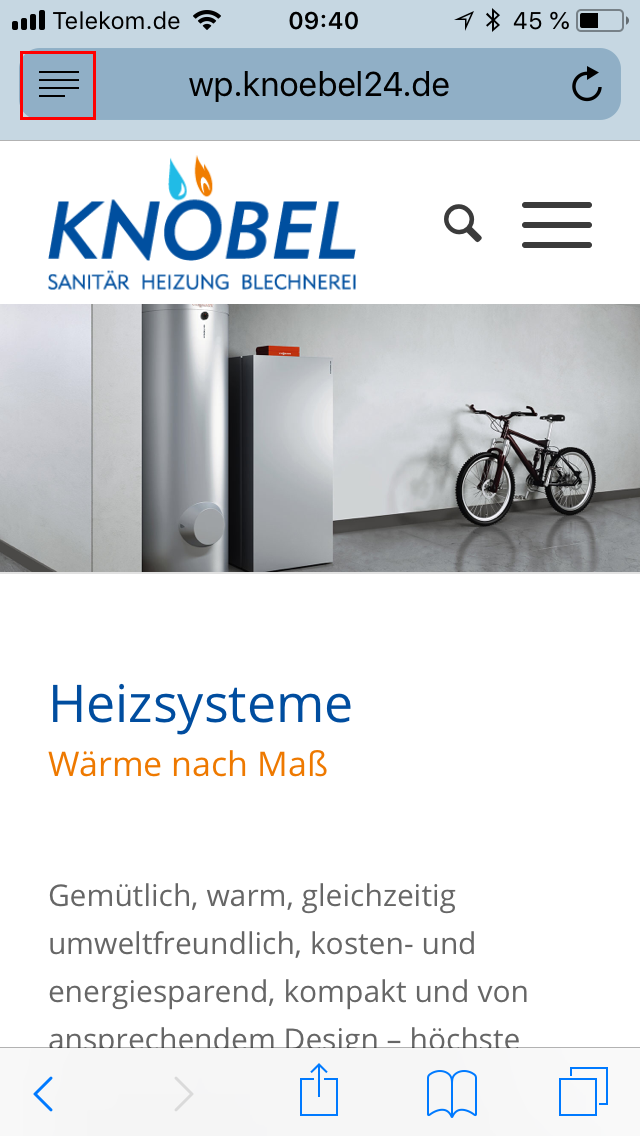
http://wp.knoebel24.de/iPhone-normal-view.png
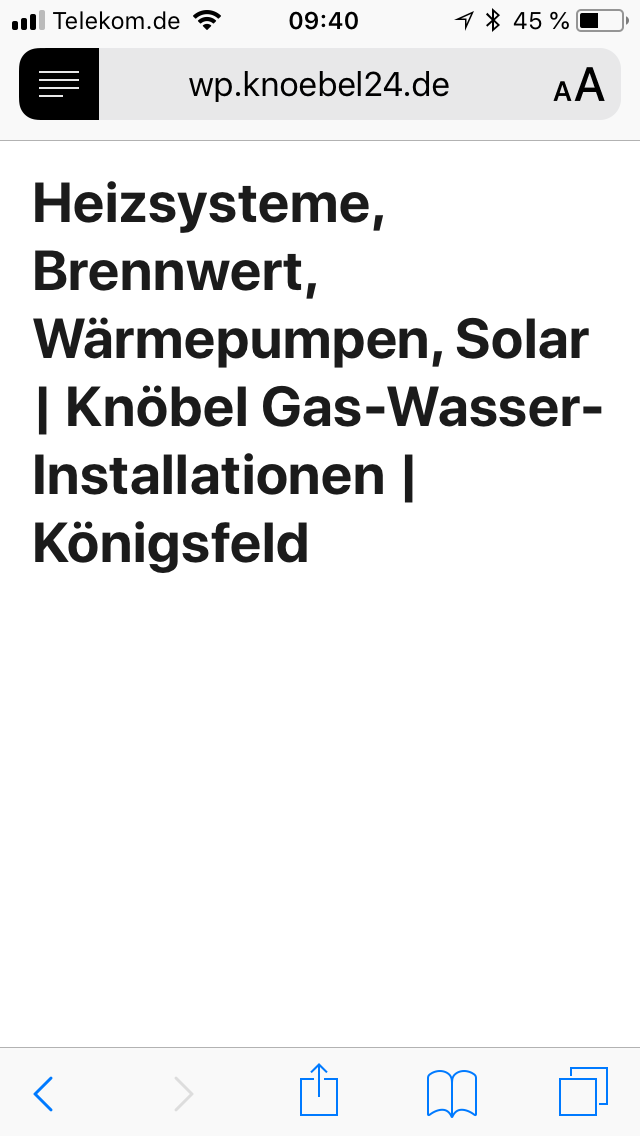
http://wp.knoebel24.de/iPhone-reader-view.png
On many websites, the browser offers a button on the top left (framed in red), which allows you to switch to the Reader view. Then usually comes a pure read view of the web page that ignores the CSS.
Unfortunately this does not work with the enfold theme, as you can see on the second screenshot. There comes only the title of the website, rather than the content. On some pages, but also comes the first headline or the first block of text. It works fine on WordPress pages with other themes.
Actually, the reader view is useful, e.g. for the visually impaired. So if you can figure out how the content area has to be structured for that, that would be great.
If necessary, I would do without the Reader View Button if it does not work anyway. On the enfold demo page you managed that somehow that the Reader View Button does not appear on any page:
How did you do that?
Best regards
Stephan
Hi
Love the theme! Keep up the great work…
As previous I have tried to experiment with color sections as they give more functionality than grids but when I add titles, text or buttons they do not show
I’m typically using Chrome but this is also the case in Safari
I don’t have an active page with color sections as they don’t work but could create a draft for you?
I’m on WP 4.9.8 & Enfold 4.4.1
Many thanks
Paul
Hi sparkzilla,
Here is the code you can put in Enfold > General Styling > Quick Css, if it does not work, put into themes/enfold/css/custom.css
@media only screen and (max-width: 767px) {
  #full_slider_1,
  #full_slider_1 .av_slideshow_full.avia-slideshow,
  #full_slider_1  .avia-slideshow-inner,
  #full_slider_1 .avia-slideshow li,
  #full_slider_1 .avia-slideshow li img {
    min-height: 220px;
  }
  #full_slider_1 .avia-slideshow li img {
    width: 140%;
  }
  .slideshow_inner_caption {
      height: 36%;
      top: 10%;
  }
  #top .avia-slideshow-button.avia-color-light {
      padding: 3px 6px;
      margin-top: 5px;
  }
  #top #wrap_all .avia-slideshow-button {
      font-size: 14px;
      line-height: 1.3em;
  }
}
If you need further assistance please let us know.
Best regards,
Victoria