Viewing 30 results - 361 through 390 (of 2,320 total)
  • Author
    Search Results
  • #1295733
    stockpilot
    Participant

    Hallo, ich möchte beim Symbolraster die Animation entfernen, also den Raster nur als Bild mit Untertitel nutzen. Sollte es einen Custom CCS Code geben, wo kann ich diesen einfügen? Besten Dank für die Hilfe.
    Mit freundlichen Grüßen
    Bernd

    Hi,

    Thanks for the clarification. Please try the following in Quick CSS under Enfold->General Styling:

    @media only screen and (max-width: 767px) {
    .av-hotspot-fallback-tooltip-inner {
        width: 80%;
        max-width: 80%;
    }
    }

    Best regards,
    Rikard

    Hi beppemodena,

    Can you try to edit the Google Map element and in each of the location, please try to put some text in Marker Tooltip
    Let us know if this helps.

    Best regards,
    Nikko

    #1291932

    Hi,

    Thank you for the update.

    Did you follow the suggestion in the following thread?

    // https://kriesi.at/support/topic/partnerlogo-element-no-tooltip-but-fixed-text-under-the-picture/#post-1290582

    To style the caption, change its color or size, you can use the following css.

    .custom-caption {
      color: red;
      font-size: 12px;
    }

    Best regards,
    Ismael

    #1291792

    Hello Enfold Team,
    i work with the theme for years now and french translation was less and less good, so i pushed yesterday on Github new complete files for french.
    I also notice some string broken with apostrophe / single quote in tooltips hover ALB elements and in some toggles titles in modal windows of ALB elements, probably an escape needed in backend rendering.
    Best regards

    #1291592
    JaneJoyce
    Participant

    Hello!
    I am setting up a new home page on an existing website. The site already uses portfolio grids extensively as news and project indexes. To differentiate news from projects, I have disabled the on-hover effect that would lay titles over grid items, and used a mixture of styled titles and excerpts to overlay text on images (fixed, not on-hover).

    For the new home page, I’m trying to restore some kind of rollover/hover effect for the items on the new page only. In the olden days, I would have done it with Javascript. Is there any other way I can get a hover text to appear for easysliders/blog-post-sliders and single images?

    Would it be possible, for example, to modify the on-hover-disabling code so that it was ignored for the new home page? The page ID is 13085. The disabling code (in functions.php) is …. (it came from https://kriesi.at/support/topic/hide-tooltips-on-gallery-images/)

    function add_custom_tooltip(){
    ?>
    <script>
    jQuery(window).load(function(){
    jQuery(‘a’).removeAttr(‘title’);
    jQuery(‘img’).removeAttr(‘title’);
    });
    </script>
    <?php
    }
    add_action(‘wp_footer’, ‘add_custom_tooltip’);

    Many thanks

    Jane Joyce

    #1290795

    In reply to: Text tooltip problem

    Hi,
    Sorry for the very late reply and thanks for the login, on the Advanced Layout Builder test page where the plugin didn’t work the text was not a link, nor did it include the link class and tooltip text, to add this please try using the “text” tab in the editor instead of the “visual” tab and write you link in this format:

    <a href="https://www.i4maturity.com/glossary/epicinnolabs/" data-cmtooltip="<p>EpicInnoLabs: a Fraunhofer – SZTAKI (Hungarian Institute for Computer Sciences) company</p>" class="glossaryLink ">EpicInnoLabs</a>

    I made this change for you on the test page, please review.

    Best regards,
    Mike

    Hi Vlad,

    This code worked fine for me – instead of the seventh, I´ve changed that to sixth for you. In the partner/logo tool you have to choose also 6 columns.

    add_action('wp_footer', 'ava_new_custom_script');
    function ava_new_custom_script(){
    ?>
    <script type="text/javascript">
    (function($) {
    	$(window).load(function() {
    		jQuery(".slide-entry.av_one_sixth").each(function() {
    			var el = jQuery(this);
    			el.append("<span class='custom-caption'>" + el.attr("data-avia-tooltip") + "</span>");
                            el.attr("data-avia-tooltip", "");
    		});
    	});
    })(jQuery);
    </script>
    <?php
    }

    If you put now something into the caption field, the text is under the logo. You can change the design of the text by editing “Enfold > General Styling > Quick Css”:

    .custom-caption {
       width: 100%;
        text-align: center;
        display: inline-block;
    }

    I don´t know what you´re meaning with article links, because I can only put a link to the logo.
    Best regards,
    Ela

    #1290576
    DouPaule
    Participant

    I started the thread and another user can decide that my issue is solved and that the thread can be closed???
    https://kriesi.at/support/topic/surpress-disable-tooltip/

    #1289851

    In reply to: Text tooltip problem

    Hi Victoria,

    Thanks, although I’d like to use the tooltip in an Avia Layout Builder page. The default editor does not allow the styling I need for this page: http://www.i4maturity.com

    Yes, I thought that was a javascript conflict. But I’d be happy to solve that. I tried a couple of tooltip plugins, all has the same problem. Something in Avia breaks the code.

    Now “CM Tooltip Glossary” plugin is set. I think we can solve this with deactivating some part of the Avia script. Can you please take a look an advise what could possibly cause the problem.

    The log in info is in the private part below.

    Thanks!

    #1289460

    In reply to: Text tooltip problem

    Hey futureworksgabor,

    There can be a JavaScript conflict and so it’s better to use it with the default editor.

    The tooltip-test-2 looks empty and so we cannot check the issue.

    Best regards,
    Victoria

    #1288994

    Topic: Text tooltip problem

    in forum Enfold
    futureworksgabor
    Participant

    Hi,

    I try to use a simple tooltip plugin on Enfold. This works fine when I create the page in default editor:

    But does not when I create the page in Avia Layout Builder:

    And of course I would work in Avia Layout Builder.
    The plugin is: https://www.cminds.com/wordpress-plugins-library/tooltipglossary/

    Seems like Avia removes some javascripts. Is that avoidable? Can you advise?

    Thanks!

    Hey cvanberkel,
    Sorry for the late reply, and thanks for the link to the solution you are trying, thanks for the login but I can’t access the wp-admin page, are you blocking IPs from the US? Anyways, I checked this solution on your homepage by injecting it via the browser (testing)
    Please see the screenshot in the Private Content area.
    Is this what you were hoping for?

    Best regards,
    Mike

    #1286549

    My client has been persuaded to keep the tooltip
    Thanks @Guenni007

    #1286532

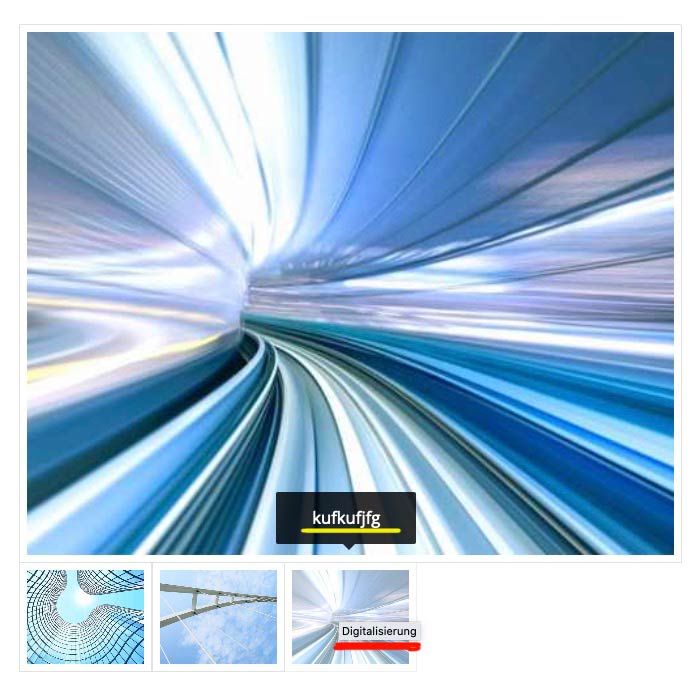
    ok – you mean this enfold feature ( yellow underlined in the image) not the tooltip ( red-underlined)

    #1286527

    Thanks @Guenni007, but wasn’t my wish the same as the wish described by @DouPaule? Regarding Namet tag tooltip removal? @Rikard?

    #1286522

    the tooltip over links and images are not influenced by enfold – these are fundamental Settings of browsers to show a tooltip if a title tag is present.

    You can remove the title attribute – but is it advisable to do so from an SEO point of view?
    Put this to your child-theme functions.php:

    function remove_title_attr(){
    if(is_single(29041)) {
    ?>
    <script>
    (function($) {
    	$(window).on('load', function(){
    		$('#wrap_all a').removeAttr('title');
    		$('#wrap_all img').removeAttr('title');
    	});
    })(jQuery);
    </script>
    <?php
    }
    }
    add_action('wp_footer', 'remove_title_attr');
    #1286505

    Hi, I have used the mentioned code in Quick CSS

    .avia-tooltip {
       display: none !important;
    }

    but the tooltip is still showing, for example on hovering the thumb images at: https://houraway.webstar.si/ljubljlana-mountain-biking/
    Each image has both alt and name entered.
    I have entered the access data for you below

    Hey Brendan!
    put the following code into the functions.php of your Child Theme and you’re able to use the Advanced Layout Builder not only on pages, but on your Blog Posts too.

    /*Use Advanced Builder on Posts*/
    add_theme_support('add_avia_builder_post_type_option');
    add_filter('avf_builder_boxes','enable_boxes_on_posts');
    function enable_boxes_on_posts($boxes) {
    	$boxes[] = array( 'title' =>__('Avia Layout Builder','avia_framework' ), 'id'=>'avia_builder', 'page'=>array('page','post', 'portfolio'), 'context'=>'normal', 'expandable'=>true );
    	$boxes[] = array( 'title' =>__('Layout','avia_framework' ), 'id'=>'layout', 'page'=>array('page','post', 'portfolio'), 'context'=>'side', 'priority'=>'low');
    	$boxes[] = array( 'title' =>__('Additional Portfolio Settings','avia_framework' ), 'id'=>'preview', 'page'=>array('page','post','portfolio'), 'context'=>'normal', 'priority'=>'high' );
    	
    	return $boxes;
    }
    
    function enfold_post_nav_settings($settings) {
    	if(is_singular('portfolio')) {
    	   $settings['is_fullwidth'] = false;
    	   $settings['skip_output'] = false;
    	}
    	return $settings;
    }
    add_filter('avf_post_nav_settings','enfold_post_nav_settings', 999, 1);
    
    /*Remove Tooltips in Masonry Gallery*/
    function add_custom_tooltip(){
    ?>
    <script>
    jQuery(window).load(function(){
    jQuery('a').removeAttr('title');
    jQuery('img').removeAttr('title');
    });
    </script>
    <?php
    }
    add_action('wp_footer', 'add_custom_tooltip');
    
    // add tag support to pages
    function tags_support_all() {
    register_taxonomy_for_object_type('post_tag', 'page');
    }
    
    // ensure all tags are included in queries
    function tags_support_query($wp_query) {
    if ($wp_query->get('tag')) $wp_query->set('post_type', 'any');
    }
    
    // tag hooks
    add_action('init', 'tags_support_all');
    add_action('pre_get_posts', 'tags_support_query');
    cvanberkel
    Participant

    I also want do display text under picture in partner logo element. Used the code from https://kriesi.at/support/topic/partnerlogo-element-no-tooltip-but-fixed-text-under-the-picture/, but its not working. I added the code to my child theme, but is looks like the script is not added. Maybe theres something wrong in my child theme. Pleas help.

    Hi Victoria
    This is not working for me…
    In a earlier thread Ismael helped me and found the “bug”in the countdown php-file:
    <?php
    /**
    * Events Countdown
    *
    * Display a countdown to the next upcoming event
    */
    if ( ! defined( ‘ABSPATH’ ) ) { exit; } // Exit if accessed directly

    if( ! class_exists( ‘Tribe__Events__Main’ ) )
    {
    if( ! function_exists( ‘av_countdown_events_fallback’ ) )
    {
    function av_countdown_events_fallback()
    {
    return “<p>Please install the The Events Calendar or The Events Calendar Pro Plugin to display the countdown</p>”;
    }

    add_shortcode( ‘av_events_countdown’, ‘av_countdown_events_fallback’ );
    }

    return;
    }

    if ( ! class_exists( ‘avia_sc_events_countdown’ ) )
    {

    class avia_sc_events_countdown extends aviaShortcodeTemplate
    {

    /**
    *
    * @var array
    */
    protected $time_array;

    /**
    * UTC startdate of first event
    *
    * @since 4.5.6
    * @var string
    */
    protected $start_date_utc;

    /**
    *
    * @since 4.2.1
    */
    public function __destruct()
    {
    parent::__destruct();

    unset( $this->time_array );
    }

    /**
    * Create the config array for the shortcode button
    */
    function shortcode_insert_button()
    {
    /**
    * inconsistent behaviour up to 4.2: a new element was created with a close tag, after editing it was self closing !!!
    * @since 4.2.1: We make new element self closing now because no id=’content’ exists.
    */
    $this->config[‘self_closing’] = ‘yes’;
    $this->config[‘version’] = ‘1.0’;

    $this->config[‘name’] = __( ‘Events Countdown’, ‘avia_framework’ );
    $this->config[‘tab’] = __( ‘Plugin Additions’, ‘avia_framework’ );
    $this->config[‘icon’] = AviaBuilder::$path[‘imagesURL’] . ‘sc-countdown.png’;
    $this->config[‘order’] = 14;
    $this->config[‘target’] = ‘avia-target-insert’;
    $this->config[‘shortcode’] = ‘av_events_countdown’;
    $this->config[‘tooltip’] = __( ‘Display a countdown to the next upcoming event’, ‘avia_framework’ );
    $this->config[‘disabling_allowed’] = true;
    $this->config[‘id_name’] = ‘id’;
    $this->config[‘id_show’] = ‘yes’;
    $this->config[‘alb_desc_id’] = ‘alb_description’;

    $this->time_array = array(
    __( ‘Second’, ‘avia_framework’ ) => ‘1’,
    __( ‘Minute’, ‘avia_framework’ ) => ‘2’,
    __( ‘Hour’, ‘avia_framework’ ) => ‘3’,
    __( ‘Day’, ‘avia_framework’ ) => ‘4’,
    __( ‘Week’, ‘avia_framework’ ) => ‘5’,
    /*
    __( ‘Month’, ‘avia_framework’ ) =>’6′,
    __( ‘Year’, ‘avia_framework’ ) =>’7′
    */
    );

    $this->start_date_utc = ”;
    }

    function extra_assets()
    {
    //load css
    wp_enqueue_style( ‘avia-module-countdown’, AviaBuilder::$path[‘pluginUrlRoot’] . ‘avia-shortcodes/countdown/countdown.css’, array( ‘avia-layout’ ), false );

    //load js
    wp_enqueue_script( ‘avia-module-countdown’, AviaBuilder::$path[‘pluginUrlRoot’] . ‘avia-shortcodes/countdown/countdown.js’, array( ‘avia-shortcodes’ ), false, true );
    }

    /**
    *
    * @since < 4.0
    * @param int $offset
    * @param int $query_fix
    * @param string $categories
    * @return WP_Query
    */
    protected function fetch_upcoming( $offset = 0, $query_fix = 0, $categories = ” )
    {
    $start_date = date( ‘Y-m-d’, mktime( 0, 0, 0, date( ‘m’ ), date( ‘d’ ) – $query_fix, date( ‘Y’ ) ) );

    $terms = ( ! empty( $categories ) ) ? explode( ‘,’, $categories ) : array();

    $query = array(
    ‘paged’ => 1,
    ‘posts_per_page’ => 1,
    ‘eventDisplay’ => ‘list’,
    ‘offset’ => $offset,
    ‘start_date’ => $start_date
    );

    if( isset( $terms[0] ) && ! empty( $terms[0] ) && ! is_null( $terms[0] ) && $terms[0] != ‘null’ )
    {
    $query[‘tax_query’] = array(
    array( ‘taxonomy’ => Tribe__Events__Main::TAXONOMY,
    ‘field’ => ‘id’,
    ‘terms’ => $terms,
    ‘operator’ => ‘IN’
    )
    );

    }

    $upcoming = Tribe__Events__Query::getEvents( $query, false );

    return $upcoming;
    }

    /**
    *
    * @since < 4.0
    * @param WP_Query $next
    * @return boolean
    */
    protected function already_started( Array $next )
    {
    $this->start_date_utc = ”;

    // backwards compatibility
    if( empty( $next[0]->event_date_utc ) && empty( $next[0]->event_date ) )
    {
    return true;
    }

    /**
    * Compare UTC times ( https://www.php.net/manual/en/function.time.php#100220 )
    */
    $today = date( ‘Y-m-d H:i:s’ );
    $this->start_date_utc = get_post_meta( $next[0]->ID, ‘_EventStartDateUTC’, true );

    if( empty( $this->start_date_utc ) )
    {
    return true;
    }

    if( $today < $this->start_date_utc )
    {
    return false;
    }

    return true;
    }

    /**
    * Popup Elements
    *
    * If this function is defined in a child class the element automatically gets an edit button, that, when pressed
    * opens a modal window that allows to edit the element properties
    *
    * @return void
    */
    function popup_elements()
    {

    $this->elements = array(

    array(
    ‘type’ => ‘tab_container’,
    ‘nodescription’ => true
    ),

    array(
    ‘type’ => ‘tab’,
    ‘name’ => __( ‘Content’, ‘avia_framework’ ),
    ‘nodescription’ => true
    ),
    array(
    ‘type’ => ‘template’,
    ‘template_id’ => $this->popup_key( ‘content_countdown’ )
    ),

    array(
    ‘type’ => ‘tab_close’,
    ‘nodescription’ => true
    ),

    array(
    ‘type’ => ‘tab’,
    ‘name’ => __( ‘Styling’, ‘avia_framework’ ),
    ‘nodescription’ => true
    ),

    array(
    ‘type’ => ‘template’,
    ‘template_id’ => ‘toggle_container’,
    ‘templates_include’ => array(
    $this->popup_key( ‘styling_general’ ),
    $this->popup_key( ‘styling_colors’ )
    ),
    ‘nodescription’ => true
    ),

    array(
    ‘type’ => ‘tab_close’,
    ‘nodescription’ => true
    ),

    array(
    ‘type’ => ‘tab’,
    ‘name’ => __( ‘Advanced’, ‘avia_framework’ ),
    ‘nodescription’ => true
    ),

    array(
    ‘type’ => ‘toggle_container’,
    ‘nodescription’ => true
    ),

    array(
    ‘type’ => ‘template’,
    ‘template_id’ => $this->popup_key( ‘advanced_heading’ )
    ),

    array(
    ‘type’ => ‘template’,
    ‘template_id’ => ‘screen_options_toggle’
    ),

    array(
    ‘type’ => ‘template’,
    ‘template_id’ => ‘developer_options_toggle’,
    ‘args’ => array( ‘sc’ => $this )
    ),

    array(
    ‘type’ => ‘toggle_container_close’,
    ‘nodescription’ => true
    ),

    array(
    ‘type’ => ‘tab_close’,
    ‘nodescription’ => true
    ),

    array(
    ‘type’ => ‘tab_container_close’,
    ‘nodescription’ => true
    )

    );

    }

    /**
    * Create and register templates for easier maintainance
    *
    * @since 4.6.4
    */
    protected function register_dynamic_templates()
    {

    /**
    * Content Tab
    * ===========
    */

    $c = array(
    array(
    ‘name’ => __( ‘Which Entries?’, ‘avia_framework’ ),
    ‘desc’ => __( ‘Select one or more taxonomies to get the next event for countdown. If none are selected all events are used.’, ‘avia_framework’ ),
    ‘id’ => ‘categories’,
    ‘type’ => ‘select’,
    ‘taxonomy’ => Tribe__Events__Main::TAXONOMY,
    ‘subtype’ => ‘cat’,
    ‘multiple’ => 6
    ),

    array(
    ‘name’ => __( ‘Display Event Title?’, ‘avia_framework’ ),
    ‘desc’ => __( ‘Choose here, if you want to display the event title’, ‘avia_framework’ ),
    ‘id’ => ‘title’,
    ‘type’ => ‘select’,
    ‘std’ => ”,
    ‘subtype’ => array(
    __( ‘No Title, timer only’, ‘avia_framework’ ) => ”,
    __( ‘Title on top’, ‘avia_framework’ ) => ‘top’,
    __( ‘Title below’, ‘avia_framework’ ) => ‘bottom’,
    )
    ),

    array(
    ‘name’ => __( ‘Smallest time unit’, ‘avia_framework’ ),
    ‘desc’ => __( ‘The smallest unit that will be displayed’, ‘avia_framework’ ),
    ‘id’ => ‘min’,
    ‘type’ => ‘select’,
    ‘std’ => ‘1’,
    ‘subtype’ => $this->time_array
    ),

    array(
    ‘name’ => __( ‘Largest time unit’, ‘avia_framework’ ),
    ‘desc’ => __( ‘The largest unit that will be displayed’, ‘avia_framework’ ),
    ‘id’ => ‘max’,
    ‘type’ => ‘select’,
    ‘std’ => ‘5’,
    ‘subtype’ => $this->time_array
    ),

    array(
    ‘name’ => __( ‘Problems with next upcoming event incorrect?’, ‘avia_framework’ ),
    ‘desc’ => __( ‘Sometimes the next upcoming event is not queried correctly. This is a known bug. In this case select a number of days to start the query before today. Usually 3-4 days should fix the problem.’, ‘avia_framework’ ),
    ‘id’ => ‘query_fix’,
    ‘type’ => ‘select’,
    ‘std’ => ‘0’,
    ‘subtype’ => AviaHtmlHelper::number_array( 1, 30, 1, array( __( ‘No problems’, ‘avia_framework’ ) => ‘0’) )
    ),

    );

    AviaPopupTemplates()->register_dynamic_template( $this->popup_key( ‘content_countdown’ ), $c );

    $c = array(
    array(
    ‘name’ => __( ‘Text Alignment’, ‘avia_framework’ ),
    ‘desc’ => __( ‘Choose here, how to align your text’, ‘avia_framework’ ),
    ‘id’ => ‘align’,
    ‘type’ => ‘select’,
    ‘std’ => ‘av-align-center’,
    ‘subtype’ => array(
    __( ‘Center’, ‘avia_framework’ ) => ‘av-align-center’,
    __( ‘Right’, ‘avia_framework’ ) => ‘av-align-right’,
    __( ‘Left’, ‘avia_framework’ ) => ‘av-align-left’,
    )
    ),

    array(
    ‘name’ => __( ‘Number Font Size’, ‘avia_framework’ ),
    ‘desc’ => __( ‘Size of your numbers in Pixel’, ‘avia_framework’ ),
    ‘id’ => ‘size’,
    ‘type’ => ‘select’,
    ‘std’ => ”,
    ‘subtype’ => AviaHtmlHelper::number_array( 20, 90, 1, array( __( ‘Default Size’, ‘avia_framework’ ) => ” ) ),
    ),

    );

    $template = array(
    array(
    ‘type’ => ‘template’,
    ‘template_id’ => ‘toggle’,
    ‘title’ => __( ‘Text Settings’, ‘avia_framework’ ),
    ‘content’ => $c
    ),
    );

    AviaPopupTemplates()->register_dynamic_template( $this->popup_key( ‘styling_general’ ), $template );

    $c = array(
    array(
    ‘name’ => __( ‘Colors’, ‘avia_framework’ ),
    ‘desc’ => __( ‘Choose the colors here’, ‘avia_framework’ ),
    ‘id’ => ‘style’,
    ‘type’ => ‘select’,
    ‘std’ => ‘av-default-style’,
    ‘subtype’ => array(
    __( ‘Default’, ‘avia_framework’ ) => ‘av-default-style’,
    __( ‘Theme colors’, ‘avia_framework’ ) => ‘av-colored-style’,
    __( ‘Transparent Light’, ‘avia_framework’ ) => ‘av-trans-light-style’,
    __( ‘Transparent Dark’, ‘avia_framework’ ) => ‘av-trans-dark-style’,
    )
    ),
    );

    $template = array(
    array(
    ‘type’ => ‘template’,
    ‘template_id’ => ‘toggle’,
    ‘title’ => __( ‘Colors’, ‘avia_framework’ ),
    ‘content’ => $c
    ),
    );

    AviaPopupTemplates()->register_dynamic_template( $this->popup_key( ‘styling_colors’ ), $template );

    $c = array(
    array(
    ‘type’ => ‘template’,
    ‘template_id’ => ‘heading_tag’,
    ‘theme_default’ => ‘h3’,
    ‘required’ => array( ‘title’, ‘not’, ” ),
    ‘context’ => __CLASS__
    ),

    );

    $template = array(
    array(
    ‘type’ => ‘template’,
    ‘template_id’ => ‘toggle’,
    ‘title’ => __( ‘Heading Tag’, ‘avia_framework’ ),
    ‘content’ => $c
    ),
    );

    AviaPopupTemplates()->register_dynamic_template( $this->popup_key( ‘advanced_heading’ ), $template );

    }

    /**
    * Frontend Shortcode Handler
    *
    * @param array $atts array of attributes
    * @param string $content text within enclosing form of shortcode element
    * @param string $shortcodename the shortcode found, when == callback name
    * @return string $output returns the modified html string
    */
    public function shortcode_handler( $atts, $content = ”, $shortcodename = ”, $meta = ” )
    {
    $meta = aviaShortcodeTemplate::set_frontend_developer_heading_tag( $atts, $meta );

    $atts = array_merge ( array(
    ‘categories’ => ”,
    ‘min’ => ‘1’,
    ‘max’ => ‘5’,
    ‘align’ => ‘av-align-center’,
    ‘size’ => ”,
    ‘title’ => ”,
    ‘query_fix’ => ‘0’,
    ‘heading_tag’ => $meta[‘heading_tag’],
    ‘heading_class’ => $meta[‘heading_class’],
    ), $atts );

    $find_post = true;
    $offset = 0;

    while( $find_post )
    {
    $next = $this->fetch_upcoming( $offset, $atts[‘query_fix’], $atts[‘categories’] );

    $offset ++;

    if( empty( $next[0] ) || ! $this->already_started( $next ) )
    {
    $find_post = false;
    }
    }

    if( ! empty( $next[0]->event_date_utc ) )
    {
    // backwards compatibility
    $event_date = $next[0]->event_date_utc;
    }
    else if( ! empty( $next[0]->event_date ) )
    {
    $event_date = $next[0]->event_date;
    }
    else
    {
    $event_date = ”;
    }

    if( empty( $next[0] ) || empty( $event_date ) || empty( $this->start_date_utc ) )
    {
    return ”;
    }

    $events_date = explode( ‘ ‘, $this->start_date_utc );

    if( isset( $events_date[0] ) )
    {
    $atts[‘date’] = date( ‘m/d/Y’, strtotime( $events_date[0] ) );
    }

    if( isset( $events_date[1] ) )
    {
    $events_date = explode( ”, $events_date[1] );
    $atts[‘hour’] = $events_date[0];
    $atts[‘minute’] = $events_date[1];
    }

    $atts[‘link’] = get_permalink( $next[0]->ID );
    $title = get_the_title( $next[0]->ID );

    if( ! empty( $atts[‘title’] ) )
    {
    $atts[‘title’] = array( $atts[‘title’] => __( ‘Upcoming’,’avia_framework’ ) . ‘: ‘ . $title );
    }

    $atts[‘timezone’] = ‘UTC’;

    $timer = new avia_sc_countdown( $this->builder );
    $output = $timer->shortcode_handler( $atts, $content, $shortcodename, $meta );

    return $output;
    }
    }
    }

    Could you telle me where i can repare the bug or something that can help to make the countdown as well as the upcoming events are visible again?
    Greetz
    Karin

    #1283564

    Hi,

    Yes, that is one way of doing it. But you have to include the post ID class before the other class, like so:

    .postid-29041 .avia-tooltip { 
      display: none; 
    }

    Best regards,
    Rikard

    #1283495

    Hi Victoria, our designer tried that, he said it removes the title attribute on the link, not the image. Just for clarity, this is what we would like to remove:

    http://capblog.raisonbrandsdev.com/wp-content/uploads/2021/02/Tooltip-scaled.jpg

    #1283061

    OK, i already found it:
    .avia-tooltip { display: none !important; }

    Is there a way to say:
    Disable avia tooltip ONLY on pageXY
    I guess yes cause every URL has a specific post-ID and a page type.
    Is the right way this?
    .avia-tooltip postid-29041 { display: none !important; }

    (i am not so confident with CSS)

    #1283058
    DouPaule
    Participant

    Hi @Mike
    how can i disable the tooltip (black box with metadata showing up when hovering over an image) in:
    – Normal Gallery
    – Gallery (one big image, thumbnails below)

    Reason:
    – When having images from a same object it shows the same metadata and that looks bad for a user
    – When using the gallery “Big image, thumbnails below” the tooltip covers the big image and that is something you should fix anyway

    kind regards
    Christian

    #1282851
    rmatus
    Participant

    Is there a way to change the size of the clickable area in an image hotspot?

    I have a map. I am NOT showing any tooltips. And, the pulses are transparent. The person needs to click on the name of plot of land and then will go to the specific area. What I would like to do is pretty much double or triple the size of the clickable area to make it easier to find and click.

    Please see the “Site Map” at http://wsbp.wpengine.com/sites/. (hosted on WPengine)

    Thank you.

    #1282443

    Hey raisonbrands,

    I did not see the tooltips on the home page. Where can we see the issue?

    Best regards,
    Victoria

    #1282322
    raisonbrands
    Participant

    Hi, when you hover over a masonry blog post, the title of the image pops up on the tooltip.

    Can we turn this off? I looked at other threads and they do not seem to apply anymore. The only solution we could come up with is removing the title from the media library, which seems weird.

    Any help would be appreciated, thanks!

    #1282217

    Hi,

    Thank you for the update.

    Try to add this css code to create more space for the icon and the title.

    .avia-icongrid-tooltip li .avia-icongrid-front {
    	padding: 0;
    }

    Make sure to include it inside the css media query that we created above. And to increase the size of the icon, try to adjust this css code.

    .avia-icongrid-icon {
    	font-size: 18px;
    	line-height: 1;
    	margin-bottom: 0.5em;
    	color: initial;
    }
    

    Increase the font-size from 18px to 30px or to any value that you prefer.

    Best regards,
    Ismael

    #1281741

    Hey wppoland,

    Thank you for the inquiry.

    This is possible but we have to modify the enfold\framework\js\conditional_load\avia_google_maps_api.js file directly, look for this code around line

    var size = _self.$data.marker[key].imagesize, half = "", full = "";
    
    if(_self.retina && size > 40) size = 40;			//retina downsize to at least half the px size
    

    Below, we can define the size manually. Example:

    size = 120;
    

    Or try to upload a Custom Map Marker Image and set the Custom Map Marker Image Size size manually. These settings are in the Content > Marker & Tooltip section of the Google Map element’s map locations.

    Best regards,
    Ismael

Viewing 30 results - 361 through 390 (of 2,320 total)