hello, those 4 images in the gallery looked alright in a gallery where i have chosen portfolio (495×400).
but on a mobile there are not lining. Probably because the thumbs are not all exactly 495×400, but just a little different from eachother.
https://jmcwebdesign.nl/wp-content/uploads/2021/03/Screenshot_20210323-102734_Chrome.jpg
what to make them line on a mobile? (or sometimes also on a pc)
Enfold is a great theme, but the gallery thumbnails is always an issue.
For example: to resovle the problem above i choose 180×180 again, because thats the only choice the thumbs wil line and not skip.
As soon as i choose 300×300 they are square but not lining, and as soon i choose Portfolio 495×400 there is the same problem.
(NB: disadvantage of 180×180 compared to 300×300 is that 180 x 180 is more vague, not so sharp , if you have for example only a row of two pics).
It might have something to do with the original sizes of the images , but why cant this be detached from each other?
Let the thumbs be exaclty the size in the options list – let it crop the pic how much it wants.In that way it will always line.
Whatever youll see once youve clicked on it/whatever the size of the big pic is – small, big, rectangle, square – doesnt matter.
Why is the thumb-sizes not what they promise to be in the options list?
best regards, jelle
-
This topic was modified 5 years ago by
 yampieters.
Just curious, when post a link to my site built on Enfold, the link does not display a thumbnail on Twitter for example. Is there a setting to turn on like “Twitter Cards” etc?
Hey Guys,
Sorry to throw another gallery related issue your way, but on Chrome and Edge (and likely any other Chromium based browser) there is a problem with the thumbnails layout using the ALB gallery element. I can’t seem to reproduce it in Safari.
You can see it in the screenshot linked to below. And you can test it in Chrome using the domain below as well (any of the galleries, it happens to them all). Sometimes the page will load ok, but rarely. Most times it has the layout quirk, and if you reload the page it seems to make it worse on each reload.
It’s not only a problem with this particular domain, another of our clients using Enfold has had the same issue, on different hosting.
I have deactivated all plugins, flushed cache, and all Enfold’s performance settings are turned off and it still happens.
I look forward to your thoughts.
Regards,
Tim
-
This topic was modified 5 years ago by
 THP Studio.
Hi,
I went to Appearance > Customize > WooCommerce > Product Images and set them to 300px and regenerated thumbnails however it did not work.
Could you please update Enfold to the latest version 4.8.1 and check if that helps?
Best regards,
Yigit
Hi
i get the following error:
Fatal error: Unparenthesized a ? b : c ? d : e is not supported. Use either (a ? b : c) ? d : e or a ? b : (c ? d : e) in /homepages/44/d40871808/htdocs/wwwneu/wp-content/themes/enfold/functions-enfold.php on line 293
Did someone have the same error?
Here is line 293 from my enfold functions:
foreach($post_type as $post)
{
$image = get_the_post_thumbnail( $post->ID, ‘thumbnail’ );
$extra_class = $image ? “with_image” : “”;
$post_type = $image ? “” : get_post_format($post->ID) != “” ? get_post_format($post->ID) : “standard”;
$iconfont = $image ? “” : av_icon_string($post_type);
$excerpt = “”;
if(!empty($post->post_excerpt))
{
$excerpt = apply_filters( ‘avf_ajax_search_excerpt’, avia_backend_truncate($post->post_excerpt,70,” “,”…”, true, ”, true) );
}
else
Php is PHP 7.4
Cheers
dezi
-
This topic was modified 5 years ago by
 dezomat2.
“You can put the shortcode inside a Code Block.”
I did and I’m still having problems. I put:
[pdfviewer]https://actionrev.com/wp-content/uploads/2021/03/Actionrev-Brochure-OnWeb.pdf[/pdfviewer]
[pdfviewer width=”200%” height=”200%” beta=”false”]https://actionrev.com/wp-content/uploads/2021/03/Actionrev-Brochure-OnWeb.pdf[/pdfviewer]
into the top part of Code Block.
The PDF shows up twice at the bottom of the page but they are in small frames that don’t allow for the full pages to be seen. One frame is wide but really shallow. The other is really skinny and shallow.
Let me recap the problem I have. I just need for the audience to zoom into a 2500 x 2500 image to read small text in a spreadsheet. They need to be able to scroll left, right, up, and down if they zoom in a lot. I prefer it to be a thumbnail image as it is now, when clicked it zooms, and then can be zoomed one more time to see the text. If I can only get that from a PDF then so be it…
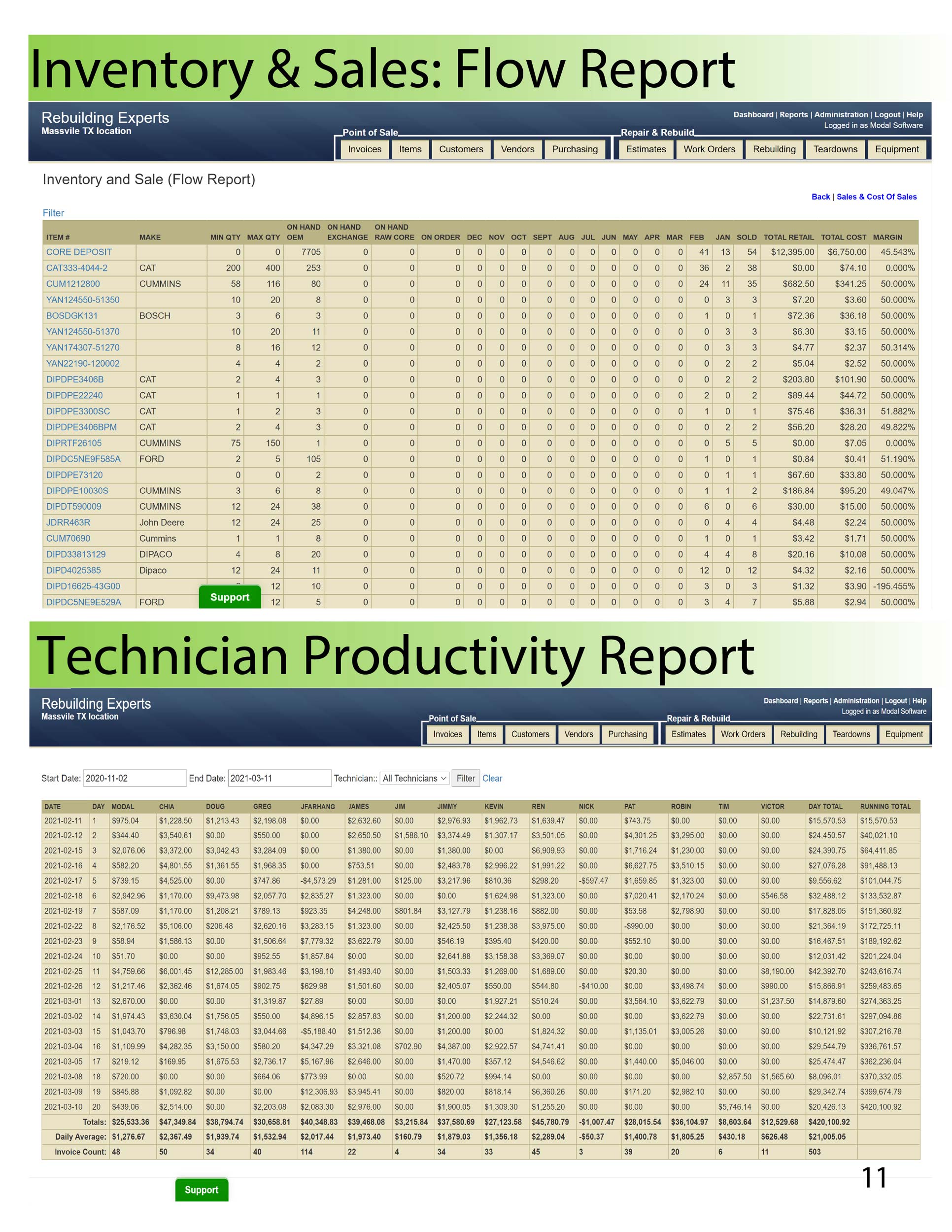
Zoom was not realized. This image https://actionrev.com/wp-content/uploads/2021/03/Flow_Technician_Productivity_Report2500x1932.jpg in Masonry Gallery is 1936x2500px but because a screen is 1920 by 1080 the fine text is not viewable unless I open the Masonry Gallery on a 4k screen. I’m wondering if there’s a way to have a pop-up image with an additional zoom after it has popped up? Scrolling up, down, left, and right is fine also.
“did you use the full resolution images for the lightbox?
on default it is not that case. It uses the large image for it. – There are some snippets for child-theme functions.php to set the source for lightbox images to “full” ”
In Setting>Media I changed Large File and Masonry Size to 2560 x 2560. This just allowed for larger images to display without creating a lower resolution thumbnail. I assume the snippets for child-theme functions.php to set the source for lightbox images to “full” will allow for someone to open a large image and scroll up, down, left, and right? Where can I find these snippets?
Hi Dino0103,
I have installed and activated this plugin: Simple Image Sizes.
Then in Settings > Media, I resized shop_thumbnail and woocommerce_gallery_thumbnail and regenerated it but it did not reflect the change I made (though regeneration succeeded).
Can you give us FTP access? so we can check if images are generated or it failed.
Best regards,
Nikko
Hi enfold-Team.
I activated the responsive images option, but it does not work. I understand it like this: On big screens a big image is delivered and on small screens a smaller thumbnail of the image. Did I get it correctly?
My issue: The biggest image size is delivered on smaller screens, too.
How can I make it work, so that smaller thumbnails are delivered for smaller screens?
Homepage is: http://www.photoart-huebner-business.de
Best regards.
Marcus
Hello,
in our WooCommece settings I see that product Thumbnail width is set to 230px
And that is fine for desktop view in 5 columns
But in mobile view the product thumbnails are enlarged to 350px, and they look a bit blurred
What can be done, keeping in mind that we would like to have a good score in Google PageSpeed, both on mobile and on desktop?
Is it possible to use a different size for desktop and mobile?
We had used in the past Simple Image Size plugin, and I see that we have
add_image_size( ‘shop_catalog’, ‘230’, ‘230’, array( “1”, “”) );
Please see screenshot
Thank you
Mauro
Uh I see, no thanks it will not change my “issue”
If possible, I’d like to get the less wide the the related entries thumbnail.
Otherwise no problem, this “issue” is not that big.
Cheers
We’ve just completed another really smart Enfold WooCommerce store for a customer in the UK.
The Health Workshop is a health food store and therapy centre based in Ashby De La Zouch, Leicestershire, UK. The shop stocks a wide range of products including high quality supplements, organic & free from food & drink, sports nutrition and natural home & beauty products. They also offer studio classes and holistic therapies in their own private rooms.
The company has had a full rebrand so the website has been designed to closely match the original concepts created by their branding consultant.
The header and menu have been modified for a mobile-first approach and a left hand slide out menu rather than right. The WooCommerce shop look has been separated into categories and products rather than both appearing in the same feed. A new widget area has been added to all shop categories allowing category and attribute filters to be visible on both desktop PCs and Mobiles.
Enfolds default Basket page has been overwritten – So that it includes quantity selectors on mobiles in portrait mode.
You can see the site here: The Health Workshop Ashby De La Zouch
Web vitals pass
The site scores 90+ in Chrome lighthouse testing. Equating to what should be a pass mark over the entire site. The site design lends itself well to speed and has no large banner images – helping keep the scores consistent throughout the site.
A small amount of work left to do here for image size optimisation – See this post: https://kriesi.at/support/topic/media-upload-and-enfolds-thumbnail-sizes/#post-1271808
but magnific-popup is part of Enfold – did you deregister the parent script in your child-theme before ?
wp_deregister_script( 'avia-popup-js' );
wp_enqueue_script( 'avia-popup-js-child', get_stylesheet_directory_uri().'/js/aviapopup/jquery.magnific-popup.min.js', array('jquery'), $vn, true);
so what is your benefit to have an own child-theme loading of the script? It is already loaded!
“I’m using a (possibly old version)…”
Or maybe you have a misconception about how a child theme interacts with the parent theme?
A child theme on its fundamental construction has three files – a style.css – and that is the basic part telling WordPress that eventually parts will be added to the parent theme; an initially still empty functions.php and a thumbnail for the dashboard.
Files with the same name in the child theme folder replace the corresponding files in the parent theme – except for the functions.php file.
The functions.php is used to add additional properties to the parent theme via code snippets. These snippets can of course also override parent theme functions through certain phrases.
This reply has been marked as private.
Hey Stefan,
The original images have different sizes and so the thumbs have different sizes too.
Here are some links for you:
https://havecamerawilltravel.com/photographer/wordpress-resize-thumbnails/
https://havecamerawilltravel.com/photographer/wordpress-thumbnail-crop
Best regards,
Victoria
Hi Dino0103,
You’re welcome, please try adding this code at the bottom of your child theme’s functions.php file:
add_filter( 'avf_modify_thumb_size', 'enfold_customization_modify_thumb_size', 10, 1 );

function enfold_customization_modify_thumb_size( $size ) {
  $size['shop_thumbnail'] = array('width'=>270, 'height'=>270);
  return $size;
}
You will need to re-upload the images, if there are too many images, try using image regeneration plugins to regenerate images.
Best regards,
Nikko
Hi There,
When I go to my catalog page all images have different sizes.
I can’t figure out how to fix this.
Can you please help.
PS, I think I have found the function that is causing the problem.
The function is one kindly supplied by Kriesi to force Lightbox images to display at full size. Is there perhaps something wrong with the syntax that caused it not to work with the new Enfold / WordPress ?
// changes lighbox images to full size
function avia_change_gallery_thumbnail_link($link, $attachment, $atts, $meta){
    $link = wp_get_attachment_image_src($attachment->ID, "full");
    return $link;
}
add_filter('avf_avia_builder_gallery_image_link', 'avia_change_gallery_thumbnail_link', 10, 4);
Hi,
Any new portfolio item I create now doesn’t show correctly in the porfolio grid. The thumbnail is showing but when I click on it only the title appears without any video nor text.
The settings are excatly the same than the other portfolio item. I tried turning off the extensions. No luck. Don’t know what to do.
If you can take a look on the “Motion design” page. The item not working is the “Oceania Hotels”. I put my website address on the private content area below.
Thankis
Hi,
we want to show videos in accodion elements. Unfortunately the video shortcode is not working in accodion elements like it is when used in a section.
we copyed the shortcode from debug mode and pasted it into the accodion element but the result was only a iframe with no mobile thumbnail and clicki action.
Are we doing something wrong or is this simply not working?
Thanks in advance.
Regards,
Sebastian
Hi ceakins1908,
Sure, please go to wp-content > themes > enfold > config-templatebuilder > avia-shortcodes > magazine > magazine.php (line 1250-1261):
if( $style == 'small' )
{
    if( empty( $this->atts['thumbnails'] ) )
    {
            $image = '';
            $extraClass = 'av-magazine-no-thumb';
    }
}
else
{
    $excerpt = ! empty( $entry->post_excerpt ) ? $entry->post_excerpt : avia_backend_truncate( $entry->post_content, apply_filters( 'avf_magazine_excerpt_length', 60 ), apply_filters( 'avf_magazine_excerpt_delimiter', ' ' ), '…', true, '' );
}
Replace it with:
if( $style == 'small' )
{
    if( empty( $this->atts['thumbnails'] ) )
    {
            $image = '';
            $extraClass = 'av-magazine-no-thumb';
    }
}

$excerpt = ! empty( $entry->post_excerpt ) ? $entry->post_excerpt : avia_backend_truncate( $entry->post_content, apply_filters( 'avf_magazine_excerpt_length', 60 ), apply_filters( 'avf_magazine_excerpt_delimiter', ' ' ), '…', true, '' );
Let us know if this helps.
Best regards,
Nikko
I’m wanting to remove the tiny thumbnails shown next to the Enfold Latest News posts in my footer and being shown in the sidebar on blog posts. You will see in the footer of my site in the far right column. And in the sidebar the small thumbnails showing. Trying to shave some time off my page load time.
I don’t want this to affect the thumbnails shown on other pages like my home page at the bottom or category or blog pages. Just footer and sidebar.
How would I go about doing this?
-
This topic was modified 5 years ago by
 wpcupid.
Hi
I need to reduce the length in order that the arrow is not going over the related entries thumbnail
So to avoid this

But without creating this

Where the text on the “next” arrow is cut
Thanks!
The main problem is the lightbox preview stays in bigger size mode. I prefer that it shrinks to original thumbnail size when Mouse-Out.
Possible?
The differing image sizes and differing thumbnail sizes don’t correlate directly that way.
sorry, if I have confused things. Currently the overlay icon does not appear when the pages loads, which is what I want. So that:
page loads: the overlay icon is visible and the portfolio thumbnail image fully opaque (currently no icon visible)
on hover: the overlay icon is visible and the portoflio image has a white overlay of 50% transparency ( this works)
on mouse off: the overlay icon is visible and the portoflio image returns to fully opaque ( currently icon stays, but so does the white overlay)
Hopefully that helps explains what the client is after. I could flatten the icon into the thumbnail image using photoshop, but was really hoping the current icon could simply stay visible the whole time instead?
Hallo,
we have a problem displaying thumbnails in related articles (blog). Thumbnails regenerated, but still same problem.
pls help
Hey Rhodo,
Please have a look at the following thread:
https://kriesi.at/support/topic/media-upload-and-enfolds-thumbnail-sizes/
If you need further assistance please let us know.
Best regards,
Victoria
Thanks Nikko
But I really don’t know what to do since i never touched the child, just add a code for images thumbnails quality. That’s it
Any idea?
Hi,
Thanks for the feedback, after editing the parent theme and regenerating your thumbnails, (for the old images), or by uploading a new image, did this work? I checked the test page but it seems like the image is not there, so I’m not sure.
If this worked then it could be added to your child theme with a fliter like this:
add_filter( 'avf_modify_thumb_size', 'enfold_customization_modify_thumb_size', 10, 1 );
function enfold_customization_modify_thumb_size( $size ) {
        $size['gallery'] = array('width'=>845, 'height'=>684 , 'crop' => false);
	return $size;
}
Best regards,
Mike