Hey,
You are welcome!
1- Which browser and device are you experiencing this issue? I checked your page on Firefox, Chrome, Safari and Opera however it does not flicker on my end.
2- It is loading cropped version of the images however that is not the case on my local installation. Have you chose full sized images when creating your gallery? If you are, could you please use this plugin – https://wordpress.org/plugins/simple-image-sizes/ and increase the size of “masonry” image sizes and regenerate thumbnails?
Regards,
Yigit
Thank you, my CSS master aka Yigit :)
Spot on, it all worked perfectly, but there are three issues:
1. The code above is now applying to all masonry galleries across the whole website. Like, the homepage, we would like to keep it with 3 columns, but this code forces them to 1 column only. Perhaps we can keep that code and add a custom ID attribute? Or even better… find a code that will allow Avia Builder to work as expected: 1, 2, 3 or 4 columns for example? It seems the iPad on Portrait is the one that is not working by default (bug?)
2, The page is flickering when it loads. Probably the image resizing? Page URL in private.
3. A different topic, but kind of related.
Because we are showing one column, the featured images from the portfolio are kind of zoomed and their quality is poor.
I guess this is because the theme is loading a smaller image size (thumbnail or similar). Is there a way to display a better quality image? I guess this is related to the size we set for thumbnails, etc. under WordPress settings but I’m not sure.
I am sending you the pages in private.
Thank you
-
This reply was modified 4 years, 12 months ago by
 sitesme. Reason: One more issue found
Hey petschka,
Thank you for the inquiry.
What do you mean by “section” exactly? Are you referring to the lightbox option? Please provide a screenshot (using imgur or dropbox) and a link to the page containing the masonry element. We would like to check it.
If it is about the lightbox images, try to adjust the Large thumbnail size in the Settings > Media panel, then regenerate the images or upload them again.
// https://wordpress.org/plugins/regenerate-thumbnails/
Best regards,
Ismael
Hi,
– To remove the “Category:” prefix, use this in the functions.php file.
add_filter("get_the_archive_title_prefix", "__return_empty_string");
– If you want to move the description back to its original place, remove this line from the avia_woocommerce_parallax_banner function.
if($description) $output .= "".$description."

";
Add this code in the functions.php file.
add_action("after_setup_theme", function() {
    add_action( 'woocommerce_archive_description', 'woocommerce_taxonomy_archive_description', 10 );
    add_action( 'woocommerce_product_archive_description', 'woocommerce_product_archive_description', 10 );
}, 20);
After that, use this css code to remove the default page thumbnail.
.tax-product_cat .page-thumb {
    display: none !important;
}
– You cannot override a config file in the child theme directory.
Best regards,
Ismael
Hi,
@thp: We do not have a list of elements yet, but you can assume that every shortcode or template file that contains the Av_Responsive_Images class and is using its methods should render responsive images.
For example, the enfold/config-templatebuilder/avia-shortcodes/image/image.php file should contain this line, which outputs an image markup with the srcset attribute.
return Av_Responsive_Images()->make_content_images_responsive( $output );
It can be easily done using any text editors’ search feature. In Microsoft VS Code for example, just hit CTRL + SHIFT F in Windows, or CMD + SHIFT + F in Mac to search for the Av_Responsive_Images in every files in the theme.
You can also assume that every template that is using the get_the_post_thumbnail or the wp_get_attachment_image function will render responsive images or an image with the srcset attribute.
Best regards,
Ismael
maybe this could be an informative topic: https://kriesi.at/support/topic/beitragsbild-eines-blogbeitrags-automatisch-anzeigen/#post-1202606
this little Snippet enables you to set even on alb based portfolios/posts the featured image if meta-box is set to : “show on single entry”:
function avf_template_builder_content_postimage_mod($content = ""){
  if(is_singular('post')   && ( '1' != get_post_meta( get_the_ID(), '_avia_hide_featured_image', true ) ) ||
     is_singular('portfolio') &&  ( '1' != get_post_meta( get_the_ID(), '_avia_hide_featured_image', true ) ) ) {
        $featuredImage = get_the_post_thumbnail( $the_id, 'entry_with_sidebar' );
        $content = '<div class="post-image">' .$featuredImage. '</div>' . $content ;
      }
  return $content;
}
add_filter('avf_template_builder_content', 'avf_template_builder_content_postimage_mod', 10, 1);
on that line: $featuredImage = get_the_post_thumbnail( $the_id, 'entry_with_sidebar' );
you decide what dimension the source of the image has ( entry_with_sidebar ) is 845×321
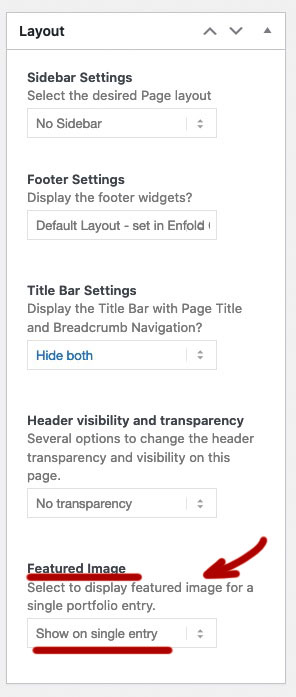
you can have on child-theme functions.php this:
function thumbnail_in_content($atts) {
    global $post;
    return get_the_post_thumbnail($post->ID);
}
add_shortcode('thumbnail', 'thumbnail_in_content');
you use it on the pages / posts as shortcode then: [thumbnail]
Hi there,
Von einer Galerie mit Einstellung: Stil > Vorschaubilderspalten > 8 Spalten ist auf Smarthone Portrait kaum noch etwas zu erkennen. Wie kann die Darstellung für mobile Endgeräte von 8 auf x geändert werden?
===
From a gallery with the setting: Style> Thumbnail Columns> 8 columns, you can hardly see anything on Smarthone Portrait. How can the display for mobile devices be changed from 8 to x?
thanks, solf
Thank you Ismael. I am trying to get the gallery to go from a 4 column thumbnail width to a 1 column thumbnail on mobile. I reduced the max to 500px as a test in the code you sent but I didn’t see any change. Is there a different CSS script I need to add for that to work?
Hi,
Whenever I share my blog posts on whatsapp or facebook, the thumbnails and summary texts are not showing up.
How It is Showing Up – https://ibb.co/VVX5m9q
How I Want It To Show Up – https://ibb.co/9gzq12d
My site – https://zimcricket.org/
Blog Example – https://zimcricket.org/zimbabwe-name-test-squad-to-face-pakistan/
it is set to that already, looks like the cropping doesnt work
tried changing around to squared and others but the thumbnails never change and are always displayed like they are right now (also wrong on “preview” pane already when editing gallery)
only thumbnails dont work, the large image on top is displaying same size for all photos as it should
worked last week before theme update and havnt changed anything else so suspect this to be at fault
//edit: just realized the big picture on top isnt displayed completely but cut off, only shown completely when you click on it
also just noticed that if i create a new empty gallery it has some random images there already in preview pane that only disappear once i pick something for the gallery, truly odd behavior
-
This reply was modified 5 years ago by
 rustleredv.
Hey rustleredv,
Thank you for the inquiry.
Looks like the gallery is using the original image instead of a thumbnail. To change that, edit the Gallery element, go to the Styling panel, then try to set the Gallery Preview Image Size to Portfolio(495×400) or any thumbnail with cropping enabled. When cropping is enabled, WP will crop and resize the image to the specified thumbnail dimension regardless of the original aspect ratio.
Best regards,
Ismael
Hey goldengate415,
Thank you for the info.
The lightbox srcset feature is still in beta mode as described in the options page, so issues should be expected. It adds the srcset attribute to the lightbox images so that the appropriate thumbnail size is used based on the size of the current screen. This improves performance because smaller images are loaded.
Is there a development or staging version of the site? Please post the site or page URL containing the lightbox so that we could check the issue further.
Best regards,
Ismael
Hi,
Thank you for the update.
The size of the thumbnails used in the product gallery is 180x180px, and if you want to adjust it, try to use this filter in the functions.php file
add_filter( 'woocommerce_gallery_thumbnail_size', function( $size ) {
    return 'medium';
} );
The medium thumbnail size can be adjusted it in the Settings > Media panel. Default size is 300x300px.
Best regards,
Ismael
The thumbnails are definitely REALLY pixelated, even in your sample screenshot. That product has since sold out, so I provided a better example of the issue in the private content below. You can see in the Product Gallery thumbnail how fuzzy/pixelated the image gets, but when you click on it to view the larger image you can see the original image is nice and big/clear.
I seem to recall something in a previous thread (that I can’t seem to find anywhere anymore!) about the Enfold theme enlarging the product gallery thumbs from the original Woocommerce size, and it ends up just making a mess of the image quality. Could be wrong about that though!
Thanks again.
looks like since the last theme update there is a bug with gallery thumbnails (show big img on top and thumbnails on bottom)
before last theme update when i added a gallery i showed all thumbnails in same size (~108x90px) “zoomed in” in case aspect ratio is different now it just puts the width to ~108px and the height is always 100% no matter what setting i try
all old galleries work still, if i try to create a new one with same images the same bug occurs
not too sure if this is related to theme update aswell but i noticed that if i click on the first image (big one on top) the lightbox only shows this image and not the others, if i click on it via thumbnail on the bottom it shows lightbox with other images from same page to browse through
anyone else having the same problem? what to do?
links shared in “private content”
thanks in advance!
Hey kellyCraftMedia,
Thank you for the inquiry.
The product gallery looks totally fine on our end, as shown in the screenshot below.
Screenshot: https://imgur.com/UW43gxc
Is that how you see the gallery?
The snippets in the following documentation might help.
// https://docs.woocommerce.com/document/image-sizes-theme-developers/
The filters there should adjust the size of the thumbnails.
Best regards,
Ismael
Hi,
The description should display automatically when the Enfold Child Category Styling is set to Default. Please try to edit one of the product categories and look for the styling just below the Thumbnail option.
Best regards,
Ismael
Hi,
Sorry for the confusion. The Styling > Preview Image Size settings is only available on the Blog Posts element. For the masonry element, the theme will automatically assign the masonry thumbnail which has a maximum size of 705x705px.
If you want to adjust the size of the thumbnail, try to install the plugin below and go to the Settings > Media panel where you can adjust the size of the masonry thumbnail. You have to regenerate the images afterwards.
// https://wordpress.org/plugins/simple-image-sizes/
Best regards,
Ismael
Hi,
Thanks for your help.
I don’t know where to “adjusted by selecting a different thumbnail in the element’s Styling > Appearance > Preview Image Size settings.” as you said.
It is not in the masonry settings, not in the theme setting,…
Can you tell me ?
Thanks in advance
Regrads,
Sophie
Any reason why my product thumbs on both the product page as well as the Product Grids are fuzzy until you click on them once? Literally as soon as I click on them, they look fine.
I have tried resizing thumbs in the Media options, regenerated thumbnails using a plugin, and nada. When I switch to a base theme (Twenty Twenty), it doesn’t seem to be an issue probably since those product thumbnails are smaller.
I also tried the solutions in this thread but the basic solution code broke my product pages and the enhanced solution code no longer functions (the link to download a file isn’t active anymore).
I’ve also tried switching between Woocommerce 3.0 Product Gallery and Default Enfold Product Gallery but no luck there.
Sample link in the private content.
Ismael,
Hi! Is there another plugin that does this — Simple Image Sizes looks like it might have been abandoned by its developer and hasn’t been updated for the last three WordPress releases — or is there confirmation this will work with the current WordPress build — what plugin is used for regenerating thumbnails or does Simple Images Sizes take care of this too —
Many thank yous!
Michael
Hey mocreate,
Thank you for the inquiry.
You will have to increase the size of the entry_without_sidebar thumbnail, which is the thumbnail or image used on posts without sidebar, and make sure that the new width and height are larger than those of the uploaded images. To do that, install the following plugin, then go to the Settings > Media panel.
// https://wordpress.org/plugins/simple-image-sizes/
Please do not forget to regenerate the thumbnails after adjusting the thumbnail size.
Best regards,
Ismael
first – you can make them smaller – on my page i have this as quick css entry:
.search-result-image img {
    width: 200px;   /****  here you can adjust the image sizes shown  ***/
    border: 1px solid #aaa
}
a.slide-image.search_image {
  overflow: visible !important;
}
a.search_image .image-overlay.overlay-type-extern {
  left: 0 !important
}
next tip: this line of the replaced code:
$searchthumb = get_the_post_thumbnail( $the_id, 'large' );
it will take the large images from enfold recalculation as source for those thumbnails.
if you have:
$searchthumb = get_the_post_thumbnail( $the_id, 'portfolio_small' ); it will have that source image for it.
_____________
see here: https://kriesi.at/support/topic/show-featured-images-in-search-results-page/#post-805253
now the line is on Enfold 4.8.2 line 33
echo "<span class='search-result-counter {$counterclass}'>{$post_loop_count}</span>";
replace that whole line 33 with:
$searchthumb = get_the_post_thumbnail( $the_id, 'large' );
echo "<span class='search-result-counter {$counterclass}'>{$searchthumb}</span>";
and this to quick css:
.search-result-counter {
    padding: 0;
}

.search-result-counter img {
	width: 100%;
	height: 100%;
	border-radius: 100px;
}
Hi,
2.) What is the actual size of the logo image that was uploaded? You may need to re-select it from the Theme Options, and make sure to select the full size and not the thumbnail version of the logo image.
Best regards,
Ismael
Hi Sheila,
For hover, font-color is invalid, just use color
As for featured image and thumbnails, I apologize for misunderstanding, please use this CSS code instead:
#top .av-magazine .av-magazine-sideshow.av_one_half {
    padding-left: 0;
}
The default value is 3% (you can set it with any value and you can use % or px)
Best regards,
Nikko
Hi Nikko,
Thanks for your quick reply! :)
* Regarding the space in the magazine element. It seems like the css is changing the space between the thumbnails images and the content, and not the space between the thumbnails and the featured post/image?
* The hover effect worked out perfectly! But how do i change the font colors? I tried to insert this css: font-color: #ffffff;
but not working.
THANKS i advange!
Best regards Sheila
Hi Sheila,
The thumbnails in the magazine element has a fixed space, you can change it via CSS (default is 15px):
#top .av-magazine-entry-small .av-magazine-thumbnail {
    margin-right: 20px;
}
And I have a background-color (pink) behind the text in the icon box – is it possible that the color changes on mouse over/hover?
Yes, it’s possible but it’s not possible inline, please remove all those inline CSS, then add this CSS code in Quick CSS:
.home #av_section_1 .iconbox_content p {
    background-color: #fbebf5;
    font-size: 13px;
    padding: 5px;
    text-align: left;
}

.home #av_section_1 .iconbox_content p:hover {
    background-color: #3374c2;
}
Best regards,
Nikko
Hey fabienneRedUmb,
Thank you for the inquiry.
The theme automatically crops the post thumbnail or the featured image to 845x321px, but it can be adjusted if necessary. Please install the following plugin, activate it, go to the Settings > Media panel, look for the entry_with_sidebar thumbnail and adjust its size. Regenerate the thumbnails after the adjustment.
// https://wordpress.org/plugins/simple-image-sizes/
Best regards,
Ismael
Hi Nikko,
Thank you! It worked. But now i cant seem to find where i can adjust the space between the featured image and the thumbnails in the magazine element?



