o.k
did some googling
I understand that if I use some plugin to regenerate the thumbnails (like this or this) than I wont need to upload all the images again
is that correct?
if so, than problem solved and you can close this topic, but please let me know..
tnx
Doron
I have this:
if($style == ‘small’)
{
if(empty($this->atts[‘thumbnails’]))
{
$image = “”;
$extraClass = “av-magazine-no-thumb”;
}
}
else
{
$excerpt = !empty($entry->post_excerpt) ? $entry->post_excerpt : avia_backend_truncate($entry->post_content, apply_filters( ‘avf_magazine_excerpt_length’ , 60) , apply_filters( ‘avf_magazine_excerpt_delimiter’ , ” “), “…”, true, ”);
but I don’t see the excerpts. ??
/Nancy
This reply has been marked as private.
Hi AdonaiAR!
Please try the following in Quick CSS:
@media only screen and (max-width: 767px) {
.page-id-652 .ls-thumbnail-wrapper{
display:none !important;
}
}
Regards,
Rikard
hi,
i would like to remove the thumbnail navigation at the bottom of my layer slider WP
http://www.albertoadonai.com/AA/?page_id=652 … but only on mobile device and keep the right and left arrows on each side of the image for navigation on the mobile.
All is right on PC screen. I want modify only on mobile.
is this possible?
thanks
Hello,
Why do I get “F” score for these images on gtmetrix ?
How can I fix that, should I setup the media setting differently ?
Right now my Media settings are:
Thumbnail size: 80px
Medium size: 300px
Large size: 1030
Hi!
Thank you for using Enfold.
The excerpt for small magazine entries is hidden by default because there’s not enough space to accommodate them. If you really want to display it, you can edit config-templatebuilder > avia-shortcodes > magazine.php, find this code on line 558:
if(empty($this->atts['thumbnails']))
				{
					 $image = "";
					 $extraClass = "av-magazine-no-thumb";
				}
Below, add this:
$excerpt = !empty($entry->post_excerpt) ? $entry->post_excerpt : avia_backend_truncate($entry->post_content, apply_filters( 'avf_magazine_excerpt_length' , 10) , apply_filters( 'avf_magazine_excerpt_delimiter' , " "), "…", true, '');
			}
Best regards,
Ismael
Hi!
Are you referring to the post featured image? This is the post featured image thumbnail sizes:
$avia_config['imgSize']['entry_with_sidebar'] 	= array('width'=>845, 'height'=>321);		            	// big images for blog and page entries
$avia_config['imgSize']['entry_without_sidebar']= array('width'=>1210, 'height'=>423 );
One for post with sidebar and other is for posts without sidebar. Please give us a link to the post with the issue. 1.3MB for an image with a size of 1200x800px is a bit too big. Please resave it using any image editor as jpg with optimize quality.
Cheers!
Ismael
I am using Enfold theme andI have a Portfolio Grid page set up to open Portfolio Elements in an AJAX Portfolio. Thumbnails appear below an enlarged image and hovering over thumbnails on desktop/laptop changes the large photo to the one hovered. This won’t work on mobile, therefore I’d like to add navigation arrows in addition to the thumbnails if possible. I’d actually like to add navigation arrows to use on desktop/laptop as well as mobile as an additional means of viewing photos.
What CSS can I add to make this happen?
-
This topic was modified 10 years, 11 months ago by
 larrywillisva.
http://metapf.com/fluid-dynamics/
How do I get the featured image to be a thumbnail to the left of the title/author etc but with the content right under and not shifted to the right?
thanks!
Hi Tobias!
use this code as an example:
<a href="http://www.youtube.com/YOUR-VIDEO" rel="prettyPhoto" title=""><img src="images/thumbnails/flash-logo.jpg" alt="YouTube" width="60" /></a>
Cheers!
Andy
-
This reply was modified 10 years, 11 months ago by
 Andy.
Andy.
Hi!
Please refer to @4jdesigns’ post above and then regenerate thumbnails using this plugin – https://wordpress.org/plugins/regenerate-thumbnails/
@4jdesigns Thanks for your help :)
Regards,
Yigit
: Hi
I am facing problem with portfolio page . When i click on the albums then sometimes it is hide by the small thumbnails.
Here is the snapshot of the page.
http://screencast.com/t/OtZaTiu3GR8
Can you please help me to find the solution.
Thanks
Divya Ganotra
: Hi
I am facing problem with portfolio page . When i click on the albums then sometimes it is hide by the small thumbnails.
Here is the snapshot of the page.
http://screencast.com/t/OtZaTiu3GR8
Can you please help me to find the solution.
Thanks
Divya Ganotra
-
This topic was modified 10 years, 11 months ago by
 sushi_x.
I am having the same issue. The new layerslider update now shows a white screen. Here is the latest updates..
newEntirely new documentation
newAdded option to import sliders without their images
newSlide backgrounds now parse shortcodes when used in “Enter URL”
newThe LayerSlider shortcode can now accept filtering options
improvedImproved compatibility with image preloaders
improvedImproved compatibility with certain plugins/themes
fixedFixed several issues with dynamic layers
fixedFixed issues when the same slider was inserted on a page in multiple times
fixedFixed TinyMCE editor tool to properly work with multiple instances on page
fixedFixed some potential JS errors that could happen in some very rare cases.
fixedYouTube video thumbnails have not been loaded until the previous slide
Hey!
Thank you for using Enfold.
Please try to regenerate the thumbnails then select the “Extra Large” thumbnail again. Use this plugin: https://wordpress.org/plugins/regenerate-thumbnails/
Cheers!
Ismael
Hi Desire!
Thank you for using Enfold.
You can decrease the thumbnail size but it will, somehow, reduce the image quality. Look for this code in functions.php:
$avia_config['imgSize']['masonry'] = array('width'=>705, 'height'=>705 , 'crop' => false); // images for fullscreen masonry
Adjust the width and height then regenerate the thumbnails. https://wordpress.org/plugins/regenerate-thumbnails/
Use this plugin to optimize the images: https://wordpress.org/plugins/wp-smushit/
Best regards,
Ismael
Hi!
The thumbnail size on http://www.manufactura.cz is only 220x220px while the product thumbnail on this page is 450x450px. That’s why it looks sharper. Try to increase the catalogue thumbnail size then regenerate the thumbnails.
EDIT: I checked the page again and it looks sharper than before. I noticed that you increase the thumbnail size to 450x450px. The only issue that I can see now is the price font being a little bit muddy. Try this to add this in the Quick CSS field:
#top .price, #top .price span, #top del, #top ins {
  -webkit-transform: translateZ(0);
  transform: translateZ(0);
  -webkit-backface-visibility: hidden;
}
Best regards,
Ismael
Hi!
This is the default behaviour of the gallery, not a bug. The crop parameter of the Medium size is set to false by default that’s why it doesn’t crop the thumbnails to the exact dimension (300x300px). If you want to have a consistent gallery, resize the images to a fixed size before uploading them as gallery item. Test another thumbnail size until you get a more consistent gallery column.
Best regards,
Ismael
On every single one of my “Single Product” pages, I get two images that come up when clicking the product image from the gallery. One is a static image that cannot scroll to next or previous image. When I click the x to close that one, the lightbox gallery is opened and I can scroll through all of the images, Also, the images in the gallery do not change when hovering over the thumbnails like I have seen other sites do. I also noticed the sidebar is below the gallery, makes the page not flow right and look ugly. I try to change with the settings and it doesn’t work. I added a link to a product in my store.
One thing I tried is clicking “Advanced Layout Editor”, nothing on the product page shows. I am able to remove and change the sidebar like this though. I tried dropping in my own Plugin Additions and everything works for the most part. But when using “Product Purchase Button” I can change quantity but it does not display the product sale amount… Any help would be appreciated.
When clicking on image for “Single Product” two images come up.
Hi patflaherty!
It looks like your using a plugin there. What is the exact code your using? If your adding the list yourself then try removing it and just display the text and thumbnail.
Regards,
Elliott
Hello,
I am using the WP Retina 2x plugin to generate retina-sized images, but it doesn’t seem to be working with the theme. I would like my custom icon images on the home page to be high-res for retina screens, but they are not appearing so. I am using the thumbnail version of the image when placing it into an image box. I have double checked the plugin settings page to make sure a retina-ready image is available for thumbnail size, and it says it is. I also tried changing the methods for serving the retina images as seen here, http://apps.meow.fr/wp-retina-2x/, but that no method works. I even tried uploading a huge 3000px image to use and it does create all retina-ready images for each size, but they still don’t show on the site. What am I missing here? Is there another way to have the thumbnail image retina-sized without the use of a plugin?
Thank you.
I think you can set the thumbnail sizes in Settings -> Media. Also make sure ‘crop’ is checked.
If that does not work, then get a plugin called ‘Simple Image Sizes’, That works like magic for my image sizes and regeneration.
Hope that helps!
This seems pretty basic, but I can’t figure it out. I need to be able to force the thumbnails below the large gallery image to be SQUARE.
Even if the image sizes vary, I do not want the height of the thumbnails to vary. Is this possible without modifying the CSS or PHP code?
Thank you!!
Hey idespiran!
Thank you for using Enfold.
Do you want to replace the product image with a video? Are you going to do this for all products? It’s possible but you need to add a custom field. Edit the product then go to the Screen Options. Enable the custom field, add a new field called “product_video” then add the youtube url as value. If possible, use this kind of youtube url format: http://www.youtube.com/watch?v=G0k3kHtyoqc
Add this in the functions.php file:
add_filter('woocommerce_single_product_image_html','avia_woocommerce_post_thumbnail_description', 10, 2);
function avia_woocommerce_post_thumbnail_description($img, $post_id)
{
	global $post, $woocommerce, $product;

	$image_title = esc_attr(get_post_field('post_content', get_post_thumbnail_id()));
	$image_link  = wp_get_attachment_url( get_post_thumbnail_id() );
	$image  = get_the_post_thumbnail( $post->ID, apply_filters( 'single_product_large_thumbnail_size', 'shop_single' ), array(
		'title' => $image_title
		) );
	$attachment_count = count( $product->get_gallery_attachment_ids() );

	if ( $attachment_count > 0 ) {
		$gallery = '[product-gallery]';
	} else {
		$gallery = '';
	}

	$video = get_post_meta( $post->ID, 'product_video', true );
	$echo = do_shortcode("[av_video src='{$video}' format='16-9' width='16' height='9' custom_class='']");


	if(has_post_thumbnail() && get_post_meta( $post->ID, 'product_video', true ))
	{
		return sprintf( $echo . '<a href="%s" itemprop="image" class="woocommerce-main-image zoom" title="%s"  rel="prettyPhoto' . $gallery . '">%s</a>', $image_link, $image_title, $image);
	}
	elseif(has_post_thumbnail() && empty($video))
	{
		return sprintf( '<a href="%s" itemprop="image" class="woocommerce-main-image zoom" title="%s"  rel="prettyPhoto' . $gallery . '">%s</a>', $image_link, $image_title, $image);
	}
	else
	{
		return $img;
	}
}
In order to make the video bigger, add this in the Quick CSS field:
.single-product-main-image {
  width: 50%;
}
For further modifications, please contact codeable: http://kriesi.at/contact/customization
Cheers!
Ismael
Hi Enfold Team,
I have posted a lot if questions the last few weeks and you guys have awesome support. Thanks for that! My website is now almost the way I want it to be so that’s great!
The thing that is still bothering me is the events calendar widget. I have added thumbnails to it per to the instructions of the plugin support.
https://theeventscalendar.com/knowledgebase/add-thumbnails-to-upcoming-events-list-widget
This results in the images showing up rather large, above my event text in the widget area. This creates a lot of white space. I would like the images to show up inline to the text at the front. I was hoping this was a small CSS tweak but the Events Calendar team doesn’t help me. They will not answer my questions on their forum and will also not tell me if they will help me do this if I purchase the plugin (at the moment I use the free version but I’m more then willing to purchase the Pro version if I can then get the help I need).
I was wondering if you guys would know if a simple CSS tweak could give me the desired effect. I know this is a plugin unrelated to enfold but because their support doesn’t help me and you guys have great support over here, I was hoping you could help me with this.
(second to the images appearing in front of the text, inline, I would like them to be smaller or rounded. If this is also possible it would be great, but it is less important then the first issue).
Hi
My Menu Shopping Cart space between different items are freaked out and im not able to see a “remove item” button or symbol – tryed to fix this by myself for more then 2 hours but without any success
I guess the problem is the following code, for some reason the space getting multiplied (2x)
element.style {
    height: 88px;
    line-height: 88px;
}
<li>
<a class="remove" title="Remove this Entry" href="xxxxx" style="height: 88px; line-height: 88px;">×</a>
<a href="xxx" style="height: 88px; line-height: 88px;">
<img class="attachment-shop_thumbnail wp-post-image" width="120" height="120" alt="c4" src="xxxx">
</a>
<a href="xxxx" style="height: 88px; line-height: 88px;">Test</a>
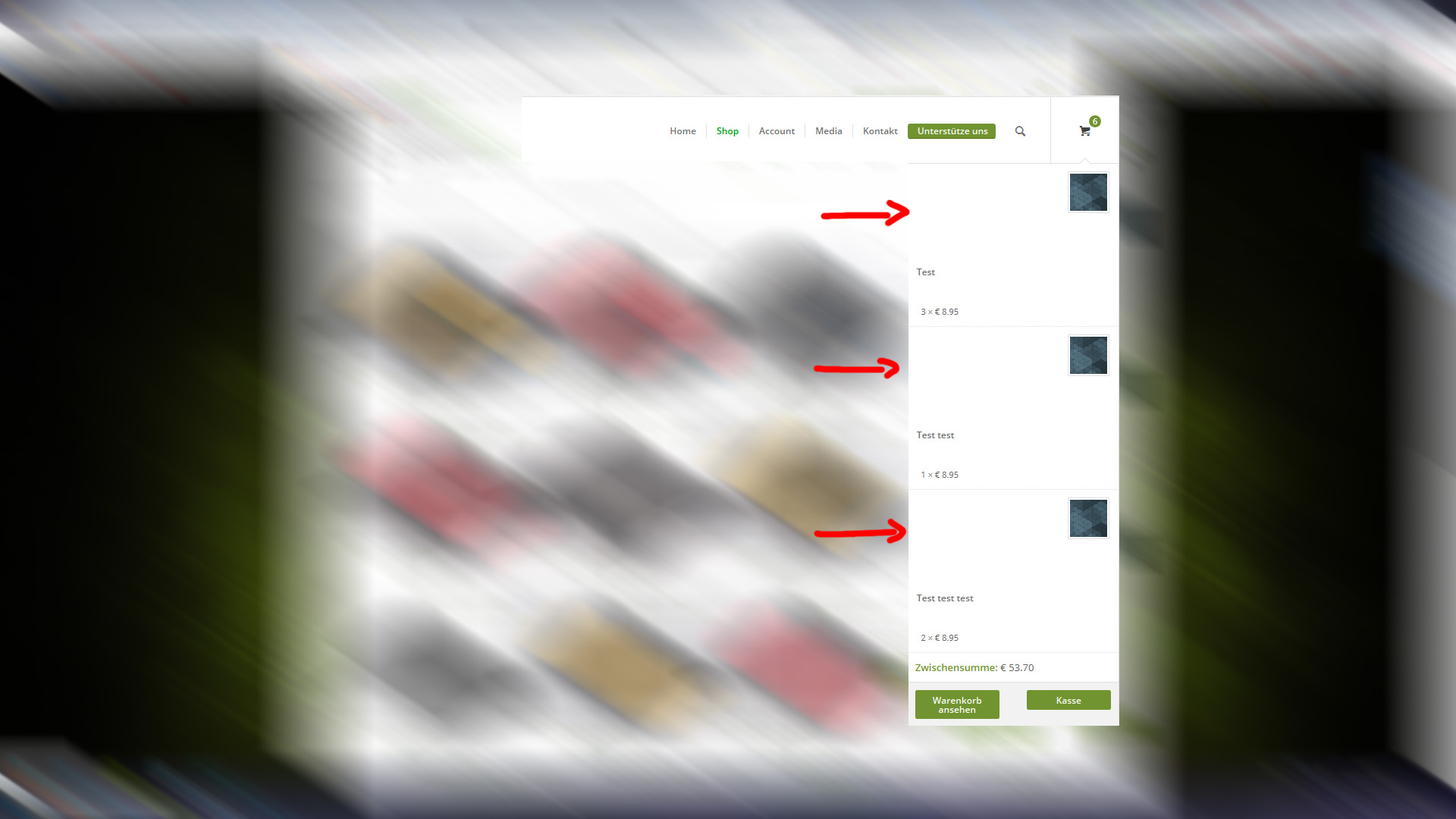
please help me
best regards,
gernr
-
This topic was modified 10 years, 11 months ago by
 Gerhard.
How do I remove the date and thumbnail in the blog widget sidebar. All I would like to display is the post title.
Thanks!
Hey!
I checked the site on my iPod and the fonts are not blurry any more. It looks sharp except for the price which is a little bit muddy. The price issue only happens on portrait mode. Regarding the images, the image quality is blurred initially like these images for example:
http://www.manufactura.cz/wp-content/upLoads/Sakai-Hoicu-Par-Slivoni-1_web-220×220.jpg
http://www.manufactura.cz/wp-content/upLoads/Sakai-Hoicu-Par-Slivoni-2_web-220×220.jpg
http://www.manufactura.cz/wp-content/upLoads/Hokusai_Vlna3-220×220.jpg
Try to upload larger images. Go to Woocommerce > Settings > Products > Display pane. Change the catalogue image size, currently set to 220x220px, then regenerate the thumbnails: https://wordpress.org/plugins/regenerate-thumbnails/
Regards,
Ismael



