
Viewing 30 results - 4,171 through 4,200 (of 10,101 total)
  • Author
    Search Results
  • #778691

    Hi,

    I checked page in question, but it looks good to me: http://i.imgur.com/UGrT884.png
    So could you already fix it?

    If not then try the following:
    1. Install this plugin: https://wordpress.org/plugins/simple-image-sizes/
    2. Go to Settings > Media
    3. Change the image size in question (increase its width / height).
    4. Regenerate the thumbnails by clicking the button at the bottom.

    Best regards,
    Andy

    #778686

    In reply to: Enfold & WooCommerce

    Hey Mike,

    Thank you very much for this information. I have followed your instructions and the thumbnails are now displaying smaller, as they should (although they are different sizes?).
    I now have an issue when I click on the thumbnail – it appears to display the thumbnail that precedes the one I clicked and when I close the window, it then displays the thumbnail I actually clicked. It is as if the ‘pop-up’ is opening twice?
    I know you are not here to support the changes WooCommerce has made, but if you can offer guidance, that would be most appreciated please.

    Kind Regards
    Neil

    #778556
    Synthea79
    Participant

    I implemented the fixes found on these forums (functions/css update to child theme, added the product thumbnail and image php files) but my site’s product images don’t look nearly as nice as someone’s who is using an updated theme (like Canvas by woocommerce, my previously used theme).

    Is there an ETA on full integration or should I hope to find someone who has done it and piece together a fix?

    #778479

    Hi,
    Oh I’m sorry, I should have asked you to increase thumbnail sizes to 182x182px in the settings, because that is the size they are showing on the page.

    Best regards,
    Mike

    #778463

    Hey Raffaykiddeljoe,
    Please try going to Settings > Media and increase thumbnail sizes to 126x126px and then regenerate thumbnails using this plugin – https://wordpress.org/plugins/regenerate-thumbnails/

    Best regards,
    Mike

    I found the solution in another thread. I copied following into my fucnctions.php child theme. It works perfect!

    /*
    Woocommerce 3.0.0 Compatibility Fix
    Remove Enfold’s custom functions that conflict with the new image display in WooCommerce 3.0.0
    */
    global $woocommerce;
    if( version_compare( $woocommerce->version, ‘3.0.0’, “>=” ) ) {
    function avia_woocommerce_gallery_thumbnail_description($img, $attachment_id, $post_id, $image_class ) {
    return $img;
    }
    function avia_woocommerce_post_thumbnail_description($img, $post_id){
    return $img;
    }
    }

    #778420
    Raffaykiddeljoe
    Participant

    Hi,
    when I add new images to a simple gallery, the thumbnails in 80×80 are very blurred. Images that were already in the gallery before are not so blurred. The uploadsize is approximately the same at all (minimum width: 1000px). When you click on the image it will be sharp in the lightbox.

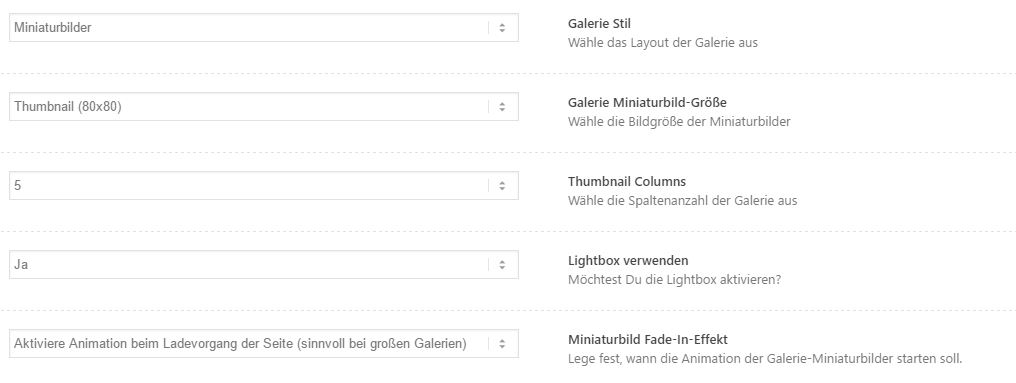
    Gallery thumbnails

    Gallery Settings

    Someone an idea? I’ve changed nothing…

    I’ve also tried “Regenerate Thumbnails” and a new upload of the pictures. Nothings helps… :-(

    #778415

    Topic: Enfold & WooCommerce

    in forum Enfold
    NeilJC
    Participant

    Hi,
    Since upgrading Woocommerce to v3.0, the product titles are the wrong font and the product thumbnails are too big. They used to be smaller and more compact.

    Woocommerce is suggesting it is the theme that is the problem?

    I doubt this as I have used Enfold 8 times now and find it to be very stable.

    Can you offer any guidance please? I find that you are very good at helping us :)

    regards
    Neil

    • This topic was modified 9 years ago by NeilJC.
    tcadam0301
    Participant

    Hello,

    when moving to a single product page for woocommerce with enfold, we get the error Missing argument 3 for avia_woocommerce_gallery_thumbnail_description(), called in /www/htdocs/(...)/wp-includes/plugin.php on line 235 and defined in /www/htdocs/(...)/wp-content/themes/enfold/config-woocommerce/config.php on line 1360
    You can see for yourself on the link I will attach in private content.
    Please share advice on how to tackle this issue.

    Have a nice weekend and thanks in advance!

    #778379

    Hey tcadam0301,

    It’s best to have the same length heading for an overall look that you are trying to achieve. If the product name is too long you have to choose between increasing the min and max height or hiding the excess length or excess info on some products.

    Please try adding this code to the Quick CSS section under Enfold > General Styling or to your child themes style.css file:
    NOTE: I have added background:gold for visual notification you can remove it from the below code.

    .inner_product_header_table {
    	min-height:100px;
    	max-height:100px;
    	overflow:hidden;
    	word-break:break-all;
    	background:gold;
    }
    .thumbnail_container{
    	min-height:300px;
    }

    I have tested the above code on your installation and it works 100% please make sure to clear the cache if you still do not see nay changes deactivate the caching plugin and try again.

    Best regards,
    Vinay

    #778112

    Sure, the file exists. I’ve posted it below:

    <?php
    /**
     * WordPress Ajax Process Execution
     *
     * @package WordPress
     * @subpackage Administration
     *
     * @link https://codex.wordpress.org/AJAX_in_Plugins
     */
    
    /**
     * Executing Ajax process.
     *
     * @since 2.1.0
     */
    define( 'DOING_AJAX', true );
    if ( ! defined( 'WP_ADMIN' ) ) {
    	define( 'WP_ADMIN', true );
    }
    
    /** Load WordPress Bootstrap */
    require_once( dirname( dirname( __FILE__ ) ) . '/wp-load.php' );
    
    /** Allow for cross-domain requests (from the front end). */
    send_origin_headers();
    
    // Require an action parameter
    if ( empty( $_REQUEST['action'] ) )
    	die( '0' );
    
    /** Load WordPress Administration APIs */
    require_once( ABSPATH . 'wp-admin/includes/admin.php' );
    
    /** Load Ajax Handlers for WordPress Core */
    require_once( ABSPATH . 'wp-admin/includes/ajax-actions.php' );
    
    @header( 'Content-Type: text/html; charset=' . get_option( 'blog_charset' ) );
    @header( 'X-Robots-Tag: noindex' );
    
    send_nosniff_header();
    nocache_headers();
    
    /** This action is documented in wp-admin/admin.php */
    do_action( 'admin_init' );
    
    $core_actions_get = array(
    	'fetch-list', 'ajax-tag-search', 'wp-compression-test', 'imgedit-preview', 'oembed-cache',
    	'autocomplete-user', 'dashboard-widgets', 'logged-in',
    );
    
    $core_actions_post = array(
    	'oembed-cache', 'image-editor', 'delete-comment', 'delete-tag', 'delete-link',
    	'delete-meta', 'delete-post', 'trash-post', 'untrash-post', 'delete-page', 'dim-comment',
    	'add-link-category', 'add-tag', 'get-tagcloud', 'get-comments', 'replyto-comment',
    	'edit-comment', 'add-menu-item', 'add-meta', 'add-user', 'closed-postboxes',
    	'hidden-columns', 'update-welcome-panel', 'menu-get-metabox', 'wp-link-ajax',
    	'menu-locations-save', 'menu-quick-search', 'meta-box-order', 'get-permalink',
    	'sample-permalink', 'inline-save', 'inline-save-tax', 'find_posts', 'widgets-order',
    	'save-widget', 'delete-inactive-widgets', 'set-post-thumbnail', 'date_format', 'time_format',
    	'wp-remove-post-lock', 'dismiss-wp-pointer', 'upload-attachment', 'get-attachment',
    	'query-attachments', 'save-attachment', 'save-attachment-compat', 'send-link-to-editor',
    	'send-attachment-to-editor', 'save-attachment-order', 'heartbeat', 'get-revision-diffs',
    	'save-user-color-scheme', 'update-widget', 'query-themes', 'parse-embed', 'set-attachment-thumbnail',
    	'parse-media-shortcode', 'destroy-sessions', 'install-plugin', 'update-plugin', 'press-this-save-post',
    	'press-this-add-category', 'crop-image', 'generate-password', 'save-wporg-username', 'delete-plugin',
    	'search-plugins', 'search-install-plugins', 'activate-plugin', 'update-theme', 'delete-theme',
    	'install-theme', 'get-post-thumbnail-html',
    );
    
    // Deprecated
    $core_actions_post[] = 'wp-fullscreen-save-post';
    
    // Register core Ajax calls.
    if ( ! empty( $_GET['action'] ) && in_array( $_GET['action'], $core_actions_get ) )
    	add_action( 'wp_ajax_' . $_GET['action'], 'wp_ajax_' . str_replace( '-', '_', $_GET['action'] ), 1 );
    
    if ( ! empty( $_POST['action'] ) && in_array( $_POST['action'], $core_actions_post ) )
    	add_action( 'wp_ajax_' . $_POST['action'], 'wp_ajax_' . str_replace( '-', '_', $_POST['action'] ), 1 );
    
    add_action( 'wp_ajax_nopriv_heartbeat', 'wp_ajax_nopriv_heartbeat', 1 );
    
    if ( is_user_logged_in() ) {
    	/**
    	 * Fires authenticated Ajax actions for logged-in users.
    	 *
    	 * The dynamic portion of the hook name, <code>$_REQUEST['action']</code>,
    	 * refers to the name of the Ajax action callback being fired.
    	 *
    	 * @since 2.1.0
    	 */
    	do_action( 'wp_ajax_' . $_REQUEST['action'] );
    } else {
    	/**
    	 * Fires non-authenticated Ajax actions for logged-out users.
    	 *
    	 * The dynamic portion of the hook name, <code>$_REQUEST['action']</code>,
    	 * refers to the name of the Ajax action callback being fired.
    	 *
    	 * @since 2.8.0
    	 */
    	do_action( 'wp_ajax_nopriv_' . $_REQUEST['action'] );
    }
    // Default status
    die( '0' );
    
    #778108

    Hi,

    I have edited the following in functions.php:

    //avia_backend_add_thumbnail_size($avia_config);

    Can you please test to see if the issue is still occuring?

    Best regards,
    Jordan Shannon

    #778026

    Hey!

    I have fixed to move the details at private.
    Regarding the option to move the thumbnails, it could be possible but it would require some more modifications
    which is – although – outside our support policy.

    Thakn you very much

    Best regards,
    Basilis

    #777948

    Hello Mike,

    First, I’m sorry but could you please put the image that you posted and all elements relatives to my website in private content please ? :-)
    About that, which “software” do you use to display informations at the right of this image (console, and so on…) ?

    About what you said, in fact my images are not uploaded in wp-content/uploads/ because I changed the path to a folder called “medias” at the root of my server.
    To do so, I put this information in my wp-config.php and it worked perfectly a long time after that… The path is still “working” for my medias because when I open “Medias tab” in WP, all the thumbnails appear correctly…

    You said that the path to my thumbnails is empty and given what I have just told you before, it seems to be logic. So, How could I change this path to my thumbnails ?

    Thanks !!

    #777942
    Mxm01189
    Participant

    Hello,
    I’m receiving the following errors with Woo Commerce and Avia Builder. Please help.

    Warning: Missing argument 3 for avia_woocommerce_gallery_thumbnail_description() in /home/cmnutrition/public_html/wp-content/themes/enfold/config-woocommerce/config.php on line 1351

    Warning: Missing argument 4 for avia_woocommerce_gallery_thumbnail_description() in /home/cmnutrition/public_html/wp-content/themes/enfold/config-woocommerce/config.php on line 1351

    Warning: Missing argument 3 for avia_woocommerce_gallery_thumbnail_description() in /home/cmnutrition/public_html/wp-content/themes/enfold/config-woocommerce/config.php on line 1351

    Warning: Missing argument 4 for avia_woocommerce_gallery_thumbnail_description() in /home/cmnutrition/public_html/wp-content/themes/enfold/config-woocommerce/config.php on line 1351

    Warning: Missing argument 3 for avia_woocommerce_gallery_thumbnail_description() in /home/cmnutrition/public_html/wp-content/themes/enfold/config-woocommerce/config.php on line 1351

    Warning: Missing argument 4 for avia_woocommerce_gallery_thumbnail_description() in /home/cmnutrition/public_html/wp-content/themes/enfold/config-woocommerce/config.php on line 1351

    #777930

    Hey alsterb,

    You have a few solutions that may work. Try the following:

    Please go to WooCommerce > Settings > Catalog and increase Catalog Images size to 350x350px then regenerate them using http://wordpress.org/plugins/regenerate-thumbnails/

    Also, you can try to increase the thumbnail quality with: http://wordpress.org/plugins/simplejpegquality/ – do not forget to regenerate the thumbnails with http://wordpress.org/plugins/regenerate-thumbnails/

    Best regards,
    Jordan Shannon

    #777895

    Hey!

    Please go to WooCommerce > Settings > Products > Display and adjust image sizes and then regenerate thumbnails using this plugin – https://wordpress.org/plugins/regenerate-thumbnails/

    Best regards,
    Yigit

    #777873
    flylanddesigns
    Participant

    My site http://www.flylanddesigns.com was working fine until I updated the plugin to 3.03. Then my gallery thumbnails don’t show up, text and titles on the homepage and banners don’t show up. It’s a mess!

    I’m in the process now of trying to restore a backup of my site to roll back this update.

    #777806

    Hi,

    du kannst die Bildgrößen in WordPress mit einem Plugin wie diesem hier verändern: https://wordpress.org/plugins/simple-image-sizes/, sodass du dann die gewünschte Größe (1500×630) bekommst. Du kannst dies für Enfold auch manuell machen: https://kriesi.at/support/topic/enfold-image-sizes/#post-336176, musst aber hinter ein “Regenerate Thumbnails” durchführen.

    Gruß,
    Andy

    #777786
    alsterb
    Participant

    Hi,

    I know there’s been similar threads to this, but I have an issue with a lo-res image being used on the single product on Enfold.

    I’ve been uploading very hi-res images (1000x1000px), so I know that’s not the issue.

    The image size on a single product is around 400x400px, and the setting for woo-commerce are:

    Catalogue images 45×450 px Hard crop
    Single product image 450×900 px
    Product thumbnails 120×120 px Hard crop?

    It’s as if it’s using the thumb image, rather than the single product image.

    Can anyone help? I’m just working locally at the moment, but can get it online for a private link if needed.

    Thanks

    #777723

    I created a fresh post “C-40C Clipper at Schiphol” in my “Fence Check” menu section, as I always did before in exact the same way… but it shows complete different picture sizes and I do have 76 !!!! files in my library folder in stead of just 4 !!

    new created post

    1: As you can see the image on top is displayed very small, and yes I can select other sizes so this is not a biggest issue…. but in the past it was scaled to fit automatically and i had not to select any format

    2: The Easy slider is also taking the wrong size of my pictures

    3: The gallery is also showing the wrong size of my pictures as it is clipping my pictures in the thumbnails and when openend it shows a smaller size as the original.

    4: my featured image is also showing the wrong size (bigger then the others) Featured image size

    And as you can see on other post like these it is automatically scaling the way I want :-)

    Example1

    Example2

    If I use one of the old pictures already in WordPress these are single uploads and still working well as shown at the bottom of the post. The Original uploaded pictures have all exact the same size (my default GMAP pictures)

    Btw also updated the theme to 4.0x as it was 3.8x if i am correct but did not change the issue. Also rolled back the wordpress installation to 4.7.2 instead of 4.7.3 but also no effect.

    I hope this explains my issue.

    #777516
    kandolina
    Participant

    Morning,

    Once I updated to the latest version of Woo Commerce Version 3.0.3, all my product pages with images are fuzzy.
    I have read through the treads, tried different browsers, tired changing the image size, re generated thumbnails.
    Still Fuzzy images.

    Any thoughts

    #777418

    Hey Felix,

    You can try the following:

    Edit includes > loop-index.php, find this code:

    
    if($slider) $slider = '<a href="'.$link.'">'.$slider.'</a>';
    			if($slider) echo '<div class="big-preview '.$blog_style.'">'.$slider.'</div>';

    Below that add the following:

    $description = get_post_field('post_content', get_post_thumbnail_id());
    			echo $description;

    You can use the “Description” field on the image attachment editor page (Media > Library > Edit) to save a description text.

    Best regards,
    Jordan Shannon

    #777394
    Trystan
    Participant

    Dear Kriesi team,

    I am currently looking for a solution to add image credits to Featured Images when creating a blog post. There seems to be a solution for this, but unfortunately I can’t seem to make it work.

    I found the following instruction here: http://www.sourcexpress.com/how-to-add-caption-to-the-featured-images-in-wordpress/

    It says this:

    Now you would need to find the section where the featured image is called. It would be mostly in content.php or single.php or content-single.php or page.php etc and may look like the below or something similar

    <div class=”entry-thumbnail”>
    <?php the_post_thumbnail(”); ?> <!– This displays the featured image –>
    </div>

    Unfortunately I cannot find this code snippet anywhere. Can you help me out? Or is there maybe a native solution to provide image captions for the Featured Images of blog posts? I found some plugins, but unfortunately they only help with adding image captions to images you insert into the blog post, not featured images themselves.

    Thanks,
    Felix

    #777391

    Topic: Latest post thumbnails

    in forum Enfold
    mikkijack
    Participant

    I’ve changed the css for the latest post thumbnails widget to this….

    .news-thumb img, .news-thumb img, .news-thumb {
        height: 70px;
        width: 100px;
        max-width: 100%;
        vertical-align: middle;
        border: none;
    

    But now, the theme is still filling it with the 36px x 36px pictures. Therefore, the pictures are fuzzy because it’s stretching it to fit instead of getting the new thumnail.

    How can I fix this?

    The login info is in the private area.

    • This topic was modified 9 years ago by mikkijack.
    #777057

    In reply to: Can't find the element

    Hey mikkijack,

    About your fist question, may you explain it better and share some screenshots, please?

    Now, about the thumbnail size, try the following:

    1. Install this plugin: https://wordpress.org/plugins/simple-image-sizes/
    2. Go to Settings > Media
    3. Change the thumbnail image size (increase its width / height).
    4. Regenerate the thumbnails by clicking the button at the bottom.

    Best regards,
    John Torvik

    #776908

    Thanks Jordan!
    I actually got it figured out right before you sent this. But I am getting an error now on the product page.

    Warning: Missing argument 3 for avia_woocommerce_gallery_thumbnail_description() in /home/metronova/public_html/visualvillain.com/wp-content/themes/enfold/config-woocommerce/config.php on line 1351

    Warning: Missing argument 4 for avia_woocommerce_gallery_thumbnail_description() in /home/metronova/public_html/visualvillain.com/wp-content/themes/enfold/config-woocommerce/config.php on line 1351

    #776616

    Topic: Errors in Enfold

    in forum Enfold
    Zaccc
    Participant

    Hello,

    I have update Enfold to latest version same as Woocommerce and now when I open site I see this errors.
    Warning: Missing argument 3 for avia_woocommerce_gallery_thumbnail_description() in /home1/zaccc/derek.weboteka.info/wp-content/themes/enfold/config-woocommerce/config.php on line 1360

    You can see yourself on link.

    Can you help me?

    Regards

    #776581
    darneson
    Participant

    Hello,

    I have a question regarding the instagram widget (Enfold Theme) I use on my page.
    GTmetrix is giving me some recommendations, but I’m unable to optimize. Its about the size of the images. Please see:

    The following images are resized in HTML or CSS. Serving scaled images could save 278.5KiB (95% reduction).
    https://scontent.cdninstagram.com/t51.2885-15/e35/c238.0.603.603/17662511_1650203518621249_4052433288818589696_n.jpg is resized in HTML or CSS from 603×603 to 60×60. Serving a scaled image could save 128.0KiB (99% reduction).

    I have this for all 12 images (thumbnails) displayed in the footer. Is there a way to manually change the size of the images to avoid unnecessary loading time?
    Many thanks and best regards,
    Darneson

    Hi, I have just read your post https://kriesi.at/support/topic/woocommerce-3-0-03-0-1-and-the-images-issue/

    It solved the problem with blurry images, but did not solve the problem with the thumbnail galleries

Viewing 30 results - 4,171 through 4,200 (of 10,101 total)