Viewing 30 results - 3,991 through 4,020 (of 10,101 total)
  • Author
    Search Results
  • #793944
    Revoluza2013
    Participant

    Hey Guys,

    in my shop the products Thumbnails are blurry?
    What can i do that the first Thumbnail is not blurry?
    Pictures are in goog quality uploaded!

    Here is on of my products:

    http://wasserfilter-mallorca.com/produkt/balealux-reisewasserfilter-sl1000/

    Thanks for helping!

    #793922

    Topic: isotope RTL website

    in forum Enfold
    gadudi
    Participant

    Hi guys
    On my website, I have some problem with items aligning to the left and not to the right (RTL mode)
    Please have a look ate this page: http://a3730-tmp.s48.upress.link/?page_id=708

    the class responisbale is av-masonry-entry isotope-item post-712 portfolio type-portfolio status-publish has-post-thumbnail hentry portfolio_entries-service portfolio_entries-adullts av-masonry-item-with-image av-grid-img av-masonry-item-loaded
    How to change and what to change please? I want the element style to say “right” instead of “left”

    #793870

    Thank you for getting back to me!

    I have updated the theme – the code has gone and the smaller thumbnails are displaying beneath (yay!) – but the pictures are still displaying as square thumbnails not the full image.

    What do I do to get them working again?

    thanks!!

    Hey Shelly_Verhoeven,

    Try adding this code at the bottom of functions.php:

    global $woocommerce;
    
    if( version_compare( $woocommerce->version, '3.0.0', ">=" ) ) {
    
    	function avia_woocommerce_gallery_thumbnail_description($img, $attachment_id, $post_id, $image_class ) {
    	    return $img;
    	}
    	function avia_woocommerce_post_thumbnail_description($img, $post_id){
    	    return $img;
    	}
    
    }

    Let us know if this helps :)

    Best regards,
    Nikko

    #793712

    Hey likegluelikecrew,

    Can you try adding this code at the bottom of functions.php:

    global $woocommerce;
    
    if( version_compare( $woocommerce->version, '3.0.0', ">=" ) ) {
    
    	function avia_woocommerce_gallery_thumbnail_description($img, $attachment_id, $post_id, $image_class ) {
    	    return $img;
    	}
    	function avia_woocommerce_post_thumbnail_description($img, $post_id){
    	    return $img;
    	}
    
    }

    Let us know if this helps :)

    Best regards,
    Nikko

    #793675
    likegluelikecrew
    Participant

    Hi, I had a web designer friend check out my site and he said the product images on my Shop page were blurry because they were being pulled from the thumbnail image and being blown up, and not the larger image. He had me increase the thumbnail size in the WooCommerce display settings, and now my Shop page doesn’t display correctly. The header image in the menu doesn’t show up and neither does the sidebar. Strange, it’s almost as if the Shop page looks like the Product page now. I tried regenerating the thumbnails and that didn’t work. Help?

    Shelly_Verhoeven
    Participant

    Hi,

    At my shop i dont use pictures. I see the product description on the right and on the left i have this:

    Warning: Missing argument 3 for avia_woocommerce_gallery_thumbnail_description() in /public/sites/www.ivyonline.nl/wp-content/themes/themeforest-4519990-enfold-responsive-multipurpose-theme-wordpress-theme/enfold/config-woocommerce/config.php on line 1360

    Warning: Missing argument 4 for avia_woocommerce_gallery_thumbnail_description() in /public/sites/www.ivyonline.nl/wp-content/themes/themeforest-4519990-enfold-responsive-multipurpose-theme-wordpress-theme/enfold/config-woocommerce/config.php on line 1360

    How can i remove this?
    And do i always have to use the my account page?

    #793300

    Hi Victoria,

    I changed the default image size settings, and regenerated thumbs, which seemed to do the trick (but they are still not quite as sharp as they used to be). I’m selling art, so it helps if the images look high quality.

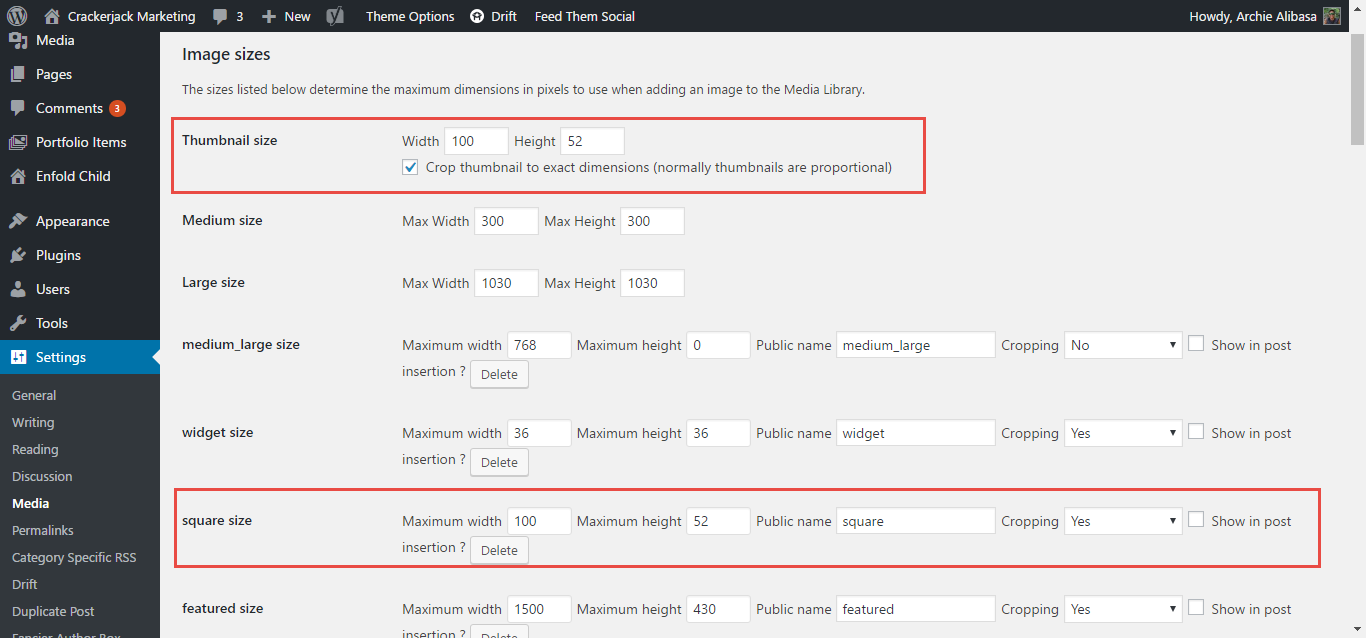
    Catalog images 300 × 300px Hard crop
    Single product image 600 × 600px Hard crop
    Product thumbnails 180 × 180px Hard crop

    Do you know if these are the actual default sizes from Woocommerce? I searched online and I found several sizes.

    Hey molibi,
    Try to go to WP > Settings > Media > Media Settings and increase your image sizes and then regenerate thumbnails using this plugin – https://wordpress.org/plugins/regenerate-thumbnails/

    Best regards,
    Mike

    #793044

    Yeah when I ad a blog posts content element to the page the image goes center. Or with the quick css enter to the left but all the content is still below.

    http://themacu.com/wp/?preview_id=14&preview_nonce=dee41f02bd&_thumbnail_id=-1&preview=true

    #792872
    FlatText
    Participant

    Hello,

    How do I force the posts for the masonry 2-column option to have one uniform size?

    Thank you

    #792870

    Also, the new settings messed up the thumbnails on the testimonials. Any way we can do this without affecting the other elements like the testimonial thumbnails? Thanks!

    #792868

    Hey Yigit!

    Thank you so much for your response! We’re halfway there!

    Right now here’s how the blog thumbnail looks like

    These are my settings (844×440 reduced 80% to 100×52)

    Is there anything else we can do so that the thumbnail size looks like this? (doesn’t crop like the current thumbnail)

    This is the blog

    Thanks!

    • This reply was modified 8 years, 11 months ago by Archie.
    #792840

    Hi Jordan,

    I am able to create SKUs and don’t want them to be automatically generated. What I am looking for is to have the SKU display on the product category page. Right now it is just a thumbnail and title (I’ve hidden the price). I haven’t been able to find plugins and no PHP snippets have worked so far. Is there anything further that you could suggest?

    #792217

    Hi 3mil-pedro,

    It does not work for portfolio, because portfolio class looks like this “av-masonry-entry isotope-item post-8460 portfolio type-portfolio status-publish has-post-thumbnail hentry portfolio_entries-charity portfolio_entries-client-stories portfolio_entries-healthcare all_sort charity_sort client-stories_sort healthcare_sort av-masonry-item-with-image av-masonry-item-loaded”. So you have to add to this function the case for portfolio_entries-.

    If you need further assistance please let us know.
    Best regards,
    Victoria

    #792214
    DianaFuetterer
    Participant

    Hallo das ist die Information im Systemstatus.
    dem-kolberger-sein/woocommerce/single-product/product-image.php Version 3.0.0 ist veraltet. Die Hauptversion ist 3.0.2,
    dem-kolberger-sein/woocommerce/single-product/product-thumbnails.php Version 3.0.0 ist veraltet. Die Hauptversion ist 3.0.2

    Ich habe die product-image.php und die product-thumbnails.php im Child theme kontrolliert hier steht
    * @package WooCommerce/Templates
    * @version 3.0.2

    Oder legt das an der Änderung der function.php hier habe ich den Code von maximus eingebunden, da die Produktbilder unscharf waren.

    Danke Grüße Diana

    #792185

    Hello Andi!
    Could you please help me again. The image size of the blog overview still doesn´t work;
    I did everything you mentioned in the posts before, including the adjustments in the functions.php file (changed the size of the small image for blogs to 301x374px, regenerated the thumbnails;

    $avia_config[‘imgSize’][‘square’] = array(‘width’=>301, ‘height’=>374); // small image for blogs

    I want ALL images on the overview blog page to be 301x374px – the image is not is there any chance?
    Thanks and best regards,
    Juergen

    #792098

    Hey Oby4455,

    Can you try adding this code at the bottom of functions.php:

    global $woocommerce;
    
    if( version_compare( $woocommerce->version, '3.0.0', ">=" ) ) {
    
    	function avia_woocommerce_gallery_thumbnail_description($img, $attachment_id, $post_id, $image_class ) {
    	    return $img;
    	}
    
    	function avia_woocommerce_post_thumbnail_description($img, $post_id){
    	    return $img;
    	}
    
    }

    Let us know if this helps :)

    Best regards,
    Nikko

    #792067
    805ITS
    Participant

    Hello,

    I added pictures on my product page but for some reason some of them appear blurry. I don’t understand why.

    The pictures are high quality and appear well when I click on them but on the thumbnail they are blurry.

    I tried many things and regenerating the thumbnails as well but without success.

    Any help would be very much appreciated!

    #791691
    Guilherme Pereira
    Participant

    Hi, i’m having a issue with the vatiarion produtct image, since i’ve uptaded the wordpress, woocommerce and enfold this option stopped to work. Results, I have brurry images and the image doesn’t change. I’m looking forword for the new elfold update, i hope this will fix it.
    I know if i change the tumbnail image size the blurry will disapear, but on the other hand my google’s seo will fall, because i’ll have the wrong image size for the others thumbnails (every one that isn’t the products’ main image).

    Now changing the subject, it is possible to put a “login/logout signin” in the top menu? Like dx.com. If the custumer ir logged in appear a wellcome “name of the customer”, if isnt appear a login signin. And it is possible that when the user click in “login/signin” appear a drop down box with the options instead of sending the user to another page?

    Thank you. With that process, the pdf seems to only be viewable as a tiny thumbnail. Clicking on it does nothing, and there seems to be no way to view full size nor print. Tested on 4 browsers on Mac.

    #791642

    PPS: if you have to get for your old uploaded files the new format – you might use a plugin like force regenerate thumbnails

    #791182

    Hey!

    Please try the following:
    1. Install this plugin: https://wordpress.org/plugins/simple-image-sizes/
    2. Go to Settings > Media
    3. Change the square image size (increase its width / height).
    4. Regenerate the thumbnails by clicking the button at the bottom.

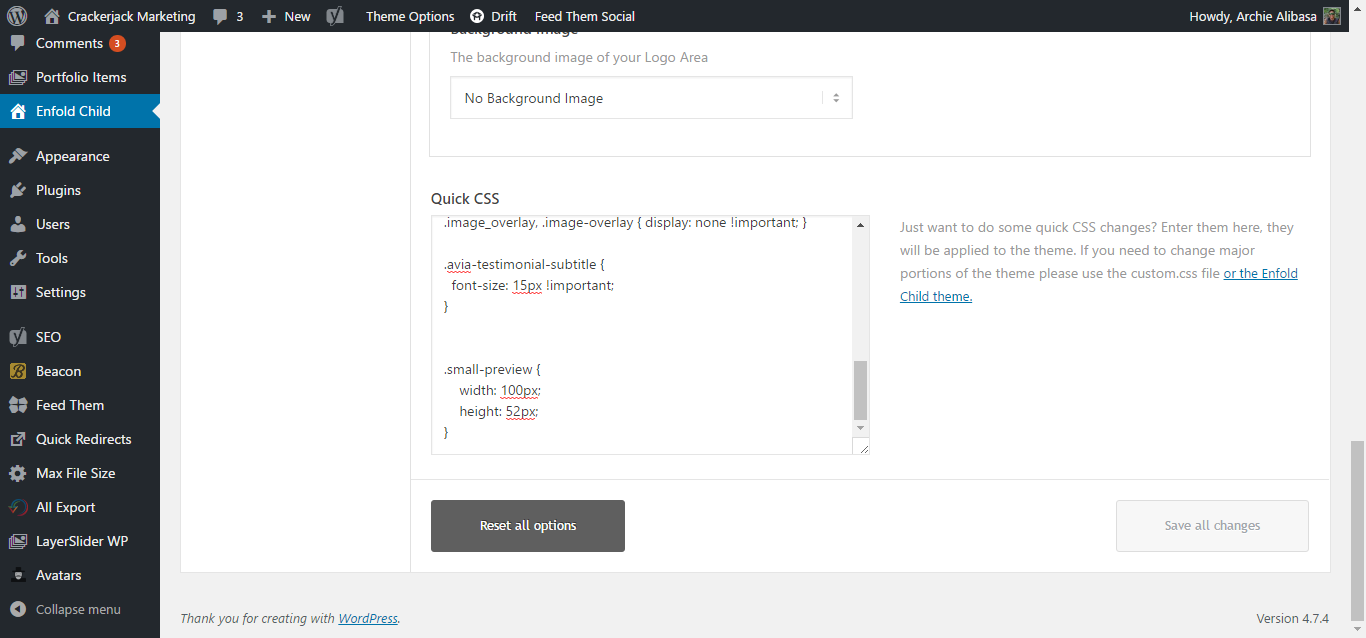
    Then add following code to Quick CSS in Enfold theme options under General Styling tab and adjust as needed

    .small-preview {
        width: 180px;
        height: 120px;
    }

    Best regards,
    Yigit

    Hello Ismael,

    Thanks for the suggestion; the shortcode [wpv-post-field] is not ok for getting images IDs. So I have placed in function php a routine to extract said ids and create a shortcode called [get-images-ids] to enable the display of the Ids list. This works in standalone but not within av-gallery (so far).
    Also, I have tried your suggested shortcode in function.php but get the following error:

    [av_gallery ids='1' style='big_thumb' preview_size='portfolio' crop_big_preview_thumbnail='avia-gallery-big-crop-thumb' thumb_size='portfolio' columns='5' imagelink='lightbox' lazyload='avia_lazyload']
    Warning: Cannot modify header information – headers already sent by (output started at /home/mysite/public_html/testbed/wp-content/themes/aja911/functions.php:110) in /home/mysite/public_html/testbed/wp-content/plugins/toolset-module-manager/common/Settings.php on line 78

    Still it might be the way to go. I have sent you credentials in the private messaging area.
    Thanks.

    • This reply was modified 8 years, 11 months ago by Sim0nb.
    #791056

    In reply to: thumbnails brighter ?

    To follow, I notice after downloading the thumbnails, that these thumbnails are dark. Only the original respects colors and brightness. Why that ?…

    Hi Victoria I downloaded https://mensmaximus.de/dokumente/enfold/enfold-child-wc3.zip
    and i added the code lines from the enfold child theme to the files
    product-image.php ,
    product-thumbnails.php
    style.css and
    function.php

    I did that because i am afraid if i activate the child theme at the moment all my setting will be reset,am i correct?
    I also have the woocommerce Version 3.0.6
    Victoria i would appreciate your help if you think the child theme will solve the problem with the blur images.
    Thank you in advance
    Xenia

    #790948

    Hi,

    It should be fixed now. I have modified this file: enfold/config-woocommerce/config.php (line 1395 – 1418)

    function avia_woocommerce_post_thumbnail_description($img, $post_id)
    {
    	global $post, $woocommerce, $product;
    
    	if(has_post_thumbnail())
    	{
    		$image_title = esc_attr(get_post_field('post_content', get_post_thumbnail_id()));
    		$image_link  = wp_get_attachment_url( get_post_thumbnail_id() );
    		$image  = get_the_post_thumbnail( $post->ID, apply_filters( 'single_product_large_thumbnail_size', 'shop_single' ), array(
    			'title' => $image_title
    			) );
    		$attachment_count = count( $product->get_gallery_attachment_ids() );
    
    		if ( $attachment_count > 0 ) {
    			$gallery = '[product-gallery]';
    		} else {
    			$gallery = '';
    		}
    
    		return sprintf( '<a href="%s" itemprop="image" class="woocommerce-main-image zoom" title="%s"  rel="prettyPhoto' . $gallery . '">%s</a>', $image_link, $image_title, $image);
    	}
    
    	return $img;
    }

    replaced it with:

    if( version_compare( $woocommerce->version, '3.0.0', ">=" ) ) {
    	function avia_woocommerce_post_thumbnail_description($img, $post_id){
    	return $img;
    	}
    } else {
    	function avia_woocommerce_post_thumbnail_description($img, $post_id)
    	{
    		global $post, $woocommerce, $product;
    
    		if(has_post_thumbnail())
    		{
    			$image_title = esc_attr(get_post_field('post_content', get_post_thumbnail_id()));
    			$image_link  = wp_get_attachment_url( get_post_thumbnail_id() );
    			$image  = get_the_post_thumbnail( $post->ID, apply_filters( 'single_product_large_thumbnail_size', 'shop_single' ), array(
    				'title' => $image_title
    				) );
    			$attachment_count = count( $product->get_gallery_attachment_ids() );
    
    			if ( $attachment_count > 0 ) {
    				$gallery = '[product-gallery]';
    			} else {
    				$gallery = '';
    			}
    
    			return sprintf( '<a href="%s" itemprop="image" class="woocommerce-main-image zoom" title="%s"  rel="prettyPhoto' . $gallery . '">%s</a>', $image_link, $image_title, $image);
    		}
    
    		return $img;
    	}
    }

    And in the same file (line 1425 – 1438)

    function avia_woocommerce_gallery_thumbnail_description($img, $attachment_id, $post_id = "", $image_class = "" )
    {
    
    		$image_link = wp_get_attachment_url( $attachment_id );
    
    		if(!$image_link) return $img;
    
    		$image = wp_get_attachment_image( $attachment_id, apply_filters( 'single_product_small_thumbnail_size', 'shop_thumbnail' ) );
    		$image_title = esc_attr(get_post_field('post_content', $attachment_id));
    
    		$img = sprintf( '<a href="%s" class="%s" title="%s"  rel="prettyPhoto[product-gallery]">%s</a>', $image_link, $image_class, $image_title, $image );
    
    	return $img;
    }

    replaced it with:

    if( version_compare( $woocommerce->version, '3.0.0', ">=" ) ) {
    	function avia_woocommerce_gallery_thumbnail_description($img, $attachment_id, $post_id, $image_class ) {
    	return $img;
    	}
    } else {
    	function avia_woocommerce_gallery_thumbnail_description($img, $attachment_id, $post_id = "", $image_class = "" )
    	{
    
    			$image_link = wp_get_attachment_url( $attachment_id );
    
    			if(!$image_link) return $img;
    
    			$image = wp_get_attachment_image( $attachment_id, apply_filters( 'single_product_small_thumbnail_size', 'shop_thumbnail' ) );
    			$image_title = esc_attr(get_post_field('post_content', $attachment_id));
    
    			$img = sprintf( '<a href="%s" class="%s" title="%s"  rel="prettyPhoto[product-gallery]">%s</a>', $image_link, $image_class, $image_title, $image );
    
    		return $img;
    	}
    }

    Let us know if it’s good on your end :)

    As for the login access, if I just copy and paste the password it doesn’t work but if I copy and paste the password then replace the single quote by typing manually, it does let me in :)

    Best regards,
    Nikko

    #790924

    Topic: thumbnails brighter ?

    in forum Enfold
    bg08ard
    Participant

    Hi,
    I’m disappointed, I noticed that the vignettes in my galleries were dull or dark. And when I display the image, the brightness is ok.
    Is what common to this type of galleries ? Or have I forgotten a setting ? How to improve the brightness of thumbnails ?
    Thank you for your help !
    Best regards

    #790905

    Hi,

    Try adding this code at the bottom of functions.php:

    global $woocommerce;
    
    if( version_compare( $woocommerce->version, '3.0.0', ">=" ) ) {
    
    	add_theme_support( 'wc-product-gallery-zoom' );
    	add_theme_support( 'wc-product-gallery-lightbox' );
    
    	function avia_woocommerce_gallery_thumbnail_description($img, $attachment_id, $post_id, $image_class ) {
    	    return $img;
    	}
    	function avia_woocommerce_post_thumbnail_description($img, $post_id){
    	    return $img;
    	}
    
    }

    Let us know if this helps :)

    Best regards,
    Nikko

    Hi,

    Could you please provide a link to the page where you’re testing this? And post the content of the custom single.php template on pastebin.com. We would like to check it. What value/values does the [wpv-post-field] returns? Maybe, you can assign it as a separate variable. Example:

    $images = do_shortcode("[wpv-post-field]");
    echo do_shortcode("[av_gallery ids='".$images."' style='big_thumb' preview_size='portfolio' crop_big_preview_thumbnail='avia-gallery-big-crop-thumb' thumb_size='portfolio' columns='5' imagelink='lightbox' lazyload='avia_lazyload']");

    Best regards,
    Ismael

Viewing 30 results - 3,991 through 4,020 (of 10,101 total)