Hi I have a site that has been customised to use advanced custom fields to create an online database of the stories of people on local war memorials. I have to update the site from PHP 7.4 to 8.0 but when I do the final page doesn’t show (link below). It currently works as still running 7.4. The server company (one.com) says it is a problem with the theme. I don’t think it is the Enfold theme as it isn’t a problem where I have used it elsewhere. I suspect it is a problem with the child theme where there are additional files (includes and page-templates) to give the needed functionality. I did not write these files and I have very basic PHP knowledge. Can you suggest how I go about resolving the problem please? You have always managed to help me get to the bottom of things in the past.
Thanks
Rob
Hi there,
I’ve seen a lot of those questions here, but none of them worked for me or weren’t suitable for my project.
We got 3 menus which can be selected to be displayed on pages. To do that, I’ve created a custom field with Advanced Custom Fields and written the separate IDs of the 3 menus as options. So far, so good.
But when it comes to changing the menu, it just won’t work. I’ve edited the “helper-main-menu.php” and added the header ID to the arguments before calling wp_nav_menu:
if(get_field('header_selection')) {
			$headerID = get_field('header_selection');
			$args = array(
					'menu' 				=> $headerID,
					'theme_location'	=> $avia_theme_location,
					'menu_id' 			=> $avia_menu_class,
					'menu_class'		=> 'menu av-main-nav',
					'container_class'	=> $avia_menu_class.' av-main-nav-wrap'.$icon_beside,
					'items_wrap'        => '<ul role="menu" class="%2$s" id="%1$s">%3$s</ul>',
					'fallback_cb' 		=> 'avia_fallback_menu',
					'echo' 				=>	false,
					'walker' 			=> new avia_responsive_mega_menu()
			);
} else { ..(args without menu-id).. }
But it just wont display the right menu. If I remove “theme_location”, it will work, but the styling is way off and it isn’t really working perfectly.
As you can see, I’m not afraid to code, so please don’t suggest other plugins. I really need that to be done manually with ACF.
Thanks in advance!
-
This topic was modified 3 years, 4 months ago by
 emilconsor.
Hi,
Thank you for the update.
You can use this filter to change the placeholder and label values of the order comments field.
function avf_custom_woocommerce_checkout_fields( $fields )
{
    $fields['order']['order_comments']['placeholder'] = 'Commentaires concernant votre commande: ex. informations ou demandes spéciales concernant votre visite guidées';
    $fields['order']['order_comments']['label'] = 'Notes de commande (facultatif)';

    return $fields;
}
add_filter( 'woocommerce_checkout_fields', 'avf_custom_woocommerce_checkout_fields' );
Place the code or filter in the functions.php file.
Best regards,
Ismael
Hello, My client wants to build a custom search field like this one,
https://www.cgrc.org/services?county=Montgomery
It’s a search field, with multiple drop down selections, that help find linked images that take you to specific services.
Can I build something like this on enfold?
Hello,
I already did:
“How do i make the custom field “adress” visible below the content of a blogpost?”
or:
How do i make any given CF visible in the content of a blogpost?
What is a custom field?:
https://kriesi.at/support/search/?bbp_search=Custom+Fields
Eva Simone
We updated to Enfold 5.1.1 on multiple sites. They are all now making the builder go full screen, behind the right Enfold Page Sidebar. Also, Advanced Custom Fields, a plugin we use on most of our sites is not showing at the bottom below enfold, it only shows the Enfold Page Builder. Also Yoast SEO is not showing. I can see it in the code when I do an Inspect in Chrome. I believe perhaps the enfold builder has css that is 100% width and height.
Hello, I have a custom postslider.php in my child theme already working.
I’m using ‘Elegant theme’ blog and I’ve added a custom author meta section just under the entry-title, before the av-vertical-delimiter.
I have a custom author meta there and is working:
$qualifica = get_the_author_meta( 'permission', $user->ID );
I want to show a custom post meta using this code:
$autore = get_post_meta( get_the_ID(), 'autore_articolo', true);
but it doesn’t show up.
The same code is in the custom loop and is working fine.
Ican’t understand why $qualifca is working while $autore is not.
Can you help me with this?
Thanks
-
This topic was modified 3 years, 5 months ago by
 uomopalese.
Hi,
Thanks for the info @guenni007.
The issue does not occur on our installation, so this is more likely an issue with a plugin or a custom script. We also noticed that when typing anything in any textarea or input fields (in a code block for example), a period or a dot is automatically appended to the text, which seems to be an autocomplete response or behavior.
Have you tried disabling the plugins temporarily? Please make sure toggle or temporarily disable the Enfold > Performance > File Compression settings afterwards.
Best regards,
Ismael
Hey Angelo,
Thank you for the inquiry.
You can enable the Cookie Handling > Modal Window Custom Content option and manually create a link to an external URL in one of the Tab Content fields.
Example:
<a href="https://external-site.com" target="_blank">Privacy Link</a>
Best regards,
Ismael
Hi,
Thank you for the feedback, I examined closer on my demo site and found that by entering the image URL directly the WordPress media library meta fields are not called like they are when a gallery element is, so I don’t see a way to get the title from the link.
But the following script will allow you to add specific titles to each hotspot and show it in the lightbox.
Try adding this code to the end of your child theme functions.php file in Appearance ▸ Editor:
function custom_hotspot_title_script() { ?>
  <script>
(function($){
$('.av-image-hotspot-1 a').attr('title','hotspot-1');
$('.av-image-hotspot-2 a').attr('title','hotspot-2');
$('.av-image-hotspot-3 a').attr('title','hotspot-3');
$('.av-image-hotspot-4 a').attr('title','hotspot-4');
$('.av-image-hotspot-5 a').attr('title','hotspot-5');
$('.av-image-hotspot-6 a').attr('title','hotspot-6');
$('.av-image-hotspot-7 a').attr('title','hotspot-7');
$('.av-image-hotspot-8 a').attr('title','hotspot-8');
$('.av-image-hotspot a').magnificPopup({
    type: 'image',
    image: {
        titleSrc: 'title'
    }
});
})(jQuery);
</script>
  <?php
}
add_action('wp_footer', 'custom_hotspot_title_script');
and adjust the titles to suit, for example for hotspot 1, change $('.av-image-hotspot-1 a').attr('title','hotspot-1'); to $('.av-image-hotspot-1 a').attr('title','custom title for hotspot 1');
I assume that this is your only hotspot element on your site, if not them we can make this script work on this one page only by adding page IDs to it.
Best regards,
Mike
how do you place the text to your layout. Are you working with the advanced layout builder of enfold ?
in this case you open f.e. the column in which your text element is placed – and open the tab on top: Advanced – on that tab you have those input fields in the developer section for IDs or custom-classes – insert alluppercase to that custom-class field ( without dot )
Or directly to the text-block alb element itself.
If you want to change all texts in a color-section – go to that advance tab to insert the class.
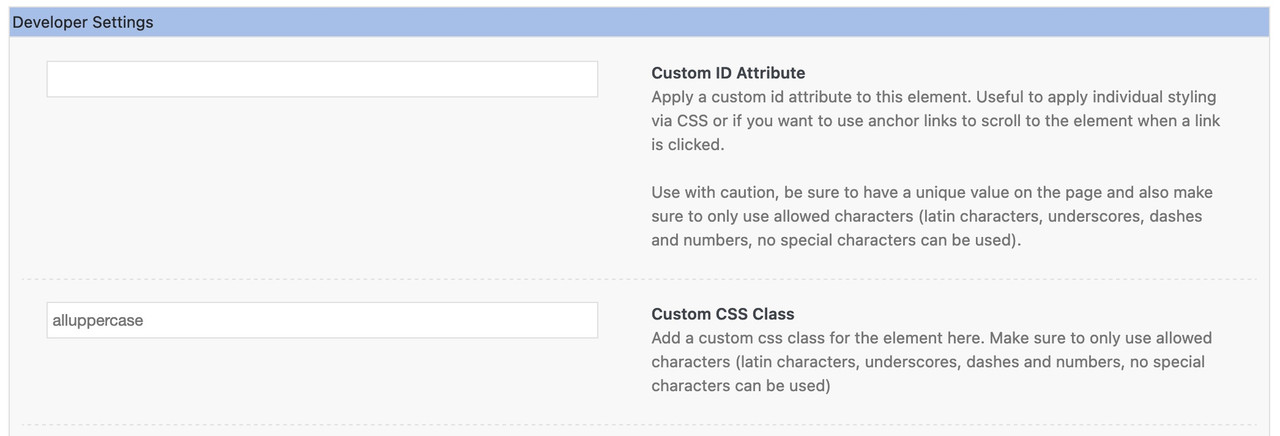
If you completely want to change the whole Text in your installation then use it without that class:
.responsive #top #wrap_all  {
  text-transform: uppercase !important
}
because of the two ID’s within this rule and the Important setting, it will mostly prevail against existing css rules that state differently.
But you thought of setting the custom-class as well? how it is named is up to you.
Otherwise i would need to see the page – if you could send me the link, I will look for a solution. Just keep in mind that I can not see the private content fields.
Hey engage24,
Thank you for the link to your site, please try this code in the General Styling ▸ Quick CSS field or in the WordPress ▸ Customize ▸ Additional CSS field:
  #footer .avia-mailchimp-form fieldset {
  display: flex;
  flex-wrap: wrap;
  }
  #footer .avia-mailchimp-form #element_avia_1_1 {
      order: 1;
  }
  #footer .avia-mailchimp-form #element_avia_2_1 {
      order: 2;
  }
  #footer .avia-mailchimp-form #element_avia_0_1 {
      order: 3;
  }
  #footer .avia-mailchimp-form .form_element:not([id*='element_avia_'])  {
      order: 4;
  }
After applying the css, please clear your browser cache and check.
The expected results:

Best regards,
Mike
Hey koomo,
Thanks for the link to your page, from what I see the Select People is given the background color by the plugin when the toggle is opened, this seems to be the correct behavior, but if you want to remove it try this code in the General Styling ▸ Quick CSS field or in the WordPress ▸ Customize ▸ Additional CSS field:
.yith-booking--simple-style .yith-wcbk-people-selector--opened .yith-wcbk-people-selector__totals {
    background: none !important;
    color: #484848;
}
to show the dropdown selections try this css:
.yith-wcbk-people-selector--opened .yith-wcbk-people-selector__fields-container {
    position: relative;
}
After applying the css, please clear your browser cache and check.
the expected results:

Best regards,
Mike
Hey JKnoblach,
Thank you for your patience and for the link to your page, it looks like you are using the masonry element and showing portfolio items. We don’t have a default way to add logo images over the masonry item on hover but I was able to find a way to do this for this situation using images, but it may not work with SVG’s because you will need to use image element shortcodes. I imagine you could create custom SVG shortcodes ad use them, but you can’t use html in the excerpts.
For this example we will create an image shortcode using the shortcode wand and paste that shortcode in to the portfolio item manual excerpt field.
Then in the masonry element we will choose to show the excerpt only instead of the title that you are now showing and add this css into the WordPress ▸ Customize ▸ Additional CSS field:
.av-masonry-entry-content .avia-image-container img {
height: 100px;
width: 100px;
}
this css assumes that your logo image is 100px square, feel free to adjust to the size you wish to show.
Then in order to show the shortcode from the excerpt you will need to install the plugin Shortcodes Anywhere or Everywhere and choose the setting In Post/Page Custom Fields

The expected result:

I linked to my example page below, please give this a try.
Best regards,
Mike
Hey Kren,
Thank you for the inquiry.
The fields in the checkout page should have borders by default. Did you add any custom css in the site? Please post the site URL in the private field so that we can check the checkout page properly.
Best regards,
Ismael
Hi,
Thank you for your patience and for the login, I will try to help you customize your plugin ARG MultiStep Checkout for WooCommerce, although this is not a third party plugin that we support.
for the width of your fields in the steps please try this css
.argmc-wrapper .argmc-form-steps {
    padding-left: 0;
    padding-right: 0;
}
.argmc-order-step, .argmc-payment-step, .argmc-order-payment-step, .argmc-order-review-step {
    max-width: 100%;
}
.woocommerce-shipping-totals.shipping th {
	width: 50px;
}
I’m not sure what you are finding wrong with the payment box in step two or three, but these boxes are styled from the plugin and will not look like our demo, I didn’t see anything out of line please see the screenshots in the Private Content area. If there was something small to adjust I would be able to assist, but I can’t re-write the plugin to look like our demo.
The English words Customer Details, Billing Address, & Shipping Address are also from the plugin:

so while I could write a script to change these, I would first suggest that you ask the plugin author for their solution as I imagine they must have dealt with this before.
I’m not sure what you mean by the “my account” fields should look like the log in / register, try explaining with some screenshots.
Best regards,
Mike
Hi Ismael,
thank you, i put custom text in both Autorespond Text fields. The Text appeard in die Autoresponder mail, one above and the other below the form labels. If I leave the Autoresponder Subject Fields in backend empty, there is no autoresponder mail. This is not the best solution, but if it is not possible to edit or exclude the form Labels from the autoresponder mail, it is the easiest solution.
best regards
Manfred
Hi,
Thank you for the update.
Did you specify a custom autoresponder text in the Content > Backend > Autorespond Text field? The fields will not be included in the autoresponder email if a custom text is specified.
Best regards,
Ismael
Hi,
Thank you for the update.
Which file should I modify to display them?
You may need to modify the includes > loop-index.php file if you want the custom fields to display on the single post page.
Best regards,
Ismael
Where are you displaying the custom fields? Did you modify a template to display them?
It will be for normal posts under certain categories.
Not implemented yet. Which file should I modify to display them?
Thanks.
Hey peterolle,
Thank you for the inquiry.
Where are you displaying the custom fields? Did you modify a template to display them? You should probably add the conditional tags around those modifications. This documentation should help.
// https://developer.wordpress.org/reference/functions/has_category/
Example:
if( has_category("dog"), get_the_ID() ) {
   // echo custom field
}
In the code above, the custom field will only display if the post has the category “dog”.
Best regards,
Ismael
I need to have special fields for some categories in the posts and I am using ACF.
What is the best way to do this and to which template I should add my custom fields code?
A simple example with an if category1, category2, and is single can help to know where and how to add the code.
Thanks.
I am working on the site at
https://ineedhelp-nr.com.au
front end pw = helpme
to assist flood victims here in Australia
the directory listings I am using have a Title field – this is showing up on the Map Listing but it is not showing once you click the link to view the Full Listing page
Looking at the support forums this is often caused by the theme – I cant see any relevant settings in Enfold bit wondered if you have an info on this?
the docs for the site say this string can be added to the template (copied to the child theme)
<?php Sabai::_h($entity->getTitle())?>
I have added it (line 23) but it is still no showing up
here is the template file code
<?php if (!$IS_EMBED) $this->Action('directory_before_single_listing', array($bundle->addon, $entity));?>
<?php $has_photos = $entity->directory_photos && ($photos = $this->Entity_RenderField($entity, 'directory_photos'));?>
<div id="<?php echo $id;?>" class="<?php echo $class;?> sabai-clearfix<?php if (!$has_photos):?> sabai-directory-no-image<?php endif;?>" itemscope itemtype="http://schema.org/gLocalBusiness">
    <meta itemprop="name" content="<?php Sabai::_h($entity->getTitle());?>" />
    <link itemprop="url" href="<?php echo $this->Entity_Url($entity);?>" />
<?php if ($labels = $this->Entity_RenderLabels($entity)):?>
    <div class="sabai-directory-labels"><?php echo $labels;?></div>
<?php endif;?>
    <div class="sabai-row">
<?php if ($has_photos):?>
        <div class="sabai-col-sm-4 sabai-directory-images">
            <?php echo $photos;?>
        </div>
<?php else:?>
        <link itemprop="image" href="<?php echo $this->NoImageUrl();?>" />
<?php endif;?>
        <div class="<?php if ($has_photos):?>sabai-col-sm-8<?php else:?>sabai-col-sm-12<?php endif;?> sabai-directory-main">
<?php if (!empty($entity->voting_rating['']['count'])):?>
            <div class="sabai-directory-rating" itemprop="aggregateRating" itemscope itemtype="http://schema.org/AggregateRating">
                <?php echo $this->Entity_RenderField($entity, 'voting_rating', array('link' => $this->Entity_Url($entity, '/reviews'), 'count_formats' => array(sprintf(__('%s review', 'sabai-directory'), '<span itemprop="reviewCount">%d</span>'), sprintf(__('%s reviews', 'sabai-directory'), '<span itemprop="reviewCount">%d</span>')), 'summary_url' => $this->Entity_Url($entity, '/ratings')));?>
            </div>
<?php endif;?>
<?php Sabai::_h($entity->getTitle());?>
<?php if ($entity->directory_category && ($categories = $this->Entity_RenderField($entity, 'directory_category'))):?>
            <div class="sabai-directory-category">
                <?php echo $categories;?>
            </div>
<?php endif;?>
            <div class="sabai-directory-info sabai-clearfix">
<?php if ($entity->directory_location):?>
                <div class="sabai-directory-location">
                    <?php echo $this->Entity_RenderField($entity, 'directory_location');?>
                </div>
<?php   if ($entity->directory_location[0]['street']):?>
                <div itemprop="address" itemscope itemtype="http://schema.org/PostalAddress" class="sabai-directory-address sabai-hidden">
                    <span itemprop="streetAddress"><?php Sabai::_h($entity->directory_location[0]['street']);?></span>
<?php     if ($entity->directory_location[0]['city']):?>
                    <span itemprop="addressLocality"><?php Sabai::_h($entity->directory_location[0]['city']);?></span>
<?php     endif;?>
<?php     if ($entity->directory_location[0]['state']):?>
                    <span itemprop="addressRegion"><?php Sabai::_h($entity->directory_location[0]['state']);?></span>
<?php     endif;?>
<?php     if ($entity->directory_location[0]['zip']):?>
                    <span itemprop="postalCode"><?php Sabai::_h($entity->directory_location[0]['zip']);?></span>
<?php     endif;?>
<?php     if ($entity->directory_location[0]['country']):?>
                    <span itemprop="addressCountry"><?php Sabai::_h($entity->directory_location[0]['country']);?></span>
<?php     endif;?>
                </div>
<?php   endif;?>
<?php endif;?>
                <div class="sabai-directory-contact">
                    <?php echo $this->Entity_RenderField($entity, 'directory_contact');?>
                </div>
                <div class="sabai-directory-social">
                    <?php echo $this->Entity_RenderField($entity, 'directory_social');?>
                </div>
            </div>
<?php if ($listing_body = $this->Entity_RenderField($entity, 'content_body')):?>
            <div class="sabai-directory-body" itemprop="description">
                <?php echo $listing_body;?>
            </div>
<?php endif;?>
            <div class="sabai-directory-custom-fields">
                <?php $this->displayTemplate('directory_custom_fields', array('entity' => $entity));?>
            </div>
        </div>
    </div>
<?php if (!empty($buttons)):?>
    <div class="sabai-navigation sabai-navigation-bottom sabai-entity-buttons">
        <?php echo $this->ButtonToolbar($buttons);?>
    </div>
<?php endif;?>
<?php if (!empty($links)):?>
    <div class="sabai-entity-links">
        <?php echo $this->ButtonLinks($links);?>
    </div>
<?php endif;?>
</div>
<?php if (!$IS_EMBED) $this->Action('directory_after_single_listing', array($bundle->addon, $entity));?>
Hi Guenni007,
thanks for your reply. The custom post type support in enfold is already active and works as it should. So far no problem.
What i have in detail is here: https://imgur.com/a/IGyAdKi
– First, i have created cpt via cpt ui. So far, so good. (see cpt registration)
– After that, i added fields to the cpt via acf. (see cpt advanced custom fields)
– Image three shows a record, now created in the custom post type having additional fields appended with acf. In here you see i’ve included a page-content-element as a template.
– The actual template you see in picture four.
That is working as supposed to. – Now, if i only *CREATE* a record, i do not have the template included you see in image number three. To have the same look and feel for all records, i have to *copy* a record that already includes the template and change the values.
I’d appreciate a cleaner solution, where the “single post” is automatically using a specific advanced layout template by the type of the post.
Cool? Any ideas? Better ideas?
Thanks & Cheers
– o.
Hi Guys,
sorry to ask another custom post types question. I’d appreciate any help.
What i have:
– I created a view custom post types using the ‘CPT UI’-Plugin
– I added the fields i need with ‘ACF’-Plugin
– I created a *single* entry of a Custom Post Type – in the content area of that entry, i added the “include page” field of the layout architect, the page that is included has the acf-fields on it.
Now, when i view that entry, it is displayed the way i like. So far, so good. The disadvantage is that if i want another entry to look like this, i’d have to copy the existing entry or again add the template to the content area.
What i want is:
– hide content area
– every newly created (not copied) custom post type entry will be using the template i created so every one looks the same.
Any ideas? Thanks in advance!
– o.
 Johanna Conrad
Guest
Hi, i want to have the burger mobile menu symbol in the header always visible on the smartphone-screen. Can you help me? When i want to go to the settings in the Dashbord (Design->Menu) there is an error code:
Fatal error: Uncaught Error: Call to undefined function beonepage_get_version() in /homepages/1/d695091931/htdocs/clickandbuilds/Verlagsagentur/wp-content/plugins/beonepage-lite/inc/custom-menu/menu-item-custom-field.php:121 Stack trace: #0 /homepages/1/d695091931/htdocs/clickandbuilds/Verlagsagentur/wp-includes/class-wp-hook.php(307): Menu_Item_Custom_Fields_Metadata::_admin(‘nav-menus.php’) #1 /homepages/1/d695091931/htdocs/clickandbuilds/Verlagsagentur/wp-includes/class-wp-hook.php(331): WP_Hook->apply_filters(NULL, Array) #2 /homepages/1/d695091931/htdocs/clickandbuilds/Verlagsagentur/wp-includes/plugin.php(474): WP_Hook->do_action(Array) #3 /homepages/1/d695091931/htdocs/clickandbuilds/Verlagsagentur/wp-admin/admin-header.php(118): do_action(‘admin_enqueue_s…’, ‘nav-menus.php’) #4 /homepages/1/d695091931/htdocs/clickandbuilds/Verlagsagentur/wp-admin/nav-menus.php(675): require_once(‘/homepages/1/d6…’) #5 {main} thrown in /homepages/1/d695091931/htdocs/clickandbuilds/Verlagsagentur/wp-content/plugins/beonepage-lite/inc/custom-menu/menu-item-custom-field.php on line 121
Es gab einen kritischen Fehler auf deiner Website. Bitte überprüfe den Posteingang deiner Website-Administrator-E-Mail-Adresse für weitere Anweisungen.
Purchase codes: 1c315244-d645-4c68-b3f9-a8249f08abbc
Thanks for helping!
best regards
Johanna Conrad
Hi,
We are working with custom made enfold elements for a long time. We often have problems with the tiny_mce field.
I created two tiny_mce fields in a custom element:
array(
                    'name' => __('Immer sichtbarer Text', 'avia_framework'),
                    'desc' => __('Enter some content for this textblock', 'avia_framework'),
                    'id' => 'visible_text',
                    'type' => 'tiny_mce',
                    'std' => __('', 'avia_framework'),
                    'tmpl_set_default' => false
                ),

                array(
                    'name' => __('Eingeklappter Text', 'avia_framework'),
                    'desc' => __('Enter some content for this textblock', 'avia_framework'),
                    'id' => 'hidden_text',
                    'type' => 'tiny_mce',
                    'std' => __('', 'avia_framework'),
                    'tmpl_set_default' => false
                ),
If I edit the content of one of the fields and add a bold text and save the page everything is fine in the frontend but in the backend in the visual view of the tiny_mce field the bold text isn’t visible any more but <strong>Text</strong> is visible as code. If I save again the frontend text is also wrong because I the the html tags. What’s the problem?
Here is the complete code for the element: https://pastebin.com/Ptn91vBU
All the best,
Patrick
Hey UFreeman,
1. Question: In the mobile version of my site, empty fields appear above the paragraphs. I know the fields are the layout elements that I use to break up the page and then populate it with content — on the web version it looks as intended, on the mobile version you can see it as an empty field above the content. How do I stop this display in the mobile version?
I believe that you want to hide three empty white boxes on your page for mobile, please see the screenshot in the Private Content area. These seem to be custom div’s in text block elements and all have the same ID so adding this css to your Quick CSS in the theme option will hide them all on mobile:
@media only screen and (max-width: 767px) {
#simple-translate {
	display: none;
}
}
After applying the css, please clear your browser cache and check.
2. I want to include an up button that appears in the bottom right corner as you start scrolling down and brings you back to the top (like here in the forum, default). All earlier questions about this here send you to a place in the theme options that doesn’t exist for me or that maybe have a completely different name.
To show the “scroll to the top” button on mobile add this css to your Quick CSS in the theme option
@media only screen and (max-width: 767px) {
.responsive #top #scroll-top-link {
    display: block;
}
}
again after applying the css, please clear your browser cache and check.
Best regards,
Mike



