Viewing 30 results - 571 through 600 (of 1,622 total)
  • Author
    Search Results
  • #1117729
    dmsystem
    Participant

    I want to enable to show Titles and breadcrumbs which are generally found in custom field options. When I click on screen options then I don’t see custom fields. I have already:

    • Reinstalled WordPress
    • Reinstalled enfold
    • Reset options in enfold
    • deactivated all plugins
    • The problem still remains. Could you please take a look at this?

      Regards

      Marks

    #1116869

    The “status” and the three other custom fields are present only for the custom post type name/slug “q_a” (see screenshot of setting in the plugin Custom Fields). We also have a custom post type name/slug “ordliste”, but this should always be visible to all, so it does not contain any custom fields. Then we have the ordinary WordPress posts.

    #1116747
    BOM
    Participant

    I use the portfolio and issue the title and the excerpt there. How can I display two additional fields in the Portfolio Grid? So I need two custom fields. I can create these with Advanced Custom fields. How do I get these into the Portfolio Grid View? Or can I also create the fields directly in the portfolio?

    #1116200

    Hi Martin,

    Did you refer to the ACF documentation?

    Best regards,
    Rikard

    #1115996
    azuro
    Participant

    Dear Enfold-Team,

    I am migrating from an older theme to Enfold atm and made use of ACF in the old theme a lot. I need to get the value from ACF fields and display them on the website but that does not seem to work in Enfold.

    [acf field=fieldname] or
    %%cf_fieldname%%

    should return the value of the field but nothing happens within Enfold. Is there a way I can fix this? If you could give an example that would be great.

    Thank you!

    Kind regards,
    Martin

    #1115953

    Hello Ismael! Great that the post now is visible from the front page once the code is typed into the search field. I think we are almost done now.

    In the reply to you on June 13th I mentioned that we use Advanced Custom Fields (ACF) and that “One ACF is “status” that can be set to either “public” or “private”.” But that is a long time ago now, so I understood that you did not remember:)

    The only thing I am missing now is that the title and content from the Q&A posts with the ACF field status set to “private” should not be searchable. In the test post I made, the title is “Test title” and the content is “Test question from user”. If I search for “Test” or “question” on the front page (write it in the search field without clicking on the search icon or pressing enter), the post is still found (see screenshot). It should be hidden, so that it is only visible by searching for the code. However, it is hidden when I press the search button. https://www.guttogjente.no/?s=question and https://www.guttogjente.no/?s=test does not display this private post in the search results. In the plugin “Custom search” I tried to set “code” as the only searchable field for custom posts, but it did not help (it would also not be an ideal solution, since the public posts would not be searchable either then). Another thing that separate the private posts from the public ones is that they don’t have a featured image, if that could help to hide them in the search query.

    #1115876
    madsonic
    Participant

    Hi :)
    Is there any way i can define custom default content to make things easy for Editors?
    Like Default preselected Taxonomies, Default selected Sliders, Default Text and Titles and things like this?

    I have to do a workaround because Enfold does not support Toolset Layouts … The ALB content of all entrys in my custom post type will be the same, the Main-content is in the custom fields.

    Is there a possibility to achieve this in any way with the ability to use shortcodes, too?
    Hope you can help.

    Kind Regards

    Hey coolicious,
    Please try this code in the General Styling > Quick CSS field or in the WordPress > Customize > Additional CSS field:

    #top.home .avia_ajax_form .first_form.form_element_third {
        clear: right !important; 
        margin-left: 5px !important; 
        width: 31.6% !important; 
    }
    #top.home #avia_0_1 {
       max-height: 44px !important; 
    }

    Then add this code to the end of your functions.php file in Appearance > Editor:

    function custom_gdpr_script(){
      ?>
      <script>
    (function($){
      $(document).ready(function(){
    $( 'fieldset' ).each(function() {
    $( this ).find( '.form_element_third' ).insertBefore( $(this).find('.av_mailchimp_privacy_check') );
    });
    });
    })(jQuery);
    </script>
    <?php
    }
    add_action('wp_footer', 'custom_gdpr_script');

    Best regards,
    Mike

    #1112526

    I had deactivated ”Search Everything”, since the “Custom Search by BestWebSoft” plugin already allows search in Custom Fields. But enabled ”Search Everything” also now, in case it can help to solve this problem.

    #1112367

    Hi,

    Have you enabled also a plugin like ” Search Everything ” which allows to search through custom fields?

    Best regards,
    Basilis

    badoes
    Participant

    Hello,

    I have quit a large (height) form in use.
    I want to have a message under the submit form whenever an user has forgotten one of the required fields
    Now the forgotten field is only light up however having a large form, users not always see which field it is about thinking they to all right.
    So I want to have a custom message behind the submit button “Please make sure all required fields are entered.”
    How can I accomplish such ?

    Regards

    #1111253
    jrmayer
    Participant

    Hello ladies & gentlemen,

    i use 2 custom post types called “Seminare” and “Anmeldungen” built with the plugin “Advanced Custom Fields” with Enfold.

    Now i have the problem the masonry blog element shows this two cpt too, how i can exclude them from this element.
    Please note thy are not shown in the dropdown of the backend element, so i don´t could exlcude them.

    Thank you team Kriesi

    Kindly regards,
    Jürgen

    • This topic was modified 6 years, 7 months ago by jrmayer.
    #1110805
    This reply has been marked as private.
    #1110176
    This reply has been marked as private.
    #1109881
    webchroma
    Participant

    Hi,

    I’m using the masonry to show some type of posts and would like to substitute the post date shown under the title with a custom post.
    I’ve found the code in av-helper-masonry.php, but wont like to change the main code. How can I change it in a child theme?

    thanks piero

    #1109669

    Hello Ismael!
    I definitely agree that the best solution would have been to get i touch with the previous developer. As I mentioned earlier in this tread, I also tried to contact the company who made the webpage, but the company had changed and they could no longer help me. Our webpage is mostly run by me and another volunteers to answer questions from youths, which they ask anonymously. They do not leave any contact information in the Gravity Form, but get a 6-digit code in the confirmation message that is generated automatically (this coding I managed to add successfully). On submission, a draft of a custom post type with their question and the code is automatically generated. The custom post type is made with the plugins CPT UI and contains Advanced Custom Fields (ACF) .One ACF is “status” that can be set to either “public” or “private”. Later, they can check their answer by searching for that code. If the answer is not suitable for being public, because it contains private information that can be tracked back to the person, it is made private so only the person with the code can view it. Therefore, we can not use the built in “private” function in WordPress.”

    If you have other solutions to achieve the same functionality I appreciate your suggestions.

    Except for in one sentence, I did not modify the code, I just pasted the old modifications to the code in between the existing code where it had been before.

    One change that I suspect could make the code above break down is that Enfold 2.4.1 had:
    $defaults = array('numberposts' => 5, 'post_type' => 'any', 'post_status' => 'publish', 'post_password' => '', 'suppress_filters' => false);
    which the former developer modified to:
    $defaults = array('numberposts' => 5, 'post_type' => array('post','Ordliste'), 'post_password' => '', );
    The latest Enfold had:
    $defaults = array('numberposts' => 5, 'post_type' => 'any', 'post_status' => 'publish', 'post_password' => '', 'suppress_filters' => false, 'results_hide_fields' => '');
    So I tried to combine the latest version and the modification to:
    $defaults = array('numberposts' => 5, 'post_type' => array('post','Ordliste'), 'post_password' => '', 'suppress_filters' => false, 'results_hide_fields' => '');

    Also, I noticed that this is an “if”-sentence without any “else”-argument.

    Hey fw100,

    If you enable the custom CSS fields under Enfold->Layout Builder, you can then add a class to the element in question. For instance only-mobile. Then add this to Quick CSS:

    .only-mobile {
      display:none;
    }
    
    @media only screen and (max-width: 767px) {
    .only-mobile {
      display:block;
    }
    }

    Best regards,
    Rikard

    #1108967
    This reply has been marked as private.
    #1105947
    guttogjente
    Participant

    I updated my theme from version 2.4.2. The one who built the webpage had made some customization without making a child theme. After the update, some private posts was made public. These are custom post types made with the plugins CPT UI andACF . I looked in the old WordPress backup and found that before the update there was a header-q_a.php with the following code in the <head> to prevent posts of the type Q&A with the custom field status set to “private” from being displayed:

     if(get_field('status') != 'private'){
    
    	   if (function_exists('avia_set_follow')) { echo avia_set_follow(); }
        }
        else{
            echo '<meta name="robots" content="noindex,nofollow">';
        } 

    I tried to add if else statement to the header-q_a.php in my child theme around the existing line:
    if (function_exists('avia_set_follow')) { echo avia_set_follow(); }
    and have added get_header(‘q_a’); in single-q_a.php as it was before, but the posts still display. Is it possible for you to log in and have a look at it? I had to set my website in maintencance mode until this is fixed. I share my login details in the private content and a link to one of the private posts that have been made public.

    #1105386

    As long as the second word isnt much longer than the first one – this will work!

    if you leave the header at non-shrinking it could be done this way too:

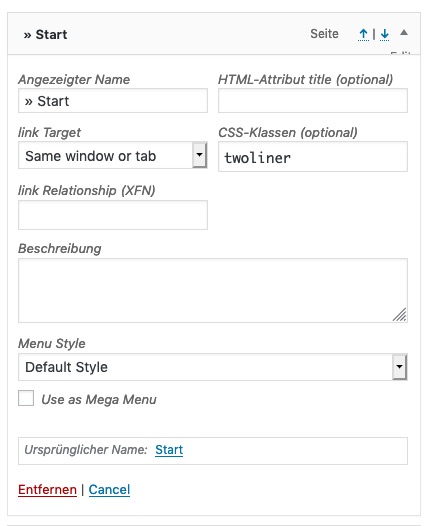
    • Give a custom class to that menu item f.e. : twoliner
    • insert item label – as you does with linebreak
    .twoliner > a {
        line-height: 20px !important;
        padding-top: 63px !important;
        text-align: center;
    }

    Advantage of that method is that the menu-item width grows with the inserted words.

    ______________________________

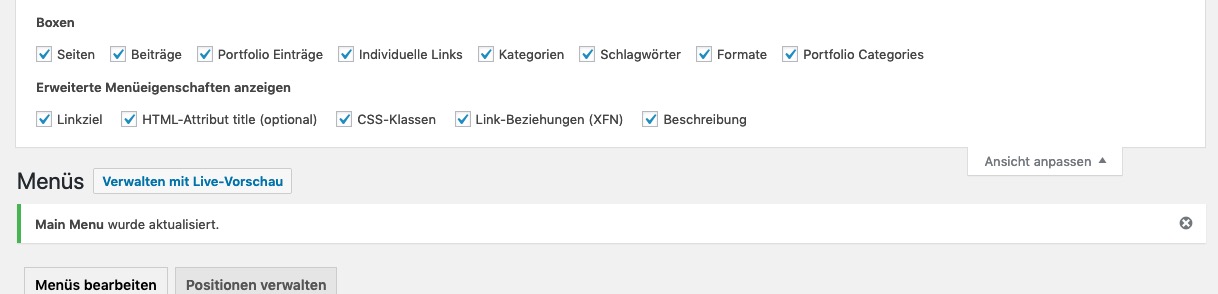
    By the way : if you don’t know how to set a custom class to menu-items:
    on the top of the menu settings page – there is on top right a slide out settings tab. There you can mark additional fields for the menu settings.
    Click to enlarge the image

    After activation of class the items look like this:

    there you are

    Hi,

    Thank you for the update.

    It seems to be working properly. Check the test post in the private field. Are you adding the info in the custom fields? The plugin has an actual meta box for the university info at very bottom of the editor. You should use that instead. We disabled the custom fields temporarily.

    Best regards,
    Ismael

    #1105327

    In reply to: ENFOLD THEME QUESTION

    Hi,
    Thank you for the login, I see that your PHP is v5.6.40, so that is good.
    But I also see that you have custom code in your parent theme (Enfold) functions.php and are using the “Advanced Custom Fields” plugin, please advise “your guys” of this because they will need to copy this to the updated theme.
    I would advise hiring from Codeable and in your request let them know it is a Enfold site.

    Best regards,
    Mike

    #1105094

    High,
    you didnt answer for one week and so I found the solution by myself: A while ago I installed the plugin custom fields and a short time later I deinstalled the plugin. Now I supposed that the plugin is necassary for the enfold theme and after installing it again the editor works correct.
    You can close the topic.
    Annett

    #1104390
    ksnoo04
    Participant

    Dear Enfold-experts,

    I just added a support contact form on my enfold theme.

    The problem is that is does not look like the forms here:

    I would like the following:
    – In my version I have borders around the different text fields – I would like it like in the above link
    – There is too much padding under the submit-button
    – There does not come a red border when it validates the form

    When I try to add some of the CSS modifications on my quick css it does not affect anything:

    Here is how I inserted the form:

    [av_contact (Email address hidden if logged out) ' title='How can we help you?' on_send='' sent='Your message has been sent! We will get back to you shortly.' link='manually,http://' subject='Support Request' autorespond='' captcha='' form_align='' color='' custom_class='' admin_preview_bg='' av_uid='av-hroj83']
    [av_contact_field label='Name' type='text' options='' check='is_empty' width='' multi_select='' av_contact_preselect='' av_uid='av-hkvmv7'][/av_contact_field]
    [av_contact_field label='E-Mail' type='text' options='' check='is_email' width='' multi_select='' av_contact_preselect='' av_uid='av-hhfwe3'][/av_contact_field]
    [av_contact_field label='Message' type='textarea' check='is_empty' options='' multi_select='' av_contact_preselect='' width='' av_uid='av-h5d55n'][/av_contact_field]
    [/av_contact]

    I tried to change to layout by:

    .av-contact-form-title fieldset h3 {
    font-size: 24px;
    text-transform: uppercase;
    }

    or
    /*—————————————-
    // CSS – Contact form label icons
    //————————————–*/
    #top .avia_ajax_form.cf-label-icons label{
    padding-left: 20px;
    }
    #top .avia_ajax_form.cf-label-icons label::before {
    position: absolute;
    left:0;
    font-family: ‘entypo-fontello’;
    }
    #top .avia_ajax_form.cf-label-icons fieldset p:nth-child(2) label:before{
    content:”e80a”;
    }
    #top .avia_ajax_form.cf-label-icons fieldset p:nth-child(3) label:before{
    content:”e805″;
    }
    #top .avia_ajax_form.cf-label-icons fieldset p:nth-child(4) label:before{
    content:”e826″;
    }
    #top .avia_ajax_form.cf-label-icons fieldset p:nth-child(5) label:before{
    content:”e83b”;
    }
    /* Input field do not support pseudo elements so we target the last p in the fieldset which is usually the submit button */
    #top .avia_ajax_form.cf-label-icons fieldset p:last-child:before{
    content:”e844″;
    color:#FFF;
    font-family: ‘entypo-fontello’;
    position: absolute;
    left: 20px;
    top: 50%;
    transform: translateY(-50%);
    }

    But nothing changes

    I hope you can help.

    • This topic was modified 6 years, 7 months ago by ksnoo04.
    #1101119
    kylerollins
    Participant

    Hi there,

    Can you guys help me on this? i’m stuck.
    I installed the ACL ( advanced custom fields) plugin and created a custom field “news_origin” and want to add to the postslider.php just after the excerpt.
    i added this piece of code:

    $output .= “<img src=’ “;
    $image = the_field(“news_origin”);
    $output .= $image[‘url’];
    $output .= ” ‘ alt=’ ‘ />”;

    but the result is
    Is not applying the image url.

    Can you help
    Thanks.

    Joel Berger
    Participant

    Hy there

    I am currently creating a website with a contact/application form.
    The customer of this business should be able to add plants which he wants the business to take care off to the form.

    Here is the link to the page, so you can get an Idea of the form:

    If you scroll down, you’ll find the form (Anmeldung).
    I’ve added two Plants (Pflanze 1 + Pflanze 2). Is it possible to create the option to ”add more”, and then one more (and then how many more) area appears where the customer can add plants?

    If you got follow-up questions to my request let me know.
    Looking forward to hear back from you.

    Kind regards
    Joel Berger

    Michael
    Participant

    When I have Enfold active, I can’t show the menu to enable custom post options, “screen options”. If I switch to a default WP theme, it works fine. Please advise a solution. Thanks. error

    Hej Vinay,

    Your screenshot doesn’t show any red notification box which suggests you didn’t get the experience I refer to. You have to complete the order details and LEAVE ONE OF THE * FIELDS OUT and continue to the end of the page, tick the two accept boxes and press the green “Afgiv Ordre” (Accept order) button. SEE SCREENSHOT – https://imgur.com/2U6rVnw

    Then the page will shoot back to the top to let you know something is missing with the red notification box… BUT because the scroll bar doesn’t go right to the top the customer doesn’t see it. They just see the green notification box in your screenshot which is the same as the box they saw when they first arrived so they can’t figure out what’s wrong with the order. They don’t realise they have to scroll up themselves to reveal the red notification box.

    I’ve already:
    – disabled the merging and compression settings
    – cleared my cache,
    – tried hard loads and get the same experience in FireFox and Chrome. I hope it has nothing to do with cache because customers would not have a clue about that so we can’t help them.

    #1095832

    Hello,
    I tried but it doesn’t work ..
    I searched a bit on the web and it seems that the problem is just enfold compatibility with a.c.f.
    But I saw that someone managed to make it work in the past:

    https://kriesi.at/support/topic/how-to-get-the-id-of-the-post-when-you-use-the-avf_post_slider_entry_excerpt/#post-640822

    this is the code in my postslider.php file now:
    $acf_field = get_field(‘provacategorie’);
    $permalink = $acf_field . ‘
    <div class=”read-more-link”>‘.__(‘Read more’,’avia_framework’).'<span class=”more-link-arrow”></span></div>
    ‘;
    but looking at the solutions of the predenti links … what am I missing? what should i add?

    ps: can’t you log in for personal reasons?
    I hope there are no problems in particular with this site or with me … I hope in your sincerity … maybe you are my competitor? if there are any “personal” problems please be clear so that I can search for other topics with other staff .. thanks

    Best regards,
    Sacha

Viewing 30 results - 571 through 600 (of 1,622 total)