Viewing 30 results - 421 through 450 (of 1,622 total)
  • Author
    Search Results
  • #1230478

    Hi Rikard,
    I followed your instructions and I believe I have updated Enfold successfully. BUT, our ARTISTS section is gone. Below, via archive.org, you can see what that looked like:

    ARTISTS menu:
    https://web.archive.org/web/20200513115631/https://www.slovenly.com/artists/

    example ARTIST PAGE (The Spits):
    https://web.archive.org/web/20200513131436/https://www.slovenly.com/artist/the-spits/

    In my admin backend, there was a submenu called ARTIST PAGES or something like that. Similar to this one:
    image.png

    It just disappeared with one of those updates. I hope that you can restore those pages. I checked PHPmyadmin and confirmed that the page data definitely still exists in the database, in wp_posts: https://snipboard.io/ivlm6C.jpg

    There is one plug-in called TYPES that is inactive. It’s supposed to “Define custom post types, custom taxonomies and custom fields.” I have an older version installed and you can see on the plug page (https://wordpress.org/plugins/types/) that it has been discontinued.

    Is there some other plugin that you know of that could provide the same functionality? Or maybe it’s built into Enfold Theme somehow?

    thanks very much
    Peter

    #1228154

    In reply to: backend woocommerce

    Hi,

    Thanks for the clarification. So does something not work as it should, or you are only concerned about the error message? You have this notification from WooCommerce:

    Important! Manual update is required.
    Due to the recent WooCommerce 4.0 changes it is necessary to reconfigure conditional fields. If you have conditional fields, please go to the billing, shipping and advanced sections and set conditionals relationships again.

    Did you check that out? Also, did you try disabling all plugin and customisation on the site to see if the message goes away then?

    Best regards,
    Rikard

    Hi,

    Thank you for the update.

    The wp_nav_menu_item_custom_fields hook is used in the themes\enfold\functions-enfold.php file, look for the avia_menu_button_style function and starting from line 1779 you’ll see this code:

    add_action('wp_nav_menu_item_custom_fields', 'avia_menu_button_style', 10, 4);
    
    	function avia_menu_button_style($output, $item, $depth, $args)
    

    Replace it with:

    add_action('wp_nav_menu_item_custom_fields', 'avia_menu_button_style', 10, 5);
    
    	function avia_menu_button_style($output, $item, $depth, $args, $id)
    

    Another instance is inside the themes\enfold\framework\php\class-megamenu.php around line 534:

    do_action( 'wp_nav_menu_item_custom_fields', $item_id, $item, $depth, $args );
    

    Add the $id parameter in the hook.

    do_action( 'wp_nav_menu_item_custom_fields', $item_id, $item, $depth, $args, $id );
    

    We’ll forward the changes to our channel.

    Best regards,
    Ismael

    Max Miko
    Participant

    Hello,
    will be laconic.

    My Goals
    Using heading with logo in center and menu below, i would like to add additional information on left and right side like phone, email, location.

    What I know
    I know that there are guide to add additional fields using custom widgets, but it is not what i need, because such fields goes below logo, but i need next to logo.

    What is my question

    So can you suggest me how can i realise it knowing that may be in future i will need diferent headings in each site page, because for example at page service 1 – i will place one contacts, on page service 2 – another and so on.

    Thank you in advance

    #1226767
    This reply has been marked as private.
    #1226722

    Hi,

    Sorry for the delay. We can’t really find anything in the theme that alters the product sorting, but it looks like ACF allows you to change the sorting or order of the Post Objects. Unfortunately, we are not sure if it’s possible to sort them based on how they were arranged in the product editor.

    // https://support.advancedcustomfields.com/forums/topic/post-object-field-sort-order/

    Example:

    // function my_post_object_query( $args, $field, $post )
    {
        // modify the order
        $args['orderby'] = 'date';
        $args['order'] = 'DESC';
    
        return $args;
    }
    
    // filter for a specific field based on it's name
    add_filter('acf/fields/post_object/query/name=heft', 'my_post_object_query', 10, 3);
    

    We’ll tag one of our developers to check the thread.

    Best regards,
    Ismael

    #1226443

    Hi,
    I don’t think it’s woocommerce because it works fine on my site, I can help hands-on by disabling some of your plugins temporarily and testing if that is ok?
    I see that you have the “Advanced Custom Fields” plugin, did your layerslider have any input from ACF, such as a form or button?
    I see an error that I didn’t see before:
    Uncaught SyntaxError: Unexpected token '<'
    this might be related or the cause of the javascript errors, I didn’t find the source yet.
    Can you please enable WP_DEBUG mode? You can do this by opening wp-config.php and adding
    define( 'WP_DEBUG' , true ); and define( 'WP_DEBUG_LOG', true ); just above /* That's all, stop editing! Happy blogging. */
    We should have some error output describing the issue in more detail, probably only on the backend when we check the layerslider slides, if a error shows on the frontend try adding define( 'WP_DEBUG_DISPLAY', false ); to the wp-config.php
    I’m also happy to do this for you, but I will need FTP access to edit the wp-config.php file.

    I understand this is a live site so naturally I will be careful, I will probably do this testing very early tomorrow morning for about an hour, so it should affect only a few visitors.

    Best regards,
    Mike

    Hi,

    Thank you for the update.

    There were other “header” custom fields which contain the value “no”, so we removed them and replaced the value of the actual “header” field. The title and breadcrumb is now displaying properly.

    Best regards,
    Ismael

    Hi Ismael
    Yes I know an H1 is in the text box. I put it because the title could not appear. I thought it’s a feature of the home page.
    Actually, since couple of month ago yoast didnt shoe me this error.

    And yes I set up manually the custom fields in the page, same result.
    I put in private my admin acces.

    Even more strange, if you check the other languages, I replaced that text tag h1 in the english page with a special title h1 and yoast doesnt show the error.

    thanks again.

    Hi,

    2) HOME H1
    even though I set to display title and breadcrumbs, home page doesnt show anything and if I manually insert a H1 in the home then WP yoast tells me that there are two H1. Only way is to not write any H1 in the home, but I dont think is a good thing for google….

    An h1 tag is already added in the first text block, which is why the plugin detects duplicate headings. Did you add any custom fields in the home page? It’s possible that the custom field header_title_bar , which controls the visibility of the title and breadcrumb, is not set properly.

    Try to enable the custom fields in the page, look for the header_title_bar field and set it to title_bar_breadcrumb.

    Best regards,
    Ismael

    #1225761
    This reply has been marked as private.
    #1225182

    hier ist mal eine ausführliche Anleitung die zeigt, wie man einem Menu-punkt eine benutzerdefinierte Klasse zuordnet.
    Nicht jeder weiss, wie die entsprechenden Felder einzublenden sind : https://kriesi.at/support/topic/how-put-logo-on-full-screen-mobile-menu/#post-1223295

    Was muss man machen um einen solchen Menupunkt dort zu platzieren?:
    Einen Menüpunkt anlegen: Über uns
    Diesem Menupunkt die Klasse: menu-item-avia-special geben
    Diesen Menupunkt kannst du eigentlich überall ablegen. Am Besten ganz unten

    __________

    here is a detailed tutorial that shows how to assign a custom class to a menu item.
    Not everyone knows how to show the corresponding fields : https://kriesi.at/support/topic/how-put-logo-on-full-screen-mobile-menu/#post-1223295

    What do you have to do to place such a menu item there?
    Create a menu item: Über uns
    This menu item has the class: menu-item-avia-special
    You can actually place this menu item anywhere. Best at the bottom

    #1224729
    liamgall80
    Participant

    Hello,
    i’d like to create a custom post type (using the plugin CPT UI or doing it manually) and some custom fields (using ACF plugin).
    Then i’d like to use the Enfold “Blog Post” element to retrieve only post with a specific custom post type but i’ve seen than i can’t select my custom post type in “Blog Post” element.
    I know that i could create a custom loop but i’m trying to understand if i could do this in an “Enfold way”.
    Could you help me to solve this problem?
    Thanks
    Regards
    Andrea

    #1224475

    Mainly just looking where to look for adding custom fields into the elegant blog function.

    #1224352
    Jox
    Participant

    I’m looking to create something similar to this mockup I have linked below. Some of that involves adding meta information I have stored in custom fields. I’ve been browsing the forums today and all of the similar questions I’ve seen asked are very dated and their solutions didn’t work for me.

    teszmor
    Participant

    **update** – cleared the cache and the problem resolved.

    Please advise. After the latest update of Ultimate Member Plugin Version 2.1.6 received error message “This plugin failed to load properly and is paused during recovery mode.” Using WordPress Version 5.4.2

    An error of type E_ERROR was caused in line 58 of the file /srv/htdocs/wp-content/plugins/ultimate-member/includes/admin/core/class-admin-navmenu.php. Error message: Uncaught ArgumentCountError: Too few arguments to function um\admin\core\Admin_Navmenu::wp_nav_menu_item_custom_fields(), 4 passed in /wordpress/core/5.4.2/wp-includes/class-wp-hook.php on line 287 and exactly 5 expected in /srv/htdocs/wp-content/plugins/ultimate-member/includes/admin/core/class-admin-navmenu.php:58 Stack trace: #0 /wordpress/core/5.4.2/wp-includes/class-wp-hook.php(287): um\admin\core\Admin_Navmenu->wp_nav_menu_item_custom_fields(‘9844’, Object(WP_Post), 0, Object(stdClass)) #1 /wordpress/core/5.4.2/wp-includes/class-wp-hook.php(311): WP_Hook->apply_filters(NULL, Array) #2 /wordpress/core/5.4.2/wp-includes/plugin.php(478): WP_Hook->do_action(Array) #3 /srv/htdocs/wp-content/themes/enfold/framework/php/class-megamenu.php(534): do_action(‘wp_nav_menu_ite…’, ‘9844’, Object(WP_Post), 0, Object(stdClass)) #4 /wordpress/core/5.4.2/wp-includes/class-wp-walker.php(144): avia_backend_walker->start_el(”, Object(WP_Post), 0, Object(stdClass)) #5 /wordpress/core/5.4.2/wp-includes/class-wp-walker.php(244): Walker->display_element(Object(WP_Post), Array, 0, 0, Array, ”) #6 /wordpress/core/5.4.2/wp-includes/nav-menu-template.php(584): Walker->walk(Array, 0, Object(stdClass)) #7 /wordpress/core/5.4.2/wp-admin/includes/nav-menu.php(1077): walk_nav_menu_tree(Array, 0, Object(stdClass)) #8 /wordpress/core/5.4.2/wp-admin/nav-menus.php(512): wp_get_nav_menu_to_edit(35891) #9 {main} thrown

    Thank you!

    • This topic was modified 5 years, 7 months ago by teszmor. Reason: Cleared the cache and the problem resolved
    #1223923

    I found the issue..

    The previous dev had included a custom register portfolio task to support custom fields. This is now unneeded as WP has a filter for that.

    thanks

    #1223816

    Hi
    Since the last update of the ultimate member plugin, we cannot edit the menus anymore.
    On GitHub the ultimate member developers helped us:
    https://github.com/ultimatemember/ultimatemember/issues/654
    So, we should change the following code:
    enfold/framework/php/class-megamenu.php
    do_action( 'wp_nav_menu_item_custom_fields', $item_id, $item, $depth, $args, $current_object_id );
    My question is:
    Is it possible, to overwrite this file in the child theme for not overwriting the original file?
    Would Enfold fix this in a later release?
    Thanks very much.
    Best regards
    Mike

    #1223490
    koolkat
    Participant

    After updating to wordpress 5.4.2 and the latest version of WordPress, custom fields may no longer be selected from screen options. I am using the classic editor.
    I tried using the block editor and enabling custom fields but that does not work either.

    I am not using ACF (advanced custom fields).

    thanks

    #1223295
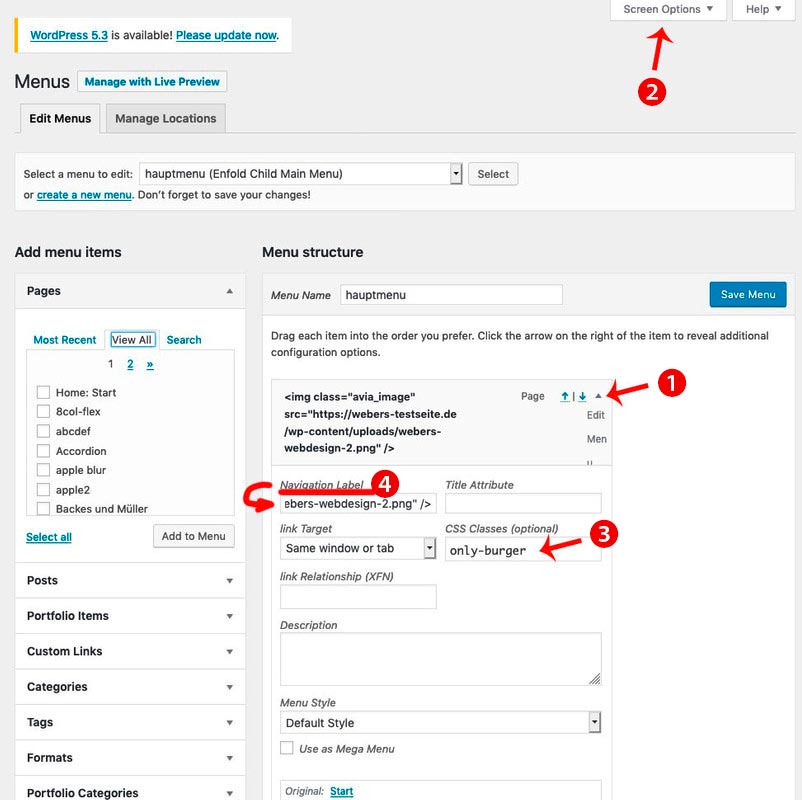
    • add to your main menu two home links
    • open the top home link (1) to see the menu-item settings by clicking on that little arrow on the right of the menu list point
    • you can now enter on navigation label (4) an img src html like:
      <img src="/wp-content/uploads/logo.png" alt="logo" />
    • if you can not see in that menu item settings dialog the classes – you had to open on top of your window that flyout “Screen Options” (2) and mark the needed fields ( custom classes )
    • that first home link (1) menu item gets now a meanigfull name f.e.: only-burger
    • just a bit in quick css:
      #avia-menu .only-burger.menu-item { display: none !important }
    • now to get rid of second home link on hamburger menu – you know what to do?
      f.e. give a custom-class to that home menu-item : only-desktop
    • so you have now for both : #avia-menu .only-burger.menu-item, #av-burger-menu-ul .only-desktop { display: none !important }

    #1222933

    Hi,

    Have you tried adding a unique category to the posts without links? We can modify the includes > loop-search.php file and check if that category exists and if it does, we can then replace the get_permalink with the link of the portfolio grid page.

    echo "<{$heading} class='post-title entry-title {$css}'><a title='".the_title_attribute('echo=0')."' href='".get_permalink()."' $markup>".get_the_title()."</a></{$heading}>";
    

    The code to get all categories already exists in that file around line 75, so all we need to do is check if the custom category exists.

    $taxonomies  = get_object_taxonomies(get_post_type($the_id));
    

    We can also use custom fields.

    // https://www.advancedcustomfields.com/

    Best regards,
    Ismael

    #1222258

    Hi @ronduring,
    Read my previous post, I have posted a solution.
    Please check this line in your theme
    wp-content/themes/enfold/framework/php/class-megamenu.php: 534
    Change this line

    do_action( 'wp_nav_menu_item_custom_fields', $item_id, $item, $depth, $args );
    To
    do_action( 'wp_nav_menu_item_custom_fields', $item_id, $item, $depth, $args, $current_object_id );

    Regards

    #1222256

    I have confirmed the same error on 3 enfold sites I support on 3 different servers. In all the cases, they all have the same issue and when editing the menu you get an error. Below are the details. Will there be a patch or update soon?

    When seeking help with this issue, you may be asked for some of the following information:
    WordPress version 5.4.2
    Current theme: Enfold (version 4.7.5)
    Current plugin: Ultimate Member (version 2.1.6) PHP version 7.3.18

    Error Details
    =============
    An error of type E_ERROR was caused in line 59 of the file /home/xxxxxx/public_html/wp-content/plugins/ultimate-member/includes/admin/core/class-admin-navmenu.php. Error message: Uncaught ArgumentCountError: Too few arguments to function um\admin\core\Admin_Navmenu::wp_nav_menu_item_custom_fields(), 4 passed in /home/xxxxxx/public_html/wp-includes/class-wp-hook.php on line 287 and exactly 5 expected in /home/xxxxxx/public_html/wp-content/plugins/ultimate-member/includes/admin/core/class-admin-navmenu.php:59
    Stack trace:
    #0 /home/xxxxxx/public_html/wp-includes/class-wp-hook.php(287): um\admin\core\Admin_Navmenu->wp_nav_menu_item_custom_fields(’54’, Object(WP_Post), 0, Object(stdClass))
    #1 /home/xxxxxx/public_html/wp-includes/class-wp-hook.php(311): WP_Hook->apply_filters(NULL, Array)
    #2 /home/xxxxxx/public_html/wp-includes/plugin.php(478): WP_Hook->do_action(Array)
    #3 /home/xxxxxx/public_html/wp-content/themes/enfold/framework/php/class-megamenu.php(534): do_action(‘wp_nav_menu_ite…’, ’54’, Object(WP_Post), 0, Object(stdClass))
    #4 /home/xxxxxx/public_html/wp-includes/class-wp-walker.php(144): avia_backend_walker->start_el

    #1222169

    Hi Yigit,

    That helped and with some tweaking I styled the table the way I wanted it.

    What about pricing tables, what would be the CSS elements I would need to target to change each of the columns color schemes for the header title, pricing fields, and table alternate rows? My client would like me to reproduce the one I created here: https://silviafindings.com/custom-made-jewellery but this worked fine because the Enfold theme colors on that website are silver and gold.

    For this new website the Enfold theme color scheme is blue, so I have to try to see what colors would best work. Here’s a link to the pricing table I would like to change to one is silver tones and the other gold tones (for metal colors…) on the website in development:
    https://diyjewellery1.wpengine.com/custom-made-pricing-and-shipping/#pricing

    Thanks so much,
    Lyse

    #1221721

    Hi guys,

    Please check this line in your theme
    wp-content/themes/enfold/framework/php/class-megamenu.php: 534

    The issue with Enfold theme and all themes which use MegaMenu PHP library. WP native hook contains 5 arguments here:
    wp-admin/includes/class-walker-nav-menu-edit.php

    do_action( 'wp_nav_menu_item_custom_fields', $item_id, $item, $depth, $args, $id );

    But MegaMenu library uses the same hook ‘wp_nav_menu_item_custom_fields’ but with 4 arguments only.

    do_action( 'wp_nav_menu_item_custom_fields', $item_id, $item, $depth, $args );

    It looks as a conflict of MegaMenu and WP >= 5.4

    There is $current_object_id argument in start_el() function, please add it to this line:

    do_action( 'wp_nav_menu_item_custom_fields', $item_id, $item, $depth, $args, $current_object_id );

    To make your MegaMenu themes compatible

    #1221696

    I have already adjusted the whole thing a bit, but it still fails at the validation.

    <form action="url_of_newsletter_provider" method="post" class="avia_ajax_form av-form-labels-hidden avia-builder-el-0 avia-builder-el-no-sibling avia_recaptcha_v3" data-avia-form-id="1" >
    	<h3 class="">Newsletter Anmeldung</h3>
    	<fieldset>
    		<p class=" first_form  form_element form_element_third" id="element_avia_1_1">
    			<label for="anrede">Anrede <abbr class="required" title="benötigt">*</abbr></label> 
    			<select name="anrede" class="select is_empty" id="avia_1_1">
    				<option value="">Anrede*</option>
    				<option id="Frau" value="Frau">Frau</option>
    				<option id="Herr" value="Herr">Herr</option>
    			</select>
    		</p>
    		<p class="  form_element form_element_third" id="element_avia_2_1">
    			<label for="avia_2_1">Vorname <abbr class="required" title="benötigt">*</abbr></label> 
    			<input name="avia_2_1" class="text_input is_empty" type="text" id="avia_2_1" value="" placeholder="Vorname*">
    		</p>
    		<p class="  form_element form_element_third" id="element_avia_3_1">
    			<label for="avia_3_1">Nachname <abbr class="required" title="benötigt">*</abbr></label> 
    			<input name="avia_3_1" class="text_input is_empty" type="text" id="avia_3_1" value="" placeholder="Nachname*">
    		</p>
    		<p class="  first_form  form_element form_fullwidth" id="element_avia_4_1">
    			<label for="avia_4_1">E-Mail <abbr class="required" title="benötigt">*</abbr></label> 
    			<input name="avia_4_1" class="text_input is_email" type="text" id="avia_4_1" value="" placeholder="E-Mail*">
    		</p>
    		<p class="hidden"><input type="text" name="avia_5_1" class="hidden " id="avia_5_1" value=""></p>
    		<input class="av-recaptcha-verify-token is_empty av-verify-recaptcha-0" type="hidden" value="" name="av_recaptcha_token">
    		<input class="av-recaptcha-verify-token-version av-verify-recaptcha-0" type="hidden" value="avia_recaptcha_v3" name="av_recaptcha_token-version">
    		<div class="av-recaptcha-error"></div>
    		<div id="avia_6_1" class="av-recaptcha-area  first_form  form_element form_fullwidth av-last-visible-form-element  av-verify-recaptcha-0" data-container_class="" data-custom_class="" data-context="av_contact_form" data-token_input="av_recaptcha_token" data-version="avia_recaptcha_v3" data-theme="light" data-size="compact" data-score="0.5" data-text_to_preview="" data-value=""></div>
    		<p class="av_form_privacy_check av_contact_privacy_check first_form  form_element form_fullwidth" id="element_avia_7_1"> 
    			<input name="avia_7_1" class="input_checkbox is_empty" type="checkbox" id="avia_7_1" value="true">
    			<label class="input_checkbox_label" for="avia_7_1">Ich willige in die Verarbeitung der hier eingegebenen Daten zur Bearbeitung meines Anliegens ein. <strong>Sie können diese Einwilligung jederzeit mit formloser Mitteilung an uns widerrufen</strong>. Details entnehmen Sie unserer <a href="url_of_privacy" target="_blank">Datenschutzerklärung</a> <abbr class="required" title="benötigt">*</abbr></label>
    		</p>
    		<p class="form_element ">
    			<input id="domain" type="hidden" name="domain" value="myurl.de">
    			<input id="id" type="hidden" name="id" value="newsletter-abonnement">
    			
    			<input type="hidden" value="1" name="avia_generated_form1">
    			<input type="button" value="Für Newsletter anmelden" class="button av-verify-recaptcha-0 av-recaptcha-submit" data-sending-label="Sende" title="Vor dem Senden verifizieren wir dass Sie ein Mensch sind.">
    			<input type="submit" value="Für Newsletter anmelden" class="button avia_button_inactive av-recaptcha-submit-real" data-sending-label="Sende" style="display: none;">
    			<div class="av-google-badge-message">Diese Seite wird durch reCAPTCHA geschützt und es gelten die Google <a href="https://policies.google.com/privacy">Datenschutzerklärungen</a> und <a href="https://policies.google.com/terms">Nutzungsbedingungen</a></div>
    		</p>
    	</fieldset>
    	<div class="avia-disabled-form">Dieses Kontaktformular ist momentan deaktiviert, da Sie den Google reCAPTCHA-Service noch nicht akzeptiert haben. Dieser ist für die Validierung des Sendevorgangs jedoch notwendig</div>
    </form>
    • This reply was modified 5 years, 7 months ago by langnaese.
    #1221198
    Nerohm
    Participant

    Hi, can you guys give some help? plugin autors says the problem is with some outdated hooks in Enfold

    type of error E_ERROR caused on line 59 of the file /home4/exxome93/public_html/wp-content/plugins/ultimate-member/includes/admin/core/class-admin-navmenu.php. Mensagem de erro: Uncaught ArgumentCountError: Too few arguments to function um\admin\core\Admin_Navmenu::wp_nav_menu_item_custom_fields(), 4 passed in /home4/exxome93/public_html/wp-includes/class-wp-hook.php on line 287 and exactly 5 expected in /home4/exxome93/public_html/wp-content/plugins/ultimate-member/includes/admin/core/class-admin-navmenu.php:59
    Stack trace:
    #0 /home4/exxome93/public_html/wp-includes/class-wp-hook.php(287): um\admin\core\Admin_Navmenu->wp_nav_menu_item_custom_fields(’98’, Object(WP_Post), 0, Object(stdClass))
    #1 /home4/exxome93/public_html/wp-includes/class-wp-hook.php(311): WP_Hook->apply_filters(NULL, Array)
    #2 /home4/exxome93/public_html/wp-includes/plugin.php(478): WP_Hook->do_action(Array)
    #3 /home4/exxome93/public_html/wp-content/themes/enfold/framework/php/class-megamenu.php(534): do_action(‘wp_nav_menu_ite…’, ’98’, Object(WP_Post), 0, Object(stdClass))
    #4 /home4/exxome93/public_html/wp-includes/class-wp-walker.php(144): avia_backend_walker->start_el(”, Object(WP_Post), 0, Object(stdClass))

    #1220744

    Hey Victoria
    We add this code in the function shortcode_handler, line 276. Here the whole foreach in there:

    				foreach( $entries as $index => $entry )
    				{	
    					$class  = 'av-upcoming-event-entry';
    					$image  = get_the_post_thumbnail( $entry->ID, 'square', array( 'class' => 'av-upcoming-event-image' ) );
    					$class .= ! empty( $image ) ? ' av-upcoming-event-with-image' : ' av-upcoming-event-without-image';
    					$title  = get_the_title( $entry->ID );
    					$link	= get_permalink( $entry->ID );
    					
    					$post->ID = $entry->ID; //temp set of the post id so that tribe fetches the correct price symbol
    					$price  = tribe_get_cost( $entry->ID, true );
    					$venue  = tribe_get_venue( $entry->ID );
    					/* ADDED FOR INFOS - START */
    					$additional_fields = tribe_get_custom_fields();
    					if ($additional_fields['Infos']) {
    						$infos = $additional_fields['Infos'];
    					} else {
    						$infos = "&nbsp;";
    					}
    					/* ADDED FOR INFOS - END */
    					$post->ID = $default_id;
    					
    					$event = '';
    					
    					$event .=	"<a href='{$link}' class='{$class}'>";
    					
    					if( $image )  
    					{
    						$event .=	$image;
    					}
    					
    					$event .=		"<span class='av-upcoming-event-data'>";
    					$event .=			"<h4 class='av-upcoming-event-title'>{$title}</h4>";
    					$event .=			"<span class='av-upcoming-event-meta'>";
    					/* ADDED FOR INFOS - START */
    					if ($infos)	$event .= "<span class='av-upcoming-event-infos'><strong>{$infos}</strong></span>";
    					/* ADDE FOR INFOS - END */
    					$event .=				"<span class='av-upcoming-event-schedule'>" . tribe_events_event_schedule_details($entry) . "</span>";
    					
    					if( $price )	
    					{
    						$event .=			"<span class='av-upcoming-event-cost'>{$price}</span>";
    					}
    					if( $price && $venue )	
    					{
    						$event .=				' - ';	
    					}
    					if( $venue )	
    					{
    						$event .=			"<span class='av-upcoming-event-venue'>{$venue}</span>";
    					}
    							
    					$event .=				apply_filters( 'avf_upcoming_event_extra_data', '', $entry );
    					$event .=			'</span>';
    					$event .=		'</span>';
    					$event .=	'</a>';
    					
    					/**
    					 * Allows to change the output 
    					 * 
    					 * @since 4.5.6.1
    					 * @param string $event
    					 * @param array $entries		WP_Post
    					 * @param int $index
    					 * @return string
    					 */
    					$output .= apply_filters( 'avf_single_event_upcoming_html', $event, $entries, $index );
    				}

    The added code is between the two “ADDED FOR INFOS – START” and “ADDED FOR INFOS – END”

    Best regards
    Mike

    #1220505

    Hi
    We show additional infos at the upcoming events (plugin The Evens Calendar) on a website.
    For that, we copied the file events_upcoming.php and edited it like this:

    $additional_fields = tribe_get_custom_fields();
    if ($additional_fields['Infos']) {
    	$infos = $additional_fields['Infos'];
    } else {
    	$infos = "&nbsp;";
    }

    And later:
    if ($infos) $event .= "<span class='av-upcoming-event-infos'><strong>{$infos}</strong></span>";

    Is it also possible to add this infos not with a copied events_upcoming.php file? For example using the filter avf_upcoming_event_extra_data?
    If yes, how we can do that?
    Thanks very much.
    Best regards
    Mike

    Nikita
    Guest

    Hi guys! I’m a developer of the Ultimate Member plugin. It looks that you have some outdated hook.
    There is WP native hook and its arguments:
    do_action( ‘wp_nav_menu_item_custom_fields’, $item_id, $item, $depth, $args, $id );
    But there
    wp-content/themes/enfold/framework/php/class-megamenu.php:534
    you use do_action( ‘wp_nav_menu_item_custom_fields’, $item_id, $item, $depth, $args ); only 4 attributes.
    Thanks!

Viewing 30 results - 421 through 450 (of 1,622 total)