
-
Search Results
-
Hi Kriesi team!
I’m in the process of replacing an ugly and loadtime-hogging pricing table on my site.
I have the html and CSS style code (see below). I created a code box with the advanced page editor on my test page and threw this in. The table looks great on various wysiwyg editors and the site I got it from, however, when I load this into my page, it’s all wonky. I’m using Enfold Child theme.
Pic 1 is how it is supposed to look.
https://picasaweb.google.com/lh/photo/qja1UzocOA6bs6xiOp7CrkXEwIN14nHUiOmhoBiRzDk?feat=directlink
Pic 2 is how it looks on my test page.
https://picasaweb.google.com/lh/photo/27aaSWHSAzJQNX1a6P7wNEXEwIN14nHUiOmhoBiRzDk?feat=directlinkhttps://rallyforlocal.com/test
Am I doing something wrong? Is it the theme that is wonking things out (namely in the header colors, price size, margins and offset inside the borders)? If yes, can you please advise?
Here’s the code I used:
<div id="pricing-table" class="pricing-table">

                            <ul>
                                <li class="heading">Basic</li>
                                <li class="price">Free</li>
                                <li>-</li>
                                <li>Basic Business Hours </li><li>1 Category </li><li> Short Business Description (250 Characters)</li><li>1 Photo </li><li> Tags (40 Characters)</li><li> 1 Website/Shop Link</li><li> 1 Social Media Link</li><li> - </li><li> - </li><li> - </li><li> - </li><li> - </li><li> - </li><li> - </li><li> - </li><li> - </li><li> - </li>
                                <li class="action"><a href="https://rallyforlocal.com/add-listing/?listing_type=gd_place&package_id=1">Sign Up Now</a></li>
                            </ul>

                            <ul>
                                <li class="heading">Patron</li>
                                <li class="price">$9.95</li>
                                <li>(per month)</li>
                                <li>Basic Business Hours</li><li> 2 Categories</li><li>Med. Business Description (1000 Characters)</li><li> 10 Photos</li><li>Tags (100 Characters) </li><li> 2 Website/Shop Links</li><li> 4 Social Media Links</li><li> - </li><li> - </li><li> - </li><li> - </li><li> - </li><li> - </li><li>Linked Events </li><li>Promotional Materials</li><li> Light Social Marketing</li><li> - </li>
                                <li class="action"><a href="https://rallyforlocal.com/add-listing/?listing_type=gd_place&package_id=7">Sign Up Now</a></li>
                            </ul>
                        <ul class="feature"><li class="heading"> Local Hero</li><li class="price"> $19.95</li><li>(per month) </li><li> Enhanced Business Hours</li><li> 4 Categories</li><li>Lengthy Business Description (Unlimited)</li><li> 40 Photos</li><li>Tags (300 Characters)</li><li>4 Website/Shop Links </li><li>10 Social Media Links </li><li> Featured Listings</li><li>Detailed Amenities</li><li> Upload Catalogs & Menus</li><li>Embed YouTube Videos </li><li>Create Printable Coupons </li><li>Front Page Logo Scroll </li><li> Linked Events</li><li>Promotional Materials </li><li>Robust Social Marketing</li><li>Blog Post </li><li class="action"><a href="https://rallyforlocal.com/add-listing/?listing_type=gd_place&package_id=8">Sign Up Now</a></li></ul><ul><li class="heading">Civic Leader </li><li class="price">Free </li><li>(Nonprofits & Clubs Only) </li><li>Basic Business Hours </li><li> 2 Categories</li><li>Lengthy Nonprofit/Club Description (Unlimited)</li><li> 20 Photos</li><li> Tags (100 Characters)</li><li>1 Website/Shop Link</li><li>10 Social Media Links </li><li> - </li><li> - </li><li> Upload Brochures/Docs</li><li>Embed YouTube Videos </li><li> - </li><li> - </li><li>Linked Events</li><li>Promotional Materials </li><li>Robust Social Marketing</li><li> Blog Post</li><li class="action"><a href="//rallyforlocal.com/add-listing/?listing_type=gd_nonprofits">Sign Up Now</a></li></ul>

<link href="http://fonts.googleapis.com/css?family=Abel" id="google-font-selector" rel="stylesheet" type="text/css"></div>

<style>
.pricing-table ul{
    border-width: 1px;
    border-style: solid;
    border-color: #CCCCCC;
    border-radius: 3px;
    margin: 3px;
    width: 220px;
    text-align: center;
    list-style: none;
    float: left;
    padding: 5px;
    background-color: #FFFFFF;
}
.pricing-table ul li{
    padding: 4px;
    background-color: #EFEFEF;
    border-width: 2px;
    border-color: #B83737;
    border-radius: 0px;
    border-bottom-width: 2px;
    font-size: 14px;
}
.pricing-table li:nth-child(odd){
    background-color: #F7F7F7;
}
.pricing-table ul .heading{
    color: #F68F29;
    font-size: 28px;
    background: #58585A;
    background: -moz-linear-gradient(top, #58585A 0%, #58585A 100%);
    background: -webkit-gradient(linear, left top, left bottom, color-stop(0%,#58585A), color-stop(100%,#58585A));
    background: -webkit-linear-gradient(top, #58585A 0%,#58585A 100%);
    background: -o-linear-gradient(top, #58585A 0%,#58585A 100%);
    background: -ms-linear-gradient(top, #58585A 0%,#58585A 100%);
    background: linear-gradient(to bottom, #58585A 0%,#58585A 100%);
    filter: progid:DXImageTransform.Microsoft.gradient( startColorstr='#58585A',  endColorstr='#58585A', GradientType=0 );
}
.pricing-table ul .price{
    color: #FFFFFF;
    background-color: #58585A;
    font-size: 40px;
}
.pricing-table ul .action{
    font-size: 14px;
    color: #2A6496;
}
.feature{
    -webkit-transform: scale(1.1);
    transform: scale(1.1);
    box-shadow: 3px 5px 7px rgba(0,0,0,.7);
}
.pricing-table .action a{
    border-color: #F68029;
    border-width: 0px;
    border-radius: 14px;
    background-color: #F68029;
    padding-top: 5px;
    padding-bottom: 5px;
    padding-left: 16px;
    padding-right: 16px;
    border-style: solid;
    color: #FFFFFF;
}
</style>
Thanks so much! I truly appreciate your time and expert advice!
Cheers, KrisHi,
I would like to replace the header on the 404 and Search Results pages with something like this:[av_section min_height='custom' min_height_px='200px' padding='small' shadow='no-border-styling' bottom_border='no-border-styling' id='' color='main_color' custom_bg='#6c7886' src='' attachment='17' attachment_size='full' attach='fixed' position='center center' repeat='stretch' video='' video_ratio='16:9' overlay_opacity='0.5' overlay_color='' overlay_pattern='' overlay_custom_pattern='']
[av_one_fifth first min_height='' vertical_alignment='' space='' custom_margin='' margin='0px' padding='0px' border='' border_color='' radius='0px' background_color='' src='' background_position='top left' background_repeat='no-repeat'][av_image src='https://intermarriedfamilies-genesisprizematch.org/wp-content/uploads/2014/09/JFN-Vertical-white160x174.png' attachment='148' attachment_size='full' align='center' animation='pop-up' styling='no-styling' hover='' link='manually,https://www.jfunders.org/' target='_blank' caption='' font_size='' appearance='' overlay_opacity='0.4' overlay_color='#000000' overlay_text_color='#ffffff'][/av_image]
[/av_one_fifth][av_three_fifth min_height='' vertical_alignment='' space='' custom_margin='' margin='0px' padding='0px' border='' border_color='' radius='0px' background_color='' src='' background_position='top left' background_repeat='no-repeat']
[av_heading tag='h1' padding='10' heading='The Jewish Funders Network and The Genesis Prize Foundation<br>Matching Grant Initiative<br/>' color='custom-color-heading' style='blockquote modern-quote modern-centered' custom_font='#79acdd' size='44' subheading_active='' subheading_size='15' custom_class=''][/av_heading]
[/av_three_fifth][av_one_fifth min_height='' vertical_alignment='' space='' custom_margin='' margin='0px' padding='0px' border='' border_color='' radius='0px' background_color='' src='' background_position='top left' background_repeat='no-repeat']
[av_image src='https://intermarriedfamilies-genesisprizematch.org/wp-content/uploads/2014/09/GPF_logo160x174.jpg' attachment='110' attachment_size='full' align='center' animation='pop-up' styling='no-styling' hover='' link='manually,http://www.genesisprize.org/' target='_blank' caption='' font_size='' appearance='' overlay_opacity='0.4' overlay_color='#000000' overlay_text_color='#ffffff'][/av_image]
[/av_one_fifth]
[/av_section][av_submenu which_menu='' menu='16' position='center' color='alternate_color' sticky='aviaTBsticky' mobile='active']
[av_submenu_item title='Menu Item 1' link='' linktarget='no' button_style='']
[av_submenu_item title='Menu Item 2' link='' linktarget='no' button_style='']
[/av_submenu]How can I do that?
Hi there,
a friend of mine tested my website for me and said there are different types of fonts and different sizes of fonts shown – which doesn’t look good. In my options it is always the google font Arimo with 16 px – how come it looks different to him? How can I change that? Do I have to use a web save font to make sure that doesnt happen?
Best Jennifer
Hi,
Where does one begin to customise the product thumbnail boxes for woocommerce – ie. background colours, the text, font & size for price and making the add to cart or more info into buttons?Probably the detail pages too if that’s not obvious but I haven’t got there yet!
Is there a tutorial for doing this anywhere maybe?
Thanks
Hey Support Team,
1. I want to change Headline of “Product description” (Produktbeschreibung) to “Bestelltabelle”
2. I want to add a button automatic to all single product pages on the short description, Shortcode: [av_button label='Zur Bestelltabelle' link='manually,#Bestelltabelle' link_target='' size='medium' position='center' icon_select='no' icon='ue800' font='entypo-fontello' color='theme-color' custom_bg='#444444' custom_font='#ffffff']
The button should be under the last sentence of the summary information.
Hey Guys,
I have a text box that takes up the width of my column. I would like to add 4 icons into that text box and have them justified so that they are evenly spread and take up the whole space. I cannot seem to get them to justify at all.
Can anyone help me please?
Many Thanks,
Mario
<p style="text-align: justify;">[av_font_icon icon='ue8f1' font='entypo-fontello' style='' caption='' link='manually,http://twitter' linktarget='_blank' size='40px' color='#00a4e3'] Follow us on Twitter [/av_font_icon] [av_font_icon icon='ue8f5' font='entypo-fontello' style='' caption='' link='manually,http://facebook' linktarget='_blank' size='40px' color='#00a4e3'] Follow us on Facebook [/av_font_icon] [av_font_icon icon='ue8fc' font='entypo-fontello' style='' caption='' link='manually,http://linkedin' linktarget='_blank' size='40px' color='#00a4e3'] Follow us on LinkedIn [/av_font_icon] [av_font_icon icon='ue805' font='entypo-fontello' style='' caption='' link='manually,mailto: (Email address hidden if logged out) ' linktarget='' size='40px' color='#00a4e3'] Send us an Email [/av_font_icon]</p>Whatever font that I try – then save – there are no changes??
Text scroll-er at thiis page
Topic: contact form titles
Hey
Can I change size and font-family of those titles? they’re too small.
Also “PLZ” has a different style. Using a code for gonts in general will mess up other titles on my website, I’ve tried that before.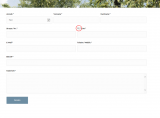
Thanks for the help.
Regards,
AlineTopic: Adding widget to header
i added a widget to the header area using a function provided by one of your threads. works great.
i got it where i want it using this css
#header .widget {
left: 80%;
padding-top: 0;
position: absolute;
top: 0;
transform: translate(-50%);
font-size: 11px;
}but now it is not responsive. http://www.bigideasweb.com
also, i working on a partner/logo slider and added quite a few pictures. i had to delete the pics and readded. now it does not function/slide. at the same time the when i am using the advanced layout the text for visual is all white and i cannot see it. i can see it if i click on text tab, but not visual. it is as if the text is white font color. any help would be greatly appreciated. i will go ahead and add another partner/logo element and see if that works.Topic: edit logo text
hey guys
I inserted the code below under functions-enfold.php. I took it from another website of ours and changed the logotext. But how do I change font-size (make it bigger), color (to #8c5656) and font-family (open sans)?
add_filter(‘avf_logo_final_output’, ‘avf_text_logo_final_output’);
function avf_text_logo_final_output($logo) {
$link = apply_filters(‘avf_logo_link’, home_url(‘/’));
$logotext = “Wohnen am Wehrenbach”;
$logotext= “<span class=’logotext’>$logotext</span>”;
$subtext = “”;
$subtext = “<span class=’subtext’>$subtext</span>”;
$logo = “<h2 class=’logo bg-logo’>“.$logotext.”$subtext</h2>”;return $logo;
}Thanks for the help


