Viewing 30 results - 691 through 720 (of 18,716 total)
  • Author
    Search Results
  • #1441241

    well – the current code is more like my code, which remains valid even when changing the standards in Enfold (e.g. font-size, font-family, border-color, color (missing in your code) etc.). But this isn’t a competition.
    Because color is missing, the color is now #141827 instead of #474747 – and your current code applies to all h2 – not just those that are set via tribe events.
    However – the main thing is that it works.

    #1441189

    Hey Christian,
    Try adding this code to the end of your child theme functions.php file in Appearance ▸ Editor:

    function custom_script() { ?>
      <script>
    (function($) {
      $(function() {
        function replaceElementTag(targetSelector, newTagString) {
          $(targetSelector).each(function(){
            var newElem = $(newTagString, {html: $(this).html()});
            $.each(this.attributes, function() {
              newElem.attr(this.name, this.value);
            });
            $(this).replaceWith(newElem);
          });
        }
        replaceElementTag('.post-entry h2.post-title.entry-title ', '<h4></h4>');
      });
    }(jQuery)); 
    </script>
      <?php
    }
    add_action( 'wp_footer', 'custom_script', 99 );

    Please ensure to copy the code from the forum and not an email notification so the symbols are not converted.
    In the code change: <h4></h4> to suit. Note that this may not change the font size, if you also want to change the font size try this CSS in your Enfold Theme Options ▸ General Styling ▸ Quick CSS field:

    .html_elegant-blog #top .post-entry .post-title, .html_elegant-blog .avia-content-slider .slide-entry-title {
    	font-size: 20px;
    }

    and adjust to suit.
    If this doesn’t help please include the url to the page in question so we can take a closer look.

    Best regards,
    Mike

    #1441188

    Hi,
    To change the post h2 font size, try this CSS in your Enfold Theme Options ▸ General Styling ▸ Quick CSS field:

    #top #wrap_all .all_colors .post-entry h2.post-title.entry-title {
    	font-size: 20px;
    }

    adjust the font-size to suit.

    Best regards,
    Mike

    #1441182

    Hi,
    Perhaps try this CSS in your Enfold Theme Options ▸ General Styling ▸ Quick CSS field:

    #top #wrap_all .all_colors h2.tribe-events-widget-events-list__header-title {
    	font-size: 20px;
    	font-weight: 600;
    	font-family: "open sans";
    }

    After applying the css, please clear your browser cache and check.

    Best regards,
    Mike

    #1441131

    if you like to synchronize it with the other widget titles:

    #top #wrap_all .all_colors .sidebar .tribe-events h2 {
      font-family: var(--enfold-font-family-heading);
      font-size: var(--enfold-font-size-theme-h3);
      color: var(--enfold-main-color-heading);
      border-color: var(--enfold-main-color-border);
      font-weight: 600 !important;
      letter-spacing: 1px;
      border-style: solid;
      border-width: 1px !important;
      padding: 10px 0;
      border-left: none;
      border-right: none;
      margin-bottom: 15px;
    }

    if you have set in quick css ( or advanced styling) different attributes than the default ones (f.e. font-size) then you have to adjust it to your needs.

    #1441112
    xfacta
    Participant

    Hi there
    i have an events calendar page using the plugin “Events Calendar” and I’m wanting to change the size of the widget title that appears on the sidebar:

    The title being “Upcoming Events” – how can I change this please.

    Cheers
    Natasha

    dancedojo
    Participant

    I noticed that link color is set in Theme options > General Settings > Primary Color.

    Unfortunately this changes text link color AND button color.

    I want my text link color to remain #00a2e8, how it’s set in theme options, but I want button text color to be different.

    If I’m using the button element of the page builder I can customize the color just fine.

    But I’m trying to add a button in a text widget in my blog sidebar using the shortcode:
    [av_button label='Try Programs' link='https://thedancedojo.com/product/free-trial/' link_target='' size='large' position='left' custom_bg='#FF9100' custom_font='#ffffff']

    The custom_bg color #FF9100 isn’t working and instead the default text link color that’s set in Theme options > General Settings > Primary Color is what displays.

    See blog page here: https://thedancedojo.com/blog/

    How can I set the custom background color of the button? Is a shortcode the only way?

    Thanks,
    Robin

    #1440974

    In reply to: Additional Icon Packs

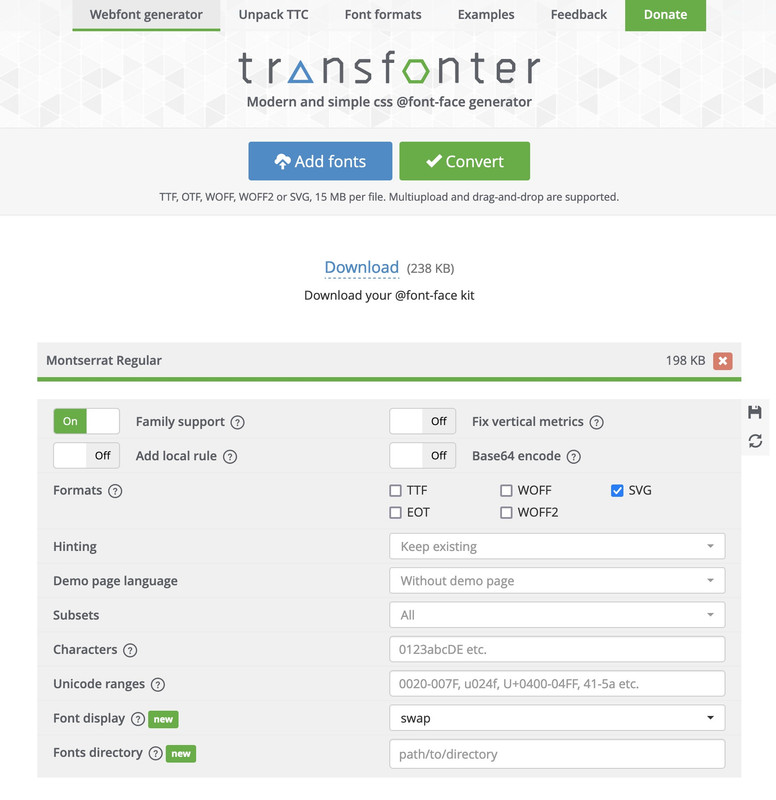
    And now the profi tip:
    1( Go to Google Font – choose your font – download it. You will get a ttf font.
    2) Go to: Transfonter
    choose svg as font:

    download the converted font – unzip and pull out the svg you get.
    3) Go to fontello – drag & drop that svg to the “custom icons” field.
    4) choose your selected icons – name it and download that zip file –
    5) upload that to Enfold – Import/Export/…. Iconfont Manager
    ;)

    see here – done with montserrat-regualar:

    download here: https://webers-testseite.de/montserrat-numbers.zip

    PS: sometimes it might be neccessary to adjust the size of those font-icons.
    eg:

    html body [data-av_iconfont="montserrat-numbers"]::before {
      font-family: 'montserrat-numbers';
      position: absolute;
      left: 50%;
      top: 50%;
      font-size: 2em;
      transform: translate(-50%, -50%);
    }

    see: https://webers-testseite.de/montserrat-numbers-2/

    and – tip: you can combine more than one font-family in that upload.

    #1440849

    Hi,

    1. You can set the font size for each screen size in the styling tab in the element option.

    2.Please try the following in Quick CSS under Enfold->General Styling:

    @media only screen and (max-width: 767px) {
    #kontakt .flex_column {
      transform: none;
    }
    }

    3. I’m not sure what is wrong with that screenshot, please try to explain a bit further.

    4. Please try the following in Quick CSS under Enfold->General Styling:

    @media only screen and (max-width: 767px) {
    .home #av_section_2 .av-horizontal-gallery-slider {
      transform: none;
    }
    }

    Best regards,
    Rikard

    #1440559
    xfacta
    Participant

    Hi there

    I have added some custom CSS to change the size of the icons but now I’ve noticed the dotted line that usually runs down the center of the icons is showing to the right – can you please help me get the line centered again: https://www.skills4lifepsychology.com/anxiety/
    here is the custom css:
    /* Icon list icon size */
    .avia-icon-list .iconlist_icon {
    height: 30px;
    width: 30px;
    line-height: 30px;
    font-size: 18px;
    }

    #top .avia-icon-list .iconlist_icon {
    top: 15px;
    }

    Cheers
    Natasha

    #1440492

    Hi,

    Include this code inside the css media query to adjust the size of the icons:

      #top .social_bookmarks li {
        width: 40px;
        margin-right: 4px;
      }
    
      #top .social_bookmarks li a {
        width: 40px;
        line-height: 40px;
        min-height: 40px;
        font-size: 24px;
      }

    Best regards,
    Ismael

    #1440465

    Hey schweg33,
    The css you posted is for the title of the widgets, for the text in the widgets try this css and adjust to suit.

    #top [id*="custom_html-"] > .custom-html-widget {
    font-size: 20px;
    font-weight: 400;
    }

    Please ensure to copy the code from the forum and not an email notification so the symbols are not converted.

    Best regards,
    Mike

    #1440448

    Hi Rikard,

    leider hat das so nicht funktioniert. Ich habe folgendes in Quick CSS eingetragen und es funktioniert. :-)

    h3.slide-entry-title.entry-title {
    font-size: 18px !important;
    }

    Viele Grüße, Petra

    PS: Ich weiß zwar nicht, warum es mit !important” funktioniert, war einfach mal ein Versuch, da ich das irgendwoanders auch verwendet habe. )

    #1440427

    Hey schweg33,
    Try this CSS:

    #top #wrap_all .all_colors .widgettitle,
    #top [id*="custom_html-"] > h3.widgettitle {
    color: #666666;
    text-transform: none;
    font-size: 23px;
    font-weight: 200;
    }
    

    Please ensure to copy the code from the forum and not an email notification so the symbols are not converted.

    Best regards,
    Mike

    #1440423
    schweg33
    Participant

    Hello everyone
    I have received the css code below from you:
    /*widget-title for all pages*/
    #top #wrap_all .all_colors .widgettitle,
    #top #custom_html-2 > h3.widgettitle {
    color: #666666;
    text-transform: none;
    font-size: 23px;
    font-weight: 200;
    }
    the title is displayed correctly on two pages:
    1 correct:
    2 correct:
    3 is displayed incorrectly

    How do I have to add the code so that all titles look the same if I also add other footers again?
    thanks in advance
    kind regards
    Franz

    #1440377

    Hey Petra,

    Please try the following in Quick CSS under Enfold->General Styling:

    h3.slide-entry-title {
      font-size: 20px;
      font-weight: 500;
    }

    Best regards,
    Rikard

    #1440326

    In reply to: Icon list styling

    Hi Mike

    For that top section color section I have the Margin and Padding set at No Padding (0px) not default size and it still has a large gap under it. So how can I reduce that gap please?

    Also for the Icon list – is anyway to change the icon list from being a h4 tag – and just a normal paragraph font/tag?

    And for the Header Social Icons – I have it set to: Display in main header area but they don’t show on mobile – how do I get the social icons to show on the mobile header area?

    Cheers
    Natasha

    #1440258

    In reply to: mobile different menu

    Hi,

    Would it be possible also enlarge the icons of social and increase the space between them?

    Yes, that should be possible. Please add this css code:

    #top .social_bookmarks li a {
        width: 50px;
        line-height: 50px;
        min-height: 50px;
        height: 100%;
        font-size: 30px;
    }
    
    #top .social_bookmarks li {
        margin-right: 5px;
        width: 50px;
    }

    Best regards,
    Ismael

    #1440137

    on your setting now try this in quick css:

    .phone-info div > span {
      display: inline-block;
      float: none;
    }

    but such a code is hard to edit so i wouldn’t work with enfold-shortcodes here – but pur html will work too.
    f.e in phone-number input field

    <a href="link1"><span class="map">Location</span></a><a href="link2"><span class="contact">Contact</span></a><a href="tel:+490221123456"><span class="tel">Phone</span></a>

    see here on header meta: https://webers-testseite.de/text/

    after that the classes will do their job in quick css:

    .responsive #header_meta .phone-info span {
        color: #aaa;
        margin-right: 15px;
        font-size:16px
    }
    
    .phone-info span::before {
        font-family: entypo-fontello;
        font-size: 24px;
        padding-right: 5px;
        position: relative;
        top: 2px;
    }
    
    .phone-info .map::before { content: "\e842"; color: #900}
    .phone-info .contact::before { content: "\e805"; color: #090}
    .phone-info .tel::before { content: "\e854"; color: #009}
    .phone-info .mail::before { content: "\e805"; color: #090}
    #1440136
    dancedojo
    Participant

    Hi, I’m trying to add Active Campaign forms to my website using the advanced editor code block but they’re breaking the page.

    There are two embed options: a one-line “simple embed” and a “full embed code.” I need to use the full embed code so I can customize the form. (both snippets pasted at end of this message).

    The simple embed code works in the advanced editor’s code block, but the full embed code breaks the page. See me recreate the issue on https://staging.thedancedojo.com/test/ here: https://www.loom.com/share/fa897947dd5a460eb5967abf9d367208

    On the live site, I originally created an About page https://thedancedojo.com/about/ using the full embed code and the page saved and can be viewed, but now I can’t edit it. When I try to edit it the advanced editor won’t load – the spinner goes forever.

    Any idea why this could be happening?

    You can use this page for testing: https://staging.thedancedojo.com/test/

    Login and FTP creds are included.

    Robin

    ==== ACTIVE CAMPAIGN FULL EMBED CODE =====
    <div class=”_form_1189″></div><script src=”https://dancedojo.activehosted.com/f/embed.php?id=1189&#8243; charset=”utf-8″></script>

    ==== ACTIVE CAMPAIGN FULL EMBED CODE =====
    <style>@import url(https://fonts.bunny.net/css?family=open-sans:400,700);</style>
    <style>
    #_form_1189_{font-size:14px;line-height:1.6;font-family:arial, helvetica, sans-serif;margin:0}#_form_1189_ *{outline:0}._form_hide{display:none;visibility:hidden}._form_show{display:block;visibility:visible}#_form_1189_._form-top{top:0}#_form_1189_._form-bottom{bottom:0}#_form_1189_._form-left{left:0}#_form_1189_._form-right{right:0}#_form_1189_ input[type=”text”],#_form_1189_ input[type=”tel”],#_form_1189_ input[type=”date”],#_form_1189_ textarea{padding:6px;height:auto;border:#979797 1px solid;border-radius:4px;color:#000000 !important;font-size:14px;-webkit-box-sizing:border-box;-moz-box-sizing:border-box;box-sizing:border-box}#_form_1189_ textarea{resize:none}#_form_1189_ ._submit{-webkit-appearance:none;cursor:pointer;font-family:arial, sans-serif;font-size:14px;text-align:center;background:#FF9100 !important;border:0 !important;-moz-border-radius:4px !important;-webkit-border-radius:4px !important;border-radius:4px !important;color:#FFFFFF !important;padding:10px !important}#_form_1189_ ._submit:disabled{cursor:not-allowed;opacity:0.4}#_form_1189_ ._submit.processing{position:relative}#_form_1189_ ._submit.processing::before{content:””;width:1em;height:1em;position:absolute;z-index:1;top:50%;left:50%;border:double 3px transparent;border-radius:50%;background-image:linear-gradient(#FF9100, #FF9100), conic-gradient(#FF9100, #FFFFFF);background-origin:border-box;background-clip:content-box, border-box;animation:1200ms ease 0s infinite normal none running _spin}#_form_1189_ ._submit.processing::after{content:””;position:absolute;top:0;bottom:0;left:0;right:0;background:#FF9100 !important;border:0 !important;-moz-border-radius:4px !important;-webkit-border-radius:4px !important;border-radius:4px !important;color:#FFFFFF !important;padding:10px !important}@keyframes _spin{0%{transform:translate(-50%, -50%) rotate(90deg)}100%{transform:translate(-50%, -50%) rotate(450deg)}}#_form_1189_ ._close-icon{cursor:pointer;background-image:url(“https://d226aj4ao1t61q.cloudfront.net/esfkyjh1u_forms-close-dark.png&#8221;);background-repeat:no-repeat;background-size:14.2px 14.2px;position:absolute;display:block;top:11px;right:9px;overflow:hidden;width:16.2px;height:16.2px}#_form_1189_ ._close-icon:before{position:relative}#_form_1189_ ._form-body{margin-bottom:30px}#_form_1189_ ._form-image-left{width:150px;float:left}#_form_1189_ ._form-content-right{margin-left:164px}#_form_1189_ ._form-branding{color:#fff;font-size:10px;clear:both;text-align:left;margin-top:30px;font-weight:100}#_form_1189_ ._form-branding ._logo{display:block;width:130px;height:14px;margin-top:6px;background-image:url(“https://d226aj4ao1t61q.cloudfront.net/hh9ujqgv5_aclogo_li.png&#8221;);background-size:130px auto;background-repeat:no-repeat}#_form_1189_ .form-sr-only{position:absolute;width:1px;height:1px;padding:0;margin:-1px;overflow:hidden;clip:rect(0, 0, 0, 0);border:0}#_form_1189_ ._form-label,#_form_1189_ ._form_element ._form-label{font-weight:bold;margin-bottom:5px;display:block}#_form_1189_._dark ._form-branding{color:#333}#_form_1189_._dark ._form-branding ._logo{background-image:url(“https://d226aj4ao1t61q.cloudfront.net/jftq2c8s_aclogo_dk.png&#8221;)}#_form_1189_ ._form_element{position:relative;margin-bottom:10px;font-size:0;max-width:100%}#_form_1189_ ._form_element *{font-size:14px}#_form_1189_ ._form_element._clear{clear:both;width:100%;float:none}#_form_1189_ ._form_element._clear:after{clear:left}#_form_1189_ ._form_element input[type=”text”],#_form_1189_ ._form_element input[type=”date”],#_form_1189_ ._form_element select,#_form_1189_ ._form_element textarea:not(.g-recaptcha-response){display:block;width:100%;-webkit-box-sizing:border-box;-moz-box-sizing:border-box;box-sizing:border-box;font-family:inherit}#_form_1189_ ._field-wrapper{position:relative}#_form_1189_ ._inline-style{float:left}#_form_1189_ ._inline-style input[type=”text”]{width:150px}#_form_1189_ ._inline-style:not(._clear)+._inline-style:not(._clear){margin-left:20px}#_form_1189_ ._form_element img._form-image{max-width:100%}#_form_1189_ ._form_element ._form-fieldset{border:0;padding:0.01em 0 0 0;margin:0;min-width:0}#_form_1189_ ._clear-element{clear:left}#_form_1189_ ._full_width{width:100%}#_form_1189_ ._form_full_field{display:block;width:100%;margin-bottom:10px}#_form_1189_ input[type=”text”]._has_error,#_form_1189_ textarea._has_error{border:#F37C7B 1px solid}#_form_1189_ input[type=”checkbox”]._has_error{outline:#F37C7B 1px solid}#_form_1189_ ._error{display:block;position:absolute;font-size:14px;z-index:10000001}#_form_1189_ ._error._above{padding-bottom:4px;bottom:39px;right:0}#_form_1189_ ._error._below{padding-top:8px;top:100%;right:0}#_form_1189_ ._error._above ._error-arrow{bottom:-4px;right:15px;border-left:8px solid transparent;border-right:8px solid transparent;border-top:8px solid #FFDDDD}#_form_1189_ ._error._below ._error-arrow{top:0;right:15px;border-left:8px solid transparent;border-right:8px solid transparent;border-bottom:8px solid #FFDDDD}#_form_1189_ ._error-inner{padding:12px 12px 12px 36px;background-color:#FFDDDD;background-image:url(“data:image/svg+xml,%3Csvg width=’16’ height=’16’ viewBox=’0 0 16 16′ fill=’none’ xmlns=’http://www.w3.org/2000/svg’%3E%3Cpath fill-rule=’evenodd’ clip-rule=’evenodd’ d=’M16 8C16 12.4183 12.4183 16 8 16C3.58172 16 0 12.4183 0 8C0 3.58172 3.58172 0 8 0C12.4183 0 16 3.58172 16 8ZM9 3V9H7V3H9ZM9 13V11H7V13H9Z’ fill=’%23CA0000’/%3E%3C/svg%3E”);background-repeat:no-repeat;background-position:12px center;font-size:14px;font-family:arial, sans-serif;font-weight:600;line-height:16px;color:#000;text-align:center;text-decoration:none;-webkit-border-radius:4px;-moz-border-radius:4px;border-radius:4px;box-shadow:0px 1px 4px rgba(31, 33, 41, 0.298295)}#_form_1189_ ._error-inner._form_error{margin-bottom:5px;text-align:left}#_form_1189_ ._button-wrapper ._error-inner._form_error{position:static}#_form_1189_ ._error-inner._no_arrow{margin-bottom:10px}#_form_1189_ ._error-arrow{position:absolute;width:0;height:0}#_form_1189_ ._error-html{margin-bottom:10px}.pika-single{z-index:10000001 !important}#_form_1189_ input[type=”text”].datetime_date{width:69%;display:inline}#_form_1189_ select.datetime_time{width:29%;display:inline;height:32px}#_form_1189_ input[type=”date”].datetime_date{width:69%;display:inline-flex}#_form_1189_ input[type=”time”].datetime_time{width:29%;display:inline-flex}@media (min-width:320px) and (max-width:667px){::-webkit-scrollbar{display:none}#_form_1189_{margin:0;width:100%;min-width:100%;max-width:100%;box-sizing:border-box}#_form_1189_ *{-webkit-box-sizing:border-box;-moz-box-sizing:border-box;box-sizing:border-box;font-size:1em}#_form_1189_ ._form-content{margin:0;width:100%}#_form_1189_ ._form-inner{display:block;min-width:100%}#_form_1189_ ._form-title,#_form_1189_ ._inline-style{margin-top:0;margin-right:0;margin-left:0}#_form_1189_ ._form-title{font-size:1.2em}#_form_1189_ ._form_element{margin:0 0 20px;padding:0;width:100%}#_form_1189_ ._form-element,#_form_1189_ ._inline-style,#_form_1189_ input[type=”text”],#_form_1189_ label,#_form_1189_ p,#_form_1189_ textarea:not(.g-recaptcha-response){float:none;display:block;width:100%}#_form_1189_ ._row._checkbox-radio label{display:inline}#_form_1189_ ._row,#_form_1189_ p,#_form_1189_ label{margin-bottom:0.7em;width:100%}#_form_1189_ ._row input[type=”checkbox”],#_form_1189_ ._row input[type=”radio”]{margin:0 !important;vertical-align:middle !important}#_form_1189_ ._row input[type=”checkbox”]+span label{display:inline}#_form_1189_ ._row span label{margin:0 !important;width:initial !important;vertical-align:middle !important}#_form_1189_ ._form-image{max-width:100%;height:auto !important}#_form_1189_ input[type=”text”]{padding-left:10px;padding-right:10px;font-size:16px;line-height:1.3em;-webkit-appearance:none}#_form_1189_ input[type=”radio”],#_form_1189_ input[type=”checkbox”]{display:inline-block;width:1.3em;height:1.3em;font-size:1em;margin:0 0.3em 0 0;vertical-align:baseline}#_form_1189_ button[type=”submit”]{padding:20px;font-size:1.5em}#_form_1189_ ._inline-style{margin:20px 0 0 !important}}#_form_1189_{position:relative;text-align:left;margin:25px auto 0;padding-top:0px;padding-right:0px;padding-bottom:0px;padding-left:0px;-webkit-box-sizing:border-box;-moz-box-sizing:border-box;box-sizing:border-box;background:#FFFFFF !important;border:0px solid #B0B0B0 !important;-moz-border-radius:0px !important;-webkit-border-radius:0px !important;border-radius:0px !important;color:#000000}#_form_1189_._inline-form,#_form_1189_._inline-form ._form-content{font-family:Open Sans;font-size:14px;font-weight:400}#_form_1189_._inline-form ._row span,#_form_1189_._inline-form ._row label{font-family:Open Sans;font-size:14px;font-weight:400;line-height:1.6em;color:black !important}#_form_1189__inlineform input[type=”text”],#_form_1189__inlineform input[type=”date”],#_form_1189__inlineform input[type=”tel”],#_form_1189__inlineform select,#_form_1189__inlineform textarea:not(.g-recaptcha-response){font-family:Open Sans;font-size:14px;font-weight:400;font-color:#000000;line-height:1.6em}#_form_1189_._inline-form ._html-code *,#_form_1189_._inline-form ._form-thank-you{font-family:Open Sans;font-size:14px;font-weight:400;color:black !important}#_form_1189_._inline-form ._form-label,#_form_1189_._inline-form ._form-checkbox-option-label,#_form_1189_._inline-form ._form-checkbox-option-description{font-family:Open Sans;font-size:14px;font-weight:700;line-height:1.6em;color:black !important}#_form_1189_._inline-form ._submit{font-family:Open Sans;font-size:14px;font-weight:400}#_form_1189_._inline-form ._form-title{font-family:Open Sans;font-size:22px;line-height:normal;font-weight:700;color:black;margin-bottom:0}#_form_1189_._inline-form ._form-branding{font-family:”IBM Plex Sans”, Helvetica, sans-serif;font-size:13px;font-weight:100;font-style:normal;text-decoration:none}#_form_1189_:before,#_form_1189_:after{content:” “;display:table}#_form_1189_:after{clear:both}#_form_1189_._inline-style{width:auto;display:inline-block}#_form_1189_._inline-style input[type=”text”],#_form_1189_._inline-style input[type=”date”]{padding:10px 12px}#_form_1189_._inline-style button._inline-style{position:relative;top:27px}#_form_1189_._inline-style p{margin:0}#_form_1189_._inline-style ._button-wrapper{position:relative;margin:27px 12.5px 0 20px}#_form_1189_ ._form-thank-you{position:relative;left:0;right:0;text-align:center;font-size:18px}@media (min-width:320px) and (max-width:667px){#_form_1189_._inline-form._inline-style ._inline-style._button-wrapper{margin-top:20px !important;margin-left:0 !important}}#_form_1189_ .iti.iti–allow-dropdown.iti–separate-dial-code{width:100%}#_form_1189_ .iti input{width:100%;height:32px;border:#979797 1px solid;border-radius:4px}#_form_1189_ .iti–separate-dial-code .iti__selected-flag{background-color:#FFFFFF;border-radius:4px}#_form_1189_ .iti–separate-dial-code .iti__selected-flag:hover{background-color:rgba(0, 0, 0, 0.05)}#_form_1189_ .iti__country-list{border-radius:4px;margin-top:4px;min-width:460px}#_form_1189_ .iti__country-list–dropup{margin-bottom:4px}#_form_1189_ .phone-error-hidden{display:none}#_form_1189_ .phone-error{color:#E40E49}#_form_1189_ .phone-input-error{border:1px solid #E40E49 !important}#_form_1189_._inline-form ._form-content ._form-list-subscriptions-field fieldset{margin:0;margin-bottom:1.1428571429em;border:none;padding:0}#_form_1189_._inline-form ._form-content ._form-list-subscriptions-field fieldset:last-child{margin-bottom:0}#_form_1189_._inline-form ._form-content ._form-list-subscriptions-field legend{margin-bottom:1.1428571429em}#_form_1189_._inline-form ._form-content ._form-list-subscriptions-field label{display:flex;align-items:flex-start;justify-content:flex-start;margin-bottom:0.8571428571em}#_form_1189_._inline-form ._form-content ._form-list-subscriptions-field label:last-child{margin-bottom:0}#_form_1189_._inline-form ._form-content ._form-list-subscriptions-field input{margin:0;margin-right:8px}#_form_1189_._inline-form ._form-content ._form-list-subscriptions-field ._form-checkbox-option-label{line-height:1;display:block;font-weight:700}#_form_1189_._inline-form ._form-content ._form-list-subscriptions-field ._form-checkbox-option-description{margin:0;margin-top:0.3333333333em;font-size:0.8571428571em}</style>
    <div style=”text-align: center;”>
    <form method=”POST” action=”https://dancedojo.activehosted.com/proc.php&#8221; id=”_form_1189_” class=”_form _form_1189 _inline-form _inline-style _dark” novalidate data-styles-version=”5″>
    <input type=”hidden” name=”u” value=”1189″ />
    <input type=”hidden” name=”f” value=”1189″ />
    <input type=”hidden” name=”s” />
    <input type=”hidden” name=”c” value=”0″ />
    <input type=”hidden” name=”m” value=”0″ />
    <input type=”hidden” name=”act” value=”sub” />
    <input type=”hidden” name=”v” value=”2″ />
    <input type=”hidden” name=”or” value=”47465d44b72343bc96c14669a6731293″ />
    <div class=”_form-content”>
    <div class=”_form_element _x10052403 _inline-style ” >
    <label for=”email” class=”_form-label”>
     
    </label>
    <div class=”_field-wrapper”>
    <input type=”text” id=”email” name=”email” placeholder=”Your email” required/>
    </div>
    </div>
    <div class=”_button-wrapper _inline-style”>
    <button id=”_form_1189_submit” class=”_submit” type=”submit”>
    Start Learning
    </button>
    </div>
    <div class=”_clear-element”>
    </div>
    </div>
    <div class=”_form-thank-you” style=”display:none;”>
    </div>
    </form>
    </div><script>
    window.cfields = [];
    window._show_thank_you = function(id, message, trackcmp_url, email) {
    var form = document.getElementById(‘_form_’ + id + ‘_’), thank_you = form.querySelector(‘._form-thank-you’);
    form.querySelector(‘._form-content’).style.display = ‘none’;
    thank_you.innerHTML = message;
    thank_you.style.display = ‘block’;
    const vgoAlias = typeof visitorGlobalObjectAlias === ‘undefined’ ? ‘vgo’ : visitorGlobalObjectAlias;
    var visitorObject = window[vgoAlias];
    if (email && typeof visitorObject !== ‘undefined’) {
    visitorObject(‘setEmail’, email);
    visitorObject(‘update’);
    } else if (typeof(trackcmp_url) != ‘undefined’ && trackcmp_url) {
    // Site tracking URL to use after inline form submission.
    _load_script(trackcmp_url);
    }
    if (typeof window._form_callback !== ‘undefined’) window._form_callback(id);
    };
    window._show_unsubscribe = function(id, message, trackcmp_url, email) {
    var form = document.getElementById(‘_form_’ + id + ‘_’), unsub = form.querySelector(‘._form-thank-you’);
    var branding = form.querySelector(‘._form-branding’);
    if (branding) {
    branding.style.display = ‘none’;
    }
    form.querySelector(‘._form-content’).style.display = ‘none’;
    unsub.style.display = ‘block’;
    form.insertAdjacentHTML(‘afterend’, message)
    const vgoAlias = typeof visitorGlobalObjectAlias === ‘undefined’ ? ‘vgo’ : visitorGlobalObjectAlias;
    var visitorObject = window[vgoAlias];
    if (email && typeof visitorObject !== ‘undefined’) {
    visitorObject(‘setEmail’, email);
    visitorObject(‘update’);
    } else if (typeof(trackcmp_url) != ‘undefined’ && trackcmp_url) {
    // Site tracking URL to use after inline form submission.
    _load_script(trackcmp_url);
    }
    if (typeof window._form_callback !== ‘undefined’) window._form_callback(id);
    };
    window._show_error = function(id, message, html) {
    var form = document.getElementById(‘_form_’ + id + ‘_’),
    err = document.createElement(‘div’),
    button = form.querySelector(‘button’),
    old_error = form.querySelector(‘._form_error’);
    if (old_error) old_error.parentNode.removeChild(old_error);
    err.innerHTML = message;
    err.className = ‘_error-inner _form_error _no_arrow’;
    var wrapper = document.createElement(‘div’);
    wrapper.className = ‘_form-inner’;
    wrapper.appendChild(err);
    button.parentNode.insertBefore(wrapper, button);
    var submitButton = form.querySelector(‘[id^=”_form”][id$=”_submit”]’);
    submitButton.disabled = false;
    submitButton.classList.remove(‘processing’);
    if (html) {
    var div = document.createElement(‘div’);
    div.className = ‘_error-html’;
    div.innerHTML = html;
    err.appendChild(div);
    }
    };
    window._load_script = function(url, callback, isSubmit) {
    var head = document.querySelector(‘head’), script = document.createElement(‘script’), r = false;
    var submitButton = document.querySelector(‘#_form_1189_submit’);
    script.charset = ‘utf-8’;
    script.src = url;
    if (callback) {
    script.onload = script.onreadystatechange = function() {
    if (!r && (!this.readyState || this.readyState == ‘complete’)) {
    r = true;
    callback();
    }
    };
    }
    script.onerror = function() {
    if (isSubmit) {
    if (script.src.length > 10000) {
    _show_error(“1189”, “Sorry, your submission failed. Please shorten your responses and try again.”);
    } else {
    _show_error(“1189”, “Sorry, your submission failed. Please try again.”);
    }
    submitButton.disabled = false;
    submitButton.classList.remove(‘processing’);
    }
    }

    head.appendChild(script);
    };
    (function() {
    if (window.location.search.search(“excludeform”) !== -1) return false;
    var getCookie = function(name) {
    var match = document.cookie.match(new RegExp(‘(^|; )’ + name + ‘=([^;]+)’));
    return match ? match[2] : null;
    }
    var setCookie = function(name, value) {
    var now = new Date();
    var time = now.getTime();
    var expireTime = time + 1000 * 60 * 60 * 24 * 365;
    now.setTime(expireTime);
    document.cookie = name + ‘=’ + value + ‘; expires=’ + now + ‘;path=/; Secure; SameSite=Lax;’;
    }
    var addEvent = function(element, event, func) {
    if (element.addEventListener) {
    element.addEventListener(event, func);
    } else {
    var oldFunc = element[‘on’ + event];
    element[‘on’ + event] = function() {
    oldFunc.apply(this, arguments);
    func.apply(this, arguments);
    };
    }
    }
    var _removed = false;
    var form_to_submit = document.getElementById(‘_form_1189_’);
    var allInputs = form_to_submit.querySelectorAll(‘input, select, textarea’), tooltips = [], submitted = false;

    var getUrlParam = function(name) {
    if (name.toLowerCase() !== ’email’) {
    var params = new URLSearchParams(window.location.search);
    return params.get(name) || false;
    }
    // email is a special case because a plus is valid in the email address
    var qString = window.location.search;
    if (!qString) {
    return false;
    }
    var parameters = qString.substr(1).split(‘&’);
    for (var i = 0; i < parameters.length; i++) {
    var parameter = parameters[i].split(‘=’);
    if (parameter[0].toLowerCase() === ’email’) {
    return parameter[1] === undefined ? true : decodeURIComponent(parameter[1]);
    }
    }
    return false;
    };

    var acctDateFormat = “%m/%d/%Y”;
    var getNormalizedDate = function(date, acctFormat) {
    var decodedDate = decodeURIComponent(date);
    if (acctFormat && acctFormat.match(/(%d|%e).*%m/gi) !== null) {
    return decodedDate.replace(/(\d{2}).*(\d{2}).*(\d{4})/g, ‘$3-$2-$1’);
    } else if (Date.parse(decodedDate)) {
    var dateObj = new Date(decodedDate);
    var year = dateObj.getFullYear();
    var month = dateObj.getMonth() + 1;
    var day = dateObj.getDate();
    return ${year}-${month < 10 ?0${month}: month}-${day < 10 ?0${day}: day};
    }
    return false;
    };

    var getNormalizedTime = function(time) {
    var hour, minutes;
    var decodedTime = decodeURIComponent(time);
    var timeParts = Array.from(decodedTime.matchAll(/(\d{1,2}):(\d{1,2})\W*([AaPp][Mm])?/gm))[0];
    if (timeParts[3]) { // 12 hour format
    var isPM = timeParts[3].toLowerCase() === ‘pm’;
    if (isPM) {
    hour = parseInt(timeParts[1]) === 12 ? ’12’ : ${parseInt(timeParts[1]) + 12};
    } else {
    hour = parseInt(timeParts[1]) === 12 ? ‘0’ : timeParts[1];
    }
    } else { // 24 hour format
    hour = timeParts[1];
    }
    var normalizedHour = parseInt(hour) < 10 ? 0${parseInt(hour)} : hour;
    var minutes = timeParts[2];
    return ${normalizedHour}:${minutes};
    };

    for (var i = 0; i < allInputs.length; i++) {
    var regexStr = “field\\[(\\d+)\\]”;
    var results = new RegExp(regexStr).exec(allInputs[i].name);
    if (results != undefined) {
    allInputs[i].dataset.name = allInputs[i].name.match(/\[time\]$/)
    ? ${window.cfields[results[1]]}_time
    : window.cfields[results[1]];
    } else {
    allInputs[i].dataset.name = allInputs[i].name;
    }
    var fieldVal = getUrlParam(allInputs[i].dataset.name);

    if (fieldVal) {
    if (allInputs[i].dataset.autofill === “false”) {
    continue;
    }
    if (allInputs[i].type == “radio” || allInputs[i].type == “checkbox”) {
    if (allInputs[i].value == fieldVal) {
    allInputs[i].checked = true;
    }
    } else if (allInputs[i].type == “date”) {
    allInputs[i].value = getNormalizedDate(fieldVal, acctDateFormat);
    } else if (allInputs[i].type == “time”) {
    allInputs[i].value = getNormalizedTime(fieldVal);
    } else {
    allInputs[i].value = fieldVal;
    }
    }
    }

    var remove_tooltips = function() {
    for (var i = 0; i < tooltips.length; i++) {
    tooltips[i].tip.parentNode.removeChild(tooltips[i].tip);
    }
    tooltips = [];
    };
    var remove_tooltip = function(elem) {
    for (var i = 0; i < tooltips.length; i++) {
    if (tooltips[i].elem === elem) {
    tooltips[i].tip.parentNode.removeChild(tooltips[i].tip);
    tooltips.splice(i, 1);
    return;
    }
    }
    };
    var create_tooltip = function(elem, text) {
    var tooltip = document.createElement(‘div’),
    arrow = document.createElement(‘div’),
    inner = document.createElement(‘div’), new_tooltip = {};
    if (elem.type != ‘radio’ && elem.type != ‘checkbox’) {
    tooltip.className = ‘_error’;
    arrow.className = ‘_error-arrow’;
    inner.className = ‘_error-inner’;
    inner.innerHTML = text;
    tooltip.appendChild(arrow);
    tooltip.appendChild(inner);
    elem.parentNode.appendChild(tooltip);
    } else {
    tooltip.className = ‘_error-inner _no_arrow’;
    tooltip.innerHTML = text;
    elem.parentNode.insertBefore(tooltip, elem);
    new_tooltip.no_arrow = true;
    }
    new_tooltip.tip = tooltip;
    new_tooltip.elem = elem;
    tooltips.push(new_tooltip);
    return new_tooltip;
    };
    var resize_tooltip = function(tooltip) {
    var rect = tooltip.elem.getBoundingClientRect();
    var doc = document.documentElement,
    scrollPosition = rect.top – ((window.pageYOffset || doc.scrollTop) – (doc.clientTop || 0));
    if (scrollPosition < 40) {
    tooltip.tip.className = tooltip.tip.className.replace(/ ?(_above|_below) ?/g, ”) + ‘ _below’;
    } else {
    tooltip.tip.className = tooltip.tip.className.replace(/ ?(_above|_below) ?/g, ”) + ‘ _above’;
    }
    };
    var resize_tooltips = function() {
    if (_removed) return;
    for (var i = 0; i < tooltips.length; i++) {
    if (!tooltips[i].no_arrow) resize_tooltip(tooltips[i]);
    }
    };
    var validate_field = function(elem, remove) {
    var tooltip = null, value = elem.value, no_error = true;
    remove ? remove_tooltip(elem) : false;
    if (elem.type != ‘checkbox’) elem.className = elem.className.replace(/ ?_has_error ?/g, ”);
    if (elem.getAttribute(‘required’) !== null) {
    if (elem.type == ‘radio’ || (elem.type == ‘checkbox’ && /any/.test(elem.className))) {
    var elems = form_to_submit.elements[elem.name];
    if (!(elems instanceof NodeList || elems instanceof HTMLCollection) || elems.length <= 1) {
    no_error = elem.checked;
    }
    else {
    no_error = false;
    for (var i = 0; i < elems.length; i++) {
    if (elems[i].checked) no_error = true;
    }
    }
    if (!no_error) {
    tooltip = create_tooltip(elem, “Please select an option.”);
    }
    } else if (elem.type ==’checkbox’) {
    var elems = form_to_submit.elements[elem.name], found = false, err = [];
    no_error = true;
    for (var i = 0; i < elems.length; i++) {
    if (elems[i].getAttribute(‘required’) === null) continue;
    if (!found && elems[i] !== elem) return true;
    found = true;
    elems[i].className = elems[i].className.replace(/ ?_has_error ?/g, ”);
    if (!elems[i].checked) {
    no_error = false;
    elems[i].className = elems[i].className + ‘ _has_error’;
    err.push(“Checking %s is required”.replace(“%s”, elems[i].value));
    }
    }
    if (!no_error) {
    tooltip = create_tooltip(elem, err.join(‘<br/>’));
    }
    } else if (elem.tagName == ‘SELECT’) {
    var selected = true;
    if (elem.multiple) {
    selected = false;
    for (var i = 0; i < elem.options.length; i++) {
    if (elem.options[i].selected) {
    selected = true;
    break;
    }
    }
    } else {
    for (var i = 0; i < elem.options.length; i++) {
    if (elem.options[i].selected
    && (!elem.options[i].value
    || (elem.options[i].value.match(/\n/g)))
    ) {
    selected = false;
    }
    }
    }
    if (!selected) {
    elem.className = elem.className + ‘ _has_error’;
    no_error = false;
    tooltip = create_tooltip(elem, “Please select an option.”);
    }
    } else if (value === undefined || value === null || value === ”) {
    elem.className = elem.className + ‘ _has_error’;
    no_error = false;
    tooltip = create_tooltip(elem, “This field is required.”);
    }
    }
    if (no_error && (elem.id == ‘field[]’ || elem.id == ‘ca[11][v]’)) {
    if (elem.className.includes(‘phone-input-error’)) {
    elem.className = elem.className + ‘ _has_error’;
    no_error = false;
    }
    }
    if (no_error && elem.name == ’email’) {
    if (!value.match(/^[\+_a-z0-9-‘&=]+(\.[\+_a-z0-9-‘]+)*@[a-z0-9-]+(\.[a-z0-9-]+)*(\.[a-z]{2,})$/i)) {
    elem.className = elem.className + ‘ _has_error’;
    no_error = false;
    tooltip = create_tooltip(elem, “Enter a valid email address.”);
    }
    }
    if (no_error && /date_field/.test(elem.className)) {
    if (!value.match(/^\d\d\d\d-\d\d-\d\d$/)) {
    elem.className = elem.className + ‘ _has_error’;
    no_error = false;
    tooltip = create_tooltip(elem, “Enter a valid date.”);
    }
    }
    tooltip ? resize_tooltip(tooltip) : false;
    return no_error;
    };
    var needs_validate = function(el) {
    if(el.getAttribute(‘required’) !== null){
    return true
    }
    if(el.name === ’email’ && el.value !== “”){
    return true
    }

    if((el.id == ‘field[]’ || el.id == ‘ca[11][v]’) && el.className.includes(‘phone-input-error’)){
    return true
    }

    return false
    };
    var validate_form = function(e) {
    var err = form_to_submit.querySelector(‘._form_error’), no_error = true;
    if (!submitted) {
    submitted = true;
    for (var i = 0, len = allInputs.length; i < len; i++) {
    var input = allInputs[i];
    if (needs_validate(input)) {
    if (input.type == ‘tel’) {
    addEvent(input, ‘blur’, function() {
    this.value = this.value.trim();
    validate_field(this, true);
    });
    }
    if (input.type == ‘text’ || input.type == ‘number’ || input.type == ‘time’) {
    addEvent(input, ‘blur’, function() {
    this.value = this.value.trim();
    validate_field(this, true);
    });
    addEvent(input, ‘input’, function() {
    validate_field(this, true);
    });
    } else if (input.type == ‘radio’ || input.type == ‘checkbox’) {
    (function(el) {
    var radios = form_to_submit.elements[el.name];
    for (var i = 0; i < radios.length; i++) {
    addEvent(radios[i], ‘click’, function() {
    validate_field(el, true);
    });
    }
    })(input);
    } else if (input.tagName == ‘SELECT’) {
    addEvent(input, ‘change’, function() {
    validate_field(this, true);
    });
    } else if (input.type == ‘textarea’){
    addEvent(input, ‘input’, function() {
    validate_field(this, true);
    });
    }
    }
    }
    }
    remove_tooltips();
    for (var i = 0, len = allInputs.length; i < len; i++) {
    var elem = allInputs[i];
    if (needs_validate(elem)) {
    if (elem.tagName.toLowerCase() !== “select”) {
    elem.value = elem.value.trim();
    }
    validate_field(elem) ? true : no_error = false;
    }
    }
    if (!no_error && e) {
    e.preventDefault();
    }
    resize_tooltips();
    return no_error;
    };
    addEvent(window, ‘resize’, resize_tooltips);
    addEvent(window, ‘scroll’, resize_tooltips);

    var hidePhoneInputError = function(inputId) {
    var errorMessage = document.getElementById(“error-msg-” + inputId);
    var input = document.getElementById(inputId);
    errorMessage.classList.remove(“phone-error”);
    errorMessage.classList.add(“phone-error-hidden”);
    input.classList.remove(“phone-input-error”);
    };

    var initializePhoneInput = function(input, defaultCountry) {
    return window.intlTelInput(input, {
    utilsScript: “https: (Email address hidden if logged out) /build/js/utils.js”,
    autoHideDialCode: false,
    separateDialCode: true,
    initialCountry: defaultCountry,
    preferredCountries: []
    });
    }

    var setPhoneInputEventListeners = function(inputId, input, iti) {
    input.addEventListener(‘blur’, function() {
    var errorMessage = document.getElementById(“error-msg-” + inputId);
    if (input.value.trim()) {
    if (iti.isValidNumber()) {
    iti.setNumber(iti.getNumber());
    if (errorMessage.classList.contains(“phone-error”)){
    hidePhoneInputError(inputId);
    }
    } else {
    showPhoneInputError(inputId)
    }
    } else {
    if (errorMessage.classList.contains(“phone-error”)){
    hidePhoneInputError(inputId);
    }
    }
    });

    input.addEventListener(“countrychange”, function() {
    iti.setNumber(”);
    });

    input.addEventListener(“keydown”, function(e) {
    var charCode = (e.which) ? e.which : e.keyCode;
    if (charCode > 31 && (charCode < 48 || charCode > 57) && charCode !== 8) {
    e.preventDefault();
    }
    });
    };

    var showPhoneInputError = function(inputId) {
    var errorMessage = document.getElementById(“error-msg-” + inputId);
    var input = document.getElementById(inputId);
    errorMessage.classList.add(“phone-error”);
    errorMessage.classList.remove(“phone-error-hidden”);
    input.classList.add(“phone-input-error”);
    };

    var _form_serialize = function(form){if(!form||form.nodeName!==”FORM”){return }var i,j,q=[];for(i=0;i<form.elements.length;i++){if(form.elements[i].name===””){continue}switch(form.elements[i].nodeName){case”INPUT”:switch(form.elements[i].type){case”tel”:q.push(form.elements[i].name+”=”+encodeURIComponent(form.elements[i].previousSibling.querySelector(‘div.iti__selected-dial-code’).innerText)+encodeURIComponent(” “)+encodeURIComponent(form.elements[i].value));break;case”text”:case”number”:case”date”:case”time”:case”hidden”:case”password”:case”button”:case”reset”:case”submit”:q.push(form.elements[i].name+”=”+encodeURIComponent(form.elements[i].value));break;case”checkbox”:case”radio”:if(form.elements[i].checked){q.push(form.elements[i].name+”=”+encodeURIComponent(form.elements[i].value))}break;case”file”:break}break;case”TEXTAREA”:q.push(form.elements[i].name+”=”+encodeURIComponent(form.elements[i].value));break;case”SELECT”:switch(form.elements[i].type){case”select-one”:q.push(form.elements[i].name+”=”+encodeURIComponent(form.elements[i].value));break;case”select-multiple”:for(j=0;j<form.elements[i].options.length;j++){if(form.elements[i].options[j].selected){q.push(form.elements[i].name+”=”+encodeURIComponent(form.elements[i].options[j].value))}}break}break;case”BUTTON”:switch(form.elements[i].type){case”reset”:case”submit”:case”button”:q.push(form.elements[i].name+”=”+encodeURIComponent(form.elements[i].value));break}break}}return q.join(“&”)};

    const formSupportsPost = false;
    var form_submit = function(e) {
    e.preventDefault();
    if (validate_form()) {
    // use this trick to get the submit button & disable it using plain javascript
    var submitButton = e.target.querySelector(‘#_form_1189_submit’);
    submitButton.disabled = true;
    submitButton.classList.add(‘processing’);
    var serialized = _form_serialize(
    document.getElementById(‘_form_1189_’)
    ).replace(/%0A/g, ‘\\n’);
    var err = form_to_submit.querySelector(‘._form_error’);
    err ? err.parentNode.removeChild(err) : false;
    async function submitForm() {
    var formData = new FormData();
    const searchParams = new URLSearchParams(serialized);
    searchParams.forEach((value, key) => {
    formData.append(key, value);
    });

    const response = await fetch(‘https://dancedojo.activehosted.com/proc.php?jsonp=true&#8217;, {
    headers: {
    “Accept”: “application/json”
    },
    body: formData,
    method: “POST”
    });
    return response.json();
    }
    if (formSupportsPost) {
    submitForm().then((data) => {
    eval(data.js);
    });
    } else {
    _load_script(‘https://dancedojo.activehosted.com/proc.php?&#8217; + serialized + ‘&jsonp=true’, null, true);
    }
    }
    return false;
    };
    addEvent(form_to_submit, ‘submit’, form_submit);
    })();

    </script>

    #1440134
    Eleina_Shinn
    Participant

    Hi,

    I would like to place 2 or items in my top bar, each with an icon and text, so a phone icon with phone number, a license icon, with license number, and possible an email icon with email text, very much like this website: https://vanfraneyplumbing.com/fort-myers-plumbing-services/

    But with Enfold, if I add more than one, then both icons are right at the beginning, lumped together, so it doesn’t separate them the way it’s written.
    See the site I’ve started here: http://eleinar25.sg-host.com/

    The Code I used is as follows:
    [av_font_icon icon='ue840' font='entypo-fontello' style='' caption='Call Us' size='20px' position='left' color='#ffffff'] Licensed Plumber FL State License #1427999 | [av_font_icon icon='ue854' font='entypo-fontello' style='' caption='Call Us' size='20px' position='left' color='#ffffff'] Call or Text 941.270.2930

    Could you tell me how to do this correctly for 2 or 3 items with icons? Thank you!

    #1440076

    Topic: Icon list styling

    in forum Enfold
    xfacta
    Participant

    Hi there
    I wanted to make the icons smaller in the icon list so have used this CSS:
    /* Icon list icon size */
    .avia-icon-list .iconlist_icon {
    height: 30px;
    width: 30px;
    line-height: 30px;
    font-size: 18px;
    }
    Which has made the icons smaller however the title text beside it is out of line – how can I make the text line up with the icon?

    See on this page (site in development) : https://www.skills4lifepsychology.com/anxiety/

    Also is there anyway to make the info in the sidebar sticky – so it scrolls with the page?

    Cheers
    Natasha

    #1439979

    Hey Petra,
    For the font size in that element try this CSS in your Enfold Theme Options ▸ General Styling ▸ Quick CSS field:

    #av-sc-portfolio-1 h3.grid-entry-title.entry-title a {
    	font-size: 14px;
    }

    For adjusting the position of the ajax portfolio element try adding this code to the end of your child theme functions.php file in Appearance ▸ Editor:

    function custom_portfolio_preview_container_script() { ?>
      <script>
    jQuery(document).ready(function($) {
        // Listen for clicks on elements with the specified class
        $('.page-id-3419 .grid-sort-container .grid-entry').click(function() {
            // Use setInterval to check every 100 milliseconds if the element has become visible
            var checkVisibility = setInterval(function() {
                // Check if the element is visible
                if ($('.page-id-3419 .portfolio_preview_container.open_container').is(':visible')) {
                    // Clear the interval once the element is visible
                    clearInterval(checkVisibility);
    
                    // Calculate the top position of the element and adjust it
                    var elementTop = $('.page-id-3419 #av_section_2').offset().top;
                    var newScrollTop = elementTop - 30; // Adjusting to scroll 20px above the element
    
                    // Scroll the page to the new position
                    $('html, body').animate({
                        scrollTop: newScrollTop
                    }, 1200); // 1200ms for a smooth animation
                }
            }, 100); // Check every 100 milliseconds
        });
    });
    </script>
      <?php
    }
    add_action( 'wp_footer', 'custom_portfolio_preview_container_script', 99 );

    note that the script specifically checks the page ID because the scroll position is calculated by the bottom of the element above the portfolio grid, so keep this in mind if you want to duplicate this for another page.

    Best regards,
    Mike

    #1439976

    Hey JennyGr,
    Thanks for the link to your site, it looks like you have some custom css that is setting the size:

    .breadcrumb-trail {
        font-size: 16px !important;
    }

    Try to find this and adjust to suit. The !important; in the css overrides the theme settings.
    If you didn’t have this css you could use the Enfold Theme Options ▸ Advanced Styling ▸ Breadcrumbs to adjust the font size.

    Best regards,
    Mike

    #1439946
    JennyGr
    Participant

    HI I’ve been changing my website fonts and can’t work out how to change my left hand navigation and the breadcrumb trail font size which are small.

    Can you help?

    Many thanks

    • This topic was modified 1 year, 10 months ago by JennyGr.
    • This topic was modified 1 year, 10 months ago by JennyGr.
    • This topic was modified 1 year, 10 months ago by JennyGr.
    #1439925

    In reply to: Font Contact form,

    Hey Diana,
    I believe that I solved both issues with this css, please clear your browser cache and check.

    ::-webkit-input-placeholder {
      color: #000 !important;
      opacity: 1 !important;
      font-size: 10px !important;
      letter-spacing: 1px;
      font-weight: 300;
    }
    ::-moz-placeholder { 
      color: #000 !important;
      opacity: 1 !important;
      font-size: 10px !important;
      letter-spacing: 1px;
      font-weight: 300;
    }
    :-ms-input-placeholder { 
      color: #000 !important;
      opacity: 1 !important;
      font-size: 10px !important;
      letter-spacing: 1px;
      font-weight: 300;
    }
    :-moz-placeholder { 
      color: #000 !important;
      opacity: 1 !important;
      font-size: 10px !important;
      letter-spacing: 1px;
      font-weight: 300;
    }

    Best regards,
    Mike

    #1439895

    Hi,
    I think that your caching plugin was not letting the Quick CSS to show correctly, so I moved the css to WordPress ▸ Customize ▸ Additional CSS and it works good there. I adjusted the css to show a bigger font, please clear your browser cache and check.
    This is the css that is now used:

    @media only screen and (min-width: 768px) and (max-width: 989px) { 
    	#header_main .inner-container .widget .textwidget p span {
        font-size: 24px !important;
     }
    }
    
    @media only screen and (min-width: 990px) and (max-width: 1439px) { 
    	#header_main .inner-container .widget .textwidget {
      	 margin-left: -196%;
      }
    }
    @media only screen and (min-width: 990px) and (max-width: 1439px) { 
      #header_main .inner-container .widget .textwidget p span {
      	 font-size: 14px !important;
      }
    }
    
    @media only screen and (min-width: 1440px) and (max-width: 1670px){
      #header_main .inner-container .widget .textwidget {
          margin-left: -97%;
      }
    }
    @media only screen and (min-width: 1440px) and (max-width: 1670px) { 
      #header_main .inner-container .widget .textwidget p span {
      	 font-size: 24px !important;
      }
    }
    
    @media only screen and (min-width: 1671px) {
      #header_main .inner-container .widget .textwidget {
          margin-left: -66%;
      }
    }
    @media only screen and (min-width: 1671px) { 
      #header_main .inner-container .widget .textwidget p span {
      	 font-size: 38px !important;
      }
    }
    
      #header_main .inner-container {
      display: flex; 
      flex-wrap: wrap; 
      justify-content: center;
      align-content: center;
      }
      #header_main .inner-container .widget {
      	padding: 0;
      }
      #header_main .inner-container .widget .textwidget {
        align-content: center;
        height: 100%;
      }

    Best regards,
    Mike

    #1439839

    In reply to: Hover Text Red

    Hi,
    Try this CSS instead, and adjust the font size to suit.

    #top.home #av_section_2 .avia_textblock > h2 > a:hover strong,
    #top.home #av_section_2 .avia_textblock > h2 > strong a:hover {
    	color: #a62c0a;
    	font-size: 40px;
    }

    Best regards,
    Mike

    #1439582

    Hi Rikard,
    That worked perfect on the menu.
    However when it now changes to tablet menu, the text doesnt use the font size defined for tablet (the white text dissapears into the white area).
    How do I fix this?

    #1439454

    Hi,

    Thank you for the info.

    Have you checked the zoom settings of the browser on the other device? It’s possible that the browser is zoomed in, which could be making the text and headings appear larger. The font size of the heading tags is set to 1em.

    #top #wrap_all .av-inherit-size .av-special-heading-tag {
        font-size: 1em;
    }

    Best regards,
    Ismael

Viewing 30 results - 691 through 720 (of 18,716 total)