Viewing 30 results - 6,091 through 6,120 (of 18,738 total)
  • Author
    Search Results
  • #1021036

    I have done that now Jordan and there has been no change. The box does not change colour. For some reason the desktop view has the burger in the corner of the screen and the mobile view of the page does not show the burger at all. I did open a separate thread https://kriesi.at/support/topic/burger-settings-not-working/ on this but no-one seems to be replying to that one whereas this one has had some suggestions made but I am still no closer to a solution.
    I got some support here to change the width of drop down menus https://kriesi.at/support/topic/cant-make-drop-down-menu-wider/ but now when I edit those numbers nothing happens on the front end.
    I also tried changing the font size in buttons after having read this thread https://kriesi.at/support/topic/button-font-size/ but the css

    .avia-button {
    font-size: 16px!important;
    }

    Isn’t changing the button font size. It seems that there is something deeper going on here. Would you please take a look and see if you can figure out why none of my edits are resulting in change. I really don’t want to consider changing theme because it would be a nightmare but as things stand I cange get my site looking how I want it so I am now seriously considering it.

    • This reply was modified 7 years, 6 months ago by hypnorich.
    #1020928

    Hey fumsel,
    Jedes Widget war eine ID, die zur css-Regel hinzugefügt werden kann, um auf die gewünschten Änderungen zu verweisen, zum Beispiel:

    #portfoliobox-2.widget {
    font-size: 10px !important;
    }

    Wenn Sie möchten, dass es in allen Widgets wirksam wird, können Sie Folgendes versuchen:

    .widget {
    font-size: 10px !important;
    }

    Wenn Sie einen Link zu Ihrer Seite bereitstellen, können wir ermitteln, wie die ID Ihres Widgets lautet.
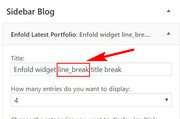
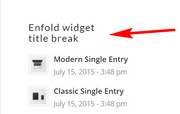
    Um einen Zeilenumbruch in Ihren Widget-Titeln hinzuzufügen, fügen Sie diesen Code am Ende Ihrer functions.php-Datei unter Aussehen> Editor hinzu:

    function widget_title_break( $title ) {
    		$title = str_replace( 'line_break', '<br/>', $title );
    		return $title;
    	}    
    	add_filter( 'widget_title', 'widget_title_break' );

    und fügen Sie diesen Text dann hinzu, wo die Zeilenumbrüche auftreten sollen:

    line_break

    2018-10-12-221856
    2018-10-12-222017

    — Translated with Google —

    Each widget was a ID that can be added to the css rule to target where you would like the changes, for example:

    #portfoliobox-2.widget {
    font-size: 10px !important;
    }

    If you would like it to take effect in all of the widgets, you could try:

    .widget {
    font-size: 10px !important;
    }

    If you post a link to your page, we can help determine what the ID of your widget is.
    To add a line break in your widget titles, Try adding this code to the end of your functions.php file in Appearance > Editor:

    function widget_title_break( $title ) {
    		$title = str_replace( 'line_break', '<br/>', $title );
    		return $title;
    	}    
    	add_filter( 'widget_title', 'widget_title_break' );

    and then add this text where you want the line breaks occur:

    line_break

    2018-10-12-221856
    2018-10-12-222017

    Best regards,
    Mike

    #1020903
    AxelSchultze
    Participant

    Hi – we are new to Enfold and very excited about it.
    We’re running wiforum.org and have a few questions to fine tune the appearance to our liking.

    1) EXCERPT NOT WORKING
    Blog is showing the full post, not just the excerpt. Once it is off the list on ENFOLD THEME SETTING it works.

    2) ADD-TO-ANY
    Can I remove ADD-To-Any on the blog list?

    3) WP_POSTVIEW
    WP_post views is not working on my site

    4) POST DATA
    Can I move >>Date | comment | Author << from the bottom of the excerpt and the bottom of the single post page to the top of the page, right below the title ? Also, would be nice to show the author name below the author picture

    5) MAIN MENU SUB LEVEL LINKS
    How can I change font size in advanced styling – it is really small

    7) MAIN MENU
    would be great to change font type (bold, normal)

    #1020880

    In reply to: Blog Title Font Size

    Hey ruffidea,

    Please try the following in quick css:

    .entry-title{
    font-size:10px!important;
    }

    If this doesn’t work, please provide a link to the site/page in question so we can look into this issue further.

    Best regards,
    Jordan Shannon

    #1020829
    qtinfo
    Participant

    What css code do i use to change the font size for the top secondary menu which is on the right upper corner.
    I tried this and it didn’t work.

    #top #avia2-menu .sub-menu li > a {
    font-size: 16px !important;
    }

    #1020817

    Topic: Blog Title Font Size

    in forum Enfold
    ruffidea
    Participant

    When using the content element ‘Blog Posts’ the title of each post is too big.
    How can I reduce this?

    Thank you

    #1020759

    Hi Rikard,
    Sorry, but this doesn’t resolve the problem.

    If you go to this page http://www.andaanastasescu.co.uk/website-overview/reviews/, you’ll see that the strong text in the body text/paragraphs is NOT Palatino, but Helvetica. Which I didn’t set up! For the whole website, Palatino is the font.
    Also, the strong text bits come in a far too large size.

    I have no idea how to style this so that the text appears in Palatino. Any ideas?
    Thank you for your help,
    Susanne

    #1020735
    zero0cool
    Participant

    I’m using two easy sliders on a page whose element visibility is different for desktop, tablet landscape, tablet portrait (slider 1) and mobile portrait (slider 2). This works great, but whilst the hidden slider is not visible, it leaves unnecessary whitespace which really bugs me.

    Since pictures say more than 1000 words

    With hidden easy slider between menu and image: https://pasteboard.co/HI7xrFw.png

    Hidden easy slider removed: https://pasteboard.co/HI7xVMj.png

    if it helps, this is the div of the hidden easy slider.

    <div data-size="masonry" data-lightbox_size="large" data-animation="fade" data-conditional_play="" data-ids="534,535,536" data-video_counter="0" data-autoplay="true" data-bg_slider="false" data-slide_height="" data-handle="av_slideshow" data-interval="5" data-class=" avia-builder-el-0 el_before_av_slideshow avia-builder-el-first av-desktop-hide av-medium-hide av-small-hide" data-css_id="" data-scroll_down="" data-control_layout="av-control-default" data-custom_markup="" data-perma_caption="" data-autoplay_stopper="" data-image_attachment="" data-min_height="0px" data-default-height="100" class="avia-slideshow avia-slideshow-1 av-control-default avia-slideshow-masonry av_slideshow avia-builder-el-0 el_before_av_slideshow avia-builder-el-first av-desktop-hide av-medium-hide av-small-hide avia-fade-slider" itemprop="ImageObject" itemscope="itemscope" itemtype="https://schema.org/ImageObject"><ul class="avia-slideshow-inner " style="padding: 0px;"><li class=" slide-1 " style="visibility: visible; opacity: 1; transition: all 0.4s cubic-bezier(0.55, 0.085, 0.68, 0.53) 0s; transform: translateZ(0px);"><div data-rel="slideshow-1" class="avia-slide-wrap "><img src="https://i1.wp.com/coaching-choices.ch/wp-content/uploads/2018/10/MK3C2960.jpg?fit=705%2C705&ssl=1" width="705" height="705" title="MK3C2960" alt="" itemprop="thumbnailUrl" data-lazy-src="https://i1.wp.com/coaching-choices.ch/wp-content/uploads/2018/10/MK3C2960.jpg?fit=705%2C705&ssl=1&is-pending-load=1" srcset="data:image/gif;base64,R0lGODlhAQABAIAAAAAAAP///yH5BAEAAAAALAAAAAABAAEAAAIBRAA7" class=" jetpack-lazy-image" style="left: 0px;"><noscript><img src='https://i1.wp.com/coaching-choices.ch/wp-content/uploads/2018/10/MK3C2960.jpg?fit=705%2C705&ssl=1' width='705' height='705' title='MK3C2960' alt='' itemprop="thumbnailUrl" /></noscript></div></li><li class=" slide-2 "><div data-rel="slideshow-1" class="avia-slide-wrap "><img src="https://i0.wp.com/coaching-choices.ch/wp-content/uploads/2018/10/MK3C2704.jpg?fit=705%2C705&ssl=1" width="705" height="705" title="MK3C2704" alt="" itemprop="thumbnailUrl" data-lazy-src="https://i0.wp.com/coaching-choices.ch/wp-content/uploads/2018/10/MK3C2704.jpg?fit=705%2C705&ssl=1&is-pending-load=1" srcset="data:image/gif;base64,R0lGODlhAQABAIAAAAAAAP///yH5BAEAAAAALAAAAAABAAEAAAIBRAA7" class=" jetpack-lazy-image"><noscript><img src='https://i0.wp.com/coaching-choices.ch/wp-content/uploads/2018/10/MK3C2704.jpg?fit=705%2C705&ssl=1' width='705' height='705' title='MK3C2704' alt='' itemprop="thumbnailUrl" /></noscript></div></li><li class=" slide-3 "><div data-rel="slideshow-1" class="avia-slide-wrap "><img src="https://i1.wp.com/coaching-choices.ch/wp-content/uploads/2018/10/MK3C2703.jpg?fit=705%2C705&ssl=1" width="705" height="705" title="MK3C2703" alt="" itemprop="thumbnailUrl" data-lazy-src="https://i1.wp.com/coaching-choices.ch/wp-content/uploads/2018/10/MK3C2703.jpg?fit=705%2C705&ssl=1&is-pending-load=1" srcset="data:image/gif;base64,R0lGODlhAQABAIAAAAAAAP///yH5BAEAAAAALAAAAAABAAEAAAIBRAA7" class=" jetpack-lazy-image"><noscript><img src='https://i1.wp.com/coaching-choices.ch/wp-content/uploads/2018/10/MK3C2703.jpg?fit=705%2C705&ssl=1' width='705' height='705' title='MK3C2703' alt='' itemprop="thumbnailUrl" /></noscript></div></li></ul><div class="avia-slideshow-arrows avia-slideshow-controls"><a href="#prev" class="prev-slide" aria-hidden="true" data-av_icon="" data-av_iconfont="entypo-fontello">Previous</a><a href="#next" class="next-slide" aria-hidden="true" data-av_icon="" data-av_iconfont="entypo-fontello">Next</a></div><div class="avia-slideshow-dots avia-slideshow-controls"><a href="#1" class="goto-slide active">1</a><a href="#2" class="goto-slide ">2</a><a href="#3" class="goto-slide ">3</a></div></div>

    #1020674

    In reply to: Styling pricing table

    Thank you, I adapted it for the pricing row and works great.

    My other query – how can I get the heading row and pricing row to be 30px instead of 90px. My code is below. I’ve tried a few adaptations, but not getting it to work. Thanks.

    <style type = “text/css”>
    .avia-heading-row { font-size: 24px !important; font-weight: bold; min-height: 30px; !important; }
    .pricing-table li { font-size: 15px; !important; min-height: 90px; }
    .pricing-table li.avia-pricing-row { font-size: 24px; min-height: 30px; !important; }
    .main_color .pricing-table li.avia-pricing-row { background-color: #666; }

    </style>

    Hi,

    #top .main_color input[button] {
    font-size: 18px;
    }

    Should change the text size of the button. Let us know if it works.

    Best regards,
    Basilis

    #1020634
    timchurchman
    Participant

    Hi, went to advanced styling, Main Menu Links and changed the option to “Apply only to mouse hover state” unfortunately if i click on this it messes up current kerning, font size and color etc. Tried to adjust font size to match old but you cant select under 8px and not sure why messes up current color.

    #1020624

    Hey micscr,

    It looks like you have this in your Quick CSS, which is overriding the settings:

    #header_main .avia-menu-text {
        font-size: 18px;
        color: #24344d !important;
    }

    Please try to remove that or only remove the !important bit of the code.

    Best regards,
    Rikard

    BeeCee
    Participant

    Hi,

    in the theme settings of ENFOLD at “advanced styling” is the option to choose a FONT for special elements (like H1, H2 etc. or like “blockquote” etc.) missing … universally … all over.

    Nowhere I can choose a special font for elements listed in the “advanced styling” settings.
    Sure, I can do this via custom.css … but this is laborious, especially if the styling of elements like blockquotes etc. is indeed offered in the theme settings -> advanced styling. I can set there lots of things, like size, colour etc. – but not a special font.

    Could you please fix this, it is now over years, that these settings remains the same without any updates?
    Thanks.

    http://imgbox.com/f8LmUwA4

    #1020242
    sdesign-web
    Participant

    Hi,

    i’ve found in your documentation how to change the size of the phone number above header
    /* Phone info font size */
    .phone-info { font-size: 15px; }
    but I can not find how to change the color. Can you please tell me what css I must add.

    Extra : Is it possible to have 2 differents color and size, i mean one for “contact us” and another one for the phone number

    Thank you in advance
    kind regards
    Stan

    Good Evening again Nikko,

    after a little bit of brainstorming I understood what you ment yesterday. ;-)
    So, today I was able to change the font-size…yippi! :-)

    The problem with the word “message” and the “send button” remains.
    So, please help me to find here a solution…thx!

    Best regards
    Carsten

    #1020030
    rockyrockshow
    Participant

    Avia Layout Builder is based on shortcodes. These are stored to the database. I tried to replace specific image elements, but the change doesn’t seem to take effect.
    For example, I activated the Debug Mode of ALB. After that, I looked for the shortcode of said element. To replace it, I’m running this MySQL statement:

    UPDATE wp_posts SET post_content = replace(post_content, "[av_image src='http://localhost/wp-content/uploads/2018/02/application_banner-e1537270610390.png' attachment='521' attachment_size='full' align='center' styling='' hover='' link='manually,https://www.f6s.com/spinlab-thehhlaccelerator8thclass' target='_blank' caption='' font_size='' appearance='' overlay_opacity='0.4' overlay_color='#000000' overlay_text_color='#ffffff' copyright='' animation='no-animation' av_uid='av-9ts9qf' admin_preview_bg=''][/av_image]", "[av_image src='http://localhost/wp-content/uploads/2018/09/APPLY_NOW_FEATURED.png' attachment='521' attachment_size='full' align='center' styling='' hover='' link='manually,https://www.nein.com' target='_blank' caption='' font_size='' appearance='' overlay_opacity='0.4' overlay_color='#000000' overlay_text_color='#ffffff' copyright='' animation='no-animation' av_uid='av-9ts9qf' admin_preview_bg=''][/av_image]");

    The only thing I change is the URL of the image. The MySQL statement takes changes the affected rows, but the website still looks the same. When I look at the page with the ALB Debug Mode again, it still shows the old shortcode element in place.
    Is it not possible to do something like this?

    • This topic was modified 7 years, 6 months ago by rockyrockshow.
    #1019996

    Hi Jordan,

    Thanks so much! That seemed to fix the font size. One more quick question, is there any way to format the posts on mobile to align the text to the left instead of center?

    -Nikki

    #1019991

    Hey n4science,

    Try adding the following to quick css:

    @media only screen and (max-width: 767px) {
    .entry-content p{
    font-size:12px!important;
    line-height:10px!important;
    }}

    Best regards,
    Jordan Shannon

    #1019936

    Hey original52,

    Well the code works on screens up to 480px, you should change it to work on screens up to 990px, like this

    
    @media only screen and (max-width: 990px) {
    .av-special-heading-tag {
      font-size: 30px !important;
    }}
    

    If you need further assistance please let us know.
    Best regards,
    Victoria

    #1019929

    Topic: Styling pricing table

    in forum Enfold
    ac
    Participant

    Hi, I have applied various solutions for styling the pricing table – some are working and some aren’t. I am applying in a code box on the page rather than css, as it only affects this one page.
    The code I’ve added is:

    <style type = “text/css”>
    .avia-heading-row { font-size: 24px !important; font-weight: bold; min-height: 30px; !important; }
    .pricing-table li { font-size: 15px; !important; min-height: 70px; }
    .pricing-table li.avia-pricing-row { font-size: 30px; min-height: 30px; !important; background-color: #666666; }

    </style>

    Most it is working, BUT the heading row and pricing row are displaying at 70px height rather than smaller 30px which I wanted. Also, the pricing row still has an orange background instead of the grey #666666. Please advise how I can amend the above code to make it work.

    #1019758

    Hi,

    Ah ok, no problem :-) Just try to do it when you can.

    Where are you placing the code? I can’t see it applying on my end. Please make sure that it’s at the very top of the Quick CSS box and that you regenerate files under Enfold->Performance if you are using file compression. If that doesn’t help then please post admin login details so that we can have a closer look.

    You could also try to use important in the CSS:

    @media only screen and (max-width: 767px) {
    .responsive .avia_responsive_table .avia-data-table td:before {
        display: block;
        font-style: none;
        font-size: 16px !important;
        text-transform: uppercase !important;
    }
    }

    Best regards,
    Rikard

    #1019753

    Hi,

    Thanks for the update. Are you referring to the tabs element? Try this css code instead.

    #top .tab_titles div {
        font-size: 20px;
    }

    Best regards,
    Ismael

    #1019725

    Hi,

    Thanks for the update. You can use this css code instead.

    #top .fullsize .template-blog .post-title a {
        font-size: 22px !important;
        font-family: 'Terminal Dosis', 'HelveticaNeue', 'Helvetica Neue', Helvetica, Arial, sans-serif !important;
        font-weight: 300;
        text-transform: uppercase;
        letter-spacing: 1px;
    }

    Best regards,
    Ismael

    Hi,

    It has to be inside a container with the “avia-copyright” class attribute.

    <small class="avs avia-copyright">Something about copyright here or the custom shortcode above.</small>
    

    CSS code.

    .avs.avia-copyright {
        position: absolute;
        background-color: rgba(0,0,0,0.1);
        text-align: right;
        color: #fff;
        padding: 0 2em 0 0;
        right: 0;
        bottom: 0;
        width: 2em;
        line-height: 2em;
        max-height: 2em;
        text-indent: -99999px;
        overflow: hidden;
        transition: all 0.3s ease-in;
        z-index: 308;
        font-size: 0.8em;
    }
    
    .avs.avia-copyright:hover {
        width: 100%;
        padding: 0 3em 0 1em;
        text-indent: 0;
        max-height: 100%;
        background-color: rgba(0,0,0,0.4);
    }
    
    .avs.avia-copyright:after {
        content: "\E81e";
        font-family: "entypo-fontello";
        display: block;
        position: absolute;
        right: 0;
        bottom: 0;
        text-indent: 0;
        font-size: 0.8em;
        width: 2.6em;
        height: 2.6em;
        line-height: 2.8em;
        text-align: center;
        color: rgba(255,255,255,0.7);
        -webkit-border-radius: 3px;
        -moz-border-radius: 3px;
        border-radius: 3px;
        cursor: pointer;
    }

    Best regards,
    Ismael

    Good Evening Nikko,

    thx for your answer, but at the moment I’m a little bit confused about it,
    because I don’t know exactly how I can change the font-size with the
    old snippets? Of course I understand that I should use the old snippets,
    but with which new css-supplements? Please tell me that a little bit more
    concrete. ;-)

    The new snippets for the colour works fine…thx! But there is one word left…
    “message”! Please take a look at the screenshot. And another problem is,
    the old snippet for the button overwrite the word “send“. ;-/ Here is the old
    snippet:
    —————————————————————————————
    .avia_ajax_form .button {
    min-width: 100%;
    background-color: #ffffff !important;
    border: none;
    }
    —————————————————————————————
    How can I fix that? And of course here I want also change the font-size of
    the word “send”. ;-)

    I’m looking forward to your feedback!

    Best regards
    Carsten

    #1019684
    netchoice
    Participant

    I’ve been trying to change the main menu font, size, color.

    The advanced styling doesnt seem to do the trick.

    Would like to make it Blue and larger.

    Thanks

    #1019645

    Hi SlmnB,

    Here is the code you can put in Enfold > General Styling > Quick Css,  if it does not work, put into themes/enfold/css/custom.css

    
    .av-inner-tab-title {
        font-size: 14px;   
    }
    

    If you need further assistance please let us know.

    Best regards,
    Victoria

    #1019601

    Hi biosdi,

    Here is the code you can put in Enfold > General Styling > Quick Css,  if it does not work, put into themes/enfold/css/custom.css

    
    @media only screen and (max-width:767px){
      #full_slider_1, 
      #full_slider_1 .av_slideshow_full.avia-slideshow,
      #full_slider_1  .avia-slideshow-inner,
      #full_slider_1 .avia-slideshow li,
      #full_slider_1 .avia-slideshow li img {
        min-height: 200px;
    
      }
       .html_header_transparency #top .avia-builder-el-0 .slideshow_caption {
          padding-top: 0px;
      }
        .slideshow_caption {
           width: 80%;
        }
    }
    @media only screen and (min-width: 768px) and (max-width:990px){
        #av_section_1 .flex_column_table {
            margin-top: -80px !important;
        }
    
        .slideshow_caption h2 {
            font-size: 30px !important;
            padding-top: 0px;
            margin-bottom: 0;
        }
        .slideshow_caption {
           width: 80%;
        }
         
    }
    

    If you need further assistance please let us know.

    Best regards,
    Victoria

    #1019569

    How can I change the font size of tab titles?

    • This reply was modified 7 years, 6 months ago by SlmnB.
    #1019528
    original52
    Participant

    Hi!
    I’ve almost finished a new website…i had some problems with text headings going offscreen in some smartphone devices.
    Problem solved adding some custom css as you mentioned in other threads.

    @media only screen and (max-width: 480px) {
    .av-special-heading-tag {
      font-size: 30px !important;
    }}

    The problem persist in some tablets, especially ipads, where the titles goes one over the other (homepage: “rivestimento interni” goes over “rivestimento esterni” in vertical view, and cuts in horizontal view).
    http://www.responsinator.com/?url=nuovosito.borsellisrl.it%2Fsito2018%2F

    What can i do?

    Thanks.

Viewing 30 results - 6,091 through 6,120 (of 18,738 total)