Hi,
Thanks for the login, in the css below, feel free to adjust the font sizes and colors to suit. We can’t make the sidebar tabs stretch to the bottom, but this css removes the bottom padding so it reaches to the bottom.
#top.page-id-2438 .main_color .tabcontainer .tab {
    color: #fff !important;
    font-size: 20px;
    line-height: 20px;
    padding-top: 15px;
    padding-bottom: 15px;
}
#top.page-id-2438 .main_color .tabcontainer .tab.active_tab {
    color: #000 !important;
    background-color: #b2b7bb !important;
    border-color: #b2b7bb !important;
}
#av-layout-grid-1 > div.flex_cell.no_margin.av_two_third.avia-builder-el-1.el_before_av_cell_one_third.avia-builder-el-first {
padding-bottom: 0px !important;
}
Best regards,
Mike
Thanks – I’m still a learner.
here i know that all variables had to be mentioned:
extract( shortcode_atts( array(
                                            'position'              => 'left',
                                            'color'                 => '',
                                            'custom_bg'             => '',
                                            'custom_border'         => '',
                                            'custom_font'           => '',
                                            'font_color'            => "",
                                            'custom_title'          => '',
                                            'custom_title_tag'      => '',
                                            'custom_content'        => '',
                                            'custom_title_size'     => '',
                                            'custom_content_size'   => '',
                                            'iconlist_styling'      => '',
                                            'animation'             => ''
but for me this just looked more liquid than liquid – so to speak superfluous
$this->iconlist_styling = '';
$this->iconlist_styling = $iconlist_styling == 'av-iconlist-small' ? "av-iconlist-small" : "av-iconlist-big";
can be closed from my point of view.
Hi, I’ve been using the accordion for a side panel on my new sites portfolio pages. I’ve managed to customise quite a bit with a bit of css content and some shortcodes.which I’m pretty happy with.

One thing I was wondering was the toggle icons themselves, is it possible to have a selected state too rather than just the hover state? So say they would be blue when selected?
I have tried with ::selected on a few elements but haven’t managed to get it to work.
Current code I have for the toggles is as..
.custom-accordion .toggle_icon:before {
	font-family: 'dig_icons';
	content:'\e815';
	position: absolute;
	font-size: 12px;
	top:50%;
	transform: translateY(-50%);
	left: 0px;
	line-height: 0;
	color:rgba(255, 255, 255, 0.2);
}

/* Active tab icon */
.custom-accordion .activeTitle .toggle_icon:before {
	font-family: 'dig_icons';
	content:'\e814';
}

/* Tab icon on hover */
.custom-accordion .toggler:hover .toggle_icon:before {
	color:rgba(255, 255, 255, 1);
}
Any help greatly appreciated!
-
This topic was modified 7 years ago by
 Digilocker.
Hi Oliver,
Sorry for the late reply. Your CSS is applying on my end, you might want to extend it using this though:
.special_amp {
    font-family: "din-2" !important;
    font-style: normal;
    font-size: inherit;
}
Best regards,
Rikard
Hey nicolealbaek,
Try adding this css code in Quick CSS, located in Enfold > General Styling:
#top .avia-content-slider .slide-entry-title.entry-title,
#top .avia-content-slider .slide-entry-title.entry-title a {
    font-size: 24px;
    color: #969f6a !important;
}

#top .avia-content-slider .slide-entry-title.entry-title a:hover {
    color: #e7b8b8 !important;
}
Best regards,
Nikko
Hey Nerohm,
The code you posted is global and affects all masonry.
Try using this instead:
#top .classname .av-inner-masonry-content .av-masonry-entry-title {
  position: absolute;
  bottom: 25px;
  text-align: left;
  font-size: 30px!important;
  padding: 10px;
  color: white!important;
}

#top .classname .av-inner-masonry-content .av-masonry-entry-content {
  position: absolute;
  bottom: 7px;
  text-align: left;
  padding: 10px;
  font-size: 16px!important;
  color: #01d7a5!important;
}
Just replace classname with the classname you set.
Best regards,
Nikko
With the latest Enfold update, I’m experiencing formatting issues when there are 2+ icon lists on a page. The first icon list will pick up the custom formatting applied to it, i.e., title font size, icon colors, etc. But the second one won’t. No matter what the settings are in the admin, it renders with the default settings when viewing the page.
Here are several examples:
I have disabled my caching program, tried adding a new list (instead of duplicating the first one), moving them so they aren’t side-by-side, and nothing fixes the default styling. Any ideas?
I’m using Enfold 4.5.5 with WP 5.1
Thanks Again Mike … Appreciate all your help so much… !
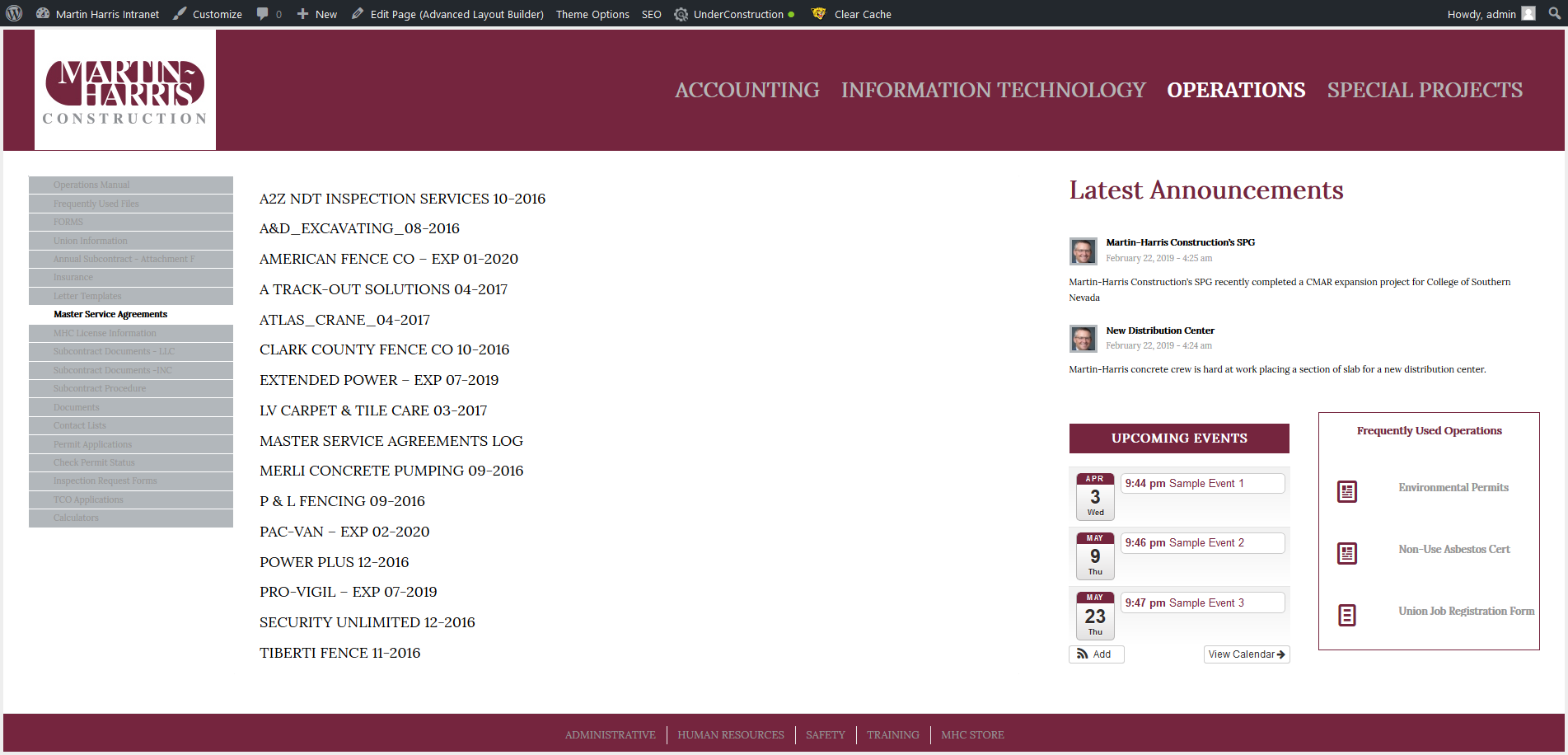
See where I am below after adding the last bit of code. I was able to increase the font size for the tab content and changed the background color of the tabs to grey.
However I still need to make the following changes to get closer to the client mock up above.
*the ability to change the the font size and color of the tab titles
*make the active tab background grey as well
*no white border between tabs
*and yes if possible push the grey area of the tab container all the way to the footer
Hi. I need to display dynamic content stored in custom fields from a specific post on another page of my site. (I’m using the Advanced Custom Fields plug-in.) In Enfold, I’m using a Code Block element along with shortcodes to keep things simple.
The custom field content contains fully qualified URLs. Ideally, I would like to display these links using a Button Row element, but I’m having problem when nesting shortcodes.
In the Code Block, using an ACF shortcode within plain HTML works fine:
<h3>Current Show Daily Forms</h3>
<ul>
<li><a href= '[acf field="release_form" post_id="530"]'  target='_blank'>Show Release Form</a></li>
</ul>
But, when I try to nest this shortcode within your Button Row shortcode, it breaks:
[av_buttonrow alignment='left' button_spacing='5' button_spacing_unit='px' av_uid='av-jo6idxj2' custom_class='chs-button-row' admin_preview_bg='']
[av_buttonrow_item label='Release Form' link='manually,[acf field="release_form" post_id="530"]' link_target='_blank' size='medium' label_display='' icon_select='yes' icon='4' font='entypo-fontello' custom_bg='' custom_font='#ffffff' av_uid='av-1fbifpm' icon_hover='']
[/av_buttonrow]
Anything I am missing, or is this just unsupported? Thank you in advance.
Gary
Hi,
#top .av_inherit_color a {
font-size: 26px;
}
#top .av_inherit_color a:hover {
color: red;
}
Try this. You can change the size and the color to what ever you need for you.
Best regards,
Basilis
Hi,
The way the css for the full width slider is set up it uses !important; in the stylesheet and will be hard to overwrite, an alternative is to use the full width slider for desktops and the full screen slider for mobile, please see the example page I cloned for you at the link in the Private Content area.
You can adjust the font sizes and add the button within the slider.
Best regards,
Mike
Hi,
Oh, I guess I misunderstood, please try this css:
.tab_titles,.active_tab {
background-color: gray !important;
}
.tab_inner_content p,.tab_inner_content a {
font-size: 20px !important;
}
results:

I would point out that the tabs don’t go to the footer like in your mockup, so you will need to do something else for that.
Best regards,
Mike
Hi hansloe,
Please remove those codes from functions.php and put this instead:
add_filter('avf_logo_final_output', 'avf_text_logo_final_output');
function avf_text_logo_final_output($logo) {
    $link = apply_filters('avf_logo_link', home_url('/'));
    $logotext = "LOGO TEXT";
    $subtext = "A CUSTOM SUBTEXT";
    $subtext = "<span class='subtext'>$subtext</span>";
    $logo = "<span class='logo'><h1>".$logotext.$subtext."</h1></span>";
    return $logo;
}

//set builder mode to debug
add_action('avia_builder_mode', "builder_set_debug");
function builder_set_debug() {
    return "debug";
}
then this code you can either put in style.css of your child theme or in Quick CSS (located inside WP Dashboard, Enfold > General Styling):
/* Text logo styling */
#top .logo,
#top .logo a {
    overflow: visible;
}

#top .logo {
    background: gold;
    display: flex;
    align-items: center;
    padding: 15px;
}

#top .logo .subtext {
    font-size: 18px;
    color: #be0027;
    position: absolute;
    width: 100%;
    left: 0;
    top: 25px;
}

/* Hide subtext on scroll */
#header.header-scrolled-full .subtext {
    display: none;
}
@cg thanks for helping out :)
Best regards,
Nikko
what do you have against shortening hexcode according to the nomenclature?
i use nearly almost for code the code tag here on board – that copy&paste will be easy.
#fff is similar to #ffffff (by the way 6digits) – on your code there are 5 !
#3a7 ist similar to #33aa77 etc.
by the way : all three digit hex-codes are websafe colors.
very important: and on your quick css you do not close the media query rule above:
@media only screen and (max-width:767px) {
  #top #wrap_all .av-burger-overlay .av-burger-overlay-scroll #av-burger-menu-ul li a {
    font-size: 20px;
    color: white !important;
  }
#menu-item-search a:before {
  color:white !important;
  }
}
that last curly bracket is missing – and makes all rules later not working ( that is the reason for not having the wider content of 1310px but to have 1010px)
Hi,
You have this in your child theme CSS:
li.current-menu-item .avia-menu-text {
    font-size: 101%;
    font-weight: bold;
    text-decoration: underline;
}
Please try to change the text-decoration value to none.
Best regards,
Rikard
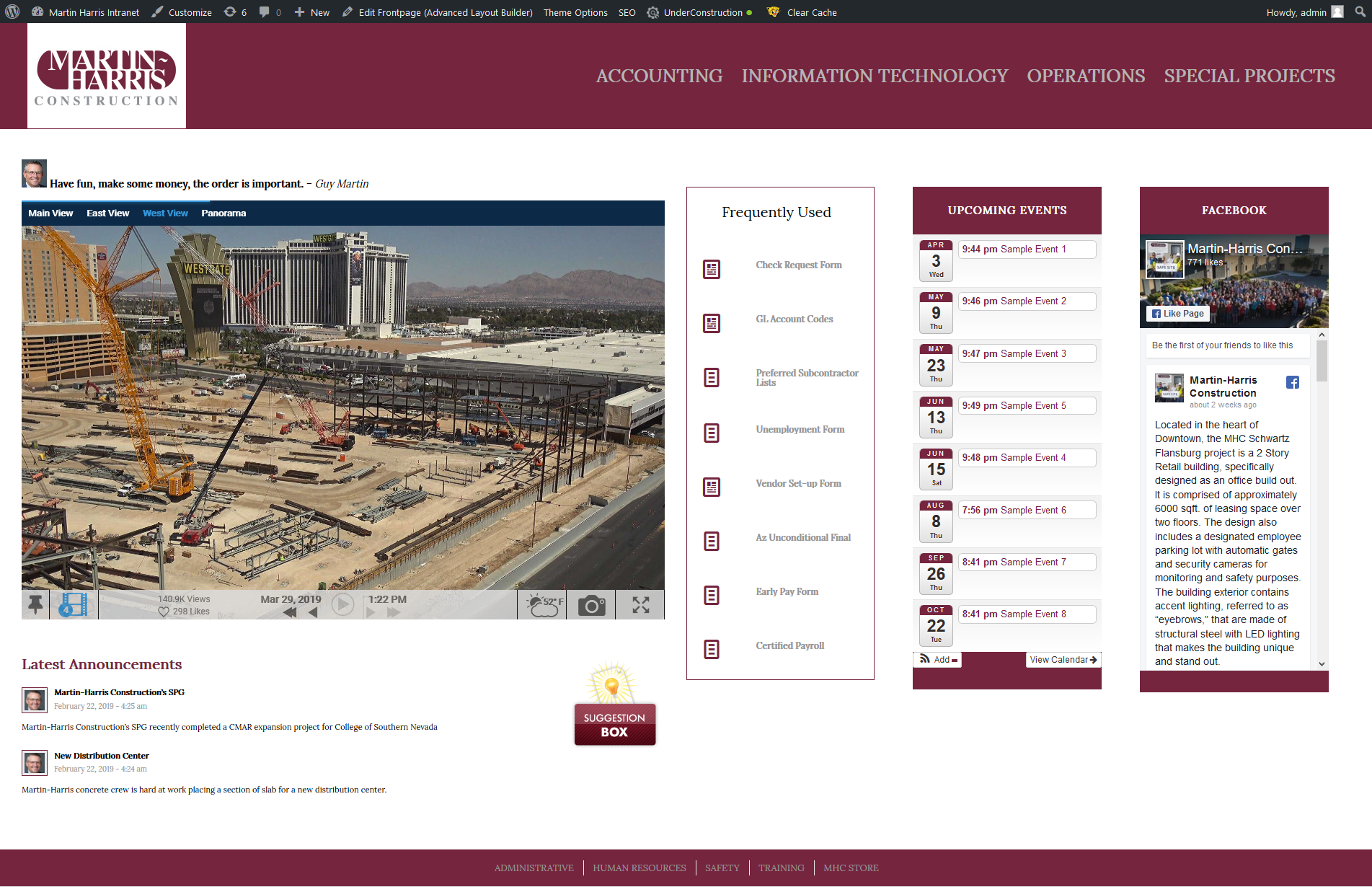
I need to make adjustments to the font size, color and padding of the “Full Width Sub Menu” element being used at the bottom of the page. See screen shot below. I also want to remove the vertical lines between each menu item. And lastly I need to make the menu item white when that page is the active page.
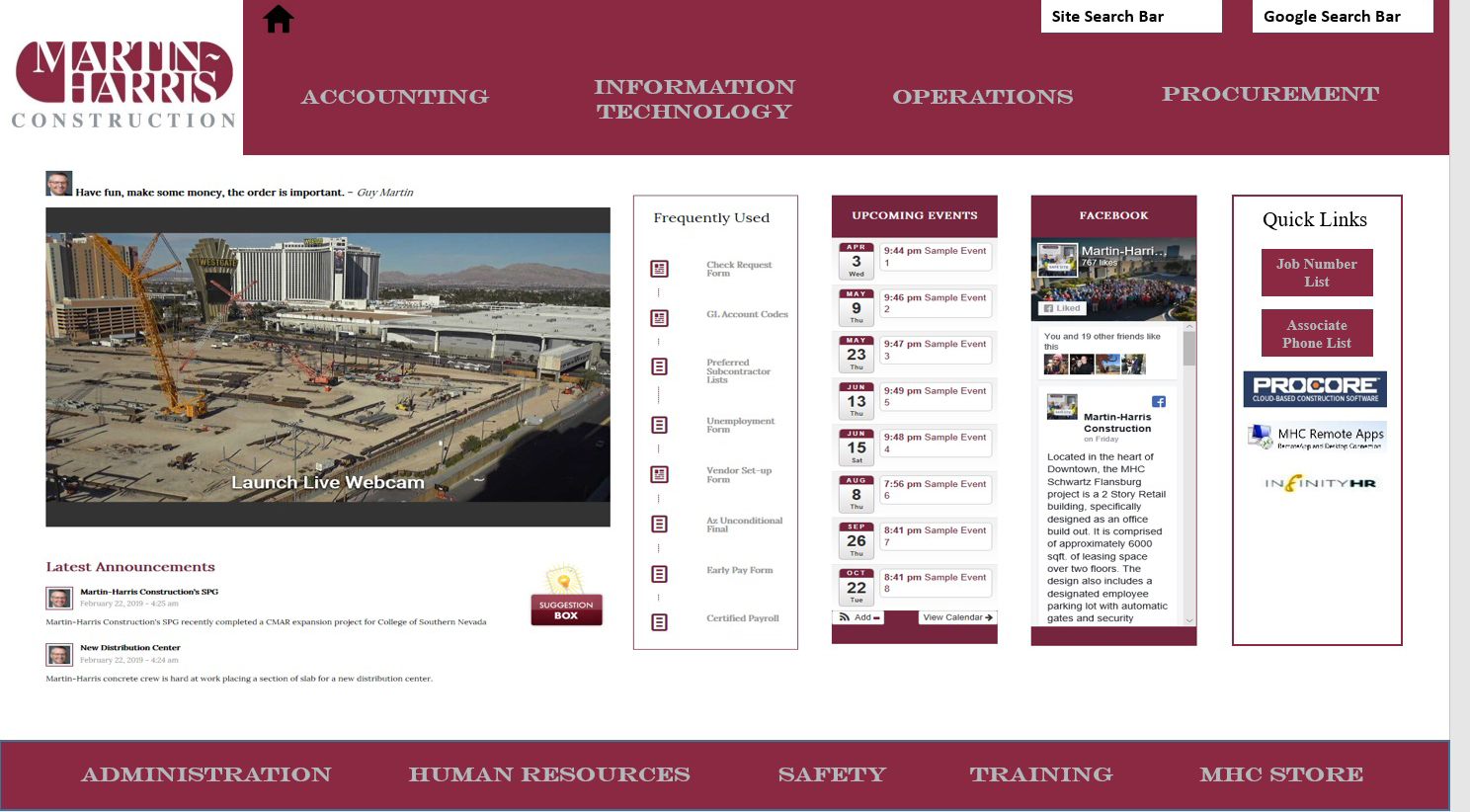
See mock up image below from client so you can see what I a shooting for. If you have a better way of doing this please let me know.
Hi 😊
I would like to change the title color of my blog post in a post slider.
I would like the font of the post title to be 24 and the title / link color #969f6a and the hover over color #e7b8b8
Is there er kode for this to put in the Quick CSS ?
Thanks for a nice theme 🙏
I’m on WP 5.1.1 with parent theme 4.2.6.
When I change the alternate font color, it doesn’t change in all browsers.
Safari works correctly. It seems like it works in IE, Chrome and Firefox, then changes back, but it may just not work at all.
The font should be black, but is light grey.
This is what is in the custom CSS box, if that is any clue.
Thanks!
Tony
.avia-content-slider .slide-entry-title {
font-size: 14px!important;
font-color: black!important;
}
.avia-content-slider .slide-entry-title {
color: white;
}
.html_elegant-blog .av-vertical-delimiter { display: none !important;
}
Hello,
I can’t figure out how to change the size of the main menu text, as well as the headings and blog body (Enfold). Will you help me?
Hi,
I have this custom css bellow for a masonry gallery and i want to apply a different one to several different Masonry elements on other page, i tried to add a custom class for the masonry element but no success, what can i do?
.av-masonry-entry .av-masonry-entry-title {
position: absolute;
bottom: 25px;
text-align: left;
font-size: 30px!important;
padding: 10px;
color: white!important;
}
.av-masonry-entry .av-masonry-entry-content {
position: absolute;
bottom: 7px;
text-align: left;
padding: 10px;
font-size: 16px!important;
color: #01d7a5!important;
}
Thanks!
hallo,
arbeite mit einer temporären Kopie “dev.deingruen.de”. ich wollte
1. statt Logo eine animierte Überschrift mit 2 zeilen im Logo haben und
2. den debug.mode aktivieren.
Aus der Enfold Dokumentation habe ich diese CSS-Snippets
//——————————-
// function – Text Logos
//——————————-
add_filter(‘avf_logo_final_output’, ‘avf_text_logo_final_output’);
function avf_text_logo_final_output($logo) {
$link = apply_filters(‘avf_logo_link’, home_url(‘/’));
$logotext = “LOGO TEXT”;
$subtext = “A CUSTOM SUBTEXT”;
$subtext = “<span class=’subtext’>$subtext</span>”;
$logo = “<span class=’logo’><h1>“.$logotext.$subtext.”</h1></span>”;
return $logo;
}
To style the text logo and subtext please use the below CSS:
/* Text logo styling */
#top .logo,
#top .logo a {
overflow: visible;
}
#top .logo {
background: gold;
display: flex;
align-items: center;
padding: 15px;
}
#top .logo .subtext {
font-size: 18px;
color: #be0027;
position: absolute;
width: 100%;
left: 0;
top: 25px;
}
/* Hide subtext on scroll */
#header.header-scrolled-full .subtext {
display: none;
}
Debug-mode-Enfold:
//set builder mode to debug
add_action(‘avia_builder_mode’, “builder_set_debug”);
function builder_set_debug()
{
return “debug”;
}
in die functions.php des enfold-child kopiert und bekomme diese Fehlermeldung:
Warning: Cannot modify header information – headers already sent by (output started at /www/htdocs/w00a3b4e/dev.deingruen.de/wp-content/themes/enfold-child/functions.php:1) in /www/htdocs/w00a3b4e/dev.deingruen.de/wp-includes/pluggable.php on line 1251
Warning: Cannot modify header information – headers already sent by (output started at /www/htdocs/w00a3b4e/dev.deingruen.de/wp-content/themes/enfold-child/functions.php:1) in /www/htdocs/w00a3b4e/dev.deingruen.de/wp-includes/pluggable.php on line 1254
Jetzt habe ich keinen Zugang mehr zum Backend. Über FTP den Code wieder entfernt, aber die Fehlermeldung kommt weiterhin.
Was kann ich noch tun?
This reply has been marked as private.
Same here. Also the following is lost in the 2nd and 3rd column….
`element.style {
font-size: 18px;
}

Hey Basilis, thanks for getting back to me.
No, I actually want to change the font size of the, I guess you’d call it the header or title of the icon box (e.g. Strategy). In addition, I’d also like to have the corresponding link in color upon hover, rather than with an underline.
Many thanks for your time and help with this.
Hi Yigit,
Thanks, Your solution solved some problems, but i think there is a lot of troubleshooting on different pages after the latest version.
I have listed a few issues I have encountered on different pages I have updated.
Maybe you can use them for troubleshooting:
1) The update 4.5.5 changed the standad image to increase – originally to zoom
– solution, change to zoom
2) Update has trouble registering child theme
– my solution: save first as an original Enfold – subsequently it works when I change it back to child theme
3) Table failed due to short code – works in other tabels (se link in private) = Debug mode – didn’t show errors
Shortcode
[av_font_icon icon='ue8bd' font='entypo-fontello' style='' caption='' link='' linktarget='' size='30px' position='center' color='#ededed' av_uid='av-2b5q2cr'][/av_font_icon]
– my solution: remove shortcode and use a dot.
4) problems with div. backgrounds – eg. image with glass in the link below – just shows white background ….
If you try to update some of your own demos, (i can see that they run with version 4.4) – then it might make sense with all the mysterious mistakes that suddenly pop up.
I stop updating my themes for now, it takes too long to troubleshoot, And then I hope that there is a more stable version just around the corner..
Let me hear if there’s anything I need to elaborate more on
BR, Pete
-
This reply was modified 7 years ago by
 2funky.
Hello,
my website(s) show HTML code now (customer view) and the Enfold editor isn’t shown/usable. The is only a lot of HTML code shown.
I’m not sure if the problem is the WP update to 5.X or installation of plugin Yast SEO (in meantime deinstalled, but problem stays).
In the meantime I switched to the classic editor again, but had no effect.
I’m not experienced with WP, used a homepage builder before, but switched to WP Hosting and Enfold Theme for more possibilities.
Here a short description of my system landscape:
# 1&1 WordPress Hosting
# Multisite:
4 Websites with different Designs
# Plugins/Themes:
– WP MultiPurposeTheme “Enfold V.4.5” mit Avia Layout Builder (instead of the standard WP editor)
– DuplicatePost
– BackWPup
– a3 Lazy Load
Example of failure (shown to endusers on website):
RALF WERKLE<br /> – Der VäterErMuTiger -<br /><br /><br /><br /><br />
Working on the websites, the Enfold Editor isn’t shown any more, but HTML-Coding:
<p>[av_headline_rotator before_rotating='RALF WERKLE' after_rotating='' multiline='aviaTBmultiline' interval='7' animation='fade' margin='' margin_sync='true' tag='h1' size='3vw' align='center' custom_title='' av-medium-font-size-title='' av-small-font-size-title='' av-mini-font-size-title='' av_uid='av-jo4k6qs8' admin_preview_bg='']<br />[av_rotator_item title=' - Der VäterErMuTiger -' link='' linktarget='' custom_title='' av_uid='av-3kl8xf']<br />[av_rotator_item title=' - Väter- und MännerMentor -' link='' linktarget='' custom_title='' av_uid='av-3fmxy3']<br />[av_rotator_item title='- Vater werden ist nicht schwer, Vater sein dagegen sehr -' link='' linktarget='' custom_title='' av_uid='av-38offf']<br />[av_rotator_item title='- Ziel ist es, das unnötige Leiden in den Familien zu beenden. Durch Befähigung und Bewusstwerdung von Vätern, Müttern, Eltern! -' link='' linktarget='' custom_title='' av_uid='av-b1amb']<br />[av_rotator_item title='' link='' linktarget='no' custom_title='' av_uid='av-2wx9mr']<br />[/av_headline_rotator][av_fullscreen size='extra_large' image_attachment='' animation='slide' conditional_play='' autoplay='true' interval='5' control_layout='av-control-default' scroll_down='aviaTBscroll_down' av_uid='av-jo4skv92']<br />[av_fullscreen_slide id='422' av_uid='av-2ovsc3'][/av_fullscreen_slide]<br />[av_fullscreen_slide id='419' av_uid='av-2ms5cb'][/av_fullscreen_slide]<br />[av_fullscreen_slide id='421' av_uid='av-2dr8kz'][/av_fullscreen_slide]<br />[av_fullscreen_slide id='418' av_uid='av-28jqkz'][/av_fullscreen_slide]<br />[av_fullscreen_slide id='406' av_uid='av-207vtv'][/av_fullscreen_slide]<br />[av_fullscreen_slide id=’407′
…
…
I’m not sure what to do. I thought about updating the enfold theme, but did the mistake not to use the enfold child theme.
Therefore I expect the loss of my developments with an update to higher version.
What do you recommend? Can s.b. assist my with transferring the developments to the enfold child theme before upgrading?
What is the best way and the next steps?
Thanks in advance.
BR, Ralf.
Btw. I didn’t succeed with the social buttons, even though I followed the instructions…….so I ended up with making a new menu item:
Url: https://www.facebook.com/profile.php?id=xxxxxxx
Menutitle: [av_font_icon icon='ue8f4' font='entypo-fontello' style='' caption='' link='' linktarget='' size='20px' position='center' color='' admin_preview_bg=''][/av_font_icon]
/OKEIwebbureau
The Desktop Logo and header looks good now. But making these changes has affected how the mobile header looks negatively.

As you can see in this image the green mobile header section isdouble the size of the logo now. How can we fix this so it looks more presentable on mobile without affecting the desktop.
The website link is below:
This is my current coding
.logo ,.logo a,.logo img {
min-height: 170px;
}
#top .avia-button-fullwidth .av-button-description {
font-size: 12px; }
.avia-button-wrap span.avia_iconbox_title {
font-size: 18px;
}
#header .logo {
overflow: visible;
}
#header .logo a,
#header .logo img {
min-height: 150px;
}
@media only screen and (max-width:767px) {
#header .logo a, #header .logo img {
min-height: 80px !important;
}
}
#avia-menu .avia-menu-text {
font-size: 17px !important;
font-weight: bold !important;
}
in addition, when I did delete little CSS in quick CSS ( general styling )
”
#mytab .av-tab-section-inner-container {
display: none;
}
@media only screen and (max-width:767px) {
#top #wrap_all #main h3.av-magazine-title.entry-title
{ font-size: 18px; } }
”
it shows automatically wiithout any click.
what I want to do is that normally it shows only 3 icons and.
when someone click one it shows that list of posts.
please let me know. thanks.
Thanks that got the logo to move up slightly into the top header. This is my current coding for everything. What can I alter to make my logo even bigger JUST on desktop?
.logo ,.logo a,.logo img {
min-height: 120px;
}
#top .avia-button-fullwidth .av-button-description {
font-size: 12px; }
.avia-button-wrap span.avia_iconbox_title {
font-size: 18px;
}
#header .logo {
overflow: visible;
}
#header .logo a,
#header .logo img {
min-height: 150px;
}
@media only screen and (max-width:767px) {
#header .logo a, #header .logo img {
min-height: 80px !important;
}
}
#top #header #header_main {
z-index: 11;
}
#header .logo {
margin-top: -15px;
}
#avia-menu .avia-menu-text {
font-size: 17px !important;
font-weight: bold !important;
}
Thanks for the reply!



