Viewing 30 results - 2,431 through 2,460 (of 18,719 total)
  • Author
    Search Results
  • #1322905

    Hi,

    Thank you for the update.

    Have you tried enabling the Advanced > Responsive Settings > Hotspot on mobile devices option? This should set the tooltip content to always display below the hotspot image, and so users will not have to tap or click the hotspot to see the tooltip content. It could also act as a support in case users are having difficulty accessing the hotspot tooltip.

    You can also adjust the size of the hotspot if necessary.

    @media only screen and (max-width: 990px) {
    .responsive .av-image-hotspot {
        height: 50px;
        width: 50px;
        line-height: 50px;
        font-size: 22px;
    }
    }
    

    Best regards,
    Ismael

    #1322686
    wwt247
    Participant

    I would like to try a seeing what my site looks like with another theme – currently using Enfold. When I install the new theme and go to edit a page the Advanced Page Builder codes are all over the page – like this –

    [av_submenu which_menu=” menu=’17’ position=’center’ color=’main_color’ mobile=’disabled’] [av_submenu_item title=’Menu Item 1′ link=” linktarget=’no’ button_style=”] [av_submenu_item title=’Menu Item 2′ link=” linktarget=’no’ button_style=”] [/av_submenu] [av_section min_height=’custom’ min_height_px=’230px’ padding=’small’ shadow=’no-border-styling’ bottom_border=’no-border-styling’ id=” color=’main_color’ custom_bg=’#365e9e’ src=’http://theme.com/wp-content/uploads/About.jpg’ attachment=’3839′ attachment_size=’full’ attach=’scroll’ position=’center center’ repeat=’stretch’ video=” video_ratio=’16:9′ overlay_opacity=’0.5′ overlay_color=’#ffffff’ overlay_pattern=” overlay_custom_pattern=”] [av_one_third first min_height=” vertical_alignment=” space=” custom_margin=” margin=’0px’ padding=’0px’ border=” border_color=” radius=’0px’ background_color=” src=” background_position=’top left’ background_repeat=’no-repeat’] [av_heading heading=’About’ tag=’h1′ style=’blockquote modern-quote’ size=’45’ subheading_active=’subheading_below’ subheading_size=’20’ padding=’10’ color=’custom-color-heading’ custom_font=’#365e9e’][/av_heading] [/av_one_third] [/av_section] [av_section min_height=’custom’ min_height_px=” padding=’small’ shadow=’no-border-styling’ bottom_border=’no-border-styling’ id=’lmb’ color=’main_color’ custom_bg=” src=” attachment=” attachment_size=” attach=’scroll’ position=’center center’ repeat=’repeat’ video=” video_ratio=’16:9′ overlay_opacity=’0.5′ overlay_color=’#ffffff’ overlay_pattern=” overlay_custom_pattern=”] [av_two_third first min_height=” vertical_alignment=” space=” custom_margin=” margin=’0px’ padding=’0px’ border=” border_color=” radius=’0px’ background_color=” src=” background_position=’top left’ background_repeat=’no-repeat’] [av_textblock size=” font_color=” color=”]

    Is there a way, maybe a plugin, that can be used to convert the Advanced Page Builder blocks to Gutenberg blocks so that the transition from one Enfold to another theme and back again is easy and seemless?

    Thank you!

    • This topic was modified 4 years, 5 months ago by wwt247.
    #1322682

    first : if you have no settings on a lot of shortcode settings – you can get rid of it:

    Zur Agentur reinsicht [av_font_icon icon='ue841' font='entypo-fontello' size='19px' position='right'][/av_font_icon]
    

    try that shortcode
    PS : you know how to find those numbers ? ue841 etc.

    • This reply was modified 4 years, 5 months ago by Guenni007.
    #1322678

    now put this to your quick css:
    the first rule is extended – then the second instruction is added

    .phone-info a {
    	display: inline-block;
    	font-size: 14px;
    	font-weight: normal !important;
    	padding-left: 15px
    }
    
    .phone-info .av_font_icon {
    	position: relative;
    	top: -4px;
    	color: #eaac57;
    }

    and in the phone-info code get rid of separator “-”
    or replace with:

    <a href="tel:3109333123">[av_font_icon icon='ue854' font='entypo-fontello' size='20px' position='left' color='#eaac57' custom_class='phone'][/av_font_icon] (310)933 3123</a><a href="mailto: (Email address hidden if logged out) ">[av_font_icon icon='ue805' font='entypo-fontello' size='20px' position='left' color='#eaac57' custom_class='email'][/av_font_icon]  (Email address hidden if logged out) </a>
    
    • This reply was modified 4 years, 5 months ago by Guenni007.
    #1322625
    Yoolia
    Participant

    Hello,

    we have a problem with our custom font size and color settings. They get lost in the translated versions of the web (via WPML). Sometimes when we update and sometimes even when we just save a page.
    Is there a way to avoid this and why does it happen?
    We also created tagbased menus and after updating the site to PHP 7.4 the menus in all languages except the original language (English) got lost.
    It is very annoying as we keep losing hours of work quite often.
    We do use a child theme.

    And I have another questions – our shop menu is a collection of tags that are assigned to products. Is it possible to add a text once the user has clicked one of the tags e.g. Oily Skin – meaning when he gets the selection of the products that have this tag, it would be ideal to have a description on top of these products giving more insights (maybe also a photo/ banner).

    Thank you,
    Julia

    #1322539

    and you realy replaced your code ( on phone-info input field ) with mine ???

    <a href="tel:3109333123">[av_font_icon icon='ue854' font='entypo-fontello' size='20px' position='left' color='#b02b2c' ][/av_font_icon] (310)933 3123</a> - <a href="mailto: (Email address hidden if logged out) ">[av_font_icon icon='ue805' font='entypo-fontello' size='20px' position='left' color='#b02b2c' ][/av_font_icon]  (Email address hidden if logged out) </a>
    
    #1322520

    Hi,

    Please edit your mobile slider and give it a custom ID (“custom-slider” in example below) and then add following code to bottom of Quick CSS field in Enfold theme options > General Styling tab
    #top #custom-slider .avia-slideshow-button { font-size: 24px; }

    Regards,
    Yigit

    #1322353

    Hi,
    Thank you for your patience, currently there is a caption for the lead gallery image that is hidden, #top .avia-gallery .avia-gallery-caption
    but when you hover over the thumbnails the lead image container is not replaced it is overlayed with a larger thumbnail and the caption is not used. So I’m not seeing a good way to change this, I did come up with this css that sets all of the tooltips to the same location so they look like captions on hover, please try this code in the General Styling ▸ Quick CSS field or in the WordPress ▸ Customize ▸ Additional CSS field:

    #top.postid-3431 .avia-tooltip.avia-tt {
    	top: 675px !important;
        left: 31% !important;
        background-color: transparent !important;
    }
    

    you could also add font size and color rules if you wanted, please see the screenshots in the Private Content area.

    Best regards,
    Mike

    #1322331

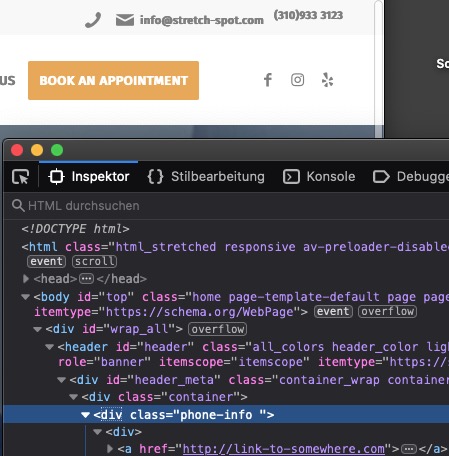
    I’m trying to make the phone number and email clickable in the area above the header

    so i guess it is the area of the header_meta.
    You can insert content to that area by using the phone-info field. As far i can see – you have done this.

    Add that little css to your quick css. – just give it a try
    Copy & Paste this code to your phone-info input field ( replace the other entries )

    <a href="tel:3109333123">[av_font_icon icon='ue854' font='entypo-fontello' size='20px' position='left' color='#b02b2c' ][/av_font_icon] (310)933 3123</a> • <a href="mailto: (Email address hidden if logged out) ">[av_font_icon icon='ue805' font='entypo-fontello' size='20px' position='left' color='#b02b2c' ][/av_font_icon]  (Email address hidden if logged out) </a>
    
    #1322319

    Hi,

    Thanks for that. Here are the shortcodes for that page:

    [av_section min_height='' min_height_px='600px' padding='huge' shadow='no-border-styling' bottom_border='no-border-styling' id='' color='main_color' custom_bg='' src='https://kriesi.at/themes/enfold-app/files/2016/05/couple-running.jpg' attachment='160' attachment_size='full' attach='fixed' position='top left' repeat='stretch' video='' video_ratio='16:9' overlay_enable='aviaTBoverlay_enable' overlay_opacity='0.6' overlay_color='#3e6792' overlay_pattern='' overlay_custom_pattern='' av_uid='av-jklju8']
    [av_one_full first min_height='' vertical_alignment='av-align-top' space='' custom_margin='aviaTBcustom_margin' margin='0px' margin_sync='true' padding='0px' padding_sync='true' border='' border_color='' radius='0px' radius_sync='true' background_color='' src='' attachment='' attachment_size='' background_position='top left' background_repeat='no-repeat' animation='fade-in' mobile_display='' av_uid='av-jeusxs']
    
    [av_heading tag='h1' padding='40' heading='<strong>Your personal fitness tracker</strong><br>Now available on all platforms.' color='custom-color-heading' style='blockquote modern-quote modern-centered' custom_font='#ffffff' size='40' subheading_active='' subheading_size='15' custom_class='' av_uid='av-jba1wo'][/av_heading]
    
    [av_button label='Learn more' link='manually,#features' link_target='' size='large' position='center' icon_select='no' icon='ue800' font='entypo-fontello' color='light' custom_bg='#444444' custom_font='#ffffff' av_uid='av-j4456o']
    
    [av_hr class='invisible' height='300px' shadow='no-shadow' position='center' custom_border='av-border-thin' custom_width='50px' custom_border_color='' custom_margin_top='30px' custom_margin_bottom='30px' icon_select='yes' custom_icon_color='' icon='ue808' font='entypo-fontello' av_uid='av-iylyxc']
    
    [/av_one_full]
    [/av_section]
    
    [av_section min_height='' min_height_px='500px' padding='default' shadow='no-border-styling' bottom_border='no-border-styling' id='' color='main_color' custom_bg='' src='' attachment='' attachment_size='' attach='scroll' position='top left' repeat='no-repeat' video='' video_ratio='16:9' overlay_opacity='0.5' overlay_color='' overlay_pattern='' overlay_custom_pattern='' av_uid='av-isj7xc']
    [av_one_full first min_height='' vertical_alignment='av-align-top' space='' custom_margin='aviaTBcustom_margin' margin='-400px,0px' padding='0px' padding_sync='true' border='' border_color='' radius='0px' radius_sync='true' background_color='' src='' attachment='' attachment_size='' background_position='top left' background_repeat='no-repeat' animation='fade-in' av_uid='av-in12fs']
    
    [av_image src='https://kriesi.at/themes/enfold-app/files/2016/05/header.png' attachment='154' attachment_size='full' align='center' styling='no-styling' hover='' link='' target='' caption='' font_size='' appearance='' overlay_opacity='0.4' overlay_color='#000000' overlay_text_color='#ffffff' animation='no-animation' av_uid='av-1ug4mo'][/av_image]
    
    [/av_one_full][av_one_third first min_height='' vertical_alignment='' space='' custom_margin='' margin='0px' padding='0px' border='' border_color='' radius='0px' background_color='' src='' background_position='top left' background_repeat='no-repeat' animation='' av_uid='av-1tngzs']
    
    [av_icon_box position='top' boxed='av-no-box' icon='uf114' font='Flaticon' title='Donec quam felis' link='' linktarget='' linkelement='' font_color='' custom_title='' custom_content='' color='custom' custom_bg='#4678ae' custom_font='#ffffff' custom_border='#4678ae' av_uid='av-i25bxs']
    Lorem ipsum dolor sit amet, consectetuer adipiscing elit. Aenean commodo ligula eget dolor.
    [/av_icon_box]
    
    [/av_one_third][av_one_third min_height='' vertical_alignment='' space='' custom_margin='' margin='0px' padding='0px' border='' border_color='' radius='0px' background_color='' src='' background_position='top left' background_repeat='no-repeat' animation='' av_uid='av-hzaeow']
    
    [av_icon_box position='top' boxed='av-no-box' icon='uf17f' font='Flaticon' title='Lorem ipsum dolor' link='' linktarget='' linkelement='' font_color='' custom_title='' custom_content='' color='custom' custom_bg='#4678ae' custom_font='#ffffff' custom_border='#4678ae' av_uid='av-hrqtoo']
    Natoque penatibus et magnis dis parturieolor sit amet, consectetuer adipiscing elit.
    [/av_icon_box]
    
    [/av_one_third][av_one_third min_height='' vertical_alignment='' space='' custom_margin='' margin='0px' padding='0px' border='' border_color='' radius='0px' background_color='' src='' background_position='top left' background_repeat='no-repeat' animation='' av_uid='av-hm4asg']
    
    [av_icon_box position='top' boxed='av-no-box' icon='uf1da' font='Flaticon' title='Donec quam felis' link='' linktarget='' linkelement='' font_color='' custom_title='' custom_content='' color='custom' custom_bg='#4678ae' custom_font='#ffffff' custom_border='#4678ae' av_uid='av-hgjejc']
    Lorem ipsum dolor sit amet, consectetuer adipiscing elit. Aenean commodo ligula eget dolor. Aenean massa.
    [/av_icon_box]
    
    [/av_one_third]
    [/av_section]
    
    [av_layout_row border='' min_height='' color='main_color' mobile='av-fixed-cells' id='features' av_uid='av-h86cko']
    
    [av_cell_two_fifth vertical_align='top' padding='800px,30px,30px,30px' background_color='#f4f4f4' src='https://kriesi.at/themes/enfold-app/files/2016/05/parallax-slides1.png' attachment='156' attachment_size='full' background_attachment='fixed' background_position='center left' background_repeat='contain' mobile_display='av-hide-on-mobile' av_uid='av-h57hco']
    
    [/av_cell_two_fifth][av_cell_three_fifth vertical_align='middle' padding='130px,130px,130px,30px' background_color='#f4f4f4' src='' attachment='' attachment_size='' background_attachment='scroll' background_position='top left' background_repeat='no-repeat' mobile_display='' av_uid='av-h111gg']
    
    [av_one_full first min_height='' vertical_alignment='av-align-top' space='' margin='0px' margin_sync='true' padding='0px' padding_sync='true' border='' border_color='' radius='0px' radius_sync='true' background_color='' src='' attachment='' attachment_size='' background_position='top left' background_repeat='no-repeat' animation='right-to-left' av_uid='av-gv0daw']
    
    [av_heading tag='h3' padding='0' heading='A great tracking app for all your workouts' color='' style='blockquote modern-quote' custom_font='' size='40' subheading_active='' subheading_size='15' custom_class='' av_uid='av-gnv59s'][/av_heading]
    
    [av_hr class='custom' height='50' shadow='no-shadow' position='left' custom_border='av-border-fat' custom_width='50px' custom_border_color='#000000' custom_margin_top='30px' custom_margin_bottom='30px' icon_select='no' custom_icon_color='' icon='ue808' font='entypo-fontello' av_uid='av-gilzuw']
    
    [av_textblock size='' font_color='' color='' av_uid='av-ga36c0']
    Consectetuer adipiscing elit. Aenean commodo ligula eget dolor. Aenean massa. Cum sociis natoque penatibus et magnis dis parturient montes, nascetur ridiculus mus.
    
    Donec quam felis, ultricies nec, pellentesque eu, pretium quis, sem. Nulla consequat massa quis enim.
    [/av_textblock]
    
    [/av_one_full][av_one_half first min_height='' vertical_alignment='av-align-top' space='' margin='0px' margin_sync='true' padding='0px' padding_sync='true' border='' border_color='' radius='0px' radius_sync='true' background_color='' src='' attachment='' attachment_size='' background_position='top left' background_repeat='no-repeat' animation='right-to-left' av_uid='av-g5lby0']
    
    [av_icon_box position='left' boxed='av-no-box' icon='uf23d' font='Flaticon' title='Donec quam felis' link='' linktarget='' linkelement='' font_color='' custom_title='' custom_content='' color='' custom_bg='' custom_font='' custom_border='' av_uid='av-g0lmt4']
    Lorem ipsum dolor sit amet, consectetuer adipiscing elit. Aenean commodo ligula eget dolor.
    [/av_icon_box]
    
    [/av_one_half][av_one_half min_height='' vertical_alignment='av-align-top' space='' margin='0px' margin_sync='true' padding='0px' padding_sync='true' border='' border_color='' radius='0px' radius_sync='true' background_color='' src='' attachment='' attachment_size='' background_position='top left' background_repeat='no-repeat' animation='right-to-left' av_uid='av-fumvbs']
    
    [av_icon_box position='left' boxed='av-no-box' icon='uf158' font='Flaticon' title='Lorem ipsum dolor' link='' linktarget='' linkelement='' font_color='' custom_title='' custom_content='' color='' custom_bg='' custom_font='' custom_border='' av_uid='av-flxdu0']
    Natoque penatibus et magnis dis parturieolor sit amet, consectetuer adipiscing elit.
    [/av_icon_box]
    
    [/av_one_half][/av_cell_three_fifth][/av_layout_row][av_layout_row border='' min_height='' color='main_color' mobile='av-flex-cells' id='' av_uid='av-fillc0']
    
    [av_cell_two_fifth vertical_align='top' padding='800px,30px,30px,30px' background_color='#4679ae' src='https://kriesi.at/themes/enfold-app/files/2016/05/parallax-slides2.png' attachment='157' attachment_size='full' background_attachment='fixed' background_position='center left' background_repeat='contain' mobile_display='av-hide-on-mobile' av_uid='av-fbmgfs']
    
    [/av_cell_two_fifth][av_cell_three_fifth vertical_align='middle' padding='130px,130px,130px,30px' background_color='#4679ae' src='' attachment='' attachment_size='' background_attachment='scroll' background_position='top left' background_repeat='no-repeat' mobile_display='' av_uid='av-f3dlpk']
    
    [av_one_full first min_height='' vertical_alignment='av-align-top' space='' margin='0px' margin_sync='true' padding='0px' padding_sync='true' border='' border_color='' radius='0px' radius_sync='true' background_color='' src='' attachment='' attachment_size='' background_position='top left' background_repeat='no-repeat' animation='fade-in' mobile_display='' av_uid='av-1hngiw']
    
    [av_heading tag='h3' padding='0' heading='Super easy syncing with all of your other devices via cloud services' color='custom-color-heading' style='blockquote modern-quote modern-centered' custom_font='#ffffff' size='40' subheading_active='' subheading_size='15' custom_class='' av_uid='av-1hjmeo'][/av_heading]
    
    [av_hr class='custom' height='50' shadow='no-shadow' position='center' custom_border='av-border-fat' custom_width='50px' custom_border_color='#ffffff' custom_margin_top='30px' custom_margin_bottom='30px' icon_select='no' custom_icon_color='' icon='ue808' font='entypo-fontello' av_uid='av-ela5js']
    
    [av_textblock size='' font_color='custom' color='#ffffff' av_uid='av-eitm1s']
    <p style="text-align: center;">Consectetuer adipiscing elit. Aenean commodo ligula eget dolor. Aenean massa. Cum sociis natoque penatibus et magnis dis parturient montes, nascetur ridiculus mus.</p>
    <p style="text-align: center;">Donec quam felis, ultricies nmassa quis enim.</p>
    [/av_textblock]
    
    [av_image src='https://kriesi.at/themes/enfold-app/files/2016/05/devices.png' attachment='155' attachment_size='full' align='left' styling='' hover='' link='' target='' caption='' font_size='' appearance='' overlay_opacity='0.4' overlay_color='#000000' overlay_text_color='#ffffff' animation='no-animation' av_uid='av-edb0cw'][/av_image]
    
    [/av_one_full][/av_cell_three_fifth][/av_layout_row][av_layout_row border='' min_height='' color='main_color' mobile='av-flex-cells' id='' av_uid='av-e3gpq8']
    
    [av_cell_two_fifth vertical_align='top' padding='800px,30px,30px,30px' background_color='' src='https://kriesi.at/themes/enfold-app/files/2016/05/parallax-slides4.png' attachment='159' attachment_size='full' background_attachment='fixed' background_position='center left' background_repeat='contain' mobile_display='av-hide-on-mobile' av_uid='av-e13u68']
    
    [/av_cell_two_fifth][av_cell_three_fifth vertical_align='middle' padding='30px,130px,30px,30px' background_color='' src='' attachment='' attachment_size='' background_attachment='scroll' background_position='top left' background_repeat='no-repeat' mobile_display='' av_uid='av-drwbrc']
    
    [av_one_full first min_height='' vertical_alignment='av-align-top' space='' margin='0px' margin_sync='true' padding='0px' padding_sync='true' border='' border_color='' radius='0px' radius_sync='true' background_color='' src='' attachment='' attachment_size='' background_position='top left' background_repeat='no-repeat' animation='right-to-left' av_uid='av-dpqueo']
    
    [av_heading tag='h3' padding='0' heading='Improvements are coming soon!' color='' style='blockquote modern-quote' custom_font='' size='40' subheading_active='' subheading_size='15' custom_class='' av_uid='av-dgmz60'][/av_heading]
    
    [av_hr class='custom' height='50' shadow='no-shadow' position='left' custom_border='av-border-fat' custom_width='50px' custom_border_color='#000000' custom_margin_top='30px' custom_margin_bottom='30px' icon_select='no' custom_icon_color='' icon='ue808' font='entypo-fontello' av_uid='av-1brz3k']
    
    [av_textblock size='' font_color='' color='' av_uid='av-1b6iq0']
    Lorem ipsum dolor sit amet, consectetuer adipiscing elit. Aenean commodo ligula eget dolor. Aenean massa. Cum sociis natoque penatibus et magnis dis parturient montes, nascetur ridiculus mus.
    
    Donec pede justo, fringilla vel, aliquet nec, vulputate eget, arcu. In enim justo, rhoncus ut, imperdiet a, venenatis vitae, justo. Nullam dictum felis eu pede mollis pretium. Integer tincidunt.
    [/av_textblock]
    
    [av_hr class='invisible' height='50' shadow='no-shadow' position='left' custom_border='av-border-fat' custom_width='50px' custom_border_color='#ffffff' custom_margin_top='30px' custom_margin_bottom='30px' icon_select='no' custom_icon_color='' icon='ue808' font='entypo-fontello' av_uid='av-cymvdk']
    
    [av_progress bar_styling='av-striped-bar' bar_animation='av-animated-bar' av_uid='av-crria8']
    [av_progress_bar title='Easy to use' progress='100' color='theme-color' icon_select='no' icon='43' font='entypo-fontello' av_uid='av-4jv1c']
    [av_progress_bar title='Flexible' progress='100' color='theme-color' icon_select='no' icon='ue800' font='entypo-fontello' av_uid='av-cipl9c']
    [av_progress_bar title='Finished' progress='70' color='theme-color' icon_select='no' icon='ue800' font='entypo-fontello' av_uid='av-cb1hg0']
    [/av_progress]
    
    [/av_one_full][/av_cell_three_fifth][/av_layout_row][av_layout_row border='' min_height='' color='main_color' mobile='av-flex-cells' id='' av_uid='av-c4pwjk']
    
    [av_cell_two_fifth vertical_align='top' padding='800px,30px,30px,30px' background_color='#4679ae' src='https://kriesi.at/themes/enfold-app/files/2016/05/parallax-slides3.png' attachment='158' attachment_size='full' background_attachment='fixed' background_position='center left' background_repeat='contain' mobile_display='av-hide-on-mobile' av_uid='av-16xtt4']
    
    [/av_cell_two_fifth][av_cell_three_fifth vertical_align='middle' padding='30px,130px,30px,30px' background_color='#4679ae' src='' attachment='' attachment_size='' background_attachment='scroll' background_position='top left' background_repeat='no-repeat' mobile_display='' av_uid='av-bsemzc']
    
    [av_one_full first min_height='' vertical_alignment='av-align-top' space='' margin='0px' margin_sync='true' padding='0px' padding_sync='true' border='' border_color='' radius='0px' radius_sync='true' background_color='' src='' attachment='' attachment_size='' background_position='top left' background_repeat='no-repeat' animation='right-to-left' av_uid='av-blwl20']
    
    [av_heading tag='h3' padding='0' heading='A growing community' color='custom-color-heading' style='blockquote modern-quote' custom_font='#ffffff' size='40' subheading_active='' subheading_size='15' custom_class='' av_uid='av-bfpujc'][/av_heading]
    
    [av_hr class='custom' height='50' shadow='no-shadow' position='left' custom_border='av-border-fat' custom_width='50px' custom_border_color='#ffffff' custom_margin_top='30px' custom_margin_bottom='30px' icon_select='no' custom_icon_color='' icon='ue808' font='entypo-fontello' av_uid='av-bajc14']
    
    [av_textblock size='' font_color='custom' color='#ffffff' av_uid='av-13yhm0']
    Consectetuer adipiscing elit. Aenean commodo ligula eget dolor. Aenean massa. Cum sociis natoque penatibus et magnis dis parturient montes, nascetur ridiculus mus.
    
    Donec quam felis, ultricies nec, pellentesque eu, pretium quis, sem. Nulla consequat massa quis enim.
    [/av_textblock]
    
    [/av_one_full][av_hr class='invisible' height='50' shadow='no-shadow' position='left' custom_border='av-border-fat' custom_width='50px' custom_border_color='#ffffff' custom_margin_top='30px' custom_margin_bottom='30px' icon_select='no' custom_icon_color='' icon='ue808' font='entypo-fontello' av_uid='av-axoh80']
    
    [av_one_half first min_height='av-equal-height-column' vertical_alignment='av-align-middle' space='' margin='0px' margin_sync='true' padding='30px' padding_sync='true' border='1' border_color='rgba(255,255,255,0.5)' radius='0px' radius_sync='true' background_color='rgba(255,255,255,0.2)' src='' attachment='' attachment_size='' background_position='top left' background_repeat='no-repeat' animation='' av_uid='av-at67eg']
    
    [av_animated_numbers number='234,560' icon_select='av-icon-before' icon='uf167' font='Flaticon' font_size='' font_size_description='' link='' linktarget='no' color='font-light' custom_color='#444444' av_uid='av-aqz5q0']
    Users registered with us
    [/av_animated_numbers]
    
    [/av_one_half][av_one_half min_height='av-equal-height-column' vertical_alignment='av-align-middle' space='' margin='0px' margin_sync='true' padding='30px' padding_sync='true' border='1' border_color='rgba(255,255,255,0.5)' radius='0px' radius_sync='true' background_color='rgba(255,255,255,0.2)' src='' attachment='' attachment_size='' background_position='top left' background_repeat='no-repeat' animation='' av_uid='av-aijtyw']
    
    [av_animated_numbers number='12,824,476' icon_select='av-icon-before' icon='uf1d9' font='Flaticon' font_size='' font_size_description='' link='' linktarget='no' color='font-light' custom_color='#444444' av_uid='av-114bdc']
    Miles run during the last month
    [/av_animated_numbers]
    
    [/av_one_half][/av_cell_three_fifth][/av_layout_row][av_section min_height='' min_height_px='500px' padding='huge' shadow='no-border-styling' bottom_border='no-border-styling' id='' color='footer_color' custom_bg='' src='' attachment='' attachment_size='' attach='scroll' position='top left' repeat='no-repeat' video='' video_ratio='16:9' overlay_opacity='0.5' overlay_color='' overlay_pattern='' overlay_custom_pattern='' av_uid='av-a92eaw']
    [av_heading heading='Other Features' tag='h3' style='blockquote modern-quote modern-centered' size='40' subheading_active='' subheading_size='15' padding='0' color='' custom_font='' av_uid='av-a1f8fs'][/av_heading]
    
    [av_hr class='custom' height='50' shadow='no-shadow' position='center' custom_border='av-border-fat' custom_width='50px' custom_border_color='#ffffff' custom_margin_top='30px' custom_margin_bottom='30px' icon_select='no' custom_icon_color='' icon='ue808' font='entypo-fontello' av_uid='av-zlt6g']
    
    [av_one_third first min_height='' vertical_alignment='av-align-top' space='' margin='0px' margin_sync='true' padding='0px' padding_sync='true' border='' border_color='' radius='0px' radius_sync='true' background_color='' src='' attachment='' attachment_size='' background_position='top left' background_repeat='no-repeat' animation='bottom-to-top' av_uid='av-9qjk4o']
    
    [av_image src='https://kriesi.at/themes/enfold-app/files/2016/05/small-feature-1-845x321.png' attachment='215' attachment_size='entry_with_sidebar' align='center' styling='no-styling' hover='av-hover-grow' link='lightbox' target='' caption='yes' font_size='' appearance='' overlay_opacity='0.6' overlay_color='#4679ae' overlay_text_color='#ffffff' animation='no-animation' av_uid='av-9j6vkw']
    Real Time Stats
    [/av_image]
    
    [av_textblock size='' font_color='' color='#ffffff' av_uid='av-xhi9k']
    <p style="text-align: left;">Consectetuer adipiscing elit. Aenean commodo ligula eget dolor. Aenean massa.</p>
    [/av_textblock]
    
    [/av_one_third][av_one_third min_height='' vertical_alignment='av-align-top' space='' margin='0px' margin_sync='true' padding='0px' padding_sync='true' border='' border_color='' radius='0px' radius_sync='true' background_color='' src='' attachment='' attachment_size='' background_position='top left' background_repeat='no-repeat' animation='bottom-to-top' av_uid='av-9983oo']
    
    [av_image src='https://kriesi.at/themes/enfold-app/files/2016/05/small-feature-2-845x321.png' attachment='222' attachment_size='entry_with_sidebar' align='center' styling='no-styling' hover='av-hover-grow' link='lightbox' target='' caption='yes' font_size='' appearance='' overlay_opacity='0.6' overlay_color='#4679ae' overlay_text_color='#ffffff' animation='no-animation' av_uid='av-91zk20']
    Analytics Features
    [/av_image]
    
    [av_textblock size='' font_color='' color='#ffffff' av_uid='av-8w4bw0']
    Lorem ipsum dolor sit amet, consectetuer adipiscing elit. Aenean commodo ligula eget dolor.
    [/av_textblock]
    
    [/av_one_third][av_one_third min_height='' vertical_alignment='av-align-top' space='' margin='0px' margin_sync='true' padding='0px' padding_sync='true' border='' border_color='' radius='0px' radius_sync='true' background_color='' src='' attachment='' attachment_size='' background_position='top left' background_repeat='no-repeat' animation='bottom-to-top' av_uid='av-8qs5og']
    
    [av_image src='https://kriesi.at/themes/enfold-app/files/2016/05/small-feature-3-845x321.png' attachment='223' attachment_size='entry_with_sidebar' align='center' styling='no-styling' hover='av-hover-grow' link='lightbox' target='' caption='yes' font_size='' appearance='' overlay_opacity='0.6' overlay_color='#4679ae' overlay_text_color='#ffffff' animation='no-animation' av_uid='av-8l4fko']
    Personal Profile
    [/av_image]
    
    [av_textblock size='' font_color='' color='#ffffff' av_uid='av-8aqeao']
    Donec quam felis, ultricies nec, pellentesque eu, pretium quis, sem. Nulla consequat massa quis enim.
    [/av_textblock]
    
    [/av_one_third][av_hr class='invisible' height='80' shadow='no-shadow' position='center' custom_border='av-border-fat' custom_width='50px' custom_border_color='' custom_margin_top='30px' custom_margin_bottom='30px' icon_select='no' custom_icon_color='' icon='ue808' font='entypo-fontello' av_uid='av-84bx88']
    
    [av_one_third first min_height='' vertical_alignment='av-align-top' space='' margin='0px' margin_sync='true' padding='0px' padding_sync='true' border='' border_color='' radius='0px' radius_sync='true' background_color='' src='' attachment='' attachment_size='' background_position='top left' background_repeat='no-repeat' animation='bottom-to-top' av_uid='av-83bc3k']
    
    [av_image src='https://kriesi.at/themes/enfold-app/files/2016/05/small-feature-4-845x321.png' attachment='224' attachment_size='entry_with_sidebar' align='center' styling='no-styling' hover='av-hover-grow' link='lightbox' target='' caption='yes' font_size='' appearance='' overlay_opacity='0.6' overlay_color='#4679ae' overlay_text_color='#ffffff' animation='no-animation' av_uid='av-7vq2wo']
    Event Schedule
    [/av_image]
    
    [av_textblock size='' font_color='' color='#ffffff' av_uid='av-7qikwo']
    Cras dapibus. Vivamus elementum semper nisi. Aenean vulputate eleifend tellus.
    [/av_textblock]
    
    [/av_one_third][av_one_third min_height='' vertical_alignment='av-align-top' space='' margin='0px' margin_sync='true' padding='0px' padding_sync='true' border='' border_color='' radius='0px' radius_sync='true' background_color='' src='' attachment='' attachment_size='' background_position='top left' background_repeat='no-repeat' animation='bottom-to-top' av_uid='av-7l52uw']
    
    [av_image src='https://kriesi.at/themes/enfold-app/files/2016/05/small-feature-5-845x321.png' attachment='225' attachment_size='entry_with_sidebar' align='center' styling='no-styling' hover='av-hover-grow' link='lightbox' target='' caption='yes' font_size='' appearance='' overlay_opacity='0.6' overlay_color='#4679ae' overlay_text_color='#ffffff' animation='no-animation' av_uid='av-7ec2n4']
    User Manager
    [/av_image]
    
    [av_textblock size='' font_color='' color='#ffffff' av_uid='av-77zulc']
    Donec quam felis, ultricies nec, pellentesqu. In enim justo, rhoncus at massa quis enim.
    [/av_textblock]
    
    [/av_one_third][av_one_third min_height='' vertical_alignment='av-align-top' space='' margin='0px' margin_sync='true' padding='0px' padding_sync='true' border='' border_color='' radius='0px' radius_sync='true' background_color='' src='' attachment='' attachment_size='' background_position='top left' background_repeat='no-repeat' animation='bottom-to-top' av_uid='av-72e1xk']
    
    [av_image src='https://kriesi.at/themes/enfold-app/files/2016/05/small-feature-6-845x321.png' attachment='226' attachment_size='entry_with_sidebar' align='center' styling='no-styling' hover='av-hover-grow' link='lightbox' target='' caption='yes' font_size='' appearance='' overlay_opacity='0.6' overlay_color='#4679ae' overlay_text_color='#ffffff' animation='no-animation' av_uid='av-6v8bds']
    Drag and Drop
    [/av_image]
    
    [av_textblock size='' font_color='' color='#ffffff' av_uid='av-6rmeoo']
    Aenean leo ligula, porttitor eu, consequat vitae, eleiem ante, dapibus in, viverra quis, feugiat a, tellus.
    [/av_textblock]
    
    [/av_one_third]
    [/av_section]
    
    [av_section min_height='' min_height_px='500px' padding='large' shadow='no-border-styling' bottom_border='no-border-styling' id='download' color='main_color' custom_bg='' src='' attachment='' attachment_size='' attach='scroll' position='top left' repeat='no-repeat' video='' video_ratio='16:9' overlay_opacity='0.5' overlay_color='' overlay_pattern='' overlay_custom_pattern='' av_uid='av-6izx7s']
    [av_two_third first min_height='' vertical_alignment='' space='' custom_margin='' margin='0px' padding='0px' border='' border_color='' radius='0px' background_color='' src='' background_position='top left' background_repeat='no-repeat' animation='' av_uid='av-6dt5g8']
    
    [av_heading heading='Pricing' tag='h3' style='blockquote modern-quote modern-centered' size='40' subheading_active='' subheading_size='15' padding='0' color='' custom_font='' av_uid='av-65sqqg'][/av_heading]
    
    [av_hr class='custom' height='50' shadow='no-shadow' position='center' custom_border='av-border-fat' custom_width='50px' custom_border_color='#000000' custom_margin_top='30px' custom_margin_bottom='30px' icon_select='no' custom_icon_color='' icon='ue808' font='entypo-fontello' av_uid='av-61ns2w']
    
    [av_table purpose='pricing' pricing_table_design='avia_pricing_minimal' pricing_hidden_cells='' caption='' responsive_styling='avia_responsive_table' av_uid='av-5v2qwg']
    [av_row row_style='avia-heading-row' av_uid='av-5qswbk'][av_cell col_style='' av_uid='av-5lk8nk']Base[/av_cell][av_cell col_style='' av_uid='av-5d3ox4']Pro[/av_cell][/av_row]
    [av_row row_style='avia-pricing-row' av_uid='av-5a3o14'][av_cell col_style='' av_uid='av-icwk0']Free<small>forever!</small>[/av_cell][av_cell col_style='' av_uid='av-4twahk']10$<small>per month</small>[/av_cell][/av_row]
    [av_row row_style='' av_uid='av-4sflvs'][av_cell col_style='' av_uid='av-4mjbwo']2 Month Statistics[/av_cell][av_cell col_style='' av_uid='av-4es9m0']Unlimited Statistics[/av_cell][/av_row]
    [av_row row_style='' av_uid='av-497ewg'][av_cell col_style='' av_uid='av-efklc']Simple Tracking[/av_cell][av_cell col_style='' av_uid='av-3yga68']Advanced Tracking[/av_cell][/av_row]
    [av_row row_style='' av_uid='av-3q7nxk'][av_cell col_style='' av_uid='av-3l3yi8']-[/av_cell][av_cell col_style='' av_uid='av-3e93xk']24/7 Support[/av_cell][/av_row]
    [av_row row_style='' av_uid='av-38d72o'][av_cell col_style='' av_uid='av-331h2g']-[/av_cell][av_cell col_style='' av_uid='av-2yiu4o']Video Learning[/av_cell][/av_row]
    [av_row row_style='' av_uid='av-2p02mg'][av_cell col_style='' av_uid='av-2jimlk']-[/av_cell][av_cell col_style='' av_uid='av-2c3f00']Free Diet Plan[/av_cell][/av_row]
    [av_row row_style='avia-button-row' av_uid='av-27lju8'][av_cell col_style='' av_uid='av-20iiig'][av_button label='Download' link='manually,#' link_target='' size='large' position='center' icon_select='no' icon='ue800' font='entypo-fontello' color='theme-color' custom_bg='#444444' custom_font='#ffffff' av_uid='av-1w3ss0']
    
    [/av_cell][av_cell col_style='' av_uid='av-1q9zjc'][av_button label='Download' link='manually,#' link_target='' size='large' position='center' icon_select='no' icon='ue800' font='entypo-fontello' color='theme-color' custom_bg='#444444' custom_font='#ffffff' av_uid='av-1mwezs']
    
    [/av_cell][/av_row]
    [/av_table]
    
    [/av_two_third][av_one_third min_height='' vertical_alignment='' space='' custom_margin='' margin='0px' padding='0px' border='' border_color='' radius='0px' background_color='' src='' background_position='top left' background_repeat='no-repeat' animation='' av_uid='av-iyzk']
    
    [av_heading tag='h3' padding='0' heading='Downloads' color='' style='blockquote modern-quote modern-centered' custom_font='' size='40' subheading_active='' subheading_size='15' custom_class='' av_uid='av-1b4pwo'][/av_heading]
    
    [av_hr class='custom' height='50' shadow='no-shadow' position='center' custom_border='av-border-fat' custom_width='50px' custom_border_color='#000000' custom_margin_top='30px' custom_margin_bottom='30px' icon_select='no' custom_icon_color='' icon='ue808' font='entypo-fontello' av_uid='av-43npc']
    
    [av_image src='https://kriesi.at/themes/enfold-app/files/2016/05/app_store.png' attachment='205' attachment_size='full' align='center' styling='' hover='av-hover-grow' link='manually,#' target='' caption='' font_size='' appearance='' overlay_opacity='0.4' overlay_color='#ffffff' overlay_text_color='#0a0a0a' animation='fade-in' av_uid='av-y6o4o'][/av_image]
    
    [av_image src='https://kriesi.at/themes/enfold-app/files/2016/05/play_store.png' attachment='206' attachment_size='full' align='center' styling='' hover='av-hover-grow' link='manually,#' target='' caption='' font_size='' appearance='' overlay_opacity='0.4' overlay_color='#000000' overlay_text_color='#ffffff' animation='fade-in' av_uid='av-oiqo0'][/av_image]
    
    [av_image src='https://kriesi.at/themes/enfold-app/files/2016/05/win_store.png' attachment='207' attachment_size='full' align='center' styling='' hover='av-hover-grow' link='manually,#' target='' caption='' font_size='' appearance='' overlay_opacity='0.4' overlay_color='#000000' overlay_text_color='#ffffff' animation='fade-in' av_uid='av-1zb8w'][/av_image]
    
    [av_hr class='custom' height='50' shadow='no-shadow' position='center' custom_border='av-border-fat' custom_width='50px' custom_border_color='#000000' custom_margin_top='30px' custom_margin_bottom='30px' icon_select='no' custom_icon_color='' icon='ue808' font='entypo-fontello' av_uid='av-f9zi0']
    
    [av_textblock size='' font_color='' color='#ffffff' av_uid='av-aguh4']
    <p style="text-align: center;">Consectetuer adipiscing elit. Aenean commodo ligula eget dolor. Aenean massa. Cum sociis natoque penatibus et magnis dis parturient montes, nascetur ridiculus mus.</p>
    <p style="text-align: center;">Donec quam felis, ultricies nmassa quis enim.</p>
    [/av_textblock]
    
    [/av_one_third]
    [/av_section]
    

    You would have to reach out to us here on the support forum in order to get the shortcodes for other page, or simply import the demo in question on a test install, where debug mode is active.

    Best regards,
    Rikard

    #1322051

    yes you can do it this way too – if you like to have the icons inside the link ( click-active) :

    <a href="tel:3109333123">[av_font_icon icon='ue854' font='entypo-fontello' size='20px' position='left' color='#b02b2c' ][/av_font_icon] (310)933 3123</a> - <a href="mailto: (Email address hidden if logged out) ">[av_font_icon icon='ue805' font='entypo-fontello'  size='20px' position='left' color='#b02b2c' ][/av_font_icon]  (Email address hidden if logged out) </a>
    

    important to have the icons besides the concerning link : display: inline-block ( or -table )

    .phone-info a {
      display: inline-block
    }

    change the color to whatever you like.

    #1322031

    Topic: CSS customization

    in forum Enfold
    alard
    Participant

    Hi,
    I would like to apply a background color to a specific “special heading” text
    I defined a new class name I called “slogan” in the Custom CSS class field.
    Here is the code of the page :
    ——
    <div class=”av-special-heading av-ktvc2qcl-8bb5e2368721f2cd810716e9f7b3774b av-special-heading-h1 custom-color-heading blockquote modern-quote avia-builder-el-1 avia-builder-el-no-sibling slogan av-thin-font av-inherit-size “>
    <h1 class=”av-special-heading-tag av-mini-font-size-overwrite av-mini-font-size-30″ itemprop=”headline”>
    A new dimension <br>to single cell analysis</h1>
    <div class=”special-heading-border”>
    <div class=”special-heading-inner-border”>
    </div>
    </div>
    </div>
    ——
    Then I added this code in the child theme ccs file :
    ——
    .slogan {
    background-color: rgba(0, 0, 0, 0.5);
    }
    ——
    It doesn’t work.
    It only works when added in the quick css box (theme settings).

    Could you please help me to fix the problem with the chid theme css file. It is a better solution, isn’t it?
    Many thanks,

    #1322009

    Hey Stretchspot,

    Thank you for the inquiry.

    Have you tried wrapping the icon shortcode and the content inside a link tag?

    Example:

    <a href="http://link-to-somewhere.com">Some content here</a>
    

    -or-

    <a href="http://link-to-somewhere.com">[av_font_icon icon='ue854' font='entypo-fontello' style='' caption='' link='' linktarget='' size='20px' position='left' color=''][/av_font_icon] <span class="custom-header-meta"><a href=“tel:3109333123">(310)933 3123</a></span> [av_font_icon icon='ue805' font='entypo-fontello' style='' caption='' link='' linktarget='' size='20px' position='left' color=''][/av_font_icon] <span class="custom-header-meta"><a href="mailto: (Email address hidden if logged out)  "> (Email address hidden if logged out) </a></span></a>
    

    Best regards,
    Ismael

    #1321815
    Stretchspot
    Participant

    Hi,

    I’m trying to make the phone number and email clickable in the area above the header. I have inserted this code into the area but it is not working.

    [av_font_icon icon='ue854' font='entypo-fontello' style='' caption='' link='' linktarget='' size='20px' position='left' color=''][/av_font_icon] <span class="custom-header-meta"><a href=“tel:3109333123">(310)933 3123</a></span> [av_font_icon icon='ue805' font='entypo-fontello' style='' caption='' link='' linktarget='' size='20px' position='left' color=''][/av_font_icon] <span class="custom-header-meta"><a href="mailto: (Email address hidden if logged out) "> (Email address hidden if logged out) </a></span>

    Any Assistance would be helpful

    #1321770

    you can use the font-icons for it
    f.e.:

    .avia_mega_div ul li ul li:before {
        content: "\e885";   /*** or \e897  ***/
        position: absolute;
        font-family: entypo-fontello;
    }

    guess you then have to position it a bit – and you can play with font-size and line-height etc. and even have different color than the text besides.

    #1321761

    Hi,
    Thanks for the feedback, please try this css:

    #top #shipping_method label[for=shipping_method_0_flat_rate3] {
    	font-size: 0;
    }
    #top #shipping_method label[for=shipping_method_0_flat_rate3] .woocommerce-Price-amount.amount {
    	font-size: 13px;
    }
    ul#shipping_method.woocommerce-shipping-methods {
    	margin-bottom: 0;
    }

    the expected results:
    2021-09-21_075948.jpg

    Best regards,
    Mike

    #1321387

    In reply to: Text formatting

    Hey katodicadesign,
    Thank you for your patience and the mockup, one way to do this would be with a table element set to display tabular data, but it does have it’s limitations, I would use a html template with css rules for better control and styling options, for example I found this template and adjusted the css a little for this effect:
    2021-09-17_001.png
    by placing this code in a code block element:

    <style>
    .timeline {
        border-bottom-right-radius: 4px;
        border-top-right-radius: 4px;
        margin: 0 auto;
        letter-spacing: 0.2px;
        position: relative;
        line-height: 1.4em;
        font-size: 1.03em;
        padding: 5px;
        list-style: none;
        text-align: left;
        max-width: 60%;
    }
    li.event {
    	list-style: none;
    }
    @media (max-width: 767px) {
        .timeline {
            max-width: 98%;
            padding: 25px;
        }
    }
    
    .timeline h1 {
        font-weight: 300;
        font-size: 1.4em;
    }
    
    .timeline h2,
    .timeline h3 {
        font-weight: 600;
        font-size: 1rem;
        margin-bottom: 10px;
    }
    
    .timeline .event {
        border-bottom: 1px dashed #000;
        padding-bottom: 25px;
        margin-bottom: 25px;
        position: relative;
    }
    
    @media (max-width: 767px) {
        .timeline .event {
            padding-top: 30px;
        }
    }
    
    .timeline .event:last-of-type {
        padding-bottom: 0;
        margin-bottom: 0;
        border: none;
    }
    
    .timeline .event:before,
    .timeline .event:after {
        position: absolute;
        display: block;
        top: 0;
    }
    
    .timeline .event:before {
        left: -207px;
        content: attr(data-date);
        text-align: right;
        font-weight: 100;
        font-size: 0.9em;
        min-width: 120px;
    }
    
    @media (max-width: 767px) {
        .timeline .event:before {
            left: 0px;
            text-align: left;
        }
    }
    
    
    @media (max-width: 767px) {
        .timeline .event:after {
            left: -31.8px;
        }
    }
    
    .rtl .timeline {
        border-left: 0;
        text-align: right;
        border-bottom-right-radius: 0;
        border-top-right-radius: 0;
        border-bottom-left-radius: 4px;
        border-top-left-radius: 4px;
        border-right: 3px solid #727cf5;
    }
    
    .rtl .timeline .event::before {
        left: 0;
        right: -170px;
    }
    
    .rtl .timeline .event::after {
        left: 0;
        right: -55.8px;
    }
    </style>
    
    <div class="container">
        <div class="row">
            <div class="col-md-12">
                <div class="card">
                    <div class="card-body">
                        <h6 class="card-title">Timeline</h6>
                        <div id="content">
                            <ul class="timeline">
                                <li class="event" data-date="12:30 - 1:00pm">
                                    <h3>Registration</h3>
                                    <p>Get here on time, it's first come first serve. Be late, get turned away.</p>
                                </li>
                                <li class="event" data-date="2:30 - 4:00pm">
                                    <h3>Opening Ceremony</h3>
                                    <p>Get ready for an exciting event, this will kick off in amazing fashion with MOP & Busta Rhymes as an opening show.</p>
                                </li>
                                <li class="event" data-date="5:00 - 8:00pm">
                                    <h3>Main Event</h3>
                                    <p>This is where it all goes down. You will compete head to head with your friends and rivals. Get ready!</p>
                                </li>
                                <li class="event" data-date="8:30 - 9:30pm">
                                    <h3>Closing Ceremony</h3>
                                    <p>See how is the victor and who are the losers. The big stage is where the winners bask in their own glory.</p>
                                </li>
                            </ul>
                        </div>
                    </div>
                </div>
            </div>
        </div>
    </div>

    you will note that the css is at the top of the code which you can leave there or move to your custom stylesheet, it’s up to you.
    Please give this a try.

    Best regards,
    Mike

    #1321184

    @marcie73 @jay

    There are multiple issues mentioned in your last posts and the solution will depend on your host and setup. It will be hard for the support team to advise further without looking at your actual setup in detail. Web vitals optimisation is bespoke and depends on any extra plugins and your server setup.

    Without knowning your hosting setup it is difficult to advise on the best plugins to resolve the issue.

    I tend to recommend Wp-Optimize as a free caching and html compression plugin. I let Enfold process the CSS and JS files from the performance panel. If you combine this with EWWW image compression plugin and Jetpack Boost. You have effectively added everything premium plugins can do without any extra costs.

    Free critical CSS generator
    Jetpack Boost includes a free critical CSS generator. This will remove the render blocking warning from Web Vitals but in most situations makes little difference to the performance scores. It can also cause some CLS issues because the CSS load order is altered by the inline critical CSS. So you will need to try it and see if it works for you without custom code in addition to the critical CSS.

    Please see below to give you a better understanding of how web vitals works.
    Most of the time a perfect score is impossible. This is because of the way elements load on the page.
    Enfold is capable of a 90+ score. This is without critical CSS and without a CDN.

    A CDN is only really needed if you have customers in multiple countries, or the actual server you have isnt very powerful so it uses the CDN to compensate for poor response times. Really, a CDN is designed to serve content from local servers to reduce server response times for global customers.

    Critical CSS generators remove the render blocking warning and improve FCP and LCP in web vitals but can affect TBT scores negatively due to extra processing.

    If you have added plugins that add extra front end elements then this will lower the performance score unless optimisation has been applied.

    Hosting
    The type of host you have will also depend on the plugins you need. If your host includes server side caching then you probably do not need a caching plugin at all. If your host has its own CDN like a dedicated wordpress host then this will also be cached serverside in most cases – So probably do not need a caching plugin.

    Enfold on its own includes its own script merge function and some extra features that optimise wordpress itself (all in the performance panel) so the only things missing from the performance stack are Caching, Critical CSS and CDN.

    If your server is a apache linux server you will need to add Gzip compression and cache control headers to the .htaccess file to remove these warnings. Most optimisation plugins can do this with one click setup.

    If you want to reduce the size of your images you can use EWWW plugin to convert them to WebP. HOWEVER if your CDN uses Polish like Cloud Flares premium system it can be set to automatically convert and compress images. So depends on your setup and if your CDN includes image compression.

    CDN and Font serving
    A host like WPEngine automatically replaces URLs with the CDN URL once it is set up correctly. This includes fonts loaded via html/head.

    If you added a third party CDN not provided by your web host – you will need to ensure that your DNS settings, any caching plugin and any CDN intergration plugin is configured properly to serve content via the CDN. So make sure you check the settings are correct.

    Doing these last bits isn’t easy. You may find that removing the render blocking warning makes some of the other metrics worse.

    I hope this helps!

    • This reply was modified 4 years, 5 months ago by thinkjarvis.
    bcnsites
    Participant

    Hi!
    I would like to ask you 2 questions, please:

    1.- In https://bcndisseny.cat/seguretat/
    The special heading “La seguretat del teu lloc web i correu és la nostra prioritat” is not rendering fine -it does in chrome-.
    · I can’t see the background color in the next FAQS area and can’t read “FAQS” on the left column because it’s in white over a white background.
    I compare this page with the rest and don’t find errors…

    2.- I want to show in the link menu area on header, the item selected in color #006cac and font-size:400. I tried by aditional css in personalization:
    At the moment I have:
    .avia-menu-text {
    font-family: lato,helveticaneue,helvetica neue,helvetica-neue,Helvetica,Arial,sans-serif;
    font-weight:300;
    font-size:20px;
    }
    And I would like to add:
    .avia-menu-text a:active {
    font-weight:400;
    color:#006cac;
    }
    It seems to be it don’t accept pseudo-classes…
    I tried by the Enfold theme options, without exit.

    Is it possible to get the item menu active in diferent color?

    Thanks in advance.
    Joan

    #1320955

    Hi Ismael,
    it works like a charm! Thank you!
    I add some css:
    .av-mobile-search div {
    position: relative;
    width: 90%;
    margin-left:20px !important;
    margin-right:20px !important;
    }

    .av-mobile-search input[type=’text’] {
    background-color:#ffffff !important;
    padding:20px !important;
    font-size:20px !important;
    font-family:’libre-baskerville-1′,’HelveticaNeue’,’Helvetica Neue’,’Helvetica-Neue’ !important;
    font-style:oblique !important;
    }

    .av-mobile-search input[type=’submit’] {
    color: #dc5b24!important;
    background-color: #ffffff !important;
    font-size:28px !important;

    }

    .av-mobile-search #searchsubmit, .ajax_load {
    width: 60px !important;
    height:62px !important;
    }

    But I can’t move it between ‘ DOMANE&RISPOSTE’ e ‘CHI SIAMO’ just like this https://ibb.co/6Jnn5Yf
    Could you please suggest me the right code to do it?

    Thank. you very much!!

    #1320884

    Hi!

    Thanks for the update.

    Is it working correctly when you temporarily remove the hidden sections (home, top)?

    Adding the following css code might help.

    .responsive.av-no-preview #top #wrap_all .av-desktop-hide, .responsive.av-no-preview #top #wrap_all .av-desktop-font-size-hidden, .responsive.av-no-preview #top #wrap_all .av-desktop-font-size-title-hidden {
    	height: 0 !important;
    }
    

    Please do not forget to toggle or temporarily disable the Performance > File Compression settings after adding the css code.

    Cheers!
    Ismael

    #1320855

    Sorry but don’t have this option.
    Ni en la edición de easy slider ni en la edición de la imagen.
    Al editar el elemento del formulario, en “styling” solo tengo la opción de
    – Tamaño de fuente para el titulo del epígrafe.
    – Caption Content Font Size
    Tampoco aparece en ninguna otras pestaña.

    Versión 4.8.6.2 del template
    WP actualizado

    #1320724

    Hi Sabine,

    Please remove !important from your code, as following:

    #av-burger-menu-ul li a span {
        font-size: 24px;
    }

    Then add following code to bottom of Quick CSS field

    #av-burger-menu-ul .sub-menu li span {
        font-size: 16px;
    }

    Best regards,
    Yigit

    #1320680

    Hi,

    Thanks for the clarification, please try this CSS:

    #av-burger-menu-ul .sub-menu .sub-menu li a {
      font-size: 16px;
    }

    You will likely have to remove the !important part of the CSS you posted in your first post.

    Best regards,
    Rikard

    Hi,

    Thanks for that. Please try the following in Quick CSS under Enfold->General Styling:

    .blog h3.slide-entry-title {
        font-size: 26px !important;
    }
    
    .single-post h1.post-title {
        font-size: 30px !important;
    }

    Best regards,
    Rikard

    #1320597

    Hey emilconsor,
    Thank you for your patience and for the link to your test site, Try adding this code to the end of your functions.php file in Appearance ▸ Editor:

    function custom_script() { ?>
        <script>
    (function($) {
      $(function() {
      	var tall = $('.custom-grid.career-grid').height();
      	var half = $('.career-flex.left').height() / 2;
          $('.career-flex.right .flex_column_div').css('height',half);
          $('.career-flex.left .avia_image').css('height',tall);
      });
    })(jQuery);
    </script>
        <?php
    }
    add_action('wp_footer', 'custom_script');

    and then add this code in the General Styling ▸ Quick CSS field or in the WordPress ▸ Customize ▸ Additional CSS field:

    @media only screen and (min-width: 1024px) and (max-width: 1440px) { 
    .career-flex.right p {
    	font-size: 0.9em;
    	line-height: 1.3em;
    }
    #top .career-flex.right .av-special-heading {
    	margin: 0;
    	padding-bottom: 10px;
    	font-size: 20px;
    }
    #top .career-flex.right .flex_column_div:nth-child(2) {
    	padding: 10px;
    }
    }
    @media only screen and (min-width: 1441px) and (max-width: 1824px) {
    	.career-flex.right p {
    	font-size: 0.9em;
    	line-height: 1.3em;
    }
    }
    .custom-grid.career-grid .flex_cell,
    .custom-grid.career-grid .flex_column_div {
    	overflow: hidden;
    }
    .career-flex.left .avia_image,
    .career-flex.right .avia_image,
    .career-flex.right .avia-image-container-inner {
    	width: 100%;
    }

    A screenshot of the expected results are below.
    I tried a few different ways to work this and feel that as the page is the best solution is to use this script and css, because it also works for very large screens 2560px, but you will note that the css only goes down to 1024px, that is because you have changed the display to flex and for mobile and tablet the layout doesn’t adjust, so you will need to write some more css for moble or switch back to display block, I’m not sure what your intentions are for that as your lower elements are also using flex.
    I see with your Grid Row element that you have placed an image element inside a column element inside the grid row cell and changed the display to flex, for the left side 2/3 cell you could just use the image as a background and it would fill the cell as you wish. For the right side you would not need to place the top image in a column, but only use a text element inside a column for the bottom text section. I created an example for you linked below with this added css:

    #av-layout-grid-1 {
    padding: 40px;
    }
    .flex_cell.av_one_third {
    padding: 0 30px;
    }
    .avia-image-container.avia-align-center {
    margin-bottom: 30px;
    }

    This is just a suggestion.

    Best regards,
    Mike

    #1320596

    Hey emilconsor,
    Thank you for your patience and for the link to your test site, Try adding this code to the end of your functions.php file in Appearance ▸ Editor:

    function custom_script() { ?>
        <script>
    (function($) {
      $(function() {
      	var tall = $('.custom-grid.career-grid').height();
      	var half = $('.career-flex.left').height() / 2;
          $('.career-flex.right .flex_column_div').css('height',half);
          $('.career-flex.left .avia_image').css('height',tall);
      });
    })(jQuery);
    </script>
        <?php
    }
    add_action('wp_footer', 'custom_script');

    and then add this code in the General Styling ▸ Quick CSS field or in the WordPress ▸ Customize ▸ Additional CSS field:

    @media only screen and (min-width: 1024px) and (max-width: 1440px) { 
    .career-flex.right p {
    	font-size: 0.9em;
    	line-height: 1.3em;
    }
    #top .career-flex.right .av-special-heading {
    	margin: 0;
    	padding-bottom: 10px;
    	font-size: 20px;
    }
    #top .career-flex.right .flex_column_div:nth-child(2) {
    	padding: 10px;
    }
    }
    @media only screen and (min-width: 1441px) and (max-width: 1824px) {
    	.career-flex.right p {
    	font-size: 0.9em;
    	line-height: 1.3em;
    }
    }
    .custom-grid.career-grid .flex_cell,
    .custom-grid.career-grid .flex_column_div {
    	overflow: hidden;
    }
    .career-flex.left .avia_image,
    .career-flex.right .avia_image,
    .career-flex.right .avia-image-container-inner {
    	width: 100%;
    }

    A screenshot of the expected results are below.
    I tried a few different ways to work this and feel that as the page is the best solution is to use this script and css, because it also works for very large screens 2560px, but you will note that the css only goes down to 1024px, that is because you have changed the display to flex and for mobile and tablet the layout doesn’t adjust, so you will need to write some more css for moble or switch back to display block, I’m not sure what your intentions are for that as your lower elements are also using flex.
    I see with your Grid Row element that you have placed an image element inside a column element inside the grid row cell and changed the display to flex, for the left side 2/3 cell you could just use the image as a background and it would fill the cell as you wish. For the right side you would not need to place the top image in a column, but only use a text element inside a column for the bottom text section. I created an example for you linked below with this added css:

    #av-layout-grid-1 {
    padding: 40px;
    }
    .flex_cell.av_one_third {
    padding: 0 30px;
    }
    .avia-image-container.avia-align-center {
    margin-bottom: 30px;
    }

    This is just a suggestion.

    Best regards,
    Mike

    #1320575

    Hi Rikard,

    I need another font-size for the second level links in the burger menu.

    Best regards,
    Sabine

    #1320541

    In reply to: Text Under The Logo

    Hey nickthe,
    Thank you for your patience and for the screenshots, but I don’t think that you gave us access to the correct site as I don’t see the filter above in your functions.php and the logo doesn’t match the screenshots, please check.
    To answer your request, try adding this code to your functions.php instead:

    add_filter('avf_logo_subtext', 'kriesi_logo_addition');
    function kriesi_logo_addition($sub)
    {
    	if( is_front_page() ){
      $sub .= "<h1 class='logo-title logo-subtitle'>";
      $sub .= "Company Name";
      $sub .= "</h1>";
    	}else{
      $sub .= "<span class='logo-title logo-subtitle'>";
      $sub .= "Company Name";
      $sub .= "</span>";
    	}
      return $sub;
    }

    and add this code in the General Styling ▸ Quick CSS field or in the WordPress ▸ Customize ▸ Additional CSS field:

    #top .logo, #top .logo a {
        overflow: visible;
    }
    
    #top .logo-subtitle {
        color: #aaa !important;
        font-size: 18px !important;
        top: 30px !important;
        position: absolute;
       white-space: nowrap;
    }
    #top h1.logo-subtitle {
    	line-height: 90px;
        margin-bottom: 0;
    }

    then clear your browser cache and check.

    Best regards,
    Mike

    #1320472

    Hi,

    Thank you for the update.

    We could try a more specific selector. Please try to replace the code with the following.

    div .togglecontainer.accordion-font-size p.toggler {
        font-size: 30px;
    }
    

    You may need to toggle or temporarily disable the Enfold > Performance > File Compression settings after adding the code.

    Best regards,
    Ismael

Viewing 30 results - 2,431 through 2,460 (of 18,719 total)