Viewing 30 results - 2,131 through 2,160 (of 18,718 total)
  • Author
    Search Results
  • #1341711

    In reply to: Post Slider Date

    Hi,

    Thanks for the update. Please try the following in Quick CSS under Enfold->General Styling:

    time.slide-meta-time {
      font-size: 12px;
    }
    
    .slide-content h3.slide-entry-title {
      padding-bottom: 10px; 
    }

    Best regards,
    Rikard

    #1341676

    Topic: Codepen code to enfold

    in forum Enfold
    Justin Blom
    Participant

    Hi Guys,

    I have a problem with a codepen that I modified. I would like to ask how I can import my codepen code into a page in Enfold. Below you can find my html/css and javascript code.

    I already tried to put its javascript in the function.php. I put the html in a code block. And i put the css in the quick css of enfold.

    Unfortunately that didn’t work

    HTML

    
    <!DOCTYPE html>
    <html>
      <head>
        <meta charset="utf-8">
        <title>lenobi Parallax Cards</title>
    
        <link href="https://fonts.googleapis.com/css?family=Roboto:300,400,700" rel="stylesheet">
      </head>
      <body>
    
        <div class="wrapper">
    
          <!-- Nike 19 -->
          <div class="card card--19">
            <div class="card__header card__header--19">
              <div class="card__watermark" data-watermark="Training"></div>
    
              <img src="https://test.dutchdesignfabriek.com/wp-content/uploads/2022/02/Logo-Lenobi-wit-met-tekst-wit-02.png" alt="Nike" class="card__logo card__will-animate">
    
              <span class="card__price card__will-animate">onze diensten</span>
    
              <h1 class="card__title card__will-animate">Training</h1>
              <span class="card__subtitle card__will-animate">Neem deel aan een van onze trainingen. We verzorgen individuele en teamgerichte trainingen op mbo+ en hbo-niveau aan professionals in de zorg, detailhandel en beveiliging. </span>
    
            </div>
    
            <div class="card__body">
              <img src="https://test.dutchdesignfabriek.com/wp-content/uploads/2022/02/training_patroon_2.png" alt="Nike 19" class="card__image card__will-animate">
              <div class="card__wish-list card__wish-list--19 card__will-animate">Lees meer</div>
    
              <span class="card__category card__will-animate">afgestemd op jouw doel</span>
            </div>
          </div>
    
          <!-- Nike Solstice -->
          <div class="card card--solstice">
            <div class="card__header card__header--solstice">
              <div class="card__watermark" data-watermark="preventie"></div>
    
              <img src="https://test.dutchdesignfabriek.com/wp-content/uploads/2022/02/Logo-Lenobi-wit-met-tekst-wit-02.png" alt="Nike" class="card__logo card__will-animate">
    
              <span class="card__price card__will-animate">Onze diensten</span>
    
              <h1 class="card__title card__will-animate">Preventie</h1>
              <span class="card__subtitle card__will-animate">Maak gebruik van Preventie Professionals® die ondersteuning bieden en ervoor zorgen dat er voldoende individuele aandacht overblijft voor de cliënt.</span>
    
            </div>
    
            <div class="card__body">
              <img src="https://test.dutchdesignfabriek.com/wp-content/uploads/2022/02/training_patroon_B_1.png" alt="Nike Solstice" class="card__image card__will-animate">
              <div class="card__wish-list card__wish-list--solstice card__will-animate">Lees meer</div>
    
              <span class="card__category card__will-animate">het gewenste resultaat</span>
            </div>
          </div>
    
          <!-- Nike Huarache -->
          <div class="card card--huarache">
            <div class="card__header card__header--huarache">
              <div class="card__watermark" data-watermark="Care"></div>
    
              <img src="https://test.dutchdesignfabriek.com/wp-content/uploads/2022/02/Logo-Lenobi-wit-met-tekst-wit-02.png" alt="Nike" class="card__logo card__will-animate">
    
              <span class="card__price card__will-animate">Onze diensten</span>
    
              <h1 class="card__title card__will-animate">Care</h1>
              <span class="card__subtitle card__will-animate">In de complexe zorg wordt het steeds moeilijker om cliënten de noodzakelijke primaire zorg te geven. Teams staan vaak onder grote druk en medewerkers wisselen elkaar doorgaans snel af.</span>
    
            </div>
    
            <div class="card__body">
              <img src="https://test.dutchdesignfabriek.com/wp-content/uploads/2022/02/training_patroon_C_3.png" alt="Nike Huarache" class="card__image card__will-animate">
              <div class="card__wish-list card__wish-list--solstice card__will-animate">Lees meer</div>
    
              <span class="card__category card__will-animate">professionele ondersteuning</span>
            </div>
          </div>
    
        </div> <!-- /wrapper -->
    
        <div class="cards-placeholder">
          <div class="cards-placeholder__item"></div>
          <div class="cards-placeholder__item"></div>
          <div class="cards-placeholder__item"></div>
        </div>
      </body>
    </html>
    
    html,
    body {
      height: 100%;
      width: 100%;
      margin: 0;
      padding: 0;
    
      font-family: "Roboto", "Helvetica", sans-serif;
    
      transition: background-color 0.2s;
      will-change: background-color;
    }
    
    .inspired-by {
      display: block;
      position: relative;
      margin-bottom: 15px;
      text-align: center;
      color: #fff;
      font-size: 14px;
    }
    
    .wrapper {
      position: relative;
      overflow-x: hidden;
      width: 100%;
      height: 100%;
    }
    
    .card {
      display: block;
      position: absolute;
      top: 25px;
      margin: 0 auto;
      width: 350px;
      background-color: #fff;
      border-radius: 15px;
    
      box-shadow: 0 30 50 rgba(0, 0, 0, 0.2);
    
      transform: translateX(-50%);
      transition: left 0.5s ease-out;
      will-change: left;
    
      -webkit-user-select: none;
      -moz-user-select: none;
      -ms-user-select: none;
      -o-user-select: none;
      user-select: none;
    }
    
    .card--19 {
      left: 50%;
    }
    
    .card--solstice,
    .card--huarache {
      left: 150%;
    }
    
    .card__header {
      position: relative;
      height: 170px;
      padding: 30px 30px 300px;
      border-top-right-radius: 15px;
      border-top-left-radius: 15px;
      color: #fff;
    }
    
    .card__header--19 {
      background-color: #F72648;
      background-image: linear-gradient(#F72648, #FCCB3C);
    
      background: #F72648;
      background: linear-gradient(#038ac4, #4ec1c1);
    }
    
    .card__header--solstice {
      background-color: #3CA3FC;
      background-image: linear-gradient(#3CA3FC, #FFD300);
    
      background: #3CA3FC;
      background: linear-gradient(#3CA3FC, #FFD300);
    }
    
    .card__header--huarache {
      background-color: #26C9F7;
      background-image: linear-gradient(#26C9F7, #DFFC3C);
    
      background: #26C9F7;
      background: linear-gradient(#26C9F7, #DFFC3C);
    }
    
    .card__watermark {
      overflow: hidden;
      position: absolute;
      bottom: 10px;
      left: 0;
      width: 100%;
    }
    
    .card__watermark::after {
      content: attr(data-watermark);
      position: relative;
      left: -20px;
      color: rgba(0, 0, 0, .3);
      font-size: 240px;
      font-weight: 700;
      text-transform: uppercase;
    }
    
    .card__logo {
      width: 110px;
      height: auto;
    }
    
    .card__price {
      float: right;
      font-size: 16px;
      font-weight: 300;
    }
    
    .card__title {
      margin: 35px 0 20px;
      font-size: 15px;
      line-height: 1.1em;
      text-transform: uppercase;
      letter-spacing: 1.5px;
    }
    
    .card__subtitle {
      display: block;
      font-size: 13px;
      font-weight: 300;
    }
    
    .card__body {
      position: relative;
      padding: 40px 30px 20px;
    }
    
    .card__image {
      z-index: 1;
      position: absolute;
      top: -230px;
      left: 30px;
      width: 125%;
    
      user-select: none;
      -moz-user-select: none;
      -webkit-user-drag: none;
      -webkit-user-select: none;
      -ms-user-select: none;
    }
    
    .card__wish-list {
      display: block;
      width: 50%;
      margin: 0 auto 15px;
      padding: 15px;
      border: 2px solid #fff;
      border-radius: 20px;
      text-align: center;
      text-transform: uppercase;
      font-size: 14px;
    }
    
    .card__wish-list--19 {
      color: #038ac4;
      border-color: #038ac4;
    }
    
    .card__wish-list--solstice {
      color: #FFBA00;
      border-color: #FFBA00;
    }
    
    .card__wish-list--huarache {
      color: #26C9F7;
      border-color: #26C9F7;
    }
    
    .card__category {
      display: block;
      font-size: 12px;
      color: #AEAEAE;
      text-transform: uppercase;
      text-align: center;
    }
    
    .card__will-animate {
      will-change: transform;
    }
    
    .cards-placeholder {
      display: block;
      position: relative;
      margin-bottom: 15px;
      text-align: center;
    }
    
    .cards-placeholder__item {
      opacity: 0.3;
      display: inline-block;
      margin-right: 10px;
      background-color: #fff;
      width: 30px;
      height: 5px;
      border-radius: 5px;
    
      transition: opacity 0.2s;
      will-change: opacity;
    }
    
    .cards-placeholder__item--active {
      opacity: 1;
    }

    Javascript

    (function () {
      'use strict';
    
      var BODY_BACKGROUNDS = [
        '#91FDFF',
        '#FFBA00',
        '#4054FF'
      ];
    
      function Slider () {
        this.cards = document.querySelectorAll('.card');
        this.currentIndex = 0;
    
        this.isDragging = false;
        this.startX = 0;
        this.currentX = 0;
    
        this.initEvents();
        this.setActivePlaceholder();
      }
    
      // initialize drag events
      Slider.prototype.initEvents = function () {
        document.addEventListener('touchstart', this.onStart.bind(this));
        document.addEventListener('touchmove', this.onMove.bind(this));
        document.addEventListener('touchend', this.onEnd.bind(this));
    
        document.addEventListener('mousedown', this.onStart.bind(this));
        document.addEventListener('mousemove', this.onMove.bind(this));
        document.addEventListener('mouseup', this.onEnd.bind(this));
    
      };
    
      // set active placeholder
      Slider.prototype.setActivePlaceholder = function () {
        var placeholders = document.querySelectorAll('.cards-placeholder__item');
        var activePlaceholder = document.querySelector('.cards-placeholder__item--active')
    
        if (activePlaceholder) {
          activePlaceholder.classList.remove('cards-placeholder__item--active');
        }
    
        placeholders[this.currentIndex].classList.add('cards-placeholder__item--active');
    
        var bodyEl = document.querySelector('body');
        bodyEl.style.backgroundColor = BODY_BACKGROUNDS[this.currentIndex];
      };
    
      // mousedown event
      Slider.prototype.onStart = function (evt) {
        this.isDragging = true;
    
        this.currentX = evt.pageX || evt.touches[0].pageX;
        this.startX = this.currentX;
    
        var card = this.cards[this.currentIndex];
    
        // calculate ration to use in parallax effect
        this.windowWidth = window.innerWidth;
        this.cardWidth = card.offsetWidth;
        this.ratio = this.windowWidth / (this.cardWidth / 4);
      };
    
      // mouseup event
      Slider.prototype.onEnd = function (evt) {
        this.isDragging = false;
    
        var diff = this.startX - this.currentX;
        var direction = (diff > 0) ? 'left' : 'right';
        this.startX = 0;
    
        if (Math.abs(diff) > this.windowWidth / 4) {
          if (direction === 'left') {
            this.slideLeft();
          } else if (direction === 'right') {
            this.slideRight();
          } else {
            this.cancelMoveCard();
          }
    
        } else {
          this.cancelMoveCard();
    
        }
    
      };
    
      // mousemove event
      Slider.prototype.onMove = function (evt) {
        if (!this.isDragging) return;
    
        this.currentX = evt.pageX || evt.touches[0].pageX;
        var diff = this.startX - this.currentX;
        diff *= -1;
    
        // don't let drag way from the center more than quarter of window
        if (Math.abs(diff) > this.windowWidth / 4) {
          if (diff > 0) {
            diff = this.windowWidth / 4;
          } else {
            diff = - this.windowWidth / 4;
          }
        }
    
        this.moveCard(diff);
      };
    
      // slide to left direction
      Slider.prototype.slideLeft = function () {
        // if last don't do nothing
        if (this.currentIndex === this.cards.length - 1) {
          this.cancelMoveCard();
          return;
        }
    
        var self = this;
        var card = this.cards[this.currentIndex];
        var cardWidth = this.windowWidth / 2;
    
        card.style.left = '-50%';
    
        this.resetCardElsPosition();
    
        this.currentIndex += 1;
        this.setActivePlaceholder();
        card = this.cards[this.currentIndex];
    
        card.style.left = '50%';
    
        this.moveCardEls(cardWidth * 3);
    
        // add delay to resetting position
        setTimeout(function () {
          self.resetCardElsPosition();
        }, 50);
      };
    
      // slide to right direction
      Slider.prototype.slideRight = function () {
        // if last don't do nothing
        if (this.currentIndex === 0) {
          this.cancelMoveCard();
          return;
        }
    
        var self = this;
        var card = this.cards[this.currentIndex];
        var cardWidth = this.windowWidth / 2;
    
        card.style.left = '150%';
    
        this.resetCardElsPosition();
    
        this.currentIndex -= 1;
        this.setActivePlaceholder();
        card = this.cards[this.currentIndex];
    
        card.style.left = '50%';
    
        this.moveCardEls(-cardWidth * 3);
    
        // add delay to resetting position
        setTimeout(function () {
          self.resetCardElsPosition();
        }, 50);
      };
    
      // put active card in original position (center)
      Slider.prototype.cancelMoveCard = function () {
        var self = this;
        var card = this.cards[this.currentIndex];
    
        card.style.transition = 'transform 0.5s ease-out';
        card.style.transform = '';
    
        this.resetCardElsPosition();
      };
    
      // reset to original position elements of card
      Slider.prototype.resetCardElsPosition = function () {
        var self = this;
        var card = this.cards[this.currentIndex];
    
        var cardLogo = card.querySelector('.card__logo');
        var cardPrice = card.querySelector('.card__price');
        var cardTitle = card.querySelector('.card__title');
        var cardSubtitle = card.querySelector('.card__subtitle');
        var cardImage = card.querySelector('.card__image');
        var cardWishList = card.querySelector('.card__wish-list');
        var cardCategory = card.querySelector('.card__category');
        var cardWillAnimate = card.querySelectorAll('.card__will-animate');
    
        // move card elements to original position
        cardWillAnimate.forEach(function (el) {
          el.style.transition = 'transform 0.5s ease-out';
        });
    
        cardLogo.style.transform = '';
        cardPrice.style.transform = '';
    
        cardTitle.style.transform = '';
        cardSubtitle.style.transform = '';
    
        cardImage.style.transform = '';
        cardWishList.style.transform = '';
        cardCategory.style.transform = '';
    
        // clear transitions
        setTimeout(function () {
          card.style.transform = '';
          card.style.transition = '';
    
          cardWillAnimate.forEach(function (el) {
            el.style.transition = '';
          });
        }, 500);
    
      };
    
      // slide card while dragging
      Slider.prototype.moveCard = function (diff) {
    
        var card = this.cards[this.currentIndex];
    
        card.style.transform = 'translateX(calc(' + diff + 'px - 50%))';
        diff *= -1;
    
        this.moveCardEls(diff);
      };
    
      // create parallax effect on card elements sliding them
      Slider.prototype.moveCardEls = function (diff) {
        var card = this.cards[this.currentIndex];
    
        var cardLogo = card.querySelector('.card__logo');
        var cardPrice = card.querySelector('.card__price');
        var cardTitle = card.querySelector('.card__title');
        var cardSubtitle = card.querySelector('.card__subtitle');
        var cardImage = card.querySelector('.card__image');
        var cardWishList = card.querySelector('.card__wish-list');
        var cardCategory = card.querySelector('.card__category');
        var cardWillAnimate = card.querySelectorAll('.card__will-animate');
    
        cardLogo.style.transform = 'translateX(' + (diff / this.ratio) + 'px)';
        cardPrice.style.transform = 'translateX(' + (diff / this.ratio) + 'px)';
    
        cardTitle.style.transform = 'translateX(' + (diff / (this.ratio * 0.90)) + 'px)';
        cardSubtitle.style.transform = 'translateX(' + (diff / (this.ratio * 0.85)) + 'px)';
    
        cardImage.style.transform = 'translateX(' + (diff / (this.ratio * 0.35)) + 'px)';
    
        cardWishList.style.transform = 'translateX(' + (diff / (this.ratio * 0.85)) + 'px)';
        cardCategory.style.transform = 'translateX(' + (diff / (this.ratio * 0.65)) + 'px)';
    
      };
    
      // create slider
      var slider = new Slider();
    
    })();
    
    #1341674

    In reply to: Post Slider Date

    Hi Mike,
    Thanks for the quick help. I have one more request.
    Can I make the font size of the date a little smaller?
    And the distance between category and title is slightly larger

    #1341638
    steviger
    Participant

    Hi,

    I’d like to add the search icon before my last menu item. Bordered works and I can see the icon when using this in the navigation label:

    [av_font_icon icon='ue803' font='entypo-fontello' style='' caption='' size='20' position='left' color='' link='' linktarget='' animation='deactivated' id='' custom_class='' av_uid='' admin_preview_bg=''][/av_font_icon]Zoeken op deze website

    However the combination of the two doesn’t seem to work. I can’t get the icon inside the blue border. Please see screendump here

    Best regards,

    Steven

    #1341525

    Hi Nikko,

    thank you, it worked perfectly. I tried to make it centered, which is also working. I tried to add a special font-weight to the title but nothing changes. Did I wrote something wrong?

    #top.home #av-layout-grid-1 .av_one_half.avia-builder-el-first .slide-entry-title {
    font-size: 40px;
    text-align: center;
    font-weight: 300px !important;
    }

    Thank you very much

    Best,
    Veronika

    #1341481

    Hi nancy2434 and goldengate415,

    Please try this in your functions.php file:

    function ava_custom_css_admin_mod() {
        echo '<style>
          .wp-core-ui .attachments:after {
              visibility: hidden;
              display: block;
              font-size: 0;
              content: " ";
              clear: both;
              height: 0;
          }
        </style>';
      }
      add_action('admin_head', 'ava_custom_css_admin_mod');

    Best regards,
    Rikard

    #1341469

    Hi Rob,

    This problem is not theme related, it comes from WordPress core. Please try this in your functions.php file for a temporary solution:

    function ava_custom_css_admin_mod() {
        echo '<style>
          .wp-core-ui .attachments:after {
              visibility: hidden;
              display: block;
              font-size: 0;
              content: " ";
              clear: both;
              height: 0;
          }
        </style>';
      }
      add_action('admin_head', 'ava_custom_css_admin_mod');

    Best regards,
    Rikard

    Hi,
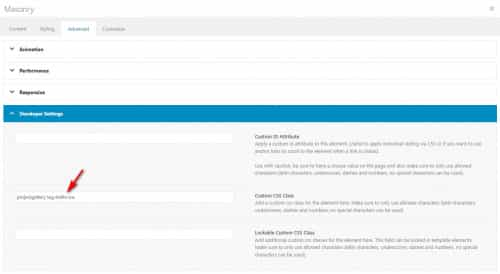
    Thank you for your patience and the login, the portfolio tags are listed as classes in the masonry items so to ensure that only the correct tags are shown and if there are none show a message we need to know what tag the masonry is going to show, so you will need to add a custom class to the masonry element for the tag that you want to show.
    This will allow us to use one script for your whole site instead of writing a different script or css rule for every page.
    So for the test page the tag class you want to show was tag-trellis-ice
    2022-02-18_003.jpg
    the portfolio tag slug for this is trellis-ice so you see that you just add tag- to the beginning, this should explain how to adjust your other pages.
    you will add this class to the developer settings custom class field:
    2022-02-18_004.jpg
    as you see, if you already have a custom class there add the second class after a space.
    I then added this script to your child theme functions.php:

    function empty_masonry_message_script() { ?>
        <script>
    const allCategoryClasses = [];
    const elementsWithCategoryClasses = document.querySelectorAll("#av-masonry-1[class*='tag-']");
    const elementsCount = elementsWithCategoryClasses.length !== null;
    
    for (let i = 0; i < elementsCount; ++i) {
      Array.prototype.push.apply(
        allCategoryClasses,
        elementsWithCategoryClasses[i].classList
      );
    }
    const presentClasses = {};
    
    var tagClass = (allCategoryClasses
      .filter((classname) => {
        const present = presentClasses[classname];
        presentClasses[classname] = true;
        return classname.indexOf("tag-") === 0 && !present;
    }));
    
    (function($) {
    var nocat = $('<div class="nocat">No Current Projects</div>').css({'text-align':'center','font-size': '20px'});
    $('#av-masonry-1 .av-masonry-container.isotope a').each( function() {
    if ($(this).children(tagClass).length =! 0) {
      $(this).css({'display':'none'});
      
    }
    });
    if($('#av-masonry-1 .av-masonry-container.isotope a').is(':hidden')){
    	$(nocat).appendTo('#av-masonry-1');
    }
    })(jQuery);
    </script>
        <?php
    }
    add_action('wp_footer', 'empty_masonry_message_script');

    and now a message No Current Projects shows instead of the wrong items:
    2022-02-18_005.jpg
    Try adding the tag classes to other pages that have no matching products to display the message.

    Best regards,
    Mike

    #1341261

    Hi Veronika,

    You’re welcome :)
    Please add this CSS code as well, just change the font-size value:

    #top.home #av-layout-grid-1 .av_one_half.avia-builder-el-first .slide-entry-title {
        font-size: 40px;
    }
    
    #top.home #av-layout-grid-1 .av_one_half.avia-builder-el-first .blog-categories a {
        font-size: 20px;
    }

    Best regards,
    Nikko

    #1341147

    Hi,
    The above example was for portrait & landscape mobile, try adjusting the font size smaller or larger to suit your needs.
    The socket is set to 85% width, if you like you can also change this for mobile with this:

    @media only screen and (max-width: 767px) { 
    .responsive #top #socket > .container {
        width: 100%;
        max-width: 100%;
    }
    }

    this will set the width to 100% to give you more room, try a combination of different widths and font sizes to suit your needs.
    If you still have trouble post a screenshot of what you see and what you expect and the width (screen resolution) of the device you are using.

    Best regards,
    Mike

    #1341101

    Hey tonyiatridis,

    Thank you for the inquiry.

    This issue will be fixed on WordPress 5.9.1. For the meantime, you have to add this code in the functions.php file to enable the gallery sorting back.

    function ava_custom_css_admin_mod() {
        echo '<style>
          .wp-core-ui .attachments:after {
              visibility: hidden;
              display: block;
              font-size: 0;
              content: " ";
              clear: both;
              height: 0;
          }
        </style>';
    }
    add_action('admin_head', 'ava_custom_css_admin_mod');
    

    Best regards,
    Ismael

    #1341041

    Hi,

    Thank you for the update.

    You can use this css code to adjust the style of the slider button.

    #top #wrap_all .avia-slideshow-button {
        border-radius: 3px;
        text-transform: uppercase;
        padding: 15px 16px;
        display: inline-block;
        margin-top: 20px;
        text-decoration: none;
        font-weight: bold;
        font-size: 20px;
    }
    

    Wrap it inside a css media query if you want to only apply the changes on certain screen sizes. What do you mean by “fixed” exactly?

    Best regards,
    Ismael

    #1340982

    This issue should be resolved in upcoming WordPress 5.9.1

    In the meantime you can add this snippet to your functions.php or as a code snippet to restore the feature:

    function ava_custom_css_admin_mod() {
        echo '<style>
          .wp-core-ui .attachments:after {
              visibility: hidden;
              display: block;
              font-size: 0;
              content: " ";
              clear: both;
              height: 0;
          }
        </style>';
     }
     add_action('admin_head', 'ava_custom_css_admin_mod');
    #1340867

    In reply to: Burger Menu Customized

    Hey Teresa,

    Thank you for the inquiry.

    You can use this css code to remove the burger menu icon and display the menu text.

    @media only screen and (max-width: 989px) {
    
      /* Add your Mobile Styles here */
      span.av-hamburger-inner {
        display: none;
      }
    
      .av-hamburger strong {
        display: block;
        float: none;
        height: 30px;
        line-height: 30px;
        font-size: 13px;
      }
    
      .av-hamburger-box {
        width: auto;
        height: 50px;
        display: block;
        line-height: 30px;
        padding: 7px 13px;
        border: 1px solid;
      }
    }
    

    Please toggle or temporarily disable the Enfold > Performance > File Compression settings after adding the css.

    Best regards,
    Ismael

    #1340845

    Hey freehaan,

    Thank you for the inquiry.

    This is a known issue in the latest version of WordPress. You have to temporarily use this code in the functions.php file to fix the gallery sorting until version 5.9.1 is released.

    function ava_custom_css_admin_mod() {
        echo '<style>
          .wp-core-ui .attachments:after {
              visibility: hidden;
              display: block;
              font-size: 0;
              content: " ";
              clear: both;
              height: 0;
          }
        </style>';
      }
      add_action('admin_head', 'ava_custom_css_admin_mod');
    

    Best regards,
    Ismael

    #1340782
    sitesme
    Participant

    Hello,

    Can you please check the homepage slideshow? The button is hidden on mobile devices. Is there a way to increase the height on mobiles only to solve this problem?

    There is also a problem with the image caption being outside the image area, also on mobile devices only.

    Thank you

    #1340764

    Hey Andreas,

    Thanks for contacting us!

    The issue is related to WordPress 5.9 and it will be fixed in upcoming version. You can read more here: https://core.trac.wordpress.org/ticket/54902

    As a temporary solution, I added following code to bottom of Functions.php file of your child theme

    function ava_custom_css_admin_mod() {
        echo '<style>
          .wp-core-ui .attachments:after {
              visibility: hidden;
              display: block;
              font-size: 0;
              content: " ";
              clear: both;
              height: 0;
          }
        </style>';
      }
      add_action('admin_head', 'ava_custom_css_admin_mod');

    Please review your website :)

    Best regards,
    Yigit

    #1340676

    Hey rixi,

    That is a WordPress problem and will be fixed in the next update. Please try this in your functions.php file until then:

    function ava_custom_css_admin_mod() {
        echo '<style>
          .wp-core-ui .attachments:after {
              visibility: hidden;
              display: block;
              font-size: 0;
              content: " ";
              clear: both;
              height: 0;
          }
        </style>';
      }
      add_action('admin_head', 'ava_custom_css_admin_mod');

    Best regards,
    Rikard

    #1340647

    Hey cindybird52,

    Please try adding this to your functions.php file:

    function ava_custom_css_admin_mod() {
        echo '<style>
          .wp-core-ui .attachments:after {
              visibility: hidden;
              display: block;
              font-size: 0;
              content: " ";
              clear: both;
              height: 0;
          }
        </style>';
      }
      add_action('admin_head', 'ava_custom_css_admin_mod');

    Best regards,
    Rikard

    #1340636

    Hi,

    Thank you for the info.

    The current size of the logo is not going to work because there is not enough space for the logo and the menu items. You will have to decrease the size of the logo and maybe decrease the number of menu items. To adjust the size of the menu items and the logo, try to add this css code.

    .responsive #top .menu-item {
        margin-left: 0;
    }
    
    .responsive #top .avia-menu-text {
        padding-right: 11px !important;
        padding-left: 11px !important;
        font-size: 13px;
    }
    
    .responsive #top .logo {
        width: auto;
        height: 88px;
    }

    The header should look like this after adding the css modification.

    screenshot: https://1drv.ms/u/s!AjjTfXSRbKTvwC2Z0HyU0Pd8eFaW?e=4aoUay

    Best regards,
    Ismael

    #1340571

    Hey,

    Thanks for contacting us!

    Please add following code to Quick CSS field in Enfold theme options > General Styling tab and adjust it as needed

    
    #top .social_bookmarks li {
      font-size: 16px;
    }
    

    Best regards,
    Yigit

    #1340503

    Hey Veronika,

    Thanks for contacting us!

    Please add following code to Quick CSS field in Enfold theme options > General Styling tab

    
    #top #wrap_all .left-section div .blog-categories a {
      text-align: center !important;
      color: red;
      display: block;
      font-size: 16px;
    }
    

    Regards,
    Yigit

    #1340462

    you don’t mean the logo that you can set in enfold options – but you mean that spinning wheel!
    this is just a keyframe animation with rotate settings

    @-webkit-keyframes av-load8 {
      0% { -webkit-transform: rotate(0deg); transform: rotate(0deg); }
      100% { -webkit-transform: rotate(360deg); transform: rotate(360deg); }
    }
    @keyframes av-load8 {
      0% { -webkit-transform: rotate(0deg); transform: rotate(0deg); }
      100% {-webkit-transform: rotate(360deg); transform: rotate(360deg); }
    }

    and this is the rule for the siteloader:

    .av-siteloader , #top div.avia-popup .mfp-preloader{
      font-size: 10px;
      position: relative;
      text-indent: -9999em;
      margin:0 auto;
      border-top: 	2px solid rgba(0, 0, 0, 0.2);
      border-right: 2px solid rgba(0, 0, 0, 0.2);
      border-bottom:2px solid rgba(0, 0, 0, 0.2);
      border-left:  2px solid #000;
      -webkit-animation: av-load8 0.8s infinite linear;
      animation: av-load8  0.8s infinite linear;
    }

    maybe you can change the borders to none – and insert an icon as content.

    #1340403
    Veronika
    Participant

    Hi dear Kriesi-Team,

    Is there a way to specifically change the position(to be centered) and the font-size of single category text and heading ( the big left one at the top of the page ), without affecting the other category texts on the right?

    Please check the green square: https://imgur.com/L5H0c4S

    thank you

    Best,
    Veronika

    #1340376

    Hi,
    For mobile you will need to use a smaller font size than 14px, but even then you will probably need to use two lines, I’m not sure how small you will want to go, but here is an example:

    @media only screen and (max-width: 767px) { 
    #socket .copyright {
        font-size: 10px;
        display: inline-block!important;
    }
    }

    2022-02-13_006.jpg

    Best regards,
    Mike

    #1340324

    Hi,
    I see, sorry you need to add it like this:

    #socket .copyright {
    float: none;
    width: 100%;
    display: inline-flex;
    justify-content: center;
    font-family: 'press-start-2p';
    font-size: 15px;
    }
    #socket .copyright a {
    	padding: 0 10px;
    }

    one rule for copyright text, and one rule for copyright links.

    Best regards,
    Mike

    #1340322

    Hey Jak73,
    Please try this code in the General Styling ▸ Quick CSS field or in the WordPress ▸ Customize ▸ Additional CSS field:

    .html_av-overlay-side-classic #top #wrap_all .av-burger-overlay #av-burger-menu-ul li a {
        border-color: #fff;
    }
    #top #wrap_all .av-burger-overlay #av-burger-menu-ul li a .avia-menu-text {
    	font-size: 18px;
    	font-family: 'verdana';
    }
    #av-burger-menu-ul {
        background-repeat: no-repeat;
        background-image: url(https://joakims.art/wp-content/uploads/2022/02/bg-intro-2000px.jpg);
        background-position: 50% 100%;
        background-attachment: scroll;
        background-size: cover;
    }

    adjust the background image to suit but ensure it is in a profile image that meets the desktop size at minimum, the mobile should be the same aspect and scales down fine.
    2022-02-12_011.jpg

    Best regards,
    Mike

    #1340320

    Hi Mike,
    thanks for your reply!
    I added this allready:

    #socket .copyright {
    float: none;
    width: 100%;
    display: inline-flex;
    justify-content: center;
    padding: 0 10px;
    font-family: ‘press-start-2p’;
    font-size: 15px;
    }
    Should be there…
    kind regards Jak

    #1340273

    Hi @Ismael,

    Apologies, I had briefly removed it to test another layout. I have it back in the page now if you’d like to check / inspect it.

    I applied the Quick CSS you shared, however it’s still far from the design / layout I’d like it to have:

    1. For instance, the background color has not changed despite the new Quick CSS code. How can I change the color of the headline row as well as the font color within the headline?
    2. The images / icons on the left are currently showing very large. How can I ensure they show in the original size 64x64px?
    3. For the table only (not the rest of the website), I would like the links and texts to be displayed in color “#e50000ff”. How can I do that, do you possibly know the custom CSS for that?
    4. For the table grid, I would like to remove all the vertical grid lines, HOWEVER KEEP the horizontal grid lines. Could you share with me how to do that as well, please?

    Thank you so much in advance, really appreciate it!! :-)

    #1340219
    Jak73
    Participant

    Hi,
    i would like to style the fly-out-burger menu.
    Please see image:
    1.) how can i change to color of the divider-lines,
    2.) how can i change the font and font-size,
    3.) how can i change the background color and how ca i add a responsive backgound image to it?

    kind regards Jak

Viewing 30 results - 2,131 through 2,160 (of 18,718 total)